

Forum Replies Created
-
AuthorPosts
-
aha .
…
please check if on youtube – the link works – when you go to share – and press embed.
If the video has no permittance to be “embedable” you will see this – allthough the video plays on youtube ( see darkend Background)
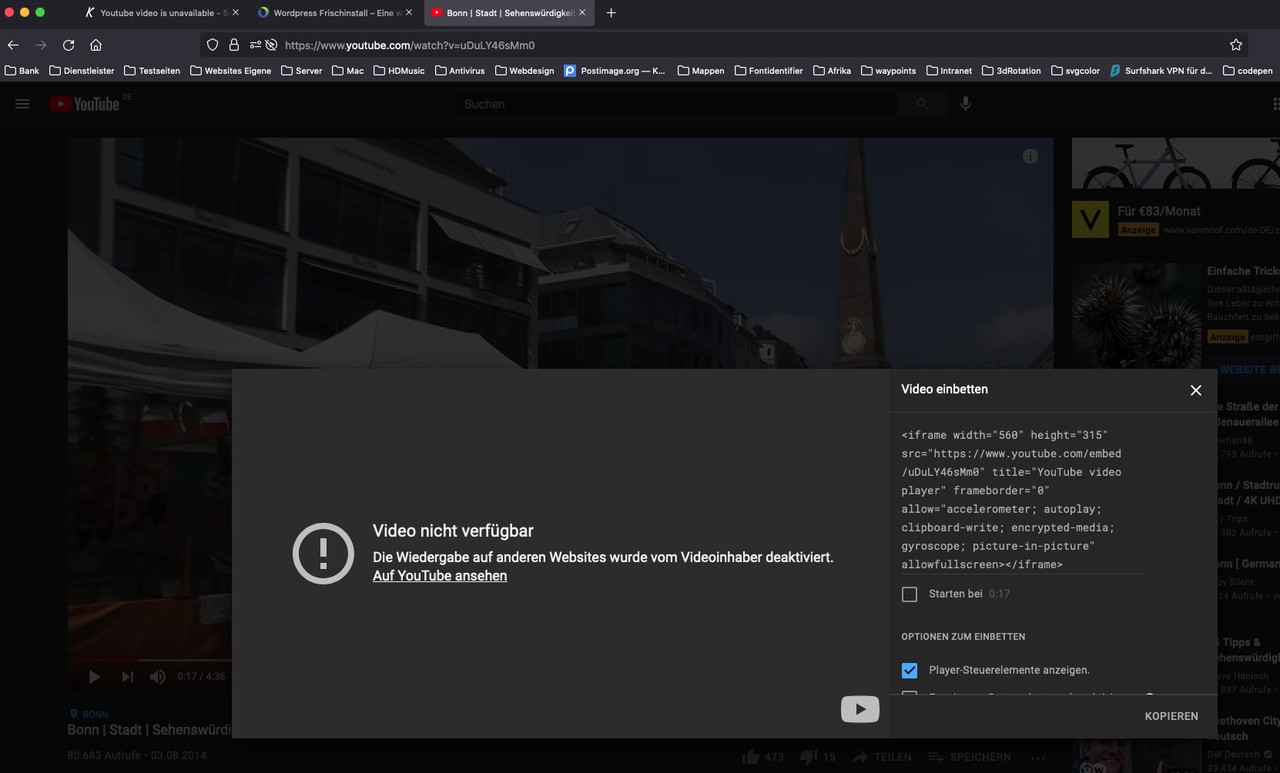
your video is playing here on my installation:
https://consulting.webers-testseite.de/bonn/Danke – habs am laufen (4.8.5), und du siehst es geht auf Anhieb. Auch mit den Waves-in-Motion.
Komme heute noch nicht zum Testen, werde hier berichten._____________
Why is the media uploader structure independent when assigning a media attachment ID ?
-
This reply was modified 4 years, 7 months ago by
Guenni007.
Where is the link ? (Anyway i got it in my browserhistory )
You have updated to WordPress 5.8 – maybe there are some inconsistencies.
you got a lot of parameters behind your video id – some of them are deprecated.
see please : https://developers.google.com/youtube/youtube_player_demoi guess the playlist option is confusing here – what exactly did you enter to the video input field ?
you got this in the link too: &playlist=player_25_1399040253_1114310161 ??if you look to the generated code via developer tools it looks like this:
https://www.youtube.com/embed/sRKLm737ilc?&showinfo=0&controls=0&color=white&autohide=1&version=3&loop=0&playlist=player_25_1399040253_1114310161&wmode=opaque&rel=0&hd=1&videoid=sRKLm737ilc&autoplay=0&html5=1&enablejsapi=1&origin=https%3A%2F%2Falamotitlesa.com&widgetid=1
_________
you are using Enfold 4.4 ( for that moment – the Version 4.8.4 needs some bugfixes – so updating is for now not a good idea ) but i think you should update in the next time.-
This reply was modified 4 years, 8 months ago by
What would be important is the change to give the fill attribute not to the path – because not all svg’s have path – there are polygone, circle, rect, etc. pp.
if you change the fill attribute to the svg itself – it will work too for all those svg.i changed in column.php and section.php to :
$element_styling->add_callback_styles( 'divider-top-svg', array( 'svg_div_top_color' ) );
$element_styling->add_callback_styles( 'divider-bottom-svg', array( 'svg_div_bottom_color' ) );
and removed the ‘divider-bottom-svg-path’ in the selectors array.
for that change you have to remove the default fill setting in shortcodes.css
/*.avia-divider-svg .avia-divider-fill*/see here: https://consulting.webers-testseite.de/dividers/
you then even can use as custom svg f.e.: ( see on example page just before footer) – and waves-in-motion will work too!
(all vectors without fill attribute are filles black on default – and this field forms the connection to the background-color of the previous (top-svg) or following ( bottom-svg ) section. )

see on the bottom
only those path, polygone, circle etc. pp are overwritten by svg fill attribute that have no inline fill style.on the DOM i see the youtube ID: sWottFkB4eU
if i move the mouse over the video background an click the context menu sometimes i can coyp video url – and this got: OBHdMrtbxY0
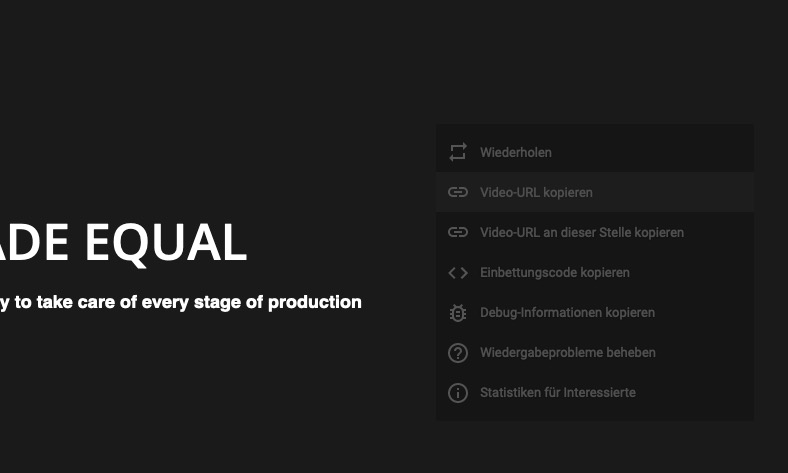
i do not know where the mismatch happens
Did You enter the video link in the data-fallback input field too?
hint for: https://kriesi.at/support/topic/problem-with-cookie-modal/#post-1212640
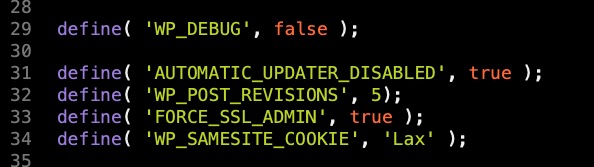
you can solve the samesite cookie message by adding this to your wp-config.php:define( 'WP_SAMESITE_COOKIE', 'Lax' );
you can try strict or none – but for me lax is enough to get rid of that.
and here is a good place for it:
Next note: Do you think it makes sense that if a bottom svg is set – the “Bottom Border Styling section” can be set as well?
In my opinion, the svg “tilt” could do the job too – and better – the angle is a matter of svg height.
For backwards compatibility, it makes sense to keep the “Bottom Border Styling section” option, but then hide it when a bottom svg is set.
Only if you like to use a gradient as slant – it makes sense.Your answer is probably purposeful.
It would be helpful to us normal mortals an update resistant solution which is presented to us. With hints here the fewest can begin something.:lol
waves-in-motion
ok – thanks
Unfortunately, the color setting on paths in defs has no effect.
Therefore it is a bit more complex with the waves-in-motion.
The svg must comply with the Enfold criteria.Maybe it would be better to give the fill to the svg itself as inline style – all svgs must be monochromatic with your settings – and only fill-opacity is changing somethimes.
btw: on svg the opacity is set via :
fill-opacity="0.5"not by style attributeThis would also have been addressable in my “waves-in-motion” via alb.
PS : i shift the custom uploads dir for custom svg to the uploads dir.
so i can upload them via Media Library. ( works only if you do not use the month and year based option )add_filter( 'avf_custom_svg_shapes_files_directory', 'my_svg_path', 10, 1 ); function my_svg_path(){ $path = get_site_url().'/wp-content/uploads'; return $path; }-
This reply was modified 4 years, 8 months ago by
Sorry didn’t find any other solution – than to check if the last string has 11 characters. All youtube IDs got 11characters.
function insert_video_by_description(){
if(is_archive()){
?>
<script>
(function($){
$(document).ready(function(){
var my_portfolio = $('.archive.tax-portfolio_entries');
	$(my_portfolio).find('p').contents().filter(function(){
	return this.nodeType === 3;
	}).wrap('<span/>');
	var youtube_video = $(my_portfolio).find('.category-term-description').find('p:last-child').find('span:last-child').text().trim();
	if(youtube_video.length === 11){
		$(my_portfolio).find('.category-term-description').find('p:last-child').find('span:last-child').css('display', 'none');
		$(my_portfolio).find('.category-term-description').append('<div class="product-video"><iframe width="560" height="315" src="https://www.youtube-nocookie.com/embed/'+youtube_video+'?autoplay=1" title="YouTube video player" frameborder="0" allow="accelerometer; autoplay; clipboard-write; encrypted-media; gyroscope; picture-in-picture" allowfullscreen></iframe></div>');
	};
});
})(jQuery);
</script>
<?php
}
}
add_action('wp_footer', 'insert_video_by_description');
This to your quick css:
.category-term-description { position: relative; max-width: 600px } .category-term-description .product-video { position: relative; padding-bottom: 56.25%; padding-top: 0; height: 0; overflow: hidden; } .product-video iframe { position: absolute; top: 0; left: 0; width: 100%; height: 100%; }Stop: One problem is still to be solved, because if there is no Youtube ID in the description it shows nonsense.
Let’s see if I can build in a check routine.maybe this could be a way for your customer to get it.
On that portfolio categories page you can even have more breaks ( two times enter will end in two p-tags in the description) – even that would work. But it is only necessary that the ID is on an extra line and the last line in your description.
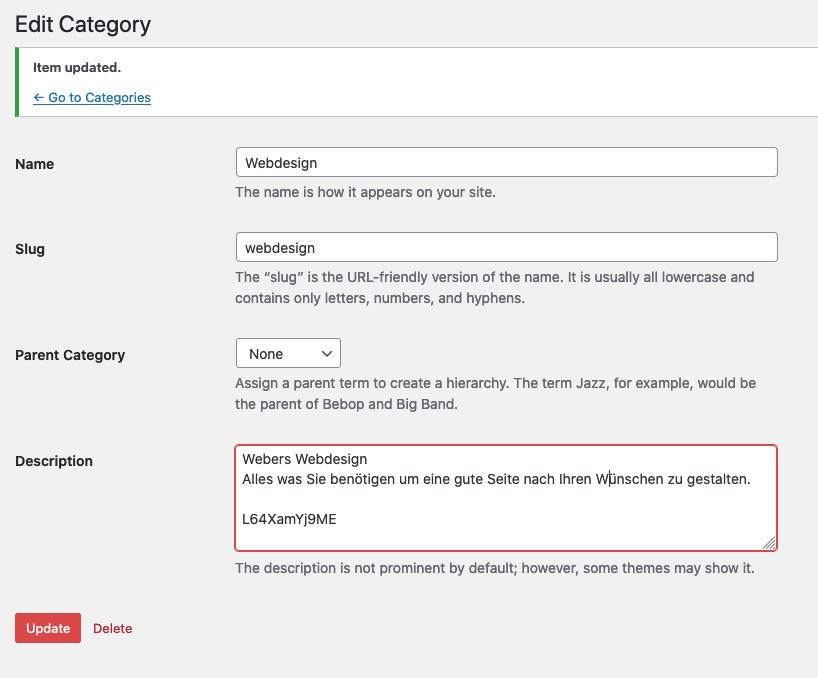
insert at the end the Youtube ID with one or more linebreaks ( just enter and insert )
then put this to your child-theme functions.php
and it might be better to execute this only on archive page :Edit :just brainstorming :lol
See: Example Page
But i think the autoplay will not work with videos not muted.
(maybe you dont need the document ready here.)See solution here: Link
smarter solution to leave the client the possibility to do it himself.
No-Chance on that.
you can try this in your child-theme functions.php:
Solution see here: Link
PS If you like to insert it after the description : use append instead of prepend
On that selector ( these are classes at body ) :
$('.archive.tax-portfolio_entries.term-monitor-interattivi')
you have your “Portfolio Category” : monitor-interattivi
If you got : termoscanner the selector would be:$('.archive.tax-portfolio_entries.term-termoscanner')-
This reply was modified 4 years, 8 months ago by
try that link on your button anyway. Even in advanced layer slider ( see example page above ) that “trick” will do the job.
under advanced tab of the slider image – you can insert that button – mybe as you already did it.
the youtube link ( or vimeo ) had to have some addendum :
(click to enlarge)
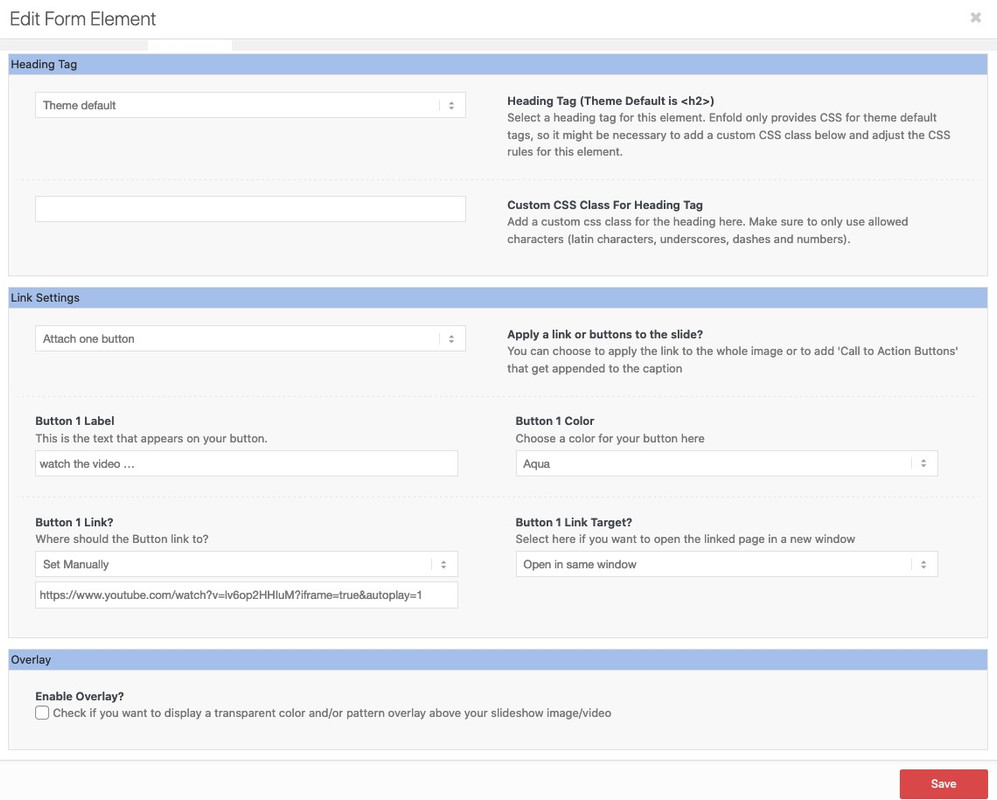
on my example page:
https://www.youtube.com/watch?v=lv6op2HHIuM?iframe=true&autoplay=1the
"?iframe=true"indicates the iframe openingAnd you do not like to link to a youtube video in a lightbox?
Example LinkWhat do you mean by: “It should not show the youtube video only when the linked is clicked.”
can you describe it a bit more – or show a page f.e. on a demo page where you like to insert that video?
f.e.: Link – is it that place on top where it should go to?July 18, 2021 at 9:25 am in reply to: Toooltip für bestimmte Galerien gezielt abschalten / Deactivate tooltip #1310575sorry wrong posting
July 18, 2021 at 9:02 am in reply to: Help with transparency and layering background images #1310573maybe it is a bit nicer if your whole masonry has a semitransparent background – and the upcomming titles will have a rounded corner on the bottom too:
So try to replace the last code of Mike for the masonries and take this one:#main .main_color .av-masonry { background-color: transparent !important; } #main .main_color .av-masonry-image-container, #main .main_color .av-masonry-outerimage-container { border-radius: 50px; } #main .main_color .av-inner-masonry-content.site-background { border-radius: 0 0 50px 50px; }if your settings in Enfold Options on layout dimensions do not work correct – there could be a synthax error in your quick css.
These settings including custom.css are placed on the bottom of all other css:.container { width:100% } .container .av-content-small.units { width:75% } .responsive .boxed#top , .responsive.html_boxed.html_header_sticky #header, .responsive.html_boxed.html_header_transparency #header { width:1310px; max-width:90% } .responsive .container { max-width:1310px } #top #header .av-main-nav > li > a { font-size:13px; font-weight:normal } @media only screen and (min-width:768px) { } @media only screen and (max-width:767px) { }so if you got f.e. a missing closing bracket or instead of a semicolon you set a comma – sometimes all the rest of the following css will not work.
you can post your quick css content here (but please use the code tag) so we can see if my guess is relevant
If you like to use the function :
Always remember that on new jQuery 3.5.1 this is deprecated$(window).load(function(){and you had to use now:
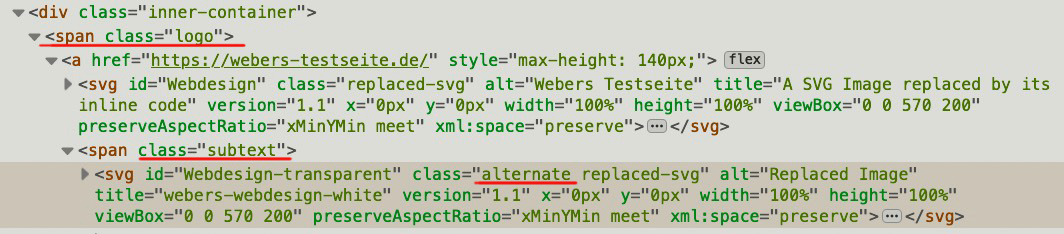
$(window).on('load', function(){if you are talking about the logo that could be seen on transparency header – this is the one in .subtext
may i see the page it concerns too. I’m participant as you are – so private Content area can not be seen by me.If you see the demo page : https://kriesi.at/themes/enfold-2017/
and on mobile view there will be no transparency – that seems to be the default behavior – but on my home page ( test page ) i got this too.
on mobile view there will be transparency first – after scroll there will be a fixed white header then.
https://webers-testseite.de/
( the only difference here is that these imgs are replaced by svgs )So is i want to change only the transparency logo on home page – i had to replace the logo in the subtext ( alternate class )
have a look at: https://kriesi.at/support/topic/media-upload-and-enfolds-thumbnail-sizes/#post-1270140
And: https://kriesi.at/support/topic/media-upload-and-enfolds-thumbnail-sizes/#post-1271808
be aware of the new snippet for uploading compression rate of images:
// new snippet to set the compression level of calculted images
add_filter("avf_jpeg_quality", "avf_set_quality_mod", 9999, 1);
add_filter("avf_wp_editor_set_quality", "avf_set_quality_mod", 9999, 1);
function avf_set_quality_mod($quality) {
	$quality = 65;   // compression level what you like in percent
	return $quality;
}
as described there, however, it is only responsible for the upload process. For the recalculating there are good plugins that do the rest after inserting the snippet for the already uploaded images.
yes – but think of jQuery 3.5.1 :
jQuery(window).load(function(){is deprecated now.
You had to use instead:jQuery(window).on('load', function(){or here in the code: Link
$(window).on('load', function(){
…
and if it is the syntax is:
(function($){
…
})(jQuery);
you can write every jQuery inside as $: ( f.e. $(‘body’) }
function av_open_inline_popup(){ ?> <script type="text/javascript"> (function($) { $(window).on('load', function(){ $('.open-popup-link').addClass('no-scroll'); $('.open-popup-link').magnificPopup({ type:'inline', midClick: true, callbacks: { beforeOpen: function () { $('body').css("overflow-y", "hidden"); }, close: function() { $('body').css("overflow-y", "auto"); }, }, }); }); })(jQuery); </script> <?php } add_action('wp_footer', 'av_open_inline_popup');You are welcome.
i think no : Link
PS : on Iconlist the same – lines 892ff
enfold/config-templatebuilder/avia-shortcodes/iconlist/iconlist.phpby the way: Link
I then made a copy of iconbox.php file and placed it in enfold-child>config-templatebuilder>avia-shortcodes>iconbox
Just create a folder in your child-themes folder : shortcodes
as you can see in the code itself :
$template_url.'/shortcodes/so insert the copy of iconbox.php to enfold-child/shortcodes
-
This reply was modified 4 years, 7 months ago by
-
AuthorPosts
