Forum Replies Created

Viewing 30 posts - 4,111 through 4,140 (of 11,918 total)
  • Author
    Posts
  • in reply to: Hotfix for the Missing Logo issue on Enfold 4.8.6.4 #1324150
    in reply to: Hotfix for the Missing Logo issue on Enfold 4.8.6.4 #1324058

    @48DESIGN : if you mark the “Enable Advanced Mode?” Option on SVG Support and save the rest will be shown.

    in reply to: Hotfix for the Missing Logo issue on Enfold 4.8.6.4 #1323904

    i use often the svg-support plugin too – but i do not mark the “Force Inline SVG” Option. maybe that was the reason for trouble.

    in reply to: Full width column with background image SVG wrong scaling #1323761

    width and height : auto is not a working style in svgs.
    https://css-tricks.com/scale-svg/

    then as mentioned befor in another topic – rename the classes – because Illustrator always use “st” – but if you have more than 1 svg on that page the last one in DOM decides the style of that classes ( st1 etc)

    try to use :

    … depends on how the svg should react on shrinking/expanding. – but we have no inline svg here – so there are two settings to make
    for the background-image a quick css f.e.:
    background-size: 100% 100% !important; see example page again.
    on top this svg:

    by the way: this is an excellent svg optimizer: https://jakearchibald.github.io/svgomg/

    try this svg instead:

    <?xml version="1.0" encoding="utf-8"?>
    <svg version="1.1" id="haseo_curve" xmlns="http://www.w3.org/2000/svg" xmlns:xlink="http://www.w3.org/1999/xlink" x="0px"
    	 y="0px" viewBox="0 0 1500 400" style="enable-background:new 0 0 1500 400;" preserveAspectRatio="xMinYMid meet" xml:space="preserve">
    <style type="text/css">
    	.haseo0{fill:none;stroke:#F3D569;stroke-width:0.3704;stroke-miterlimit:1.4816;}
    	.haseo1{fill:#F3D569;}
    	.haseo2{fill:#FFFFFF;}
    </style>
    <g>
    	<path class="haseo0" d="M0,400l83.4-89l50.7,44.5l60.9-57.4l65.3,9.1l52.5-45.3l9.2-32.5l78.3,14.7l41.4-26.6l13.8-22.7l54.3-10H567
    		l39.6-15.6l28.6,24.7l31.3-5.4l44.2-28.4l58.3-31.2l44.9-48.5l76.4-15.7L905,89.5l4.6-15.6l63.7,15.6l34-35.7l81.1-20.6l42.4,20.6
    		l39.6-20.6l44.2,15.5l56.7,5.1l15.7-6.2l43.3-16.4l90.3-2L1500,0"/>
    	<path class="haseo1" d="M83.4,315.6c-2.5,0-4.5-2-4.5-4.5s2-4.5,4.5-4.5c2.5,0,4.5,2,4.5,4.5C88,313.5,85.9,315.6,83.4,315.6z"/>
    	<path class="haseo2" d="M83.4,307.4c2,0,3.6,1.6,3.6,3.6s-1.7,3.6-3.6,3.6c-2,0-3.6-1.6-3.6-3.6S81.4,307.4,83.4,307.4 M83.4,305.6
    		c-3,0-5.4,2.5-5.4,5.4c0,3,2.5,5.4,5.4,5.4c2.9,0,5.4-2.5,5.4-5.4C88.9,308,86.4,305.6,83.4,305.6z"/>
    	<path class="haseo1" d="M134.1,360.4c-2.5,0-4.5-2-4.5-4.5c0-2.5,2-4.5,4.5-4.5c2.5,0,4.5,2,4.5,4.5
    		C138.6,358.4,136.6,360.4,134.1,360.4z"/>
    	<path class="haseo2" d="M134.1,352.3c2,0,3.6,1.6,3.6,3.6c0,1.9-1.7,3.6-3.6,3.6c-2,0-3.6-1.6-3.6-3.6
    		C130.5,353.9,132.1,352.3,134.1,352.3 M134.1,350.4c-3,0-5.4,2.5-5.4,5.4c0,2.9,2.5,5.4,5.4,5.4s5.4-2.5,5.4-5.4
    		C139.5,352.9,137.1,350.4,134.1,350.4z"/>
    	<path class="haseo1" d="M194.2,302.7c-2.5,0-4.5-2-4.5-4.5s2-4.5,4.5-4.5c2.5,0,4.5,2,4.5,4.5S196.8,302.7,194.2,302.7z"/>
    	<path class="haseo2" d="M194.2,294.5c2,0,3.6,1.6,3.6,3.6c0,2-1.7,3.6-3.6,3.6c-1.9,0-3.6-1.6-3.6-3.6S192.3,294.5,194.2,294.5
    		 M194.2,292.7c-3,0-5.4,2.5-5.4,5.4c0,3,2.5,5.4,5.4,5.4c2.9,0,5.4-2.5,5.4-5.4C199.8,295.2,197.3,292.7,194.2,292.7z"/>
    	<path class="haseo1" d="M260.3,311.8c-2.5,0-4.5-2-4.5-4.5s2-4.5,4.5-4.5s4.5,2,4.5,4.5S262.8,311.8,260.3,311.8z"/>
    	<path class="haseo2" d="M260.3,303.7c2,0,3.6,1.6,3.6,3.6c0,2-1.7,3.6-3.6,3.6c-2,0-3.6-1.6-3.6-3.6
    		C256.6,305.3,258.3,303.7,260.3,303.7 M260.3,301.9c-3,0-5.4,2.5-5.4,5.4c0,3,2.5,5.4,5.4,5.4c3,0,5.4-2.5,5.4-5.4
    		S263.2,301.9,260.3,301.9z"/>
    	<path class="haseo1" d="M313.7,266.2c-2.5,0-4.5-2-4.5-4.5s2-4.5,4.5-4.5c2.5,0,4.5,2,4.5,4.5S316.2,266.2,313.7,266.2z"/>
    	<path class="haseo2" d="M313.7,258.1c2,0,3.6,1.6,3.6,3.6c0,1.9-1.7,3.6-3.6,3.6c-2,0-3.6-1.6-3.6-3.6
    		C310.1,259.7,311.7,258.1,313.7,258.1 M313.7,256.2c-3,0-5.4,2.5-5.4,5.4c0,3,2.5,5.4,5.4,5.4c3,0,5.4-2.5,5.4-5.4
    		C319.2,258.7,316.7,256.2,313.7,256.2z"/>
    	<path class="haseo1" d="M322,234.6c-2.5,0-4.5-2-4.5-4.5c0-2.5,2-4.5,4.5-4.5s4.5,2,4.5,4.5C326.5,232.6,324.5,234.6,322,234.6z"/>
    	<path class="haseo2" d="M322,226.4c2,0,3.6,1.6,3.6,3.6s-1.7,3.6-3.6,3.6c-2,0-3.6-1.6-3.6-3.6S320,226.4,322,226.4 M322,224.6
    		c-3,0-5.4,2.5-5.4,5.4c0,2.9,2.5,5.4,5.4,5.4c3,0,5.4-2.5,5.4-5.4C327.4,227.1,324.9,224.6,322,224.6z"/>
    	<path class="haseo1" d="M400.3,248.6c-2.5,0-4.5-2-4.5-4.5s2-4.5,4.5-4.5s4.5,2,4.5,4.5S402.8,248.6,400.3,248.6z"/>
    	<path class="haseo2" d="M400.3,240.5c2,0,3.6,1.6,3.6,3.6s-1.7,3.6-3.6,3.6c-1.9,0-3.6-1.6-3.6-3.6S398.3,240.5,400.3,240.5
    		 M400.3,238.6c-3,0-5.4,2.5-5.4,5.4s2.5,5.4,5.4,5.4s5.4-2.5,5.4-5.4S403.2,238.6,400.3,238.6z"/>
    	<path class="haseo1" d="M441.7,222.6c-2.5,0-4.5-2-4.5-4.5s2-4.5,4.5-4.5s4.5,2,4.5,4.5S444.2,222.6,441.7,222.6z"/>
    	<path class="haseo2" d="M441.7,214.4c2,0,3.6,1.6,3.6,3.6c0,2-1.7,3.6-3.6,3.6c-2,0-3.6-1.6-3.6-3.6
    		C438,216.1,439.7,214.4,441.7,214.4 M441.7,212.6c-3,0-5.4,2.5-5.4,5.4c0,3,2.5,5.4,5.4,5.4c3,0,5.4-2.5,5.4-5.4
    		S444.7,212.6,441.7,212.6z"/>
    	<path class="haseo1" d="M455.5,199.6c-2.5,0-4.5-2-4.5-4.5c0-2.5,2-4.5,4.5-4.5s4.5,2,4.5,4.5C460.1,197.6,458,199.6,455.5,199.6z"/>
    	<path class="haseo2" d="M455.5,191.4c2,0,3.6,1.6,3.6,3.6c0,1.9-1.7,3.6-3.6,3.6c-2,0-3.6-1.6-3.6-3.6
    		C452,193.1,453.5,191.4,455.5,191.4 M455.5,189.6c-3,0-5.4,2.5-5.4,5.4c0,2.9,2.5,5.4,5.4,5.4c3,0,5.4-2.5,5.4-5.4
    		C461,192.1,458.5,189.6,455.5,189.6z"/>
    	<path class="haseo1" d="M509.9,189.3c-2.5,0-4.5-2-4.5-4.5c0-2.5,2-4.5,4.5-4.5c2.5,0,4.5,2,4.5,4.5
    		C514.4,187.3,512.4,189.3,509.9,189.3z"/>
    	<path class="haseo2" d="M509.9,181.2c2,0,3.6,1.6,3.6,3.6c0,2-1.7,3.6-3.6,3.6s-3.6-1.6-3.6-3.6C506.2,182.7,507.9,181.2,509.9,181.2
    		 M509.9,179.3c-3,0-5.4,2.5-5.4,5.4c0,3,2.5,5.4,5.4,5.4c3,0,5.4-2.5,5.4-5.4C515.3,181.8,512.8,179.3,509.9,179.3z"/>
    	<path class="haseo1" d="M567,189.3c-2.5,0-4.5-2-4.5-4.5c0-2.5,2-4.5,4.5-4.5s4.5,2,4.5,4.5C571.5,187.3,569.5,189.3,567,189.3z"/>
    	<path class="haseo2" d="M567,181.2c2,0,3.6,1.6,3.6,3.6c0,2-1.7,3.6-3.6,3.6s-3.6-1.6-3.6-3.6C563.3,182.7,565,181.2,567,181.2
    		 M567,179.3c-3,0-5.4,2.5-5.4,5.4c0,3,2.5,5.4,5.4,5.4s5.4-2.5,5.4-5.4C572.4,181.8,569.9,179.3,567,179.3z"/>
    	<path class="haseo1" d="M605.6,173.9c-2.5,0-4.5-2-4.5-4.5c0-2.5,2-4.5,4.5-4.5s4.5,2,4.5,4.5C610.2,171.9,608.1,173.9,605.6,173.9z"
    		/>
    	<path class="haseo2" d="M605.6,165.8c2,0,3.6,1.6,3.6,3.6c0,2-1.7,3.6-3.6,3.6s-3.6-1.6-3.6-3.6S603.6,165.8,605.6,165.8 M605.6,163.9
    		c-3,0-5.4,2.5-5.4,5.4c0,3,2.5,5.4,5.4,5.4s5.4-2.5,5.4-5.4C611.1,166.4,608.6,163.9,605.6,163.9z"/>
    	<ellipse class="haseo1" cx="635.1" cy="193.9" rx="4.5" ry="4.5"/>
    	<path class="haseo2" d="M635.1,190.3c2,0,3.6,1.6,3.6,3.6s-1.7,3.6-3.6,3.6s-3.6-1.6-3.6-3.6S633.1,190.3,635.1,190.3 M635.1,188.5
    		c-3,0-5.4,2.5-5.4,5.4c0,3,2.5,5.4,5.4,5.4s5.4-2.5,5.4-5.4C640.6,190.9,638.1,188.5,635.1,188.5z"/>
    	<ellipse class="haseo1" cx="665.4" cy="188.4" rx="4.5" ry="4.5"/>
    	<path class="haseo2" d="M665.4,184.7c2,0,3.6,1.6,3.6,3.6s-1.7,3.6-3.6,3.6s-3.6-1.6-3.6-3.6S663.4,184.7,665.4,184.7 M665.4,182.9
    		c-3,0-5.4,2.5-5.4,5.4c0,3,2.5,5.4,5.4,5.4s5.4-2.5,5.4-5.4C671,185.4,668.5,182.9,665.4,182.9z"/>
    	<path class="haseo1" d="M769.9,133.4c-2.5,0-4.5-2-4.5-4.5c0-2.5,2-4.5,4.5-4.5s4.5,2,4.5,4.5C774.4,131.4,772.4,133.4,769.9,133.4z"
    		/>
    	<path class="haseo2" d="M769.9,125.3c2,0,3.6,1.6,3.6,3.6s-1.7,3.6-3.6,3.6s-3.6-1.6-3.6-3.6S767.9,125.3,769.9,125.3 M769.9,123.4
    		c-3,0-5.4,2.5-5.4,5.4s2.5,5.4,5.4,5.4s5.4-2.5,5.4-5.4S772.9,123.4,769.9,123.4z"/>
    	<g>
    		<path class="haseo1" d="M813.8,85c-2.5,0-4.5-2-4.5-4.5c0-2.5,2-4.5,4.5-4.5s4.5,2,4.5,4.5C818.3,83,816.3,85,813.8,85z"/>
    		<path class="haseo2" d="M813.8,76.9c2,0,3.6,1.6,3.6,3.6c0,2-1.7,3.6-3.6,3.6s-3.6-1.6-3.6-3.6C810.1,78.5,811.8,76.9,813.8,76.9
    			 M813.8,75.1c-3,0-5.4,2.5-5.4,5.4c0,3,2.5,5.4,5.4,5.4s5.4-2.5,5.4-5.4C819.3,77.5,816.8,75.1,813.8,75.1z"/>
    	</g>
    	<g>
    		<path class="haseo1" d="M890.3,69.1c-2.5,0-4.5-2-4.5-4.5c0-2.5,2-4.5,4.5-4.5s4.5,2,4.5,4.5C894.8,67.1,892.8,69.1,890.3,69.1z"/>
    		<path class="haseo2" d="M890.3,60.9c2,0,3.6,1.6,3.6,3.6c0,1.9-1.7,3.6-3.6,3.6s-3.6-1.6-3.6-3.6C886.7,62.6,888.2,60.9,890.3,60.9
    			 M890.3,59.1c-3,0-5.4,2.5-5.4,5.4c0,2.9,2.5,5.4,5.4,5.4s5.4-2.5,5.4-5.4C895.7,61.6,893.2,59.1,890.3,59.1z"/>
    	</g>
    	<g>
    		<path class="haseo1" d="M905,92.3c-2.5,0-4.5-2-4.5-4.5c0-2.5,2-4.5,4.5-4.5s4.5,2,4.5,4.5C909.5,90.3,907.5,92.3,905,92.3z"/>
    		<path class="haseo2" d="M905,84.1c2,0,3.6,1.6,3.6,3.6c0,1.9-1.7,3.6-3.6,3.6s-3.6-1.6-3.6-3.6C901.4,85.8,903,84.1,905,84.1
    			 M905,82.3c-3,0-5.4,2.5-5.4,5.4c0,2.9,2.5,5.4,5.4,5.4s5.4-2.5,5.4-5.4C910.4,84.8,908,82.3,905,82.3z"/>
    	</g>
    	<g>
    		<path class="haseo1" d="M909.6,77.8c-2.5,0-4.5-2-4.5-4.5c0-2.5,2-4.5,4.5-4.5s4.5,2,4.5,4.5C914.1,75.8,912.1,77.8,909.6,77.8z"/>
    		<path class="haseo2" d="M909.6,69.6c2,0,3.6,1.6,3.6,3.6c0,1.9-1.7,3.6-3.6,3.6s-3.6-1.6-3.6-3.6C906,71.3,907.6,69.6,909.6,69.6
    			 M909.6,67.8c-3,0-5.4,2.5-5.4,5.4s2.5,5.4,5.4,5.4s5.4-2.5,5.4-5.4S912.6,67.8,909.6,67.8z"/>
    	</g>
    	<g>
    		<path class="haseo1" d="M973.4,92.3c-2.5,0-4.5-2-4.5-4.5c0-2.5,2-4.5,4.5-4.5c2.5,0,4.5,2,4.5,4.5C977.9,90.3,975.8,92.3,973.4,92.3
    			z"/>
    		<path class="haseo2" d="M973.4,84.1c2,0,3.6,1.6,3.6,3.6c0,1.9-1.7,3.6-3.6,3.6c-2,0-3.6-1.6-3.6-3.6
    			C969.8,85.8,971.3,84.1,973.4,84.1 M973.4,82.3c-3,0-5.4,2.5-5.4,5.4c0,2.9,2.5,5.4,5.4,5.4s5.4-2.5,5.4-5.4
    			C978.8,84.8,976.3,82.3,973.4,82.3z"/>
    	</g>
    	<g>
    		<path class="haseo1" d="M1007.3,58.3c-2.5,0-4.5-2-4.5-4.5c0-2.5,2-4.5,4.5-4.5c2.5,0,4.5,2,4.5,4.5
    			C1011.9,56.3,1009.9,58.3,1007.3,58.3z"/>
    		<path class="haseo2" d="M1007.3,50.1c2,0,3.6,1.6,3.6,3.6s-1.7,3.6-3.6,3.6c-2,0-3.6-1.6-3.6-3.6S1005.4,50.1,1007.3,50.1
    			 M1007.3,48.3c-3,0-5.4,2.5-5.4,5.4c0,2.9,2.5,5.4,5.4,5.4s5.4-2.5,5.4-5.4C1012.8,50.8,1010.4,48.3,1007.3,48.3z"/>
    	</g>
    	<g>
    		<path class="haseo1" d="M1088.4,37.8c-2.5,0-4.5-2-4.5-4.5s2-4.5,4.5-4.5c2.5,0,4.5,2,4.5,4.5C1093,35.7,1091,37.8,1088.4,37.8z"/>
    		<path class="haseo2" d="M1088.4,29.6c2,0,3.6,1.6,3.6,3.6s-1.7,3.6-3.6,3.6c-2,0-3.6-1.6-3.6-3.6S1086.5,29.6,1088.4,29.6
    			 M1088.4,27.8c-3,0-5.4,2.5-5.4,5.4s2.5,5.4,5.4,5.4s5.4-2.5,5.4-5.4S1091.4,27.8,1088.4,27.8z"/>
    	</g>
    	<g>
    		<path class="haseo1" d="M1130.8,58.3c-2.5,0-4.5-2-4.5-4.5c0-2.5,2-4.5,4.5-4.5c2.5,0,4.5,2,4.5,4.5
    			C1135.4,56.3,1133.3,58.3,1130.8,58.3z"/>
    		<path class="haseo2" d="M1130.8,50.1c2,0,3.6,1.6,3.6,3.6s-1.7,3.6-3.6,3.6c-2,0-3.6-1.6-3.6-3.6S1128.8,50.1,1130.8,50.1
    			 M1130.8,48.3c-3,0-5.4,2.5-5.4,5.4c0,2.9,2.5,5.4,5.4,5.4s5.4-2.5,5.4-5.4C1136.2,50.8,1133.8,48.3,1130.8,48.3z"/>
    	</g>
    	<g>
    		<path class="haseo1" d="M1170.4,37.8c-2.5,0-4.5-2-4.5-4.5s2-4.5,4.5-4.5c2.5,0,4.5,2,4.5,4.5C1175,35.7,1172.9,37.8,1170.4,37.8z"/>
    		<path class="haseo2" d="M1170.4,29.6c2,0,3.6,1.6,3.6,3.6s-1.7,3.6-3.6,3.6c-2,0-3.6-1.6-3.6-3.6S1168.4,29.6,1170.4,29.6
    			 M1170.4,27.8c-3,0-5.4,2.5-5.4,5.4s2.5,5.4,5.4,5.4s5.4-2.5,5.4-5.4S1173.4,27.8,1170.4,27.8z"/>
    	</g>
    	<g>
    		<path class="haseo1" d="M1214.6,53.1c-2.5,0-4.5-2-4.5-4.5s2-4.5,4.5-4.5c2.5,0,4.5,2,4.5,4.5C1219.2,51,1217.1,53.1,1214.6,53.1z"/>
    		<path class="haseo2" d="M1214.6,44.9c2,0,3.6,1.6,3.6,3.6s-1.7,3.6-3.6,3.6c-2,0-3.6-1.6-3.6-3.6S1212.6,44.9,1214.6,44.9
    			 M1214.6,43.1c-3,0-5.4,2.5-5.4,5.4c0,2.9,2.5,5.4,5.4,5.4s5.4-2.5,5.4-5.4C1220,45.5,1217.6,43.1,1214.6,43.1z"/>
    	</g>
    	<g>
    		<path class="haseo1" d="M1271.3,58.3c-2.5,0-4.5-2-4.5-4.5c0-2.5,2-4.5,4.5-4.5c2.5,0,4.5,2,4.5,4.5
    			C1275.8,56.3,1273.8,58.3,1271.3,58.3z"/>
    		<path class="haseo2" d="M1271.3,50.1c2,0,3.6,1.6,3.6,3.6s-1.7,3.6-3.6,3.6c-2,0-3.6-1.6-3.6-3.6S1269.3,50.1,1271.3,50.1
    			 M1271.3,48.3c-3,0-5.4,2.5-5.4,5.4c0,2.9,2.5,5.4,5.4,5.4s5.4-2.5,5.4-5.4C1276.7,50.8,1274.3,48.3,1271.3,48.3z"/>
    	</g>
    	<g>
    		<ellipse class="haseo1" cx="1329.2" cy="30.6" rx="4.5" ry="4.5"/>
    		<path class="haseo2" d="M1329.2,26.9c2,0,3.6,1.6,3.6,3.6c0,1.9-1.7,3.6-3.6,3.6c-2,0-3.6-1.6-3.6-3.6S1327.3,26.9,1329.2,26.9
    			 M1329.2,25.1c-3,0-5.4,2.5-5.4,5.4s2.5,5.4,5.4,5.4s5.4-2.5,5.4-5.4S1332.3,25.1,1329.2,25.1z"/>
    	</g>
    	<g>
    		<ellipse class="haseo1" cx="1421.4" cy="29.6" rx="4.5" ry="4.5"/>
    		<path class="haseo2" d="M1421.4,25.9c2,0,3.6,1.6,3.6,3.6s-1.7,3.6-3.6,3.6c-2,0-3.6-1.6-3.6-3.6S1419.4,25.9,1421.4,25.9
    			 M1421.4,24.1c-3,0-5.4,2.5-5.4,5.4c0,2.9,2.5,5.4,5.4,5.4s5.4-2.5,5.4-5.4S1424.5,24.1,1421.4,24.1z"/>
    	</g>
    	<g>
    		<path class="haseo1" d="M710.7,164.1c-2.5,0-4.5-2-4.5-4.5c0-2.5,2-4.5,4.5-4.5s4.5,2,4.5,4.5C715.2,162.1,713.2,164.1,710.7,164.1z"
    			/>
    		<path class="haseo2" d="M710.7,156c2,0,3.6,1.6,3.6,3.6c0,1.9-1.7,3.6-3.6,3.6s-3.6-1.6-3.6-3.6C707.1,157.6,708.6,156,710.7,156
    			 M710.7,154.1c-3,0-5.4,2.5-5.4,5.4c0,2.9,2.5,5.4,5.4,5.4s5.4-2.5,5.4-5.4C716.1,156.6,713.6,154.1,710.7,154.1z"/>
    	</g>
    </g>
    </svg>
    

    and for that color-section :

    .page-id-4215 #av_section_1,
    .page-id-4215 #av_section_2 {
        background-size: 100% 100% !important;
    }
    

    on the bottom with preserveAspectRatio=“none“

    in reply to: Full width column with background image SVG wrong scaling #1323755

    First, do you have the latest version of enfold installed?
    Is there an example page where i can see the issue.
    On a testpage i can not reproduce it: https://consulting.webers-testseite.de/hammerseo/

    in reply to: Youtube video not blocked properly #1323725

    Must not have been so important after all.

    in reply to: Header Extra Elements Phone Number Links #1323724

    complaining is always immediate, positive feedback takes longer – why was that? ;)

    in reply to: Hotfix for the Missing Logo issue on Enfold 4.8.6.4 #1323644

    just for info: for those Participants who are using my replace every img svg file with its inline svg-function : now the logo img replacement is obsolete to replace.
    On Enfold 4.8.6.4 this is done by the theme itself.

    Therefore now uses the whole thing in this way excluding the logo img:

    // replace every svg with its inline code
    function replace_img_if_svg_with_inline_svg() {
    ?>
    <script type="text/javascript">
    (function($) {
      $(':not(.logo) img').filter(function() { return this.src.match(/.*\.svg$/); }).each(function(){
        var imgSVG    = $(this);
        var imgURL    = $(this).attr('src');
        var imgAlt    = $(this).attr('alt');
        var imgTitle  = $(this).attr('title');
        var imgClass  = $(this).attr('class');
        $.get(imgURL, function(data) {
        var svg = $(data).find('svg');
        	
        // Remove invalid XML tags - mostly that is usefull to preserve so it is commented out here
        // svg = svg.removeAttr('xmlns xmlns:xlink');
    
        // add replaced image's alt tag to the inline SVG
        typeof imgAlt === 'undefined' || imgAlt === '' ?  (svg = svg.attr('alt', 'Replaced Image')) : (svg = svg.attr('alt', imgAlt)) ;
        // add replaced image's Title tag to the inline SVG
        typeof imgTitle === 'undefined' || imgTitle === '' ? (svg = svg.attr('title', 'A SVG Image replaced by its inline code')) : (svg = svg.attr('title', imgTitle));
        // Add replaced image's classes to the new SVG and add replaced-svg as new class
        typeof imgClass === 'undefined' || imgClass === '' ? (svg = svg.attr('class', 'replaced-svg')) : (svg = svg.attr('class', imgClass+' replaced-svg'));
        // Replace image with inline SVG Code
            imgSVG.replaceWith(svg);
        }, 'xml');
    });
    })(jQuery);
    </script>
    <?php
    } 
    add_action('wp_footer', 'replace_img_if_svg_with_inline_svg');
    in reply to: Logo Missing Quick Fix #1323601

    The wonderful support for svg logos might be the reason. I guess the developers just forgot to bring the image part (jpg, png) back to the logo area.
    Because I actually only ever use svgs as a logo ( when possible ) I didn’t notice it.

    in reply to: Responsive Typography (Feature Request) #1323406

    by the way – i often make my own css for example for headings in this way:

    font-size: min(max(24px, 4vw), 48px);
    

    read here f.e.: https://css-tricks.com/simplified-fluid-typography/

    or use clamp:

    font-size: clamp(100%, 1rem + 2vw, 24px);
    

    see here for browser support: https://caniuse.com/?search=clamp

    in reply to: Footer gone #1323258

    maybe it is time to have a sticky post on top of this forum.
    I guess a lot of participants got child-theme header.php files – and with the new footer.php that comes to conflict.
    see my answer here: https://kriesi.at/support/topic/socket-footer-has-disappeared-after-recent-update/#post-1323255

    in reply to: socket footer has disappeared after recent update #1323255

    Since Enfold 4.8.6.3 several lines of code have been added to the new header.php ( lines 40 to 107 and 146-147 etc. ). The reason for this is the new option for the footer: Curtain Effect.

    So if your installation contains a header.php and/or footer.php in the child theme, you have to update them too. So check via ftp if they are present in the child theme folder.
    So if you already have alternate files there, you should remember why this is the case, because just putting a copy there doesn’t make sense.

    Now create copies of the new (4.8.6.3) files and reapply the former adjustments there. Before you upload them via ftp to the child-theme, save the older files as rollback on your harddisk.

    With such major changes to the parent theme, you must always remember to also renew the theme’s alternate files in your child theme. Of course, then with the changes that justify their presence in the child theme.

    _______


    @bkatzdesign

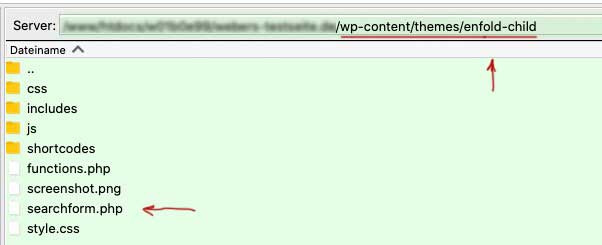
    To solve now the problem : maybe tell us what files are besides your child-theme style.css ( root directory of the child-theme )
    on default premade Enfold Child – there should be only three files : ( style.css, functions.php and screenshot.png ).
    i do often have a shortcodes folder there. you see on the image that this would be the place for footer.php and header.php files in your child-theme

    i guess you can create on basis of portfolio other custom post types ( often seen as CPT )

    but if i look into the dev tools of the link you noted on first post. these are pages with subpages ( no taxonomies nor categories )

    in reply to: Headline Rotator in lightbox #1323196

    PS

    in reply to: Headline Rotator in lightbox #1323175

    I will make one

    • This reply was modified 4 years, 3 months ago by Guenni007.

    Go to dashboard – settings – permalinks:

    in reply to: Insert image src in the menu #1322941

    by the way : i do not now why you like to have that png in your menu –
    but if you look into the appearance – menu settings on window top right there is “screen options”
    if you activate to see css classes on menu-items you can give a class ( in my case : gradient ) to menu-items then. And with that class you can even have animated backgrounds on menu-items. see : https://webers-testseite.de/

    li.gradient .avia-menu-text {
        color: #fff;
        background: linear-gradient(-45deg,#FFA63D,#FF3D77,#338AFF,#3CF0C5);
        background-size: 600%;
        border: none !important;
        animation: anime 14s linear infinite;
        padding: 10px 20px !important;
        border-radius: 10px !important;
    }

    next way – you can have the enfold options on that menu page to mark the option : “Button Style colored”
    this color can be changed to what ever you like. ( see same link : Impressum )
    and with a border-radius valued with 4 values you can influence each corner separatly of that rectrangle:
    ( top-left top-right bottom-right bottom-left – nomenclatura goes clockwise from top-left corner )

    #top #wrap_all .header_color .av-menu-button-colored > a .avia-menu-text {
      background-color:#aea410;
      border-color:#aea410;
      border-radius: 0 0 10px 10px;
    }

    and f.e. on your screenshot above – you can have that for your contact button too ;)

    in reply to: Error #1322939

    Aha – good to know

    in reply to: Scroll to Top Button Styling – Where do I find it? #1322881

    try this – play with your own colors

    #scroll-top-link {
      color: #c9342f;
    }
    
    #scroll-top-link:hover {
      border: 1px solid #848484;
    }
    in reply to: Header Extra Elements Phone Number Links #1322876

    btw. if you like to have that phone icon mirrored:

    .av_font_icon.phone {
      transform: scaleX(-1) !important;
    }
    in reply to: How can I change the subtitles H6 in icongrid #1322868

    there are jQuery Methods – but a lot of participants here believe that this is not the best method to substitut tags on SEO reasons.

    in reply to: How can I change the subtitles H6 in icongrid #1322867

    A child-theme solution could be to have an own icongrid.php in your child-themes/shortcodes folder.
    This folder had to be created by yourself. Put in a copy of the icongrid.php ( from : enfold/config-templatebuilder/avia-shortcodes/icongrid/ )
    edit that file arround line 1884

    $subtitle_el = 'h6';
    

    and change that to

    $subtitle_el = 'p';
    

    this snippet is for using the child-theme alternative files and comes to child-theme functions.php:

    function avia_include_shortcode_template($paths){
      $template_url = get_stylesheet_directory();
          array_unshift($paths, $template_url.'/shortcodes/');
      return $paths;
    }
    add_filter('avia_load_shortcodes', 'avia_include_shortcode_template', 15, 1);

    see docu: Link

    in reply to: Horizontal Scrolling Text in Header #1322808

    i think it will be only a matter of postion or width.
    can you have a look into your page with developer tools.
    try ( to see only if there are some entries ) – then style it in a different way.

    .mtphr-dnt-tick-contents {
        position: relative;
        overflow: visible;
        height: 35px;
        width: 500px;
    }
    in reply to: Insert image src in the menu #1322801

    nicht dafür ! ;)

    in reply to: URGENT: LOST FOOTER WITH UPDATE #1322790

    do you have a footer.php in your child-themes folder ?

    in reply to: Insert image src in the menu #1322779

    and even here there is the colon missing after margin -and the units of the value ( zero could be without unit ) !

    <p style="text-align: left; margin: -10px 0 0 0;"><img class="alignnone size-full wp-image-111" src="https://hr-pflege.de/wp-content/uploads/2021/09/1.png" width="20" height="20"/></p>
    
    in reply to: CSS customization #1322778

    what do you mean by “child css” ? the style.css file of the child-theme ?
    besides, I think the quick css is the solution that is always the fastest to implement, so why avoid it?

    and by the way – do you realy want to give a background-color to the whole width?
    if not – this would be a maybe nicer code:

    .slogan {
        background-color: rgba(0,0,0,0.5);
        display: inline-block;
        width: unset !important;
        padding: 10px 15px 0px;
    }
    in reply to: Insert image src in the menu #1322771

    no – definitly not only the closing tag
    that was a completely wrong way to write down the css. I would be very surprised if it would work anywhere.
    on margin – no separators between the values !
    if you have 4 values on it it is: margin: 10px 0 0 0 ;
    ( means margin-top: 10px ; margin-right: 0; margin-bottom: 0; margin-left: 0 )
    if there are three values: margin: 0 10px 0
    ( means magin-top: 0; margin-right and margin-left: 10px; margin-bottom: 0; )
    if there are two values: margin: 10px 0;
    (means margin-top and margin-bottom : 10px ; margin-right and margin-left: 0 )

    semicolons between different style settings please ( so text-align and margin had to be separated by semicolon )

    allowed values for text-align: left|right|center|justify|initial|inherit;

    All this is not bad, we are all still learning. And no question is too stupid – only not asking is stupid.

    in reply to: Change Symbol in Submenu #1322769
    in reply to: Insert image src in the menu #1322761

    This is something that could not work:

    p style="text-align: margin 0.0.0.0;"
    

    text-align: ?
    margin : no colon is noted above – and no dots between the values (0 0 0 0) – if all have the same value shorten to:
    margin: 0

    i do not know why there had to be a p-tag but if so – a closing p-tag had to be there too

    <p style="text-align: left;  margin: 0;"><img class="alignnone size-full wp-image-111" src="https://hr-pflege.de/wp-content/uploads/2021/09/1.png"/></p>
    
Viewing 30 posts - 4,111 through 4,140 (of 11,918 total)