

Forum Replies Created
-
AuthorPosts
-
zunächst wenn du anker setzt – werden dies hoffentlich ID’s sein, denn auch ein navigierbarer Anker sollte einzigartig sein.
Bei Klassen kannst du in das Feld beliebig viele eingeben. Du musst nur darauf achten, dass diese durch eine Leerstelle getrennt sind.
Alle eingetragenen Klassen werden am gleichen Element angefügt.Das Problem mit deiner css Setzung ist, dass dies die Browsersilbentrennung ist, und mit deutscher Rechtschreibung nicht vieles gemeinsam hat.
______
Du siehst an meiner Beispielseite auch die Trennung innerhalb von englischen Texten.
Die Einstellungen in Hyphenator sind ja auch dafür gedacht die Zahl der Filtersprachen zu begrenzen. Die Standardsprache ist nur dafür gesetzt, wenn ein lang-Attribut bei html fehlt. Das sollten aber Sprachplugins beherschen diese zu setzen.Wenn Du das natürlich in die Hände einer html ungeübten Person übergeben mußt ist es ( hyphens setzung ) wohl die einzige praktikable Lösung.
for those who are interested – https://www.typografie.info/3/wiki.html/v/grosses-eszett/
I’m not a friend of that too – but there are arguments for that to useÜbrigens: du könntest mal in den Einstellungen von Hyphenator das Häckchen bei An/Aus Switch setzen und folgendes in dein Quick CSS einfügen:
#HyphenatorToggleBox {
	position: fixed !important;
	top: 200px !important;
	right: 20px !important;
	background-color: rgb(235, 13, 13) !important;
	font: 12px Arial !important;
	padding: 5px !important;
	border-radius: 0 !important;
}
Dann siehst du einen Switch Button mit dem man den Einfluss ein und ausschalten kann. Nur zu Testzwecken.
https://webers-testseite.de/hyphenator/PS: sollte es dann bei Dir funktionieren; Die Setzung der Klasse kann an jedem Elternelement erfolgen um für alle Texte unterhalb Wirkung zu zeigen.
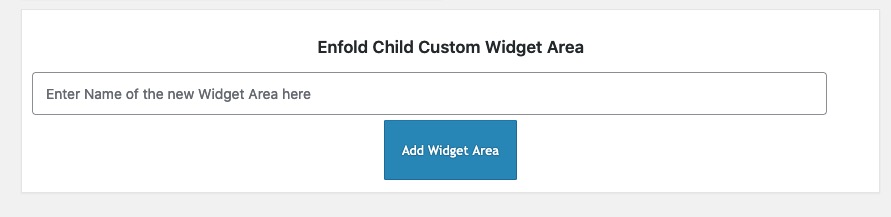
Also wenn du einer Color-Section die Klasse : hyphenate gibts sind auch alle Texte innerhalb dem unterworfen.you haven’t this on dashboard – appearance – widgets:
You are talking about the headings ALB elements – right?
you had to know that this custom class ( ID’s have to be unique – so if you want to use it on a page twice – a class will be better ) goes to the parent container so selector will be before the h2 container itself.
and if you do not like to have the whole width with a background-color – you had to set the container to display : inline-block
( my test custom class was: heading-bg-special).heading-bg-special .av-special-heading-tag { background-color: red; display: inline-block; padding: 2px 8px !important; }March 22, 2022 at 9:03 pm in reply to: Hiding tooltip also hides lightbox text (under image) #1345583if you only want it for img and anchors – use instead:
function temporary_removal_title_tags(){ ?> <script> window.onload = function() { var links = document.querySelectorAll('a , img'); for (var i = 0; i < links.length; i++) { var link = links[i]; link.onmouseover = function() { this.setAttribute("org_title", this.title); this.title = ""; }; link.onmouseout = function() { this.title = this.getAttribute("org_title"); }; link.onclick = function() { this.title = this.getAttribute("org_title"); }; } }; </script> <?php } add_action('wp_footer', 'temporary_removal_title_tags');es ist halt bei der DSGVO so, dass sobald du auch nur eine Kontaktmöglichkeit anbietest ( Telefon; E-Mail etc. ) – muss das eben vorhanden sein.
Das machen sehr viele falsch, die glauben eine sogenannte Visitenkarten-Seite im Netz platzieren zu können._______
und bei den Sprachen, die hyphenate bedient, hast du das manuell eingestellt? Ist aus performance gründen schon besser.
Ausserdem siehst du ja anhand meiner Beispielseite, dass bei breiten Screens ja auch kein Unterschied zu sehen ist. Hast du mal deine Seitenbreite ( durch verkleinern des Browserfensters ) verkleinert?Hast du nachdem du Hyphenate installiert hast – alle Cache geleert ( Browser Cache ) in Enfold – falls du das aktiviert hast das Merging aktualisiert ( unter Performance ) – hast du Performance Plugins laufen? dort auch die Cache erneuern.
Vielleicht schickst du mir mal das Seitenpasswort (also nicht die WP Zugänge) via E-Mail ( alles unter meinem Nick – bzw siehst ja die Testseite )
________
wei man ein plugin installiert weißt du! Mein Vorschlag für Günters Plugin war halt nur, dass man da nicht drei Rauten vor und nach den Einsetzungen macht sondern nur eine. Und eben die Liste erweitert – da es so viele schöne html entities gibt die man nutzen könnte.
zB ist das nonbreaking hyphen (geschützter Bindestrich) auch in der deutschen Sprache wichtig um zu verhindern, dass diese Worte bei Zeilenumbruch getrennt werden. ( z.B. bei 100 % – gehört einfach ein Leerzeichen hin – oder besser vielleicht ein dreiviertel Geviert Leerzeichen; soll aber wohl nicht im Zeilenumbruch getrennt werden – daher meine #nbhyp# Ergänzung in dem Plugin.
Hier kannst du meine Veränderungen sehen – pastebin: Link
und hier das installierbare zip file downloaden: https://webers-testseite.de/avia-special-characters.zipAb da kannst Du dann überall für diese Zeichen das Pendent einsetzen. In allen ALB Elementen wo der Kontent gesetzt wird – aber auch in der Textblock eingabe. #shy# setzt dann ein softhyphen.
-
This reply was modified 3 years, 12 months ago by
Guenni007.
it is a wordpress – no it is a browser related question – if there are titles – browsers will show tooltip after some time.
to simply remove all titles from images :function custom_remove_title_script() { ?> <script> (function($){ $("img").hover(function(){ $(this).removeAttr("title"); }); })(jQuery); </script> <?php } add_action('wp_footer', 'custom_remove_title_script');but even this you had to know how to insert it.
if content is missing after activating a child-theme – then there is something wrong with the installation from you.
i tried to explain it even for noobs how to. And linked the description to the docu with even a film to explain.
Maybe you let a mod do this for you.Otherwise you can insert it to parent-theme functions.php ( it is in enfold folder ) and on that file there is a comment at the bottom of that file:
/*
 *  register custom functions that are not related to the framework but necessary for the theme to run
 */
after that – and before the last command (
require_once( 'functions-enfold.php' );) i would place that code.March 22, 2022 at 7:13 pm in reply to: Audioplayer -time display in the timeline not visible #1345568on the demos and on my own test there are infos about the time:
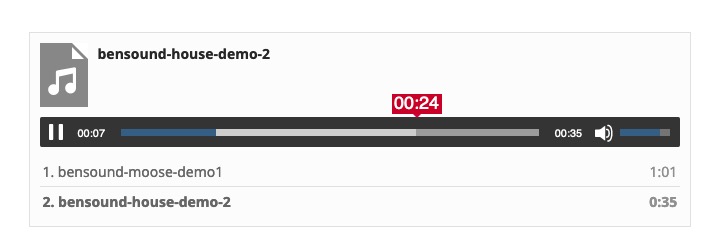
see here and look to the css code for influence on that current time: https://webers-testseite.de/code-for-audioplayer/
and for the bars too.can you try this in your child-theme functions.php:
ok i had to show you the image of that snippet, because boardsoft will allways transform the included entities to the signs:
you had to type it your own:
( click to enlarge )

or copy&paste from pastebin: https://pastebin.com/k0f385TJ
by the way – that does not come from enfold – it is a wordpress based style. from media.php and function is : wp_underscore_playlist_templates
zunächst war mein Kommentar bezüglich Impressum und Datenschutz bezogen auf :
josk-design.de
Da sieht man nix. Da ich Teilnehmer bin wie Du, sehe ich versteckte Inhalte nicht.Natürlich funktioniert das auch im Flattersatz; aber die berühmten “Wasserfälle” treten halt besonders häufig bei Blocksatz auf:
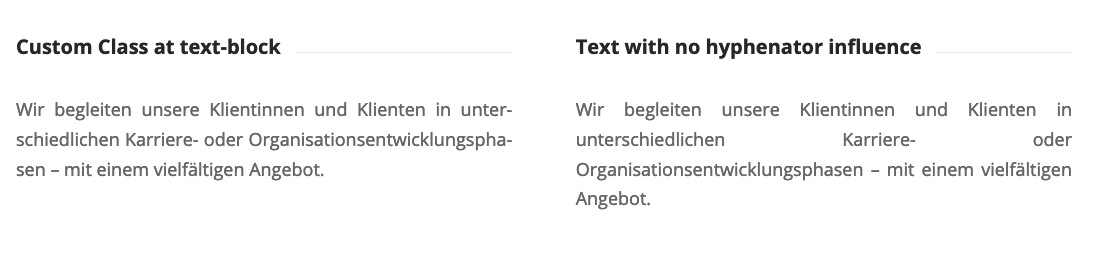
Der Link zu meinem Beitrag – und als Ergänzung zu Günters ( Namensvetter hier an Board ) kleinem Plugin zielt auf das manuelle Setzen der bedingten Umbrüche ab ( die dann natürlich auch den Bindestrich setzen )
Leider ist es so das bestimmte Zeichen wie größer, kleiner etc. als tags interpretiert werden und im besten Fall missachtet werden – manchmal zerschießen Sie einem auch die Seite. Zudem sind die bedingten Umbrüche die man setzt wirksam, aber nach dem erneuten Aufrufen der z.B. des Überschriftelements verschwunden. Das passiert nicht mit dem kleinen Plugin – ein wort sieht dann so aus im Eingabefeld:
Donau#shy#dampf#shy#schiffahrts#shy#gesellschafts#shy#kapitän
Diese Setzung bleibt bestehen – und auch im Backend sieht man, dass man was verändert hat.Wie gesagt “Hyphenator” ist toll – ich verwende ihn jedoch meist nur für Seiten bei denen der Kunde auf Blocksatz besteht. – Das Pluginin greif jedoch nur für die Textblöcke, welche diese custom-class besitzen: hyphenate.
PS: wie setzt du die Klasse am TextBlock ? Man gibt in das Eingabefeld wirklich nur hyphenate ein ! ohne Punkt
Das weist du schon?PS: du siehst übergens, dass diese Toole es auch so macht – es setzt überall dieses
­ein wo eine Trennung hingehört.

Sometimes reading is first step to learning. Everything is well documented even on enfold docu: Link
if you like to change parent-theme functions.php ( not functions-enfold.php – never said something else ) – you had to be very carefull –
first with the place you insert that snippet – then you always had to do that – each time enfold updates – because that file will be overwritten by the update. So my recommendation is : child-theme
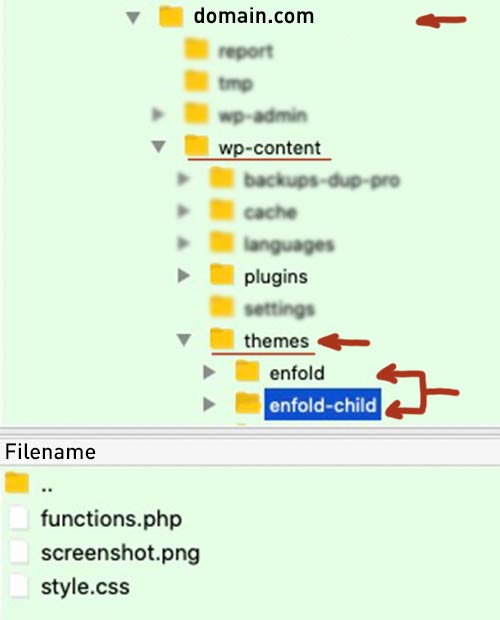
Next : as mentiond above it is the themes root directory – and you see it on the image above: child-theme is selected on ftp and the files in it are: style.css, functions.php and screenshot.pngfirst to know : as one of the central files – the functions.php is in the root directory of your theme !
And : child-theme can have its own functions.php ( same as above directly in root direcctory of the child-theme
if you got a child-theme : parent-theme and child-theme are siblings:
Actually, you cannot destroy an existing installation by setting up a child theme. Because you can always go back and activate the parent theme.
When you have installed ( uploaded the child-theme folder to your themes directory – on Dashboard – Themes there will be two enfold themes. One is marked as Child-Theme.
After Activation of the child-theme – go to (now) Enfold-Child Options :
on Import/Export Tab there is on top the button: “Import Parent Theme Settings” – click
This will take your settings from the parent-theme to your child-theme – including quick css entries and all the other settings.
It is not always the case that this does not work right away. If this is the case for you, please contact us again.Are you familiar with ftp-clients like filezilla etc. ?
To your fundamental question – where to insert that snippets ( code provided above )
First of all, I recommend using a child theme; this has many more advantages than disadvantages from my point of view. The child theme initially takes over all the properties of the parent theme until it develops its own properties.
Hence the naming. A child theme actually only comes in the form of a style.css in which it is declared to which parent it belongs.
If you download the prefabricated child theme from Enfold, you will see three files in the zip file – the mentioned style.css – a screenshot, so that you can directly recognize the affiliation to the parent theme in the dashboard / themes, and a quasi empty functions.php.
This central file is also a great exception, as it is one of the few files that is not intended as a replacement for the parent theme elements, but as an addendum. This is where such code snippets belong ( without deleting the introductory<?php)
There are snippets that will overwrite parent-theme instructions – but then they have to be coded that way. The most snippets only do change or add new abilities.Accordingly, this child theme does not require an update in the proper sense. Occasionally, however, it needs to be reworked, in case of major changes within the parent theme or WordPress.
Therefore, it is advisable to add comments to the added code snippets, which make it easier to understand the origin and meaning of the change even after years.In a php file you can implement this in two ways:
Either you surround the comment :/*** a comment here * without any influence to the code snipptet itself ***/or for a one-liner by prefixing it with :
// a comment here without any influence to the code snipptet itselfon that snippet above you see the the new function got a name – This name can be chosen arbitrarily; it is better to recognize directly what it is about. This function is then added to the theme via a so-called “hook” by add_action.
-
This reply was modified 3 years, 12 months ago by
Personally, I was only bothered by the galleries with previews.
https://kriesi.at/themes/enfold-2017/elements/gallery/
If you hover a little bit over the thumbnails, an Enfold Tooltip and the WordPress Tooltip will be shown at the same time. Therefore my solution to hover the Titles in a Substitute Title ( org_title ) to cache.

there is a simpler method to remove all titles – but then as mentioned above – the seo aspect will be ignored – and if you decide to show on an image a lightbox – the title is missing in the bottom-bar of the lightbox.
well if you even want to hide the titles on lightbox images – that was the wrong function ( p.s. : comes to child-theme functions.php)
the function above will do the job: to hide titles on hover – but on click they will be back for exactly the lightbox bottom-bar.if you like to preserve the titles for SEO reasons – comment out that part with click event – or remove it:
function temporary_removal_title_tags(){
?>
<script>
  window.onload = function() {
    //var links = document.querySelectorAll('img, a ,div[title]');
      var links = document.getElementsByTagName("img");
      for (var i = 0; i < links.length; i++) {
          var link = links[i];
          link.onmouseover = function() {
              this.setAttribute("org_title", this.title);
              this.title = "";
          };
          link.onmouseout = function() {
              this.title = this.getAttribute("org_title");
          };
      }
  };
</script>
<?php
}
add_action('wp_footer', 'temporary_removal_title_tags');
you can include other selectors etc. see the alternate line: for
var links = document.getElementsByTagName("img");
then use instead:function temporary_removal_title_tags(){ ?> <script> window.onload = function() { var links = document.querySelectorAll('img, a ,div[title]'); for (var i = 0; i < links.length; i++) { var link = links[i]; link.onmouseover = function() { this.setAttribute("org_title", this.title); this.title = ""; }; link.onmouseout = function() { this.title = this.getAttribute("org_title"); }; } }; </script> <?php } add_action('wp_footer', 'temporary_removal_title_tags');Etwas Offtopic : deine sehr minimalistische Seite bedarf trotzdem eines Impressums und einer Datenschutzseite – zumal du das Statistiktool von Jetpack nutzt. Selbst wenn dem nicht so wäre, da du eine Kontaktmöglichkeit offerierst reicht es um die Seite abmahngefährdet zu nennen. Da solltest Du unbedingt nachbessern. ;)
since this is quite a calculation-intensive plugin, it would not be very performant if you use it frequently on a page.
For this reason, it is also best to manually set the languages for which it is intended.
In this case it seems to me better to set “breaking points” in long words manually. There is an html entity for the web application which provides exactly that: softhyphen­see here an older text of mine : https://kriesi.at/support/topic/problem-with-hyphens/#post-1179376
wendest du das überall? oder nur – wie eigentlich vorgesehen auf Textblöcke bei denen du die Klasse gesetzt hast. Standard ist wohl : hyphenate
Denn eigentlich macht es am meisten Sinn, wenn es sich um block-text handelt ( justified text blocks)do you apply this everywhere? or only – as actually intended on text blocks where you have set the class; default is probably : hyphenate
Because it actually makes the most sense when it is about justified block text.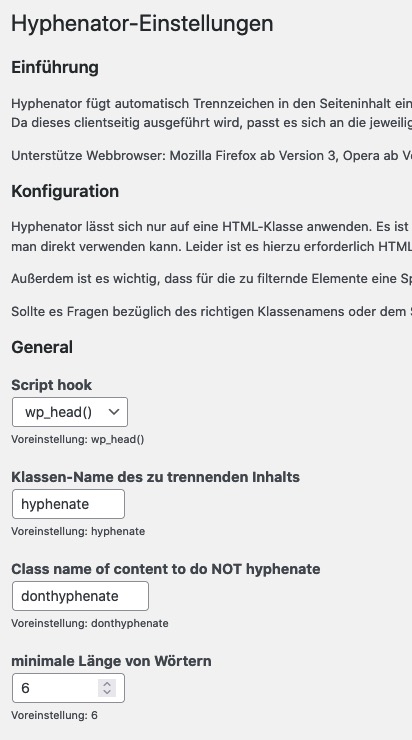
See your example text her on :
https://webers-testseite.de/hyphenator/March 17, 2022 at 8:24 pm in reply to: How to use Avia Layout Builder with new custom post type content #1344982PS: if you like to include your CPT to search results use:
function include_cpt_search( $query ) {
    if ( $query->is_search ) {
    $query->set( 'post_type', array( 'post', 'page', 'proyectos_ma' ) );
    }
    return $query;
}
add_filter( 'pre_get_posts', 'include_cpt_search' );
March 17, 2022 at 8:22 pm in reply to: How to use Avia Layout Builder with new custom post type content #1344978can you please test this in your child-theme functions.php:
function avf_alb_supported_post_types_mod( array $supported_post_types ) { $supported_post_types[] = 'proyectos_ma'; return $supported_post_types; } add_filter('avf_alb_supported_post_types', 'avf_alb_supported_post_types_mod', 10, 1); function avf_metabox_layout_post_types_mod( array $supported_post_types ) { $supported_post_types[] = 'proyectos_ma'; return $supported_post_types; } add_filter('avf_metabox_layout_post_types', 'avf_metabox_layout_post_types_mod', 10, 1);First :
this here :
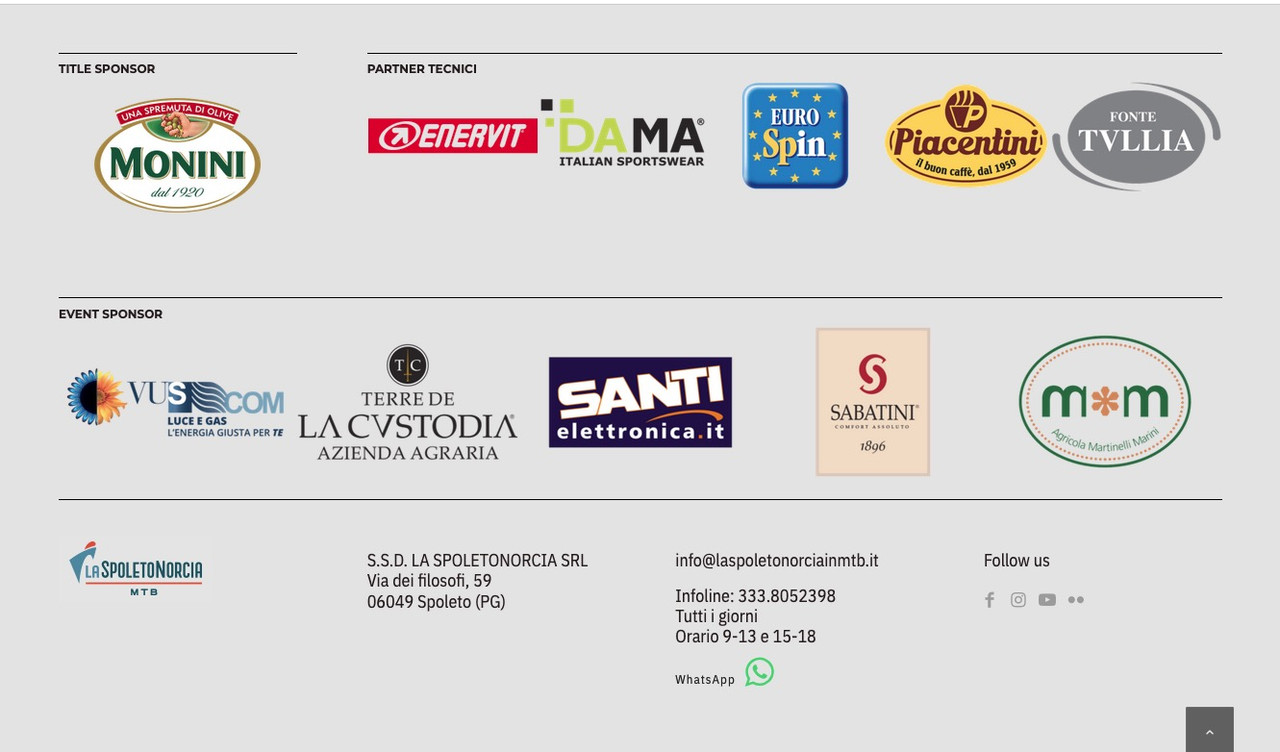
is the content you like to have on all pages ?
– i can see it on your front-page too – so your code does not take over the if clause ?next Enfold has an option to choose a whole page as footer !
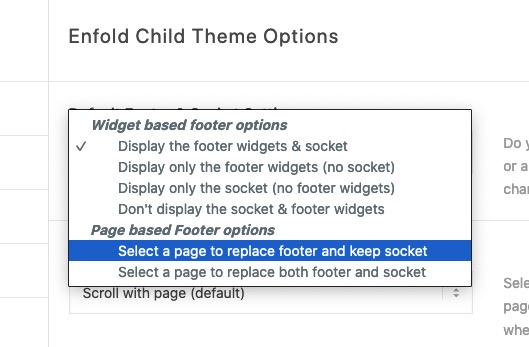
So style a new page ( sponsors ) and set this page to be the footer-pageIf you have some changes on that sponsors – just edit that page ( page as footer ) – and all pages are up to date at once.
if you have opended a post / portfolio – the metabox is missing?
At the top of the window there is a “Screen Options” dropdown button that allows you to mark whether or not these features should be displayed.
Perhaps someone had accidentally removed the “Featured Image” meta field
(click to enlarge:)

and if you decide to only show first 6 Elements on very small screens you can add a rule to the last media query:
@media only screen and (max-width: 339px) {
  #top #wrap_all .avia-gallery .avia-gallery-thumb a {
    flex: 1 1 100%
  }

  #top #wrap_all .avia-gallery .avia-gallery-thumb a:nth-of-type(n+7) {
    display: none !important;
  }
}
in the lightbox then all images will be present.
first – even if the other browsers are doing it well – i would use the flex modell here for all browsers – and for the responsive case – set the items
f.e.:#top #wrap_all .avia-gallery .avia-gallery-thumb { display: flex; flex-direction: row; flex-wrap: wrap; } #top #wrap_all .avia-gallery .avia-gallery-thumb a { width: unset !important } @media only screen and (min-width: 990px) { #top #wrap_all .avia-gallery .avia-gallery-thumb a { flex: 0 1 16% } } @media only screen and (min-width: 768px) and (max-width: 989px) { #top #wrap_all .avia-gallery .avia-gallery-thumb a { flex: 0 1 25% } } @media only screen and (max-width: 767px) { #top #wrap_all .avia-gallery .avia-gallery-thumb a { flex: 0 1 33% } } @media only screen and (max-width: 479px) { #top #wrap_all .avia-gallery .avia-gallery-thumb a { flex: 0 1 49% } } @media only screen and (max-width: 339px) { #top #wrap_all .avia-gallery .avia-gallery-thumb a { flex: 1 1 100% /*** here the images can grow to 100% ( first 1 indicates the item-grow ) ***/ } }March 17, 2022 at 1:18 pm in reply to: Need logo to extend past the menu area to overlap the content below. #1344869if you got a height on 150px for the header height – and you like to have the logo on a height of 200px the percentual growth is at aprox. 133%
So try :
#top.page-id-15 .logo,
#top.page-id-15 .logo a {
  overflow: visible;
}

#top.page-id-15 .logo img {
  height: 133%;
  max-height: 200px !important;
}
if your page-id-15 is the home page you can replace #top.page-id-15 with #top.home
The overflow will ensure that the logo is over the content.
This method will work even with shrinking header – see f.e.: here: https://pirol-hifi.de/March 15, 2022 at 8:08 pm in reply to: Blog Ansicht – Beitragsdatum in Englisch statt auf Deutsch #1344656next question to the mods/devs on WordPress wp-includes – general-template.php ( near lines 2690 )
is that the normal setting:function get_post_time( $format = 'U', $gmt = false, $post = null, $translate = false ) { $post = get_post( $post );translate is set here to false.
March 15, 2022 at 7:58 pm in reply to: Blog Ansicht – Beitragsdatum in Englisch statt auf Deutsch #1344652Did you check the settings – General and Date Format:
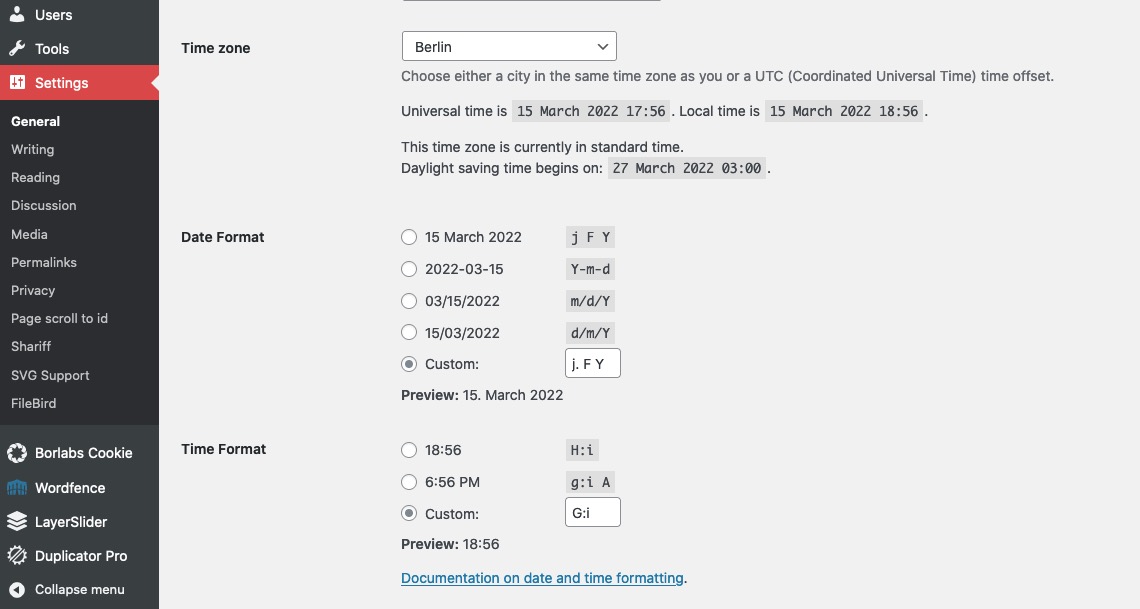
Edit : No that should not influence the language shown on your blog.
-
This reply was modified 3 years, 12 months ago by
-
AuthorPosts
