Forum Replies Created
-
AuthorPosts
-
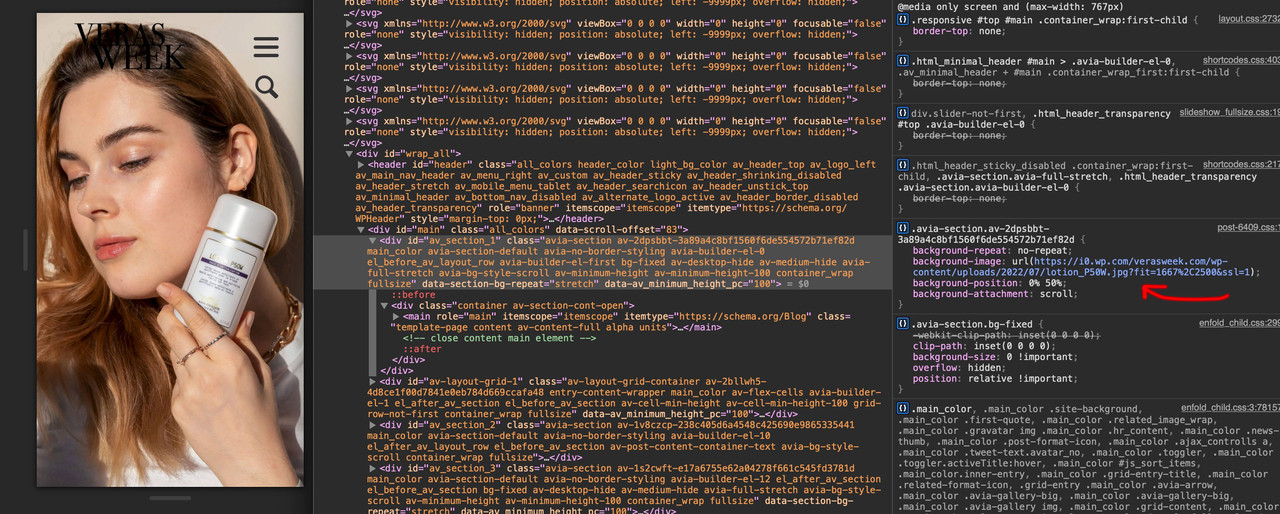
on that page: /sonnenschutz_und_was_ihr_dazu_wissen_muesst you got fixed setting – not scroll on attachment. !!!
Important: so set the background-attachment on that color-section to scroll please!
the same on /was-mich-das-zusammenziehen-gelehrt-hat with #av_section_3
on /warum-weiss-die-ultimative-farbe-ist and
/sind-gesichtssprays-wirklich-hilfreich/ i do not see your error.
What kind of iphone is it – is it realy older than the one i tested this for you: iphone 6s with iOs 15.5 ;)yes
Or just set this in addition to the bg-fixed rules:
.avia-section.bg-fixed.av-minimum-height-100:not(.av-slideshow-section) .container {
       height: 100vh !important
}
so – you can use all the other minimum-height options on enfold – and if you use the 100% value the rule above does force the other setting.
The Fontello site is a bit picky about the compound path. Therefore, my recommendation is: upload the svgs to icomoon app. Remove the colours there.
And download the newly generated svgs there. Unzip the icomoon zip and upload the svgs to fontello.
Icomoon App: https://icomoon.io/app/#/select
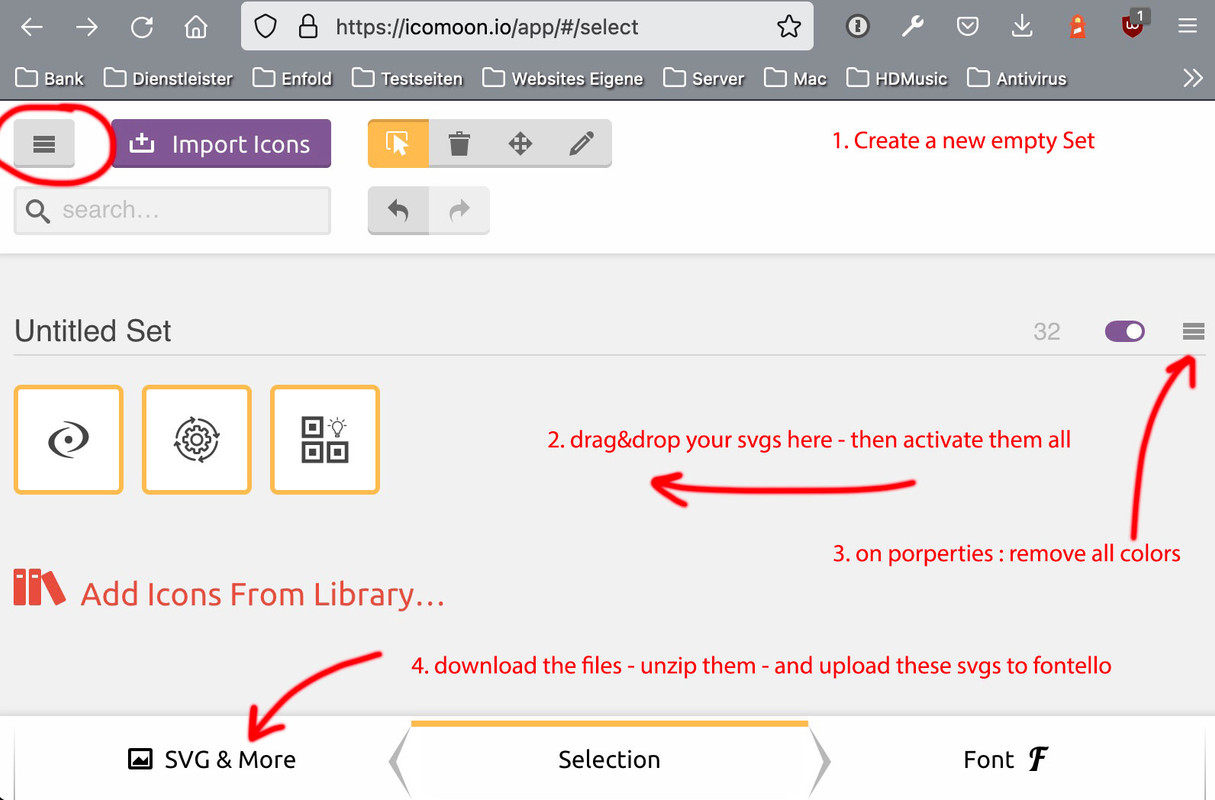
In practice, it would even be possible to upload the fonts generated there to Enfold; however, some settings for the font properties are optimised in Enfold with Fontello Settings (baselines, grid, whitespace, etc.) – so that this small intermediate step is worthwhile.
( f.e. your icon nygtq is a little bit cut off at the right side )Font Icons here are only used in a non-colored way. Uploads to fontello only work correct if the fill is (standard) : black.
if you like to use multicolored icons anyway. Do the above – and replace later the corresponding source svg files:
https://kriesi.at/support/topic/ajout-dicones-dans-enfold/#post-1356658next – strange behavior: if i use the minimum-height option with 75% from enfold ( removed the custom-class : fullheight with its vh setting in quick css ) – it works too !
i only can reproduce the effect ( from your film on top ) that the last “fixed” pseudo-container is seen and background-colors of other containers – are gone when using that 100% setting.PS: even a minimum custom-height of 99% will do the job – without css height – only with bg-fixed substitution. ??? – why not the 100%
yes – on that page now – it works on my iphone.
Don’t know why the height calculation on shortcode.js hampered that fix.What is annoying is that the Apple navigation bar on the bottom and the url window on top is outside the height of the screen. So when they disappears with scrolling, the screen height gets greater, and this is of course taken into account by adjusting the container. The image enlarges accordingly.
maybe it is the way of determine the av-minimum-height-100 and the calculation in shortcode js.
Can you try to set those color-sections to : no minimum height – and give another custom-class to it: fullheight
so there will be in the input field: bg-fixed fullheight
then add this to quick css :.avia-section.fullheight .container { height: 100vh; }this is the css way to do it. And lets see if it is a difference on mobile behavior.
da muss was anderes stören, – ich habe auf einem Iphone 8 auch dieses Ergebnis deines Filmes. Aber wenn ich meine Beispielseite auf dem gleichen Iphone ansehe, wird es korrekt angezeigt.
___________
there must be something else interfering, – I have on an Iphone 8 also this result of your movie. But when I view my example page on the same iphone, it is displayed correctly.And even this “hardcore” proof is o.k: https://webers-testseite.de/background-fixed/
where can i see that page where you have changed it?
i do know your domain from former topics so if you like to say only the page i will find it.Here it works :
/biologique-recherche-und-warum-es-suchtig-macht
/was-mich-das-zusammenziehen-gelehrt-hat/i will now test it on real devices – but on all my browsers in mobile simulation it works.
background-attachment: fixed is not supported by most of the mobile devices.
So Enfold turns that to background-attachment to : scroll – and a parallax container is generated.A position fixed is supported by mobile devices – the trick is to tranform that.
Important: so set the background-attachment on that color-section to scroll please!
give a custom class to that color-section : bg-fixed and put this to your quick css:.avia-section.bg-fixed { -webkit-clip-path: inset(0 0 0 0); clip-path: inset(0 0 0 0); background-size: 0 !important; overflow: hidden; position: relative !important; } .avia-section.bg-fixed:before { background-image: inherit !important; background-repeat: inherit !important; background-size: cover; background-position: inherit; content: ""; position: fixed !important; width: 100%; height: 100%; top: 0; left: 0; z-index: -1 !important; will-change: transform; pointer-events: none; }see f.e: https://webers-testseite.de/goodwave2/
PS: kanst du mal auf deiner Seite : was_mich_2_jahre_haarefaerbens_gelehrt_haben schauen, die Bilder sind eingeladen über:
i0.wp.com – war das deine Dev Seite, die du migriert hast? Jetzt hast du eine Rückbezüge auf diese Seite, das ist mixed Content bewertet – ausserdem ist die http – weshalb die Seite dann auch als nicht sicher eingestuft wird.Das muss mit dem Scroll ( AviaScrollSpy function ) verhalten zusammenhängen. Es gibt ja diese funktion des current-menu-items on scroll.
Denn wenn du runterscrollst auf der Seite St. Josef Kita – und du kommst zu der Anmeldung – springt der current-menu-item auf St. Josef Hort
Da könnte sein, dass du einen Anker dort gesetzt hast der dem Menu Punkt entspricht. Ich sehe ihn aber nicht im DOM …
___________
This must be related to the scroll behavior (AviaScrollSpy function). There is this function of the current-menu-item on scroll.
Because if you scroll down on the page St. Josef Kita – and you come to the registration – the current-menu-item jumps to St. Josef Hort.
It could be that you have set an anchor there that corresponds to the menu item. But I don’t see it in the DOM …well a quick and dirty way is to make them not clickable in quick css:
.breadcrumb {
  pointer-events: none;
}
but in the DOM the a-tags and all href are still present.
to change all settings in class-breadcrumb-trail.php and class-breadcrumb-legacy.php and have child-theme substitutes is complex and – on parent theme changes in those files you had to think of reproducing that changes.a jQuery solution could be to change a-tag to span-tag and remove the hrefs – please try in your child-theme functions.php:
function breadcrumb_links_to_span(){ ?> <script> (function($) { $('.breadcrumb-trail span').css('float', 'left'); $('.breadcrumb ').each( function() { $(".breadcrumb-trail a").replaceWith(function(){ return $("<span>" + $(this).html() + "</span>").removeAttr('href'); }); }); })(jQuery); </script> <?php } add_action('wp_footer', 'breadcrumb_links_to_span');mayby this is an option : https://webers-web.info/woogie/
__________________________
Testpage Layout is:
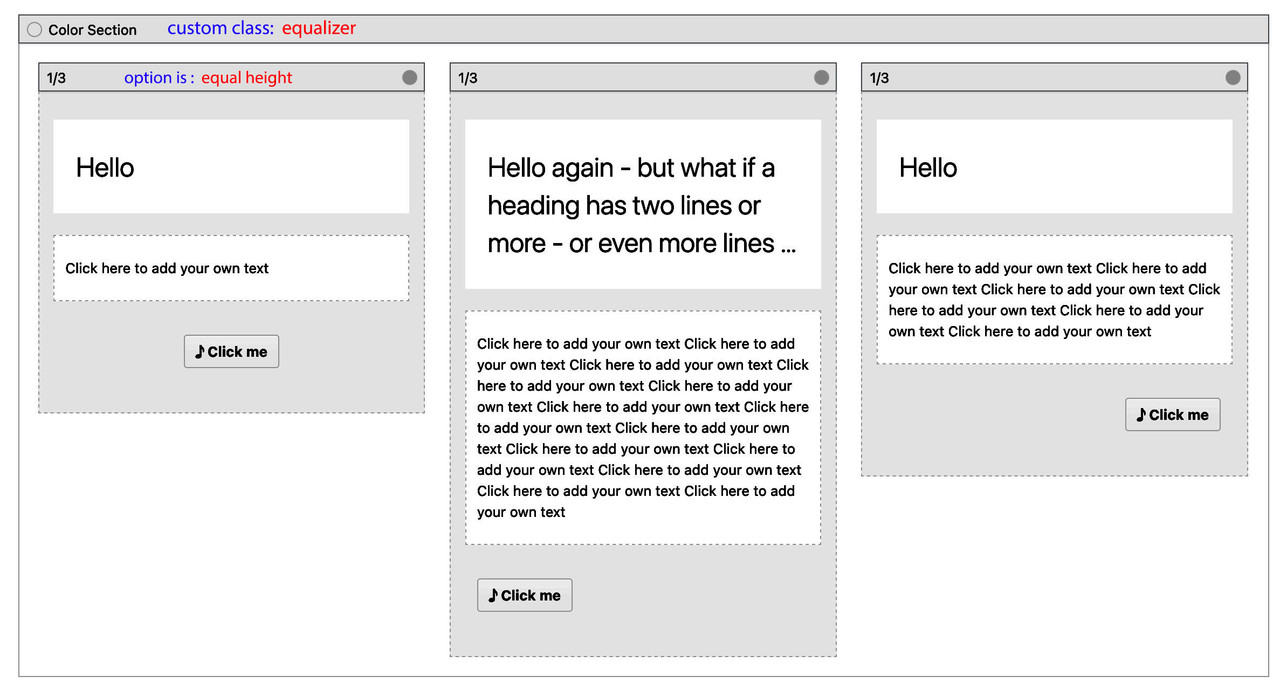
to quick css:
.equalizer .flex_column { padding-bottom: 60px !important; /*** depends on your button dimensions ***/ } .equalizer .av-special-heading { min-height: 80px; /*** maybe you have to adjust it for responsive case - when more lines will be present ***/ } .equalizer .flex_column .avia-button-wrap { position: absolute; bottom: 10px; left: 0; width: 100%; padding: 0 20px; /*** synchronize the 20px value with your column setting padding ***/ }I’m afraid I’m going to have to make a little apology. On my more modern Apple devices, of course, a newer Safari is installed. But on my older MacMini runs a Safari of the previous versions. There webp is not supported. So I guess that Iphones up to 8 and older Ipads do not display the images.
ich glaube da kommen wir so ohne die Hilfe eines Mod nicht weiter, denn ich denke, dass es Sinn machen würde wenn Sich das ein Mod mit Zugangsdaten ansehen könnte. Die Option mit dem Hamburger Clone Menu Punkt habe ich auch noch nie ausgetestet.
Hinterlege mal hier im Private Content Area deine Daten, damit die sich das mal anschauen können – bitte berichtet dann was es war.
Danke____
I think we can not get on without the help of a mod, because I think it would make sense if a mod with access data could look at it. The option with the hamburger clone menu item I have also never tested.
Deposit here in the Private Content Area your data, so that they can look at it – please report then what it was.
Thanksyou have on hamburger menu choosen the “Clone Title Menu Items To Submenu” and to have a “Clone ” for it
i do not know if this could be the reason for it – but you can quickly test it by temporarily disabling this option. To be on the safe side, also clear all caches before you check it._________
Du hast im Hamburger-Menü die Option “Clone Title Menu Items To Submenu” gewählt, um dort einen “Clone” dafür zu haben
Ich weiß nicht, ob dies der Grund für das Problem sein könnte – aber Du kannst es schnell testen, indem Du diese Option vorübergehend deaktivierst. Um auf Nummer sicher zu gehen, solltest du auch alle Caches löschen, bevor du es überprüfst.es wird demnach ja die Klasse von Enfold : current-menu-item falsch gesetzt.
_________
guess it is better we do discuss that in english.
the class : current-menu-item is set incorrectly from enfold.scheint wohl leider nicht selten, obwohl ich noch nie betroffen war – schau mal hier wird sowas auch angesprochen: https://kriesi.at/support/topic/wrong-menu-item-is-highlighted/
_______________
btw:
das ist jetzt nicht zu dem Problem, aber ich schaue gerade dein DOM an und die CSS
ein Kommentar innerhalb einer CSS wird durch /* Kommentar */ – wie bei “montserrat-regular – latin” gesetzt.
Du hast da teilweise bei den Schriften : das # indiziert das eine ID css gesetzt bekommt. Keine Ahnung ob es einfluss auf die Folgenden css haben kann. Denn du hast ja recht wenig dort#keine Kategorien anzeigen #schriftart montserrat /* montserrat-regular - latin */ … #schrift_oleo /* oleo-script-regular - latin */ …Ich meine Hier an Board was mit dem #top gelesen zu haben – ich suche mal / oder Du – da scheint ein kleiner Bug mit dabei zu sein.
Edit : das kann es nicht sein : link
es betraf etwas anderes – und es scheint ganz normal das Nach Klick das aktive Menu das /#top angehängt bekommt.Diese top level menu items, hast du die als manuellen Link eingefügt oder Standard als Drag&Drop über Seiten?
Wenn du die als Custom-Link eingesetzt hast, was hast du bei URL eingegeben?
Ich frage, weil bei St. Josef Hort verlinkst du auf #top.
nimm das #top mal raus.Edit : falscher Ansatz – ich schaue es mir nochmal tiefer an.
Diese Drei sind als Unterseiten der Frontpage definiert – richtig?The problem is not to give more space to the menu items – but what is on smaller screens to do? F.e. on ipad / ipad-mini other devices – where the hamburger is not active.
so if you set f.e. in your quick css:
#top .av-main-nav > li > a {
  padding: 0 25px;
}
then try to pull your browser window smaller to see if the menu will overlap your logo before the hamburger is active.
well – you might want to pay attention to this when creating your demo pages. If you equip the newest demo e.g. directly with webp images.
yes Mike – I have already understood that; only what advantage is gained by such an approach? Is the use of the picture tag only needed to offer a fallback solution; or is the picture tag used to offer other image formats in the responsive case?
So if it is used for these reasons, I think there is no argument for its use with the good distribution of webp support and the use of the srcset option.
If you need the plugin to have a nice automatic conversion of images to webp format images – ok. – but automatically replacing the img tag with picture tag? For what?Often plugins make useful special additions to the basic installation – but not always.
How many images are needed for a standard WordPress installation? 30-40? If it is not a photographer site or a shop system are already a lot. To convert this number as webp is relatively fast to do. Meanwhile even Photoshop offers the webp format as a possibility – you can make a droplet on your desktop to convert images to webp.PS : maybe if we start to use now the avif-format – a picture tag will be a good solution til this will be standard
__________
>Offtopic:
Why do I like to ask about the reasoning behind the use of certain plugins?
f.e.: I have enough customers here who absolutely want to have extensive statistics tools installed. Google Analytics seems to have a magical attraction for users. My inquiries as to who should take over their evaluation and who is also able to draw correct conclusions from it are usually met with ignorance. In 90% of the cases where I installed Google Analytics for customers, the interest in evaluating it independently quickly evaporated, and Google alone drew the benefit from it. Some of the collected data is simply not relevant for website operators.My answer concerning to your other question but also to webp format:
https://kriesi.at/support/topic/add-lightbox-manually/#post-1355589Just use webp – the “can i use page” shows that only the IE11 with less than 0,5% gloabal usage does not support webp.
In my opinion the usage of a fallback solution is now obsolete. Enfold supports webp usage in all alb elements – no need for a picture construct.See slider on : https://enfold.webers-webdesign.de/tooltips/
in the non-responsive case (grid cells are next to each other) the height is determined by the cell with the most content.
In the responsive case (the grid cells get the 100% width and are arranged on top of each other) the heights are then determined individually by each existing content.
No content – no height; or if the default paddings of 30px are present a height of 60px.
You can prevent this by placing a whitespace separator in that cell with the background-image.
____________________________
btw. if you like to have a different order when cells are in responsive layout – you can set on grid-row alb options to have either reverse-order or to have individual order setting.
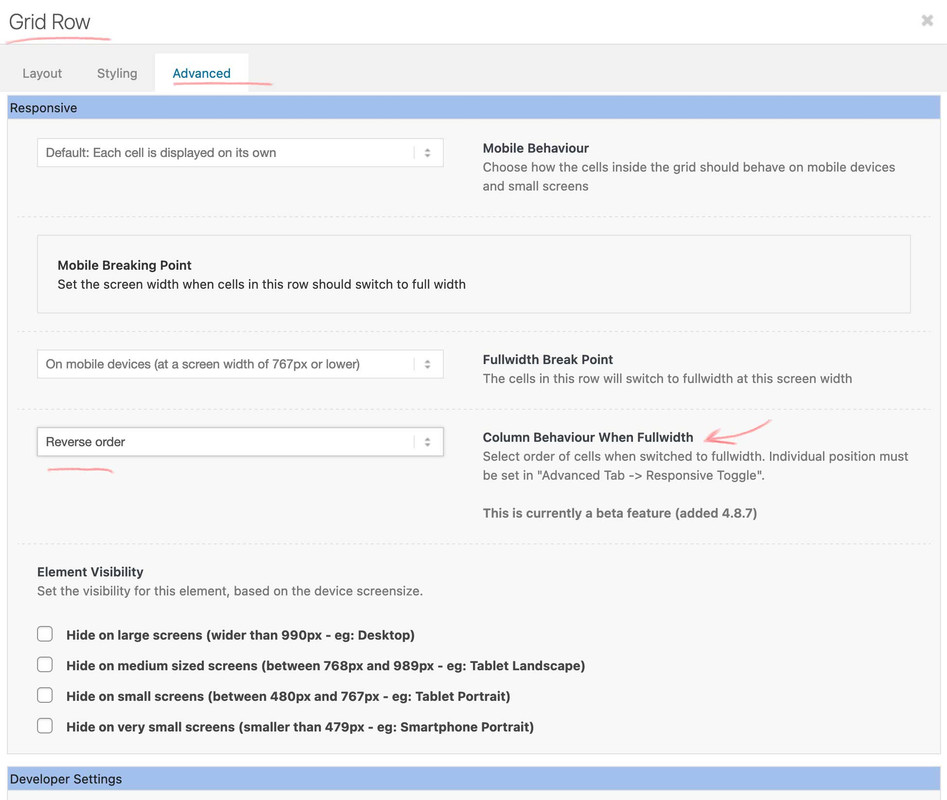
the further to the right a cell is, the further up it is in the responsive case. – or you can choose here individual setup. Then you can determine the order in each cell. higher values are on top – lower at the bottomThis is of course very handy if you want to have an alternating sequence of background images and content cells ( image – text – image – text …)
This is part of htaccess file in root folder of your wordpress installation. That file has no file-extension and is an invisible file ( with a dot in front : .htaccess ) – but you can force most of the ftp clients to show those files ( f.e. filezilla under Server Menu ).
Maybe Google does not like the interest-cohort() option – read about that setting and Google FLoC
or just use the little plugin Günter has written : https://github.com/KriesiMedia/enfold-library/tree/master/integration%20plugins/Enfold/Special%20Character%20Translation
other entries can be inserted into the array, of course.
f.e.:
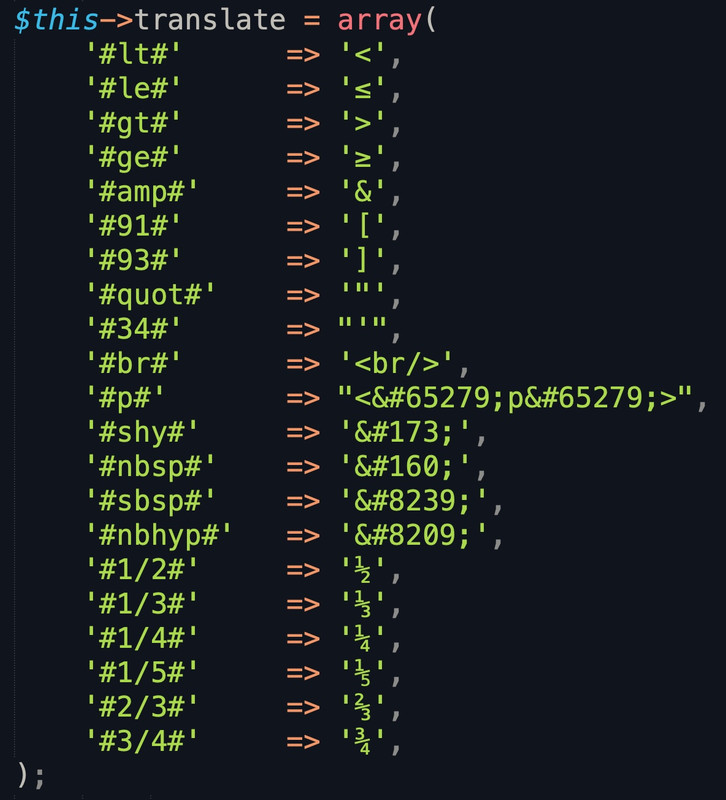
see and download mine from: https://pastebin.com/jttc230x
And in contrast to Günter’s notation, I always put only one # before and after the character.
After activation of the plugin – you can use these substitutions – f.e. for a linebreak then #br#July 3, 2022 at 6:16 pm in reply to: Don't display ANYTHING from Events Calendar in Enfold Search #1357143The last code snippet explicitly excludes the Tribe Events, the last but one excludes the tribe events (but also other Custom Post Types (CPTs)) by not naming them in the arrays.
_____
:)
All may come to the party except Guenni007 ( number of guests any number)
Jill and Jack are allowed to come to the party. ( yes Guenni007 is not allowed to come – but neither are the rest – number of guests : 2 )i know some filters ( no scripts ) as child-theme functions.php snippet to use – but they only do highlight the search word in the search-results page.
// highlight search word in results
function highlight_results($text) {
    if (is_search() && !is_admin()) {
        $sr = get_query_var('s');
        $keys = explode(' ', $sr);
        $keys = array_filter($keys);
        $text = preg_replace('/('.implode('|', $keys) .')/iu', '<span class="search-highlight">\0</span>', $text);
    }
    return $text;
}
add_filter('the_excerpt', 'highlight_results');
add_filter('the_title', 'highlight_results');
But I would recommend this plugin:
It highlights the search term not only on the search results page, but also on the related links.
https://en-gb.wordpress.org/plugins/highlight-search-terms/ -
AuthorPosts