

Forum Replies Created
-
AuthorPosts
-
Nicht dafür.
PS : ich konnte auch nur die Seite sehen, weil im Screenshot oben die Domain zu sehen war.Ach komm schon vorhin war im DOM nix zu sehen – Da war der Container leer! ;)
Wie auch immer wenn du jetzt zu deinem Verschieben auch noch das overflow richtig setzt siehst du auch unterhalb das Caption:
_____________
Oh, come on, there was nothing to see in the DOM earlier – the container was empty! ;)
However, if you now also set the overflow correctly to your move, you will also see the caption below:#top .avia-image-overlay-wrap a.avia_image { overflow: visible; }PS: du lädst viele Bilder über http – daher auch kein Schutzzeichen oben in der URL.
Schau mal woran das liegen könnte. Wenn garnichts hilft, installiere Search und Replace
Da kannst du die Datenbank durchsuchen und Zeichenfolgen ersetzten also zB
suchen: http://domain.touch
ersetzen: https://domain.touch
achte aber darauf, dass sich bis auf das http – https nichts in den Feldern unterscheidet auch keine leerzeichen oder Striche etc. ppAnd you realy inserted to the caption input field some text? There is no reason why the other images have that – and the one not.
July 20, 2022 at 12:12 pm in reply to: Design transition from slide show to color selection? #1358883Developer Tools des Browsers öffnen – zu dem svg navigieren – rechte Maustaste – äußeres html kopieren:
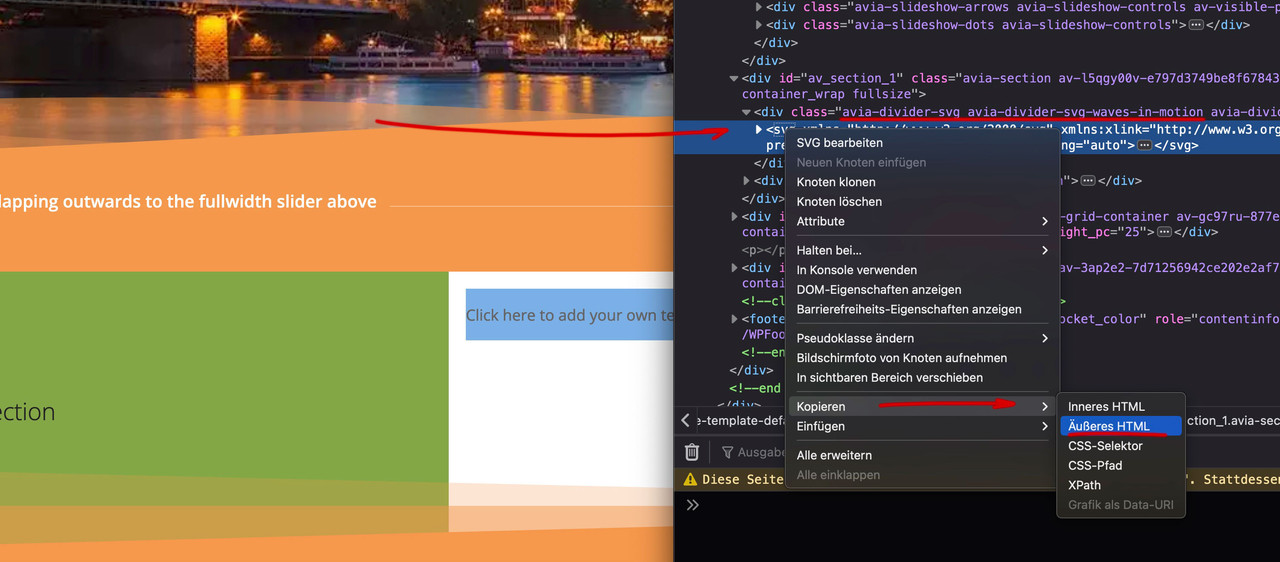
and: https://kriesi.at/documentation/enfold/columns/#adding-custom-svg-dividers
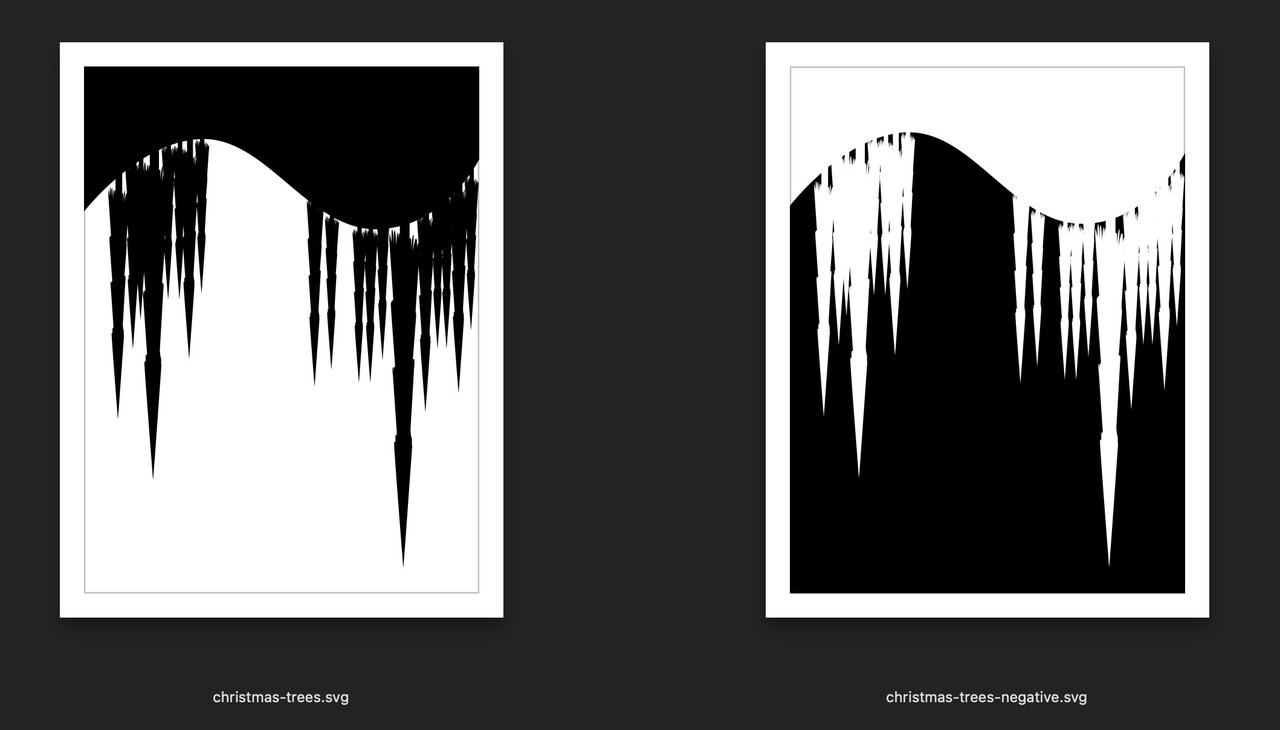
Meine Empfehlung nun – hochladen der custom svg files in einen uploads unterordner: avia_custom_shapes
für die Option “has flip” benötigst du dann allerdings zwei files – wobei die Nomenklatur dann des Flip Files festliegt ( hat als addendum : -negative )
(transparenz und Füllung wechseln hier )
I’m afraid you’ll have to reset the footer widgets.
They will have been reset to the default values.temp remove of the title tag on hovering – put this to your child-theme functions.php:
function temporary_removal_title_tags(){
?>
<script>
  window.onload = function() {
      var links = document.querySelectorAll('a, img, *[title]');
      for (var i = 0; i < links.length; i++) {
          var link = links[i];
          link.onmouseover = function() {
              this.setAttribute("data-tooltip", this.title);
              this.title = "";
          };
          link.onmouseout = function() {
              this.title = this.getAttribute("data-tooltip");
          };
          link.onmousedown = function() {
              this.title = this.getAttribute("data-tooltip");
          };
      }
  };
</script>
<?php
}
add_action('wp_footer', 'temporary_removal_title_tags');
July 19, 2022 at 8:56 pm in reply to: Horizontal Gallery on mobile phones: can I jump directly into the lightbox? #1358814well one thing is that on touch devices ( mobile phones ) there is no hover effect.
you can do this to show it always on the touch device case:.avia_mobile #top .av-active-gal-item .av-horizontal-gallery-link { opacity: 1 !important; }or use that class instead touch-device
but that one thing you mentioned i could not reproduce : that there is only a half lightbox button.
Next: on my simulated mobile devices – your gallery do that what you like to have – it opens directly the lightbox on click.
Edit: aha – i know now why – you make the button a 100% width and height.Well – a manual way to do it is to use the shortcode for the breadcrumb trail:
place this to your child-theme functions.php :
and use whereever you like to place that as :[av_breadcrumbs]July 19, 2022 at 12:01 pm in reply to: Design transition from slide show to color selection? #1358757Das sind custom made svgs. Schau dir die svgs von Enfold mal mit einem Guten Texteditor an ( OSX: Sublime Text oder Windows: notepad++ )
Der Aufbau ist recht ähnlich – ein wenig was über svgs sollte man wissen.PS : das svg liegt ja im DOM als inline svg file explizit vor. Niemand hindert dich das svg aus dem DOM herauszukopieren ;)
Anleitungen wie man custom svgs einbindet gibt es nicht nur von mir hier an Board genüge :)PPS: was überigens bei den meisten svg dividern der Fall ist – so auch bei Elementor und Konsorten.
schau mal die Stadt-Silhouette: https://guenterweber.com/#footer
July 18, 2022 at 7:26 pm in reply to: Design transition from slide show to color selection? #1358679wenn du in der gleichen color-section für den unteren divider dann z.B.: als Divider color wählst: #cf1b15 dann ist auch dort der Übergang harmonisch.
July 18, 2022 at 7:19 pm in reply to: Design transition from slide show to color selection? #1358678Ein ID wird hier garnicht benötigt – dieses outwards-top-divider ist eine Klasse, damit du das auch auf einer Seite mehrmals nutzen kannst muss das so sein. Diese Klasse geht an die color-section selber:
( bei Color-Section zu Color-Section macht das Überlappen zu der anderen Sektion keinen Sinn, aber falls nochmal ein Slider oder z.B. eine Grid-Row so sein soll …
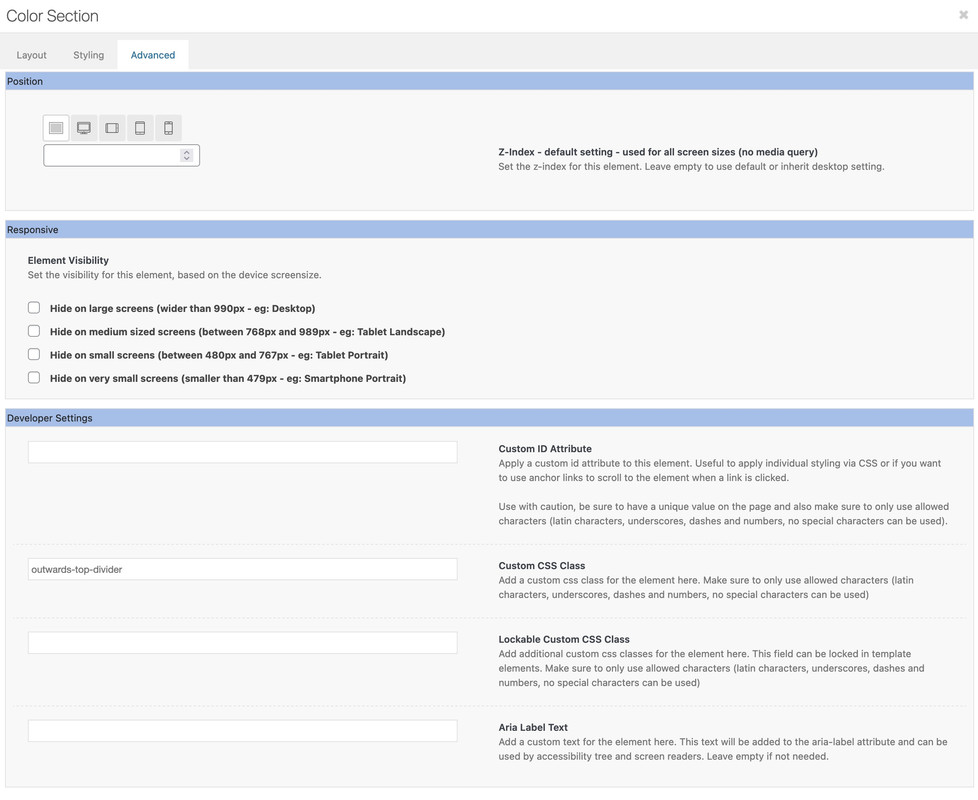
Wenn du bei den svg-dividern dann wählst:
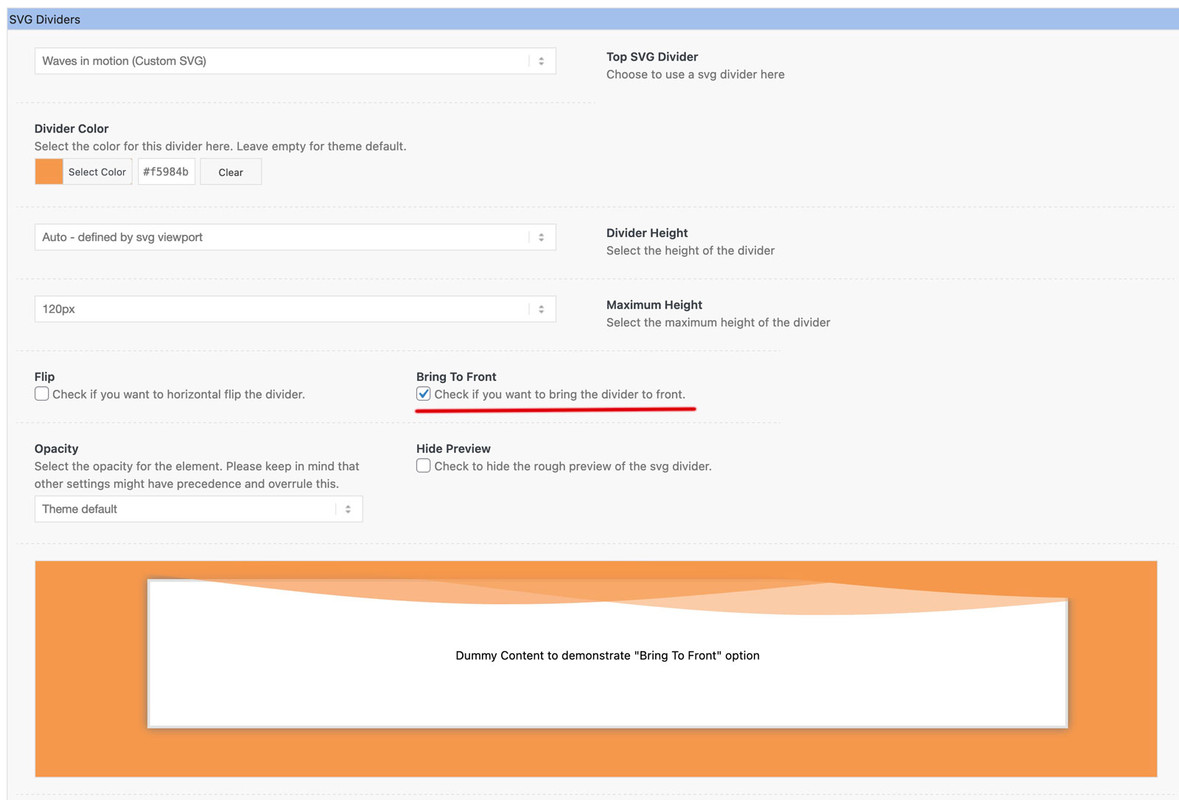
ist der z-index automatisch auf 100 gesetzt.
Da du jetzt ja einen Übergang von dem Slider zu einer weißen Color-section haben möchtest, wählst du bei Divider Color auch weiß.to which element this request is concerning?
There are some ALB elements which are accompanied by a tooltip.PS: really 10px width ?
July 18, 2022 at 2:37 pm in reply to: Design transition from slide show to color selection? #1358664Do not forget the custom class to set and :
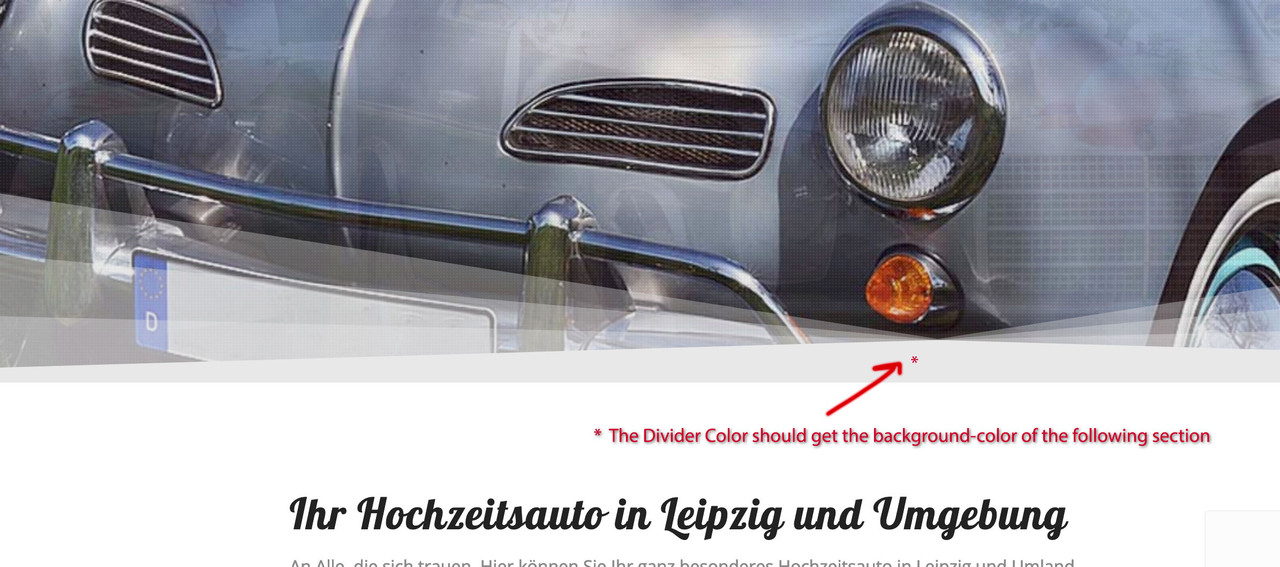
you can see here all css and settings that are needed:
July 18, 2022 at 10:32 am in reply to: Design transition from slide show to color selection? #1358644your idea – to use the following color-section with top svg divider is the right one.
There are twp things to keep in mind:
– the z-index had to be bigger ( this could be done in the alb settings on divider ( keep in front )
– transform-origin default value is : center center
so if you only rotate or mirror the svg – it stayes in the same position : but if you set the transform-origin to top center – it will have the desired effect.also remember to take the Divider Color equal to the background-color of that color section.
but to use it whereever you like to have it – it is best to give to the following color-section a custom class – f.e.: outwards-top-divider
i prefer the scale transformation – but rotate(180deg) is also possible:.avia-section.outwards-top-divider .avia-divider-svg-top { transform: scaleY(-1); -webkit-transform-origin: center top; transform-origin: center top; z-index: 100; /*** if you set it in the alb - you don't need this rule here ***/ }see: https://enfold.webers-webdesign.de/martin/
PS: i transform here the surrounding container of the svg – the reason is not to overwrite the transforms of the svg itself.
hover the area where you like to place that element. On hovering the drag&drop areas where you can place that element are shown with a blue background.
If you are over the place where you can and want to place it – the background gets green.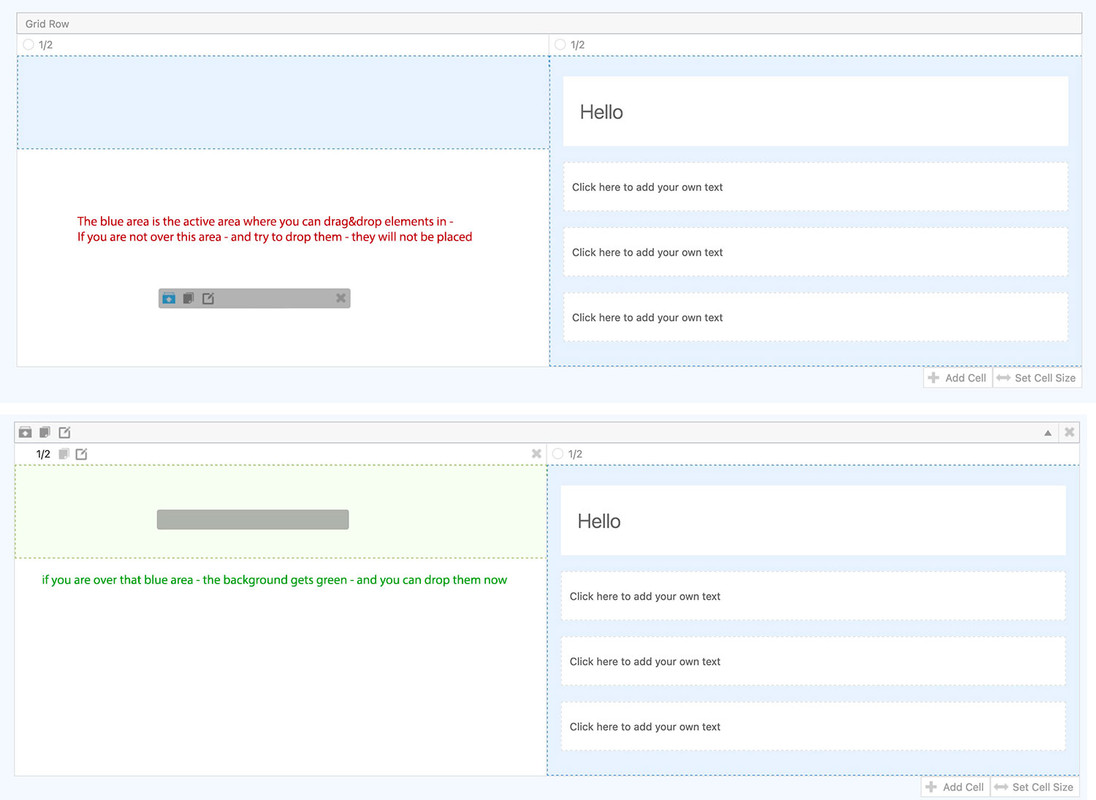
it is so simple – but my dear participants are not really interested in a good solution ;) very sad!
use a nice tool : plugin: duplicator. – it is very powerful even as non pro Version ( pro only has ftp and cloud storage)
it generates two files – an installer.php file and a zip ( or if to big an own format for it: daf)
you only upload those two files to your installation root directory. Start installer.php and just insert the new server infos and server passwords.
Thats it.do you use WPML ? see here: https://kriesi.at/support/topic/portfolio-grid-does-not-display-category-content-correctly/
if so – update your wpml
you can shift the column the image is inside. That is possible with older enfold versions.
row margins : custom margins.
depends on the enfold version you are running.
The newest one got a own options dialog on this Image – Advanced tab:
see here an example : https://enfold.webers-webdesign.de/image-overlap/
Have you deactivated the theme support for loading Google fonts?
something like this:
function my_output_google_webfonts_script( $activate ){
  return false;
}
add_filter( 'avf_output_google_webfonts_script', 'my_output_google_webfonts_script', 10, 1 );
i do always load my fonts locally – mainly from GDPR (DSGVO) reasons.
Even if you have hampered that loading – you can use determination of used fonts by: Enfold (Child) – General Styling – Fonts.
If you load different fonts than those listed – you can add to that list your self hosted fonts.f.e.:
function avia_add_custom_font($fonts){
    $fonts['Amaranth'] = 'Amaranth:ital,wght@0,400;0,700;1,400;1,700&display=swap';
    return $fonts;
}
add_filter( 'avf_available_google_fonts',  'avia_add_custom_font');
The added custom font is at the end of the dropdown list (not in alphabetical order)
-
This reply was modified 3 years, 3 months ago by
Yigit.
By the way – you are loading your questrial font from mixed content page – guess it was your developer page :
mf-prod.com/voxius/if you like to synchronize the colors on your sidebar category listings :
.widget .cat-item-42 a {color: blue}
.widget .cat-item-45 a {color: green}
etc.
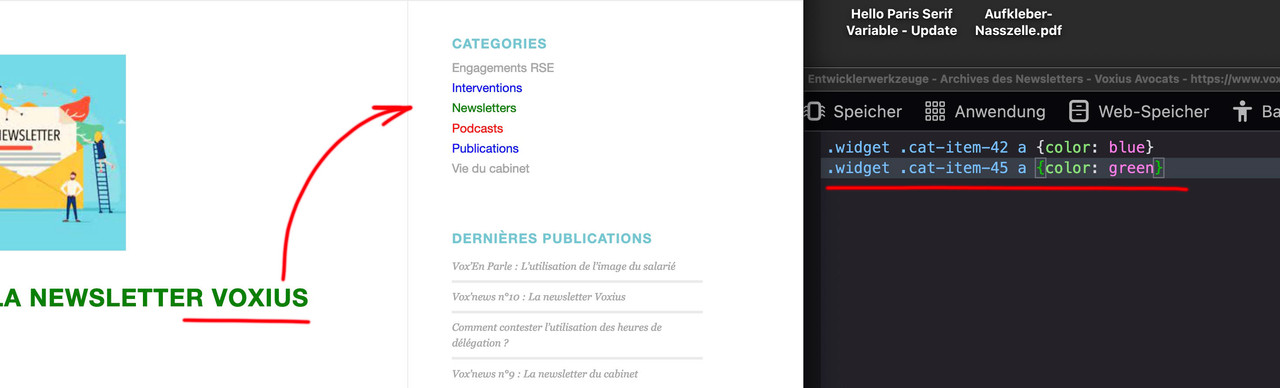
maybe this is easier to use instead – because you do not need to look for the ID’s:
.widget .cat-item a[href*="newsletters"] {color: green}
.widget .cat-item a[href*="vie-du-cabinet"] {color: orange}
.widget .cat-item a[href*="publications"] {color: blue}
etc.
f.e. on that page: https://www.voxius-avocats.com/actualites/
.av-sort-by-term a.active_sort .inner_sort_button span { text-transform: uppercase; font-weight: bold; } #masonry_id_interventions_sort .av-masonry-entry-title.entry-title, .interventions_sort_button .inner_sort_button { color: red; }try:
.category-podcasts .av-masonry-entry-title.entry-title,
.category-podcasts .post-title.entry-title,
.sort_by_cat a.podcasts_sort_button {
  color: red;
}

.category-newsletters .av-masonry-entry-title.entry-title,
.category-newsletters .post-title.entry-title,
.sort_by_cat a.newsletters_sort_button {
  color: green;
}

.category-publications .av-masonry-entry-title.entry-title,
.category-publications .post-title.entry-title,
.sort_by_cat a.publications_sort_button {
  color: blue;
}

.category-vie-du-cabinet .av-masonry-entry-title.entry-title,
.category-vie-du-cabinet .post-title.entry-title ,
.sort_by_cat a.vie-du-cabinet_sort_button {
  color: orange;
}
etc.
each 3rd line is if you got a sort on categories aktivatedPS: if you like to have an indicator for activated sort cat:
f.e.:.sort_by_cat a.active_sort { text-transform: uppercase; font-weight: bold; }IMPORTANT : sometimes it is not sort_by_cat but : av-sort-by-term ( if portfolio masonry …)
like here on that masonry: https://kriesi.at/themes/enfold-2017/elements/masonry/And you see – we could have the problem that a post has two or more cats or portfolio “cats” ( terms )
like in the example page : portfolio_entries-photography and portfolio_entries-illustrationon that portfolio case you got some ID’s to differ what is active sort: ( for that demo page of enfold above )
#masonry_id_photography_sort .av-masonry-entry-title.entry-title { color: red; } #masonry_id_illustration_sort .av-masonry-entry-title.entry-title { color: blue; }it works with the shortcode inserted on a page.
Or now i tested it for you – deinstall the embeded Layerslider ( if you have allready some sliders – choose option : Remove theme plugin files and keep slides ):
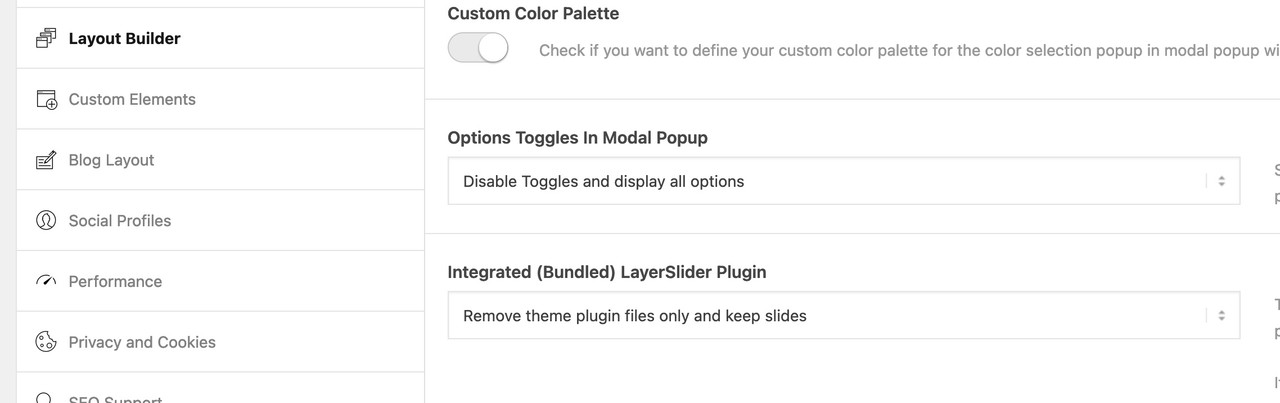
then install the downloaded plugin. It will work then as expected.
Well there are a lot of anchors on your page. those invisible headings – and these anchors are found sometimes three times in your submenu.
F.e. the #oeffnungszeiten (h6 id=oeffungszeiten ) – when you scroll to that h6 – so it is on top – the indicator shows the concerning link – but why it does jump to the next – or previous submenu i realy do not know.yes you can use all the other settings on min-height option without that littel fix of Link
But for the 100% setting this seems to be the fix for it. Fortunately, this class (av-minimum-height-100) is added in that case.Edit: Maybe you test to place the shortcode on the wanted page in a text-block or code-block element.
The Option to show on Target Pages does not do the job ( maybe only on ALB generated pages/posts )how did you install that plugin? I do not think that only inserting the serialnumber will do the job.
On a page of mine – i choosed the option on : Enfold – Layout Builder – Integrated (Bundled) LayerSlider Plugin : Remove Theme Plugin.
Then i did a normal Plugin Install with the zip you downloaded from Kreatura Media.
Don’t know – if that is the solution – but it might help to have automatic Updates aswell too. -
This reply was modified 3 years, 3 months ago by
-
AuthorPosts
