

Forum Replies Created
-
AuthorPosts
-
by the way on my test page there is my code – with masonry support too.
And here you see why i do prefer to set this via post tag! ( sorting by category in combination ).mfp-zoom-in.mfp-ready.mfp-bg { opacity: 1; background-color: #333; }you’re right Mike – I interpreted the sentence as meaning that he wants to remove the Transparent background altogether:
“I want the color to stay and but without transparency.”
That’s why I set off the lightbox image from the background with a shadow.If it’s that he just wants a completely black background it’s probably the way you’ve suggested now.
A more precise formulation of the wish would have been good here.as mentioned above if you like to have it under the first paragraph then use ( insertAfter)
function move_featured_image_to_first_paragraph(){
?>
<script type="text/javascript">
window.addEventListener("DOMContentLoaded", function () {
(function($) {
        $('.single .post-entry').each( function() {
            var featuredImage = $(this).find('.big-preview.single-big');
            var targetElement = $(this).find('.entry-content-wrapper .entry-content > p:first-of-type');
            $(featuredImage).insertAfter($(targetElement));
        });
})(jQuery);
});
</script>
<?php
}
add_action('wp_footer', 'move_featured_image_to_first_paragraph');
results in:

However, the problem is that your postings don’t all follow this example. sometimes you have this TOC container above the first p-tag sometimes below, then again it’s not included (Cucumber Salad).
_______
it is up to you – if you change that codeline wit target to:
var targetElement = $(this).find('.entry-content-wrapper .entry-content > p:nth-of-type(3)');then it is the third paragraph
and not to use category – you can use post tags for it.
To have the post tag on single post as body class you can use this in child-theme functions.php:function add_tags_to_body_class( $classes ) { if( (is_single()) && $tags = get_the_tags(get_queried_object_id())){ foreach( $tags as $tag ) { $classes[] = 'tag-' . strtolower($tag->name); } } return $classes; } add_filter( 'body_class', 'add_tags_to_body_class' );for blog – you can forward these classes as classes on the article.slide-entry
for that you had to edit as Nikko mentioned the postslider.php:
( and the link from Nikko to add-elements-to-alb shows you how to have a child-theme alb element.)just before that line 900 ( see codeblock of Nikko ) insert:
( the strtolower brings all tags to lowercase – so a tag : Eating will end in a class: tag-eating )$posttags = get_the_tags($the_id); foreach($posttags as $posttag) { $post_class .= 'tag-' . strtolower($posttag->name) . ' '; }then you can set on your posts the tags : badge1, badge2, badge3 or commerce-member etc
you will have on article then the class: tag-commerce-member or tag-badge1 etc.now you can differ between those entries in f.e a grid blog.
If you decide to use that badge1, badge2, badge3 nomenklatura for your post-tags :
( the image names do not need to be synchronized with that tags ).avia-content-slider, .avia-content-slider-inner, a.slide-image { overflow: visible !important } .slide-entry[class*='tag-badge'] a.slide-image:after { content: ""; width: 50px; height: 50px; position: absolute; top: -10px; right: -10px; background-repeat: no-repeat; background-size: contain; box-shadow: 0px 0px 10px -2px #000; z-index: 301 } .slide-entry.tag-badge1 a.slide-image:after { background-image: url(/wp-content/uploads/badge1.jpg) ; } .slide-entry.tag-badge2 a.slide-image:after { background-image: url(/wp-content/uploads/badge2.png) ; } .slide-entry.tag-badge3 a.slide-image:after { background-image: url(/wp-content/uploads/badge3.jpg) ; } /**** etc. ***/see f.e.: https://enfold.webers-webdesign.de/blog/
and did you try my snippet in your child-theme funcitons.php?
But i see that your posts are not consistent in showing the first paragraph – sometimes there is more info before the first paragraph is seen – than you have more info.
If your postings had a similar content structure, the image would certainly be in the same place everywhere.
After I applied my codesnippet in the developer tools, I see for example in the one posting the
(I have interrupted the giant image so that it does not take up too much space here):
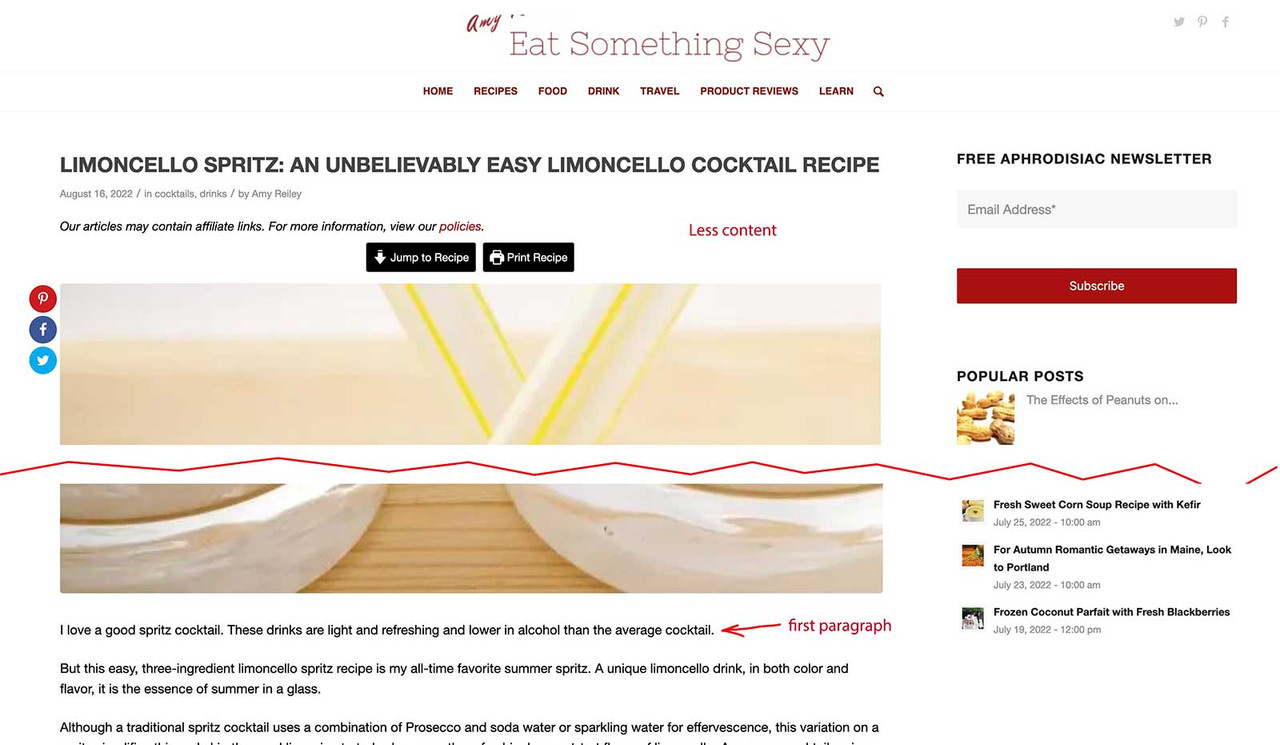
Another Posting :
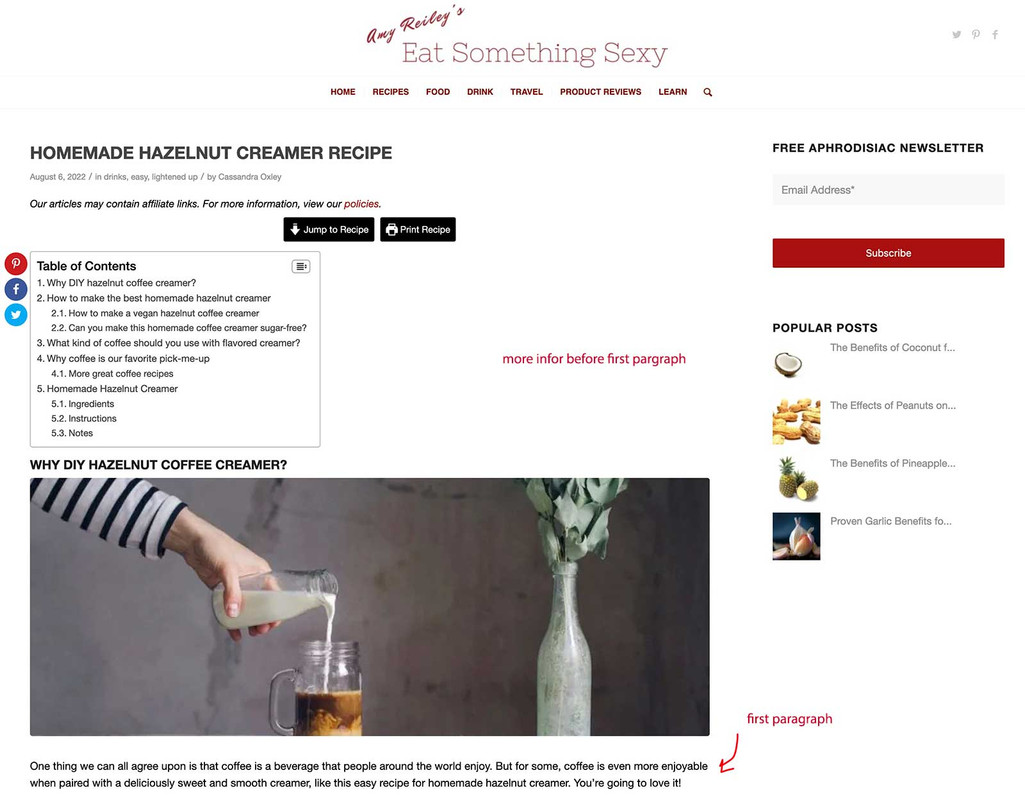
now – where is the place you like to have that featured image?
Maybe it’s enough for you to have the headline first, and then the featured image. You can achieve this by changing the blog style to “Modern Business”.or try this in your child-theme functions.php :
function move_featured_image_to_first_paragraph(){
?>
<script type="text/javascript">
window.addEventListener("DOMContentLoaded", function () {
(function($) {
        $('.single .post-entry').each( function() {
            var featuredImage = $(this).find('.big-preview.single-big');
            var targetElement = $(this).find('.entry-content-wrapper .entry-content > p:first-of-type');
            $(featuredImage).insertBefore($(targetElement));
        });
})(jQuery);
});
</script>
<?php
}
add_action('wp_footer', 'move_featured_image_to_first_paragraph');
if you like to have the image after the first p tag use insertAfter
there is a class added to html when viewing your site via mobile device: avia_mobile
and for desktop browsers it is : avia_desktop.responsive.avia_desktop #top .copyright { display: none; }or do you like to get rid of the whole socket ?
.responsive.avia_desktop #top #socket { display: none; }-
This reply was modified 3 years, 7 months ago by
Guenni007.
August 20, 2022 at 8:03 am in reply to: Extremely slow page load time with Enfold theme (other themes load fast) #1362250see here a solution with your video – after you have checked it – i will go and set in a different video and image.
here are the results on gtmetrix: https://gtmetrix.com/reports/enfold.webers-webdesign.de/k7GTMbfW/
the TTFB is higher than normal on my server – this is due to the video – but it is 1s ( long enough but not 4.5s) – with only enfold merging enabled.___________
by the way and off topic:
see that page – and look if the responsive behavior isn’t this way better too. https://enfold.webers-webdesign.de/gallery/
what i did:
first i give a custom class or ID to that color-section – in my case it is an ID: hawkey-bg-video
the settings on that color-section are: no minimum height
the settings on the bg-video ( aspect ratio: 1920:700) – yes you can insert this valuesnow to have the correct responsive height of the color-section we had to synchronize it with that video aspect ratio
700/1920*100 = 36.45
that means : if the width is 100vw the height of that section had to be: 36.45vw
but your content must have enough space inside that section – so a min-height had to be set for small screens:#hawkey-bg-video { height: 36.45vw; min-height: 330px; } #hawkey-bg-video .container { max-width: 90%; top: 50%; transform: translateY(-50%); z-index: 5 }Sorry – then you’ll have to wait until a mod sees your request – I’m a participant like you.
no i had to see your example page – to see how to differ between the posts.
can you try to explain it a bit more precise: “I could add a conditional badge to the display grid.”
Or try to give us a mockup or sketch. – What do you mean by display mechanism?
is it like this ? ( but with different images , or icons ) :

The best advice you can give is to see the page in question. If you don’t want to post the link to it, please try to find an Enfold demo site similar to yours.
well at 1001 fonts – there is a source for it to download as otf files
uploading this to fontsquirell leads to files that only got the 400 as font-weight info.
The transfonter.org does a better job.and please do not upload each font-style and font-weight separatly !
https://kriesi.at/support/topic/font-weights-all-400-when-importing-font-file/#post-1362386The Tab Section ( in Layout Elements ) is something that could be the first choice on this.
You can drag&drop alb elements to the tab cells and handle it like a color-section.
See an example page bild with this element: https://enfold.webers-webdesign.de/eduardo/where did you enter those rules?
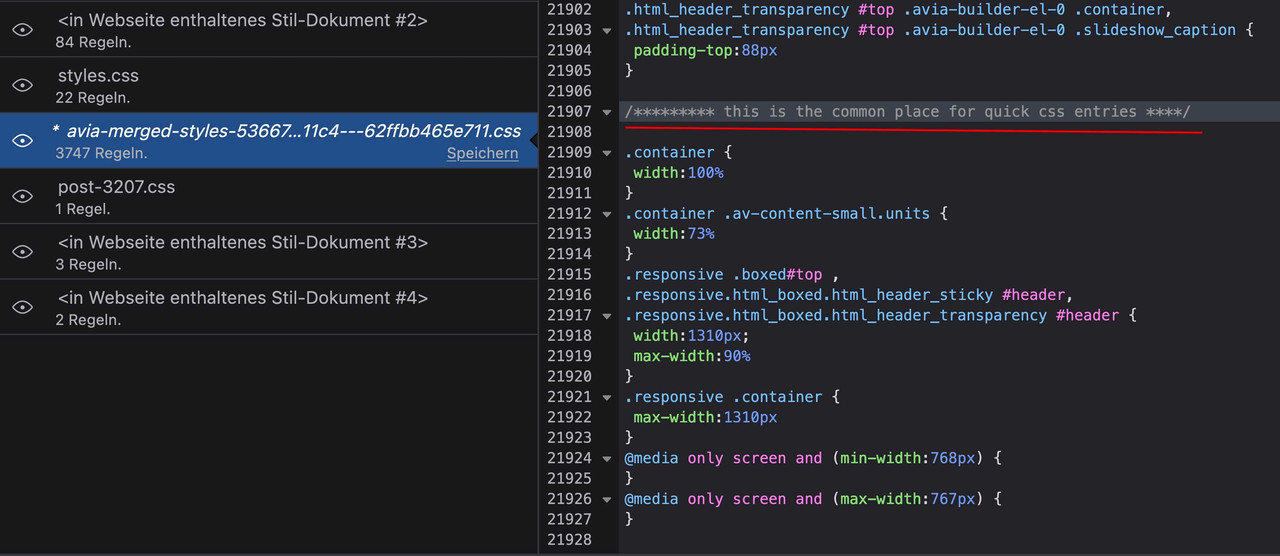
Have you regenerated the merged files – under performance : “Delete Old CSS And JS Files?”because on your css i can not see any quick css entry –
every font that has to be loaded reduces the performance of your page. Therefore I would leave the rendering of italic font styles to the browser.
Since most browsers now support woff and woff2, I would only put these in the zip files.by the way mike – how did you get the correct font-weight numbers to those uploaded files ( black : 900 etc. )
where do you generate the web font files ?
OK: transfonter.org is in this case better – it leaves the font-weight as it is.for masonry gallery you can do this in quick css.
But sometimes under the images – there are titles and the close button and the left and right arrows are styled for a dark background – so you had to find a possibility to differ between foreground ( lightbox image ) and background ( body beyond )try in quick css :
.mfp-zoom-in.mfp-ready.mfp-bg,
.mfp-zoom-in.mfp-ready .mfp-preloader {
  opacity: 0;
}

.mfp-wrap.mfp-gallery .mfp-img {
  box-shadow: 0px 0px 20px -5px #000;
  padding: 0 0 40px;
}

.mfp-wrap.mfp-gallery .mfp-figure {
  background-color: rgba(0,0,0,0.5) !important
}

.mfp-wrap.mfp-gallery .mfp-arrow:before {
  color: #333 !important
}

.mfp-wrap.mfp-gallery .mfp-bottom-bar {
  padding: 8px 20px  !important;
}

div.avia-popup .mfp-close {
  right: -5px;
  border: 2px solid #ddd;
  top: -45px;
  color: #000;
  background-color: #FFF;
  opacity: 1;
}

div.avia-popup .mfp-close:hover {
  border: 2px solid #000;
  opacity: 1;
}
and if you like to have the body content in grayscale when lightbox is opened:
#top.mfp-zoom-out-cur #wrap_all  {
  -webkit-filter: grayscale(1);
  filter: grayscale(1);
}
if you like to have a light background behind tiltes and image counter – you can change it on the mfp-figure – but then you had to change the font color for those entries.
but if you like to give this a chance – for child-theme functions.php:
( the dummy widgets are not influenced on that – due to snippet length ;) )function ava_re_register_widgets(){ unregister_sidebar('av_everywhere'); register_sidebar( array( 'name' => 'Displayed Everywhere', 'before_widget' => '<section id="%1$s" class="widget clearfix %2$s">', 'after_widget' => '<span class="seperator extralight-border"></span></section>', 'before_title' => '<h4 class="widgettitle">', 'after_title' => '</h4>', 'id' => 'av_everywhere' )); unregister_sidebar('av_blog'); register_sidebar( array( 'name' => 'Sidebar Blog', 'before_widget' => '<section id="%1$s" class="widget clearfix %2$s">', 'after_widget' => '<span class="seperator extralight-border"></span></section>', 'before_title' => '<h4 class="widgettitle">', 'after_title' => '</h4>', 'id' => 'av_blog' )); unregister_sidebar('av_pages'); register_sidebar( array( 'name' => 'Sidebar Pages', 'before_widget' => '<section id="%1$s" class="widget clearfix %2$s">', 'after_widget' => '<span class="seperator extralight-border"></span></section>', 'before_title' => '<h4 class="widgettitle">', 'after_title' => '</h4>', 'id' => 'av_pages' )); if( class_exists( 'WooCommerce' ) ){ unregister_sidebar('av_shop_overview'); register_sidebar( array( 'name' => 'Shop Overview Page', 'before_widget' => '<section id="%1$s" class="widget clearfix %2$s">', 'after_widget' => '<span class="seperator extralight-border"></span></section>', 'before_title' => '<h4 class="widgettitle">', 'after_title' => '</h4>', 'id' => 'av_shop_overview' )); unregister_sidebar('av_shop_single'); register_sidebar( array( 'name' => 'Single Product Pages', 'before_widget' => '<section id="%1$s" class="widget clearfix %2$s">', 'after_widget' => '<span class="seperator extralight-border"></span></section>', 'before_title' => '<h4 class="widgettitle">', 'after_title' => '</h4>', 'id' => 'av_shop_single' )); }; if( avia_get_option( 'archive_sidebar' ) == 'archive_sidebar_separate' ){ unregister_sidebar('av_archives'); register_sidebar( array( 'name' => 'Sidebar Archives', 'before_widget' => '<section id="%1$s" class="widget clearfix %2$s">', 'after_widget' => '<span class="seperator extralight-border"></span></section>', 'before_title' => '<h4 class="widgettitle">', 'after_title' => '</h4>', 'id' => 'av_archives' )); }; $footer_columns = avia_get_option( 'footer_columns', '5' ); for( $i = 1; $i <= $footer_columns; $i++ ){ unregister_sidebar('av_footer_' . $i ); register_sidebar( array( 'name' => 'Footer - Column ' . $i, 'before_widget' => '<section id="%1$s" class="widget clearfix %2$s">', 'after_widget' => '<span class="seperator extralight-border"></span></section>', 'before_title' => '<h4 class="widgettitle">', 'after_title' => '</h4>', 'id' => 'av_footer_' . $i )); } } add_action( 'widgets_init', 'ava_re_register_widgets', 11 );so with that you can decide what tag the widget areas will have on the widget-titles
PS : the if clauses with woocommerce and archiv_sidebar i have not testedi think that the call of the widget init in parent theme functions.php:
require_once( 'includes/admin/register-widget-area.php' );
can not be replaced by a child theme analog file.one easy way is to substitut them by jQuery in your child-theme functions.php.
Some fellow members here on board think that this has no influence on the SEO Analysis (that they will stay to read them as h3) of the site. However, many of the BOTs – including the Google Bot – are reading more and more of the content of a page after all the loading processes have been completed.function replace_tags_with_tags(){ ?> <script> (function($) { function replaceElementTag(targetSelector, newTagString) { $(targetSelector).each(function(){ var newElem = $(newTagString, {html: $(this).html()}); $.each(this.attributes, function() { newElem.attr(this.name, this.value); }); $(this).replaceWith(newElem); }); } replaceElementTag('h3.widgettitle', '<h4></h4>'); }(jQuery)); </script> <?php } add_action('wp_footer', 'replace_tags_with_tags');everywhere or only in the footer?
just put in the mainClass the enfold class: avia-popup
(mainClass: 'avia-popup mfp-fade',) and to better select that popup maybe we put in an additonal class f.e.: peoplefunction button_for_biography(){ ?> <script> window.addEventListener("DOMContentLoaded", function () { (function($) { $('#people').each(function(){ var that = this; $('.flex_column', this).each(function(i){ if($(this).find('.mfp-hide').length){ $(this).find('.avia-button').attr('href','#bio-'+(i+1)).addClass('no-scroll'); $(this).find('.avia_image').attr('href','#bio-'+(i+1)).addClass('no-scroll'); $(this).find('.mfp-hide').attr('id','bio-'+(i+1)).addClass('white-popup'); } }); }); $('#people .flex_column').find('.avia-button[href^="#bio-"]').magnificPopup({ type:'inline', midClick: true, removalDelay: 500, mainClass: 'avia-popup mfp-fade people', gallery: { enabled:true, }, }); $('#people .flex_column').find('.avia_image[href^="#bio-"]').magnificPopup({ type:'inline', midClick: true, removalDelay: 500, mainClass: 'avia-popup mfp-fade people', gallery: { enabled:true, }, }); })(jQuery); }); </script> <?php } add_action( 'wp_footer', 'button_for_biography');now we can influence that close button “X” only for that popup (people) by:
div.avia-popup.people .mfp-close { right: -5px; top: -45px; color: #fff; }example page : https://enfold.webers-webdesign.de/deborah/
if it is ok that the sticky element only is sticky inside its parent container then you do not need any plugin on this.
This direct parental element can be set to display: flex
then you can set the side bar to position: sticky:f.e.: ( for sidebar_left change it )
.responsive #top {
    overflow-x: visible;
}

#top #wrap_all {
    overflow: visible;
}

@media only screen and (min-width: 768px){
    #top .sidebar_right .container {
	  display: flex;
	}

    #top .sidebar {
	    position: -webkit-sticky !important;
	    position: sticky !important;
	    top: 80px;   /*** depends on your header-height after scrolling ***/
	}
}
see some examples – it is alway the same : parent to flex – sticky element direct child.
https://webers-testseite.de/sticky-sidebar/
https://webers-testseite.de/sticky-elements/and for better understanding: https://webers-testseite.de/layout-mimic/
you see there that even the grid-cells can be handled this way.August 18, 2022 at 11:35 am in reply to: Filter Change the first label for special masonry element #1362049can you try this:
add_filter("avf_masonry_sort_first_label", function($first_item_name) {
    if(is_page(2623)) {
        $first_item_name = "ABC";
    }
    if(is_page(array( 123, 38147 ))){
        $first_item_name = "DEF";
    }
    return $first_item_name;
}, 10, 1);
ID’s without quotation marks – page-names with
the first Bio is there twice : do not give a link to the image – it will be done by the code itself!
The button must have that # but the images you could leave as they are.Thanks Rikard – but as i said – on youtube and or vimeo etc. the loading had to be GDPR compliant. You had to opt in first – then starting the video.
this is hard to get with background-videos – even if they do not start automatically.Just a moment – i see that the gallery will show by this code each lightbox twice
so i had to thing about that a while … and because maybe not all images on the page got hidden bios – i inserted if clauses:function button_for_biography(){ ?> <script> window.addEventListener("DOMContentLoaded", function () { (function($) { $('#people').each(function(){ var that = this; $('.flex_column', this).each(function(i){ if($(this).find('.mfp-hide').length){ $(this).find('.avia-button').attr('href','#bio-'+(i+1)).addClass('no-scroll'); $(this).find('.avia_image').attr('href','#bio-'+(i+1)).addClass('no-scroll'); $(this).find('.mfp-hide').attr('id','bio-'+(i+1)).addClass('white-popup'); } }); }); $('#people .flex_column').find('.avia-button[href^="#bio-"]').magnificPopup({ type:'inline', midClick: true, removalDelay: 500, mainClass: 'mfp-fade', gallery: { enabled:true, }, }); $('#people .flex_column').find('.avia_image[href^="#bio-"]').magnificPopup({ type:'inline', midClick: true, removalDelay: 500, mainClass: 'mfp-fade', gallery: { enabled:true, }, }); })(jQuery); }); </script> <?php } add_action( 'wp_footer', 'button_for_biography');PS: i see on your developer page that on click the lightbox opens and the background scrolls a bit.
so i inserted on those links the class: no-scroll to hamper thatdon’t know why this makes the difference ;)
see all code and example page on : https://enfold.webers-webdesign.de/sky19er/
for that fading you have to insert that mainClass:
Edit: see next posting
( PS : you can try here like Mike did in the other topic with native eventListener DOMContentLoaded – but window on load will work too )
and in additon to quick css:
.mfp-fade.mfp-bg {
  opacity: 0;
  -webkit-transition: all 0.3s ease-out;
  transition: all 0.3s ease-out;
}
.mfp-fade.mfp-bg.mfp-ready {
  opacity: 0.8;
}
.mfp-fade.mfp-bg.mfp-removing {
  opacity: 0;
}
.mfp-fade.mfp-wrap .mfp-content {
  opacity: 0;
  -webkit-transition: all 0.3s ease-out;
  transition: all 0.3s ease-out;
}
.mfp-fade.mfp-wrap.mfp-ready .mfp-content {
  opacity: 1;
}
.mfp-fade.mfp-wrap.mfp-removing .mfp-content {
  opacity: 0;
}
and if you like to have between the items on gallery mode a fading – replace white-popup rule with :
.mfp-content .white-popup {
	position: relative;
	background: #FFF;
	padding: 40px;
	width: auto;
	max-width: 800px;
	margin: 50px auto;
	-webkit-animation: .3s fadeIn both;
	animation: .3s fadeIn both;
	-webkit-backface-visibility: hidden;
	backface-visibility: hidden;
}
You don’t have the need to insert links to the images – the code above will do – but to see that there is a link on the image:
#people .avia_image[href^="#"] {
	cursor: pointer;
}
#people .avia_image[href^="#"]:hover {
  box-shadow: 0 0 10px -3px #333;
  -webkit-transform: scale(1.05);
  transform: scale(1.05);
}
see again: https://enfold.webers-webdesign.de/sky19er/
-
This reply was modified 3 years, 7 months ago by
-
AuthorPosts
