Hi,
If you need the buttons and post meta info (date, comments) to align, you can either apply a minimum height to the post title and excerpt, or make sure they have the same number of characters, which is probably not ideal. To do the former, you can add the following css code:
#top .avia-content-slider .slide-entry-title {
    min-height: 118px;
}
In the end, the position of the “read more” button will depend on the length of the title and post excerpt.
Best regards,
Ismael
Hi,
If you want the left image to be taller or larger on smaller screen sizes, try adding another image element with a taller aspect ratio. The current image is a bit square and gets squeezed disproportionately in height compared to the right widget because it’s inside a smaller column (1/4 width). After adding the other image, you can toggle the visibility of both images on different screen sizes using Advanced > Responsive > Element Visibility options.
You can also add this css code to adjust the width of the column containing the image.
@media only screen and (max-width: 1024px) {

  /* Add your Mobile Styles here */
  #top .flex_column.av-acgfsc-cb6752318e4619c3295e6429d893dcfc {
    width: 50%;
    margin-left: 0;
  }
}
After adding the css:
View post on imgur.com
Best regards,
Ismael
How do I include a picture that is on my desktop into this support chat?
The client wish is to display roundabout 30 Kitchens, that are sold in a portal called https://www.kleinanzeigen.de. One solution to integrate this listing in the current website is to display a gallery of portfolios and there realize it with an iFrame. Another: solve it with a plugin or something similar.
1) How is it possible to integrate a responsive iFrame without issues – I didn´t succeed with the following code – it crashes the website complete?
2) And the other problem is that browsers doesn´t allow the display of iFrames. How to solve this?
3) Or is it possible to integrate directly the adverts via plugin/other solution?
IFRAME EXAMPLE
<div class="container"><iframe class="responsive-iframe" src="https://www.kleinanzeigen.de/s-anzeige/moderne-doppelhaushaelfte-mit-keller-in-ruhiger-lage-kueche-geschenkt-/3077951470-208-6482"></iframe></div>
CSS
/***** RESPONSIVE IFRAME *****/
.container {
  position: relative;
  overflow: hidden;
  width: 100%;
  padding-top: 56.25%; /* 16:9 Aspect Ratio (divide 9 by 16 = 0.5625) */
}

/* Then style the iframe to fit in the container div with full height and width */
.responsive-iframe {
  position: absolute;
  top: 0;
  left: 0;
  bottom: 0;
  right: 0;
  width: 100%;
  height: 100%;
}
After update Enfold, the Search Icon To Main Menu does not appear in a site with “Stretched Or Boxed Layout: Boxed Layout; Logo And Main Menu: Top Header”.
Please see Private Content
Best regards,
Oriano
Hi Ismael,
No plugin, As I said, EVERY shortcode is not rendered!
Setup a Admin-Account for you.
And there is a strange thing happening: I use a php-snippet with the Plugin code snippet. I run it on the site mentioned in the private area. There I activate a List with child-pages, which works fine – but only for some ours (or logout). Then the settings are overwirtten. If you set “Child Pages Top Level Shortdode” to “Enable at end of content”, it works. Some hours later the checkbox is empty and the snippet is ignored! Very strange.
I guess its a caching-issue (all cachings are disabled everywhere!), bacause there is another problem: when refreshing a page after editing something in snippets, it is not laoded. If I do a hard-reset of the site it works.
Hey smithyoung,
The update to 7.1.1 has to be done manually from the version you are running, please refer to my replies in this thread: https://kriesi.at/support/topic/enfold-4-5-theme-update-update-failed-download-failed-a-valid-url-was-not-pro/#post-1021541
You can either update manually via FTP: https://kriesi.at/documentation/enfold/how-to-install-enfold-theme/#theme-update, or upload the theme as if it was new under Appearance->Themes->Add New Theme.
If that doesn’t work then please try to delete the whole theme folder, then replace it with the new version. Make sure that you have backups of the site before starting updating.
Also please read this after you have updated: https://kriesi.at/documentation/enfold/theme-registration/
Best regards,
Rikard
Hey Jackie,
You can edit the excerpt in the Exerpt field. If you can’t see it, then select to show it under Screen Options in the top right hand corner of the screen while editing a post.
Best regards,
Rikard
you are talking about the news sites?
but if there are additonal columns below – what should happen?

have a look to one of your news pages or the blog page itself:
.responsive body#top.blog,
.responsive body#top.wp-singular {
  overflow-x: visible !important;
}

.responsive body#top.blog #wrap_all ,
#top.wp-singular #wrap_all{
  overflow: visible !important;
}

@media only screen and (min-width: 767px){
  .responsive body#top.blog .sidebar_right .container,
  #top.wp-singular .sidebar_right .container{
    display: flex;
  }

  .responsive body#top.blog .sidebar ,
  #top.wp-singular .sidebar{
    position: -webkit-sticky !important;
    position: sticky !important;
    top: 180px;
    align-self: flex-start;
    flex: 0 1 30%
  }
}
but that does not work with following sections under the sticky container.
Hi,
Thanks for that. Please try the following in Quick CSS under Enfold->General Styling:
@media only screen and (max-width: 767px) {
#top .fullsize .template-blog .post .entry-content-wrapper {
  text-align: left;
}
}
Best regards,
Rikard
Hi,
while trying different methods to implement shortcodes (as text, html block-type shortcode and content-elment “code”, in the main site , the footer or the widget) the shortcode is not rendererd and always occurs literally as shortcode.
So, for e.g. [pagelist] doesn’t show a list of all pager but “[pagelist]”.
Due to every shortcode I tried.
I found in an very old topic from 2013 that there was a problem in the functions.php, but this seems not to be the case here.
How to troubleshoot this problem?
A link of example in the private area.
Good morning, the page https://easyzanzibar.com/dove-alloggiare-a-zanzibar/ loads a large image even when opened on mobile. In your test, you show me that it should use a 218 Kb image in the desktop slide, while my optimized image is 141 kb. If it then always uses the large image on mobile, what kind of optimization is that?
The technical programmers who are trying to solve the problem of a very slow site and CPU that exceeds the limit have sent me reports stating: ‘Enfold is a heavy and outdated theme for a site like yours.’
If this is the case, I have to eliminate Enfold from all four of my websites and completely redo them.
Does it turn out that Enfold creates problems with slow loading and high CPU demand for sites like ours?
AI answers:
Regarding your question about Enfold:
Yes, it is a known issue that the Enfold theme can sometimes cause slow loading times and high CPU usage for some websites. This can be due to several factors:
Theme Features: Enfold is a feature-rich theme, and while this offers a lot of flexibility, it can also lead to more code and assets that need to be loaded, potentially slowing down the site. Some of these features, if not used, can still contribute to the load.
Image Handling: As you’ve noticed, how the theme handles images across different devices can impact performance. If the theme isn’t correctly serving optimized images for mobile, it can significantly slow down loading times on those devices.
I would like to understand from you if there is anything that can be done to avoid redoing everything
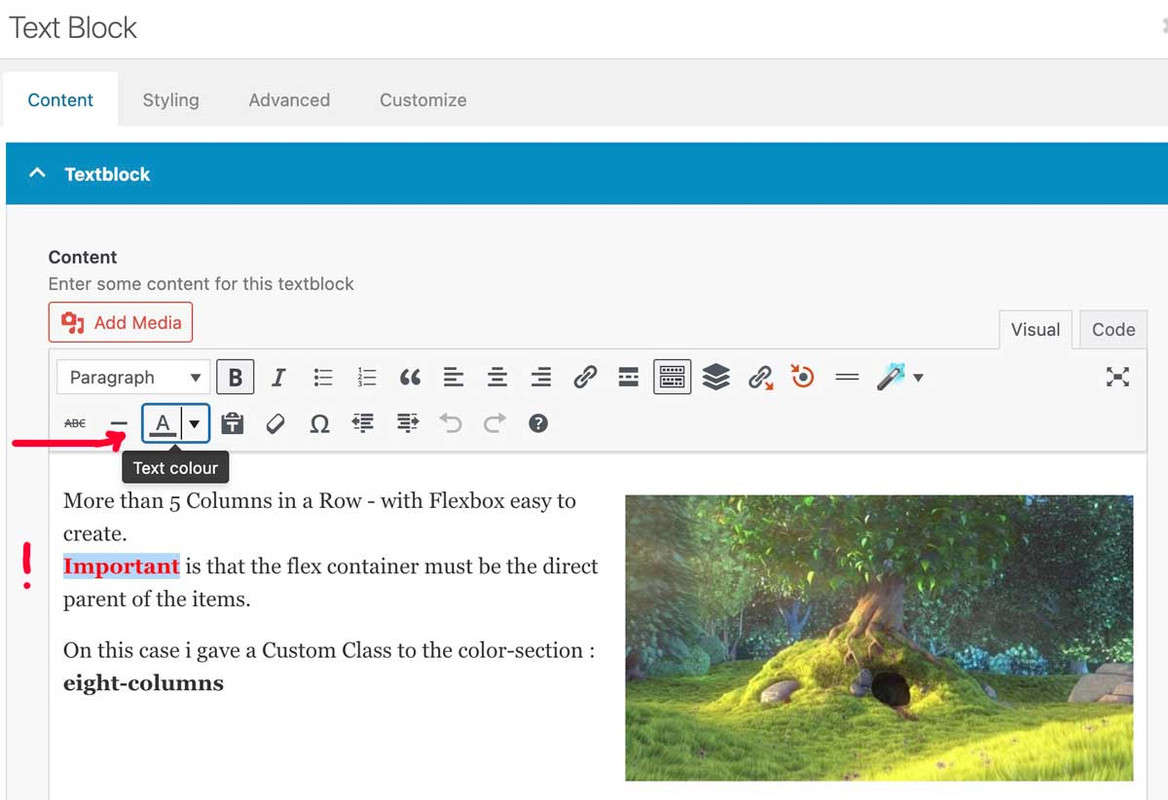
If you use more specific selectors, you can style “strong” differently.
if you want it only on some words in a textblock you had to use the way above from Rikard.
for example if you like to have a different color for them only on one page – use the page ID :
#top.page-id-12345 strong {
  color: black;
}
sometimes it might be necessary to have an !important on the value. (black !important;)
PS: if you are editing text-blocks the editor could do that for you
this will create an inline-style:
<span style="color: #ff0000;"><strong>Important</strong></span>
see here on very small screens: https://webers-web.info/datenschutz/
that sidebar menu on the left goes to a hamburger on top right on small screen width.
you see on the link above (https://jonsuh.com/hamburgers/) – and (on enfold main burger DOM ) what are the class names – i used them too – because then a predefined look is allready present.:
and the script to manage the burger is allready loaded
(page-id-3 – is my privacy page)
add_action('ava_after_main_menu', function() {
if ( is_page(3)){
echo '<nav class="datenschutz-menu" role="navigation">';
echo '<div class="container av-menu-mobile-active">';
echo '<a href="#" class="mobile_menu_toggle no-scroll" aria-hidden="true" data-av_icon="" data-av_iconfont="entypo-fontello"><span class="av-current-placeholder">Datenschutz</span>';
echo '<span class="subnav-hamburger subnav-hamburger--spin-r"><span class="subnav-hamburger-box"><span class="subnav-hamburger-inner"></span></span></span>';
echo '</a>';
echo do_shortcode('[menu name="datenschutz"]');
echo '</div>';
echo '</nav>';
}
});
on that line: echo do_shortcode('[menu name="datenschutz"]'); you see the usage of that menu shortcode
now i got that extra subnav-hamburger (this name is set by me – it only reminds me that this is subnavigation on privacy page )
now i have to have the same behaviour on that second burger menu:
function subnav_hamburger_first(){
if(is_page(array( 3))){
?>
<script>
(function($){
    var $subham = $(".mobile_menu_toggle");
    $subham.on("click", function(a) {
		$subham.find(".subnav-hamburger").toggleClass("is-active");
		$subham.next(".menu-datenschutz-container").find('#menu-datenschutz').toggleClass("av-open-submenu");
    });
	$('#menu-datenschutz li').on("click", function(b) {
		$(this).addClass('selected').siblings().removeClass('selected');
		$(this).parents('#menu-datenschutz').toggleClass('av-open-submenu');
		$(this).parents('.av-menu-mobile-active').find('.subnav-hamburger').toggleClass('is-active');
	});
})(jQuery);
</script>
<?php
}}
add_action('wp_footer', 'subnav_hamburger_first');
This is not a trivial request, which is why there are several paid plugins available. To grasp the complexity of a multilevel burger menu, take a look at the avia-snippet-hamburger-menu.js code.
Hi,
The other sorting items are displayed because some portfolio items belong to multiple categories. For example, the item Harrisonburg Innovation Hub is assigned to “Commercial and Retail”, which is a selected category, but it also belongs to three additional categories, Anthony Barone’s Projects, Ben Reid’s Projects, and Kevin Gabel’s Projects.
Please note that all categories associated with the items will display as sorting options. The “Which Entries Should Be Used” option only controls which items are shown in the masonry element, but it does not control or limit the sorting/filter categories.
If you need to hide the other categories and only display the selected ones, try adding this css code:
#top .av-sort-by-term a, #top .av-sort-by-term .text-sep {
    display: none;
}

#top .av-sort-by-term .commercial-retail_sort_button, #top .av-sort-by-term .education_sort_button, #top .av-sort-by-term .healthcare_sort_button, #top .av-sort-by-term .industrial_sort_button, #top .av-sort-by-term .municipal-civic_sort_button, #top .av-sort-by-term .religious_sort_button {
    display: inline-block;
}
Best regards,
Ismael
Hey Alan,
Thank you for the inquiry.
There is no option for this in the Color section by default, but you can add a custom class name (e.g., av-section-border-radius) to the element under Advanced > Developer Settings > Custom CSS Class field, then add the following css to apply the border radius.
#top #wrap_all .av-section-border-radius {
    border-bottom-right-radius: 100px;
    border-bottom-left-radius: 100px;
}
Another option is the Layout > SVG Divider settings.
View post on imgur.com
Best regards,
Ismael
Hi,
We are trying to load a backup version of one of our sites into a dev environment. When we loaded it, we received the same error as this thread discusses: https://kriesi.at/support/topic/magister10/
To try and fix it, we updated Enfold via FTP, but there are still some issues. I’ve added the dev URL in the private section along with FTP login details.
Any help would be great.
Thanks
i did it this way with the edited child-theme files
(just erased the && ! isMobile ):
function wp_change_sticky_header_script() {
  wp_deregister_script( 'avia-sticky-header' );

  $vn = avia_get_theme_version();
  $options = avia_get_option();
  $child_theme_url = get_stylesheet_directory_uri();

  $min_js = avia_minify_extension( 'js' );
  //  $min_css = avia_minify_extension( 'css' );  for that js - file not needed to mention here

  $condition  = ( isset( $options['header_position'] ) && $options['header_position'] == 'header_top' );
  $condition2 = ( isset( $options['header_sticky'] ) && $options['header_sticky'] == 'header_sticky' ) && $condition;
  avia_enqueue_script_conditionally( $condition2 , 'avia-sticky-header-child', "{$child_theme_url}/js/avia-snippet-sticky-header{$min_js}.js", array('avia-default'), $vn, true);
}
add_action( 'wp_enqueue_scripts', 'wp_change_sticky_header_script', 100 );
but allways to do this on all pages where i like to have a shrinking header on mobile devices too – and to generate allways the minified file from the actual avia-snippet-sticky-header.js file – is a lot of work.
A filter set by you would be a great time saver here
using something like this :
add_filter('avf_shrinking_header_on_mobile', '__return_true');
😉 I am of course aware that a filter has no place in a script file. But maybe there is a trick that could regulate it differently.
Hi,
You have to remove the width property from this css code to keep the logo from being distorted:
.logo, .logo a {
    overflow: visible;
    height: 100px;
    background-color: #075195;
    border-bottom-right-radius: .3125rem;
    border-bottom-left-radius: .3125rem;
    width: 12.5rem;
}
And to replace the dashes with bullets, add this css code:
.html_av-overlay-side-classic #top .av-burger-overlay li li .avia-bullet {
    height: 3px;
    opacity: 1;
    border: none!important;
    width: 3px;
    border-radius: 100%;
}
Best regards,
Ismael
👉 I would like to adjust the position of the logo as in website’s logo below
https://globalhealth.duke.edu/
👉 Replace the “-” in the mobile submenu with a “.”
Hey Mike,
We have some good progress. I changed the text padding-left from pixel to percentage. Now no matter how I change the shape of the page the text keeps the creative indentation I want. Thank you for showing me that. I also added some line breaks to the end of my text to allow the background image more room to show.
Still struggling with the background image. Your test page looked like this..
/Users/j-birdteching/Desktop/Contact-test-desktop.jpg
This is what I am hoping to achieve.
/Users/j-birdteching/Desktop/Jkos-contact.jpg
I know some people like a more vertical window and some like a more horizontal window so, fit, distort, stretch, fill, whatever you call it, I would like to always see the entire background image. The image is abstract enough to be able to handle considerable distortion.
/Users/j-birdteching/Desktop/contact-vert.jpg
/Users/j-birdteching/Desktop/contact-horizontal.jpg
The next challenge is getting this page to look good on a phone. Is having a separate contact page just for phones something we should be considering?
Doing the left margin by percentage did work for the phone but, I think having 50-60% margin padding on a phone is unrealistic.
The font would have to be a micro font. lol
/Users/j-birdteching/Desktop/contact-phone-2.jpg
The test page you made looks like this on my phone. I could live without the text having the creative indentation and just being uniformly left, right or center justified but, the page didn’t scroll down to see the rest of the text.
/Users/j-birdteching/Desktop/test-contact-phone.jpg
We’ll see what the background image looks like on the phone after we make adjustments to the desktop.
Thank you,
Jason
Hey rixi,
I notice that on mobile not all of the dates show, only every other one, so to correct try adding this code to the end of your child theme functions.php file in Appearance ▸ Editor, if you are not using a child theme you could use the WP Code plugin then add a new snippet, in the top right corner use the PHP snippet as the code type:

and ensure that it is activated, then add the bellow code and save.
function custom_timeline_script_for_mobile() { ?>
  <script>
document.addEventListener('DOMContentLoaded', () => {
  // Check if there are any .av-milestone-even elements
  const milestones = document.querySelectorAll('.av-milestone-even');
  if (milestones.length === 0) return; // Exit if no milestones found

  // Define the media query for screens smaller than 989px
  const mediaQuery = window.matchMedia('(max-width: 989px)');

  // Function to reorder elements
  const reorderMilestones = () => {
    if (mediaQuery.matches) {
      milestones.forEach(milestone => {
        const date = milestone.querySelector('.av-milestone-date');
        const icon = milestone.querySelector('.av-milestone-icon-wrap');
        const content = milestone.querySelector('.av-milestone-content-wrap');

        // Ensure all elements exist before reordering
        if (date && icon && content) {
          milestone.innerHTML = '';
          milestone.appendChild(date);
          milestone.appendChild(icon);
          milestone.appendChild(content);
        }
      });
    }
  };

  reorderMilestones();
    mediaQuery.addEventListener('change', reorderMilestones);
});
</script>
  <?php
}
add_action( 'wp_footer', 'custom_timeline_script_for_mobile', 99 );
Then I notice that one of your content boxes has too much padding for the list:

Try this CSS in your Enfold Theme Options ▸ General Styling ▸ Quick CSS field:
@media only screen and (max-width: 989px) {
    .av-no-preview ul.avia-timeline-vertical .av-milestone-content li {
        padding: 0;
    }
}

Changing the content padding and font size of the title and content may also help:
@media only screen and (max-width: 989px) {
    .avia-timeline-boxshadow .av-milestone-contentbox {
    padding: 1em;
    }
    #top #wrap_all .all_colors h4.av-milestone-title {
    font-size: 20px;
    }
    .av-milestone-content p,
    .av-milestone-content li {
    font-size: 12px;
    line-height: 18px;
    }
}

Try this and adjust to suit.
Best regards,
Mike
Hey jkos,
When you set the background image to Scale to fit it scales image, so the whole image is always visible, this includes the height. Which is why the image does not reach the sides.
At Stretch to fit it stretches the image width to cover the page, less the 50px padding that the page has by default.
The height of your column is not set so the content is determining the height, but you have little content so the whole background image is not shown. If you set the column height to 150% then it will show.
But I recommend trying the color section instead because the background image will then be full width. I created a test page linked below to demonstrate.
Since the color section wants to vertically center the content, I added this css to the bottom of the page so your content will be higher:
.responsive #top #wrap_all .avia-section.av-minimum-height-99vw .container {
    display: flex;
    justify-content: center;
    margin-top: 15%;
    max-width: fit-content;
}
The reason your text is off the screen for mobile is because your text has 800px padding, which is larger than a mobile screen:

to correct this you could change it to a percentage, or for this I created a css grid for two columns to achieve the layout without padding, and on mobile the grid is stacked. See the test page below.
For others, this is the HTML for the two columns:
<div class="parent">
<div class="div1"> first column text </div>
<div class="div2"> second column text </div>
</div>
and this is the css:
@media screen and (max-width: 789px) {
  .parent{
      grid-template-columns: 1fr;
      grid-template-rows: 1fr;
   }
}
@media screen and (min-width: 790px) {
.parent {
display: grid;
grid-template-columns: repeat(2, 1fr);
grid-template-rows: 1fr;
grid-column-gap: 0px;
grid-row-gap: 0px;
}

.div1 { grid-area: 1 / 1 / 2 / 2; }
.div2 { grid-area: 1 / 2 / 2 / 3; }
}
Best regards,
Mike
Hey syberknight-tb,
Unfortunately, we don’t have an element that will achieve this for you in the theme, while there are many plugins that may work for you, when I check some of them they don’t quite match, but if you spend more time testing each one you may find one.
I was able to create something that may work for you using javascript and HTML in a shortcode, on mobile it shows 1 1/2 team member cards with prev & next arrows and loop when you click to the end:

on tablet it shows 2 1/2 cards:

and on desktop it shows 3 1/2 cards:

As is it holds 8 cards, you can add more or have less, you will need to edit the HTML to add your images and text, hopefully you will be able to do this:

Try adding this code to the end of your child theme functions.php file in Appearance ▸ Editor, If you are not using a child theme you could use the WP Code plugin then add a new snippet, in the top right corner use the PHP snippet as the code type:
and ensure that it is activated, then add the code below and save.
function team_carousel_shortcode() {
    ob_start(); ?>

    <div class="carousel-container">
        <button id="prevBtn">←</button>
        <div class="carousel">
            <div class="carousel-track">
                <!-- START: Team Members -->
        <div class="card"> <img src="/people-2-2-300x300.jpg" alt="Member 1"><p>Member 1<br>A short bio for the team member</p></div>
        <div class="card"> <img src="/people-2-2-300x300.jpg" alt="Member 2"><p>Member 2<br>A short bio for the team member</p></div>
        <div class="card"> <img src="/people-2-2-300x300.jpg" alt="Member 3"><p>Member 3<br>A short bio for the team member</p></div>
        <div class="card"> <img src="/people-2-2-300x300.jpg" alt="Member 4"><p>Member 4<br>A short bio for the team member</p></div>
        <div class="card"> <img src="/people-2-2-300x300.jpg" alt="Member 5"><p>Member 5<br>A short bio for the team member</p></div>
        <div class="card"> <img src="/people-2-2-300x300.jpg" alt="Member 6"><p>Member 6<br>A short bio for the team member</p></div>
        <div class="card"> <img src="/people-2-2-300x300.jpg" alt="Member 7"><p>Member 7<br>A short bio for the team member</p></div>
        <div class="card"> <img src="/people-2-2-300x300.jpg" alt="Member 8"><p>Member 8<br>A short bio for the team member</p></div>
        <!-- END: Team Members -->
            </div>
        </div>
        <button id="nextBtn">→</button>
    </div>

    <style>
    .carousel-container {
        position: relative;
        width: 80%;
        overflow: visible;
        margin: auto;
    }

    .carousel {
        overflow: hidden;
        width: 100%;
    }

    .carousel-track {
        display: flex;
        transition: transform 0.5s ease-in-out;
    }

    .card {
        box-sizing: border-box;
        padding: 10px;
        background: #e8e8e8;
        margin: 5px;
        border-radius: 8px;
        text-align: center;
        box-shadow: 0 4px 10px rgba(0,0,0,0.1);
    }

    @media only screen and (max-width: 767px) {
        .card { flex: 0 0 62%; }
    }

    @media only screen and (min-width: 768px) and (max-width: 1800px) {
        .card { flex: 0 0 38%; }
    }

    @media only screen and (min-width: 1801px) {
        .card { flex: 0 0 28%; }
    }

    .card p {
        color: #000;
     }
	.card img {
        width: 100%;
        height: auto;
        object-fit: cover;
        border-radius: 100%;
    }

    #nextBtn, #prevBtn {
        position: absolute;
        top: 50%;
        transform: translateY(-50%);
        color: #000;
        border: 2px solid #000;
        padding: 10px;
        cursor: pointer;
        z-index: 10;
    }

    #prevBtn { left: -50px; }
    #nextBtn { right: -50px; }
    </style>

    <script>
    document.addEventListener('DOMContentLoaded', function () {
        const track = document.querySelector('.carousel-track');
        const cards = document.querySelectorAll('.card');
        const prevBtn = document.getElementById('prevBtn');
        const nextBtn = document.getElementById('nextBtn');

        let currentIndex = 0;
        let cardWidth = cards[0].offsetWidth + 20;

        function updateCarousel() {
            const shift = currentIndex * cardWidth;
            track.style.transform = translateX(-${shift}px);
        }

        function moveToNext() {
            currentIndex++;
            if (currentIndex >= cards.length) {
                currentIndex = 0;
            }
            updateCarousel();
        }

        function moveToPrev() {
            currentIndex--;
            if (currentIndex < 0) {
                currentIndex = cards.length - 1;
            }
            updateCarousel();
        }

        nextBtn.addEventListener('click', moveToNext);
        prevBtn.addEventListener('click', moveToPrev);

        window.addEventListener('resize', () => {
            cardWidth = cards[0].offsetWidth + 20;
            updateCarousel();
        });
    });
    </script>

    <?php
    return do_shortcode(ob_get_clean());
}
add_shortcode('team_carousel', 'team_carousel_shortcode');
Then add this shortcode in a code block element on your page: [team_carousel]
Feel free to adjust the colors in the css in the code.
Best regards,
Mike
This reply has been marked as private.
Bear with me, I am new to using background images. Having several issues.
I am using a background image in the 1/1 element on my Contact page. The image matches the horizontal px of my site. I would love for the background image to go all the way to the edge of the page on theft and right – to stretch horizontally as needed to match page.
The left & right padding for desktop is set to 0px.
The background image is set: Stretch to fit.
When I expand my page to the right the background image does not ‘stretch’ to fit, it zooms in to fit. Resulting in the top and bottom of the image to be cut off. I would rather the image distort horizontally to fit.
In addition, the text box on this page seems to be in a fixed position. I would love for it to stay proportional to the background image, if possible.
Lastly, this page on my phone is not even close. lol
Help, please! :)
Hi,
Go to each setting then enable it and choose “select page” so none will be selected. See this post.
Best regards,
Mike
 Ventsislav Krastev
Guest
Hi,
to my #post-1484859 , please look at this:
BR
Venty
Hi,
Thanks for the update. I’ve imported the top level pages for you, please let us know if you should need anything else. Note that images are not included, but I’m guessing that you will replace them with your own anyway? If not, then you can download them from the demo pages by right clicking on the image and select to save them on your local machine.
Best regards,
Rikard



