
-
Search Results
-
Hello again,
My previous thread was closed so I will be creating this new one.
The recent update has just been release (september 18th 2013) and I still don’t get the update in wp-admin using Enfold Child Theme.
I have double checked my Themeforest username and also my API – They are both correct.
How come I do not see the update?
Hi I have added a larger logo to the header and changed style.css in the child theme by adding this code:
/*default header: main logo and main menu height. increase max value if you want to use a bigger logo*/
#header_main .container, .main_menu ul:first-child > li a{ height:150px; line-height: 88px; }
.fixed_header #main{ padding-top:150px; } /* padding of the main container should be equal height as the header height above*/This works fine in most browsers but the logo does not resize in IE8 when you scrawl down. The menu resizes as it should but the logo stays the same size which makes it being cut off.
How can I fix this issue because more then half of the current site visitors are using IE8.
Thank you,
Wordpress Installation:
Enfold version: 2.1
WooCommerce Version: 2.0.14
Wordpress Version: 3.6Hello,
I am having trouble customizing the front page of my WooCommerce installation on my Enfold site. This is the page I am working with: http://198.252.65.103/shop/. Effectively, what I am trying to do is use the Avia Layout Builder to insert some content at the top of the page (as displayed) and then have the WooCommerce layered navigation append below that.
For some reason, the formatting is getting all screwy only when I use a Layout Element within the Avia builder (so 1/1, 2/2, 1/3, etc). If I just place a couple text blocks, the navigation works fine. However, as you can see we want to put some imagery beside our blocks so we need to figure out what we’re doing wrong or if it can be fixed.
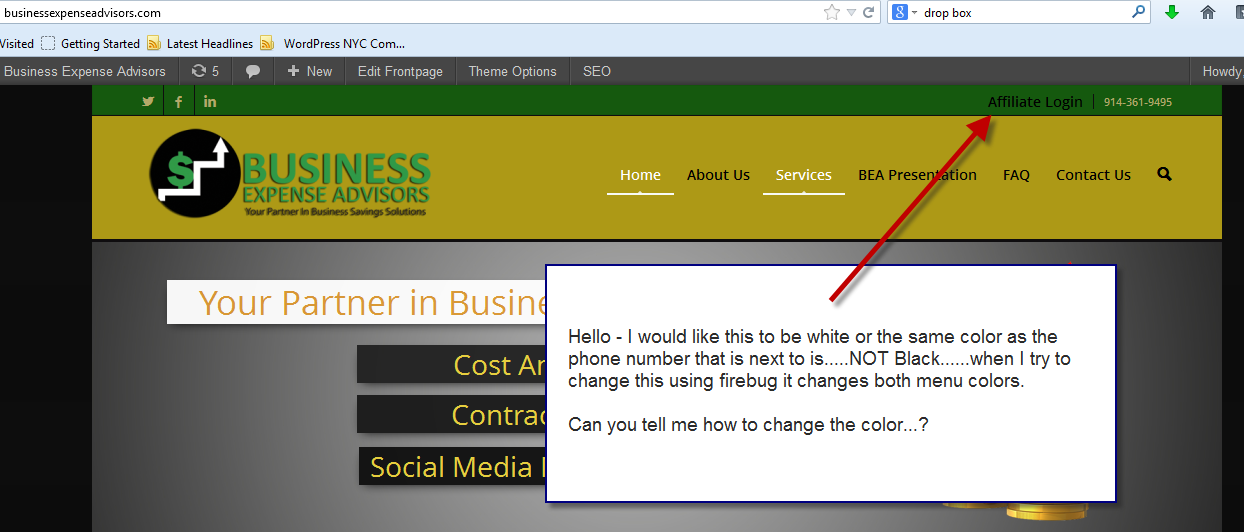
Topic: Top menu font color
Hello – I would like the color for the Affiliate Login (top menu) to be white or the same color as the telephone number (on the same line) . When I try to change the color in firebug it changes both menus.
Can you tell me how to change this color…..see screen shot.
http://businessexpenseadvisors.com/
Topic: Addthis Hide from homepage
Hello,
I have added an addthis vertical bar as per the instructions here:
https://kriesi.at/support/topic/placing-addthis-social-icons-into-the-header/
I am using the new addthis smart layer option with the following code:
<!– AddThis Smart Layers BEGIN –>
<!– Go to http://www.addthis.com/get/smart-layers to customize –>
<script type=”text/javascript” src=”//s7.addthis.com/js/300/addthis_widget.js#accoutcode”></script>
<script type=”text/javascript”>
addthis.layers({
‘theme’ : ‘light’,
‘share’ : {
‘position’ : ‘left’,
‘numPreferredServices’ : 4
}
});
</script>
<!– AddThis Smart Layers END –>However, it really doesn’t look great on the slider on the homepage so do you know of anyway to hide it from the homepage? I have searched the net but can’t find anything that would help.,
Thanks
Andrew
Hi,
Where is the function “advanced search” in this Forum?
Now if I have to search for a term, such as “header” the results of ALL the themes, but I try Enfold results related to the topic.Topic: Border On bread-crumb wrap
I added a border on the title (breadcrumbs) wrap with this CSS
/*border missing at base of title container:*/
.title_container {
border-bottom-style: solid;
border-bottom-width: 1px;
}I needed to add it as I used the layer slider with a white background image and the top of the slider didn’t show a border.
http://chriswardphotography.net/consumer/services/studio-photography/
I now have a problem that on other pages it has two borders:
http://chriswardphotography.net/about-me/awards/
Example:
http://www.chriswardphotography.com/test-area/examples/example11.jpg
Any ideas of a work around?
Topic: Layout Header
hello,
at first: thanks for solving my first problem (shortcode for slider was broken by
markdown-plugin).now there is an other issue…
on http://reboot.netztaucher.com i use the ubermeneu für navigation on top.
the colored navigation fills not the complete width of the header. is there a
simple way to fix this?

bis dann, marco.
Hi there,
I am sorry to bother you, but i am having an issue with custom CSS to disable breadcumbs, disable post meta-data, and fixing the header height in Enfold-Child.
I am running the site with WPML; and i have added the following code to the custom CSS field in the Styling panel of Enfold:#header_main .container, .main_menu ul:first-child > li > a {
height: 120px !important;
line-height: 120px !important;
}
html.fixed_header #main {
padding-top: 120px;
}
.breadcrumb {
display: none !important;
}
.post-meta-infos {
display: none !important;
}The code takes effect in the ENGLISH part of the site; but not in the SPANISH part. I have also added the same code to the Spanish Styling field; but it does not work. It is another way to make this so it works in both languages?
Even when putting the code in the spanish part, the main manu have a strange behaviour; take a look at the english and spanish page:
This one is OK (english) http://fpminvestment.com/?page_id=89
This one act strange (spanish) http://fpminvestment.com/?page_id=92&lang=esThanks in advance! :)
Topic: logo size – ipad
sorry to bring this one back up but i didnt think to check till last night,
https://kriesi.at/support/topic/logo-size-4/
Is there anything to add to the custom coding so the logo changes on a mobile/ipad device as it goes over the home button, i guess due to keeping a fixed size??
Viewing 30 results - 139,561 through 139,590 (of 142,920 total)


