
-
AuthorSearch Results
-
April 26, 2024 at 12:19 pm #1440948
In reply to: adjustments to the before/after image
Hey fkm,
Thanks for the screenshots and link to your site, try this CSS in your Enfold Theme Options ▸ General Styling ▸ Quick CSS field:#top .avia-image-diff-container { margin: 0; width: 100vw !important; position: relative !important; left: calc(-50vw + 50%) !important; }Please ensure to copy the code from the forum and not an email notification so the symbols are not converted.
After applying the css, please clear your browser cache and check.Best regards,
MikeApril 26, 2024 at 12:05 pm #1440944Hi,
Thank you for your patience, please try disabling Enfold Theme Options ▸ Performance ▸ JS & CSS file merging and compression and disable any other caching plugins and enable Enfold Theme Options ▸ Performance ▸ Delete old CSS and JS files
Then clear your device cache, please note that iPhones can be hard to clear the cache, often you need to also clear the history to fully purge the cache, following these steps for Safari and note Step 4 where you will Clear the History.
If this doesn’t help please try adding this code to the end of your theme functions.php file in Appearance ▸ Editor:function custom_avf_post_css_create_file( $create ) { return false; } add_filter( 'avf_post_css_create_file', 'custom_avf_post_css_create_file', 10, 1 );and clear your cache again.
If this doesn’t correct please include admin login in the Private Content area so we can investigate.
Also when you say that “Desktop environments” work fine, is that Mac or Windows, or both?Best regards,
MikeApril 26, 2024 at 10:05 am #1440930In reply to: Hide search icon
Hi,
Thank you for the update.
You can add this css code to hide the search icon on desktop view:
@media only screen and (min-width: 768px) {

  /* Add your Desktop Styles here */
  .responsive #top .av-main-nav .menu-item-avia-special {
    display: none;
  }
}
Make sure that the Enfold > Main Menu > Menu Items For Mobile settings is set to the first option.
Best regards,
IsmaelApril 26, 2024 at 9:52 am #1440928Hi,
thanks for the quick reply, I just can’t find the right section to translate in the language files…
We could also try the previous solution – the code your team provided last time still works (see below), it just does not adress the right H1 any more, so perhaps we just have to change this: #top.post-type-archive-tribe_events h1.main-title.entry-title
Just a guess…Thanks and best regards
function custom_script(){
  ?>
  <script>
(function($){
  $(document).ready(function(){
  $("#top.post-type-archive-tribe_events h1.main-title.entry-title").text("Kalender mit Ereignissen");
  });
})(jQuery);
</script>
<?php
}
add_action('wp_footer', 'custom_script');
April 26, 2024 at 8:43 am #1440919In reply to: Theme Updates
Hey Mark,
If you don’t have access to the account which was used to purchase your theme license, then please make sure that you do. If you can’t get access, then you can purchase a new license here: https://themeforest.net/item/enfold-responsive-multipurpose-theme/4519990
After you have access to the theme files, then the update to 5.7 has to be done manually from the version you are running, please refer to my replies in this thread: https://kriesi.at/support/topic/enfold-4-5-theme-update-update-failed-download-failed-a-valid-url-was-not-pro/#post-1021541
You can either update manually via FTP: https://kriesi.at/documentation/enfold/how-to-install-enfold-theme/#theme-update, or upload the theme as if it was new under Appearance->Themes->Add New Theme.
If that doesn’t work then please try to delete the whole theme folder, then replace it with the new version. Make sure that you have backups of the site before starting updating.
Also please read this after you have updated: https://kriesi.at/documentation/enfold/theme-registration/Best regards,
RikardApril 26, 2024 at 8:37 am #1440917Topic: Footer background image blurry on iOS devices
in forum Enfoldwebmonnik
ParticipantHallo,
I’m experiencing an issue with the background image in the footer of a webpage that appears fine on desktop and Android devices but is blurry and appears to be repeating on iPhones. The CSS for the background image is set to background-size: cover; which stretches the image nicely across devices except on iPhones where it does not render properly.
Any advice on how to ensure the background image remains sharp and does not repeat on all types of devices, especially iPhones, would be greatly appreciated.
Thank you!
Best regards, Rogier
April 26, 2024 at 5:58 am #1440909Hey!
Although this score may not appear favorable and the audits report some issues, the site still loads quickly on both mobile devices and desktop view based on our checks. I’m not implying that these issues should be ignored or left as they are, but rather that the site continues to function and load at a reasonable speed. The issue with the LCP should not significantly affect the user experience.
Best regards,
IsmaelApril 26, 2024 at 4:09 am #1440893In reply to: erledigt – Tablet Menü im Querformat nicht sichtbar
Hi,
Thank you for the info.
We’re unable to reproduce the issue using tablet emulation. The mobile menu only displays when the screen width is less than 768px and when the header has shifted to the top. Before testing the page, please make sure to purge the cache and clear your browser history.
Best regards,
IsmaelApril 26, 2024 at 4:05 am #1440892In reply to: Nach Oben-Pfeil
Hey hallo352,
Thank you for the inquiry.
The back-to-top button is disabled on mobile devices by default but you can display it back by adding this css code.
@media only screen and (max-width: 767px) {

  /* Add your Mobile Styles here */
  .responsive #scroll-top-link {
    display: block;
  }
}
This button is no longer necessary on mobile phones, as most mobile browsers have a feature where you can return to the top by double-tapping the top edge of the phone screen.
Best regards,
IsmaelApril 25, 2024 at 11:15 pm #1440880Sorry, guys…have been having computer problems! This is WONDEFUL! I put it in immediately to test it out. Perfection.
Thanks so much…was pulling hair out…now, it is safe!I think I have also gotten the background color of the hamburger when slideout is NOT slid… I put in bold purple just to see if that would be proper.
/*** Actual hamburger before slide out?*/
#top #wrap_all .av-burger-menu-main .av-hamburger {
background-color: purple!important;
}It’s a thrill to see it finally work properly. And, thanks, also for the “to get rid of those borders left/right” — it looked peculiar, but was concentrating on the other css. Appreciate you including that…looks MUCH better now.
You can close this thread. Hope it helps others as much as it helped me!
Weekend’s coming…hope you guys have a great one!
April 25, 2024 at 8:21 pm #1440875Hey Lorena,
You can purchase the theme here: https://themeforest.net/item/enfold-responsive-multipurpose-theme/4519990
After you have access to the theme files, then the update to 5.7 has to be done manually from the version you are running, please refer to my replies in this thread: https://kriesi.at/support/topic/enfold-4-5-theme-update-update-failed-download-failed-a-valid-url-was-not-pro/#post-1021541
You can either update manually via FTP: https://kriesi.at/documentation/enfold/how-to-install-enfold-theme/#theme-update, or upload the theme as if it was new under Appearance->Themes->Add New Theme.
If that doesn’t work then please try to delete the whole theme folder, then replace it with the new version. Make sure that you have backups of the site before starting updating.
Also please read this after you have updated: https://kriesi.at/documentation/enfold/theme-registration/Best regards,
RikardApril 25, 2024 at 7:27 pm #1440867In reply to: Remove featured image expand in posts
yes you are right – the snippet turns the sequence to first image then titel.
Besides the css of setting only the pointer-events to none.:#top .template-single-blog main .big-preview.single-big a { pointer-events: none !important; }there must be a hampering method to avoid generation of that link
April 25, 2024 at 6:02 pm #1440860In reply to: PHP update 7.4 to 8.1 failled
Hi
thanks. I’m not able to copy the page and so on. This is why I use Enfold, not having to deal with this knowledge. As the site must be connected to the host (hostpoint.ch) it has to happen on the real site.
Thank you beeing so kind to find the problem.
Maybe it would be better to switch to some one with german language skills? As I wrote: switching form php 7.4 to 8.1 is not working only for this site: http://www.jmbuettner.ch (log in see above). All others work fine: http://www.hammerstrasse.ch / http://www.familienfoto.ch / http://www.constitutio.info and so on (all of these Enfold theme.
For background info: see the treat I had for the same site a view weeks ago: https://kriesi.at/support/topic/blog-eintrage-lange-unlimitiert-einsatz-von-php-einstellungen/#post-1439384
regards
DominicApril 25, 2024 at 5:36 pm #1440858In reply to: Remove featured image expand in posts
For me the post title appears at the top, the image and then the text content.
Like this: https://kriesi.at/themes/enfold-gym/2014/08/24/a-nice-entry/
April 25, 2024 at 5:22 pm #1440854In reply to: Sidebar not responding
Hi,
Thanks for the update. Please let us know if you should need any further help on the topic, or if we can close it.
Best regards,
RikardApril 25, 2024 at 5:16 pm #1440851Hey Lorena,
First of all you need access to a Themeforest account which has bought the theme license, after that then the update to 5.7 has to be done manually from the version you are running, please refer to my replies in this thread: https://kriesi.at/support/topic/enfold-4-5-theme-update-update-failed-download-failed-a-valid-url-was-not-pro/#post-1021541
You can either update manually via FTP: https://kriesi.at/documentation/enfold/how-to-install-enfold-theme/#theme-update, or upload the theme as if it was new under Appearance->Themes->Add New Theme.
If that doesn’t work then please try to delete the whole theme folder, then replace it with the new version. Make sure that you have backups of the site before starting updating.
Also please read this after you have updated: https://kriesi.at/documentation/enfold/theme-registration/Enfold is compatible with the latest versions of WordPress, PHP and MySQL.
Best regards,
RikardApril 25, 2024 at 3:36 pm #1440840In reply to: Line height in LayerSlider 7 text
try:
( but if you like to be more selective this code is too global for the layersliders)#top .avia-layerslider .ls-wrapper .ls-layer { line-height: 1em; }layersliders do have on common a counting ID – like : #layer_slider_1 – you can use that to specify the slider etc.
Next hint: you do not need to make that in quick css.
On layerslider there is a css input field for the corresponding element. Select the layer – go to style and make your settings:
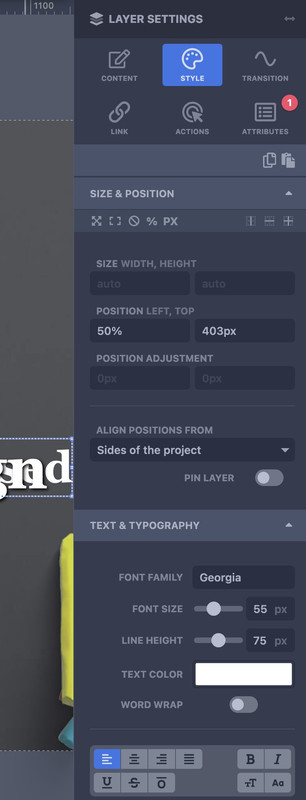 April 25, 2024 at 3:01 pm #1440830
In reply to: Tab Module | calculation of the height is incorrect
Hi,
Thanks for the update. Please let us know if you should need any further help on the topic, or if we can close it.
Best regards,
RikardApril 25, 2024 at 2:57 pm #1440828In reply to: Anchor links on other pages
Hi,
Thanks for the update. Please let us know if you should need any further help on the topic, or if we can close it.
Best regards,
RikardApril 25, 2024 at 1:16 pm #1440823Topic: Icon Circle: Item visible without hovering
in forum Enfoldnorthorie
ParticipantHi,
I would like one item of the circle to be visible without hovering, f.e. item 1 on top. I want to see the title and text immediately.
Can you help?
Link on private content.Best regards!
April 25, 2024 at 1:13 pm #1440822Topic: Icon Circle: Huge and lazy on Desktop
in forum EnfoldParticipantHi,
on desktop the icon circle is huge and lazy. It takes a lot of time til it appears.
How can I get it smaller and quicker?
On mobile it is totally fine.Link on private content.
Best regards!
April 25, 2024 at 1:08 pm #1440820In reply to: Button position on sliders
Thank you! Topic can be closed
April 25, 2024 at 12:52 pm #1440818Hi,
Could you please try replying to the thread ( https://kriesi.at/support/topic/content-collaboration-can-you-feature-our-woocommerce-plugin-in-your-article/ ) once again? You can do that by following the link from your inbox. You can reply here as well.
Unfortunately, it’s not possible to register to our support forums without a valid Enfold Purchase Code.
Best regards,
YigitApril 25, 2024 at 12:30 pm #1440814In reply to: Social media icons on mobile menu
Hi,
Without FTP access, and you are not using a child theme you could use the WP Code plugin then add a new snippet, in the top right corner use the PHP snippet as the code type:

then add the code from the solution and it should work.
If you can not add the plugin, and you don’t have FTP access or a child theme, then unfortunately you will not be able to make this customization.Best regards,
MikeApril 25, 2024 at 12:08 pm #1440805Hi Dharchini,
Is your WooCommerce Products Add-On plugin compatible with Enfold? If it is, we can include it in the Recommended Plugins list ( https://kriesi.at/support/topic/recommended-plugins/ ). Your WooCommerce Bookings And Appointments plugin is already included in this list.
Please let us know if you’d like to test Enfold with your plugin.
Best regards,
YigitApril 25, 2024 at 11:56 am #1440800In reply to: Remove featured image expand in posts
what kind of image you like to show – a non cropped – but smaller image?
you can set a max-width now for that full image.
it all depends on what you have set for blog layout and what to show on “Single Post Style” !
without seeing your page it is hard to give better advice
f.e.:#top.postid-45175 .template-single-blog main .wp-post-image { position:relative; max-width:calc(100% - 250px); left:125px; min-width:unset !important; margin-bottom:50px }April 25, 2024 at 10:57 am #1440793In reply to: Move the symbol/icon at the tab titles
Hi Rikard,
thank you very much for your quick reply.
That one is the solution – it worked just fine.Please feel free to close this topic as successfully completed.
Best regards,
fkmApril 25, 2024 at 10:05 am #1440783In reply to: PHP update 7.4 to 8.1 failled
Hi Ismael
thanks for fast reply: No, I did not. See screenshot on private content.
Does it have to do with the fact that I use Enfold Child? As my provider will stop PHP 7.4 in the near future; i would be sure to build this website on a good basis :-)
Any other suggestiions?
regards
DominicApril 25, 2024 at 9:25 am #1440771In reply to: Tab Module | calculation of the height is incorrect
Hi Ismael,
when set to automatic height some of the content is cut of. You can see that when switching between the tabs. The Images are missing or some of text most of the time.
That is the problem that needs to be fixed.
Changing the Vertical alignment to Top doesn’t seem to fix that.Best regards,
GerryApril 25, 2024 at 9:19 am #1440769In reply to: Move the symbol/icon at the tab titles
-
AuthorSearch Results
Viewing 30 results - 5,161 through 5,190 (of 142,866 total)
-
Search Results
-
Hallo,
I’m experiencing an issue with the background image in the footer of a webpage that appears fine on desktop and Android devices but is blurry and appears to be repeating on iPhones. The CSS for the background image is set to background-size: cover; which stretches the image nicely across devices except on iPhones where it does not render properly.
Any advice on how to ensure the background image remains sharp and does not repeat on all types of devices, especially iPhones, would be greatly appreciated.
Thank you!
Best regards, Rogier
Hi,
I would like one item of the circle to be visible without hovering, f.e. item 1 on top. I want to see the title and text immediately.
Can you help?
Link on private content.Best regards!


