Hey Mariarita,
Thank you for the inquiry.
1.) To create a megamenu, please go to the Appearance > Menus panel, add a new link, then toggle the “Use as a Mega Menu” option. Please check the link below for more info.
// https://kriesi.at/documentation/enfold/mega-menu/#how-to-use-the-mega-menu
2.) In order to lower the logo, add this css code:
.logo img, .logo svg {
    top: 20px;
}
3.) And to remove the description from the menu, please edit the menu item in the Appearance > Menus panel, then look for the description field.
If you have any additional questions at this time we kindly ask that you open them up in a separate thread. The longer threads get in the forum, they become more difficult to support as they tend to drift off topic and they also make it troublesome for users trying to search for solutions. Keeping threads relevant to their original inquiry ensures that we can keep better track of what has been resolved and that users can more effectively find answers to similar issues they might be experiencing.
Thanks!
Best regards,
Ismael
Hi,
Try adding this css to your Quick CSS field:
@media only screen and (max-width: 767px) {
.responsive #top .logo.avia-standard-logo {
	display: flex;
  justify-content: center;
  width: 100%;
}
}
Best regards,
Mike
Hi,
I added your horizontal gallery to your archive pages with this function.php file:
add_action('ava_after_main_container', 'ava_after_main_title_mod');
function ava_after_main_title_mod() {
	if ( is_archive() ) {
		echo do_shortcode("[av_horizontal_gallery ids='3297,3299,3315,3298,3318,3308,3316,3303,3317' ids_dynamic='' initial='' img_copyright='' height='20' size='large' gap='no' active='' control_layout='av-control-hidden' slider_navigation='av-navigate-arrows av-navigate-dots' nav_visibility_desktop='' nav_arrow_color='' nav_arrow_bg_color='' nav_dots_color='' nav_dot_active_color='' lightbox_arrow_color='' lightbox_arrow_bg_color='' img_copyright_font='' av-desktop-font-img_copyright_font='' av-medium-font-img_copyright_font='' av-small-font-img_copyright_font='' av-mini-font-img_copyright_font='' img_copyright_color='' img_copyright_bg='' transition_speed='' autoplay='true' interval='3' manual_stopper='aviaTBmanual_stopper' links='active' link_dest='' lightbox_text='' img_scrset='' lazy_loading='disabled' alb_description='' id='' custom_class='' template_class='' av_uid='av-a6srr' sc_version='1.0'][/av_horizontal_gallery]");
	}
}
please check.
Best regards,
Mike
Hi,
Thanks for the update. If you have questions which are not related to the original topic, then please open a new thread.
We’ll close this thread for now since your original question seems to have been resolved.
Best regards,
Rikard
Hello Mike,
the result for this page is OK https://www.federscacchilazio.com/notizie/ in fact the horizontal gallery is shown at the top of the page.
However, selecting categories or month-year the situation is different as you can see in the following pages:
https://www.federscacchilazio.com/category/formazione/arbitri/
https://www.federscacchilazio.com/2024/07/
Is it possible to insert the same horizontal gallery at the top of the page also for this type of pages??
Thank you very much
and by colour is meant the background colour of the header – as Mike already suspected?
you can look what selectors the background-color of the header is for. and change it via that page-id of your single page.
#top.page-id-46970 .header_color .header_bg {
  background-color: green
}

#top.page-id-46970 .header_color .container_wrap_meta {
  background-color: green
}
____________________________
or you can change f.e. the variable that is set by enfold options ( like mike above shows )
these colors are for header:
–enfold-header-color-bg
–enfold-header-color-bg2
where bg is header background-color – and bg2 is header_meta background-color
you can change these settings via filter for one single page only by:
( because the page / post ID goes to the html as class: html_entry_id_12345 we can use that as selector )
function my_avf_dynamic_css_after_vars($output = ''){
  $output .= "\n";
  /*** Override a defined var for a specific page id*/
  $output .= "html.html_entry_id_46970  {\n";
  $output .=    "--enfold-header-color-bg: #aaa;\n";
  $output .=    "--enfold-header-color-bg2: #aaa;\n";
  $output .= "}\n";
  return $output;
}
add_filter( 'avf_dynamic_css_after_vars', 'my_avf_dynamic_css_after_vars', 10, 1 );
replace the color #aaa to your wanted values.
Once the code snippet has been successfully entered, the page/browser caching must be refreshed.
you find the page-id-xyz or postid-xyz on the body tag. You had to adjust the codes above to your id and wanted colors.
I managed to put the separator on top of the slider and I thank you! However, I can’t animate them… Can you help me?
Hey mat,
The update to 6.0.2 has to be done manually from the version you are running, please refer to my replies in this thread: https://kriesi.at/support/topic/enfold-4-5-theme-update-update-failed-download-failed-a-valid-url-was-not-pro/#post-1021541
You can either update manually via FTP: https://kriesi.at/documentation/enfold/how-to-install-enfold-theme/#theme-update, or upload the theme as if it was new under Appearance->Themes->Add New Theme.
If that doesn’t work then please try to delete the whole theme folder, then replace it with the new version. Make sure that you have backups of the site before starting updating.
Also please read this after you have updated: https://kriesi.at/documentation/enfold/theme-registration/
Best regards,
Rikard
PS : did you switch in this moment to hamburger from the beginning – a few minutes ago – there was the normal desktop navigation seen.?
PPS: i see now the reason – you have a switch rule for 2000px – my recommendation is to only have hamburger for your navigation:
Enfold Options – Main Menu – Menu Items For Desktop : “Display as Icon”
and remove then the rules concerning to that switch point.
After doing this we will see if the problem is solved so far. because your rules do set all menu items to display none – even the #menu-item-search
Hi,
Thanks for the update. Please let us know if you should need any further help on the topic, or if we can close it.
Best regards,
Rikard
Auf meiner Seite wird auf dem Desktop im Frontend Content nicht ausgespielt, obwohl dieser im Backend vorhanden ist. Und in der mobile Ansicht ist der Content teilweise vorhanden, allerdings überlappt dieser mit anderem Content.
Es handelt sich um den Bereich “Content Generierung” auf der Startseite (home). Dieser wird nicht ausgepsielt.
Wer kann mir sagen woran das liegt?
——————- english version ——————-
On my site, content is not displayed on the desktop in the frontend, although it is available in the backend. And in the mobile view, the content is partially available, but it overlaps with other content.
This is the “Content generation” area on the start page (home). This is not being played out.
Who can tell me why this is happening?
-
This topic was modified 1 year, 7 months ago by
 Flyingeye78.
Hello,
I just purchased the Enfold theme because of the high reviews, but I’m starting to doubt my skills. I have a few customization requests for my website that I’m hoping you can assist with:
– Display Category/Archive Pages with a Specific Blog Layout:
I would like the category and archive pages to feature a blog layout with two columns. Each post should display a fixed boxed featured image and the title ONLY for the desktop view. Additionally, I need this layout to be responsive and adjustable for various screen sizes. For the mobile/tablet view, it can be just the normal one column + featured image + title (no excerpts and other metadata).
– Post Slider Element Adjustment
I am using the Post Slider element in the Advanced Editor for my About page. I need this element to display images in a square aspect ratio, rather than taking the size of the featured image.
– Fix LayerSlider7 Embeds
On the homepage, the LayerSlider7 embeds appear to have unwanted padding when viewed on tablets. Can this padding be removed or adjusted?
– Google Ads Overlap Issue
My Google Ads banners are overlapping with my paragraphs. I need assistance in fixing this so the ads are properly aligned and do not interfere with the content.
– Responsive Design for Enfold Theme Elements
I would like all elements of the Enfold theme on my current website to be fully responsive and adjust smoothly to different screen sizes. It looks like every time I do additional CSS code, it only looks good on one device (usually the home page).
Thank you for your assistance!
Hi,
When I check your homepage there is no content, so I checked the page linked below, and I see for mobile the header shows and when I scroll the header scrolls away.
As I read your posts above I believe that you want a transparent mobile header and hide the burger menu.
For this, please add this css to your Quick CSS field:
@media only screen and (max-width: 767px) {
  .responsive #top #main {margin-top: -80px!important;}
  #top #wrap_all .av_header_transparency {background-color: transparent!important;}
  div#header_main > .container {display: block !important;}
  #avia-menu-0 { display: none;}
  }
After you apply the CSS please clear your browser cache and reload the page to check.
Best regards,
Mike
Hi,
I’m not seeing a green color, please remove all other css from this thread above and add this css instead:
#top div div .av-dark-form .button {
    background: #000;
    color: #D4AF37;
    border-radius: 10px;
    border: none;
}

#top div div .av-dark-form .button:hover {
    background: #D4AF37;
    color: #000;
}
Please ensure to copy the code from the forum and not an email notification so the symbols are not converted.
After you apply the CSS please clear your browser cache and reload the page to check.
Best regards,
Mike
Hi,
Thanks for your feedback, when I check in your burger menu the search icon has a dark color so it is hard to see, try this css in your Quick CSS field:
.html_av-overlay-side.av-burger-overlay-active #top #wrap_all #header .menu-item-search-dropdown a {
    color: #fff;
}
This should make it white, feel free to adjust to suit.
After you apply the CSS please clear your browser cache and reload the page to check.
Best regards,
Mike
Think I may have gotten too complex (for me!) and I can’t seem to “find” the flyout icon. I have one on desktop view…but not in hamburger.
To test, I HAD turned off my child theme and just put on the wonderful Enfold…and voila! The search icon appeared in the flyout.
But it disappears now when I have child theme in place.
Could you take a look and see where I have taken a wrong turn? I tried to make mobile the always menu…
Thanks!
Oh yes, the site url! https://calvarybaptistdunnellon.com
Hey stefv8,
If you activate debug mode under Enfold->Layout Builder->Show advanced options, then you can add this shortcode in the box which will appear under the regular layout window on a new page, so that you can see what settings the element has:
[av_layout_row border='' min_height='0' color='main_color' mobile='av-flex-cells' id='collections' av_uid='av-6pr6fk']
[av_cell_one_fourth vertical_align='top' padding='0px' padding_sync='true' background_color='' src='' attachment='' attachment_size='' background_attachment='scroll' background_position='top left' background_repeat='no-repeat' av_uid='av-6hwbk8']

[av_image src='https://kriesi.at/themes/enfold-shop/files/2015/03/winter-girl-small-495x400.jpg' attachment='551' attachment_size='portfolio' copyright='' caption='yes' styling='no-styling' align='center' font_size='' overlay_opacity='0.7' overlay_color='#6786a1' overlay_text_color='#ffffff' animation='no-animation' hover='av-hover-grow av-hide-overflow' appearance='' link='product,66' target='' title_attr='' alt_attr='' lazy_loading='disabled' id='' custom_class='' template_class='' av_element_hidden_in_editor='0' av_uid='av-6dsjcg' sc_version='1.0' admin_preview_bg='']
NEW
WINTER COLLECTION
[/av_image]

[/av_cell_one_fourth][av_cell_one_fourth vertical_align='top' padding='0px' padding_sync='true' background_color='' src='' attachment='' attachment_size='' background_attachment='scroll' background_position='top left' background_repeat='no-repeat' av_uid='av-6686k8']

[av_image src='https://kriesi.at/themes/enfold-shop/files/2015/03/couple-sitting-495x400.jpg' attachment='546' attachment_size='portfolio' copyright='' caption='yes' styling='no-styling' align='center' font_size='' overlay_opacity='0.7' overlay_color='#6786a1' overlay_text_color='#ffffff' animation='no-animation' hover='av-hover-grow av-hide-overflow' appearance='' link='product_cat,15' target='' title_attr='' alt_attr='' lazy_loading='disabled' id='' custom_class='' template_class='' av_element_hidden_in_editor='0' av_uid='av-61m3e8' sc_version='1.0' admin_preview_bg='']
LATEST
STREET CLOTHES
[/av_image]

[/av_cell_one_fourth][av_cell_one_fourth vertical_align='top' padding='0px' padding_sync='true' background_color='' src='' attachment='' attachment_size='' background_attachment='scroll' background_position='top left' background_repeat='no-repeat' av_uid='av-5wd80g']

[av_image src='https://kriesi.at/themes/enfold-shop/files/2015/03/girls-shopping-desat-495x400.jpg' attachment='549' attachment_size='portfolio' copyright='' caption='yes' styling='no-styling' align='center' font_size='' overlay_opacity='0.7' overlay_color='#6786a1' overlay_text_color='#ffffff' animation='no-animation' hover='av-hover-grow av-hide-overflow' appearance='' link='product_cat,12' target='' title_attr='' alt_attr='' lazy_loading='disabled' id='' custom_class='' template_class='' av_element_hidden_in_editor='0' av_uid='av-5oekkg' sc_version='1.0' admin_preview_bg='']
FRESH
SPORTSWEAR
[/av_image]

[/av_cell_one_fourth][av_cell_one_fourth vertical_align='top' padding='0px' padding_sync='true' background_color='' src='' attachment='' attachment_size='' background_attachment='scroll' background_position='top left' background_repeat='no-repeat' av_uid='av-jvrd4']

[av_image src='https://kriesi.at/themes/enfold-shop/files/2015/03/hipster-girls-working-495x400.jpg' attachment='554' attachment_size='portfolio' copyright='' caption='yes' styling='no-styling' align='center' font_size='' overlay_opacity='0.7' overlay_color='#6786a1' overlay_text_color='#ffffff' animation='no-animation' hover='av-hover-grow av-hide-overflow' appearance='' link='product_cat,10' target='' title_attr='' alt_attr='' lazy_loading='disabled' id='' custom_class='' template_class='' av_element_hidden_in_editor='0' av_uid='av-5cjrlk' sc_version='1.0' admin_preview_bg='']
FUNKY
ACCECCOIRS
[/av_image]

[/av_cell_one_fourth]
[/av_layout_row]
Best regards,
Rikard
Hey Michael F,
Please try the following in Quick CSS under Enfold->General Styling:
#top #wrap_all .av-burger-overlay .av-burger-overlay-scroll #av-burger-menu-ul li a {
  color: #000;
}
Best regards,
Rikard
Hey leloux,
Please try the following in Quick CSS under Enfold->General Styling:
.js_active .top_tab .tab {
  font-size: 18px;
}
Best regards,
Rikard
Hi,
Thanks for that. Please try the following in Quick CSS under Enfold->General Styling:
#top #wrap_all .av-main-nav ul > li > a {
  font-weight: 600 !important;
}

#top #header.av_minimal_header .main_menu ul:first-child > li > ul {
  background-color: rgba(0, 0, 0, 0.5) !important;
}
Best regards,
Rikard
A few days about my site started doing weird things. I’ve lost the ability to use the Avia Layout builder on any new post but existing ones work find, every time I make a change to a block or other elements the page scrolls back to the top and I have to scroll back to where I just was, It’s duplicating blocks and the content within them on my site, and comments turned on by themselves on at least one post, it also made the post referenced super skinny instead of full width when all I did was attempt to add new content to the page, and blocks/elements have been removed from pages.
My theme is the Enfold Child. My theme, WP, and widgets are all up to date.
Can someone help?
-
This topic was modified 1 year, 7 months ago by
 ScatmanAT.
Hi,
Thanks for that. Did you try to activate the layout builder at the top right of the screen while editing your pages?
Best regards,
Rikard
inspected in search to why the theme is not putting the layer slider on top in my site: https://novo.strokmatic.com/
comparing to https://header-test.strokmatic.com/
and can’t find a rule that cause the space from the top.
i don’t know where to fix that problem and no support here seems to care
Hi,
Please provide a screen resolution size for your sample devices so I can try to match on my desktop Dev Tools and examine closer.
Best regards,
Mike
Hi,
Try adding this CSS in your Enfold Theme Options ▸ General Styling ▸ Quick CSS field:
@media only screen and (max-width: 767px) {
#top #header #av-burger-menu-ul .sub-menu .avia_mega_text_block a {
    text-decoration: none;
    font-size: 13px;
    font-weight: 400;
}
}
Best regards,
Mike
Hi Mike,
now on the desktop it looks perfect, anyhow on the mobile version it’s not perfect yet.

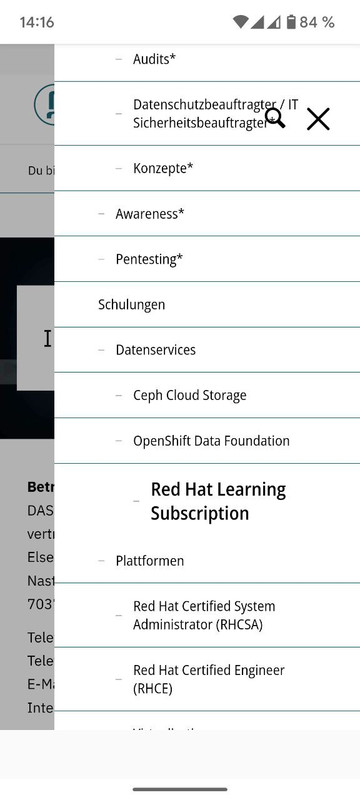
Thanks again for your support
Kind regards
Uli
Hi Rikard,
No further help required. Thank you. You may close this topic.
Kind regards
Mark
Hi,
Thanks for the update. Please let us know if you should need any further help on the topic, or if we can close it.
Best regards,
Rikard
Hi,
Thanks for the update. Please let us know if you should need any further help on the topic, or if we can close it.
Best regards,
Rikard
Hi,
Thanks for the update. Please let us know if you should need any further help on the topic, or if we can close it.
Best regards,
Rikard



