-
Search Results
-
Topic: Immagini non più visibili
Buongiorno, da mesi non riesco a fare theme up-grade perchè non visualizza più le immagini in homepage.
Ora ho aggiornato ancora ma niente.
Versione PHP: 7.4.27
GrazieTopic: Site not displaying properly
Our site yesterday started displaying improperly. I thought it was an issue regarding not being up to date, so we purchased a new license since the developer never gave it to us. the site doesn’t display properly.
The error log gives this –[19-Jan-2022 20:15:22 UTC] PHP Deprecated: Unparenthesized
a ? b : c ? d : eis deprecated. Use either(a ? b : c) ? d : eora ? b : (c ? d : e)in /home/furn456/public_html/furniture-pros.com/wp-content/themes/enfold/functions-enfold.php on line 194
[19-Jan-2022 20:15:22 UTC] PHP Deprecated: Unparenthesizeda ? b : c ? d : eis deprecated. Use either(a ? b : c) ? d : eora ? b : (c ? d : e)in /home/furn456/public_html/furniture-pros.com/wp-content/themes/enfold/functions-enfold.php on line 194
[19-Jan-2022 20:15:22 UTC] PHP Deprecated: Unparenthesizeda ? b : c ? d : eis deprecated. Use either(a ? b : c) ? d : eora ? b : (c ? d : e)in /home/furn456/public_html/furniture-pros.com/wp-content/themes/enfold/functions-enfold.php on line 194
[19-Jan-2022 20:15:27 UTC] PHP Warning: session_start(): Cannot start session when headers already sent in /home/furn456/public_html/furniture-pros.com/wp-content/themes/enfold/config-templatebuilder/avia-shortcodes/masonry_entries.php on line 32
[19-Jan-2022 20:15:27 UTC] PHP Warning: session_start(): Cannot start session when headers already sent in /home/furn456/public_html/furniture-pros.com/wp-content/themes/enfold/config-templatebuilder/avia-shortcodes/masonry_entries.php on line 32
[19-Jan-2022 20:15:27 UTC] PHP Warning: session_start(): Cannot start session when headers already sent in /home/furn456/public_html/furniture-pros.com/wp-content/themes/enfold/config-templatebuilder/avia-shortcodes/portfolio.php on line 27
[19-Jan-2022 20:15:27 UTC] PHP Warning: session_start(): Cannot start session when headers already sent in /home/furn456/public_html/furniture-pros.com/wp-content/themes/enfold/config-templatebuilder/avia-shortcodes/portfolio.php on line 27
[19-Jan-2022 20:15:27 UTC] PHP Warning: session_start(): Cannot start session when headers already sent in /home/furn456/public_html/furniture-pros.com/wp-content/themes/enfold/config-templatebuilder/avia-shortcodes/masonry_entries.php on line 32
[19-Jan-2022 20:15:27 UTC] PHP Warning: session_start(): Cannot start session when headers already sent in /home/furn456/public_html/furniture-pros.com/wp-content/themes/enfold/config-templatebuilder/avia-shortcodes/portfolio.php on line 27
[19-Jan-2022 20:15:31 UTC] PHP Deprecated: Unparenthesizeda ? b : c ? d : eis deprecated. Use either(a ? b : c) ? d : eora ? b : (c ? d : e)in /home/furn456/public_html/furniture-pros.com/wp-content/themes/enfold/functions-enfold.php on line 194
[19-Jan-2022 20:15:31 UTC] PHP Warning: session_start(): Cannot start session when headers already sent in /home/furn456/public_html/furniture-pros.com/wp-content/themes/enfold/config-templatebuilder/avia-shortcodes/masonry_entries.php on line 32
[19-Jan-2022 20:15:31 UTC] PHP Warning: session_start(): Cannot start session when headers already sent in /home/furn456/public_html/furniture-pros.com/wp-content/themes/enfold/config-templatebuilder/avia-shortcodes/portfolio.php on line 27
[19-Jan-2022 20:15:33 UTC] PHP Deprecated: Unparenthesizeda ? b : c ? d : eis deprecated. Use either(a ? b : c) ? d : eora ? b : (c ? d : e)in /home/furn456/public_html/furniture-pros.com/wp-content/themes/enfold/functions-enfold.php on line 194
[19-Jan-2022 20:15:33 UTC] PHP Warning: session_start(): Cannot start session when headers already sent in /home/furn456/public_html/furniture-pros.com/wp-content/themes/enfold/config-templatebuilder/avia-shortcodes/masonry_entries.php on line 32
[19-Jan-2022 20:15:33 UTC] PHP Warning: session_start(): Cannot start session when headers already sent in /home/furn456/public_html/furniture-pros.com/wp-content/themes/enfold/config-templatebuilder/avia-shortcodes/portfolio.php on line 27
[19-Jan-2022 20:15:34 UTC] PHP Deprecated: Unparenthesizeda ? b : c ? d : eis deprecated. Use either(a ? b : c) ? d : eora ? b : (c ? d : e)in /home/furn456/public_html/furniture-pros.com/wp-content/themes/enfold/functions-enfold.php on line 194
[19-Jan-2022 20:15:34 UTC] PHP Warning: session_start(): Cannot start session when headers already sent in /home/furn456/public_html/furniture-pros.com/wp-content/themes/enfold/config-templatebuilder/avia-shortcodes/masonry_entries.php on line 32
[19-Jan-2022 20:15:34 UTC] PHP Warning: session_start(): Cannot start session when headers already sent in /home/furn456/public_html/furniture-pros.com/wp-content/themes/enfold/config-templatebuilder/avia-shortcodes/portfolio.php on line 27
[19-Jan-2022 20:16:36 UTC] PHP Deprecated: Unparenthesizeda ? b : c ? d : eis deprecated. Use either(a ? b : c) ? d : eora ? b : (c ? d : e)in /home/furn456/public_html/furniture-pros.com/wp-content/themes/enfold/functions-enfold.php on line 194
[19-Jan-2022 20:16:36 UTC] PHP Warning: session_start(): Cannot start session when headers already sent in /home/furn456/public_html/furniture-pros.com/wp-content/themes/enfold/config-templatebuilder/avia-shortcodes/masonry_entries.php on line 32
[19-Jan-2022 20:16:36 UTC] PHP Warning: session_start(): Cannot start session when headers already sent in /home/furn456/public_html/furniture-pros.com/wp-content/themes/enfold/config-templatebuilder/avia-shortcodes/portfolio.php on line 27
[19-Jan-2022 20:58:28 UTC] PHP Deprecated: Unparenthesizeda ? b : c ? d : eis deprecated. Use either(a ? b : c) ? d : eora ? b : (c ? d : e)in /home/furn456/public_html/furniture-pros.com/wp-content/themes/enfold/functions-enfold.php on line 194
[19-Jan-2022 20:58:28 UTC] PHP Warning: session_start(): Cannot start session when headers already sent in /home/furn456/public_html/furniture-pros.com/wp-content/themes/enfold/config-templatebuilder/avia-shortcodes/masonry_entries.php on line 32
[19-Jan-2022 20:58:28 UTC] PHP Warning: session_start(): Cannot start session when headers already sent in /home/furn456/public_html/furniture-pros.com/wp-content/themes/enfold/config-templatebuilder/avia-shortcodes/portfolio.php on line 27
[19-Jan-2022 20:58:33 UTC] PHP Deprecated: Unparenthesizeda ? b : c ? d : eis deprecated. Use either(a ? b : c) ? d : eora ? b : (c ? d : e)in /home/furn456/public_html/furniture-pros.com/wp-content/themes/enfold/functions-enfold.php on line 194
[19-Jan-2022 20:58:33 UTC] PHP Warning: session_start(): Cannot start session when headers already sent in /home/furn456/public_html/furniture-pros.com/wp-content/themes/enfold/config-templatebuilder/avia-shortcodes/masonry_entries.php on line 32
[19-Jan-2022 20:58:33 UTC] PHP Warning: session_start(): Cannot start session when headers already sent in /home/furn456/public_html/furniture-pros.com/wp-content/themes/enfold/config-templatebuilder/avia-shortcodes/portfolio.php on line 27
[19-Jan-2022 20:59:58 UTC] PHP Deprecated: Unparenthesizeda ? b : c ? d : eis deprecated. Use either(a ? b : c) ? d : eora ? b : (c ? d : e)in /home/furn456/public_html/furniture-pros.com/wp-content/themes/enfold/functions-enfold.php on line 194
[19-Jan-2022 20:59:58 UTC] PHP Warning: session_start(): Cannot start session when headers already sent in /home/furn456/public_html/furniture-pros.com/wp-content/themes/enfold/config-templatebuilder/avia-shortcodes/masonry_entries.php on line 32
[19-Jan-2022 20:59:58 UTC] PHP Warning: session_start(): Cannot start session when headers already sent in /home/furn456/public_html/furniture-pros.com/wp-content/themes/enfold/config-templatebuilder/avia-shortcodes/portfolio.php on line 27
[19-Jan-2022 20:59:59 UTC] PHP Deprecated: Unparenthesizeda ? b : c ? d : eis deprecated. Use either(a ? b : c) ? d : eora ? b : (c ? d : e)in /home/furn456/public_html/furniture-pros.com/wp-content/themes/enfold/functions-enfold.php on line 194
[19-Jan-2022 21:00:00 UTC] PHP Warning: session_start(): Cannot start session when headers already sent in /home/furn456/public_html/furniture-pros.com/wp-content/themes/enfold/config-templatebuilder/avia-shortcodes/masonry_entries.php on line 32
[19-Jan-2022 21:00:00 UTC] PHP Warning: session_start(): Cannot start session when headers already sent in /home/furn456/public_html/furniture-pros.com/wp-content/themes/enfold/config-templatebuilder/avia-shortcodes/portfolio.php on line 27
[19-Jan-2022 23:42:38 UTC] PHP Warning: require(/home/furn456/public_html/furniture-pros.com/wp-includes/class-wp-paused-extensions-storage.php): failed to open stream: No such file or directory in /home/furn456/public_html/furniture-pros.com/wp-settings.php on line 40
[19-Jan-2022 23:42:38 UTC] PHP Warning: require(/home/furn456/public_html/furniture-pros.com/wp-includes/class-wp-paused-extensions-storage.php): failed to open stream: No such file or directory in /home/furn456/public_html/furniture-pros.com/wp-settings.php on line 40
[19-Jan-2022 23:42:38 UTC] PHP Fatal error: require(): Failed opening required ‘/home/furn456/public_html/furniture-pros.com/wp-includes/class-wp-paused-extensions-storage.php’ (include_path=’.:/opt/cpanel/ea-php73/root/usr/share/pear’) in /home/furn456/public_html/furniture-pros.com/wp-settings.php on line 40I updated php to the latest version offered by our hosting account which is PHP 7.4 (ea-php74) but am at a loss of what to troubleshoot now. WordPress is up to date with 5.8.3
Hello, after switching to PHP 7.4 I now get error message. I have already updated all plugins to the latest version. The theme has the version 4.5.7. Why do I get error messages? I have a screenshot of the error messages.
On the front page is the following error message because it is hard to see: “Warning: Creating default object from empty value in /home/www/wp-content/themes/enfold/config-templatebuilder/avia-shortcodes/slideshow_layerslider/slideshow_layerslider.php on line 28”.

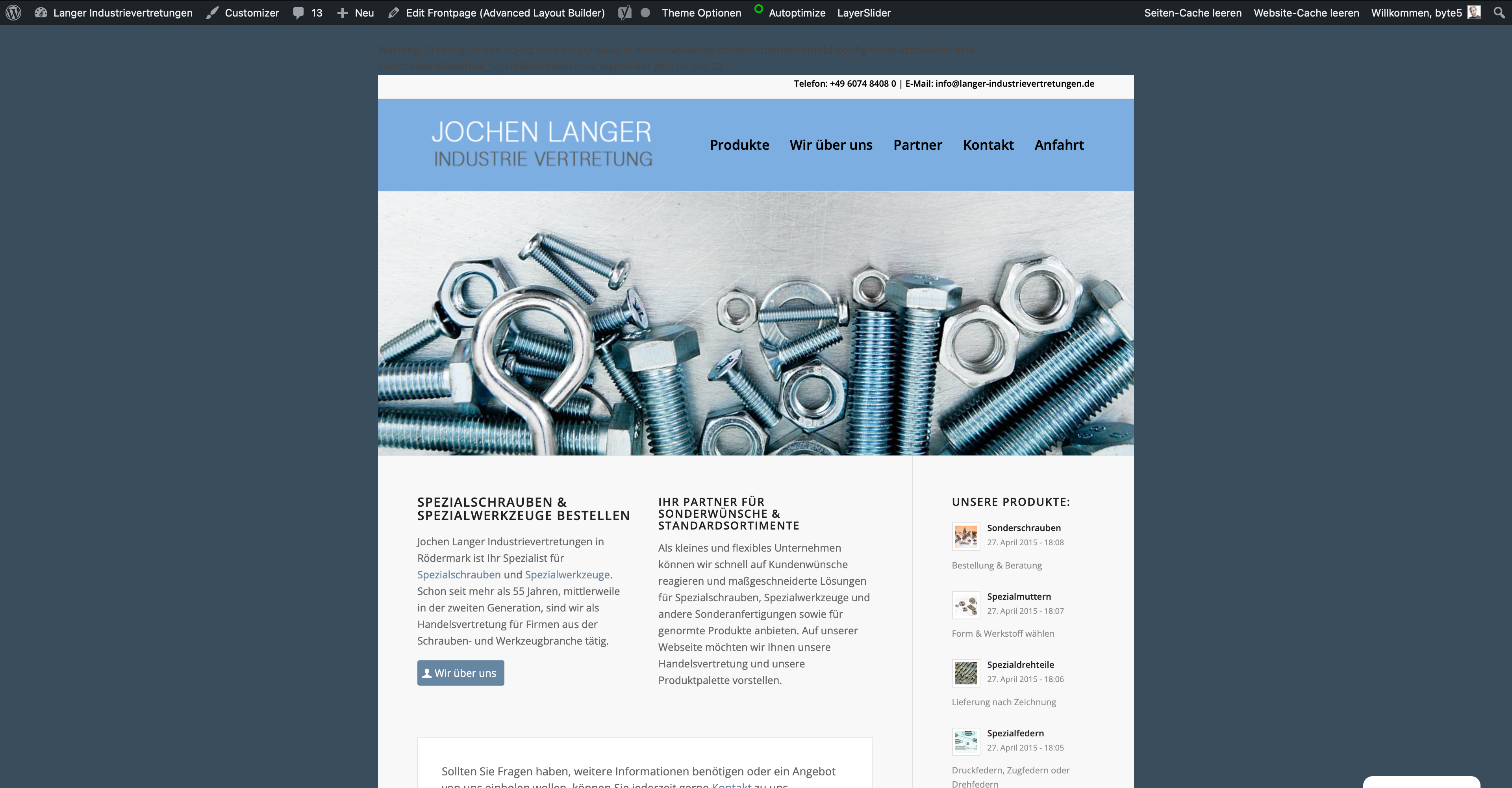
Please for help!
Best regards
MatthiasTopic: Enfold 4.8
Hi there!
I have a client who just had updated wordpress to the latest version. Including Php version 7.4. And now the AVIA layout builder does not work, meaning the client can’t update any information on the page… tried using the classic editor plug-in but no success. They have bought his product – Enfold A superflexible and responsive Business Theme version 3.4.6. and I understand that is the latest version since there are no updates availble.
Hello,
I got a massage from WordPress that some Error occured. Unfortunally I cant fix this and I don’t understand where I can find this Error, I saw that allready some other users got simular messages. See the message below:
In diesem Fall hat WordPress einen Fehler in deinem Theme „Enfold“ abgefangen.
Besuche zunächst deine Website (https://www.vdco.de/) und überprüfe sie auf sichtbare Probleme. Besuche als nächstes die Seite, auf der der Fehler aufgetreten ist (https://www.vdco.de/test/wp-admin/post.php?post=1023&action=edit) und prüfe, ob es sichtbare Probleme gibt.
Fehler-Details
==============
Ein Fehler vom Typ E_ERROR wurde in der Zeile 1447 der Datei /mnt/web323/a1/64/53424064/htdocs/htdocs/test/wp-content/themes/enfold/config-templatebuilder/avia-shortcodes/logoslider/logoslider.php verursacht. Fehlermeldung: Uncaught Error: Call to a member function get_class_string() on null in /mnt/web323/a1/64/53424064/htdocs/htdocs/test/wp-content/themes/enfold/config-templatebuilder/avia-shortcodes/logoslider/logoslider.php:1447
Stack trace:
#0 /mnt/web323/a1/64/53424064/htdocs/htdocs/test/wp-content/themes/enfold/config-templatebuilder/avia-shortcodes/logoslider/logoslider.php(872): avia_partner_logo->html()
#1 /mnt/web323/a1/64/53424064/htdocs/htdocs/test/wp-content/themes/enfold/config-templatebuilder/avia-template-builder/php/class-shortcode-template.php(1123): avia_sc_partner_logo->shortcode_handler()
#2 /mnt/web323/a1/64/53424064/htdocs/htdocs/test/wp-includes/shortcodes.php(356): aviaShortcodeTemplate->shortcode_handler_prepare()
#3 [internal function]: do_shortcode_tag()
#4 /mnt/web323/a1/64/53424064/htdocs/htdocs/test/wp-includes/shortcodes.php(228): preg_replace_callback()
#5 /mnt/web323/a1/64/53424064/htdocs/htdocs/test/wp-includes/class-wp-hook.php(303): do_shortcode()
#6 /mnt/web323/a1/64/53424064/htdocs/htdocs/Thank you for helping
ClaudiaTopic: Eror
Sir, I am using your theme when I am changing PHP version 7.3 to 7.4 then errors occur
Call to undefined function ScssPhpScssPhpctype_space() plz solve my erorHi,
the problem is that the content on several pages is not shown as it should appear. For example, pictures are not shown, background colors are not shown, or text font, text size and text color are not shown as they should. I am using the Avia Layout Editor.
I noticed that when the page is still saved as a draft all appears correctly but after changing to published, the above mentioned problems.– I am using latest WP
– I updated the theme Enfold, but that did not solve the problem. Now using Enfold 4.8.8.1
– I changed php from 7.4 to 8.0, but that did not solve it. So I did go back to 7.4 for now.
– php memory limit is set to 256 MB. Server allows up to 512 MB.Please help asap.
Thank you.Topic: Ein Fehler vom Typ E_ERROR
Hi Kriesi-team,
I received this message from WordPress today (see below).
It’s just a page that I made for testing purposes (home-event). Therefore there is no link to it on the live website.
But I have to continue working on it soon.
Can you help me please? Thanks in advance!!!Claudia
*****
“Seit WordPress 5.2 gibt es eine eingebaute Funktion, die erkennt, wenn ein Plugin oder ein Theme einen fatalen Fehler auf deiner Website verursacht, und dich deswegen mit dieser automatisierten E-Mail benachrichtigt.In diesem Fall hat WordPress einen Fehler in deinem Theme „Enfold“ abgefangen.
Besuche zunächst deine Website (https://www.makercamp-geno.de/) und überprüfe sie auf sichtbare Probleme. Besuche als nächstes die Seite, auf der der Fehler aufgetreten ist (https://www.makercamp-geno.de/wp-admin/post.php?post=8282&action=edit) und prüfe, ob es sichtbare Probleme gibt.
Bitte kontaktiere dein Hosting-Unternehmen, um Unterstützung bei der weiteren Untersuchung dieses Problems zu erhalten.
Wenn deine Website fehlerhaft zu sein scheint und du nicht mehr wie gewohnt auf dein Dashboard zugreifen kannst, hat WordPress jetzt einen speziellen „Wiederherstellungsmodus“. Auf diese Weise kannst du dich sicher in deinem Dashboard anmelden und weitere Untersuchungen durchführen.
Um deine Website zu schützen, läuft dieser Link in 1 Tag ab. Aber keine Sorge: Ein neuer Link wird dir per E-Mail zugeschickt, wenn der Fehler nach Ablauf der Frist erneut auftritt.
Wenn du Hilfe bei diesem Problem suchst, wirst du möglicherweise nach einigen der folgenden Informationen gefragt:
WordPress-Version 5.8.3
Aktuelles Theme: Enfold Child (Version 1.0)
Aktuelles Plugin: (Version )
PHP-Version 7.4.16Fehler-Details
==============
Ein Fehler vom Typ E_ERROR wurde in der Zeile 1447 der Datei /home/www/wordpress/wp-content/themes/enfold/config-templatebuilder/avia-shortcodes/logoslider/logoslider.php verursacht. Fehlermeldung: Uncaught Error: Call to a member function get_class_string() on null in /home/www/wordpress/wp-content/themes/enfold/config-templatebuilder/avia-shortcodes/logoslider/logoslider.php:1447
Stack trace:
#0 /home/www/wordpress/wp-content/themes/enfold/config-templatebuilder/avia-shortcodes/logoslider/logoslider.php(872): avia_partner_logo->html()
#1 /home/www/wordpress/wp-content/themes/enfold/config-templatebuilder/avia-template-builder/php/class-shortcode-template.php(1123): avia_sc_partner_logo->shortcode_handler(Array, ‘\n[av_partner_lo…’, ‘av_partner’, Array)
#2 /home/www/wordpress/wp-includes/shortcodes.php(356): aviaShortcodeTemplate->shortcode_handler_prepare(Array, ‘\n[av_partner_lo…’, ‘av_partner’)
#3 [internal function]: do_shortcode_tag(Array)
#4 /home/www/wordpress/wp-includes/shortcodes.php(228): preg_replace_callback(‘/\\[(\\[?)(av_hr|…’, ‘do_shortcode_ta…’, ‘\n[av_hr c…’)
#5 /home/www/wordpress/wp-content/themes/enfold/config-templatebuilder/avia-template-builder/php/class-shortcod”****
it crashes WP5.8.3 with latest PhP. After activate theme the whole site crashed, reinstalling WP from scratch and adding the newest downloaded files either as zip view WP or as zip via channel results in the same:
– theme shows in WP
– live preview of Enfold produces critical error
– activation of Enfold crashes the site completely also with critical error but now on all WP menu optionAnd I’m supposed to pay $40 again for support for these sort of errors?
Deprecated: Return type of WP_Theme::offsetExists($offset) should either be compatible with ArrayAccess::offsetExists(mixed $offset): bool, or the #[ReturnTypeWillChange] attribute should be used to temporarily suppress the notice in /home/cccr/domains/cc-cr.com/public_html/wp-includes/class-wp-theme.php on line 554
Deprecated: Return type of WP_Theme::offsetGet($offset) should either be compatible with ArrayAccess::offsetGet(mixed $offset): mixed, or the #[ReturnTypeWillChange] attribute should be used to temporarily suppress the notice in /home/cccr/domains/cc-cr.com/public_html/wp-includes/class-wp-theme.php on line 595
Deprecated: Return type of WP_Theme::offsetSet($offset, $value) should either be compatible with ArrayAccess::offsetSet(mixed $offset, mixed $value): void, or the #[ReturnTypeWillChange] attribute should be used to temporarily suppress the notice in /home/cccr/domains/cc-cr.com/public_html/wp-includes/class-wp-theme.php on line 535
Deprecated: Return type of WP_Theme::offsetUnset($offset) should either be compatible with ArrayAccess::offsetUnset(mixed $offset): void, or the #[ReturnTypeWillChange] attribute should be used to temporarily suppress the notice in /home/cccr/domains/cc-cr.com/public_html/wp-includes/class-wp-theme.php on line 544
Deprecated: Return type of WP_REST_Request::offsetExists($offset) should either be compatible with ArrayAccess::offsetExists(mixed $offset): bool, or the #[ReturnTypeWillChange] attribute should be used to temporarily suppress the notice in /home/cccr/domains/cc-cr.com/public_html/wp-includes/rest-api/class-wp-rest-request.php on line 960
Deprecated: Return type of WP_REST_Request::offsetGet($offset) should either be compatible with ArrayAccess::offsetGet(mixed $offset): mixed, or the #[ReturnTypeWillChange] attribute should be used to temporarily suppress the notice in /home/cccr/domains/cc-cr.com/public_html/wp-includes/rest-api/class-wp-rest-request.php on line 980
Deprecated: Return type of WP_REST_Request::offsetSet($offset, $value) should either be compatible with ArrayAccess::offsetSet(mixed $offset, mixed $value): void, or the #[ReturnTypeWillChange] attribute should be used to temporarily suppress the notice in /home/cccr/domains/cc-cr.com/public_html/wp-includes/rest-api/class-wp-rest-request.php on line 992
Deprecated: Return type of WP_REST_Request::offsetUnset($offset) should either be compatible with ArrayAccess::offsetUnset(mixed $offset): void, or the #[ReturnTypeWillChange] attribute should be used to temporarily suppress the notice in /home/cccr/domains/cc-cr.com/public_html/wp-includes/rest-api/class-wp-rest-request.php on line 1003
Deprecated: Return type of WP_Block_List::current() should either be compatible with Iterator::current(): mixed, or the #[ReturnTypeWillChange] attribute should be used to temporarily suppress the notice in /home/cccr/domains/cc-cr.com/public_html/wp-includes/class-wp-block-list.php on line 151
Deprecated: Return type of WP_Block_List::next() should either be compatible with Iterator::next(): void, or the #[ReturnTypeWillChange] attribute should be used to temporarily suppress the notice in /home/cccr/domains/cc-cr.com/public_html/wp-includes/class-wp-block-list.php on line 175
Deprecated: Return type of WP_Block_List::key() should either be compatible with Iterator::key(): mixed, or the #[ReturnTypeWillChange] attribute should be used to temporarily suppress the notice in /home/cccr/domains/cc-cr.com/public_html/wp-includes/class-wp-block-list.php on line 164
Deprecated: Return type of WP_Block_List::valid() should either be compatible with Iterator::valid(): bool, or the #[ReturnTypeWillChange] attribute should be used to temporarily suppress the notice in /home/cccr/domains/cc-cr.com/public_html/wp-includes/class-wp-block-list.php on line 186
Deprecated: Return type of WP_Block_List::rewind() should either be compatible with Iterator::rewind(): void, or the #[ReturnTypeWillChange] attribute should be used to temporarily suppress the notice in /home/cccr/domains/cc-cr.com/public_html/wp-includes/class-wp-block-list.php on line 138
Deprecated: Return type of WP_Block_List::offsetExists($index) should either be compatible with ArrayAccess::offsetExists(mixed $offset): bool, or the #[ReturnTypeWillChange] attribute should be used to temporarily suppress the notice in /home/cccr/domains/cc-cr.com/public_html/wp-includes/class-wp-block-list.php on line 75
Deprecated: Return type of WP_Block_List::offsetGet($index) should either be compatible with ArrayAccess::offsetGet(mixed $offset): mixed, or the #[ReturnTypeWillChange] attribute should be used to temporarily suppress the notice in /home/cccr/domains/cc-cr.com/public_html/wp-includes/class-wp-block-list.php on line 89
Deprecated: Return type of WP_Block_List::offsetSet($index, $value) should either be compatible with ArrayAccess::offsetSet(mixed $offset, mixed $value): void, or the #[ReturnTypeWillChange] attribute should be used to temporarily suppress the notice in /home/cccr/domains/cc-cr.com/public_html/wp-includes/class-wp-block-list.php on line 110
Deprecated: Return type of WP_Block_List::offsetUnset($index) should either be compatible with ArrayAccess::offsetUnset(mixed $offset): void, or the #[ReturnTypeWillChange] attribute should be used to temporarily suppress the notice in /home/cccr/domains/cc-cr.com/public_html/wp-includes/class-wp-block-list.php on line 127
Deprecated: Return type of WP_Block_List::count() should either be compatible with Countable::count(): int, or the #[ReturnTypeWillChange] attribute should be used to temporarily suppress the notice in /home/cccr/domains/cc-cr.com/public_html/wp-includes/class-wp-block-list.php on line 199
Deprecated: version_compare(): Passing null to parameter #2 ($version2) of type string is deprecated in /home/cccr/domains/cc-cr.com/public_html/wp-content/plugins/templates-patterns-collection/vendor/codeinwp/themeisle-sdk/load.php on line 31
Deprecated: version_compare(): Passing null to parameter #2 ($version2) of type string is deprecated in /home/cccr/domains/cc-cr.com/public_html/wp-content/plugins/templates-patterns-collection/vendor/codeinwp/themeisle-sdk/load.php on line 36
Deprecated: Automatic conversion of false to array is deprecated in /home/cccr/domains/cc-cr.com/public_html/wp-content/themes/enfold/framework/php/class-superobject.php on line 302
Fatal error: Uncaught mysqli_sql_exception: Table ‘cccr_wp2.wp_layerslider’ doesn’t exist in /home/cccr/domains/cc-cr.com/public_html/wp-includes/wp-db.php:2056 Stack trace: #0 /home/cccr/domains/cc-cr.com/public_html/wp-includes/wp-db.php(2056): mysqli_query() #1 /home/cccr/domains/cc-cr.com/public_html/wp-includes/wp-db.php(1945): wpdb->_do_query() #2 /home/cccr/domains/cc-cr.com/public_html/wp-includes/wp-db.php(2695): wpdb->query() #3 /home/cccr/domains/cc-cr.com/public_html/wp-admin/includes/upgrade.php(2749): wpdb->get_results() #4 /home/cccr/domains/cc-cr.com/public_html/wp-content/themes/enfold/config-layerslider/LayerSlider/assets/wp/activation.php(193): dbDelta() #5 /home/cccr/domains/cc-cr.com/public_html/wp-content/themes/enfold/config-layerslider/LayerSlider/assets/wp/activation.php(86): layerslider_create_db_table() #6 /home/cccr/domains/cc-cr.com/public_html/wp-includes/class-wp-hook.php(303): layerslider_activation_routine() #7 /home/cccr/domains/cc-cr.com/public_html/wp-includes/class-wp-hook.php(327): WP_Hook->apply_filters() #8 /home/cccr/domains/cc-cr.com/public_html/wp-includes/plugin.php(470): WP_Hook->do_action() #9 /home/cccr/domains/cc-cr.com/public_html/wp-settings.php(578): do_action() #10 /home/cccr/domains/cc-cr.com/public_html/wp-config.php(108): require_once(‘/home/cccr/doma…’) #11 /home/cccr/domains/cc-cr.com/public_html/wp-load.php(50): require_once(‘/home/cccr/doma…’) #12 /home/cccr/domains/cc-cr.com/public_html/wp-admin/admin.php(34): require_once(‘/home/cccr/doma…’) #13 /home/cccr/domains/cc-cr.com/public_html/wp-admin/customize.php(13): require_once(‘/home/cccr/doma…’) #14 {main} thrown in /home/cccr/domains/cc-cr.com/public_html/wp-includes/wp-db.php on line 2056
Er heeft zich een kritieke fout voorgedaan op deze site. Controleer je site beheerder e-mail inbox voor instructies.please note this also happens when the site is freshly installed and language is default English
Hallo,
hoffe Ihr könnt mir weiterhelfen. Das Problem hatte ich plötzlich am Freitagnachmittag. Seit dem habe ich alles versucht, bekomme es aber nicht hin.
Ich kann mich normal an melden, komme auf “Dashboard” und gehe auf “alle Seiten”.
Sobald ich auf Seite mit dem Titel “Start” klicke, kommt die Seite https://lifefeeling.info/wp-admin/post.php?post=17&action=edit
mit der Meldung:
“Es gab einen kritischen Fehler auf deiner Website. Bitte überprüfe den Posteingang deiner Website-Administrator-E-Mail-Adresse für weitere Anweisungen.
Erfahre mehr über die Problembehandlung in WordPress.”Heißt, ich kann leider die Seite “Start” nicht mehr bearbeiten!
Wenn ich die anderen Seiten anklicke, komme ich in den Editor
Hier die E-Mail von WordPress:
__________________________________________________________________________________________________________________—–Ursprüngliche Nachricht—–
Von: WordPress < (Email address hidden if logged out) >
Gesendet: Sonntag, 9. Januar 2022 17:14
An: (Email address hidden if logged out)
Betreff: [1safir business training] Deine Website hat ein technisches ProblemHallo!
Seit WordPress 5.2 gibt es eine eingebaute Funktion, die erkennt, wenn ein Plugin oder ein Theme einen fatalen Fehler auf deiner Website verursacht, und dich deswegen mit dieser automatisierten E-Mail benachrichtigt.
In diesem Fall hat WordPress einen Fehler in deinem Theme „Enfold“ abgefangen.
Besuche zunächst deine Website (https://lifefeeling.info/) und überprüfe sie auf sichtbare Probleme. Besuche als nächstes die Seite, auf der der Fehler aufgetreten ist (https://lifefeeling.info/wp-admin/post.php?post=17&action=edit) und prüfe, ob es sichtbare Probleme gibt.
Bitte kontaktiere dein Hosting-Unternehmen, um Unterstützung bei der weiteren Untersuchung dieses Problems zu erhalten.
Wenn deine Website fehlerhaft zu sein scheint und du nicht mehr wie gewohnt auf dein Dashboard zugreifen kannst, hat WordPress jetzt einen speziellen „Wiederherstellungsmodus“. Auf diese Weise kannst du dich sicher in deinem Dashboard anmelden und weitere Untersuchungen durchführen.
Um deine Website zu schützen, läuft dieser Link in 1 Tag ab. Aber keine Sorge: Ein neuer Link wird dir per E-Mail zugeschickt, wenn der Fehler nach Ablauf der Frist erneut auftritt.
Wenn du Hilfe bei diesem Problem suchst, wirst du möglicherweise nach einigen der folgenden Informationen gefragt:
WordPress-Version 5.8.3
Aktuelles Theme: MyEnfold Child (Version 1.0) Aktuelles Plugin: (Version ) PHP-Version 8.0.13Fehler-Details
==============
Ein Fehler vom Typ E_ERROR wurde in der Zeile 1447 der Datei /www/htdocs/w01266a3/lifefeeling.info/wp-content/themes/enfold/config-templatebuilder/avia-shortcodes/logoslider/logoslider.php verursacht. Fehlermeldung: Uncaught Error: Call to a member function get_class_string() on null in /www/htdocs/w01266a3/lifefeeling.info/wp-content/themes/enfold/config-templatebuilder/avia-shortcodes/logoslider/logoslider.php:1447
Stack trace:
#0 /www/htdocs/w01266a3/lifefeeling.info/wp-content/themes/enfold/config-templatebuilder/avia-shortcodes/logoslider/logoslider.php(872): avia_partner_logo->html()
#1 /www/htdocs/w01266a3/lifefeeling.info/wp-content/themes/enfold/config-templatebuilder/avia-template-builder/php/class-shortcode-template.php(1123): avia_sc_partner_logo->shortcode_handler(Array, ‘\n[av_partner_lo…’, ‘av_partner’, Array)
#2 /www/htdocs/w01266a3/lifefeeling.info/wp-includes/shortcodes.php(356): aviaShortcodeTemplate->shortcode_handler_prepare(Array, ‘\n[av_partner_lo…’, ‘av_partner’)
#3 [internal function]: do_shortcode_tag(Array)
#4 /www/htdocs/w01266a3/lifefeeling.info/wp-includes/shortcodes.php(228): preg_replace_callback(‘/\\[(\\[?)(av_hea…’, ‘do_shortcode_ta…’, ‘\n[av_head…’)
#5 /www/htdocs/w01266a3/lifefeeling.info/wp-content/themes/enfold/config-templatebuilder/avia-template-builder/php/class-shortcode-helper.php(526): do_shortcode(‘\n[av_head…’)
#6 /www/htdocs/w01266a3/lifefeeling.info/wp-content/themes/enfold/config-templatebuilder/avia-shortcodes/section/section.php(1337): ShortcodeHelper::avia_remove_autop(‘\n[av_head…’, true)
#7 /www/htdocs/w01266a3/lifefeeling.info/wp-content/themes/enfold/config-templatebuilder/avia-template-builder/php/class-shortcode-template.php(1123): avia_sc_section->shortcode_handler(Array, ‘\n[av_head…’, ‘av_section’, Array)
#8 /www/htdocs/w01266a3/lifefeeling.info/wp-includes/shortcodes.php(356): aviaShortcodeTemplate->shortcode_handler_prepare(Array, ‘\n[av_head…’, ‘av_section’)
#9 [internal function]: do_shortcode_tag(Array)
#10 /www/htdocs/w01266a3/lifefeeling.info/wp-includes/shortcodes.php(228): preg_replace_callback(‘/\\[(\\[?)(av_but…’, ‘do_shortcode_ta…’, ‘[av_fullscreen …’)
#11 /www/htdocs/w01266a3/lifefeeling.info/wp-includes/class-wp-hook.php(303): do_shortcode(‘[av_fullscreen …’)
#12 /www/htdocs/w01266a3/lifefeeling.info/wp-includes/plugin.php(189): WP_Hook->apply_filters(‘[av_fullscreen …’, Array)
#13 /www/htdocs/w01266a3/lifefeeling.info/wp-includes/rest-api/endpoints/class-wp-rest-posts-controller.php(1792): apply_filters(‘the_content’, ‘
__________________________________________________________________________________________________________________Es wäre super, von Euch zu hören.
Gruß Jörg
Hello. I just updated the theme to assist with a logo issue I was having. It fixed that issue, but now the footer is gone. I checked theme options and its still set up to show the footer. I checked widgets and the content is still there. rest perma-links just in case. no luck.
WordPress is up to date as well as plugins and php is 7.4