Viewing 30 results - 1,471 through 1,500 (of 16,891 total)
  • Author
    Search Results
  • I found a way to create a new subscription on Plesk and can now use PHP 7.3.11 (that was the option it gave)
    But I see 8.1 is the most current and will try and use that (if I can).

    Will the latest Enfold Theme be ok on:
    both:
    PHP 7.3.11
    and
    PHP 8.1

    Best Regards
    Nick Ray Ball

    #1402239

    In reply to: The font clitch

    Hi pimroll,

    Thanks for giving us access, please review your website now.

    I saw this code in your functions.php file:

    add_action('wp_head','hook_font');
    function hook_font() {
    	$output = '<link rel="stylesheet" id="avia-google-webfont" href="//fonts.googleapis.com/css?family=Open+Sans:300,700" type="text/css" media="all"/>';
    	echo $output;
    }

    and I just replaced it with (to preload the font):

    add_action('wp_head','hook_font');
    function hook_font() {
    	$output = '<link rel="preload" as="style" type="text/css" href="//fonts.googleapis.com/css?family=Work+Sans:700,400,100&display=auto" />';
    	$output .= '<link rel="stylesheet" id="avia-google-webfont" href="//fonts.googleapis.com/css?family=Open+Sans:300,700" type="text/css" media="all"/>';
    	echo $output;
    }

    Best regards,
    Nikko

    #1402208

    Hi,
    Try adding the custom class replace-title-with-caption to your masonry gallery element:
    Enfold_Support_706.jpeg
    then add this code to the end of your child theme functions.php file in Appearance ▸ Editor:

    function replace_masonry_gallery_lightbox_title_with_gallery_caption() { ?>
      <script>
    window.addEventListener('DOMContentLoaded', function() {
    (function($){
    $(window).load(function(){  
        $('.av-masonry-gallery.replace-title-with-caption a.av-masonry-entry.lightbox-added').magnificPopup({
        type: 'image',
    		image: {
            titleSrc: false,
            markup: '<div class="mfp-figure">'+
                      '<div class="mfp-close"></div>'+
                      '<div class="mfp-top-bar"></div>'+
                      '<div class="mfp-img"></div>'+
                      '<div class="mfp-bottom-bar">'+
                        '<div class="mfp-title"></div>'+
                        '<div class="mfp-counter"></div>'+
                      '</div>'+
                    '</div>',
        },
        mainClass:          'avia-popup mfp-zoom-in mfp-image-loaded',
        closeOnContentClick:  false,
        midClick:         true,
    
        gallery: {
          enabled:      true
        },
    
        callbacks: {
    		markupParse: function (template, values, item) {
    			values.title = item.el.closest('.av-masonry-entry').find('.av-masonry-entry-content').text();
    		},
            change: function() {
                $(this.content)
                    .find('.mfp-top-bar')
                    .html(
                        '<h2>' +
                            $(this.currItem.el).attr('title') +
                        '</h2>'
                    );
            },
        },
      }); 
      $(document).on('click', '.popup-modal-dismiss', function (e) { 
        $.magnificPopup.close();
      });
    });
    })(jQuery);
    });
    </script>
      <?php
    }
    add_action('wp_footer', 'replace_masonry_gallery_lightbox_title_with_gallery_caption');

    The expected result:
    Enfold_Support_709.jpeg
    This code is based on some shared by Guenni007, thanks Guenni007.

    Best regards,
    Mike

    agavinho
    Participant

    Woocommerce/woocommerce.php has been deactivated due to an error: Plugin file does not exist

    Hello team,
    We need urgent help! A few minutes ago, the Woocommerce plugin suddenly disappeared from the dashboard/template. this is a huge problem that we need to be fixed ASAP – Ii affects our online business, tremendously.

    After that, we updated enfold and cleaned the cache and the problem persists.
    PHP version: 7.4.33
    Running the latest version! (5.5)

    Thanks in advance for the great support as usual!
    best,
    Nadia

    • This topic was modified 3 years ago by agavinho.
    Nick Ray Ball
    Guest

    Can I load a new Enfold Theme onto WordPress 5.5 on a Server using php 5.6.30

    The website is not live yet, but it will be
    http://www.S-World-AI.com

    Other websites I have using Enfold are

    http://network.villasecrets.com

    These were all made in about 2017

    My problem is I have a website http://www.cape-town-luxury-villas.com/
    That uses old PHP
    So if I upgrade the server to the latest PHP it will probably fall apart

    So I hoped (for now) to load WordPress 5.5 and then add the Enfold Theme
    And update them all later.

    #1401949

    With a fresh installation, “Site health” show the following:

    2 critical issues
    Critical issues are items that may have a high impact on your sites performance or security, and resolving these issues should be prioritized.

    The REST API encountered an error Performance
    Your site could not complete a loopback request Performance

    7 recommended improvements
    Recommended items are considered beneficial to your site, although not as important to prioritize as a critical issue, they may include improvements to things such as; Performance, user experience, and more.

    You should remove inactive plugins Security
    You should remove inactive themes Security
    A scheduled event has failed Performance
    You should use a persistent object cache Performance
    Your website does not use HTTPS Security
    The authorization header is missing Security
    Unable to detect the presence of page cache Performance

    14 items with no issues detected
    Your version of WordPress (6.1.1) is up to date Performance
    Your site is running the current version of PHP (8.2.3) Performance
    Required and recommended modules are installed Performance
    PHP default timezone is valid Performance
    No PHP sessions detected Performance
    SQL server is up to date Performance
    UTF8MB4 is supported Performance
    Your site can communicate securely with other services Security
    HTTP requests seem to be working as expected Performance
    Your site is not set to output debug information Security
    Files can be uploaded Performance
    Plugin and theme auto-updates appear to be configured correctly Security
    Can communicate with WordPress.org Security
    Background updates are working Security

    Hi,

    enclosed the communication with the world4you support, they raised the maximum execution time and PHP time limit with no effect.
    If i switch to another theme the website is loading immediately.

    According to “debug.log” the error has something to do with the nav-menu-template?
    [19-Mar-2023 18:05:02 UTC] PHP Fatal error: Maximum execution time of 90 seconds exceeded in /home/.sites/150/site6680906/web/wp-includes/nav-menu-template.php on line 213

    Is the nav-menu-template something the theme uses?

    Could i just reset the whole wordpress site and restore the content (sites and pictures)? Do you have any best-practice on how to save the content and restore the site with theme?

    Thank you!

    ——————————————————————————————————–
    Hi,

    the error says that the maximum execution time (90) is to low.

    i increased the value to 300.

    I increased the settings

    PHP time limit to 300
    Max input time to 120

    Herzliche Grüße vom E-Mail-Support-Team aus Linz,

    Adnan

    Kritik? Lob? Wünsche? Unser Anliegen ist Ihre Zufriedenheit:
    https://info.world4you.com/feedback/index.php?202466016

    ==============================================
    Technischer Support
    ==============================================
    WORLD4YOU Internet Services GmbH
    Hafenstraße 35
    A-4020 Linz, Austria/Europe
    (Email address hidden if logged out)
    http://www.world4you.com
    ==============================================
    Fbnr.: FN232485s des LG Linz
    IBAN: AT613400000005077508
    BIC: RZOOAT2L
    FAQ Portal: https://www.world4you.com/faq
    ==============================================

    19.03.2023 20:06 – (Email address hidden if logged out) schrieb:
    (Email address hidden if logged out) schrieb:

    > Dear Adnan,
    >
    > did you look at the enclosed Error-Logs?
    >
    > What is causing the following error messages:
    > * (70007)The timeout specified has expired: [client 81.19.159.90:47136] AH00574: ap_content_length_filter: apr_bucket_read() failed
    > * PHP Fatal error: Maximum execution time of 90 seconds exceeded in /home/.sites/150/site6680906/web/wp-includes/nav-menu-template.php on
    > line 213
    >
    > The Theme Support asked me to raise following settings:
    > \”I see in your WordPress ▾ Dashboard ▾ Tools ▾ Site Health ▾ Info ▾ Server your PHP time limit & Max input time are low, try
    > changing them to:
    > PHP time limit 300
    > Max input time 120\”
    >
    > Can you assist with that? Do you think thats not the reason for the error?
    >
    > Thanks
    >

    content

    Hi,

    i cannot find a issue on the server.

    I think the problem is with the theme.

    Please try a another theme so we can see it the site works again.

    Then we now the problem is from the theme.

    Herzliche Grüße vom E-Mail-Support-Team aus Linz,

    Adnan

    Kritik? Lob? Wünsche? Unser Anliegen ist Ihre Zufriedenheit:
    https://info.world4you.com/feedback/index.php?202466016

    ==============================================
    Technischer Support
    ==============================================
    WORLD4YOU Internet Services GmbH
    Hafenstraße 35
    A-4020 Linz, Austria/Europe
    (Email address hidden if logged out)
    http://www.world4you.com
    ==============================================
    Fbnr.: FN232485s des LG Linz
    IBAN: AT613400000005077508
    BIC: RZOOAT2L
    FAQ Portal: https://www.world4you.com/faq
    ==============================================

    19.03.2023 20:06 – (Email address hidden if logged out) schrieb:
    (Email address hidden if logged out) schrieb:

    > Hi,
    >
    > since a few days our website is encountering a problem, it doesnt load anymore. We also received an email, that wordpress went into recovery
    > mode due to a plugin. We deactivated all plugins now that arent necessary but the problem remains.
    >
    > I also tried reseting the webspace through world4you options and paid €22, it didnt solve the problem.
    >
    > Enclosed the server error log and the debug.log.
    >
    > I also contacted the enfold theme support, they said the problem is most likely not linked to the used theme.
    >
    > Your Sincerely
    >
    > —————————————–
    > Kundennummer: 50335413
    > Package ID: 31739815 / juliaholzer.com
    >

    #1401906
    Michael Menke
    Guest

    Hallo,

    wie zuletzt von Yigit geschrieben, habe ich nun ein Envato Theme Key gekauft.

    Ich habe einen privaten Schlüssel erstellt und eingegeben. Die Version des Themes ist nun 4.7.4. Soweit ich sehen konnte, ist es nicht die aktuelle Version, oder?
    Ich habe Probleme, wenn ich die PHP-Version 8.x einstelle, dann erscheint die Website nur falsch und es tritt der Fehler auf “Es gab einen kritischen Fehler auf Ihrer Website”.

    Was mache ich falsch? Was kann ich tun?

    Beste Grüße
    Michael Menke

    #1401892

    I activate the WordPress Debug-Modus.
    When I activate the Enfold-Theme, this message is shown:
    Fatal error: Allowed memory size of 67108864 bytes exhausted (tried to allocate 20480 bytes) in /usr/www/users/stbugo/wp2023/wp-content/themes/enfold/config-templatebuilder/avia-template-builder/php/base-classes/class-popup-templates-base.php on line 104

    #1401884
    themeflori
    Participant

    Hello!
    We have a fresh wordpress 6.1.1 running on a server with PHP 8.1.17. When we activate the Enfold-Theme 5.4.1 the system ist showing a critical error.
    What is the problem?
    I’ve set up 20 systems with Enfold and never had a problem like this.
    The provider is Hetzner an I see nothing special.
    Thank you!

    Kann man hier auch auf Deutsch fragen?

    Thank you!

    • This topic was modified 3 years ago by themeflori.
    • This topic was modified 3 years ago by themeflori.
    #1401871

    Topic: Footer not visible

    in forum Enfold
    bonsaimedia
    Participant

    The entire footer recently disappeared from the site. The rst of the website works fine.

    These erros show up in the error log:
    PHP Warning: Undefined array key “footer_option” in /home/vandenheuveldres/public_html/wp-content/themes/enfold/footer.php on line 35
    PHP Warning: Undefined array key “footer_behavior” in /home/vandenheuveldres/public_html/wp-content/themes/enfold/footer.php on line 37
    PHP Warning: Undefined array key “footer_behavior” in /home/vandenheuveldres/public_html/wp-content/themes/enfold/footer.php on line 288

    try in your child-theme functions.php:

    function change_href_from_scroll_top_link(){
    if ( is_page(2077) ) {	
    ?>
    <script type="text/javascript">
    window.addEventListener("DOMContentLoaded", function () { 	
    (function($) {
    	$('#scroll-top-link').attr({
    		'href': 'https://new_link',
    		'title': 'new Title',
    	});
    })(jQuery);
    });
    </script>
    <?php
    }
    }
    add_action('wp_footer', 'change_href_from_scroll_top_link');

    if you got more than one page use array:
    if(is_page(array( 2077, 38147, … ))){

    see test page: https://enfold.webers-webdesign.de/impressum/

    Hi Michael,

    The hook you used does not exist so it will not work.
    I think you’ll need to use a child theme and then copy footer.php from the parent theme to the child theme and make changes on line 328:

    <a href='#top' title='<?php _e( 'Scroll to top', 'avia_framework' ); ?>' id='scroll-top-link' <?php echo av_icon_string( 'scrolltop' ); ?>><span class="avia_hidden_link_text"><?php _e( 'Scroll to top', 'avia_framework' ); ?></span></a>

    You can use the conditional tag to set it to change href on page 2077.
    Hope this helps.

    Best regards,
    Nikko

    #1401826

    Hi,

    You can use this function in functions.php for that:

    function woogie07_after_body_tag() { 
    ?>
    Your script goes here
    <?php
    }
    add_action('ava_after_body_opening_tag', 'woogie07_after_body_tag');

    Best regards,
    Rikard

    #1401779

    Topic: Enfold Child error!!!

    in forum Enfold
    puconsulting
    Participant

    Hello,

    I have been in contact with our website host regarding the error in our wesite and they mentioned;”based on the error, that really has something to do with your theme ‘Enfold’. You are using the child theme for the stylesheet and this child theme is currently outdated so it is an expected behavior.”

    We get the warning below in our live website:
    Warning: Undefined array key “layerslider-css” in /customers/5/3/e/puconsulting.se/httpd.www/wp-content/themes/enfold/config-templatebuilder/avia-template-builder/php/class-asset-manager.php on line 1277 Warning: Trying to access array offset on value of type null in /customers/5/3/e/puconsulting.se/httpd.www/wp-content/themes/enfold/config-templatebuilder/avia-template-builder/php/class-asset-manager.php on line 1277
    0

    Do you have any suggestions?

    Hi,

    i updated to Version 5.4.1, unfortunately it didnt change anything.

    Enclosed are the Server Error Logs and content of “debug.log”, is this something that i need to discuss with my hosting provider? do you have tips anyway what the cause is?

    Thank you

    Server-Logs:
    [Sun Mar 19 09:39:10.864277 2023] [core:error] [pid 1838040:tid 139946534889216] (70007)The timeout specified has expired: [client 81.19.159.90:47136] AH00574: ap_content_length_filter: apr_bucket_read() failed, referer: https://www.juliaholzer.com/
    [Sun Mar 19 09:39:16.953274 2023] [core:error] [pid 1836362:tid 139946895910656] (70007)The timeout specified has expired: [client 81.19.159.90:34586] AH00574: ap_content_length_filter: apr_bucket_read() failed, referer: https://www.juliaholzer.com/
    [Sun Mar 19 12:29:32.238306 2023] [core:error] [pid 1265885:tid 139946492925696] (70007)The timeout specified has expired: [client 93.158.90.162:57953] AH00574: ap_content_length_filter: apr_bucket_read() failed, referer: http://juliaholzer.com/humans.txt
    [Sun Mar 19 12:29:33.726384 2023] [core:error] [pid 1265823:tid 139946526496512] (70007)The timeout specified has expired: [client 93.158.90.147:3581] AH00574: ap_content_length_filter: apr_bucket_read() failed, referer: http://juliaholzer.com/ads.txt
    [Sun Mar 19 12:29:38.669328 2023] [core:error] [pid 1265955:tid 139946006411008] (70007)The timeout specified has expired: [client 93.158.90.137:5485] AH00574: ap_content_length_filter: apr_bucket_read() failed, referer: http://www.juliaholzer.com/
    [Sun Mar 19 13:45:22.964215 2023] [access_compat:error] [pid 1263783:tid 139946904303360] [client 185.178.186.44:47488] AH01797: client denied by server configuration: /home/.sites/150/site6680906/web/xmlrpc.php
    [Sun Mar 19 18:41:21.133187 2023] [access_compat:error] [pid 3655427:tid 139946375493376] [client 139.59.110.189:56118] AH01797: client denied by server configuration: /home/.sites/150/site6680906/web/xmlrpc.php
    [Sun Mar 19 18:51:09.140265 2023] [core:error] [pid 3781814:tid 139947030165248] (70007)The timeout specified has expired: [client 188.22.220.177:55773] AH00574: ap_content_length_filter: apr_bucket_read() failed, referer: https://www.juliaholzer.com/
    [Sun Mar 19 19:04:05.242292 2023] [core:error] [pid 3955168:tid 139947105433344] (70007)The timeout specified has expired: [client 188.22.220.177:55863] AH00574: ap_content_length_filter: apr_bucket_read() failed, referer: https://www.juliaholzer.com/wp-admin/post.php?post=143&action=edit
    [Sun Mar 19 19:04:05.744302 2023] [core:error] [pid 3955168:tid 139946937579264] (70007)The timeout specified has expired: [client 188.22.220.177:55863] AH00574: ap_content_length_filter: apr_bucket_read() failed, referer: https://www.juliaholzer.com/wp-admin/post.php?post=143&action=edit
    [Sun Mar 19 19:04:41.344721 2023] [core:error] [pid 3955168:tid 139946929186560] (70007)The timeout specified has expired: [client 188.22.220.177:55866] AH00574: ap_content_length_filter: apr_bucket_read() failed, referer: https://www.juliaholzer.com/wp-admin/post.php?post=143&action=edit
    [Sun Mar 19 19:04:41.398888 2023] [core:error] [pid 3955168:tid 139947029899008] (70007)The timeout specified has expired: [client 188.22.220.177:55866] AH00574: ap_content_length_filter: apr_bucket_read() failed, referer: https://www.juliaholzer.com/wp-admin/post.php?post=143&action=edit
    [Sun Mar 19 19:04:41.429284 2023] [core:error] [pid 3955168:tid 139947038291712] (70007)The timeout specified has expired: [client 188.22.220.177:55866] AH00574: ap_content_length_filter: apr_bucket_read() failed, referer: https://www.juliaholzer.com/wp-admin/post.php?post=143&action=edit

    debug.log
    [19-Mar-2023 18:05:02 UTC] PHP Fatal error: Maximum execution time of 90 seconds exceeded in /home/.sites/150/site6680906/web/wp-includes/nav-menu-template.php on line 213
    [19-Mar-2023 18:05:59 UTC] PHP Fatal error: Maximum execution time of 90 seconds exceeded in /home/.sites/150/site6680906/web/wp-includes/nav-menu-template.php on line 213

    #1401690

    Hi,
    To add a navigation arrow to Guenni007‘s script you would add: gallery:{enabled:true} to it like this:

    function posts_iframe_popup() { 
    ?>
    <script type="text/javascript">
    window.addEventListener('DOMContentLoaded', function() {
    (function($) {
      $(' a.av-masonry-entry').magnificPopup({
        type:'iframe',
    gallery:{
        enabled:true
      }
      }); 
    })(jQuery);
    });
    </script>
    <?php }
    add_action('wp_footer', 'posts_iframe_popup');

    But this opens the masonry item as an iframe and not the image.
    You can change the type to image, but since the image is a background image it will not show in the magnificPopup, I didn’t find a way to get the background image.

    Best regards,
    Mike

    #1401621

    Hey woogie07,
    Please try adding it to the Enfold Theme Options ▸ Google Services ▸ Google Analytics Tracking Code field.
    If you really want to add it to your child theme functions.php add it into this function:

    function custom_head_script() { ?>
      <script>
    //your code here
      </script>
      <?php
    }
    add_action('wp_head', 'custom_head_script', 10 );

    Best regards,
    Mike

    Ravinder Kumar
    Guest

    Website not working after upgrade php version 7.4 to 8.0. then i rollback from 8.0 to 7.4. after rollback some features not working in the site.

    julia_holzer
    Participant

    Hallo,

    wir sind grundsätzlich sehr zufrieden mit dem Enfold-Theme, seit dem Wochenende laufen wir jedoch in folgendes Problem. Die Webseite lädt nicht mehr und wenn via WordPress-Admin versucht wird eine Seite zu bearbeiten ist dies auch nicht möglich und die “Vorschau” Ansicht lädt nicht uns ist in einem Endlos-Loop. Wir haben versucht die letzten Änderungen und Seiten Updates rückgängig zu machen, leider ohne Erfolg.

    Weiters hat uns folgendes Mail erreicht und wir vermuten hier einen Zusammenhang mit dem Fehler. Das betroffene Plugin haben wir deaktiviert bzw bereits entfernt, dies führte jeodoch auch nicht zur Problemlösung.

    Bitte um Unterstützung! Leider haben wir noch kein Backup auf das wir zurücksteigen können.

    lg

    ————————————————————————————————————————————
    Von: WordPress
    Datum: 13. März 2023 um 11:07:58 MEZ

    Hallo!

    Seit WordPress 5.2 gibt es eine eingebaute Funktion, die erkennt, wenn ein Plugin oder ein Theme einen fatalen Fehler auf deiner Website verursacht, und dich deswegen mit dieser automatisierten E-Mail benachrichtigt.

    In diesem Fall hat WordPress einen Fehler in einem deiner Plugins, WP Captcha, abgefangen.

    Besuche zunächst deine Website (https://www.juliaholzer.com/) und überprüfe sie auf sichtbare Probleme. Besuche als nächstes die Seite, auf der der Fehler aufgetreten ist (https://www.juliaholzer.com/wp-login.php) und prüfe, ob es sichtbare Probleme gibt.

    Bitte kontaktiere dein Hosting-Unternehmen, um Unterstützung bei der weiteren Untersuchung dieses Problems zu erhalten.

    Wenn deine Website fehlerhaft zu sein scheint und du nicht mehr wie gewohnt auf dein Dashboard zugreifen kannst, hat WordPress jetzt einen speziellen „Wiederherstellungsmodus“. Auf diese Weise kannst du dich sicher in deinem Dashboard anmelden und weitere Untersuchungen durchführen.

    <URL – Wiederherstellung – nicht mehr nutzbar >

    Um deine Website zu schützen, läuft dieser Link in 1 Tag ab. Aber keine Sorge: Ein neuer Link wird dir per E-Mail zugeschickt, wenn der Fehler nach Ablauf der Frist erneut auftritt.

    Wenn du Hilfe bei diesem Problem suchst, wirst du möglicherweise nach einigen der folgenden Informationen gefragt:
    WordPress-Version 6.1.1
    Aktives Theme: Enfold Child (Version 1.0)
    Aktuelles Plugin: WP Captcha (Version 2.0.0)
    PHP-Version 8.0.28

    Fehler-Details
    ==============
    Ein Fehler vom Typ E_ERROR wurde in der Zeile 81 der Datei /home/.sites/150/site6680906/web/wp-content/plugins/wp-captcha/includes/modules/wordpress/class-c4wp-login.php verursacht. Fehlermeldung: Uncaught TypeError: in_array(): Argument #2 ($haystack) must be of type array, null given in /home/.sites/150/site6680906/web/wp-content/plugins/wp-captcha/includes/modules/wordpress/class-c4wp-login.php:81
    Stack trace:
    #0 /home/.sites/150/site6680906/web/wp-content/plugins/wp-captcha/includes/modules/wordpress/class-c4wp-login.php(81): in_array(‘my5T4’, NULL, true)
    #1 /home/.sites/150/site6680906/web/wp-includes/class-wp-hook.php(308): C4WP_Wordpress_Login->c4wp_validation_check(Object(WP_User), ‘nUduKuVamUQa’)
    #2 /home/.sites/150/site6680906/web/wp-includes/plugin.php(205): WP_Hook->apply_filters(Object(WP_User), Array)
    #3 /home/.sites/150/site6680906/web/wp-includes/user.php(169): apply_filters(‘wp_authenticate…’, Object(WP_User), ‘nUduKuVamUQa’)
    #4 /home/.sites/150/site6680906/web/wp-includes/class-wp-hook.php(308): wp_authenticate_username_password(Object(WP_User), ‘wordpressadmin’, ‘nUduKuVamUQa’)
    #5 /home/.sites/150/site6680906/web/wp-includes/plugin.php(205): WP_Hook->apply_filters(NULL, Array)
    #6 /home/.sites/150/site6680906/web/wp-includes/pluggable.php(614): apply_filters(‘authenticate’, NULL, ‘wordpressadmin’, ‘nUduKuVamUQa’)
    #7 /home/.sites/150/site6680906/web/wp-includes/user.php(95): wp_authenticate(‘wordpressadmin’, ‘nUduKuVamUQa’)
    #8 /home/.sites/150/site6680906/web/wp-login.php(1231): wp_signon(Array, true)
    #9 {main}
    thrown

    #1401136
    Ümit Kirdar
    Guest

    [Tue Mar 14 08:15:17.963691 2023] [proxy_fcgi:error] [pid 2672792:tid 140346746976000] [client 85.6.132.226:0] AH01071: Got error ‘PHP message: PHP Fatal error: Uncaught TypeError: Argument 1 passed to aviaElementTemplates::set_locked_attributes() must be of the type array, string given, called in /var/www/vhosts/natuerlich-hund.ch/httpdocs/wp-content/themes/enfold/config-templatebuilder/avia-shortcodes/slideshow_fullscreen/slideshow_fullscreen.php on line 1091 and defined in /var/www/vhosts/natuerlich-hund.ch/httpdocs/wp-content/themes/enfold/config-templatebuilder/avia-template-builder/php/class-element-templates.php:3768nStack trace:n#0 /var/www/vhosts/natuerlich-hund.ch/httpdocs/wp-content/themes/enfold/config-templatebuilder/avia-shortcodes/slideshow_fullscreen/slideshow_fullscreen.php(1091): aviaElementTemplates->set_locked_attributes()n#1 /var/www/vhosts/natuerlich-hund.ch/httpdocs/wp-content/themes/enfold/config-templatebuilder/avia-shortcodes/slideshow_fullscreen/slideshow_fullscreen.php(1135): avia_sc_slider_fullscreen->get_element_styles()n#2 /var/www/vhosts/natuerlich-hund.ch/httpdocs/wp-content/themes/enfold/config-temp…’, referer: https://natuerlich-hund.ch/wp-admin/post.php?post=11&action=edit

    #1400991
    blockbaster
    Participant

    I have WordPress version 6.1.1, Enfold, 5.4.1, PHP version: 7.4.33

    I use a child theme. In the Enfold settings –> Blog layout –> Similar posts –> Show thumbnail and post title by default

    I have posts that contain a similar tag. However, nothing appears at the bottom of the post page.

    When I test write changes here, nothing happens on the page:

    ../wp-content/themes/enfold-child/includes/related-posts.php

    <?php
    $cMsg = 'huhu';
    echo '<script type="text/javascript">alert("'.$cMsg.'");</script>';

    How do I get the similar posts enabled again?

    #1400952

    In reply to: Saving Corrupts Page

    Hi,
    Thanks for the feedback, so a couple of things that I notice between this thread and your original, first in the original thread I had found rouge curly brackets in your inline CSS:
    Enfold_Support_552.jpeg
    and had removed them on the page that was corrected and had no errors, but in this thread, Yigit found them again, so my first thought is that you had used Revisions to try to edit an older revision of the page that was corrected, but I think the Yigit and I were fixing two different pages, is this correct?
    I believe that you have been using the ALB templates to create these pages, is this correct?
    Enfold_Support_615.jpeg
    If so this means that the errors are in some of these templates and adding them to the pages and saving could be the cause.
    If this is true you can not fix the templates that have the errors, they should be deleted or they will spread the errors.
    The second thing I notice is you said above: The only other thing I did differently was that I added it to a folder called IN PROGRESS. referring to a plugin Folders – Unlimited Folders to Organize Media Library Folder, Pages, Posts, File Manager so perhaps try disabling the plugin as this could be a conflict.
    Also note that WordPress requires a minimum PHP v7.4, Enfold has no trouble with PHP v7.4 or v8, if there was an error about the PHP version I’m sure it was from one of your plugins.
    Please ask your webhost to enable PHP v7.4 and if they see and error ask them to disable your plugins and check again on a page other than these with the errors.
    I recommend creating your page from scratch without using any of your templates and without the Folders Plugin enabled, I believe you will find your new page error free.

    Best regards,
    Mike

    #1400931

    Hi,
    Thanks for your patience, the error: Failed to open stream: No such file or directory in /is/htdocs/wp12175280_E3ZQ0CNJI0/www/wp-includes/script-loader.php on line 276 points to a missing WordPress file. Since you can’t login to your site to try to reinstall WordPress, check if you can do so in your web host panel, assuming that you originally installed it from there.
    If not please see this article starting at: Upgrade WordPress manually via FTP this will replace any corrupted or missing WordPress core files without losing your data, please note to not overwrite your wp-content folder or your wp-config.php file, this is what connects to your WordPress database.
    If you are not sure about this ask your webhost for help.

    Best regards,
    Mike

    #1400899
    This reply has been marked as private.
    #1400871

    In reply to: Saving Corrupts Page

    Wordpress version 6.1.1
    I have once again reached out to the hosting to look for errors and settings to adjust.
    They say the wordpress memory limit is 256M, but I just increased it to 1G

    from a hosting support ticket 3/7/23:
    “I found the following error in the error_log of the website:
    [07-Mar-2023 13:01:26 America/Chicago] PHP Deprecated: Directive ‘allow_url_include’ is deprecated in Unknown on line 0
    This means that PHP 7.4 is not fully supported by your website and hence I have reduced it to PHP 7.3”

    However, when I checked the PHP still said 7.4, so I have changed it to 7.3.
    I also changed the following:
    memory_limit: 1G
    post_max_size: 512M
    upload_max_size: 512M
    max_execution_time: 1000
    max_input_time: 1000

    max_input_vars: was already at 10000

    I don’t know if this will help. I’m just stabbing in the dark asI am a designer, not a programmer.

    #1400861

    Hey jaumem4,
    Thanks for the login, I see that you have a PHP warning in your WordPress Dashboard that you are using PHP v7.3.33
    Please ask your webhost to update your server to at least v7.4 and then check again.

    Best regards,
    Mike

    Hi,
    Try adding this code to the end of your child theme functions.php file in Appearance ▸ Editor:

    function custom_script() { ?>
      <script>
    window.addEventListener('DOMContentLoaded', function() {
    (function($){
    	var width = $(window).width();
    	if (width <= 767) {
    $( '#top.woocommerce-page.archive' ).each(function() {
    $( this ).find( '#woocommerce_product_categories-3' ).insertBefore( $(this).find('.template-shop.content') );
    });
    }
    })(jQuery);
    });
    </script>
      <?php
    }
    add_action('wp_footer', 'custom_script');

    Then clear your browser cache and check.

    Best regards,
    Mike

    #1400827

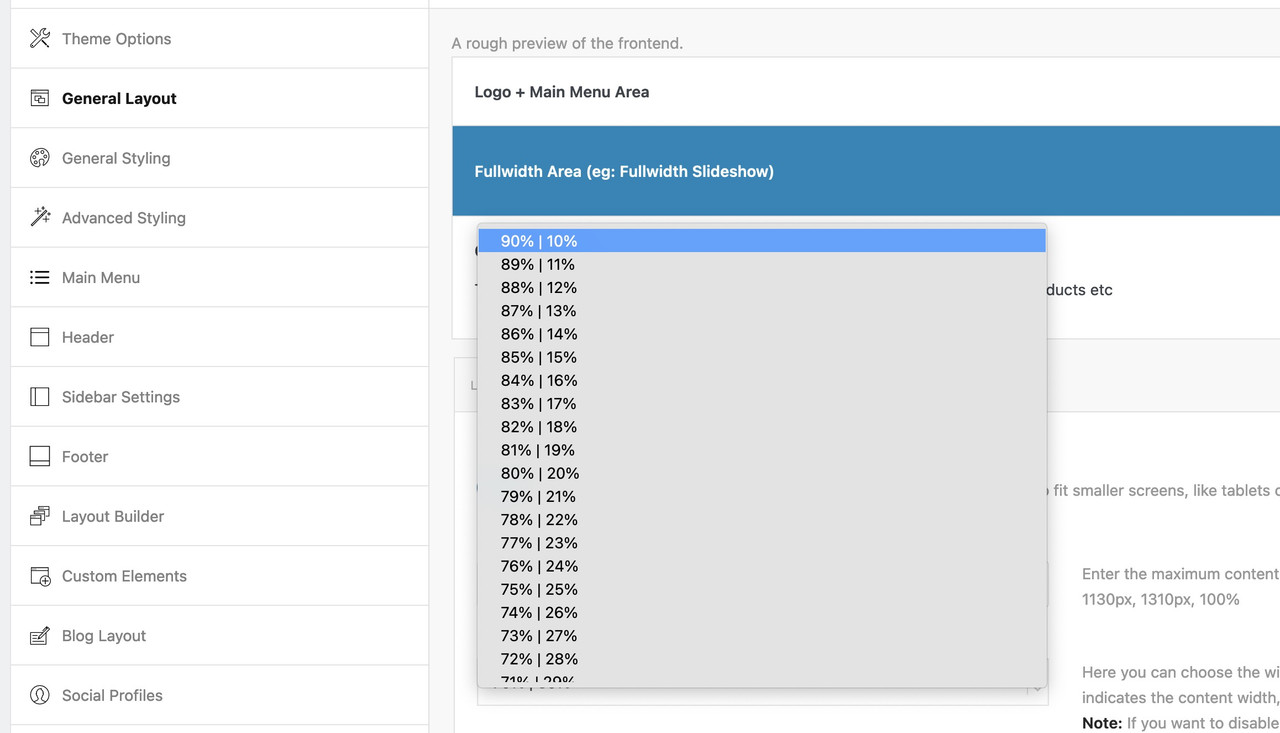
    In reply to: Size sidebar 10%

    aha – this is a possiblility to change the options tab via child-theme:
    ( sometimes the settings had to fit with preset css ( layout.css , grid.css )) – and so maybe for the setting there is no correspondence to find )
    but in this case it seems to be only that css setting above – that is influenced by this options tab.

    put this to your child-theme functions.php:

    function my_avf_option_page_data_change_elements( array $avia_elements = array() ){
      $slug = "layout";
      $id   = 'content_width';
      $index = -1;
      /** Find index of element to change*/
      foreach( $avia_elements as $key => $element ){
        if( isset( $element['id'] ) &&  ( $element['id'] == $id ) && isset( $element['slug'] ) && ( $element['slug'] == $slug ) ){
          $index = $key;
          break;
        }
      }
      
      /** * If key not found, return unmodified array*/
      if( $index < 0 ){ return $avia_elements;}
      
      /*** Make your customizations*/ 
      $avia_elements[ $index ]['subtype'] = array(
    								'90% | 10%' => '90',
    								'89% | 11%' => '89',
    								'88% | 12%' => '88',
    								'87% | 13%' => '87',
    								'86% | 14%' => '86',
    								'85% | 15%' => '85',
    								'84% | 16%' => '84',
    								'83% | 17%' => '83',
    								'82% | 18%' => '82',
    								'81% | 19%' => '81',
    
    								'80% | 20%' => '80',
    								'79% | 21%' => '79',
    								'78% | 22%' => '78',
    								'77% | 23%' => '77',
    								'76% | 24%' => '76',
    								'75% | 25%' => '75',
    								'74% | 26%' => '74',
    								'73% | 27%' => '73',
    								'72% | 28%' => '72',
    								'71% | 29%' => '71',
    
    								'70% | 30%' => '70',
    								'69% | 31%' => '69',
    								'68% | 32%' => '68',
    								'67% | 33%' => '67',
    								'66% | 34%' => '66',
    								'65% | 35%' => '65',
    								'64% | 36%' => '64',
    								'63% | 37%' => '63',
    								'62% | 38%' => '62',
    								'61% | 39%' => '61',
    
    								'60% | 40%' => '60',
    								'59% | 41%' => '59',
    								'58% | 42%' => '58',
    								'57% | 43%' => '57',
    								'56% | 44%' => '56',
    								'55% | 45%' => '55',
    								'54% | 46%' => '54',
    								'53% | 47%' => '53',
    								'52% | 48%' => '52',
    								'51% | 49%' => '51',
    								'50% | 50%' => '50'
    							);
      return $avia_elements;
    }
    add_filter( 'avf_option_page_data_init', 'my_avf_option_page_data_change_elements', 10, 1 );

    i used it once in a similar way for footer_columns.

    • This reply was modified 3 years, 1 month ago by Guenni007.
    #1400797

    Hi,
    Thanks for the feedback, I first copied your page to my test site and the error didn’t occur so this rules out a bug in the theme, then I saw that you have two parent themes installed Enfold v5.4.1 & Enfold v4.9.2.2 so I tried activating both of these, but the error only occurs with your child theme, so I removed your custom code your your child theme functions.php, but this didn’t solve. I tried disabling your plugins and removing your child theme Quick CSS, but this didn’t solve.
    so I don’t know why this is occurring but this css solves the issue:

    @media only screen and (max-width: 767px) { 
    	#top #wrap_all #main #sub_menu1 {
    		 position: absolute !important;
    		 top: auto !important;
    	}
    }

    I have added this to your Quick CSS, please clear your browser cache and check.

    Best regards,
    Mike

Viewing 30 results - 1,471 through 1,500 (of 16,891 total)