Viewing 30 results - 1,441 through 1,470 (of 16,891 total)
  • Author
    Search Results
  • I have a few other websites using Enfold and Enfold Child themes. They do not have the Mailchimp plugin and are experiencing the same issues as https://luxuriant-robot.flywheelstaging.com/ when using PHP 8.0. When I roll back to 7.4 the issues go away. Neither of them have custom header.php or footer.php in the child theme. these sites also have a different hosting provider. So with several different variables at play, it seems the PHP version 8.0 and higher is the only consistent issue across the 3 sites.

    I’m restored PHP 8.0 so as to continue troubleshooting

    Tested Local version of staging site – got rid of Mailchimp API, Mailchimp, widget, homepage element and that didn’t seem to make any difference.

    • This reply was modified 3 years ago by Debrankin.
    • This reply was modified 3 years ago by Debrankin.
    • This reply was modified 3 years ago by Debrankin.

    PHP 7.4.3 fixes the issue
    PHP 8.0. and 8. 1 – the problems return. I’ll hazard a guess the problems began with the initial 8.0 update, but I only discovered the issue in the past two weeks since I only use the customizer rarely and haven’t edited any widgets for quite some time. I went through all the recommended troubleshooting steps before I contacted you.

    • This reply was modified 3 years ago by Debrankin.
    #1403320

    Hey Munford,
    This sounds like your web host has not enabled the PHP ZipArchive Extension You can check if the PHP ZipArchive Extension is installed by going to the layerslider dashboard and clicking the three dots in the upper right corner and click the System Status
    layerslider_system_status_menu_option.jpg
    then look under the Server Settings to see if PHP ZipArchive Extension is enabled.
    layerslider_system_status_PHP_ZipArchive_Extension.jpg
    If it is not enabled you will need to ask your web host to enable.

    Best regards,
    Mike

    #1403299

    In reply to: Change Shop #2

    Hi,
    It’s been a while since I helped you create this, so I tried to recreate this on my test site and found that changing the label in the function to di like this works correctly: echo '<p> di : ' . $value . '</p>';
    Enfold_Support_807.jpeg
    But after re-reading the original support thread after this solution was created you asked for the author’s name to be also linked.
    So I believe you are not using this function and you are using the script instead.
    In this case please add this script to your child theme functions.php:

    function custom_replace_autore_script() { ?>
      <script>
    window.addEventListener('DOMContentLoaded', function() {
    (function($){
    $('.pa-autore .autore-label').contents().filter(function() {
      return this.nodeType == 3
    }).each(function(){
      this.textContent = this.textContent.replace('Autore','di');
    });
    })(jQuery);
    });
    </script>
      <?php
    }
    add_action('wp_footer', 'custom_replace_autore_script');

    the expected results:
    Enfold_Support_811.jpeg

    Best regards,
    Mike

    I rolled back to php version 7.4.3 and that seemed to resolve the issues. Not sure what next step should be, how to resolve issues with latest PHP version.

    #1403270

    Hey cambium.digital,
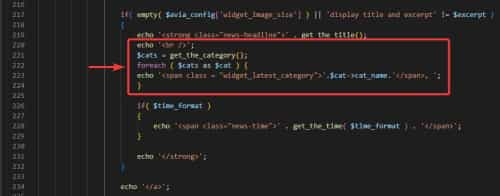
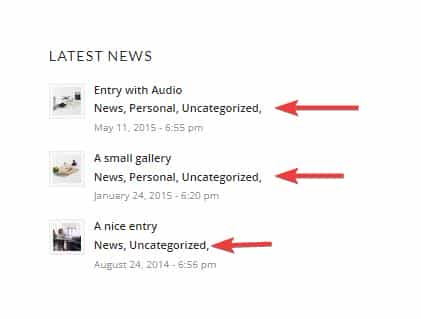
    Thank you for your patience, the file to edit to add the categories to the Latest News widget is:
    /wp-content/themes/enfold/framework/php/widgets/widget-classes/class-avia-newsbox.php
    on line 219 (v5.5) look for:
    echo '<strong class="news-headline">' . get_the_title();
    below this add:

    echo '<br />';
    $cats = get_the_category();
    foreach ( $cats as $cat ) {
    echo '<span class = "widget_latest_category">'.$cat->cat_name.'</span> ';
    }

    Enfold_Support_789.jpeg
    Enfold_Support_791.jpeg
    If you don’t want the date to show place two slashes before the line echo '<span class="news-time">' . get_the_time( $time_format ) . '</span>'; like this: //echo '<span class="news-time">' . get_the_time( $time_format ) . '</span>';
    Typically files in the /framework/ directory can not be added to a child theme and copying the function directly to the child theme functions.php was not successful.

    Best regards,
    Mike

    #1403266

    In reply to: Change Shop #2

    Hi Mike,

    > Try changing the di in the function that gets the label
    I have try, and I get the following error:
    Parse error: syntax error, unexpected ‘di’ (T_STRING), expecting ‘;’ or ‘,’ in /Volumes/T7/sitimamp/clueb/wp-content/themes/enfold-child/functions.php on line 103

    and on line 103, I have this:
    echo '<p>' di ': ' . $value . '</p>';

    Best regards
    Oriano

    Yes, please do what you need to.
    I received this alert when you were logged into the staging server earlier today (est), indicating that the custom panel was still not loading. So it seems the error did occur for you but not sure why you state you can’t replicate the problem:
    ——-
    WordPress has a built-in feature that detects when a plugin or theme causes a fatal error on your site, and notifies you with this automated email.

    In this case, WordPress caught an error with your theme, Enfold.

    First, visit your website (https://luxuriant-robot.flywheelstaging.com/) and check for any visible issues. Next, visit the page where the error was caught (https://luxuriant-robot.flywheelstaging.com/wp-admin/customize.php?return=%2Fwp-admin%2Fthemes.php) and check for any visible issues.

    Please contact your host for assistance with investigating this issue further.

    If your site appears broken and you can’t access your dashboard normally, WordPress now has a special “recovery mode”. This lets you safely login to your dashboard and investigate further.

    https://luxuriant-robot.flywheelstaging.com/wp-login.php?action=enter_recovery_mode&rm_token=0gGcdMeIz1zFwQc1LKjO7v&rm_key=pRhHJUQN6ifZr4f1OqPbY5

    To keep your site safe, this link will expire in 1 day. Don’t worry about that, though: a new link will be emailed to you if the error occurs again after it expires.

    When seeking help with this issue, you may be asked for some of the following information:
    WordPress version 6.2
    Active theme: Enfold Child (version 4.7.6.4.1623028560)
    Current plugin: (version )
    PHP version 8.1.17

    Error Details
    =============
    An error of type E_ERROR was caused in line 144 of the file /www/wp-content/themes/enfold/framework/php/widgets/widget-classes/class-avia-mailchimp.php. Error message: Uncaught TypeError: strip_tags(): Argument #1 ($string) must be of type string, stdClass given in /www/wp-content/themes/enfold/framework/php/widgets/widget-classes/class-avia-mailchimp.php:144
    Stack trace:
    #0 /www/wp-content/themes/enfold/framework/php/widgets/widget-classes/class-avia-mailchimp.php(144): strip_tags(Object(stdClass))
    #1 /wordpress/wp-includes/class-wp-widget.php(535): aviaFramework\widgets\avia_mailchimp_widget->form(Array)
    #2 /wordpress/wp-admin/includes/widgets.php(274): WP_Widget->form_callback(Array)
    #3 /wordpress/wp-includes/class-wp-customize-widgets.php(1148): wp_widget_control(Array, Array)
    #4 /wordpress/wp-includes/class-wp-customize-widgets.php(1167): WP_Customize_Widgets->get_widget_control(Array)
    #5 /wordpress/wp-includes/customize/class-wp-widget-form-customize-control.php(117): WP_Customize_Widgets->get_widget_control_parts(Array)
    #6 /wordpress/wp-includes/class-wp-customize-control.php(337): WP_Widget_Form_Customize_Control->to_json()
    #7 /wordpress/wp-includes/class-wp-customize-manager.php(5000): WP_Customize_Control->json()
    #8 /wordpress/wp-includes/class-wp-hook.php(308): WP_Customize_Manager->customize_pane_settings(”)
    #9 /wordpress/wp-includes/class-wp-hook.php(332): WP_Hook->apply_filters(NULL, Array)
    #10 /wordpress/wp-includes/plugin.php(517): WP_Hook->do_action(Array)
    #11 /wordpress/wp-admin/customize.php(302): do_action(‘customize_contr…’)
    #12 {main}
    thrown

    • This reply was modified 3 years ago by Debrankin.

    Hey Illingco,
    Thanks for your patience and the link to your site, as I understand your question you would like to add a full-width sub-menu element to all of your single product pages.
    First you will need the shortcode for the full-width sub-menu element, to get this Enable the Avia Layout Builder Debugger and on a new page use the Advanced Layout Builder to create your full-width sub-menu element, then in the debugger field below the ABL you will see the shortcode, save this to a plain text editor and discard the page. Then remove any line breaks in the shortcode and add it to this function in your child theme functions.php:

    add_action('ava_after_main_container', 'ava_after_main_title_mod');
    function ava_after_main_title_mod() {
    	if(is_product()) {
    		echo do_shortcode("[your submenu shortcode here]");
    	}
    }

    The expected results
    Enfold_Support_787.jpeg

    Best regards,
    Mike

    Hi,
    For the pagination your site rayball.co.uk/blog/ the site is using Enfold v3.3.2 with WordPress v5.1.15, this version of Enfold doesn’t support WP v5+ and needs to be updated, thus the cause for the pagination issue.
    The four sites you listed above range in versions between v3.3.2 & 4.2.6 all of these will need to be manually updated following the steps I posted earlier.
    I see that you have posted that you purchased a new license please register for the support forum here and open a new support thread here.

    Best regards,
    Mike

    #1403155

    In reply to: Warning error on PHP

    Hi Nikko

    Unfortunately, the issue isn’t solved.

    Are you able to see what causes the problem as the warning tells that the issue can be found here: /var/www/scan3d.dk/public_html/wp-content/themes/enfold/config-templatebuilder/avia-template-builder/php/class-asset-manager.php on line 1175

    Bedt regards,
    Maja

    #1403140

    In reply to: Warning error on PHP

    Had some similar issue and tried;
    downgrade PHP 8.2 to 7.4, looked good, but just for a short time.
    Today we uploaded a backup of the website in other ftp file. This brought me back to WP 6.1.1. After updating to 6.2 again, same error occurred.
    Finally I update Enfold 5.4 to 5.5 and there came an error in den WordPress backend themes:
    enfold/config-wordpress-seo/wpseo-mod.min.js
    Then I thought, maybe the download of the theme 5.5 was broken,
    so I started a new download of the theme enfold 5.5 again on themeforest right now.
    Installed again, voila, currently no error messages.

    I m still curious, what caused this stuff?
    Thanks

    #1403117

    Topic: Warning error on PHP

    in forum Enfold
    majabhjorth
    Participant

    Hi Kriesi

    I have an error on my website:
    Warning: Creating default object from empty value in /var/www/scan3d.dk/public_html/wp-content/themes/enfold/config-templatebuilder/avia-template-builder/php/class-asset-manager.php on line 1175

    It doesn’t seem like it’s something I can fix myself as it is an error on the PHP. Can you help me solve it?
    After the error showed up this morning, the favicon on the same webpage has been replaced with WordPress’. Maybe there is a connection between that and the error?

    I’m looking forward to hear from you.
    Best regards,
    Maja

    #1403079

    Hi,

    Thank you for the update.

    We modified the code in the functions.php file a bit and added another filter to allow execution of theme shortcodes outside the builder. This is the modified code.

    add_action("woocommerce_before_main_content", function() {
       echo do_shortcode("[av_submenu which_menu='' menu='58' position='center' sticky='aviaTBsticky' color='main_color' mobile='disabled' mobile_switch='av-switch-768' alb_description='' id='' custom_class='' template_class='' av_uid='av-ldyiqu1t' sc_version='1.0'] [av_submenu_item title='Élément 1 de menu' button_style='' link='' linktarget='' av_uid='av-gb0n7' sc_version='1.0'] [av_submenu_item title='Élément 2 de menu' button_style='' link='' linktarget='' av_uid='av-bn1kr' sc_version='1.0'] [/av_submenu]");
    }, 20);
    
    function avf_custom_exec_sc_only_mod( $exec_sc_only, $obj_sc, $atts, $content, $shortcodename, $fake ) {
    	return true;
    }
    
    add_filter( 'avf_alb_exec_sc_only', 'avf_custom_exec_sc_only_mod', 10, 6 );
    

    The submenu is now displaying correctly in the single product page but it might require a few css adjustments.

    Best regards,
    Ismael

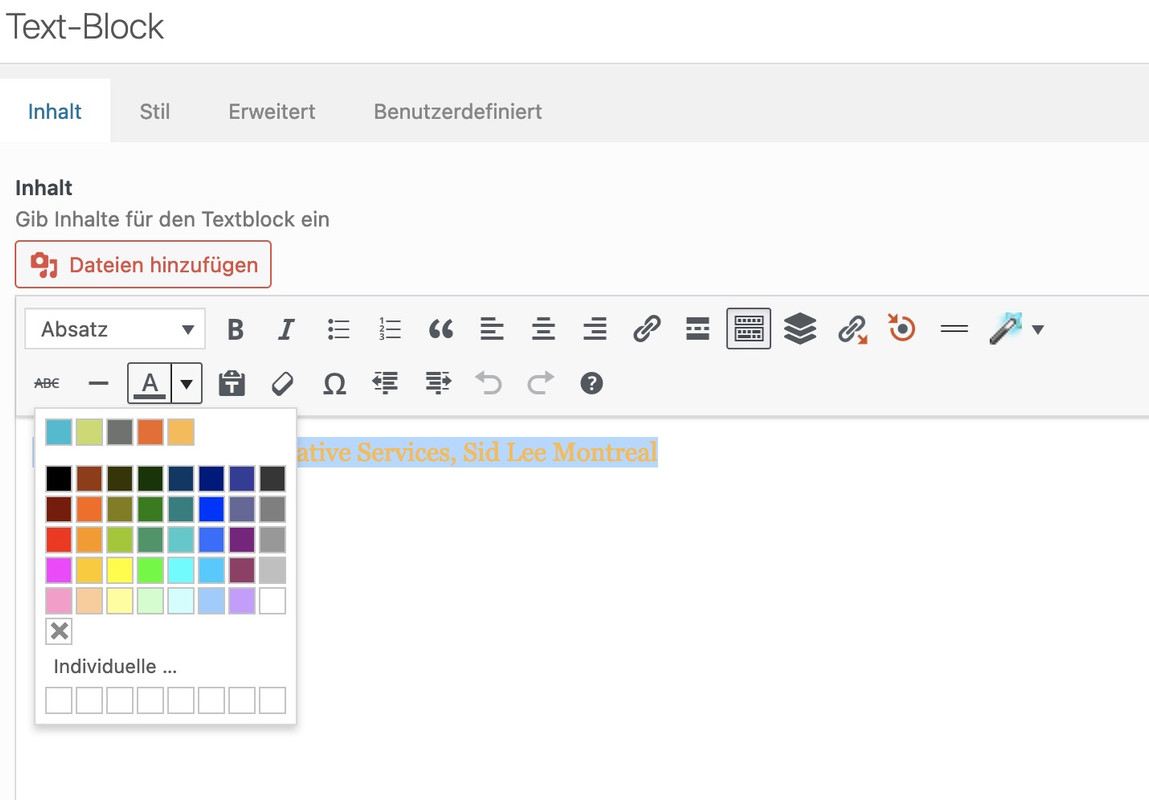
    haha – sorry for the font colors in a text-block ( tiny-mce ) this is not a full solution – i will have a look to add there an additional row …

    not as easy as one two three – but if you like :
    this comes to child-theme functions.php:

    // Custom theme colors ( max 8 - notation without #  but a name seems to be mandatory )
    $avia_custom_colors = array(
    	'14bed2' => __( 'Primary blue', 'avia' ),
    	'cadd69' => __( 'Primary green', 'avia' ),
    	'70736f' => __( 'Primary gray', 'avia' ),
    	'f26722' => __( 'Secondary orange', 'avia' ),
    	'fdbb4a' => __( 'Secondary yellow', 'avia' ),
    );
    
    /**
     * Customize TinyMCE text color picker.
     * Filter: tiny_mce_before_init
     *
     * @param  array $init Initialiation array for TinyMCE
     * @return array
     */
    function avia_set_colors_tinymce( $init ) {
    	global $avia_custom_colors;
    
    	/**
    	 * Array to hold custom colors.
    	 * Note that this not an associative array.
    	 * Each color takes up two array elements.
    	 */
    	$colors_custom = array();
    	foreach ( $avia_custom_colors as $color => $label ) {
    		$colors_custom[] = $color;
    		$colors_custom[] = $label;
    	}
    
    	/**
    	 * I like the custom colors to take up the entire
    	 * first row. However, if there are only a few colors,
    	 * the color picker becomes too narrow and tall,
    	 * so this adds blank squares to help stretch it out.
    	 * This block can be removed if you don't want placeholders
    	 */
    	$_num_of_cols = 8;
    	while ( count( $colors_custom ) / 2 < $_num_of_cols ) {
    		$colors_custom[] = '_hide';
    		$colors_custom[] = '';
    	}
    	
    	/**
    	 * Original colors.
    	 * @see wp-includes/js/timemce/langs/wp-langs-en.js
    	 */
    	$colors_original = array( '000000', 'Black', '993300', 'Burnt orange', '333300', 'Dark olive', '003300', 'Dark green', '003366', 'Dark azure', '000080', 'Navy Blue', '333399', 'Indigo', '333333', 'Very dark gray', '800000', 'Maroon', 'FF6600', 'Orange', '808000', 'Olive', '008000', 'Green', '008080', 'Teal', '0000FF', 'Blue', '666699', 'Grayish blue', '808080', 'Gray', 'FF0000', 'Red', 'FF9900', 'Amber', '99CC00', 'Yellow green', '339966', 'Sea green', '33CCCC', 'Turquoise', '3366FF', 'Royal blue', '800080', 'Purple', '999999', 'Medium gray', 'FF00FF', 'Magenta', 'FFCC00', 'Gold', 'FFFF00', 'Yellow', '00FF00', 'Lime', '00FFFF', 'Aqua', '00CCFF', 'Sky blue', '993366', 'Brown', 'C0C0C0', 'Silver', 'FF99CC', 'Pink', 'FFCC99', 'Peach', 'FFFF99', 'Light yellow', 'CCFFCC', 'Pale green', 'CCFFFF', 'Pale cyan', '99CCFF', 'Light sky blue', 'CC99FF', 'Plum', 'FFFFFF', 'White', );
    	
    	// Create complete colors array with custom and original colors
    	$colors = array_merge( $colors_custom, $colors_original );
    
    	/**
    	 * Begin textcolor parameters for TinyMCE plugin.
    	 * @link https://www.tinymce.com/docs/plugins/textcolor/
    	 */
    	$init['textcolor_map'] 	= json_encode( $colors );
    
    	/**
    	 * Colors are displayed in a grid of columns and rows.
    	 * Set the number of columns to match the number of custom colors,
    	 * this way our colors make up the first row so they're easier to identify quickly.
    	 * Halve the count since each color has two array entries.
    	 */
    	$init['textcolor_cols'] = count( $colors_custom ) / 2;
    	
    	// Set number of rows
    	$init['textcolor_rows'] = ceil( ( ( count( $colors ) / 2 ) + 1 ) / $init['textcolor_cols'] );
    	
    	return $init;
    }
    add_filter( 'tiny_mce_before_init', 'avia_set_colors_tinymce' );
    
    /**
     * Adjust TinyMCE custom color styling grid
     * Action: admin_head
     */
    function avia_style_custom_colors_timymce () { ?>
    	<style type="text/css">
    		/* Add padding after first row */
    		.mce-colorbutton-grid tr:first-of-type td {
    			padding-bottom: 10px;
    		}
    
    		/* Hide the filler blocks */
    		.mce-colorbutton-grid tr:first-of-type td div[data-mce-color="#_hide"] {
    			visibility: hidden;
    		}
    
    		/* Fix spacing issue with the "transparent" block */
    		.mce-colorbtn-trans div {
    		    line-height: 11px !important;
    		}
    	</style>
    <?php }
    add_action( 'admin_head', 'avia_style_custom_colors_timymce' );
    
    /**
     * Customize Iris color picker.
     * Inspired by @link https://wordpress.org/plugins/iris-color-picker-enhancer/
     * Action: admin_footer, customize_controls_print_footer_scripts
     */
    function avia_set_colors_iris() {
    	global $avia_custom_colors;
    	
    	if ( wp_script_is( 'wp-color-picker', 'enqueued' ) ) : ?>
    		<script type="text/javascript">
    			jQuery.wp.wpColorPicker.prototype.options = {
    				palettes: [
    					<?php foreach ( array_keys( $avia_custom_colors ) as $color ) {
    						echo "'#$color',";
    					} ?>
    				]
    			};
    		</script>
    	<?php endif;
    }
    add_action( 'admin_footer', 'avia_set_colors_iris' );
    add_action( 'customize_controls_print_footer_scripts', 'avia_set_colors_iris' );
    #1402969
    Cliffy
    Participant

    I have a site I have been using since the early days of Enfold. It is big, over 2GB and most of this is down to images.

    WHY, when I upload an image that has been optimized by Shortpixel to 67KB does Enfold create another 14 variations totalling 3.887MB?

    This costs server space, and inodes space and leaves less room on any hosting platform.

    Please, after all this time, can you introduce a feature to overcome this in the user interface? I don’t want to have to mess around with config files, or PHP hacks etc. It should be in the options surely?

    Suggesting other plugins to manage this should not be necessary. Elementor does not do this, why does Enfold?

    #1402892

    Hey,

    You are not forced to edit the footer.php to remove the backlink. As @guenni007 pointed it out and as documented on our documentation (https://kriesi.at/documentation/enfold/footer/#copyrights-info) you can simply add [nolink] shortcode to remove it.


    @Guenni007
    Thanks as always! :)

    Best regards,
    Yigit

    Hi Mike.
    Ok… some headway… I redid the recording for out hosting company, recreating the problem after deleting the cache etc… so updated video link is in the private area.

    The hosting company then compared the video you the logs and found a fatal PHP error. Here is the code:

    https://p29.zdusercontent.com/attachment/14776431/SWjV5LxX4jWOjyNK11LgeFawB?token=eyJhbGciOiJkaXIiLCJlbmMiOiJBMTI4Q0JDLUhTMjU2In0..EhNZ9YynQq6YwKm6bPnecg.67TALKtRNlCgge2KNEsLRu3nGtrY-qyZKddvv2Hqea2bcQsL4yVq-e-U786vmLkO3fX1ONicwvbGogWP2aGgMdDQE9V8-KuaanjGk1oOgTE6RzklgpyUWzscYU1uVyPj9Lc6Xb-K3tX9QUpVon0zaMuVCYde4HsTrbk9ficfdhznIzwfELtz2I0_ZRjUrrZmHCelNexKZXdS4fwcEw7-5zBirKZvGUO5q4L3vHJUO1TCcoyZk38ICjK6XvtduztgjZzLUBspwWAOD7rT1IWrwFyYWKyi6Kri6K5_vKtCr-wGF_BwecrQtznOcSqKN1o_.hdnr309gQH1Yce96k8RZ0A

    I am not a coder, but it SEEMS it is being created from the Enfold theme?
    [EDITED]I also see something about “Email Preferences” shortcodes there, so deleted a gravity form of that name, just in case[/Edited]

    • This reply was modified 3 years ago by inlinks.

    Hi,

    You can try @Guenni007’s recommendation above and use css to create the colored bar, but if you want to continue with the previous solution, try to replace get_footer hook with the ava_before_footer hook as suggested above. This is one of the template hooks in the footer.php file.

    Best regards,
    Ismael

    Debrankin
    Participant

    production: https://natureslogic.com/ (I’ve included admin access credentials)
    staging: https://luxuriant-robot.flywheelstaging.com/

    the following issues occur both on staging and production sites. I want to resolve this on staging since that will be pushed to production in a few weeks.

    https://luxuriant-robot.flywheelstaging.com/wp-admin/customize.php?url=https%3A%2F%2Fnatureslogic.com%2Fdealer-resources%2F

    customize panel not loading. this is the email i recieve (using wordfence plugin)

    WordPress caught an error with your theme, Enfold. First, visit your website (https://luxuriant-robot.flywheelstaging.com/) and check for any visible issues. Next, visit the page where the error was caught (https://luxuriant-robot.flywheelstaging.com/wp-admin/customize.php?url=https%3A%2F%2Fluxuriant-robot.flywheelstaging.com%2Fproduct%2Ffeline-can-turkey%2F) and check for any visible issues. Please contact your host for assistance with investigating this issue further. If your site appears broken and you can’t access your dashboard normally, WordPress now has a special “recovery mode”. This lets you safely login to your dashboard and investigate further. https://luxuriant-robot.flywheelstaging.com/wp-login.php?action=enter_recovery_mode&rm_token=NIus2JQxg513FGtOgHNO8r&rm_key=o2H1zY6J6ngTRzq4t6l32L

    WordPress version 6.1.1 Active theme: Enfold Child (version 4.7.6.4.1623028560) Current plugin: (version ) PHP version 8.1.17 Error Details

    ============= An error of type E_ERROR was caused in line 144 of the file /www/wp-content/themes/enfold/framework/php/widgets/widget-classes/class-avia-mailchimp.php. Error message: Uncaught TypeError: strip_tags(): Argument #1 ($string) must be of type string, stdClass given in /www/wp-content/themes/enfold/framework/php/widgets/widget-classes/class-avia-mailchimp.php:144 Stack trace: #0 /www/wp-content/themes/enfold/framework/php/widgets/widget-classes/class-avia-mailchimp.php(144): strip_tags(Object(stdClass)) #1 /wordpress/wp-includes/class-wp-widget.php(535): aviaFramework\widgets\avia_mailchimp_widget->form(Array) #2 /wordpress/wp-admin/includes/widgets.php(274): WP_Widget->form_callback(Array) #3 /wordpress/wp-includes/class-wp-customize-widgets.php(1128): wp_widget_control(Array, Array) #4 /wordpress/wp-includes/class-wp-customize-widgets.php(1147): WP_Customize_Widgets->get_widget_control(Array) #5 /wordpress/wp-includes/customize/class-wp-widget-form-customize-control.php(117): WP_Customize_Widgets->get_widget_control_parts(Array) #6 /wordpress/wp-includes/class-wp-customize-control.php(337): WP_Widget_Form_Customize_Control->to_json() #7 /wordpress/wp-includes/class-wp-customize-manager.php(4985): WP_Customize_Control->json() #8 /wordpress/wp-includes/class-wp-hook.php(308): WP_Customize_Manager->customize_pane_settings(”) #9 /wordpress/wp-includes/class-wp-hook.php(332): WP_Hook->apply_filters(NULL, Array) #10 /wordpress/wp-includes/plugin.php(517): WP_Hook->do_action(Array) #11 /wordpress/wp-admin/customize.php(292): do_action(‘customize_contr…’) #12 {main} throwntMgxH5VeEWBZpflh7lgRY4UPD3y9RafrqrrJ51uwgcMspI0NA_gzfPtaWpvYidnjsNigSMVj3UTMMEmLjLSDVX0pd96BHZ5KHq9SLgKXDc5QYIPgFwvUOCyzaCo3vETZGG3CXBF6v6rYQoLdzj5XlUQAD0XQawe601b0QVuj1frD94PtI6U.gif”

    widgets appear normally on the front end, but widget panel in admin is non-responsive:
    https://luxuriant-robot.flywheelstaging.com/widgets.php

    I’ve disabled all plugins – and the issues don’t resolve.

    When I switch to a different theme – in this case twenty-twenty, the issues are resolved (with plugins activated, not disabled).

    when going into WP recovery mode. Enfold theme and child theme don’t load, with error that the installation of theme isn’t complete.

    Please advise. https://getflywheel.com is the host

    • This topic was modified 3 years ago by Debrankin.
    #1402819
    guychalk
    Participant

    We are using LearnDash and wanted to use the Advanced Layout Builder in the LearnDash custom post types. From the forums we’ve installed this code in functions.php:

    * Adds the Avia layout builder to Learndash custom post types
    **/
    function avf_alb_supported_post_types_mod( array $supported_post_types )
    {
    $supported_post_types[] = ‘sfwd-lessons’;
    $supported_post_types[] = ‘sfwd-courses’;
    $supported_post_types[] = ‘sfwd-topic’;
    return $supported_post_types;
    }
    add_filter(‘avf_alb_supported_post_types’, ‘avf_alb_supported_post_types_mod’, 10, 1);
    // end of function that adds the avia layout builder to Learndash

    But we don’t see the last two element tabs in the editor (Content and Media) – this is what we see the link:
    https://nam02.safelinks.protection.outlook.com/?url=https%3A%2F%2Fdocs.google.com%2Fdocument%2Fd%2F1XTQhP-d3zMc1mHlSCpAzgFt1xoHZIh2m3r9RHuLP6Pk%2Fedit%3Fusp%3Dsharing&data=05%7C01%7Cgchalk%40jhu.edu%7Cab28263923e745be064408db2fbe6364%7C9fa4f438b1e6473b803f86f8aedf0dec%7C0%7C0%7C638156266978271313%7CUnknown%7CTWFpbGZsb3d8eyJWIjoiMC4wLjAwMDAiLCJQIjoiV2luMzIiLCJBTiI6Ik1haWwiLCJXVCI6Mn0%3D%7C3000%7C%7C%7C&sdata=QZxPobAEYjg4Z1R9EDzDbtKnqqpPFgXajtNa31n7MDY%3D&reserved=0

    #1402764

    In reply to: Referrer Policy

    … I explained the following:
    We use a form from active activecampaign. https://professional-software.net/lpwebinar/
    In the past with another themes it worked fine.
    I had tested without any theme it works fine.
    With enfold theme it doesn’t work in chrome.

    The problem is that the send button action will blocked from Referrer Policy.
    Here the request:
    Request URL: https://professional-software.activehosted.com/proc.php?u=27&f=27&s=&c=0&m=0&act=sub&v=2&or=99d18d848edd01350ef8cdeef20a9d56&firstname=m&email=m.stoll%40outlook.de&jsonp=true

    I can’t not send an screen shot to you.
    I can’t show my problem vie remote control.

    OK how we can go on?

    #1402723

    Hi,

    A lot of sites made with Enfold score quite well on the page speed testing tool as long as the site is properly optimized and is hosted on a decent server. The speed of the site largely depends on the performance optimizations and the specifications of the server.

    Is the site hosted on a shared server? If it is on a shared server, then you won’t be able to access your own PHP configuration file or upgrade the site dependencies. You may need to upgrade to a dedicated server or move to a managed hosting platform such as Flywheel or Kinsta.

    Best regards,
    Ismael

    #1402693

    The question I asked:
    I have now purchased several themes and even with all the extra functionallities disabled, the site speed is still fairly slow. According to ‘Enfold-support’, my server is not serving the theme and the issue could be resolved via PHP.ini file (https://kriesi.at/support/topic/sitespeed-slow-ttfb-10-seconds/). Can you indicate where I can find this file?

    The answer I received for my hosting provider:
    ” The code of your website is too heavy. You have to simplify the forwarded code because it is too heavy for the visitor the first time they visit the website. https://gtmetrix.com/reduce-initial-server-response-time.html Keep the server response time for the main document short because all other requests depend on it. Learn how to improve this Consider using a plugin like WP Rocket to significantly reduce server response time » I see that the hosting is also on php 7.4, maybe the code can be changed to 8.2 since 7.4 will soon be unavailable.

    So here’s what I’m going to do:
    As I have tried multiple PHP version, multiple themes along the way and because of the poor support I’m getting, I’m going to look for a new hosting provider.
    Tips are welcome (for an example: focus on more than 100MB MySQL hosting)

    Best regards,

    #1402659
    maryenvato
    Participant

    Hi,
    after theme update ( now we have 5.5), we can’t upgrade PHP to 8.1.17, in private content the errors.
    Can you tell me why i receive this errors.

    Looking forward hearing from you.
    Best regards
    MS

    #1402492

    Hey Anna_Tewes,
    Perhaps a button like this:
    Enfold_Support_729.jpeg
    Try adding this code to the end of your child theme functions.php file in Appearance ▸ Editor:

    function custom_script() { ?>
      <script>
    window.addEventListener('DOMContentLoaded', function() {
      (function($){
      var button = $('<div id="customButton" class="avia-button-wrap av-lfo8bepl-f0ac6d7c934e9f180b74755360f479e5-wrap avia-button-center  avia-builder-el-0  avia-builder-el-no-sibling "><a href="" class="avia-button  avia-icon_select-no avia-size-medium avia-position-center avia-color-dark"><span class="avia_iconbox_title">Overview</span></a></div>');
      $(button).prependTo('body');
      })(jQuery);
    });
    </script>
      <?php
    }
    add_action('wp_footer', 'custom_script');

    and add this css at Enfold Theme Options ▸ General Styling ▸ Quick CSS field:

    #customButton {
        position: fixed;
        top: 7%;
        right: 12%;
        z-index: 503;
    }
    

    If you need any help adjusting for your site please include an admin login in the Private Content area so we can be of more assistance.

    Best regards,
    Mike

    #1402484

    In reply to: Blog issues

    Hey NoraGTS,
    To add a sidebar to your category page, aka archive page, please set it at Enfold Theme Options ▸ Sidebar Settings ▸ Sidebar On Archive Pages
    Enfold_Support_727.jpeg
    To change the font family of the blog category links try this css:

    #top .blog-categories.minor-meta {
    	font-family: open-sans;
    }

    To change the news widget (sidebar & footer) to the lighter font weight you are using elsewhere, try adding this code to the end of your child theme functions.php file in Appearance ▸ Editor:

    function change_strong_tag_to_span_for_news_widget() { ?>
      <script>
    (function($) {
      $(function() {
        function replaceElementTag(targetSelector, newTagString) {
          $(targetSelector).each(function(){
            var newElem = $(newTagString, {html: $(this).html()});
            $.each(this.attributes, function() {
              newElem.attr(this.name, this.value);
            });
            $(this).replaceWith(newElem);
          });
        }
        replaceElementTag('strong.news-headline', '<span></span>');
      });
    }(jQuery)); 
    </script>
      <?php
    }
    add_action('wp_footer', 'change_strong_tag_to_span_for_news_widget');

    The add this css:

    #top .main_color .widget a .news-headline,
    #top .news-headline .news-time {
        font-weight: lighter;
        color: #567483;
    }
    #footer .news-headline,
    #footer .news-headline .news-time {
        font-weight: lighter;
    }

    To change Weiterlesen to MEHR ERFAHREN try adding this code to the end of your child theme functions.php file in Appearance ▸ Editor:

    
    function my_text_strings( $translated_text, $text, $domain ){
      switch ( $translated_text ){
          case 'Weiterlesen'    :  $translated_text = __( 'MEHR ERFAHREN', $domain ); break;
        }
        return $translated_text;
      }
    add_filter('gettext', 'my_text_strings', 20, 3);

    Best regards,
    Mike

    #1402465

    Hi,
    Thanks for the screenshots, please try this solution by adding this code to the end of your child theme functions.php file in Appearance ▸ Editor:

    add_filter( 'woocommerce_ajax_variation_threshold', 'wc_ninja_ajax_threshold' );
    function wc_ninja_ajax_threshold() {
        return 100;
    }

    If this doesn’t help please include an admin login in the Private Content area so we can be of more assistance.

    Best regards,
    Mike

    Hi Yigit.
    Hope you are doing well.

    I have bought the new theme for S-Word-AI.com :)
    And will load it as soon as I’ve worked out if I can upgrade Plesk to automatically install the newest version of PHP from 7.3 to 8.1

    But, I cant work out how to start a new support thread on https://kriesi.at/support/

    I want to know about the question above and how to work out which of my previously bought licences are for which website and how to find or get real API keys for them, and how to upgrade them.

    Let me know if I need to open a new thread or if its best to keep chatting on this one?

    Best Regards
    Nick Ray Ball

    As well as the new website S-World-AI.com – that we have spoken about so far.

    I need to upgrade the theme on http://www.rayball.co.uk (and other sites)
    The server is upgrading PHP to 7.4

    Must I buy a new theme to get the latest version?
    Or can I upgrade the old theme?

    Any landmines I should expect trying to get an old 2015 theme 3.3.2 website upgraded to a new theme?
    Can a paid support package help with this type of question?

Viewing 30 results - 1,441 through 1,470 (of 16,891 total)