

-
AuthorPosts
-
March 20, 2023 at 12:42 pm #1401773
Hi Please assist with this.
Your text block is wrapped in a section tag. as well as a heading is wrapped in a section tag as well.
This is not semantically correct, as it stuff up the HTML structure of the site.
Thank you.
March 20, 2023 at 7:07 pm #1401819Hey ermington,
I’m not sure what you are referring to, or what you need to remove? A link to where we can see the actual problem would be a good place to start.
Best regards,
RikardMarch 30, 2023 at 10:43 pm #1403045Sorry for the Intermission: Unfortunately, your other topic is already closed. Link
Of course Enfold has a solution for this – under : Layout Builder – Custom Color Palette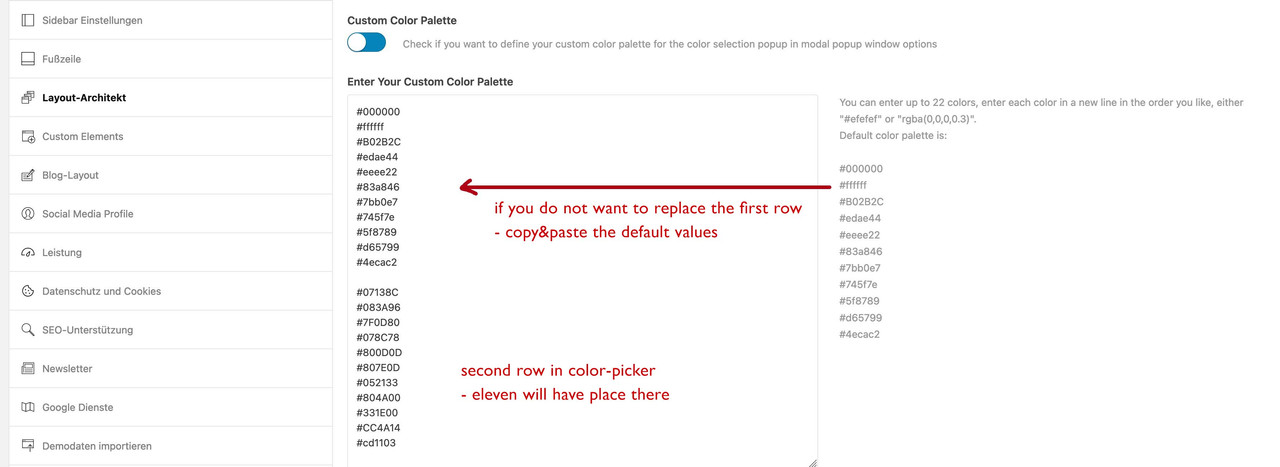 March 30, 2023 at 10:58 pm #1403048
haha – sorry for the font colors in a text-block ( tiny-mce ) this is not a full solution – i will have a look to add there an additional row …
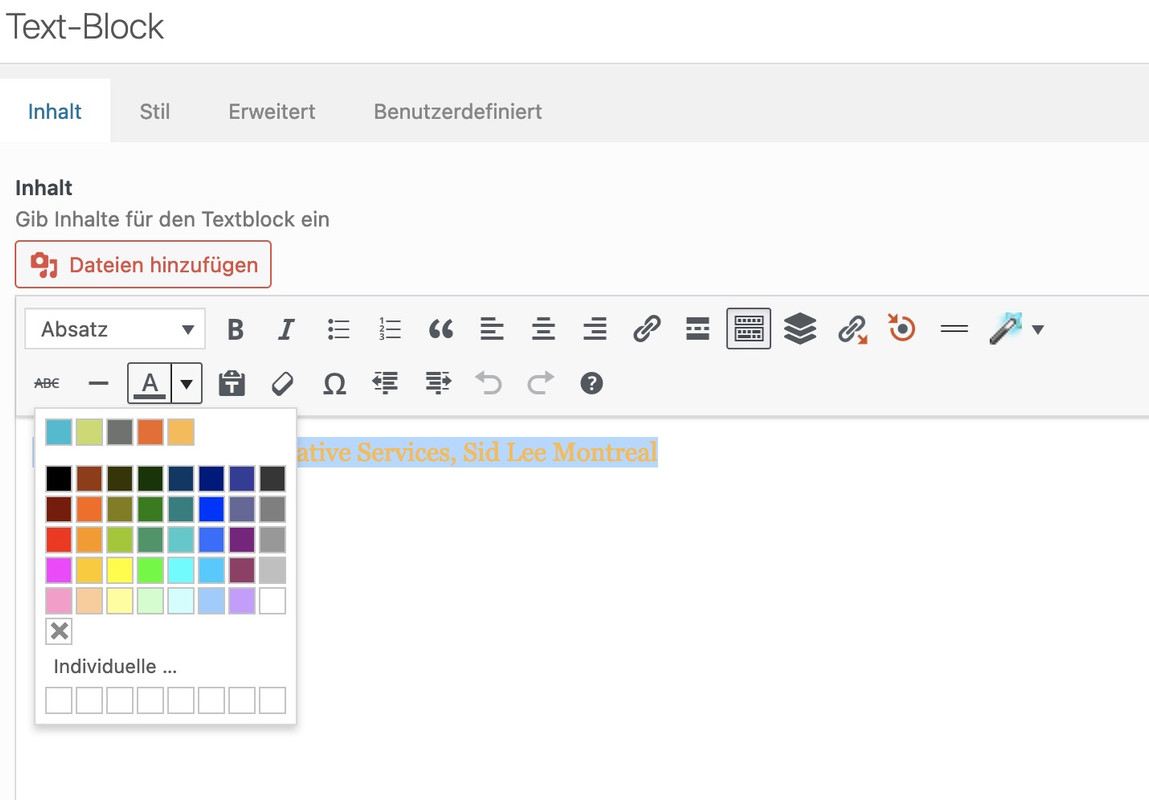
not as easy as one two three – but if you like :
this comes to child-theme functions.php:// Custom theme colors ( max 8 - notation without # but a name seems to be mandatory ) $avia_custom_colors = array( '14bed2' => __( 'Primary blue', 'avia' ), 'cadd69' => __( 'Primary green', 'avia' ), '70736f' => __( 'Primary gray', 'avia' ), 'f26722' => __( 'Secondary orange', 'avia' ), 'fdbb4a' => __( 'Secondary yellow', 'avia' ), ); /** * Customize TinyMCE text color picker. * Filter: tiny_mce_before_init * * @param array $init Initialiation array for TinyMCE * @return array */ function avia_set_colors_tinymce( $init ) { global $avia_custom_colors; /** * Array to hold custom colors. * Note that this not an associative array. * Each color takes up two array elements. */ $colors_custom = array(); foreach ( $avia_custom_colors as $color => $label ) { $colors_custom[] = $color; $colors_custom[] = $label; } /** * I like the custom colors to take up the entire * first row. However, if there are only a few colors, * the color picker becomes too narrow and tall, * so this adds blank squares to help stretch it out. * This block can be removed if you don't want placeholders */ $_num_of_cols = 8; while ( count( $colors_custom ) / 2 < $_num_of_cols ) { $colors_custom[] = '_hide'; $colors_custom[] = ''; } /** * Original colors. * @see wp-includes/js/timemce/langs/wp-langs-en.js */ $colors_original = array( '000000', 'Black', '993300', 'Burnt orange', '333300', 'Dark olive', '003300', 'Dark green', '003366', 'Dark azure', '000080', 'Navy Blue', '333399', 'Indigo', '333333', 'Very dark gray', '800000', 'Maroon', 'FF6600', 'Orange', '808000', 'Olive', '008000', 'Green', '008080', 'Teal', '0000FF', 'Blue', '666699', 'Grayish blue', '808080', 'Gray', 'FF0000', 'Red', 'FF9900', 'Amber', '99CC00', 'Yellow green', '339966', 'Sea green', '33CCCC', 'Turquoise', '3366FF', 'Royal blue', '800080', 'Purple', '999999', 'Medium gray', 'FF00FF', 'Magenta', 'FFCC00', 'Gold', 'FFFF00', 'Yellow', '00FF00', 'Lime', '00FFFF', 'Aqua', '00CCFF', 'Sky blue', '993366', 'Brown', 'C0C0C0', 'Silver', 'FF99CC', 'Pink', 'FFCC99', 'Peach', 'FFFF99', 'Light yellow', 'CCFFCC', 'Pale green', 'CCFFFF', 'Pale cyan', '99CCFF', 'Light sky blue', 'CC99FF', 'Plum', 'FFFFFF', 'White', ); // Create complete colors array with custom and original colors $colors = array_merge( $colors_custom, $colors_original ); /** * Begin textcolor parameters for TinyMCE plugin. * @link https://www.tinymce.com/docs/plugins/textcolor/ */ $init['textcolor_map'] = json_encode( $colors ); /** * Colors are displayed in a grid of columns and rows. * Set the number of columns to match the number of custom colors, * this way our colors make up the first row so they're easier to identify quickly. * Halve the count since each color has two array entries. */ $init['textcolor_cols'] = count( $colors_custom ) / 2; // Set number of rows $init['textcolor_rows'] = ceil( ( ( count( $colors ) / 2 ) + 1 ) / $init['textcolor_cols'] ); return $init; } add_filter( 'tiny_mce_before_init', 'avia_set_colors_tinymce' ); /** * Adjust TinyMCE custom color styling grid * Action: admin_head */ function avia_style_custom_colors_timymce () { ?> <style type="text/css"> /* Add padding after first row */ .mce-colorbutton-grid tr:first-of-type td { padding-bottom: 10px; } /* Hide the filler blocks */ .mce-colorbutton-grid tr:first-of-type td div[data-mce-color="#_hide"] { visibility: hidden; } /* Fix spacing issue with the "transparent" block */ .mce-colorbtn-trans div { line-height: 11px !important; } </style> <?php } add_action( 'admin_head', 'avia_style_custom_colors_timymce' ); /** * Customize Iris color picker. * Inspired by @link https://wordpress.org/plugins/iris-color-picker-enhancer/ * Action: admin_footer, customize_controls_print_footer_scripts */ function avia_set_colors_iris() { global $avia_custom_colors; if ( wp_script_is( 'wp-color-picker', 'enqueued' ) ) : ?> <script type="text/javascript"> jQuery.wp.wpColorPicker.prototype.options = { palettes: [ <?php foreach ( array_keys( $avia_custom_colors ) as $color ) { echo "'#$color',"; } ?> ] }; </script> <?php endif; } add_action( 'admin_footer', 'avia_set_colors_iris' ); add_action( 'customize_controls_print_footer_scripts', 'avia_set_colors_iris' );April 1, 2023 at 11:55 am #1403183 -
AuthorPosts


- You must be logged in to reply to this topic.