
-
AuthorSearch Results
-
February 17, 2024 at 5:41 pm #1434587
In reply to: WordPress 6.4 & 6.4.1 – Unstable Environment
This reply has been marked as private.February 17, 2024 at 4:52 pm #1434581Topic: Error when activating theme
in forum Enfolddianelester29
ParticipantHi. When activating Enfold, I get this error: There has been a critical error on this website. Please check your site admin email inbox for instructions.
I reached out to my hosting company for help, and they can’t activate the theme either. He re-uploaded the files but can’t activate. His reply is below, suggested I reach out to you. I have used Enfold successfully on other sites, so not sure what is going on. Would appreciate any help. Thanks.
Hosting company reply:
I wasn’t able to get that theme to work either. Here are some of the errors it produces, in case you want to send them to the theme author:[17-Feb-2024 04:52:04 UTC] PHP Warning: require(/var/www/test.ginjohnacting.com/wp-content/themes/enfold/framework/php/widgets/class-widget-loader.php): Failed to open stream: No such file or directory in /var/www/test.ginjohnacting.com/wp-content/themes/enfold/framework/php/inc-autoconfig.php on line 222
[17-Feb-2024 04:52:04 UTC] PHP Warning: require(/var/www/test.ginjohnacting.com/wp-content/themes/enfold/framework/php/widgets/class-widget-loader.php): Failed to open stream: No such file or directory in /var/www/test.ginjohnacting.com/wp-content/themes/enfold/framework/php/inc-autoconfig.php on line 222
[17-Feb-2024 04:52:04 UTC] PHP Fatal error: Uncaught Error: Failed opening required ‘/var/www/test.ginjohnacting.com/wp-content/themes/enfold/framework/php/widgets/class-widget-loader.php’ (include_path=’.:/usr/share/pear’) in /var/www/test.ginjohnacting.com/wp-content/themes/enfold/framework/php/inc-autoconfig.php:222
Stack trace:0 /var/www/test.ginjohnacting.com/wp-content/themes/enfold/framework/avia_framework.php(38): require()
1 /var/www/test.ginjohnacting.com/wp-content/themes/enfold/functions.php(247): require_once(‘/var/www/test.g…’)
2 /var/www/test.ginjohnacting.com/wp-settings.php(611): include(‘/var/www/test.g…’)
3 /var/www/test.ginjohnacting.com/wp-config.php(94): require_once(‘/var/www/test.g…’)
4 /var/www/test.ginjohnacting.com/wp-load.php(50): require_once(‘/var/www/test.g…’)
5 /var/www/test.ginjohnacting.com/wp-admin/admin.php(34): require_once(‘/var/www/test.g…’)
6 /var/www/test.ginjohnacting.com/wp-admin/themes.php(10): require_once(‘/var/www/test.g…’)
7
thrown in /var/www/test.ginjohnacting.com/wp-content/themes/enfold/framework/php/inc-autoconfig.php on line 222February 16, 2024 at 7:08 pm #1434539Topic: Footer not displaying
in forum Enfoldamyncuih
ParticipantHello,
We are using an Enfold child theme. The footer on our dev site is not showing and displays this error code:
Warning: Undefined array key “footer_option” in /code/wp-content/themes/enfold/footer.php on line 35 Warning: Undefined array key “footer_behavior” in /code/wp-content/themes/enfold/footer.php on line 37 Warning: Undefined array key “footer_behavior” in /code/wp-content/themes/enfold/footer.php on line 288
February 15, 2024 at 9:56 pm #1434447In reply to: Failed to Decode Downloaded Font
Hi @Guenni007 !!
Thank you!! I just checked again and yes, the woff2 is there. There is also a charmap.php (that has all the codes) but it does work inside of Enfold. But does not exist when downloading from Fontello.
So the Failed to decode downloaded font message is due to the list of character codes and names not being on the config.json file and being in the charmap.php but nothing pointing to it?
Error message: The requested URL /wp-content/uploads/sites/22/avia_fonts/medical/config.json was not found on this server.
I think I am going to create my own icons ;)
February 15, 2024 at 4:27 pm #1434421In reply to: Enfold Front Page Problems
This reply has been marked as private.February 12, 2024 at 8:10 pm #1434106Topic: Update to 5.6.10 breaks all my widgets in footer
in forum Enfoldxuamox
ParticipantHi,
I have not updated the Enfold theme in a while and updating to 5.6.10 broke a custom HTML widget that I was using in the footer region and is not displaying anything now except a text msg that reads “Here are some interesting links for you! Enjoy your stay :)”
If I try and add any new widgets to the footer, none of them will be saved and updated on the website.
No Updates available. You are running the latest version! (5.6.10)
Your PHP version: 7.4.33.4Has anyone else had this issue and is there a fix?
For now, I have had to revert back to a previous back up before I did the theme update.
Thanks
-
This topic was modified 2 years, 1 month ago by
xuamox.
February 12, 2024 at 6:20 pm #1434097Topic: Child Theme Breaks After Updating Enfold Parent Theme
in forum EnfoldEmpiread
ParticipantHello,
I am attempting to update the Enfold Child theme to work with PHP 8.2 from PHP 7.4. I installed the latest version of the Enfold theme and the parent theme will update. However, I get a critical error on the child theme. I tried using the latest version of the files in the download available for the Child theme, and still get a critical error.
Please advise.
Thanks!-
This topic was modified 2 years, 1 month ago by
Empiread.
February 12, 2024 at 12:05 am #1434035In reply to: Link with lightbox only content option
Hi,
I tried to recreate the post that you linked to, so I created a test page with two links:

the first link opens a Classic Editor post in a new tab, the second opens the same post in a lightbox, in order for the link to work this must be added to the end of the post url:
?iframe=true&modal
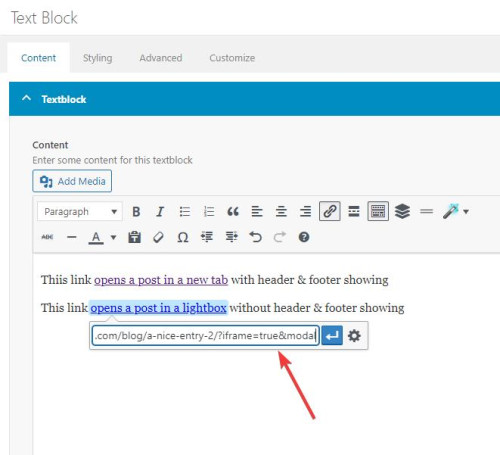
Then I added two snippets in my WP Code plugin, the first is a PHP snippetfunction add_modal_qs(){ if(isset($_GET['modal'])) { global $avia_config; if(isset($avia_config)) { $avia_config['template'] = 'blank'; } } } add_action('init', 'add_modal_qs');the second is a CSS snippet
#top.blank .title_container,#top.blank #main .sidebar{display:none;}
#top.blank .container .av-content-small.units {width: 100%;}
#top.blank .container .content {border: none;}
#top.blank #main .sidebar {border: none;}
The PHP snippet opens the post in a lightbox with no header or footer, the CSS snippet hides the titlebar and the sidebar and makes the post content full width.
So the first link, with the normal url, opens the post in a new tab with everything showing:
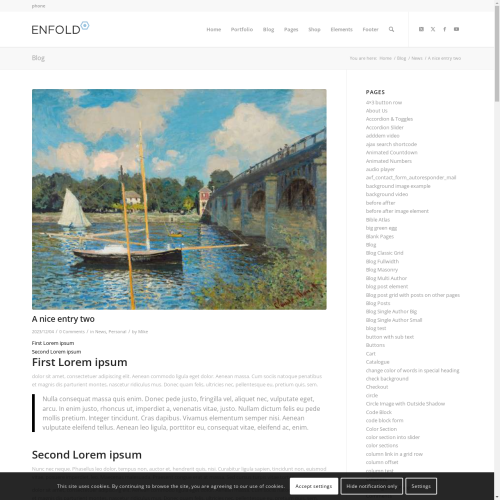
the second link with ?iframe=true&modal added to the url open a lightbox with only the content showing:

Best regards,
MikeFebruary 11, 2024 at 5:21 pm #1434000In reply to: blog page customize
Hey rqn,
If you want to hide the prev / next post navigation and add a new blog post navigation to the bottom of the posts, above the share buttons, try adding this code to the end of your child theme functions.php file in Appearance ▸ Editor:add_filter( 'the_content', 'prev_next_post_nav' ); function prev_next_post_nav( $content ) { if ( is_singular('post') ) { $content .= '<div style="clear:both;"></div>'; $content .= '<div class="prev-next-nav-container">'; $content .= '<div class="prev-nav">'; $content .= get_previous_post_link(); $content .= '</div>'; $content .= '<div class="next-nav">'; $content .= get_next_post_link(); $content .= '</div>'; $content .= '</div>'; return $content; } else { return $content; } }Then add this CSS in your Enfold Theme Options ▸ General Styling ▸ Quick CSS field:
.prev-next-nav-container {
	width: 100%;
	height: 70px;
    padding-top: 20px;
    padding-bottom: 10px;
}
.prev-next-nav-container .prev-nav {
	display: inline-block;
	float: left;
    border-style: solid;
    border-width: 2px;
    border-radius: 0px;
    text-align: center;
    padding: 5px;
    text-decoration: none;
}
.prev-next-nav-container .next-nav {
	display: inline-block;
	float: right;
    border-style: solid;
    border-width: 2px;
    border-radius: 0px;
    text-align: center;
    padding: 5px;
    text-decoration: none;
}
.prev-next-nav-container .prev-nav:hover,
.prev-next-nav-container .next-nav:hover {
	background-color: rgba(0,0,0,.2);
	color: #fff;
}
.prev-next-nav-container .prev-nav:hover a,
.prev-next-nav-container .next-nav:hover a {
	color: #fff;
}
.prev-next-nav-container .prev-nav a,
.prev-next-nav-container .next-nav a {
	display: inline-block;
}
.prev-next-nav-container .prev-nav:empty,
.prev-next-nav-container .next-nav:empty,
.single-post .avia-post-nav.avia-post-prev,
.single-post .avia-post-nav.avia-post-next {
  display: none;
}
This will make post navigation buttons like this:

The buttons only have a light styling, you can adjust to suit.
On Advanced Layout Builder posts they will show at the bottom of the post page:

Please ensure to copy the code from the forum and not an email notification so the symbols are not converted.Best regards,
MikeFebruary 11, 2024 at 10:34 am #1433967Topic: PHP Fatal error: Uncaught TypeError
in forum Enfoldaiko-logi
ParticipantHello Enfold-team,
i am facing the following problem when trying to edit one certain page. Other pages can be edited fine, but one throws this:
[11-Feb-2024 09:26:12 UTC] PHP Fatal error: Uncaught TypeError: Argument 1 passed to aviaElementTemplates::set_locked_attributes() must be of the type array, string given, called in /kunden/xxxx/webseiten/xxxx/wp-content/themes/enfold/config-templatebuilder/avia-shortcodes/slideshow/slideshow.php on line 1026 and defined in /kunden/432494_80799/webseiten/xxxx/wp-content/themes/enfold/config-templatebuilder/avia-template-builder/php/class-element-templates.php:3794
Stack trace:
#0 /kunden/xxxx/webseiten/xxxx/wp-content/themes/enfold/config-templatebuilder/avia-shortcodes/slideshow/slideshow.php(1026): aviaElementTemplates->set_locked_attributes()
#1 /kunden/xxxx/webseiten/xxxx/wp-content/themes/enfold/config-templatebuilder/avia-shortcodes/slideshow/slideshow.php(1110): avia_sc_slider->get_element_styles()
#2 /kunden/xxxx/webseiten/xxxx/wp-content/themes/enfold/config-templatebuilder/avia-template-builder/php/class-shortcode-template.php(1181): avi in /kunden/xxxx/webseiten/xxxx/wp-content/themes/enfold/config-templatebuilder/avia-template-builder/php/class-element-templates.php on line 3794I also see this:
[11-Feb-2024 09:26:24 UTC] PHP Notice: Undefined index: id in /kunden/xxxx/webseiten/xxxx/wp-content/themes/enfold/config-templatebuilder/avia-shortcode-helpers/class-avia-slideshow.php on line 1196It is the same with all plugins disabled, but it is worth noting that also there’s this in log:
[11-Feb-2024 09:21:32 UTC] PHP Notice: Undefined index: gravityforms in /kunden/xxxx/webseiten/xxxx/wp-content/plugins/wp-security-audit-log/classes/WPSensors/Helpers/class-gravityforms-helper.php on line 57I am currently running PHP 7.4 on the site, with newest WordPress (6.4.3) and newest Enfold (5.6.10)
Could you please advise, what can be done?
February 11, 2024 at 12:56 am #1433962In reply to: pass product url or permalink to contact form
Hi,
Try this javascript it will get url of the product page with the “more info” button when clicked and then redirect to your contact form page and add the original page url into a form field. For this example it adds the url into the message field, but you could add another field for the url so your visitors don’t write over the url.
Try testing this javascript as is first by adding this code to the end of your child theme functions.php file in Appearance ▸ Editor:function custom_script_to_add_product_url_into_contact_form() { ?> <script> document.addEventListener("DOMContentLoaded", function() { var button = document.getElementById('woocommerce-catalog_custom_button'); if (!!button) { button.removeAttribute('href'); button.onclick = function() { redirectToForm(); }; } function redirectToForm() { var currentPageUrl = window.location.href; window.location.href = 'https://www.officineditrevi.com/en/contact-us-products-info/?source=' + encodeURIComponent(currentPageUrl); } var urlParams = new URLSearchParams(window.location.search); var sourceUrl = urlParams.get('source'); if (sourceUrl) { var formField = document.querySelector('.cf7-txt-c'); formField.value = sourceUrl; } }); </script> <?php } add_action( 'wp_footer', 'custom_script_to_add_product_url_into_contact_form', 99 );Please ensure to copy the code from the forum and not an email notification so the symbols are not converted.
If it then works you can try adding another field to your form and adjust the code above.
I tested this by injecting it in the browser and it worked for the test page and form that you linked above, I assume that all of the buttons on your product pages are the same.Best regards,
MikeFebruary 10, 2024 at 9:33 pm #1433948In reply to: Hi, i need some help for the sorting function
Hi,
Your screenshot show the “title: attribute, this is shown by the browser and is not a theme feature, to remove this try adding this code to the end of your child theme functions.php file in Appearance ▸ Editor:function temporary_removal_title_tags(){ ?> <script> window.onload = function() { var links = document.querySelectorAll('a , img'); for (var i = 0; i < links.length; i++) { var link = links[i]; link.onmouseover = function() { this.setAttribute("org_title", this.title); this.title = ""; }; link.onmouseout = function() { this.title = this.getAttribute("org_title"); }; link.onclick = function() { this.title = this.getAttribute("org_title"); }; } }; </script> <?php } add_action('wp_footer', 'temporary_removal_title_tags');Thanks to Guenni007 for this script.
Please ensure to copy the code from the forum and not an email notification so the symbols are not converted.Best regards,
MikeFebruary 8, 2024 at 3:09 pm #1433702In reply to: Change Layout of Category Pages to Grid Style
Hi Ismael,
the masonry of the portfolio pages are back again.
The archive pages still don’t show a masonry grid.
In the new archive code I see twice a line that starts with “$atts =array ( …”.
Maybe this produces a conflict?<?php if( ! defined( 'ABSPATH' ) ) { die(); } global $avia_config, $more; /* * get_header is a basic wordpress function, used to retrieve the header.php file in your theme directory. */ get_header(); $showheader = true; if( avia_get_option( 'frontpage' ) && $blogpage_id = avia_get_option( 'blogpage' ) ) { if( get_post_meta( $blogpage_id, 'header', true ) == 'no' ) { $showheader = false; } } if( $showheader ) { echo avia_title( array( 'title' => avia_which_archive() ) ); } do_action( 'ava_after_main_title' ); ?> <div class='container_wrap container_wrap_first main_color <?php avia_layout_class( 'main' ); ?>'> <div class='container template-blog '> <main class='content <?php avia_layout_class( 'content' ); ?> units' <?php avia_markup_helper( array( 'context' => 'content', 'post_type' => 'post' ) );?>> <?php $tds = term_description(); if( $tds ) { echo "<div class='category-term-description'>{$tds}</div>"; } $avia_config['blog_style'] = apply_filters( 'avf_blog_style', avia_get_option( 'blog_style', 'multi-big' ), 'archive' ); if( $avia_config['blog_style'] == 'blog-grid' ) { global $posts; $post_ids = array(); foreach( $posts as $post ) { $post_ids[] = $post->ID; } if( ! empty( $post_ids ) ) { $atts = array( 'type' => 'grid', 'items' => get_option( 'posts_per_page' ), 'columns' => 3, 'class' => 'avia-builder-el-no-sibling', 'paginate' => 'yes', 'use_main_query_pagination' => 'yes', 'custom_query' => array( 'post__in' => $post_ids, 'post_type' => get_post_types() ) ); /** * @since 4.5.5 * @return array */ $atts = apply_filters( 'avf_post_slider_args', $atts, 'archive' ); $atts =array ( 'link' => array ( 0 => 'category', ), 'term_rel' => 'IN', 'wc_prod_visible' => '', 'wc_prod_hidden' => 'hide', 'wc_prod_featured' => '', 'prod_order_by' => '', 'prod_order' => '', 'date_filter' => '', 'date_filter_start' => '', 'date_filter_end' => '', 'date_filter_format' => 'yy/mm/dd', 'period_filter_unit_1' => '1', 'period_filter_unit_2' => 'year', 'page_element_filter' => '', 'sort' => 'yes', 'query_orderby' => 'date', 'query_order' => 'DESC', 'caption_elements' => 'title excerpt', 'caption_styling' => '', 'caption_display' => 'always', 'img_copyright' => '', 'size' => 'fixed masonry', 'orientation' => '', 'image_size' => 'masonry', 'gap' => '1px', 'columns' => 'flexible', 'av-desktop-columns' => '', 'av-medium-columns' => '', 'av-small-columns' => '', 'av-mini-columns' => '', 'items' => '12', 'paginate' => 'none', 'color' => '', 'custom_bg' => '', 'img_copyright_font' => '', 'av-desktop-font-img_copyright_font' => '', 'av-medium-font-img_copyright_font' => '', 'av-small-font-img_copyright_font' => '', 'av-mini-font-img_copyright_font' => '', 'img_copyright_color' => '', 'img_copyright_bg' => '', 'animation' => 'active', 'animation_duration' => '', 'animation_custom_bg_color' => '', 'animation_custom_bg_color_multi_list' => '', 'animation_z_index_curtain' => '100', 'overlay_fx' => 'active', 'img_scrset' => '', 'lazy_loading' => 'disabled', 'av-desktop-hide' => '', 'av-medium-hide' => '', 'av-small-hide' => '', 'av-mini-hide' => '', 'alb_description' => '', 'id' => '', 'custom_class' => '', 'template_class' => '', 'element_template' => '', 'one_element_template' => '', 'show_locked_options_fakeArg' => '', 'av_uid' => 'av-3lh7ch', 'sc_version' => '1.0', 'ids' => false, 'action' => false, 'post_type' => array ( 'post' => 'post', 'page' => 'page', 'attachment' => 'attachment', 'revision' => 'revision', 'nav_menu_item' => 'nav_menu_item', 'custom_css' => 'custom_css', 'customize_changeset' => 'customize_changeset', 'oembed_cache' => 'oembed_cache', 'user_request' => 'user_request', 'wp_block' => 'wp_block', 'wp_template' => 'wp_template', 'wp_template_part' => 'wp_template_part', 'wp_global_styles' => 'wp_global_styles', 'wp_navigation' => 'wp_navigation', 'acf-taxonomy' => 'acf-taxonomy', 'acf-post-type' => 'acf-post-type', 'acf-field-group' => 'acf-field-group', 'acf-field' => 'acf-field', 'product' => 'product', 'product_variation' => 'product_variation', 'shop_order' => 'shop_order', 'shop_order_refund' => 'shop_order_refund', 'shop_coupon' => 'shop_coupon', 'shop_order_placehold' => 'shop_order_placehold', 'alb_elements' => 'alb_elements', 'alb_custom_layout' => 'alb_custom_layout', 'rm_content_editor' => 'rm_content_editor', 'portfolio' => 'portfolio', 'avia_framework_post' => 'avia_framework_post', ), 'offset' => 0, 'container_links' => 'active', 'link_dest' => '', 'lightbox_text' => '', 'container_class' => 'av-masonry-entries', 'auto_ratio' => 1.7, 'set_breadcrumb' => true, 'custom_markup' => '', 'taxonomy' => 'category', 'categories' => array ( ), ); $blog = new avia_masonry($atts); $blog->get_element_styles(); $blog->query_entries(); echo '<div class="entry-content-wrapper">' . $blog->html() . '</div>'; } else { get_template_part( 'includes/loop', 'index' ); } } else { /* Run the loop to output the posts. * If you want to overload this in a child theme then include a file * called loop-index.php and that will be used instead. */ $more = 0; get_template_part( 'includes/loop', 'index' ); } ?> <!--end content--> </main> <?php //get the sidebar if( avia_get_option( 'archive_sidebar' ) == 'archive_sidebar_separate' ) { $avia_config['currently_viewing'] = 'archive'; } else { $avia_config['currently_viewing'] = 'blog'; } get_sidebar(); ?> </div><!--end container--> </div><!-- close default .container_wrap element --> <?php get_footer();Best regards,
Vera-
This reply was modified 2 years, 2 months ago by
Vera.
February 8, 2024 at 12:16 pm #1433669In reply to: Change Layout of Category Pages to Grid Style
Hi,
Thank you for the info.
Please remove the filter in the functions.php file and replace the modification in the archive.php file with the following:
$atts =array (
				'link' =>
				array (
				  0 => 'category',
				),
				'term_rel' => 'IN',
				'wc_prod_visible' => '',
				'wc_prod_hidden' => 'hide',
				'wc_prod_featured' => '',
				'prod_order_by' => '',
				'prod_order' => '',
				'date_filter' => '',
				'date_filter_start' => '',
				'date_filter_end' => '',
				'date_filter_format' => 'yy/mm/dd',
				'period_filter_unit_1' => '1',
				'period_filter_unit_2' => 'year',
				'page_element_filter' => '',
				'sort' => 'yes',
				'query_orderby' => 'date',
				'query_order' => 'DESC',
				'caption_elements' => 'title excerpt',
				'caption_styling' => '',
				'caption_display' => 'always',
				'img_copyright' => '',
				'size' => 'fixed masonry',
				'orientation' => '',
				'image_size' => 'masonry',
				'gap' => '1px',
				'columns' => 'flexible',
				'av-desktop-columns' => '',
				'av-medium-columns' => '',
				'av-small-columns' => '',
				'av-mini-columns' => '',
				'items' => '12',
				'paginate' => 'none',
				'color' => '',
				'custom_bg' => '',
				'img_copyright_font' => '',
				'av-desktop-font-img_copyright_font' => '',
				'av-medium-font-img_copyright_font' => '',
				'av-small-font-img_copyright_font' => '',
				'av-mini-font-img_copyright_font' => '',
				'img_copyright_color' => '',
				'img_copyright_bg' => '',
				'animation' => 'active',
				'animation_duration' => '',
				'animation_custom_bg_color' => '',
				'animation_custom_bg_color_multi_list' => '',
				'animation_z_index_curtain' => '100',
				'overlay_fx' => 'active',
				'img_scrset' => '',
				'lazy_loading' => 'disabled',
				'av-desktop-hide' => '',
				'av-medium-hide' => '',
				'av-small-hide' => '',
				'av-mini-hide' => '',
				'alb_description' => '',
				'id' => '',
				'custom_class' => '',
				'template_class' => '',
				'element_template' => '',
				'one_element_template' => '',
				'show_locked_options_fakeArg' => '',
				'av_uid' => 'av-3lh7ch',
				'sc_version' => '1.0',
				'ids' => false,
				'action' => false,
				'post_type' =>
				array (
				  'post' => 'post',
				  'page' => 'page',
				  'attachment' => 'attachment',
				  'revision' => 'revision',
				  'nav_menu_item' => 'nav_menu_item',
				  'custom_css' => 'custom_css',
				  'customize_changeset' => 'customize_changeset',
				  'oembed_cache' => 'oembed_cache',
				  'user_request' => 'user_request',
				  'wp_block' => 'wp_block',
				  'wp_template' => 'wp_template',
				  'wp_template_part' => 'wp_template_part',
				  'wp_global_styles' => 'wp_global_styles',
				  'wp_navigation' => 'wp_navigation',
				  'acf-taxonomy' => 'acf-taxonomy',
				  'acf-post-type' => 'acf-post-type',
				  'acf-field-group' => 'acf-field-group',
				  'acf-field' => 'acf-field',
				  'product' => 'product',
				  'product_variation' => 'product_variation',
				  'shop_order' => 'shop_order',
				  'shop_order_refund' => 'shop_order_refund',
				  'shop_coupon' => 'shop_coupon',
				  'shop_order_placehold' => 'shop_order_placehold',
				  'alb_elements' => 'alb_elements',
				  'alb_custom_layout' => 'alb_custom_layout',
				  'rm_content_editor' => 'rm_content_editor',
				  'portfolio' => 'portfolio',
				  'avia_framework_post' => 'avia_framework_post',
				),
				'offset' => 0,
				'container_links' => 'active',
				'link_dest' => '',
				'lightbox_text' => '',
				'container_class' => 'av-masonry-entries',
				'auto_ratio' => 1.7,
				'set_breadcrumb' => true,
				'custom_markup' => '',
				'taxonomy' => 'category',
				'categories' =>
				array (
				),
			);

	        $blog = new avia_masonry($atts);
			$blog->get_element_styles();
			$blog->query_entries();

	        echo '<div class="entry-content-wrapper">' . $blog->html() . '</div>';
Also, you have to make sure that Grid Layout is selected in the Enfold > Blog Layout > Blog Layout settings.
Best regards,
IsmaelFebruary 8, 2024 at 12:09 pm #1433668123Support
ParticipantHi Support,
ich bekomme, wenn ich das Theme Enfold im WP Dashboard öffne folgende Fehlermeldung 75214096 Es fehlt ein Stylesheet.
Ich kann das Theme auch nicht unter PHP 8.xx laufen lassen, dann erhalte ich einen Fehler 503.
Hängt das eventuell zusammen?Danke und Grüße
ThomasFebruary 8, 2024 at 10:46 am #1433645In reply to: portfolio catagory page adjust
Hi,
1.) Did you install any plugins related to the sidebar or widgets? The widgets should NOT be duplicated by default.
2.) We recommend installing a child theme and place the filter in the child theme’s functions.php file. You can also try to add the filter around line 51, just below this code.
if( isset( $avia_config['use_child_theme_functions_only'] ) )
{
	return;
}
Best regards,
IsmaelFebruary 7, 2024 at 6:10 pm #1433523Hi,
Thank you for your patience, unfortunately this element doesn’t have this option, you can choose to only show the one category alone by choosing only one category, or if you want to enable many categories and have one selected first you can try adding this code to the end of your child theme functions.php file in Appearance ▸ Editor:function custom_script() { ?> <script> (function($){ setTimeout( function() { var grid = $('#js_sort_items .sort_by_cat'); if( grid ) { grid.find('a[data-filter="austria-trend_sort"]').trigger('click'); console.log('click'); } }, 800); })(jQuery); </script> <?php } add_action( 'wp_footer', 'custom_script', 99 );This will click your “austria-trend” sort option on page load. You can change this to the item you wish and adjust the delay option (800) if you wish. I tested this on your page by injecting it in the browser and it working well.
Please ensure to copy the code from the forum and not an email notification so the symbols are not converted.Best regards,
MikeFebruary 7, 2024 at 3:06 pm #1433484In reply to: portfolio catagory page adjust
Hi dear Ismael,
it is add in enfold functions.php.
i add in the end. but it donot work.

kindly helpFebruary 6, 2024 at 7:35 am #1433182In reply to: portfolio catagory page adjust
Hey Yaphoon,
Thank you for the inquiry.
You can use this css code to adjust the style of the masonry title.
.av-masonry-entry .av-masonry-entry-title {
    line-height: 1.3em;
    margin: 0;
    font-size: 20px;
    font-family: Verdana;
}
To adjust the hover color of the menu button, add this.
#top #wrap_all .header_color #menu-item-174:hover > a .avia-menu-text {
    background-color: #3f75e9;
    color: #ffffff;
    border-color: #3f59e9;
}
And to adjust the size of the images in the archive pages, you have to edit the enfold/taxonomy-portfolio_entries.php and adjust the parameters in the avia_post_grid instance around line 38.
$grid = new avia_post_grid(
										array(
											'linking'			=> '',
											'columns'			=> '3',
											'contents'			=> 'title',
											'sort'				=> 'no',
											'paginate'			=> 'yes',
											'set_breadcrumb'	=> false,
											'preview_mode' => 'custom',
											'image_size' => 'full'
										));
If you have any additional questions at this time we kindly ask that you open them up in a separate thread. The longer threads get in the forum, they become more difficult to support as they tend to drift off topic and they also make it troublesome for users trying to search for solutions. Keeping threads relevant to their original inquiry ensures that we can keep better track of what has been resolved and that users can more effectively find answers to similar issues they might be experiencing.
Thanks!
Best regards,
IsmaelFebruary 6, 2024 at 2:53 am #1433176Theme Updates in progress.
Once you have entered and verified your Envato Personal Token Key WordPress will check for updates every 12 Hours and notify you here, if one is availableYour current Enfold Theme Version Number is 4.8
Your PHP version: 7.3.1p1February 5, 2024 at 9:23 pm #1433049In reply to: Login page logo
Thanks, i was able to modify with this code in function.php. But i was wondering, if the theme get update, will it replace the function.php file?
/* Replace wp-login logo */
function login_page_logo(){
$site_url = home_url(); // URL of site
echo ‘<style>.login h1 a {
background-repeat: no-repeat;
background-image: url( ‘ . $site_url . ‘/wp-content/uploads/2024/01/U-NEXT-logo-noir-transparent-300×137.png );
background-position: center center;
background-size: contain !important;
width: 100% !important;
}
</style>’;
}
add_action(‘login_head’, ‘login_page_logo’);/* Replace wp-logo link */
function login_page_URL( $url ){
$url = home_url(‘/home’);
return $url;
}
add_filter(‘login_headerurl’, ‘login_page_URL’);February 5, 2024 at 11:58 am #1432994In reply to: Dropdown menu accessibility (arrow keys NOT tab)
Thanks Ishmael
But now I just get an error here instead:An error of type E_COMPILE_ERROR was caused in line 109 of the file /nas/content/live/oxwedev/wp-content/themes/enfold-child/functions.php. Error message: Cannot redeclare tab_though_menu_skipping_sub_menu_items_unless_down_or_up_arrow_keys_are_used() (previously declared in /nas/content/live/oxwedev/wp-content/plugins/insert-headers-and-footers/includes/class-wpcode-snippet-execute.php(287) : eval()’d code:2)
February 4, 2024 at 8:51 pm #1432945In reply to: Page Builder Issue
Hi,
Oh, I misunderstood, I thought that you were saying that the plugin was causing the admin-ajax.php 403 (Forbidden) error. Perhaps disabling it along with your other plugins would be a good test. I note in your log above there are a few errors for the gravityforms plugin as it has exhausted the memory size
It also looks like you downgraded your PHP to v7.3.33, I thought before you were using v7.4?
Perhaps your plugins require v8, have you tried that?Best regards,
MikeFebruary 4, 2024 at 6:38 pm #1432936In reply to: Page Builder Issue
Hi Mike
I am pretty sure the issue with the custom login plugin was because I was messing with the htaccess file. Its working again.
I did test disabling the mod security and that did not work. below is the error log if you can see anything there that stands out. I notice the ini_set errors and thought that was odd. and the fatal error for allowed memory, but that could be from my testing. The ini_set error is listed in the other sites too.Stack trace:
#0 /home/summitenvcon/public_html/wp-load.php(50): require_once()
#1 /home/summitenvcon/public_html/wp-blog-header.php(13): require_once(‘/home/summitenv…’)
#2 /home/summitenvcon/public_html/index.php(17): require(‘/home/summitenv…’)
#3 {main}
thrown in /home/summitenvcon/public_html/wp-config.php on line 3
[01-Feb-2024 08:04:51 UTC] PHP Warning: ini_set() has been disabled for security reasons in /home/summitenvcon/public_html/wp-includes/load.php on line 605
[01-Feb-2024 10:23:38 UTC] PHP Warning: ini_set() has been disabled for security reasons in /home/summitenvcon/public_html/wp-includes/load.php on line 605
[01-Feb-2024 13:50:23 UTC] PHP Warning: Use of undefined constant ABSPATH – assumed ‘ABSPATH’ (this will throw an Error in a future version of PHP) in /home/summitenvcon/public_html/wp-settings.php on line 33
[01-Feb-2024 13:50:23 UTC] PHP Warning: require(ABSPATHwp-includes/version.php): failed to open stream: No such file or directory in /home/summitenvcon/public_html/wp-settings.php on line 33
[01-Feb-2024 13:50:23 UTC] PHP Fatal error: require(): Failed opening required ‘ABSPATHwp-includes/version.php’ (include_path=’.:/opt/cpanel/ea-php74/root/usr/share/pear’) in /home/summitenvcon/public_html/wp-settings.php on line 33
[01-Feb-2024 13:50:24 UTC] PHP Warning: ini_set() has been disabled for security reasons in /home/summitenvcon/public_html/wp-includes/load.php on line 605
[01-Feb-2024 13:50:28 UTC] PHP Warning: ini_set() has been disabled for security reasons in /home/summitenvcon/public_html/wp-includes/load.php on line 605
[01-Feb-2024 20:05:56 UTC] PHP Warning: ini_set() has been disabled for security reasons in /home/summitenvcon/public_html/wp-includes/load.php on line 605
[02-Feb-2024 05:08:15 UTC] PHP Warning: ini_set() has been disabled for security reasons in /home/summitenvcon/public_html/wp-includes/load.php on line 605
[02-Feb-2024 05:08:17 UTC] PHP Warning: ini_set() has been disabled for security reasons in /home/summitenvcon/public_html/wp-includes/load.php on line 605
[02-Feb-2024 11:16:50 UTC] PHP Warning: ini_set() has been disabled for security reasons in /home/summitenvcon/public_html/wp-includes/load.php on line 605
[02-Feb-2024 11:16:51 UTC] PHP Warning: ini_set() has been disabled for security reasons in /home/summitenvcon/public_html/wp-includes/load.php on line 605
[02-Feb-2024 11:16:51 UTC] PHP Warning: ini_set() has been disabled for security reasons in /home/summitenvcon/public_html/wp-includes/load.php on line 605
[02-Feb-2024 13:38:19 UTC] PHP Warning: ini_set() has been disabled for security reasons in /home/summitenvcon/public_html/wp-includes/load.php on line 605
[02-Feb-2024 16:41:25 UTC] PHP Warning: ini_set() has been disabled for security reasons in /home/summitenvcon/public_html/wp-includes/load.php on line 605
[02-Feb-2024 19:12:01 UTC] PHP Warning: ini_set() has been disabled for security reasons in /home/summitenvcon/public_html/wp-includes/load.php on line 605
[02-Feb-2024 21:23:00 UTC] PHP Warning: ini_set() has been disabled for security reasons in /home/summitenvcon/public_html/wp-includes/load.php on line 605
[02-Feb-2024 21:46:25 UTC] PHP Warning: ini_set() has been disabled for security reasons in /home/summitenvcon/public_html/wp-includes/load.php on line 605
[02-Feb-2024 23:22:07 UTC] PHP Warning: ini_set() has been disabled for security reasons in /home/summitenvcon/public_html/wp-includes/load.php on line 605
[03-Feb-2024 00:09:53 UTC] PHP Warning: ini_set() has been disabled for security reasons in /home/summitenvcon/public_html/wp-includes/load.php on line 605
[03-Feb-2024 07:29:39 UTC] PHP Warning: ini_set() has been disabled for security reasons in /home/summitenvcon/public_html/wp-includes/load.php on line 605
[03-Feb-2024 12:52:00 UTC] PHP Warning: ini_set() has been disabled for security reasons in /home/summitenvcon/public_html/wp-includes/load.php on line 605
[03-Feb-2024 14:29:40 UTC] PHP Warning: ini_set() has been disabled for security reasons in /home/summitenvcon/public_html/wp-includes/load.php on line 605
[03-Feb-2024 14:45:11 UTC] PHP Warning: ini_set() has been disabled for security reasons in /home/summitenvcon/public_html/wp-includes/load.php on line 605
[03-Feb-2024 16:52:49 UTC] PHP Warning: ini_set() has been disabled for security reasons in /home/summitenvcon/public_html/wp-includes/load.php on line 605
[03-Feb-2024 22:54:12 UTC] PHP Warning: ini_set() has been disabled for security reasons in /home/summitenvcon/public_html/wp-includes/load.php on line 605
[03-Feb-2024 22:54:52 UTC] PHP Warning: ini_set() has been disabled for security reasons in /home/summitenvcon/public_html/wp-includes/load.php on line 605
[03-Feb-2024 22:54:53 UTC] PHP Warning: ini_set() has been disabled for security reasons in /home/summitenvcon/public_html/wp-includes/load.php on line 605
[03-Feb-2024 22:54:54 UTC] PHP Warning: ini_set() has been disabled for security reasons in /home/summitenvcon/public_html/wp-includes/load.php on line 605
[03-Feb-2024 22:54:55 UTC] PHP Warning: ini_set() has been disabled for security reasons in /home/summitenvcon/public_html/wp-includes/load.php on line 605
[03-Feb-2024 22:55:00 UTC] PHP Warning: ini_set() has been disabled for security reasons in /home/summitenvcon/public_html/wp-includes/load.php on line 605
[03-Feb-2024 23:54:11 UTC] PHP Warning: ini_set() has been disabled for security reasons in /home/summitenvcon/public_html/wp-includes/load.php on line 605
[03-Feb-2024 23:54:59 UTC] Cron reschedule event error for hook: action_scheduler_run_queue, Error code: invalid_schedule, Error message: Event schedule does not exist., Data: {“schedule”:”every_minute”,”args”:[“WP Cron”],”interval”:60}
[03-Feb-2024 23:55:28 UTC] PHP Warning: ini_set() has been disabled for security reasons in /home/summitenvcon/public_html/wp-includes/load.php on line 605
[03-Feb-2024 23:55:28 UTC] PHP Warning: ini_set() has been disabled for security reasons in /home/summitenvcon/public_html/wp-includes/load.php on line 605
[03-Feb-2024 23:55:34 UTC] PHP Warning: ini_set() has been disabled for security reasons in /home/summitenvcon/public_html/wp-includes/load.php on line 605
[03-Feb-2024 23:55:34 UTC] PHP Warning: ini_set() has been disabled for security reasons in /home/summitenvcon/public_html/wp-includes/load.php on line 605
[03-Feb-2024 23:55:34 UTC] PHP Warning: ini_set() has been disabled for security reasons in /home/summitenvcon/public_html/wp-includes/load.php on line 605
[03-Feb-2024 23:55:34 UTC] PHP Warning: ini_set() has been disabled for security reasons in /home/summitenvcon/public_html/wp-includes/load.php on line 605
[04-Feb-2024 00:02:51 UTC] PHP Warning: ini_set() has been disabled for security reasons in /home/summitenvcon/public_html/wp-includes/default-constants.php on line 69
[04-Feb-2024 00:02:51 UTC] PHP Fatal error: Allowed memory size of 33554432 bytes exhausted (tried to allocate 20480 bytes) in /home/summitenvcon/public_html/wp-content/plugins/wordfence/lib/wfUtils.php on line 762
[04-Feb-2024 00:03:18 UTC] PHP Warning: ini_set() has been disabled for security reasons in /home/summitenvcon/public_html/wp-includes/default-constants.php on line 69
[04-Feb-2024 00:03:18 UTC] PHP Fatal error: Allowed memory size of 33554432 bytes exhausted (tried to allocate 2621440 bytes) in /home/summitenvcon/public_html/wp-content/plugins/gravityforms/includes/fields/class-gf-field-name.php on line 500
[04-Feb-2024 00:03:19 UTC] PHP Warning: ini_set() has been disabled for security reasons in /home/summitenvcon/public_html/wp-includes/default-constants.php on line 69
[04-Feb-2024 00:03:19 UTC] PHP Fatal error: Allowed memory size of 33554432 bytes exhausted (tried to allocate 32768 bytes) in /home/summitenvcon/public_html/wp-content/wflogs/rules.php on line 1595
[04-Feb-2024 00:03:20 UTC] PHP Warning: ini_set() has been disabled for security reasons in /home/summitenvcon/public_html/wp-includes/default-constants.php on line 69
[04-Feb-2024 00:03:20 UTC] PHP Fatal error: Allowed memory size of 33554432 bytes exhausted (tried to allocate 151552 bytes) in /home/summitenvcon/public_html/wp-content/plugins/wordpress-seo/vendor/composer/autoload_real.php on line 33
[04-Feb-2024 00:03:21 UTC] PHP Warning: ini_set() has been disabled for security reasons in /home/summitenvcon/public_html/wp-includes/default-constants.php on line 69
[04-Feb-2024 00:03:22 UTC] PHP Fatal error: Allowed memory size of 33554432 bytes exhausted (tried to allocate 20480 bytes) in /home/summitenvcon/public_html/wp-content/plugins/wordfence/lib/wfUtils.php on line 762
[04-Feb-2024 00:03:23 UTC] PHP Warning: ini_set() has been disabled for security reasons in /home/summitenvcon/public_html/wp-includes/default-constants.php on line 69
[04-Feb-2024 00:03:23 UTC] PHP Fatal error: Allowed memory size of 33554432 bytes exhausted (tried to allocate 114688 bytes) in /home/summitenvcon/public_html/wp-content/themes/enfold/config-templatebuilder/avia-template-builder/php/class-template-builder.php on line 682
[04-Feb-2024 00:03:25 UTC] PHP Warning: ini_set() has been disabled for security reasons in /home/summitenvcon/public_html/wp-includes/default-constants.php on line 69
[04-Feb-2024 00:03:25 UTC] PHP Fatal error: Allowed memory size of 33554432 bytes exhausted (tried to allocate 65536 bytes) in /home/summitenvcon/public_html/wp-content/plugins/wordpress-seo/src/services/indexables/indexable-version-manager.php on line 25
[04-Feb-2024 00:03:28 UTC] PHP Warning: ini_set() has been disabled for security reasons in /home/summitenvcon/public_html/wp-includes/default-constants.php on line 69
[04-Feb-2024 00:03:28 UTC] PHP Fatal error: Allowed memory size of 33554432 bytes exhausted (tried to allocate 20480 bytes) in /home/summitenvcon/public_html/wp-content/themes/enfold/framework/php/function-set-avia-frontend.php on line 116
[04-Feb-2024 00:03:30 UTC] PHP Warning: ini_set() has been disabled for security reasons in /home/summitenvcon/public_html/wp-includes/default-constants.php on line 69
[04-Feb-2024 00:03:30 UTC] PHP Warning: ini_set() has been disabled for security reasons in /home/summitenvcon/public_html/wp-includes/default-constants.php on line 69
[04-Feb-2024 00:03:30 UTC] PHP Fatal error: Allowed memory size of 33554432 bytes exhausted (tried to allocate 32768 bytes) in /home/summitenvcon/public_html/wp-content/plugins/wordpress-seo/src/helpers/schema/language-helper.php on line 1
[04-Feb-2024 00:03:30 UTC] PHP Fatal error: Allowed memory size of 33554432 bytes exhausted (tried to allocate 2621440 bytes) in /home/summitenvcon/public_html/wp-content/plugins/gravityforms/includes/fields/class-gf-field-number.php on line 24
[04-Feb-2024 00:03:32 UTC] PHP Warning: ini_set() has been disabled for security reasons in /home/summitenvcon/public_html/wp-includes/default-constants.php on line 69
[04-Feb-2024 00:03:32 UTC] PHP Fatal error: Allowed memory size of 33554432 bytes exhausted (tried to allocate 32768 bytes) in /home/summitenvcon/public_html/wp-content/wflogs/rules.php on line 1595
[04-Feb-2024 00:03:33 UTC] PHP Warning: ini_set() has been disabled for security reasons in /home/summitenvcon/public_html/wp-includes/default-constants.php on line 69
[04-Feb-2024 00:03:34 UTC] PHP Fatal error: Allowed memory size of 33554432 bytes exhausted (tried to allocate 151552 bytes) in /home/summitenvcon/public_html/wp-content/plugins/wordpress-seo/vendor/composer/autoload_real.php on line 33
[04-Feb-2024 00:04:14 UTC] PHP Warning: ini_set() has been disabled for security reasons in /home/summitenvcon/public_html/wp-includes/default-constants.php on line 69
[04-Feb-2024 00:04:14 UTC] PHP Fatal error: Allowed memory size of 33554432 bytes exhausted (tried to allocate 2621440 bytes) in /home/summitenvcon/public_html/wp-content/plugins/gravityforms/includes/fields/class-gf-field-number.php on line 225
[04-Feb-2024 00:04:20 UTC] PHP Warning: ini_set() has been disabled for security reasons in /home/summitenvcon/public_html/wp-includes/default-constants.php on line 69
[04-Feb-2024 00:04:20 UTC] PHP Fatal error: Allowed memory size of 33554432 bytes exhausted (tried to allocate 2621440 bytes) in /home/summitenvcon/public_html/wp-content/plugins/gravityforms/includes/fields/class-gf-field-name.php on line 498
[04-Feb-2024 00:04:22 UTC] PHP Warning: ini_set() has been disabled for security reasons in /home/summitenvcon/public_html/wp-includes/default-constants.php on line 69
[04-Feb-2024 00:04:23 UTC] PHP Fatal error: Allowed memory size of 33554432 bytes exhausted (tried to allocate 32768 bytes) in /home/summitenvcon/public_html/wp-content/wflogs/rules.php on line 1595
[04-Feb-2024 00:04:23 UTC] PHP Warning: ini_set() has been disabled for security reasons in /home/summitenvcon/public_html/wp-includes/default-constants.php on line 69
[04-Feb-2024 00:04:23 UTC] PHP Warning: ini_set() has been disabled for security reasons in /home/summitenvcon/public_html/wp-includes/default-constants.php on line 69
[04-Feb-2024 00:04:24 UTC] PHP Warning: ini_set() has been disabled for security reasons in /home/summitenvcon/public_html/wp-includes/default-constants.php on line 69
[04-Feb-2024 00:04:24 UTC] PHP Fatal error: Allowed memory size of 33554432 bytes exhausted (tried to allocate 151552 bytes) in /home/summitenvcon/public_html/wp-content/plugins/wordpress-seo/vendor/composer/autoload_real.php on line 33
[04-Feb-2024 00:04:24 UTC] PHP Fatal error: Allowed memory size of 33554432 bytes exhausted (tried to allocate 2621440 bytes) in /home/summitenvcon/public_html/wp-content/plugins/gravityforms/includes/fields/class-gf-field-name.php on line 493
[04-Feb-2024 00:04:24 UTC] PHP Warning: ini_set() has been disabled for security reasons in /home/summitenvcon/public_html/wp-includes/default-constants.php on line 69
[04-Feb-2024 00:04:24 UTC] PHP Fatal error: Allowed memory size of 33554432 bytes exhausted (tried to allocate 32768 bytes) in /home/summitenvcon/public_html/wp-content/wflogs/rules.php on line 1595
[04-Feb-2024 00:04:25 UTC] PHP Warning: ini_set() has been disabled for security reasons in /home/summitenvcon/public_html/wp-includes/default-constants.php on line 69
[04-Feb-2024 00:04:25 UTC] PHP Warning: ini_set() has been disabled for security reasons in /home/summitenvcon/public_html/wp-includes/default-constants.php on line 69
[04-Feb-2024 00:04:25 UTC] PHP Fatal error: Allowed memory size of 33554432 bytes exhausted (tried to allocate 20480 bytes) in /home/summitenvcon/public_html/wp-content/plugins/wordfence/lib/wfUtils.php on line 334
[04-Feb-2024 00:04:25 UTC] PHP Fatal error: Allowed memory size of 33554432 bytes exhausted (tried to allocate 151552 bytes) in /home/summitenvcon/public_html/wp-content/plugins/wordpress-seo/vendor/composer/autoload_real.php on line 33
[04-Feb-2024 00:04:26 UTC] PHP Warning: ini_set() has been disabled for security reasons in /home/summitenvcon/public_html/wp-includes/default-constants.php on line 69
[04-Feb-2024 00:04:26 UTC] PHP Fatal error: Allowed memory size of 33554432 bytes exhausted (tried to allocate 20480 bytes) in /home/summitenvcon/public_html/wp-content/plugins/wordfence/lib/wfUtils.php on line 334
[04-Feb-2024 00:05:30 UTC] PHP Warning: ini_set() has been disabled for security reasons in /home/summitenvcon/public_html/wp-includes/default-constants.php on line 69
[04-Feb-2024 00:05:30 UTC] PHP Fatal error: Allowed memory size of 33554432 bytes exhausted (tried to allocate 2621440 bytes) in /home/summitenvcon/public_html/wp-content/plugins/gravityforms/common.php on line 502
[04-Feb-2024 00:05:59 UTC] PHP Warning: ini_set() has been disabled for security reasons in /home/summitenvcon/public_html/wp-includes/default-constants.php on line 69
[04-Feb-2024 00:05:59 UTC] PHP Fatal error: Allowed memory size of 33554432 bytes exhausted (tried to allocate 2621440 bytes) in /home/summitenvcon/public_html/wp-content/plugins/gravityforms/includes/fields/class-gf-field-name.php on line 493
[04-Feb-2024 00:06:12 UTC] PHP Warning: ini_set() has been disabled for security reasons in /home/summitenvcon/public_html/wp-includes/default-constants.php on line 69
[04-Feb-2024 00:06:12 UTC] PHP Fatal error: Allowed memory size of 33554432 bytes exhausted (tried to allocate 2621440 bytes) in /home/summitenvcon/public_html/wp-content/plugins/gravityforms/includes/fields/class-gf-field-name.php on line 500
[04-Feb-2024 00:07:22 UTC] PHP Warning: ini_set() has been disabled for security reasons in /home/summitenvcon/public_html/wp-includes/default-constants.php on line 69
[04-Feb-2024 00:07:22 UTC] PHP Fatal error: Allowed memory size of 33554432 bytes exhausted (tried to allocate 2621440 bytes) in /home/summitenvcon/public_html/wp-content/plugins/gravityforms/includes/fields/class-gf-field-name.php on line 493
[04-Feb-2024 00:07:23 UTC] PHP Warning: ini_set() has been disabled for security reasons in /home/summitenvcon/public_html/wp-includes/default-constants.php on line 69
[04-Feb-2024 00:07:23 UTC] PHP Warning: ini_set() has been disabled for security reasons in /home/summitenvcon/public_html/wp-includes/default-constants.php on line 69
[04-Feb-2024 00:07:23 UTC] PHP Warning: ini_set() has been disabled for security reasons in /home/summitenvcon/public_html/wp-includes/default-constants.php on line 69
[04-Feb-2024 00:07:23 UTC] PHP Fatal error: Allowed memory size of 33554432 bytes exhausted (tried to allocate 32768 bytes) in /home/summitenvcon/public_html/wp-content/wflogs/rules.php on line 1595
[04-Feb-2024 00:07:23 UTC] PHP Warning: ini_set() has been disabled for security reasons in /home/summitenvcon/public_html/wp-includes/default-constants.php on line 69
[04-Feb-2024 00:07:24 UTC] PHP Fatal error: Allowed memory size of 33554432 bytes exhausted (tried to allocate 151552 bytes) in /home/summitenvcon/public_html/wp-content/plugins/wordpress-seo/vendor/composer/autoload_real.php on line 33
[04-Feb-2024 00:07:37 UTC] PHP Warning: ini_set() has been disabled for security reasons in /home/summitenvcon/public_html/wp-includes/default-constants.php on line 69
[04-Feb-2024 00:07:37 UTC] PHP Fatal error: Allowed memory size of 33554432 bytes exhausted (tried to allocate 2621440 bytes) in /home/summitenvcon/public_html/wp-content/plugins/gravityforms/includes/fields/class-gf-field-number.php on line 75
[04-Feb-2024 00:08:14 UTC] PHP Warning: ini_set() has been disabled for security reasons in /home/summitenvcon/public_html/wp-includes/default-constants.php on line 69
[04-Feb-2024 00:08:14 UTC] PHP Fatal error: Allowed memory size of 33554432 bytes exhausted (tried to allocate 2621440 bytes) in /home/summitenvcon/public_html/wp-content/plugins/gravityforms/includes/fields/class-gf-field-name.php on line 498
[04-Feb-2024 00:08:20 UTC] PHP Warning: ini_set() has been disabled for security reasons in /home/summitenvcon/public_html/wp-includes/default-constants.php on line 69
[04-Feb-2024 00:08:20 UTC] PHP Fatal error: Allowed memory size of 33554432 bytes exhausted (tried to allocate 2621440 bytes) in /home/summitenvcon/public_html/wp-content/plugins/gravityforms/includes/fields/class-gf-field-name.php on line 498
[04-Feb-2024 00:10:10 UTC] PHP Warning: ini_set() has been disabled for security reasons in /home/summitenvcon/public_html/wp-includes/default-constants.php on line 69
[04-Feb-2024 00:10:10 UTC] PHP Fatal error: Allowed memory size of 33554432 bytes exhausted (tried to allocate 2621440 bytes) in /home/summitenvcon/public_html/wp-content/plugins/gravityforms/includes/fields/class-gf-field-number.php on line 199
[04-Feb-2024 00:10:40 UTC] PHP Warning: ini_set() has been disabled for security reasons in /home/summitenvcon/public_html/wp-includes/default-constants.php on line 69
[04-Feb-2024 00:10:41 UTC] PHP Fatal error: Allowed memory size of 33554432 bytes exhausted (tried to allocate 2621440 bytes) in /home/summitenvcon/public_html/wp-content/plugins/gravityforms/includes/fields/class-gf-field-number.php on line 119
[04-Feb-2024 00:11:04 UTC] PHP Warning: ini_set() has been disabled for security reasons in /home/summitenvcon/public_html/wp-includes/default-constants.php on line 69
[04-Feb-2024 00:11:05 UTC] PHP Fatal error: Allowed memory size of 33554432 bytes exhausted (tried to allocate 2621440 bytes) in /home/summitenvcon/public_html/wp-content/plugins/gravityforms/includes/fields/class-gf-field-name.php on line 546
[04-Feb-2024 00:11:50 UTC] PHP Warning: ini_set() has been disabled for security reasons in /home/summitenvcon/public_html/wp-includes/default-constants.php on line 69
[04-Feb-2024 00:11:50 UTC] PHP Fatal error: Allowed memory size of 33554432 bytes exhausted (tried to allocate 2621440 bytes) in /home/summitenvcon/public_html/wp-content/plugins/gravityforms/includes/fields/class-gf-field-name.php on line 500
[04-Feb-2024 00:12:11 UTC] PHP Warning: ini_set() has been disabled for security reasons in /home/summitenvcon/public_html/wp-includes/default-constants.php on line 69
[04-Feb-2024 00:12:11 UTC] PHP Fatal error: Allowed memory size of 33554432 bytes exhausted (tried to allocate 2621440 bytes) in /home/summitenvcon/public_html/wp-content/themes/enfold/framework/php/widgets/widget-classes/class-avia-combo.php on line 103
[04-Feb-2024 00:12:15 UTC] PHP Warning: ini_set() has been disabled for security reasons in /home/summitenvcon/public_html/wp-includes/default-constants.php on line 69
[04-Feb-2024 00:12:15 UTC] PHP Fatal error: Allowed memory size of 33554432 bytes exhausted (tried to allocate 2621440 bytes) in /home/summitenvcon/public_html/wp-content/themes/enfold/framework/php/widgets/widget-classes/class-avia-combo.php on line 134
[04-Feb-2024 00:14:38 UTC] PHP Warning: ini_set() has been disabled for security reasons in /home/summitenvcon/public_html/wp-includes/default-constants.php on line 69
[04-Feb-2024 00:14:38 UTC] PHP Fatal error: Allowed memory size of 33554432 bytes exhausted (tried to allocate 2621440 bytes) in /home/summitenvcon/public_html/wp-content/plugins/gravityforms/includes/fields/class-gf-field-name.php on line 493
[04-Feb-2024 00:14:39 UTC] PHP Warning: ini_set() has been disabled for security reasons in /home/summitenvcon/public_html/wp-includes/default-constants.php on line 69
[04-Feb-2024 00:14:39 UTC] PHP Warning: ini_set() has been disabled for security reasons in /home/summitenvcon/public_html/wp-includes/default-constants.php on line 69
[04-Feb-2024 00:14:39 UTC] PHP Fatal error: Allowed memory size of 33554432 bytes exhausted (tried to allocate 32768 bytes) in /home/summitenvcon/public_html/wp-content/wflogs/rules.php on line 1595
[04-Feb-2024 00:14:39 UTC] PHP Fatal error: Allowed memory size of 33554432 bytes exhausted (tried to allocate 2621440 bytes) in /home/summitenvcon/public_html/wp-content/plugins/gravityforms/includes/fields/class-gf-field-name.php on line 493
[04-Feb-2024 10:14:41 UTC] PHP Warning: ini_set() has been disabled for security reasons in /home/summitenvcon/public_html/wp-includes/load.php on line 605
[04-Feb-2024 10:14:42 UTC] PHP Warning: ini_set() has been disabled for security reasons in /home/summitenvcon/public_html/wp-includes/load.php on line 605
[04-Feb-2024 10:14:43 UTC] PHP Warning: ini_set() has been disabled for security reasons in /home/summitenvcon/public_html/wp-includes/load.php on line 605
[04-Feb-2024 10:14:44 UTC] PHP Warning: ini_set() has been disabled for security reasons in /home/summitenvcon/public_html/wp-includes/load.php on line 605
[04-Feb-2024 10:14:44 UTC] PHP Warning: ini_set() has been disabled for security reasons in /home/summitenvcon/public_html/wp-includes/load.php on line 605
[04-Feb-2024 10:14:45 UTC] PHP Warning: ini_set() has been disabled for security reasons in /home/summitenvcon/public_html/wp-includes/load.php on line 605
[04-Feb-2024 10:14:45 UTC] PHP Warning: ini_set() has been disabled for security reasons in /home/summitenvcon/public_html/wp-includes/load.php on line 605
[04-Feb-2024 10:14:46 UTC] PHP Warning: ini_set() has been disabled for security reasons in /home/summitenvcon/public_html/wp-includes/load.php on line 605
[04-Feb-2024 10:14:48 UTC] PHP Warning: ini_set() has been disabled for security reasons in /home/summitenvcon/public_html/wp-includes/load.php on line 605
[04-Feb-2024 10:14:51 UTC] PHP Warning: ini_set() has been disabled for security reasons in /home/summitenvcon/public_html/wp-includes/load.php on line 605
[04-Feb-2024 10:14:55 UTC] PHP Warning: ini_set() has been disabled for security reasons in /home/summitenvcon/public_html/wp-includes/load.php on line 605
[04-Feb-2024 10:15:00 UTC] PHP Warning: ini_set() has been disabled for security reasons in /home/summitenvcon/public_html/wp-includes/load.php on line 605
[04-Feb-2024 10:15:04 UTC] PHP Warning: ini_set() has been disabled for security reasons in /home/summitenvcon/public_html/wp-includes/load.php on line 605
[04-Feb-2024 10:15:09 UTC] PHP Warning: ini_set() has been disabled for security reasons in /home/summitenvcon/public_html/wp-includes/load.php on line 605
[04-Feb-2024 10:15:15 UTC] PHP Warning: ini_set() has been disabled for security reasons in /home/summitenvcon/public_html/wp-includes/load.php on line 605
[04-Feb-2024 10:15:19 UTC] PHP Warning: ini_set() has been disabled for security reasons in /home/summitenvcon/public_html/wp-includes/load.php on line 605
[04-Feb-2024 10:15:30 UTC] PHP Warning: ini_set() has been disabled for security reasons in /home/summitenvcon/public_html/wp-includes/load.php on line 605
[04-Feb-2024 10:15:30 UTC] PHP Warning: ini_set() has been disabled for security reasons in /home/summitenvcon/public_html/wp-includes/load.php on line 605
[04-Feb-2024 14:37:26 UTC] PHP Warning: ini_set() has been disabled for security reasons in /home/summitenvcon/public_html/wp-includes/load.php onFebruary 4, 2024 at 2:29 pm #1432926Hi,
For mobile try this slow scroll to anchor with offset function in your child theme functions.php, I tested in on your page by injecting it in the browser and it seemed to work well.function slow_scroll_to_anchor_with_offset() { ?> <script> (function($) { var width = $(window).width(); if ((width <= 767)) { $('a[href*=#]:not([href=#])').click(function() { if (location.pathname.replace(/^\//,'') == this.pathname.replace(/^\//,'') && location.hostname == this.hostname) { var target = $(this.hash); target = target.length ? target : $('[name=' + this.hash.slice(1) +']'); if (target.length) { $('html,body').animate({ scrollTop: target.offset().top - 80 //offset }, 1000); return false; } } }); //Executed on page load with URL containing an anchor tag. if($(location.href.split("#")[1])) { var target = $('#'+location.href.split("#")[1]); if (target.length) { $('html,body').animate({ scrollTop: target.offset().top - 80 //offset }, 1000); return false; } } } else {} }(jQuery)); </script> <?php } add_action( 'wp_footer', 'slow_scroll_to_anchor_with_offset', 99 );Best regards,
MikeFebruary 4, 2024 at 2:10 pm #1432925In reply to: Page Builder Issue
Hi,
If you are still getting the admin-ajax.php 403 (Forbidden) then try the common fixes, and if that doesn’t help then check with your webhost if they can see a cause in your error logs.
I see now your custom login url is a 404 as well as the standard WP login url, and it makes me think that perhaps this customization is breaking how the backend admin-ajax.php is being called or loaded. Try disabling this customization. Perhaps the key is in what is different with this install and the others that don’t have an issue, are that all on the same server, same plugins and customization, etc. There is probably something small and different that is causing this.Best regards,
MikeFebruary 4, 2024 at 12:33 am #1432904In reply to: Page Builder Issue
Hi,
Thank you for your patience and the link to your site, I notice in your WordPress ▸ Dashboard ▸ Tools ▸ Site Health ▸ Info ▸ Server that your PHP max input variables is set to 4000, please try changing to 10000
Also try setting your Max input time to 120 and your PHP memory limit to 768M
Perhaps uping your WordPress Constants WP_MEMORY_LIMIT to 64M and changing your Database Max connections from 300 to 1000 will also help. These are the settings that I see are different between your site and my test site.
When I checked your homepage I saw the error: admin-ajax.php 403 (Forbidden) this can be caused by many issues, such as if mod_security is enabled on the server, try asking your webhost if it is, and to disable it as a test. It could also be caused by incorrect file permissions or a Corrupt .htaccess file. Please see this article for common fixes.Best regards,
MikeFebruary 3, 2024 at 4:43 pm #1432881In reply to: HTML for Turning On Audio?
Hi,
Thank you Guenni007 for your examples, the private page that clbdcnpafe linked to uses a video element with a vimeo video link, and unfortunately the video mute option is from vimeo inside of an iframe. So as you pointed out, the videos must be self-hosted.
Based on Guenni007’s script I modified it some to create a button to enabled the sound on self-hosted videos, this is my example page, and this is what the button looks like:

This is the css for the Enfold Theme Options ▸ General Styling ▸ Quick CSS field:.custom-mute { display: block; color: #fff; font-size: 40px; padding: 20px; border: solid 2px #fff; position: absolute; bottom: 50%; right: 36%; z-index: 50; } .custom-mute.sound-on { display: none; }This is the code for the end of the child theme functions.php file in Appearance ▸ Editor:
function custom_script() { ?>
  <script>
(function($) {
    $('.avia-video').prepend('<div class="custom-mute">Click to unmute</div>');
      $('.avia-video').on('click', '.custom-mute', function() {
        $('video').prop('muted', !$("video").prop('muted'));
      });

    $('.avia-video').on('click', '.custom-mute', function() {
      $(this).toggleClass("sound-on");
    });
})(jQuery);
</script>
  <?php
}
add_action( 'wp_footer', 'custom_script', 99 );
This doesn’t require any theme files to be modified because it is only for the video element and not a background video in a color section or the slider element as Guenni007’s examples, in these cases please follow Guenni007’s post.
Best regards,
MikeFebruary 1, 2024 at 3:45 pm #1432737Topic: Enfold upgrade from 3.8
in forum Pre Sale QuestionsTomas Kasparek
GuestHello, we are small webhosting provider and after upgrade of our platform to php8.2 (from 7.4), our customer suffered from old version of Enfold theme. Neither we nor the customer have any idea under what registration the plugin was obtained. Would you be please able to help him to get some newer version compatible with php8.2 for offline installation as the WP is not working at all so there is no option to update the theme from WP administation.
Thank you in advance
February 1, 2024 at 10:27 am #1432695Topic: Error after updating to newest version
in forum EnfoldBen_2015
ParticipantHi,
I have updated the the to the newest version but I only saw a white screen. Problem is the following:
WordPress-Version 6.4.3
Aktives Theme: Enfold Child (Version 1.0)
Aktuelles Plugin: (Version )
PHP-Version 8.0.30Fehler-Details
==============
Ein Fehler vom Typ E_ERROR wurde in der Zeile 38 der Datei /www/htdocs/w00afd3e/websiteneu/wp-content/themes/enfold/framework/avia_framework.php verursacht. Fehlermeldung: Uncaught Error: Failed opening required ‘php/inc-autoconfig.php’ (include_path=’.:/usr/share/php:..’) in /www/htdocs/w00afd3e/websiteneu/wp-content/themes/enfold/framework/avia_framework.php:38
Stack trace:
#0 /www/htdocs/w00afd3e/websiteneu/wp-content/themes/enfold/functions.php(247): require_once()
#1 /www/htdocs/w00afd3e/websiteneu/wp-settings.php(611): include(‘/www/htdocs/w00…’)
#2 /www/htdocs/w00afd3e/websiteneu/wp-config.php(118): require_once(‘/www/htdocs/w00…’)
#3 /www/htdocs/w00afd3e/websiteneu/wp-load.php(50): require_once(‘/www/htdocs/w00…’)
#4 /www/htdocs/w00afd3e/websiteneu/wp-admin/admin-ajax.php(22): require_once(‘/www/htdocs/w00…’)
#5 {main}
thrownWhat can I do?
Regards
Ben -
This topic was modified 2 years, 1 month ago by
-
AuthorSearch Results
-
Search Results
-
Topic: Error when activating theme
Hi. When activating Enfold, I get this error: There has been a critical error on this website. Please check your site admin email inbox for instructions.
I reached out to my hosting company for help, and they can’t activate the theme either. He re-uploaded the files but can’t activate. His reply is below, suggested I reach out to you. I have used Enfold successfully on other sites, so not sure what is going on. Would appreciate any help. Thanks.
Hosting company reply:
I wasn’t able to get that theme to work either. Here are some of the errors it produces, in case you want to send them to the theme author:[17-Feb-2024 04:52:04 UTC] PHP Warning: require(/var/www/test.ginjohnacting.com/wp-content/themes/enfold/framework/php/widgets/class-widget-loader.php): Failed to open stream: No such file or directory in /var/www/test.ginjohnacting.com/wp-content/themes/enfold/framework/php/inc-autoconfig.php on line 222
[17-Feb-2024 04:52:04 UTC] PHP Warning: require(/var/www/test.ginjohnacting.com/wp-content/themes/enfold/framework/php/widgets/class-widget-loader.php): Failed to open stream: No such file or directory in /var/www/test.ginjohnacting.com/wp-content/themes/enfold/framework/php/inc-autoconfig.php on line 222
[17-Feb-2024 04:52:04 UTC] PHP Fatal error: Uncaught Error: Failed opening required ‘/var/www/test.ginjohnacting.com/wp-content/themes/enfold/framework/php/widgets/class-widget-loader.php’ (include_path=’.:/usr/share/pear’) in /var/www/test.ginjohnacting.com/wp-content/themes/enfold/framework/php/inc-autoconfig.php:222
Stack trace:0 /var/www/test.ginjohnacting.com/wp-content/themes/enfold/framework/avia_framework.php(38): require()
1 /var/www/test.ginjohnacting.com/wp-content/themes/enfold/functions.php(247): require_once(‘/var/www/test.g…’)
2 /var/www/test.ginjohnacting.com/wp-settings.php(611): include(‘/var/www/test.g…’)
3 /var/www/test.ginjohnacting.com/wp-config.php(94): require_once(‘/var/www/test.g…’)
4 /var/www/test.ginjohnacting.com/wp-load.php(50): require_once(‘/var/www/test.g…’)
5 /var/www/test.ginjohnacting.com/wp-admin/admin.php(34): require_once(‘/var/www/test.g…’)
6 /var/www/test.ginjohnacting.com/wp-admin/themes.php(10): require_once(‘/var/www/test.g…’)
7
thrown in /var/www/test.ginjohnacting.com/wp-content/themes/enfold/framework/php/inc-autoconfig.php on line 222Topic: Footer not displaying
Hello,
We are using an Enfold child theme. The footer on our dev site is not showing and displays this error code:
Warning: Undefined array key “footer_option” in /code/wp-content/themes/enfold/footer.php on line 35 Warning: Undefined array key “footer_behavior” in /code/wp-content/themes/enfold/footer.php on line 37 Warning: Undefined array key “footer_behavior” in /code/wp-content/themes/enfold/footer.php on line 288
Hi,
I have not updated the Enfold theme in a while and updating to 5.6.10 broke a custom HTML widget that I was using in the footer region and is not displaying anything now except a text msg that reads “Here are some interesting links for you! Enjoy your stay :)”
If I try and add any new widgets to the footer, none of them will be saved and updated on the website.
No Updates available. You are running the latest version! (5.6.10)
Your PHP version: 7.4.33.4Has anyone else had this issue and is there a fix?
For now, I have had to revert back to a previous back up before I did the theme update.
Thanks
Hello,
I am attempting to update the Enfold Child theme to work with PHP 8.2 from PHP 7.4. I installed the latest version of the Enfold theme and the parent theme will update. However, I get a critical error on the child theme. I tried using the latest version of the files in the download available for the Child theme, and still get a critical error.
Please advise.
Thanks!Hello Enfold-team,
i am facing the following problem when trying to edit one certain page. Other pages can be edited fine, but one throws this:
[11-Feb-2024 09:26:12 UTC] PHP Fatal error: Uncaught TypeError: Argument 1 passed to aviaElementTemplates::set_locked_attributes() must be of the type array, string given, called in /kunden/xxxx/webseiten/xxxx/wp-content/themes/enfold/config-templatebuilder/avia-shortcodes/slideshow/slideshow.php on line 1026 and defined in /kunden/432494_80799/webseiten/xxxx/wp-content/themes/enfold/config-templatebuilder/avia-template-builder/php/class-element-templates.php:3794
Stack trace:
#0 /kunden/xxxx/webseiten/xxxx/wp-content/themes/enfold/config-templatebuilder/avia-shortcodes/slideshow/slideshow.php(1026): aviaElementTemplates->set_locked_attributes()
#1 /kunden/xxxx/webseiten/xxxx/wp-content/themes/enfold/config-templatebuilder/avia-shortcodes/slideshow/slideshow.php(1110): avia_sc_slider->get_element_styles()
#2 /kunden/xxxx/webseiten/xxxx/wp-content/themes/enfold/config-templatebuilder/avia-template-builder/php/class-shortcode-template.php(1181): avi in /kunden/xxxx/webseiten/xxxx/wp-content/themes/enfold/config-templatebuilder/avia-template-builder/php/class-element-templates.php on line 3794I also see this:
[11-Feb-2024 09:26:24 UTC] PHP Notice: Undefined index: id in /kunden/xxxx/webseiten/xxxx/wp-content/themes/enfold/config-templatebuilder/avia-shortcode-helpers/class-avia-slideshow.php on line 1196It is the same with all plugins disabled, but it is worth noting that also there’s this in log:
[11-Feb-2024 09:21:32 UTC] PHP Notice: Undefined index: gravityforms in /kunden/xxxx/webseiten/xxxx/wp-content/plugins/wp-security-audit-log/classes/WPSensors/Helpers/class-gravityforms-helper.php on line 57I am currently running PHP 7.4 on the site, with newest WordPress (6.4.3) and newest Enfold (5.6.10)
Could you please advise, what can be done?
Hi Support,
ich bekomme, wenn ich das Theme Enfold im WP Dashboard öffne folgende Fehlermeldung 75214096 Es fehlt ein Stylesheet.
Ich kann das Theme auch nicht unter PHP 8.xx laufen lassen, dann erhalte ich einen Fehler 503.
Hängt das eventuell zusammen?Danke und Grüße
ThomasTopic: Enfold upgrade from 3.8
Hello, we are small webhosting provider and after upgrade of our platform to php8.2 (from 7.4), our customer suffered from old version of Enfold theme. Neither we nor the customer have any idea under what registration the plugin was obtained. Would you be please able to help him to get some newer version compatible with php8.2 for offline installation as the WP is not working at all so there is no option to update the theme from WP administation.
Thank you in advance
Hi,
I have updated the the to the newest version but I only saw a white screen. Problem is the following:
WordPress-Version 6.4.3
Aktives Theme: Enfold Child (Version 1.0)
Aktuelles Plugin: (Version )
PHP-Version 8.0.30Fehler-Details
==============
Ein Fehler vom Typ E_ERROR wurde in der Zeile 38 der Datei /www/htdocs/w00afd3e/websiteneu/wp-content/themes/enfold/framework/avia_framework.php verursacht. Fehlermeldung: Uncaught Error: Failed opening required ‘php/inc-autoconfig.php’ (include_path=’.:/usr/share/php:..’) in /www/htdocs/w00afd3e/websiteneu/wp-content/themes/enfold/framework/avia_framework.php:38
Stack trace:
#0 /www/htdocs/w00afd3e/websiteneu/wp-content/themes/enfold/functions.php(247): require_once()
#1 /www/htdocs/w00afd3e/websiteneu/wp-settings.php(611): include(‘/www/htdocs/w00…’)
#2 /www/htdocs/w00afd3e/websiteneu/wp-config.php(118): require_once(‘/www/htdocs/w00…’)
#3 /www/htdocs/w00afd3e/websiteneu/wp-load.php(50): require_once(‘/www/htdocs/w00…’)
#4 /www/htdocs/w00afd3e/websiteneu/wp-admin/admin-ajax.php(22): require_once(‘/www/htdocs/w00…’)
#5 {main}
thrownWhat can I do?
Regards
Ben


