Viewing 30 results - 721 through 750 (of 16,890 total)
  • Author
    Search Results
  • #1445500

    Hey imc-html,

    Verwendet Ihr die letzte Version von Enfold 5.7.1 ? Wenn nicht, bitte einmal updaten (wenn möglich zuerst auf einer Staging Site testen).

    Die “Initialisierung” der Bilder erfolgt in ..\config-templatebuilder\avia-shortcode-helpers\class-avia-slideshow.php in function set_slides( $ids ) mit

    get_posts() und diese Funktion wird von WPML unterstützt, um die Bilder ID zu übersetzen.

    Voraussetzung dafür ist, dass die Bilder auch mit WPML übersetzt sind. Könnt Ihr das einmal überprüfen?

    Best regards,
    Günter

    #1445104

    Hi Rikard,
    thanks for the quick reply!!

    If I turn off all plugins this comment appears
    And the site cannot be seen at all.

    אודות וורדפרס
    אורה אילון
    התאמה אישית
    1קיים עדכון 1 זמין
    00 תגובות בהמתנה
    חדש
    Edit Frontpage (Advanced Layout Builder)
    Theme Options
    Theme Extensions
    חיפוש
    שלום, orah-ayalon

    Fatal error: Uncaught Error: Call to undefined function pll_current_language() in /home/orahayal/public_html/wp-content/themes/enfold-child/functions.php:10 Stack trace: #0 /home/orahayal/public_html/wp-includes/class-wp-hook.php(326): av_change_logo(‘https://www.ora…’) #1 /home/orahayal/public_html/wp-includes/plugin.php(205): WP_Hook->apply_filters(‘https://www.ora…’, Array) #2 /home/orahayal/public_html/wp-content/themes/enfold/framework/php/function-set-avia-frontend.php(741): apply_filters(‘avf_logo’, ‘https://www.ora…’, ‘option_set’) #3 /home/orahayal/public_html/wp-content/themes/enfold/includes/helper-main-menu.php(163): avia_logo(‘https://www.ora…’, false, ‘span’, ‘height=”100″ wi…’) #4 /home/orahayal/public_html/wp-includes/template.php(812): require(‘/home/orahayal/…’) #5 /home/orahayal/public_html/wp-includes/template.php(745): load_template(‘/home/orahayal/…’, false, Array) #6 /home/orahayal/public_html/wp-includes/general-template.php(206): locate_template(Array, true, false, Array) #7 /home/or in /home/orahayal/public_html/wp-content/themes/enfold-child/functions.php on line 10

    If I run only this plugin polylang the site is working again.
    Now I see that I can update the template to Version (5.7.1).

    But this comment still appears in the editing window of the pages – as in the photo
    Deprecated: The get_page_by_title function was deprecated in version 6.2.0! WP_Query should be used instead. in /home/orahayal/public_html/wp-includes/functions.php on line 6078

    https://www.orah-ayalon.com/wp-content/uploads/2024/05/IMG-1.png

    Thank you,
    Yossi Yerushalmi

    #1445022

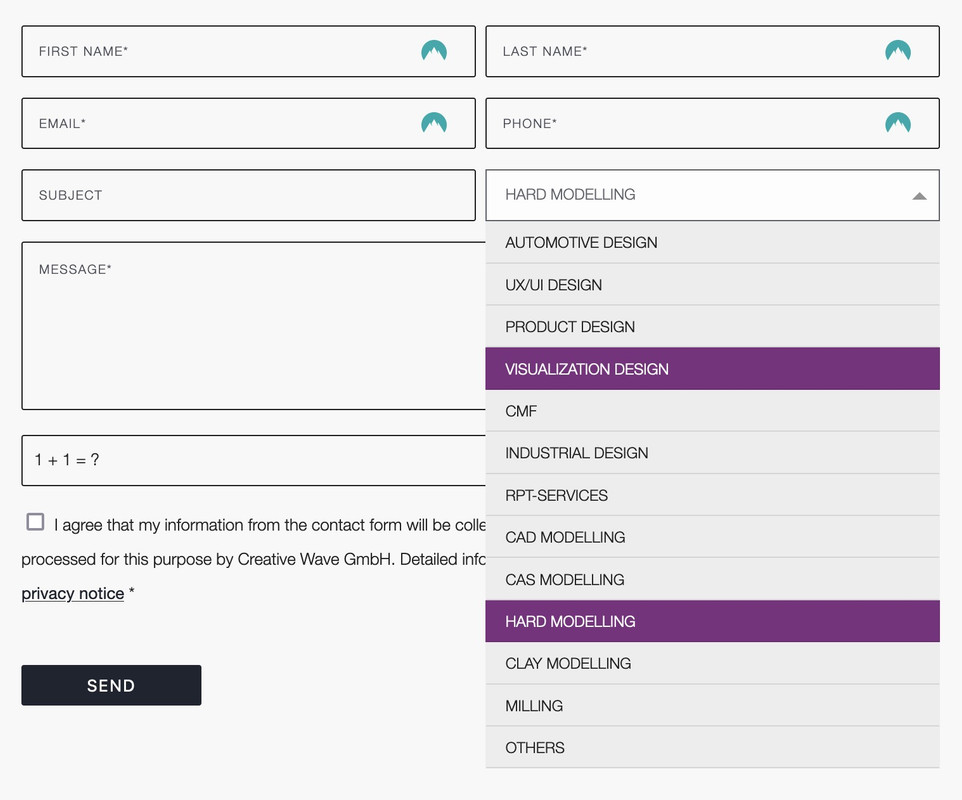
    you can only influence the select box ( as check boxes, radio buttons etc. ) by replacing the original html by a different html structure.

    put this to your child-theme functions.php:
    ( it is specific to your form – because the selector for that form element is given by the ID: #element_avia_6_1
    on other form elements it might be a different ID )

    function style_select_options(){
    ?>
    <script>
    window.addEventListener("DOMContentLoaded", function () { 
        (function($) {     
            $('.avia_ajax_form #element_avia_6_1').addClass('custom-select');
        })(jQuery);
    
        var x, i, j, l, ll, selElmnt, a, b, c;
        /* Look for any elements with the class "custom-select": */
        x = document.getElementsByClassName("custom-select");
        l = x.length;
        for (i = 0; i < l; i++) {
          selElmnt = x[i].getElementsByTagName("select")[0];
          ll = selElmnt.length;
          /* For each element, create a new DIV that will act as the selected item: */
          a = document.createElement("DIV");
          a.setAttribute("class", "select-selected");
          a.innerHTML = selElmnt.options[selElmnt.selectedIndex].innerHTML;
          x[i].appendChild(a);
          /* For each element, create a new DIV that will contain the option list: */
          b = document.createElement("DIV");
          b.setAttribute("class", "select-items select-hide");
          for (j = 1; j < ll; j++) {
            /* For each option in the original select element,
            create a new DIV that will act as an option item: */
            c = document.createElement("DIV");
            c.innerHTML = selElmnt.options[j].innerHTML;
            c.addEventListener("click", function(e) {
                /* When an item is clicked, update the original select box,
                and the selected item: */
                var y, i, k, s, h, sl, yl;
                s = this.parentNode.parentNode.getElementsByTagName("select")[0];
                sl = s.length;
                h = this.parentNode.previousSibling;
                for (i = 0; i < sl; i++) {
                  if (s.options[i].innerHTML == this.innerHTML) {
                    s.selectedIndex = i;
                    h.innerHTML = this.innerHTML;
                    y = this.parentNode.getElementsByClassName("same-as-selected");
                    yl = y.length;
                    for (k = 0; k < yl; k++) {
                      y[k].removeAttribute("class");
                    }
                    this.setAttribute("class", "same-as-selected");
                    break;
                  }
                }
                h.click();
            });
            b.appendChild(c);
          }
          x[i].appendChild(b);
          a.addEventListener("click", function(e) {
            /* When the select box is clicked, close any other select boxes,
            and open/close the current select box: */
            e.stopPropagation();
            closeAllSelect(this);
            this.nextSibling.classList.toggle("select-hide");
            this.classList.toggle("select-arrow-active");
          });
        }
    
        function closeAllSelect(elmnt) {
          /* A function that will close all select boxes in the document,
          except the current select box: */
          var x, y, i, xl, yl, arrNo = [];
          x = document.getElementsByClassName("select-items");
          y = document.getElementsByClassName("select-selected");
          xl = x.length;
          yl = y.length;
          for (i = 0; i < yl; i++) {
            if (elmnt == y[i]) {
              arrNo.push(i)
            } else {
              y[i].classList.remove("select-arrow-active");
            }
          }
          for (i = 0; i < xl; i++) {
            if (arrNo.indexOf(i)) {
              x[i].classList.add("select-hide");
            }
          }
        }
    
        /* If the user clicks anywhere outside the select box,
        then close all select boxes: */
        document.addEventListener("click", closeAllSelect); 
    
    });
    </script>
    <?php
    }
    add_action('wp_footer', 'style_select_options');
    

    after that for quick.css:

    /*the container must be positioned relative:*/
    .custom-select {
      font-family: inherit;
      text-transform: uppercase;
    }
    
    .custom-select select {
      display: none !important;
    }
    
    #top .select-selected {
      background-color: var(--enfold-main-color-bg);
      border-color: var(--enfold-main-color-primary);
      border-width: 1px;
      height: 41px;
      font-size: 12px;
      color: var(--enfold-main-color-primary);
      opacity: 0.7
    }
    
    /*style the arrow inside the select element:*/
    .select-selected:after {
      position: absolute;
      content: "";
      top: 18px;
      right: 10px;
      width: 0;
      height: 0;
      border: 6px solid transparent;
      border-color: #666 transparent transparent transparent;
    }
    
    /*point the arrow upwards when the select box is open (active):*/
    .select-selected.select-arrow-active:after {
      border-color: transparent transparent #666 transparent;
      top: 12px;
    }
    
    /*style the items (options), including the selected item:*/
    .select-items div,
    .select-selected {
      color: #FFF;
      padding: 2px 15px 2px;
      border: 1px solid transparent;
      border-color: transparent transparent rgba(0, 0, 0, 0.1) transparent;
      cursor: pointer;
      user-select: none;
    }
    
    /*style the items (options), including the selected item:*/
    .select-selected {
      padding: 5px 15px 2px;
    }
    
    /*style items (options):*/
    .select-items {
      position: absolute;
      background-color: #ddd;
      top: 100%;
      left: 0;
      right: 0;
      z-index: 99;
      font-size: 12px
    }
    
    /*hide the items when the select box is closed:*/
    .select-hide {
      display: none;
    }
    
    .select-items div:hover, .same-as-selected {
      background-color: #7d2a7e;
      color: #fff !important;
    }

    Looks then this way – but you can now style each option and pseudo states to your needs:

    • This reply was modified 1 year, 10 months ago by Guenni007.
    #1444989

    Hey, Rikard

    1. I need help in updating the template, it is updated and remains in version: 5.0.1.
    I tried to change the token but the template still does not update.

    2. I need help with this comment the site shows up all the time, regardless of the plugin not working well
    Deprecated: The get_page_by_title function was deprecated in version 6.2.0! WP_Query should be used instead. in /home/orahayal/public_html/wp-includes/functions.php on line 6078
    https://www.orah-ayalon.com/wp-content/uploads/2024/05/IMG-1.png

    3. Thanks I will contact the support of this plugin.

    Thank you,
    Yossi Yerushalmi

    #1444886
    Yossi Yerushalmi
    Participant

    Hi support team
    I have a website that is not working

    1. Update the template
    2. A note appears to me, in the editing tool of the pages – photo IMG-2
    Notice: Undefined variable: script_url in /home/orahayal/public_html/wp-content/plugins/flipbook-plugin/flipbook.php on line 70
    https://www.orah-ayalon.com/wp-content/uploads/2024/05/IMG-2.png

    3. Another note appears when I activate the Flip Book plugin – IMG-1 photo
    Deprecated: The get_page_by_title function was deprecated in version 6.2.0! WP_Query should be used instead. in /home/orahayal/public_html/wp-includes/functions.php on line 6078
    https://www.orah-ayalon.com/wp-content/uploads/2024/05/IMG-1.png

    Thank you,
    yossi yerushalmi

    #1444778

    Topic: PHP upgrade fail

    in forum Enfold
    SugarPR
    Participant

    Hi – please help me – my host (Dreamhost) for my site (currently on Enfold 4.1.2 has failed an upgrade for PHP 8.2 – and they have identified the following error:

    After careful investigation, I found that it seems your active theme: enfold may be the reason for the failure.
    When doing a test via the backend. I noticed that the following error:

    Warning: Trying to access array offset on value of type null in
    /home/wp_c3sy69/alexanderknightaccountants.co.uk/wp-content/themes/enfold/framework/php/function-set-avia-frontend.php
    on line 74
    PHP Fatal error: Unparenthesized a ? b : c ? d : e is not supported.
    Use either (a ? b : c) ? d : e or a ? b : (c ? d : e) in
    /home/wp_c3sy69/alexanderknightaccountants.co.uk/wp-content/themes/enfold/functions-enfold.php
    on line 265
    Fatal error: Unparenthesized a ? b : c ? d : e is not supported. Use
    either (a ? b : c) ? d : e or a ? b : (c ? d : e) in
    /home/wp_c3sy69/alexanderknightaccountants.co.uk/wp-content/themes/enfold/functions-enfold.php
    on line 265
    Error: There has been a critical error on this website.Learn more about
    troubleshooting WordPress. There has been a critical error on this
    website.

    With that being said. I would recommend trying a different theme and then
    attempt the upgrade. Or, perhaps have a developer or enfold theme
    developers further check that error and see if they can provide an update
    for PHP 8.2.

    #1444760
    JohnMYates
    Participant

    We are having a repeated (at least 14 times since 01/01/2024) error on a woocommerce site.

    Site details are:
    WordPress version 6.5.3
    Active theme: Enfold Child (version 1.0)
    Current plugin: (version )
    PHP version 8.1.28

    Error message (redacted by YYYYYY) is:
    Error Details
    =============
    An error of type E_ERROR was caused in line 2011 of the file
    /home/YYYYYY/public_html/wp-content/themes/enfold/config-templatebuilder/avia-template-builder/php/class-template-builder.php.
    Error message: Allowed memory size of 1073741824 bytes exhausted
    (tried to allocate 139700361116000 bytes)

    Each time the error has occurred the pressure has been to get the site back up and running asap. To do so I have, each time, reinstalled the Enfold Theme and cleared recovery mode and this seems to fix the issue.

    The error occurred last night so we may be clear for a while, or it may happen at any time.

    How best can we (collectively) identify the problem and resolve it with a minimum of site downtime?

    Many thanks

    John

    #1444422

    Hey manurimini,
    As I understand your question when you click a anchor link the page scrolls too far and goes under the sticky sub-menu, to change this you will need to adjust the offset.
    The following script will change it but you may need to adjust the offset for your site, so in this example our header is 80px high on mobile and the sub-menu is 60px height, making 140px:
    Enfold Support 5839
    The height doesn’t change until 990px when the burger menu is replaced with text items, and then the header is 90px high on mobile and the sub-menu is 60px height, making 150px:
    Enfold Support 5841
    So add this code to the end of your child theme functions.php file in Appearance ▸ Editor or If you are not using a child theme you could use the WP Code plugin then add a new snippet, in the top right corner use the PHP snippet as the code type:
    Enfold_Support_2680.jpeg
    then add this code and save.

    function custom_change_offset() { ?>
      <script>
    (function($) {
    	var width = $(window).width();
        if ((width < 989)) {
      $('a[href*=#]:not([href=#])').click(function() {
        if (location.pathname.replace(/^\//,'') == this.pathname.replace(/^\//,'') 
    && location.hostname == this.hostname) {
    
          var target = $(this.hash);
          target = target.length ? target : $('[name=' + this.hash.slice(1) +']');
          if (target.length) {
            $('html,body').animate({
              scrollTop: target.offset().top - 140 //offset
            }, 1000);
            return false;
          }
        }
      });
      //Executed on page load with URL containing an anchor tag.
      if($(location.href.split("#")[1])) {
          var target = $('#'+location.href.split("#")[1]);
          if (target.length) {
            $('html,body').animate({
              scrollTop: target.offset().top - 140 //offset
            }, 1000);
            return false;
          }
        }
        } 
        else if ((width > 990)) {
      $('a[href*=#]:not([href=#])').click(function() {
        if (location.pathname.replace(/^\//,'') == this.pathname.replace(/^\//,'') 
    && location.hostname == this.hostname) {
    
          var target = $(this.hash);
          target = target.length ? target : $('[name=' + this.hash.slice(1) +']');
          if (target.length) {
            $('html,body').animate({
              scrollTop: target.offset().top - 150 //offset
            }, 1000);
            return false;
          }
        }
      });
      //Executed on page load with URL containing an anchor tag.
      if($(location.href.split("#")[1])) {
      	var targett = $('#'+location.href.split("#")[1]);
          if (targett.length) {
            $('html,body').animate({
              scrollTop: targett.offset().top - 150 //offset
            }, 1000);
            return false;
          }
        }
        }
    }(jQuery));
    </script>
      <?php
    }
    add_action( 'wp_footer', 'custom_change_offset', 99 );

    Please ensure to copy the code from the forum and not an email notification so the symbols are not converted.
    Note that there is four places you may need to adjust two 140px & two 150px
    Also note that you can add more space if you like, it doesn’t have to be exact.
    In my example I added a red border around the sections to make it easy to see, on mobile it is like this:
    Enfold Support 5843
    and on tablet 1024px like this:
    Enfold Support 5845
    and desktop like this:
    Enfold Support 5847
    Please note that when testing by changing your browser widow size it is best to reload the page so the screen size can be recalculated, this won’t be an issue on real devices.

    Best regards,
    Mike

    Hi,
    Your website link in the copyright (Website Design by) is broken, try clicking it.
    If you are not using a child theme you could use the WP Code plugin then add a new snippet, in the top right corner use the PHP snippet as the code type:
    Enfold_Support_2680.jpeg
    then add Guenni007’s code and save.

    Best regards,
    Mike

    #1444074
    manurimini
    Participant

    Hello
    I’m using a sticky menu on tablets and mobiles that works perfectly
    Here the code:

    @media only screen and (max-width: 989px) {
    .html_stretched.responsive.html_mobile_menu_tablet.html_header_top #top #main {
        margin-top: 120px !important; }
      .html_stretched.responsive.html_mobile_menu_tablet #top #wrap_all #header {
        position: fixed !important; 
      }}
    
    @media only screen and (max-width: 767px) {
    .responsive #top #wrap_all #header {
        position: fixed;
    }}

    I also use the Alb full width submenu to point some anchor links.
    The problem with anchor links is that they don’t stop scrolling under the Alb full width submenu.
    How can I have the page scrollig to the anchor and stopping before the Alb full width submenu which has also different heights in tablets or mobilephones?

    I’ve tried to add the function:

    function mobile_sub_menu_sticky() { ?>
    <script>
    window.addEventListener('DOMContentLoaded', function() {
      (function($){
      	var width = $(window).width();
        var $stickyTop = $('#sub_menu1');
        if (width <= 989) {
        $stickyTop.waypoint(function(direction) {
          if (direction === 'down') {
             $stickyTop.addClass('sticky-top');
          }
          if (direction === 'up') {
             $stickyTop.removeClass('sticky-top');
          }
        }, {
          offset: '0%'
        });
        }
      })(jQuery);
    });
    </script>
      <?php
    }
    add_action('wp_footer', 'mobile_sub_menu_sticky');

    And then the CSS:

    .sticky-top {
    	position:fixed!important;
    	top:120px!important;
    	z-index:600!important;
    }

    But it didn’t work

    Thank you
    Manu

    • This topic was modified 1 year, 10 months ago by manurimini.
    • This topic was modified 1 year, 10 months ago by manurimini.
    • This topic was modified 1 year, 10 months ago by manurimini.
    • This topic was modified 1 year, 10 months ago by manurimini.
    • This topic was modified 1 year, 10 months ago by manurimini.
    #1443879

    Topic: Blogs slider

    in forum Enfold
    Deef
    Participant

    I was assigned to a website made some time agou using enfold 5.0.1. when I upgraded it to 5.7 the posts slider (slider an custom post type) does not show the content any more. It is showing a ‘read more’ with link that seems to be correct but it does not output the image and text that is on that post.

    I am not a php or enfold developer so do not know where to look at. It does not seem that there is a custom avia shortcode in the child theme so it is in the basic enfold theme. there is no error so I am clueless on where to start. Any help is appreciated.

    
    ### WordPress Environment ###
    
    WordPress address (URL): https://www.seemann-henschel.de
    Site address (URL): https://www.seemann-henschel.de
    WC Version: 8.9.0
    REST API Version: ✔ 8.9.0
    Action Scheduler Version: ✔ 3.7.4
    Log Directory Writable: ✔
    WP Version: 6.5.3
    WP Multisite: –
    WP Memory Limit: 512 MB
    WP Debug Mode: –
    WP Cron: ✔
    Language: de_DE_formal
    External object cache: –
    
    ### Server Environment ###
    
    Server Info: Apache
    PHP Version: 8.1.19
    PHP Post Max Size: 96 MB
    PHP Time Limit: 300
    PHP Max Input Vars: 10000
    cURL Version: 7.38.0
    OpenSSL/1.0.2l
    
    SUHOSIN Installed: –
    MySQL Version: 5.7.25
    Max Upload Size: 96 MB
    Default Timezone is UTC: ✔
    fsockopen/cURL: ✔
    SoapClient: ✔
    DOMDocument: ✔
    GZip: ✔
    Multibyte String: ✔
    Remote Post: ✔
    Remote Get: ✔
    
    ### Database ###
    
    WC Database Version: 8.9.0
    WC Database Prefix: wp_
    Datenbank-Gesamtgröße: 200.84MB
    Datenbank-Datengröße: 161.84MB
    Datenbank-Indexgröße: 39.00MB
    wp_woocommerce_sessions: Daten: 0.06MB + Index: 0.02MB + Engine InnoDB
    wp_woocommerce_api_keys: Daten: 0.02MB + Index: 0.03MB + Engine InnoDB
    wp_woocommerce_attribute_taxonomies: Daten: 0.02MB + Index: 0.02MB + Engine InnoDB
    wp_woocommerce_downloadable_product_permissions: Daten: 0.02MB + Index: 0.06MB + Engine InnoDB
    wp_woocommerce_order_items: Daten: 0.02MB + Index: 0.02MB + Engine InnoDB
    wp_woocommerce_order_itemmeta: Daten: 1.52MB + Index: 0.67MB + Engine InnoDB
    wp_woocommerce_tax_rates: Daten: 0.02MB + Index: 0.06MB + Engine InnoDB
    wp_woocommerce_tax_rate_locations: Daten: 0.02MB + Index: 0.03MB + Engine InnoDB
    wp_woocommerce_shipping_zones: Daten: 0.02MB + Index: 0.00MB + Engine InnoDB
    wp_woocommerce_shipping_zone_locations: Daten: 0.02MB + Index: 0.05MB + Engine InnoDB
    wp_woocommerce_shipping_zone_methods: Daten: 0.02MB + Index: 0.00MB + Engine InnoDB
    wp_woocommerce_payment_tokens: Daten: 0.02MB + Index: 0.02MB + Engine InnoDB
    wp_woocommerce_payment_tokenmeta: Daten: 0.02MB + Index: 0.03MB + Engine InnoDB
    wp_woocommerce_log: Daten: 0.02MB + Index: 0.02MB + Engine InnoDB
    matomo_access: Daten: 0.02MB + Index: 0.02MB + Engine InnoDB
    matomo_archive_blob_2022_01: Daten: 1.52MB + Index: 0.02MB + Engine InnoDB
    matomo_archive_blob_2022_02: Daten: 0.02MB + Index: 0.02MB + Engine InnoDB
    matomo_archive_blob_2022_03: Daten: 0.02MB + Index: 0.02MB + Engine InnoDB
    matomo_archive_blob_2022_04: Daten: 0.02MB + Index: 0.02MB + Engine InnoDB
    matomo_archive_blob_2022_05: Daten: 0.02MB + Index: 0.02MB + Engine InnoDB
    matomo_archive_blob_2022_06: Daten: 0.02MB + Index: 0.02MB + Engine InnoDB
    matomo_archive_blob_2022_07: Daten: 0.02MB + Index: 0.02MB + Engine InnoDB
    matomo_archive_blob_2022_08: Daten: 3.17MB + Index: 0.14MB + Engine InnoDB
    matomo_archive_blob_2022_09: Daten: 2.52MB + Index: 0.16MB + Engine InnoDB
    matomo_archive_blob_2022_10: Daten: 3.52MB + Index: 0.17MB + Engine InnoDB
    matomo_archive_blob_2022_11: Daten: 3.52MB + Index: 0.14MB + Engine InnoDB
    matomo_archive_blob_2022_12: Daten: 3.52MB + Index: 0.17MB + Engine InnoDB
    matomo_archive_blob_2023_01: Daten: 3.52MB + Index: 0.17MB + Engine InnoDB
    matomo_archive_blob_2023_02: Daten: 3.41MB + Index: 0.14MB + Engine InnoDB
    matomo_archive_blob_2023_03: Daten: 3.52MB + Index: 0.13MB + Engine InnoDB
    matomo_archive_blob_2023_04: Daten: 0.02MB + Index: 0.02MB + Engine InnoDB
    matomo_archive_blob_2023_05: Daten: 0.02MB + Index: 0.02MB + Engine InnoDB
    matomo_archive_blob_2023_06: Daten: 0.02MB + Index: 0.02MB + Engine InnoDB
    matomo_archive_blob_2023_07: Daten: 0.02MB + Index: 0.02MB + Engine InnoDB
    matomo_archive_blob_2023_08: Daten: 0.02MB + Index: 0.02MB + Engine InnoDB
    matomo_archive_blob_2023_09: Daten: 0.02MB + Index: 0.02MB + Engine InnoDB
    matomo_archive_blob_2023_10: Daten: 0.02MB + Index: 0.02MB + Engine InnoDB
    matomo_archive_blob_2023_11: Daten: 0.02MB + Index: 0.02MB + Engine InnoDB
    matomo_archive_blob_2023_12: Daten: 0.33MB + Index: 0.05MB + Engine InnoDB
    matomo_archive_blob_2024_01: Daten: 3.52MB + Index: 0.16MB + Engine InnoDB
    matomo_archive_blob_2024_02: Daten: 0.31MB + Index: 0.05MB + Engine InnoDB
    matomo_archive_blob_2024_03: Daten: 0.02MB + Index: 0.02MB + Engine InnoDB
    matomo_archive_blob_2024_04: Daten: 0.02MB + Index: 0.02MB + Engine InnoDB
    matomo_archive_blob_2024_05: Daten: 0.02MB + Index: 0.02MB + Engine InnoDB
    matomo_archive_invalidations: Daten: 0.02MB + Index: 0.02MB + Engine InnoDB
    matomo_archive_numeric_2022_01: Daten: 0.02MB + Index: 0.03MB + Engine InnoDB
    matomo_archive_numeric_2022_02: Daten: 0.02MB + Index: 0.03MB + Engine InnoDB
    matomo_archive_numeric_2022_03: Daten: 0.02MB + Index: 0.03MB + Engine InnoDB
    matomo_archive_numeric_2022_04: Daten: 0.02MB + Index: 0.03MB + Engine InnoDB
    matomo_archive_numeric_2022_05: Daten: 0.02MB + Index: 0.03MB + Engine InnoDB
    matomo_archive_numeric_2022_06: Daten: 0.02MB + Index: 0.03MB + Engine InnoDB
    matomo_archive_numeric_2022_07: Daten: 0.02MB + Index: 0.03MB + Engine InnoDB
    matomo_archive_numeric_2022_08: Daten: 0.20MB + Index: 0.22MB + Engine InnoDB
    matomo_archive_numeric_2022_09: Daten: 0.20MB + Index: 0.27MB + Engine InnoDB
    matomo_archive_numeric_2022_10: Daten: 0.27MB + Index: 0.30MB + Engine InnoDB
    matomo_archive_numeric_2022_11: Daten: 0.31MB + Index: 0.31MB + Engine InnoDB
    matomo_archive_numeric_2022_12: Daten: 0.25MB + Index: 0.33MB + Engine InnoDB
    matomo_archive_numeric_2023_01: Daten: 0.25MB + Index: 0.27MB + Engine InnoDB
    matomo_archive_numeric_2023_02: Daten: 0.20MB + Index: 0.23MB + Engine InnoDB
    matomo_archive_numeric_2023_03: Daten: 0.16MB + Index: 0.22MB + Engine InnoDB
    matomo_archive_numeric_2023_04: Daten: 0.02MB + Index: 0.03MB + Engine InnoDB
    matomo_archive_numeric_2023_05: Daten: 0.02MB + Index: 0.03MB + Engine InnoDB
    matomo_archive_numeric_2023_06: Daten: 0.02MB + Index: 0.03MB + Engine InnoDB
    matomo_archive_numeric_2023_07: Daten: 0.02MB + Index: 0.03MB + Engine InnoDB
    matomo_archive_numeric_2023_08: Daten: 0.02MB + Index: 0.03MB + Engine InnoDB
    matomo_archive_numeric_2023_09: Daten: 0.02MB + Index: 0.03MB + Engine InnoDB
    matomo_archive_numeric_2023_10: Daten: 0.02MB + Index: 0.03MB + Engine InnoDB
    matomo_archive_numeric_2023_11: Daten: 0.02MB + Index: 0.03MB + Engine InnoDB
    matomo_archive_numeric_2023_12: Daten: 0.08MB + Index: 0.06MB + Engine InnoDB
    matomo_archive_numeric_2024_01: Daten: 0.31MB + Index: 0.30MB + Engine InnoDB
    matomo_archive_numeric_2024_02: Daten: 0.05MB + Index: 0.06MB + Engine InnoDB
    matomo_archive_numeric_2024_03: Daten: 0.02MB + Index: 0.03MB + Engine InnoDB
    matomo_archive_numeric_2024_04: Daten: 0.02MB + Index: 0.03MB + Engine InnoDB
    matomo_archive_numeric_2024_05: Daten: 0.02MB + Index: 0.03MB + Engine InnoDB
    matomo_brute_force_log: Daten: 0.02MB + Index: 0.02MB + Engine InnoDB
    matomo_changes: Daten: 0.02MB + Index: 0.02MB + Engine InnoDB
    matomo_custom_dimensions: Daten: 0.02MB + Index: 0.02MB + Engine InnoDB
    matomo_goal: Daten: 0.02MB + Index: 0.00MB + Engine InnoDB
    matomo_locks: Daten: 0.02MB + Index: 0.00MB + Engine InnoDB
    matomo_logger_message: Daten: 0.02MB + Index: 0.00MB + Engine InnoDB
    matomo_log_action: Daten: 0.36MB + Index: 0.09MB + Engine InnoDB
    matomo_log_conversion: Daten: 0.02MB + Index: 0.03MB + Engine InnoDB
    matomo_log_conversion_item: Daten: 0.02MB + Index: 0.02MB + Engine InnoDB
    matomo_log_link_visit_action: Daten: 0.20MB + Index: 0.16MB + Engine InnoDB
    matomo_log_profiling: Daten: 0.02MB + Index: 0.02MB + Engine InnoDB
    matomo_log_visit: Daten: 1.52MB + Index: 0.45MB + Engine InnoDB
    matomo_option: Daten: 0.02MB + Index: 0.02MB + Engine InnoDB
    matomo_plugin_setting: Daten: 0.02MB + Index: 0.02MB + Engine InnoDB
    matomo_privacy_logdata_anonymizations: Daten: 0.02MB + Index: 0.02MB + Engine InnoDB
    matomo_report: Daten: 0.02MB + Index: 0.00MB + Engine InnoDB
    matomo_report_subscriptions: Daten: 0.02MB + Index: 0.02MB + Engine InnoDB
    matomo_segment: Daten: 0.02MB + Index: 0.00MB + Engine InnoDB
    matomo_sequence: Daten: 0.02MB + Index: 0.00MB + Engine InnoDB
    matomo_session: Daten: 0.02MB + Index: 0.00MB + Engine InnoDB
    matomo_site: Daten: 0.02MB + Index: 0.00MB + Engine InnoDB
    matomo_site_setting: Daten: 0.02MB + Index: 0.02MB + Engine InnoDB
    matomo_site_url: Daten: 0.02MB + Index: 0.00MB + Engine InnoDB
    matomo_tracking_failure: Daten: 0.02MB + Index: 0.00MB + Engine InnoDB
    matomo_twofactor_recovery_code: Daten: 0.02MB + Index: 0.00MB + Engine InnoDB
    matomo_user: Daten: 0.02MB + Index: 0.02MB + Engine InnoDB
    matomo_user_dashboard: Daten: 0.02MB + Index: 0.00MB + Engine InnoDB
    matomo_user_language: Daten: 0.02MB + Index: 0.00MB + Engine InnoDB
    matomo_user_token_auth: Daten: 0.02MB + Index: 0.02MB + Engine InnoDB
    wp_actionscheduler_actions: Daten: 11.54MB + Index: 4.39MB + Engine MyISAM
    wp_actionscheduler_claims: Daten: 0.00MB + Index: 0.00MB + Engine MyISAM
    wp_actionscheduler_groups: Daten: 0.00MB + Index: 0.01MB + Engine MyISAM
    wp_actionscheduler_logs: Daten: 11.51MB + Index: 7.18MB + Engine MyISAM
    wp_borlabs_cookie_consent_log: Daten: 1.64MB + Index: 0.46MB + Engine MyISAM
    wp_borlabs_cookie_content_blocker: Daten: 0.01MB + Index: 0.00MB + Engine MyISAM
    wp_borlabs_cookie_cookies: Daten: 0.01MB + Index: 0.00MB + Engine MyISAM
    wp_borlabs_cookie_groups: Daten: 0.00MB + Index: 0.00MB + Engine MyISAM
    wp_borlabs_cookie_script_blocker: Daten: 0.00MB + Index: 0.00MB + Engine MyISAM
    wp_borlabs_cookie_statistics: Daten: 0.46MB + Index: 0.46MB + Engine MyISAM
    wp_commentmeta: Daten: 0.02MB + Index: 0.03MB + Engine InnoDB
    wp_comments: Daten: 0.02MB + Index: 0.09MB + Engine InnoDB
    wp_duplicator_pro_entities: Daten: 0.01MB + Index: 0.00MB + Engine MyISAM
    wp_duplicator_pro_packages: Daten: 0.17MB + Index: 0.00MB + Engine MyISAM
    wp_easywpsmtp_debug_events: Daten: 0.02MB + Index: 0.00MB + Engine InnoDB
    wp_easywpsmtp_tasks_meta: Daten: 0.00MB + Index: 0.00MB + Engine MyISAM
    wp_layerslider: Daten: 0.02MB + Index: 0.00MB + Engine InnoDB
    wp_layerslider_drafts: Daten: 0.00MB + Index: 0.00MB + Engine MyISAM
    wp_layerslider_revisions: Daten: 0.02MB + Index: 0.00MB + Engine InnoDB
    wp_links: Daten: 0.02MB + Index: 0.02MB + Engine InnoDB
    wp_novalnet_aff_account_detail: Daten: 0.02MB + Index: 0.02MB + Engine InnoDB
    wp_novalnet_aff_user_detail: Daten: 0.02MB + Index: 0.02MB + Engine InnoDB
    wp_novalnet_callback_history: Daten: 0.02MB + Index: 0.00MB + Engine InnoDB
    wp_novalnet_subscription_details: Daten: 0.02MB + Index: 0.03MB + Engine InnoDB
    wp_novalnet_transaction_detail: Daten: 0.02MB + Index: 0.09MB + Engine InnoDB
    wp_options: Daten: 7.23MB + Index: 1.20MB + Engine InnoDB
    wp_pmxi_files: Daten: 0.02MB + Index: 0.00MB + Engine InnoDB
    wp_pmxi_hash: Daten: 0.01MB + Index: 0.01MB + Engine MyISAM
    wp_pmxi_history: Daten: 0.02MB + Index: 0.00MB + Engine InnoDB
    wp_pmxi_images: Daten: 0.44MB + Index: 0.00MB + Engine InnoDB
    wp_pmxi_imports: Daten: 0.14MB + Index: 0.00MB + Engine InnoDB
    wp_pmxi_posts: Daten: 0.05MB + Index: 0.00MB + Engine InnoDB
    wp_pmxi_templates: Daten: 0.05MB + Index: 0.00MB + Engine InnoDB
    wp_postmeta: Daten: 51.14MB + Index: 12.36MB + Engine InnoDB
    wp_posts: Daten: 31.06MB + Index: 1.31MB + Engine InnoDB
    wp_redirection_404: Daten: 2.02MB + Index: 0.31MB + Engine InnoDB
    wp_redirection_groups: Daten: 0.02MB + Index: 0.03MB + Engine InnoDB
    wp_redirection_items: Daten: 0.05MB + Index: 0.09MB + Engine InnoDB
    wp_redirection_logs: Daten: 0.14MB + Index: 0.05MB + Engine InnoDB
    wp_snippets: Daten: 0.00MB + Index: 0.00MB + Engine MyISAM
    wp_storeabill_documentmeta: Daten: 0.00MB + Index: 0.00MB + Engine MyISAM
    wp_storeabill_documents: Daten: 0.00MB + Index: 0.01MB + Engine MyISAM
    wp_storeabill_document_itemmeta: Daten: 0.00MB + Index: 0.00MB + Engine MyISAM
    wp_storeabill_document_items: Daten: 0.00MB + Index: 0.00MB + Engine MyISAM
    wp_storeabill_document_noticemeta: Daten: 0.00MB + Index: 0.00MB + Engine MyISAM
    wp_storeabill_document_notices: Daten: 0.00MB + Index: 0.00MB + Engine MyISAM
    wp_storeabill_journals: Daten: 0.00MB + Index: 0.00MB + Engine MyISAM
    wp_termmeta: Daten: 0.05MB + Index: 0.03MB + Engine InnoDB
    wp_terms: Daten: 0.02MB + Index: 0.03MB + Engine InnoDB
    wp_term_relationships: Daten: 0.09MB + Index: 0.06MB + Engine InnoDB
    wp_term_taxonomy: Daten: 0.02MB + Index: 0.03MB + Engine InnoDB
    wp_usermeta: Daten: 0.08MB + Index: 0.03MB + Engine InnoDB
    wp_users: Daten: 0.02MB + Index: 0.05MB + Engine InnoDB
    wp_wc_admin_notes: Daten: 0.02MB + Index: 0.00MB + Engine InnoDB
    wp_wc_admin_note_actions: Daten: 0.02MB + Index: 0.02MB + Engine InnoDB
    wp_wc_category_lookup: Daten: 0.02MB + Index: 0.00MB + Engine InnoDB
    wp_wc_customer_lookup: Daten: 0.02MB + Index: 0.03MB + Engine InnoDB
    wp_wc_download_log: Daten: 0.02MB + Index: 0.03MB + Engine InnoDB
    wp_wc_orders: Daten: 0.00MB + Index: 0.00MB + Engine MyISAM
    wp_wc_orders_meta: Daten: 0.00MB + Index: 0.00MB + Engine MyISAM
    wp_wc_order_addresses: Daten: 0.00MB + Index: 0.00MB + Engine MyISAM
    wp_wc_order_coupon_lookup: Daten: 0.02MB + Index: 0.03MB + Engine InnoDB
    wp_wc_order_operational_data: Daten: 0.00MB + Index: 0.00MB + Engine MyISAM
    wp_wc_order_product_lookup: Daten: 0.09MB + Index: 0.06MB + Engine InnoDB
    wp_wc_order_stats: Daten: 0.16MB + Index: 0.14MB + Engine InnoDB
    wp_wc_order_tax_lookup: Daten: 0.02MB + Index: 0.03MB + Engine InnoDB
    wp_wc_product_attributes_lookup: Daten: 0.01MB + Index: 0.03MB + Engine MyISAM
    wp_wc_product_download_directories: Daten: 0.00MB + Index: 0.01MB + Engine MyISAM
    wp_wc_product_meta_lookup: Daten: 0.06MB + Index: 0.09MB + Engine InnoDB
    wp_wc_rate_limits: Daten: 0.00MB + Index: 0.00MB + Engine MyISAM
    wp_wc_reserved_stock: Daten: 0.00MB + Index: 0.00MB + Engine MyISAM
    wp_wc_tax_rate_classes: Daten: 0.02MB + Index: 0.02MB + Engine InnoDB
    wp_wc_webhooks: Daten: 0.02MB + Index: 0.02MB + Engine InnoDB
    wp_woocommerce_gzd_dhl_im_products: Daten: 0.00MB + Index: 0.00MB + Engine MyISAM
    wp_woocommerce_gzd_dhl_im_product_services: Daten: 0.00MB + Index: 0.00MB + Engine MyISAM
    wp_woocommerce_gzd_dhl_labelmeta: Daten: 0.02MB + Index: 0.03MB + Engine InnoDB
    wp_woocommerce_gzd_dhl_labels: Daten: 0.02MB + Index: 0.03MB + Engine InnoDB
    wp_woocommerce_gzd_packaging: Daten: 0.00MB + Index: 0.00MB + Engine MyISAM
    wp_woocommerce_gzd_packagingmeta: Daten: 0.00MB + Index: 0.00MB + Engine MyISAM
    wp_woocommerce_gzd_shipmentmeta: Daten: 0.06MB + Index: 0.03MB + Engine InnoDB
    wp_woocommerce_gzd_shipments: Daten: 0.22MB + Index: 0.14MB + Engine InnoDB
    wp_woocommerce_gzd_shipment_itemmeta: Daten: 0.28MB + Index: 0.38MB + Engine InnoDB
    wp_woocommerce_gzd_shipment_items: Daten: 0.22MB + Index: 0.31MB + Engine InnoDB
    wp_woocommerce_gzd_shipment_labelmeta: Daten: 0.00MB + Index: 0.00MB + Engine MyISAM
    wp_woocommerce_gzd_shipment_labels: Daten: 0.00MB + Index: 0.00MB + Engine MyISAM
    wp_woocommerce_gzd_shipping_provider: Daten: 0.02MB + Index: 0.02MB + Engine InnoDB
    wp_woocommerce_gzd_shipping_providermeta: Daten: 0.06MB + Index: 0.03MB + Engine InnoDB
    wp_woof_query_cache: Daten: 0.02MB + Index: 0.02MB + Engine InnoDB
    wp_woof_sd: Daten: 0.00MB + Index: 0.00MB + Engine MyISAM
    wp_yoast_indexable: Daten: 0.39MB + Index: 0.11MB + Engine MyISAM
    wp_yoast_indexable_hierarchy: Daten: 0.02MB + Index: 0.07MB + Engine MyISAM
    wp_yoast_migrations: Daten: 0.00MB + Index: 0.01MB + Engine MyISAM
    wp_yoast_primary_term: Daten: 0.00MB + Index: 0.01MB + Engine MyISAM
    wp_yoast_seo_links: Daten: 0.23MB + Index: 0.07MB + Engine MyISAM
    wp_yoast_seo_meta: Daten: 1.72MB + Index: 1.84MB + Engine MyISAM
    
    ### Post Type Counts ###
    
    acf-field: 29
    acf-field-group: 2
    attachment: 3114
    avia_framework_post: 37
    customize_changeset: 3
    cwginstocknotifier: 500
    document_template: 5
    invoice: 4
    itsec-dash-card: 8
    itsec-dashboard: 1
    nav_menu_item: 72
    oembed_cache: 7
    page: 55
    post: 53
    product: 317
    revision: 1836
    sh_event: 55
    shop_order: 1443
    shop_order_refund: 1
    wp_global_styles: 1
    wpcf7_contact_form: 3
    
    ### Security ###
    
    Secure connection (HTTPS): ✔
    Hide errors from visitors: ✔
    
    ### Active Plugins (30) ###
    
    Advanced Custom Fields: von WP Engine – 6.2.9
    Autoptimize: von Frank Goossens (futtta) – 3.1.11
    Back In Stock Notifier for WooCommerce | WooCommerce Waitlist Pro: von codewoogeek – 5.3.2
    BackWPup: von WP MEDIA SAS – 4.0.4
    Borlabs Cookie - Cookie Opt-in: von Borlabs GmbH – 2.2.67
    Contact Form 7 to NEWSTROLL api: von NEWSTROLL.de – 1.0.0
    Classic Editor: von WordPress-Mitwirkende – 1.6.3
    Classic Widgets: von WordPress-Mitwirkende – 0.3
    Contact Form 7: von Takayuki Miyoshi – 5.9.4
    Disable Comments: von WPDeveloper – 2.4.6
    Easy WP SMTP: von Easy WP SMTP – 2.3.0
    Enable Media Replace: von ShortPixel – 4.1.5
    Limit Login Attempts Reloaded: von Limit Login Attempts Reloaded – 2.26.9
    Loco Translate: von Tim Whitlock – 2.6.9
    One Stop Shop für WooCommerce: von vendidero – 1.6.2
    Redirection: von John Godley – 5.4.2
    Regenerate Thumbnails: von Alex Mills (Viper007Bond) – 3.1.6
    Seemann Henschel Import Cron: von clickstorm GmbH – 1.0
    SVG Support: von Benbodhi – 2.5.5
    Germanized für WooCommerce Pro: von vendidero – 3.10.2
    Germanized für WooCommerce: von vendidero – 3.16.5
    Google Analytics for WooCommerce: von WooCommerce – 2.0.7
    heidelpay WooCommerce: von heidelpay – 1.6.0
    HUSKY - Products Filter Professional for WooCommerce: von realmag777 – 1.3.5.3
    WooCommerce: von Automattic – 8.9.0
    Yoast SEO: von Team Yoast – 22.7
    WP All Import Pro: von Soflyy – 4.8.5
    WP Crontrol: von John Blackbourn – 1.16.3
    WP All Import - ACF Add-On: von Soflyy – 3.3.8
    WP All Import - WooCommerce Import Add-On Pro: von Soflyy – 4.0.0
    
    ### Inactive Plugins (0) ###
    
    ### Must Use Plugins (1) ###
    
    WP Migrate DB Compatibility: von Delicious Brains – 1.2
    
    ### Settings ###
    
    API Enabled: –
    Force SSL: –
    Currency: EUR (€)
    Currency Position: right_space
    Thousand Separator: .
    Decimal Separator: ,
    Number of Decimals: 2
    Taxonomies: Product Types: external (external)
    grouped (grouped)
    simple (simple)
    variable (variable)
    
    Taxonomies: Product Visibility: exclude-from-catalog (exclude-from-catalog)
    exclude-from-search (exclude-from-search)
    featured (featured)
    outofstock (outofstock)
    rated-1 (rated-1)
    rated-2 (rated-2)
    rated-3 (rated-3)
    rated-4 (rated-4)
    rated-5 (rated-5)
    
    Connected to WooCommerce.com: –
    Enforce Approved Product Download Directories: –
    HPOS feature enabled: –
    Order datastore: WC_Order_Data_Store_CPT
    HPOS data sync enabled: –
    
    ### Logging ###
    
    Enabled: ✔
    Handler: Automattic\WooCommerce\Internal\Admin\Logging\LogHandlerFileV2
    Retention period: 30 Tage
    Level threshold: –
    Log directory size: 793 kB
    
    ### WC Pages ###
    
    Shop-Basis: #506 - /shop/
    Warenkorb: #507 - /warenkorb-2/
    Kasse: #28 - /checkout/
    Ihr Konto: #14 - /mein-konto/
    Allgemeine Geschäftsbedingungen: #697 - /agb/
    
    ### Theme ###
    
    Name: Enfold Child
    Version: 1.0
    Author URL: http://kriesi.at
    Child Theme: ✔
    Parent Theme Name: Enfold
    Parent Theme Version: 5.7.1
    Parent Theme Author URL: https://kriesi.at
    WooCommerce Support: ✔
    
    ### Templates ###
    
    Overrides: enfold-child/woocommerce/checkout/thankyou.php Version 3.7.0 ist veraltet. Die Hauptversion ist 8.1.0
    enfold-child/woocommerce/single-product/meta.php
    enfold-child/woocommerce/single-product/product-image.php Version 3.5.1 ist veraltet. Die Hauptversion ist 7.8.0
    enfold-child/woocommerce/single-product/short-description.php
    enfold-child/woocommerce/single-product/title.php
    
    Outdated Templates: ❌
    					
    					
    						Erfahren Sie
    wie Sie aktualisieren können
    
    ### Admin ###
    
    Enabled Features: activity-panels
    analytics
    product-block-editor
    coupons
    core-profiler
    customize-store
    customer-effort-score-tracks
    import-products-task
    experimental-fashion-sample-products
    shipping-smart-defaults
    shipping-setting-tour
    homescreen
    marketing
    mobile-app-banner
    navigation
    onboarding
    onboarding-tasks
    product-variation-management
    product-virtual-downloadable
    product-external-affiliate
    product-grouped
    product-linked
    product-pre-publish-modal
    product-custom-fields
    remote-inbox-notifications
    remote-free-extensions
    payment-gateway-suggestions
    shipping-label-banner
    subscriptions
    store-alerts
    transient-notices
    woo-mobile-welcome
    wc-pay-promotion
    wc-pay-welcome-page
    
    Disabled Features: minified-js
    new-product-management-experience
    settings
    async-product-editor-category-field
    launch-your-store
    
    Daily Cron: ✔ Next scheduled: 2024-05-15 09:25:07 +02:00
    Options: ✔
    Notes: 19
    Onboarding: completed
    
    ### Action Scheduler ###
    
    Abgeschlossen: 30.144
    Oldest: 2024-04-14 09:49:19 +0200
    Newest: 2024-05-15 09:45:13 +0200
    
    Fehlgeschlagen: 2.204
    Oldest: 2020-11-09 15:53:52 +0100
    Newest: 2024-05-13 14:47:24 +0200
    
    Ausstehend: 10
    Oldest: 2024-05-15 09:50:05 +0200
    Newest: 2024-05-16 05:01:00 +0200
    
    ### Status report information ###
    
    Generated at: 2024-05-15 09:49:53 +02:00
    
    #1443012

    In reply to: home page config

    Hey seomar,
    The white bar at the top was due to your LayerSlider having a space above the background image, I changed the background to “cover” and now it is fixed:
    Enfold Support 5758
    To have a different logo on mobile, Try adding this code to the end of your child theme functions.php file in Appearance ▸ Editor:

    add_filter('avf_logo','av_change_logo');
    function av_change_logo($logo)
    {
        if(wp_is_mobile() ) {
        $logo = "http://kriesi.at/wp-content/themes/kriesi/images/logo.png";
        }
        return $logo;
    }

    change the url to your new logo image
    The reason your LayerSlider is not showing until someone interacts wih it is due to your WPRocket lazy load, you need to add a exclusion
    Enfold Support 5760
    Your EWWW Image Optimizer is also dong the same thing:
    Enfold Support 5762
    I added these for you please clear your browser cache and check, if you still have trouble clear your server cache or disable both plugins.
    for your last question, do you mean this:
    Enfold Support 5764
    it is in your LayerSlider, please change there.

    Best regards,
    Mike

    #1442998

    Hi,
    Thanks for the feedback, remove the css above and keep the caption in your featured image in the media library, and then try adding this code to the end of your child theme functions.php file in Appearance ▸ Editor:

    function custom_post_featured_image_link( $image_link ) {
    	if(is_single() && has_post_thumbnail()) {
    		$image_link = get_the_post_thumbnail();
    		$thumbnail_id = get_post_thumbnail_id();
    		$thumbnail_caption = wp_get_attachment_caption($thumbnail_id);
    		$caption_div = '<div class="featured-image-caption" style="text-align: center;">' . esc_html($thumbnail_caption) . '</div>';
    		$image_link = $image_link . $caption_div;
    	}
    	return $image_link;
    }
    add_filter( 'avf_post_featured_image_link', 'custom_post_featured_image_link', 10, 3 );

    the caption should show like this:
    Enfold Support 5752
    I’m not sure how it will show for your different layouts as the WordPress login above didn’t work for me so I couldn’t test, so give it a try.

    Best regards,
    Mike

    Hey robertbwc,
    Try adding this code to the end of your child theme functions.php file in Appearance ▸ Editor:

    function my_woocommerce_catalog_orderby( $orderby ) {
    	unset($orderby["default"]);
    	unset($orderby["menu_order"]);
    	unset($orderby["price"]);
    	unset($orderby["date"]);
    	unset($orderby["popularity"]);
    	unset($orderby["rating"]);
    	unset($orderby["rand"]);
    	unset($orderby["relevance"]);
            return $orderby;
    }
    add_filter( "avf_wc_product_order_dropdown_frontend", "my_woocommerce_catalog_orderby", 20 );

    it will remove all except Name & ID
    Enfold Support 5734

    Best regards,
    Mike

    #1442912

    Topic: Adobe Type Kit Issues

    in forum Enfold
    spokerstradingco
    Participant

    Hi, I’m following this thread on how to add an Adobe type kit to the Enfold theme. https://kriesi.at/support/topic/adding-adobe-typekit-to-my-website/

    I add the code in private to my child theme but I’m getting this error. Your PHP code changes were not applied due to an error on line 17 of file wp-content/themes/enfold-child/functions.php. Please fix and try saving again.

    syntax error, unexpected ‘Regular’’ (T_STRING), expecting ‘]’

    I’m not too sure of the font weight but this is the font im using Edpirito Regular. https://fonts.adobe.com/fonts/espiritu

    Any help would be appriectaed!

    Hi,
    Thanks for the login, I’m not sure what could be causing this, but I see that you are using WPRocket, sometimes this has blocked elements if not enough exclusions were added to it’s exclusion field, so to text try disabling this and your lazy load plugin to see if this helps.
    I also see that you have a header.php & footer.php file in your child theme, if these do not match the current footer.php & header.php, it will cause errors in your theme, it is the most common reason for errors after updating. Please try enabling the parent theme and see if the map then shows.
    I also note that you don’t have a Privacy Policy page enabled and your Privacy and Cookies tabs are missing one:
    Enfold Support 5730
    this is what you should see:
    Enfold Support 5732
    try enabling a Privacy Policy page.

    Best regards,
    Mike

    #1442814
    lichtartist
    Participant

    Enfold: Vs. 5.7.1
    PHP: Vs. 8.2.18

    After the latest WordPress Update Mails from the Enfold Contact Form are no more delivered to the deposited Mailadresses.

    >Backend >Your E-Mailadresses

    All additional PlugIns are deactivated.

    Best Regards
    V.

    #1442705
    keep12
    Participant

    Hello,

    We are having this issue in our webpage, oneair.es. Do you have any solution?

    2024/05/08 13:09:25 [error] 119155#119155: *466665 FastCGI sent in stderr: “PHP message: ******* Font config file not found (or empty) for font ‘flaticon’ at expected path: /www/oneaires_571/public/wp-content/uploads/avia_fonts/flaticon/config.jsonPHP message: PHP Fatal error: Uncaught TypeError: Cannot access offset of type string on string in /www/oneaires_571/public/wp-content/themes/enfold/framework/php/class-form-generator.php:1685
    Stack trace:
    #0 /www/oneaires_571/public/wp-content/themes/enfold/framework/php/class-form-generator.php(1118): avia_form->check_element(‘avia_14_1’, Array)
    #1 /www/oneaires_571/public/wp-content/themes/enfold/framework/php/class-form-generator.php(416): avia_form->captcha(‘avia_14_1’, Array)
    #2 /www/oneaires_571/public/wp-content/themes/enfold/config-templatebuilder/avia-shortcodes/contact/contact.php(1020): avia_form->create_elements(Array)
    #3 /www/oneaires_571/public/wp-content/themes/enfold/config-templatebuilder/avia-template-builder/php/class-shortcode-template.php(1332): avia_sc_contact->shortcode_handler(Array, Array, ‘av_contact’, Array)
    #4 /www/oneaires_571/public/wp-includes/shortcodes.php(433): aviaShortcodeTemplate->shortcode_handler_prepare(Array, ‘\n[av_contact_fi…’, ‘av_contact’)
    #5 [inter” while reading response header from upstream, client: 37.19.221.175, server: oneair.es, request: “POST /renovaciones-revalidaciones/ HTTP/2.0”, upstream: “fastcgi://unix:/var/run/php8.1-fpm-oneaires.sock:”, host: “www.oneair.es:64685”, referrer: “https://www.oneair.es/&#8221;

    #1442696
    This reply has been marked as private.
    #1442676
    Sam_ADSeries
    Participant

    Hi,

    To start – plugins and themes are all up to date.

    When updating to PHP 8.3.6 initially the website appears to be live and stable. Suddenly within 24 hours the website is offline a critical error statement appears. To get the website back up and running I revert back to PHP 8.1.28.

    I have checked on enfold for any updates to theme and it states: No Updates available. You are running the latest version! (4.8.7)

    On WordPress Debugging in Plesks, I see these errors on screen:

    Deprecated: Creation of dynamic property avia_slideshow::$subslides is deprecated in /var/www/vhosts/adseries.biz/httpdocs/wp-content/themes/enfold/config-templatebuilder/avia-shortcodes/av-helper-slideshow.php on line 895

    Deprecated: Creation of dynamic property avia_slideshow::$ie8_fallback is deprecated in /var/www/vhosts/adseries.biz/httpdocs/wp-content/themes/enfold/config-templatebuilder/avia-shortcodes/av-helper-slideshow.php on line 433

    Deprecated: Creation of dynamic property avia_slideshow::$service is deprecated in /var/www/vhosts/adseries.biz/httpdocs/wp-content/themes/enfold/config-templatebuilder/avia-shortcodes/av-helper-slideshow.php on line 504

    Deprecated: Calling get_class() without arguments is deprecated in /var/www/vhosts/adseries.biz/httpdocs/wp-content/themes/enfold/config-templatebuilder/avia-shortcodes/postslider/postslider.php on line 1026

    All relating to the third party theme ‘Enfold’.

    The these does not appear to be optimised or coded for PHP 8.3, Are therefore any updates for the theme which works with PHP 8.3?

    There is also a mention of this on the vulnerabilities: WordPress Enfold theme <= 5.6.4 – Reflected Cross Site Scripting (XSS) vulnerability
    Reflected Cross Site Scripting (XSS) vulnerability discovered by Rafie Muhammad (Patchstack) in WordPress Theme Enfold (versions <= 5.6.4)

    Please can I ask you to investigate and let me know what the solution would be?
    Thanks, Sam

    Hi,

    Thank you for using Enfold and reporting this.

    I added a fix to next release 5.7.2.

    Meanwhile please replace …/enfold/config-templatebuilder/avia-template-builder/php/base-classes/class-popup-templates-responsive.php

    with

    https://github.com/KriesiMedia/enfold-library/blob/master/temp_fixes/Enfold_5_7_1/config-templatebuilder/avia-template-builder/php/base-classes/class-popup-templates-responsive.php

    Do not forget to make a backup of the original file for a fallback.

    Best regards,
    Günter

    #1442440

    Topic: Enfold 407

    Aldar
    Guest

    Hi

    Is Enfold version 4.0.7 compatible with PHP 8?

    craigw38
    Participant

    Section Content duplicating and other sections of the same page disappears

    Full working homepage: https://tinyurl.com/2daj5qvx

    After editing a text section:https://tinyurl.com/25eakku5

    Disabled all plugins: = no go
    Updated enfold theme = no go
    hosting – no errors on their side:
    Seen error on the wordpress:
    [04-May-2024 13:54:45 UTC] PHP Warning: Attempt to read property “type” on null in /home/turfgloc/public_html/wp-includes/rest-api/endpoints/class-wp-rest-templates-controller.php on line 769

    #1442283

    Hey Christy,
    Thank you for the link to your site, try adding this code to the end of your child theme functions.php file in Appearance ▸ Editor:

    function custom_script() { ?>
      <script>
    window.addEventListener('DOMContentLoaded', function() {
      (function($){
      	var width = $(window).width();
          if (width > 767) {
        $('.avia-pricing-table-container').each(function(){  
         var $columns = $('li',this);
         var maxHeight = Math.max.apply(Math, $columns.map(function(){
             return $(this).height();
         }).get());
         $columns.height(maxHeight);
      });
       }
      })(jQuery);
    });
    </script>
      <?php
    }
    add_action( 'wp_footer', 'custom_script', 99 );

    Please ensure to copy the code from the forum and not an email notification so the symbols are not converted.

    Best regards,
    Mike

    #1442088

    In reply to: Fatal error defaultarg

    Hi,
    I could not find the av-slideshow-helper.php as mentioned in another message but I did find something close:
    enfold\config-templatebuilder\avia-shortcode-helpers\class-avia-slideshow.php
    which has a default_arg function on line 127

    Should I put this file in my child theme? And should I put it in the root of the childtheme or in \config-templatebuilder\avia-shortcode-helpers\?

    #1441993
    Antonio Sánchez Viñeque
    Guest

    Good afternoon,

    I am using WordPress version 6.2.5 with PHP version 7.4.33
    I have Enfold Theme installed version 4.8.8.1.
    I want to update Enfold to the latest version 5.7 or the previous version 5.6.12 and I have several questions:
    -Is Enfold version 5.6.12 (or 5.7) compatible with Enfold v/ 4.8.8.1 and WordPress 6.2.5?
    -If I update, will I have to make changes to the website?

    I’m trying to update through the Theme Update tab of the Enfold options but I always get the error: Failed to update plugin: check your license detail first?
    I know the license is old, but I’m willing to buy it again if necessary.

    Can you help me with the update? Or can you help me with purchasing the new version if necessary and installing it?
    ______________________________________
    Buenas tardes,

    Estoy usando WordPress versión 6.2.5 con PHP versión 7.4.33
    Tengo instalado en Tema Enfold versión 4.8.8.1.
    Quiero actualizar Enfold a la última versión 5.7 o a la anterior 5.6.12 y tengo varias preguntas:
    -¿La versión 5.6.12 (o la 5.7) de Enfold es compatible con la v/ 4.8.8.1 de Enfold y con la 6.2.5 de WordPress?
    -Si actualizo, ¿Tendré que hacer cambios en la web?

    Estoy intentando actualizar a través de la pestaña Theme Update de las opciones de Enfold pero tengo siempre el error: Failed to update plugin: check your license detail first?
    Se que la licencia es antigua, pero estoy dispuesto a comprarla de nuevo si es necesario.

    ¿Pueden ayudarme con la actualización? o ¿pueden ayudarme con la compra de la nueva versión si es necesario y su instalación?

    #1441983

    give a unique ID to your color-section – here in my case it was: randomized
    this is for only one page of mine so there is the is_page conditional.
    upload the images via ftp into a given folder ( here it is a folder on uploads-folder: random-images
    then put only the image-filenames into the array.

    function randomize_bg_image() {
    if(is_page(34024)){ 
    ?>
    <script type="text/javascript">
    (function($){
    	    var images = ['o2-7.jpg', 'o2-1.jpg', 'o2-2.jpg', 'o2-3.jpg', 'o2-4.jpg', 'o2-5.jpg', 'o2-6.jpg'];
    	    $('#randomized').css({
    	    	'background-image': 'url(/wp-content/uploads/random-images/' + images[Math.floor(Math.random() * images.length)] + ')'
    	    });
    })(jQuery);
    </script>
    <?php
    }
    }
    add_action( 'wp_footer', 'randomize_bg_image' );

    see: https://webers-testseite.de/bg-scheduling/

    I would upload an unspectacular iconfont. Here I have inverted numbers. Link

    Then upload your coloured icons and make a note of the path for each icon.
    now replace an icon of this font with the noted links of your coloured icons

    this comes to your quick css:

    .av_font_icon {
        overflow: visible !important;
    }
    
    [data-av_iconfont="solar-icons"]  {
      content: " ";
      background-size: 100px;    
      background-position: center center;
      background-repeat: no-repeat;
      border: none !important;
      color: transparent !important;
    }
    
    [data-av_iconfont="solar-icons"][data-av_icon="\e800"]{background-image: url(/wp-content/uploads/globe.gif) !important}
    [data-av_iconfont="solar-icons"][data-av_icon="\e801"]{background-image: url(/wp-content/uploads/broken-spheres.svg) !important}
    [data-av_iconfont="solar-icons"][data-av_icon="\e802"]{background-image: url(/wp-content/uploads/bubbles.svg) !important}
    [data-av_iconfont="solar-icons"][data-av_icon="\e803"]{background-image: url(/wp-content/uploads/chrome-balls.svg) !important}
    [data-av_iconfont="solar-icons"][data-av_icon="\e804"]{background-image: url(/wp-content/uploads/film.svg) !important}
    [data-av_iconfont="solar-icons"][data-av_icon="\e805"]{background-image: url(/wp-content/uploads/glas-dots.svg) !important}
    [data-av_iconfont="solar-icons"][data-av_icon="\e806"]{background-image: url(/wp-content/uploads/glas-waben.svg) !important}
    [data-av_iconfont="solar-icons"][data-av_icon="\e807"]{background-image: url(/wp-content/uploads/green-world.svg) !important}
    [data-av_iconfont="solar-icons"][data-av_icon="\e808"]{background-image: url(/wp-content/uploads/home.svg) !important}
    [data-av_iconfont="solar-icons"][data-av_icon="\e809"]{background-image: url(/wp-content/uploads/hui.svg) !important}
    [data-av_iconfont="solar-icons"][data-av_icon="\e80a"]{background-image: url(/wp-content/uploads/lotus.svg) !important}
    [data-av_iconfont="solar-icons"][data-av_icon="\e80b"]{background-image: url(/wp-content/uploads/nachhaltig1.svg) !important}


    Now – if you place your circled number 1 – you can see even in preview – the replaced colored icon:
    And – yes even animated gifs can be inserted:

    see replaced first icon : https://webers-testseite.de/abc/

    PS: on that page with the snippets – you can see that i use the elements sizes for the icons – to generate the background-size :
    https://enfold.webers-webdesign.de/colorized-font-icons/

    if you like to use that too – remove from css code above the background-size line

    function transfer_fontsize_to_backgroundsize(){
    ?>
    <script>
    window.addEventListener("DOMContentLoaded", function () { 
    (function($) {     
    	$('.av-icon-char[data-av_iconfont="solar-icons"], .iconbox_icon[data-av_iconfont="solar-icons"]').each(function() {
    		var iconLineHeight = parseInt($(this).css('line-height'));
    		var iconPadding = parseInt($(this).css('padding'));
    		$(this).css('background-size', (iconLineHeight + 2*(iconPadding))+'px');
    	});
    })(jQuery);
    });
    </script>
    <?php
    }
    add_action('wp_footer', 'transfer_fontsize_to_backgroundsize');

    @Guenni007, thank you for your advice on the jQuery. I’ve updated the functions.php file per your suggestion and all appears to be in working order.

Viewing 30 results - 721 through 750 (of 16,890 total)