Thanks for the help Ismael.
.image-overlay {

background: transparent;

}
works fine but the other command to remove the circle doesn’t work.
On the lower part of this post both the left and right aligned images are not automatically snapping into place. I used “.blog-meta {width: 100%!important;}” to fix the featured image.
http://vstudio-fotografie.de/tzlu/2013/06/titel/
Hi,
You can add this on your custom.css or Quick CSS
.image-overlay {
background: transparent;
}
If you want to remove the circle, use this instead.
.image-overlay {

display: none;

}
Regards,
Ismael
Hello !
please help.
I have the same problem №1 like Spiv
1. I tested my site on ipad and I make use of the custom repeated background images uploaded through the styling editor.
This works fine on desktop, but testing it on iOS (with chrome and safari browser) I see no backgrounds. Background is white, none of the backgrounds uploaded through the editor are visible on ipad. This happens with all of them (header, socket, main content,…
I can see backgroud image just a 1-2sec. until page loading. Then – background comes white.
If I set up background attachment = scroll . Everything works fine. When turn to “Fixed” – background disappear .
This bug – only on iOS devices . Android – works fine.
Themeforest Demo-site haven`t this bug, but there is no sample page in XML demo content :-) . May be Helpdesk can put here the code of page : “Meet the team” ?
Hi,
No, not possible with the Theme Options but you can do it on your custom.css or Quick CSS. You need to find the body class id of a specific page. If you are using Chrome, right click then click Inspect Element.
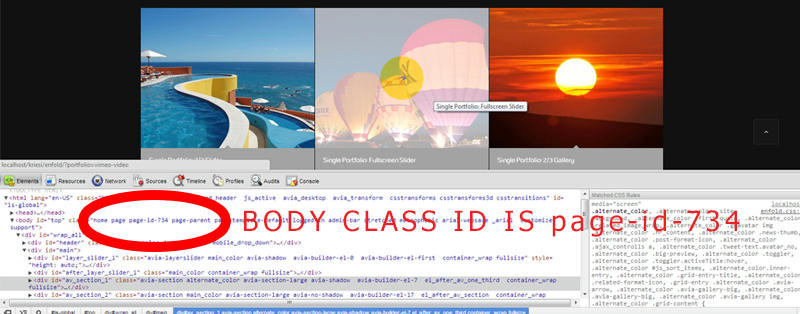
Then you can use this on your custom.css
.page-id-734 .main_color {

background-color: red;

}


.page-id-734  .alternate_color {

background-color: pink;

}
The css above will only be applied on the page with the id .page-id-734.
Regards,
Ismael
Hi,
Can you show an image on the demo site if you can’t post url to yours where this is happening please?
kriesi.at/themes/enfold/
Thanks,
Nick
Hi,
Can you give us a link to the page with the issue?
It is working fine on my end. This is the screenshot.

Regards,
Ismael
Hi Nick,
Thank you for your reply! The issue has been resolved by leaving the “where do you want to display the blog” box empty, in the Enfold settings. I just use a blog roll element in a page. That in combination with removing the big preview display in CSS has done the job.
The perforated line (timeline) has gone from the blog roll, which leaves me with a blog roll with small featured images, and the single post is now displayed without a featured image.
May I take the opportunity and ask how to remove the file name line, which appears on the top side of a featured image in the post view, when you click the image to see it on the lightbox or should I post a new question for that?
Best,
Stephen
Hi,
Did the code above work? I did see the images when I use the css code.
Regards,
Ismael
Hi,
You can actually create a shop category page, using the woocommerce shortcode. Create a page then insert this on the Visual Editor.
[product_categories number="1"]
Add images on the “Add Featured Media” section.
Please hire a freelance developer to do it for you. :)
Regards,
Ismael
Hi,
I would like to ask if it’s possible to add background color/image to just a select few pages in my website and not all pages within? If so, HOW WOULD I DO IT? Please help.
With much appreciation,
Gurmit
Yep, it’s at 1.5.1. The problem occurs only when I use the “no sidebar” template. It seems to work when one of the other templates are used.
When using the “no sidebar” template there are other problems, the featured image is not displayed right. It shows only ± 80 pixels of it. Also when inserting a gallery it is not centered but shifted to the right. You might want to have a good look at the no sidebar templates they seem to contain some bugs.
Hi,
Do you have Enfold 1.5? It will fix the issue.
Regards,
Ismael
Hi,
If you are using a 4 column porfolio, find this code on functions.php
$avia_config['imgSize']['portfolio_small'] = array('width'=>260, 'height'=>185 ); // images for portfolio 4 columns
Replace it with
$avia_config['imgSize']['portfolio_small'] = array('width'=>300, 'height'=>300 ); // images for portfolio 4 columns
Regenerate thumbnails using this: http://wordpress.org/extend/plugins/regenerate-thumbnails/
Regards,
Ismael
Hi,
Do you mean the Blog Grid Style? Suggested image size is 495×400. You can find the image size on functions.php.
$avia_config['imgSize']['portfolio'] = array('width'=>495, 'height'=>400 ); // images for portfolio entries (2,3 column)
Can you give us a link to your website?
Regards,
Ismael
In this page i use the form: http://www.glassesoff.com/pre-resgitration/
and i have some questions about it:
1/ is it possible to make the text that is above the form dissapear when getting the “thank you” msg ?
2/ can i change the container size for the “thank you” msg ?
3/ is it possible to but a button image instead of the submit button ?
4/ i want to make a confermation link in the auto-response email (so the user will confirm his/her regestration) is it possible?
thank you
When I create a gallery with the magic wand, media, gallery it does not insert the image’s.
This is what I get.
[av_gallery ids='' style='thumbnails' preview_size='portfolio' thumb_size='portfolio_small' columns='5' imagelink='lightbox']
Looking forward to hearing from you soon.
Hi,
Please try adding this css to your /css/custom.css .. You should play around with those numbers
@media only screen and (max-width: 479px) {

span.ls-s-1, p.ls-s-1 {


font-size: .65em !important;

line-height: 1.11em !important;

}}
I don’t see the dot and the phrase to its right move anywhere in smaller screen sizes. http://www.clipular.com/c?7289023=s7IOHczI8yQeEbHbV2eupP8gvWw&f=.png
Thanks,
Nick
Not having any success yet. To reiterate, I want to make the thumbnail boxes horizontal below the featured image, without cropping the thumbnails.
http://desertspringspublishing.com/self-publishing/entertaining-your-way/
Please reply.
Hi,
using images in the megamenu, they all appear in slightly different sizes. http://s7.directupload.net/images/130605/wj4et96v.png
The uploaded images have all the same size 350x100px
and the come out as
first=272×78 // second=273×78 // third=257×73 // last=273×74
How could I achieve that they’re all the same size? Do you have a suggestion for the image size uploaded?
Thanks & best regards
Katharina
Hello,
As you can see here:
http://i39.tinypic.com/3012h55.jpg
I’ve modified some of the colors in the portfolio grid on my website,
BUT:
– How do I change the color of those white “dots”?
ALSO:
– How do I change the color of the portfolio-grid images – on mouse hover from white to gray?
AND:
– How do I change the background color of the portfolio grid. During the time when the images in the portfolio grid are being loaded the color BEHIND the images seems to be set to white by default. When the grid is being rendered on a black background the white color behind the images is visible for a breif perod of time during the loading process. I’d like to set this color to black. How do I do that?
Best Regards,
Vlad
Hi andreanapier1985,
I believe the portfolio element actually needs to have a featured image set for the portfolio item for the display to work properly. So if an image isn’t set, the excerpt doesn’t get rendered and the layout tends to fail.
I’m not familiar with any plugins off hand that offer a absolute positioned contact button but I’m sure there are some out there as I’ve seen it used with a similar look on other sites from time to time.
Regards,
Devin
When I insert a picture in a post (normal WP way). And I set the image alignment to left or right, it does not automatically format. Only by hovering over the picture it snaps into place. This happens both in Chrome and Safari (did not test others).
I would like to know how to show the full portfolio image on the portfolio page. Right now, all of my portfolio images are the same size circle (300px by 300px) and it is automatically cutting off the top and bottom the circle. I would like it to show the full image, but maybe have the thumb 100% wide so it can fit inside smaller columns. Does this make sense?
Hi
I want my featured image to have all the same size on my blog masonry some of them have the good size but others are bigger. Why that?
How can I fix this?
Thanks
Hi Ismael,
Thanks for getting back to me. I put that code in the custom css, and it made all the thumbnails square. However, when you hover over the thumbnail, the larger featured image above is squished. I’ll give you a link to see what I mean.
http://desertspringspublishing.com/self-publishing/entertaining-your-way/
What I would like to do is have the thumbnails horizontal, and the images proportional.
Any help would be greatly appreciated.
Thanks, Ismael.
Hi Suicide Rescue,
display: none only removes content from the view of the user and causes the computer to ignore it but doesn’t actually prevent it from loading. So if the layerslider is slowing down the page load (which it is) you will get the biggest performance boost from shrinking those big background images.
Try a tool like: http://www.smushit.com/ysmush.it/
Regards,
Devin
thanks for your reply Ismael,
I disabled all plugins and still no joy – I imported the site from a test build and figured there may have been an issue exporting the portfolio items to the new database so I’m rebuilding sadly as I could resolve this.
thanks again
I want to insert a layerslider in my home page.
I go to Advance Layout Editer
I press the button Media toevoegen (adding Media)
Then i see all my media images but there is no layerslider.
How can I insert a layerslider in my page?
Kind regards,
Maarten



