We have tried updating sites several sites with the Enfold theme to PHP 8.0 and on each site we receive the error message, “”There has been a critical error on this website.”
Are there known issues with updating to PHP 8.0 with the Enfold theme, and if so, will there be a release to address these incompatibility errors?
Thank you.
Hi
We have on all hovered links in our events double underlines, see private content section.
Is this a problem of The Events Calendar plugin or of Enfold theme?
Thanks very much.
Best regards
Mike
Hi,
Thanks for the update, I’ll go ahead and close this thread for now then. Please open a new thread if you should have any further questions or problems.
Best regards,
Rikard
Hi,
Thank you for the screenshot.
Did you remove the css code that we mentioned above? Please try to toggle or temporarily disable the Enfold > Performance > File Compression settings after removing the css.
Best regards,
Ismael
Hey MikeTandySwag,
Thank you for the inquiry.
You can enable the sidebar on mobile view by toggling the Enfold > Sidebar Settings > Sidebar on Smartphones option, make sure to purge the cache afterwards.
Best regards,
Ismael
Hi,
Yes, that should be possible. Please try to add this css code to move the date beside the post title..
.av-magazine .av-magazine-content-wrap .av-magazine-title {
    float: left;
    margin-right: 10px;
}
Please toggle or temporarily disable the Enfold > Performance > File Compression settings after adding the css.
Best regards,
Ismael
Thank you Ismael, I will use a plugin for this now and wait for the Enfold update. Good news that this option will be included in the theme :)
Alwin
Hi there,
I am using the Masonry element to display woocommerce products and would like to replace the price range which is displayed for variable products by some calculated price (variation price / variation weight in grams, in reversed order (“from ” the lowest price per gram first, then “to ” the highest) for variables products of specific categories.
I am not sure that duplicating the Masonry element (which is used for various post types, including products) into a new “Bulk Variable Products Masonry” element is the most efficient way to to this. Especially because I would not like to experiment compatibility issues during upcoming updates of the Enfold theme or the Masonry element.
Details:
- I was thinking ofusing the native woocommerce fields for weight and price of each variation of concerned variable products.
- The current price range on masonry display would be replaced by “From X,XX€/g to X,XX€/g”
- I don’t know if it is easier to trigger some specified categories to process this change or if a checkbox option could be displayed in the Masonry edition, as soon as the “product” type is selected.
Can you please tell me what solution you would use to to this without having to duplicate the whole masonry element and by limiting further compatibility risks ?
Best regards
You had to know a fundamental thing on WPML: Nearly all of the Enfold Settings are saved separatly by each language.
Quck Css, Color Settings, Advanced Settings etc. pp.
You see an additional Tab on top of the enfold settings:
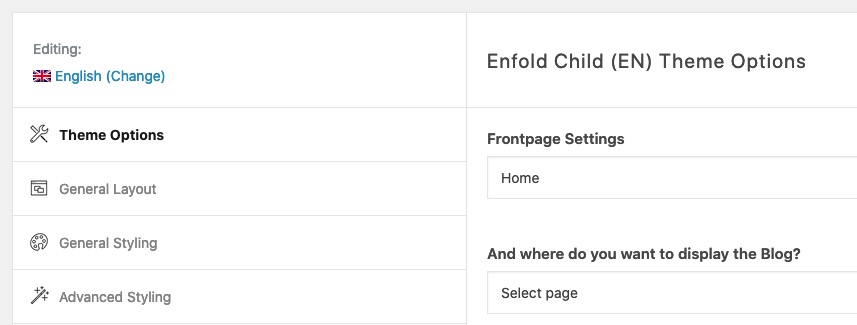
My advice is: Layout and Style your first default language. After doing that – you can then transfrer your enfold settings to the other languages.
Just export the enfold theme settings file from your default language – change the lang on that tab – and import that theme settings file.
Many claim that this is too complicated, I find it a nice feature. You can choose your own colour schemes and fonts etc. for each language.
Hi,
Great, I’m glad that you got it working, and thanks for the update. I’ll close this thread for now then, please open a new thread if you should have any further questions or problems.
Best regards,
Rikard
Hi,
Great, I’m glad that you got it working, and thanks for the update. I’ll close this thread for now then, please open a new thread if you should have any further questions or problems.
Best regards,
Rikard
Hi kazeko,
Thanks for the update, I’ll close this thread for now then. Please open a new thread if you should have any further questions or problems.
Best regards,
Rikard
Hi,
Please try this CSS instead:
ul.pricing-table {
    border: 10px solid black;
}

ul.pricing-table li {
    border: 1px solid black;
}
You can copy a table if you enable debug mode: https://kriesi.at/documentation/enfold/intro-to-advanced-layout-builder/#debug-mode. You can also save the element as a template when you hover over it, then click the far left icon. You can then load the template into your new page.
Best regards,
Rikard
Hi Stefanija,
Thanks for reaching out to us!
I am sorry for the misunderstanding but there was a typing error in our last chat which we later corrected in an additional reply.
We are currently working on a major update for Enfold and not interested in collaboration at the moment. If/when we are interested, we will contact you :)
Enjoy the rest of your day!
Best regards,
Yigit
Hey Glenn,
Thanks for contacting us!
Choices theme is no longer in development. Currently the only theme we are developing and supporting is Enfold – https://kriesi.at/themes/enfold-overview/ which is the most powerful, flexible and user-friendly theme we have ever created.
You can easily create more modern looking layouts using Enfold.
If you would like to have more information on Enfold, please let us know :)
Regards,
Yigit
Hi,
I followed the post you suggested: https://kriesi.at/documentation/enfold/intro-to-layout-builder/#add-elements-to-alb
I created the file in the ” testimonials.php” folder of the child theme.
I inserted the function in the function.php file, but I get the error you see in the image: https://monosnap.com/file/xLnW2GXhcSZxglvooVFUjGSBns5Iy8
WordPress sent me an email with the details of the error:
Error Details
=============
An error of type E_ERROR was caused in line 731 of the file /home/customer/www/leagrowingpeople.com/public_html/wp-content/themes/enfold-child/shortcodes/testimonials.php. Error message: Uncaught Error: Call to undefined method aviaElementStyling::add_responsive_classes() in /home/customer/www/leagrowingpeople.com/public_html/wp-content/themes/enfold-child/shortcodes/testimonials.php:731
Stack trace:
#0 /home/customer/www/leagrowingpeople.com/public_html/wp-content/themes/enfold-child/shortcodes/testimonials.php(931): avia_sc_testimonial->get_element_styles(Array)
#1 /home/customer/www/leagrowingpeople.com/public_html/wp-content/themes/enfold/config-templatebuilder/avia-template-builder/php/class-shortcode-template.php(1123): avia_sc_testimonial->shortcode_handler(Array, ‘\n[av_test…’, ‘av_testimonials’, Array)
#2 /home/customer/www/leagrowingpeople.com/public_html/wp-includes/shortcodes.php(356): aviaShortcodeTemplate->shortcode_handler_prepare(Array, ‘\n[av_test…’, ‘av_testimonials’)
#3 [internal function]: do_shortcode_tag(Array)
#4 /home/customer/www/leagrowingpeople.com/public_html/wp-includes/shortcodes.php(228): preg_replace_callback(‘/\\[(\\[?)(av_tes…’, ‘do_shortcod
If I remove the function I don’t see any changes in the testimonial.
How can I fix it?
Thank you for your support,
Manuela
Hey stella-experience,
Thank you for the inquiry.
That is the default style of the header on tablet and phone view. We can use this css code in the Quick CSS field to revert back to the transparent header, but it might cause layout issues on mobile view.
@media only screen and (min-width: 768px) and (max-width: 989px) {
.responsive.html_mobile_menu_tablet #top #wrap_all #header {
    position: fixed;
    width: 100%;
    float: none;
    height: auto;
    margin: 0 !important;
    opacity: inherit;
    min-height: 0;
}
}
Please make sure to toggle or temporarily disable the Enfold > Performance > File Compression settings after adding the css.
Best regards,
Ismael
Hi,
Thank you for the info.
We checked the enfold_child.css file and the Quick CSS field and we didn’t find any css errors. We did find a missing # in one of the color fields in the Enfold > General Styling > Logo Area panel, but fixing this color value didn’t change anything. Is it working correctly when the cache and compression plugins are disabled?
Best regards,
Ismael
Hi,
Thank you for the update.
The site was still loading the older versions of the scripts and stylesheets, so we temporarily disabled the Enfold > Performance > File Compression settings to regenerate the files. The accordion element is now working properly. (see private field)
Best regards,
Ismael
Hi,
You can override an existing element in your child theme by creating a new shortcode path in the child theme directory. Please check this documentation.
// https://kriesi.at/documentation/enfold/intro-to-layout-builder/#add-elements-to-alb
Once you have a copy of the toggles shortcode files (js, php) in the shortcodes folder within the child theme directory, you have to update the script path in the extra_assets function in the toggles.php file. Look for this code around line 115.
function extra_assets()
		{
			//load css
			wp_enqueue_style( 'avia-module-toggles', AviaBuilder::$path['pluginUrlRoot'] . 'avia-shortcodes/toggles/toggles.css', array( 'avia-layout' ), false );

				//load js
			wp_enqueue_script( 'avia-module-toggles', AviaBuilder::$path['pluginUrlRoot'] . 'avia-shortcodes/toggles/toggles.js', array( 'avia-shortcodes' ), false, true );
		}
Best regards,
Ismael
Hey Matt,
Thanks for contacting us!
You can refer to this post – https://codex.wordpress.org/WP_DEBUG and disable WP debug to hide the warning. We have stopped developing Newscast theme a long time ago and therefore we cannot provide support for it. If you must use it, setting WP debug to false and using a plugin to display your menu could be an option however it is probably compatible with WordPress version 4.0 and up.
If you would like to upgrade your website, we would recommend Enfold – https://kriesi.at/themes/enfold-overview/ which is the most powerful, flexible and user-friendly theme we have ever created. We have discontinued all of our older themes in 2018 to focus on Enfold. Newscast was discontinued almost a decade ago :) If you would like to have more information on Enfold, please let us know :)
Best regards,
Yigit
Hi Manuela,
Yes, that is true. Then you can refer to this post – https://kriesi.at/documentation/enfold/intro-to-layout-builder/#add-elements-to-alb to load the file from your child theme.
Best regards,
Yigit
I experience a strange behavior in one installation of Enfold: The settings of the general page width are ignored as well as the cookie banner settings. And the header shows inconsistent behavior: The regular menu header disappears, if it’s set to transparent it has a blue background.
I see this for a couple of days now and can’t find a reasonable cause. The page doesn’t have a custom footer.php or header.php in the child theme.
Any idea what could have gone wrong? And how to fix it?
-
This topic was modified 4 years ago by
 Christoph.
Hello,
I’m running version 4.8.3 of Enfold and I’ve run into this issue: when I make changes to the page and hit save, portions of the page disappear. I have to restore it to a previously saved version. I thought it was an issue with cloning an existing site, but I built a new staging space and I’m running into the same issue.
I’m using about four color sections on the page, and at some points when I hit save, I lose the third or fourth color section.
Any guidance to resolve this issue is appreciated. Here is a link to the second staging site that I built: https://wordpress-692037-2560276.cloudwaysapps.com/
Thanks!
Becky
Hey rixi,
Please try the following in Quick CSS under Enfold->General Styling:
@media only screen and (max-width: 767px) {
.avia-icon-list .iconlist_icon {
    float: inherit;
    margin-bottom: 20px;
}

.iconlist-timeline {
    display: none;
}
}
Best regards,
Rikard
Hi,
Thanks for letting us know, I’ll close this thread for now then. Please open a new thread if you should have any further questions or problems.
Best regards,
Rikard
Hello, after updating on version 4.9.2.1 footer widgets are not shown. I did no customization to footer.php/header.php in the enfold theme. The enfold child theme contains only style.css, functions.php and the screenshot. Any idea?
Thank you
hi ismael,
thanks for your quick reply. we have no idea why this the google analytics is not working – on other enfold websites it is currently working?!?
we have just recently activated the privacy setting via the modal window. however, the google tracking code didn’t either already work before. yes, we have tried to disabled all plugins. unfortunately there is no staging environment. however, we do daily backups with updraft+ so you can also work on the live version.
please help us to find a solution that works, thanks in advance
best
axelf.
Hi,
Thanks for letting us know, I’ll close this thread for now then. Please open a new thread if you should have any further questions or problems.
Best regards,
Rikard



