Hi,
No, 4.9.2.3 is the latest version: https://kriesi.at/documentation/enfold/changelog/
Best regards,
Rikard
Hi,
Thanks for that. I’ve uploaded the new version of the theme to the folder in private. I’m a bit hesitant to activate it though, since the WordPress version you are running is very old too. Could you update WordPress first of all, then change the current enfold folder to enfold_old, then rename the enfold_new folder to simply enfold? Please make sure that you have backups of the site before doing this.
Best regards,
Rikard
Hi,
I see that you are running an old version of the theme, could you try to update to the latest version (4.9.2.3) to see if that helps please? The update to 4.9.x has to be done manually from the version you are running, please refer to my replies in this thread: https://kriesi.at/support/topic/enfold-4-5-theme-update-update-failed-download-failed-a-valid-url-was-not-pro/#post-1021541
You can either update manually via FTP: https://kriesi.at/documentation/enfold/how-to-install-enfold-theme/#theme-update, or use a plugin to upload the theme zip file: https://wordpress.org/plugins/update-theme-and-plugins-from-zip-file/
If that doesn’t work then please try to delete the whole theme folder, then replace it with the new version. Make sure that you have backups of the site before starting updating.
Also please read this after you have updated: https://kriesi.at/documentation/enfold/theme-registration/
Best regards,
Rikard
Hi iaranguren,
Please open a new thread and include WordPress admin login details in private, so that we can have a closer look at your site.
Best regards,
Rikard
Hi,
Thanks for the update, I’ll go ahead and close this thread for now then. Please open a new thread if you should have any further questions or problems.
Best regards,
Rikard
Hey Jason,
Please try the following in Quick CSS under Enfold->General Styling:
.sidebar #categories-4 label.screen-reader-text {
  display: none;
}
Best regards,
Rikard
Hi,
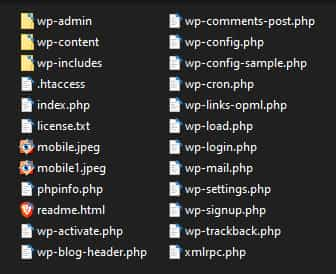
I’m not sure that I follow what you mean, when you say that you have copied the parent directory 5 times, do you mean that you copied the \wp-content\themes\enfold\ directory 5 times,
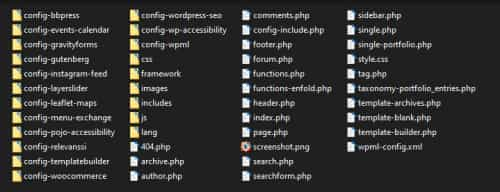
or that you copied the WordPress directory 5 times?
1: you can build your primary site first, but you won’t be “copying” it to the other sites, you will be using the WordPress ▸ Tools ▸ Export from that site and then WordPress ▸ Tools ▸ Import on the other sites.
2: you will not be able to “delete” the theme directories and “copy” the other directories to it, in WordPress the changes you make are stored in the database, not in the actual files.
Best regards,
Mike
Hi,
Im new to model pages modification.
Could you please suggest a tutorial explaining how to modify the homepage of Enfold Default Demo homepage ?
Thanks,
Kind regards,
N. Piano
Hi Mike,
I could finally find the way to create 5 sub-directories (empty), by coping the parent directory. Three questions:
1. If i got it right, I have to edit the parent theme first with content, and then copy it in sub-directories: right ?
2. Is it possible to delete the child-directories that I created and duplicate new ones (once I edit the parent theme) without disbalancing the website or my c-panel ? (so to keep the pages layout, the images and the video and have to replace just the text while duplicating, cause I already lost a lot of time).
3. I followed your recommendation to import the enfold default demo, and it said to import the child demo first, so I did it. What do I have to do with it now ? Does it run automatically by itself and stores things, or do I have to do something with it ? Cause I will have a parent and 4 child themes.
Thanks a lot for your help and kind regards,
Natacha
Hi,
Great, I’m glad that you got it working, and thanks for the update and feedback. I’ll close this thread for now then, please open a new thread if you should have any further questions or problems.
Best regards,
Rikard
This reply has been marked as private.
Hey Loveronika,
Please try the following in Quick CSS under Enfold->General Styling:
@media only screen and (max-width: 1024px) {
  nav.main_menu {
    display: block !important;
  }
  #avia-menu .menu-item {
    display: none;
  }
  .av-burger-menu-main.menu-item-avia-special {
    display: block;
  }
}
Change the 1024 value to your preferred pixel value.
Best regards,
Rikard
Hey dondela,
Please try the following in Quick CSS under Enfold->General Styling:
@media only screen and (max-width: 767px) {
.page-id-9683 #av_section_2 iframe {
    height: 197px;
}
}
Best regards,
Rikard
Hi Sigmund,
Please try the following in Quick CSS under Enfold->General Styling:
.av-masonry-col-3 .av-masonry-entry {
    width: 31%;
}
Best regards,
Rikard
Hi Rikard,
Thanks for answering quickly.
The tutorial didn’t say that demos are to be imported from the dashbord. You might want to add this to it, so other people won’t struggle like crazy to do it from the Enfold page :-)
As for the import, it worked, thank you. But I had to give it 6 tries, ’cause the message “try and reflesh page” would come over and over again.
So the problem is solved, thanks very much.
Kind regards,
Natacha
Here’s how to do that: You can set a CSS class on a specific Hype element by filling in a CSS class on the input form:

Next, go to your theme CSS, and insert:
.minheight400 { min-height:400px; }
This will apply the class to your Hype animation, and your Hype element will be a child element of that.
Unfortunately this does not work in enfold. When moving the iPd from landscape to portrait view, the embedded Hype animation does not scale to fit. I tested it with other themes and it worked there.
Hi,
I’ve upgraded the Enfold child theme and the footer area has gone back to a default setup. The old widgets are still visible on the backend side but not on the site.
Thanks in advance for your help
Alex
I am building a new website with a lot of photos and to save storage space I want to reduce the number of photo sizes created by Enfold.
I don’t need these sizes:
– 36×36 widget and other square image sizes
– 260×185 portfolio small
– 845×684 gallery
– 710×375 nagazine
– 845×321 entry with sidebar
– 1210×423 entry without sidebar
– 1500×430 featured
– 1500×630 featured large
If I understood correctly I should then add the following code to my functions.php file (in my Child theme):
function ava_image_sizes() {
	remove_image_size('magazine');
	remove_image_size('widget');
	remove_image_size('featured');
	remove_image_size('featured_large');
	remove_image_size('portfolio_small');
	remove_image_size('gallery');
	remove_image_size('entry_with_sidebar');
	remove_image_size('entry_without_sidebar');
        remove_image_size('square');
}
add_action( 'after_setup_theme', 'ava_image_sizes', 11 );
– Is that above code correct like this?
– After adding this code I have read the advice to use the Regenerate Thumbnails plugin, but this plugin is not updated for a year, so is it still recommended?
Thanks for your help!
Hi,
Glad to hear that you have this sorted out, and thanks for sharing your solution, if you have any further questions please create a new thread and we will gladly try to help you. Thank you for using Enfold.
Best regards,
Mike
Hi,
Glad Rikard could help, if you have any further questions please create a new thread and we will gladly try to help you. Thank you for using Enfold.
Best regards,
Mike
Hello, our website has WPML installed, and the main language is English.
The problems encountered are as follows:
When the Portoflio items page is copied to the second language system, the column link in the page will be different from the setting of the English language page;
But when the link is clicked on the front page, the column link of the second page is the same as the column link of English
Version:
ENFOLD 4.9.2.2 WPML 4.5.5
Please help me.
Hey kathyzech,
Thanks for the login details. You are not running the latest version of the theme. First off, please follow this in order to register your theme license and to create a token for the backend of the theme: https://kriesi.at/documentation/enfold/theme-registration/
If the updates are still not coming through after that, then please try to install and configure this plugin: https://envato.com/market-plugin/
Best regards,
Rikard
Hi Natacha,
So downloading demos from Enfold->Demo Import is not working on your installation? If that is the case, then please post admin WordPress login details in private, so that we can have a closer look.
Best regards,
Rikard
Hi!
I recently purchased Enfold 4.9
I created the token and verified it. I was expecting to see the updates available in my WP dashboard in Enfold Theme Options, but they do not appear.
Since I purchased Enfold there were two new updates (I receive notification by e-mail).
I just deleted all the Transients, hoping this would help. But the new updates still do not show.
Please, help! I truly do not wish to have to update every time via FTP. Thanks.
PS: I have moved the staging page from one account to another on my server. May this be the problem? Thanks in advance for your help.
The LayerSlider is compiled within the latest Enfold version.
New LayerSlider versions become compiled with the next Enfold update.
Buildin-Updates are undergoing tests.
Hi,
Thank you for the update.
We are not really sure why the video overflows outside the color section container, but adding this css code should help.
.av-l31mc4br-42bfcdb10488d68af8476b8cb1bdbd43 {
    overflow: hidden;
}
Please make sure to toggle or temporarily disable the Enfold > Performance > File Compression settings after adding the css code.
Best regards,
Ismael
Hey leplusweb,
Thank you for the inquiry.
The import might not be working because the theme is outdated. The latest version is 4.9.2.3 but the version installed in the site is 4.7.6.1. Please update the theme manually via FTP before attempting to import the demo again.
// https://kriesi.at/documentation/enfold/theme-update/#update-via-ftp
Best regards,
Ismael
Hey frawer,
Thank you for the inquiry.
Using this css code should adjust the width of the first column in the table.
#after_full_slider_1 .flex_column.av_two_third table tr th:first-child {
    width: 20%;
}
You may need to apply a custom css class name or ID to the table element.
// https://kriesi.at/documentation/enfold/add-custom-css/
Best regards,
Ismael
I created this website a couple years ago for my Church.
The Church Secretary has been maintaining the site.
Today she contacted me to update a section of the site that she doesn’t know how to do.
When I went into the Admin area all these error message are appearing in the sections under the “Appearance” section.
I don’t know what is causing them or how to fix them.
Could someone please help me?
Can you review all the admin area and see what is happening?
I think we are on the latest Enfold version???
Thanks Ricard
I have de-activated the plugin
it says my version of enfold is
“Theme Updates
No Updates available. You are running the latest version! (4.8.8.1)”
Is that not the latest version?



