Hello Mike,
Eveything is fine after your upgrade on my site http://www.twinloc-ld.fr !
I just have a problem with Google Search and Google Ads. My site is no more indexed because Google Robots receive a 404 error instead of the pages.
Did you already have this strange error after upgrade to Worpress 6 and last Enfold version ?
Thanks a lot,
Xavier
Hallo Leute,
ich habe Probleme beim Update von 4.7.6.4 auf 4.9.2.3. Und ich weiß nicht ob damit zusammenhängt das die dymanic_avia komplett voll läuft und massiv Datenspeicher ansammelt.
Ich habe aucf WordPress 6.0 upgedatet und blöderweise erst danach erst versucht das Enfold apdate zu machen.
Es geht um die Seite http://www.moma-shop.de.
Liebe Grüße
Oli
Hallo liebes Enfold Team
Auf meiner Webseite (siehe private Content) erscheinen die 1/4 Spalten, die ich nur für den PC-Desktop sichtbar eingerichtet habe,
auch auf meinem TABLET Galaxy Tab A im Portrait-Format.
Obwohl ich, wie gesagt, jede dieser 1/4 Spalten im Bearbeiten-Modus, im Reiter ERWEITERT unter RESPONSIVE auf:
“auf mobilen Geräten ausblenden” gesetzt habe.
1/4 Spalten lassen sich ja scheinbar nicht in eine “Farb-Sektion” einsetzten. (Warum eigentlich nicht?)
Dort hätte man ja auch noch ein Häckchen für das jeweilige Endgerät setzen könnte.
Letztlich sind die 1/4 Spalten also auf meinem Tablet im Portrait Format doppelt zu sehen, in unterschiedlichen Größen
(Ich hoffe Sie können das auf Ihren Tablets auch sehen, oder dieses Problem irgendwie nachvollziehen)
Hoffe Sie könne mir da helfen.
lieber Gruß
Bernhard
Hi,
Glad to hear that you have this sorted out, if you have any further questions please create a new thread and we will gladly try to help you. Thank you for using Enfold.
Best regards,
Mike
Hi,
@thijmens thank you for your patience and the link to your site, the script in this thread is for the product slider element, your page is not using this element it is a Shop page.
On your page the first 3 columns are equal height but the last one has double the product excerpt, so making all four equal height to the last one will make the first 3 look strange with a lot of white space, my recommendation is that you would be better to remove half of the product excerpt from the last one.
If you would like further help with this please open a new thread and include an admin login in the Private Content area.
We try to keep the threads focused on a single topic to help future searches, thank you for your understanding.
Best regards,
Mike
Hi
Yesterday I updated a site with the latest Enfold and the site crashed. I had an older version of Enfold and uploaded via FileZilla and the site came back online. It was the error log that told med Enfold was the culprit.
A little later I tried to update a second site, and got an error when updating and the updated closed down.
I am now a little hesitant to try to update any more sites. Could you please check and confirm that the latest version of Enfold is not going to crash my sites?
Regards
Nina
Hi,
Great, I’m glad that you found the problem, and thanks for the update. I’ll close this thread for now then, please open a new thread if you should have any further questions or problems.
Best regards,
Rikard
Hi,
After updating to enfold 4.9.2.3 (from 4.8.8.1), pages with video background on color section generate error :
E_ERROR on line 865 of /…/wp-content/themes/enfold/config-templatebuilder/avia-shortcode-helpers/class-avia-slideshow.php.
Uncaught Error: Call to a member function get_subitem_styling_info() on null in /…/wp-content/themes/enfold/config-templatebuilder/avia-shortcode-helpers/class-avia-slideshow.php:865
Stack trace:
#0 /…/wp-content/themes/enfold/config-templatebuilder/avia-shortcode-helpers/class-avia-slideshow.php(579): avia_slideshow->html_advanced_slide()
#1 /…/wp-content/themes/enfold-child/shortcodes/section.php(1392): avia_slideshow->html()
#2 /…/wp-content/themes/enfold-child/shortcodes/section.php(1120): avia_new_section()
#3 /…/wp-content/themes/enfold/config-templatebuilder/avia-template-builder/php/class-shortcode-template.php(1142): avia_sc_section->shortcode_handler()
#4 /…/wp-includes/shortcodes.php(356): aviaShortcodeTemplate->shortcode_handler_prepare()
#5 [internal function]: do_shortcode_tag()
#6 /…/wp-includes/shortcodes.php(228): preg_replace_callback()
#7 /var/ww
Hi,
Great, I’m glad that Ismael could help you out. I’ll close this thread for now then, please open a new thread if you should have any further questions or problems.
Best regards,
Rikard
This reply has been marked as private.
Hi HulaSlim,
Here are the steps you’ll need to do in order to achieve something similar to the link you gave.
1. Go to Enfold > Footer, then set the following:
– Default Footer & Socket Settings: Display the footer widgets & socket
– Footer Columns: 4
2. Go to Appearance > Widgets, then add the following to the Footer Columns (widget area)
– Footer – Column 1, use Image widget
– Footer – Column 2 to 4, use Text widget
Hope this helps.
Best regards,
Nikko
Hi ugnju,
We’re glad that we could help you :)
Thanks for using Enfold and have a great day!
Best regards,
Nikko
Hi Elena,
Have you imported parent theme options?
The instructions are on this section: https://kriesi.at/documentation/enfold/child-theme/#toggle-id-4
Best regards,
Nikko
Hi there, this website I built is loading very slow: https://contracostahousing.org/
I built it out on a subdomain (https://contracosta.cobaltsapphire.com/) which loads at a normal speed, and once I migrated it over to its primary domain using All-in-one wp migration plugin, I noticed several links stopped working and that’s when the site starting loading slowly.
I reached out to Ams.net (network router vendor), Granite (IP provider), and At&t (webhost), and At&t told me the following:
“It has been determined that the issue arises due to a coding error as the website loads without latency, while the htaccess file in the /public folder is disabled. Refer to the attached screenshot. Also, there are no issues on the server side. We regret to inform you that we do not provide support for coding issues. Please be advised to review your website code.”
Is there any chance you can help me fix this problem? Thank you!
Hello,
I have not changed anything on my end besides WP updates (6.0) and Enfold updates. I noticed a sizable white space/gap below the slider on most of our pages. This requires the user to scroll to get to the content below the slider. I would appreciate any advice or assistance in getting this resolved. Thanks in advance!
I have a issue with the lightbox modes in combination with 10web Photo Galery.
When having the Lightbox Modal Window on the images will open on mobile 2 times in lightbox. On desktop the first page will open the Enfold lightbox and other pages the 10web lightbox.
When disabling the Lightbox Modal Window the images on the first page are opening in a new screen instead of the lightbox.
I really need the 10web lightbox on the album pages for the right information to be shown. Does anyone know a solution?
Website used: http://www.hinsefotografie.nl/portfolio/volwassenen/
This is with Lightbox Modal Window on.
if you open that progress-bar alb element – you see this –

both entries could be clicked again – and a new popup will arise. On this you have the styling mode of each progress par – including colors
Guess the default color will be the theme-color – and this is set on enfold options : general styling : primary color
( this is dependent on if the element is main content or alternate content etc. )
2) what do you mean by admin panel – what do you like to change there ?
Do you mean on dashboard – users – your profile: the admin color scheme ?
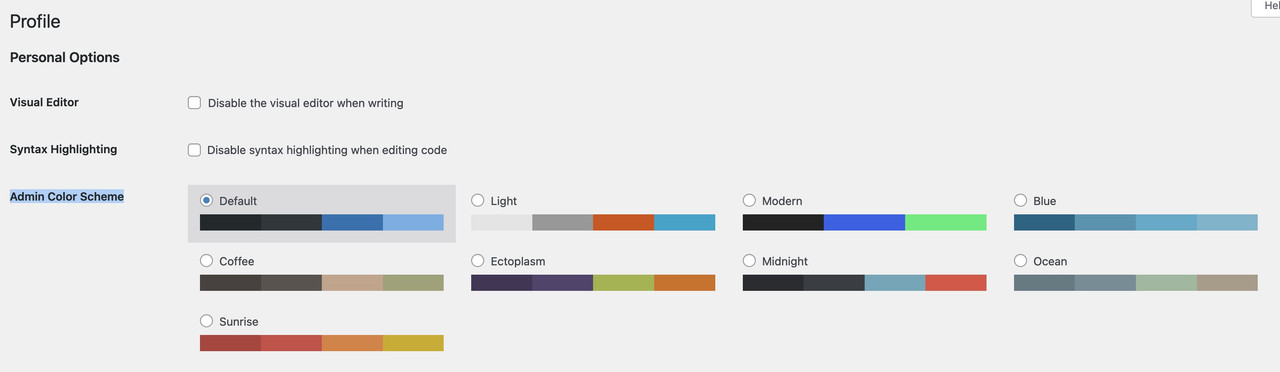
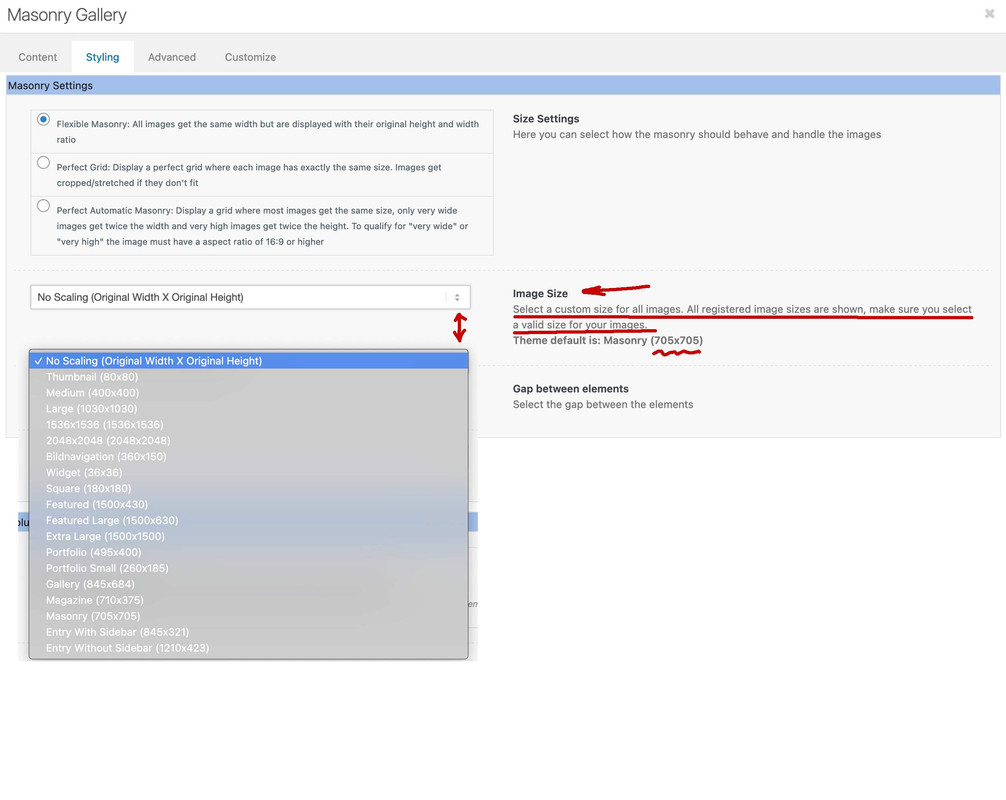
Enfold provides some additional image sizes to have for their alb elements a better choice.
in functions.php of enfold there are:
$avia_config['imgSize']['widget'] 			 	= array('width'=>36,  'height'=>36);						// small preview pics eg sidebar news
$avia_config['imgSize']['square'] 		 	    = array('width'=>180, 'height'=>180);		                 // small image for blogs
$avia_config['imgSize']['featured'] 		 	= array('width'=>1500, 'height'=>430 );						// images for fullsize pages and fullsize slider
$avia_config['imgSize']['featured_large'] 		= array('width'=>1500, 'height'=>630 );						// images for fullsize pages and fullsize slider
$avia_config['imgSize']['extra_large'] 		 	= array('width'=>1500, 'height'=>1500 , 'crop' => false);	// images for fullscrren slider
$avia_config['imgSize']['portfolio'] 		 	= array('width'=>495, 'height'=>400 );						// images for portfolio entries (2,3 column)
$avia_config['imgSize']['portfolio_small'] 		= array('width'=>260, 'height'=>185 );						// images for portfolio 4 columns
$avia_config['imgSize']['gallery'] 		 		= array('width'=>845, 'height'=>684 );						// images for portfolio entries (2,3 column)
$avia_config['imgSize']['magazine'] 		 	= array('width'=>710, 'height'=>375 );						// images for magazines
$avia_config['imgSize']['masonry'] 		 		= array('width'=>705, 'height'=>705 , 'crop' => false);		// images for fullscreen masonry
$avia_config['imgSize']['entry_with_sidebar'] 	= array('width'=>845, 'height'=>321);		            	// big images for blog and page entries
$avia_config['imgSize']['entry_without_sidebar']= array('width'=>1210, 'height'=>423 );						// images for fullsize pages and fullsize slider
you see that there is featured and featured image and extra_large …
Now is you put an image to your layout or insert to an alb element ( masonry gallery, gallery etc. ) there are default insertions for them.
But you can allways change them by the alb options.
See masonry gallery f.e.:
if you open a new page and style it with enfold advanced layout editor – you can pull a single button-row alb element into the layout.
( Nothing else – no columns etc. pp – except if you like to have it in your widget too )
if you have activated the debug mode under the layout input area – there is the shortcode area.
this shortcode represents the button-row.
So style it til you are satisfied with all colors and links etc.
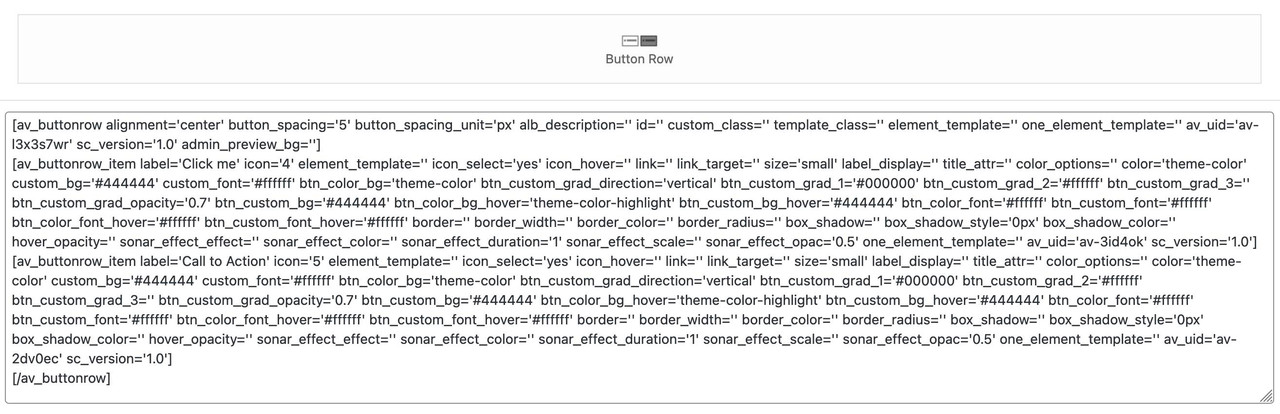
copy paste it then – and put that shortcodes into the html widget of header2
but use this snippet : https://kriesi.at/support/topic/cant-get-a-widget-area-above-the-header/#post-1353220
on that snippet you see that the header-widget area is : header2
this is up to you – how you call it: it only had to be the same name here on widgets options.

click then : Add widget area button.
then you can insert f.e. a html widget to it. These html widgets can be filled with enfold alb shortcodes.

Do you know how to activate the enfold debug mode? : Link
Dear Enfold Team,
We use the Accordeon Element on our Site (see Private Content) for FAQ.
We have 7 diffrent Categories for FAQ’s, so we used this Element 7 times.
On each element we turned on the FAQ Page Schema.
Now Google Search Console reported the problem, that the Tag “FAQPage” is used multiple times on this page, which is not allowed.
You can see that it in the Source code of the website.
I noticed that it says only use the FAQPage on one Element on each page. But then the other Elements get the Tag “CreativeWork” which does not support FAQ direct in the Google Search results.
Other Plugins like Yoast SEO, which has a FAQ Element, renders/combine them in one FAQPage Tag even if you have multiple FAQ Elements on one Page. You can read about it here: https://github.com/Yoast/wordpress-seo/issues/14429
Is it possible that you can this too?
Thanks for your help,
Greetings Jannis
Hey Martin,
Which text in particular are you looking to target? Please post a link to where we can see an example. If you are looking to set a general styling rule for the body or paragraph tags for example, the you can do so under Enfold->Advanced Styling.
Best regards,
Rikard
OK, so I’ve done some dancing with this- it didn’t work. What we wanted to do was add two buttons above the logo/menu area.
I came upon this, which we can totally work with:
BUT…
The CSS on that page is wrong.
The title says:
Header Layout: Logo left, Widgets right, menu below
But the CSS clearly says
/************************************
Logo left, Widget center, widget right, menu above
*************************************
Anyone have the proper CSS for Logo left, Widgets right, menu below?
Thanks!
M
Hey fkm,
Please try the following in Quick CSS under Enfold->General Styling:
#top .av_header_stretch .container {
    width: 98%;
}
Best regards,
Rikard
Hi,
Thanks for letting us know, I’ll close this thread for now then. Please open a new thread if you should have any further questions or problems.
Best regards,
Rikard
Hi Rikard,
I don’t know what you mean by mentioning the link https://wpexpert.se/enfold/
The link to my website is in private content.
Best regards, Annelies
impossible mine is 188 kb big. And layerslider is active on that installation.
i got 3500 lines of extra code in my child-theme funtions.php.
but this isn’t the real link to this file! isn’t it?
these two merged files are in the uploads folder – dynamic_avia folder.
if i go through your js file there are no enfold things inside – f.e. avia- etc
where did you get the file from?
Hey Ismael,
thank you very much for your reply.
I just realized that I didn´t clearly explain what I was trying to say – my mistake, sorry about that. :)
What I mean is that I put some code in the child functions.php that I found in another enfold user’s thread (I think it was the following one) and since then one item of the portfolio grid that I´m using on this page opened the ajax portfolio preview automatically when loading the page (without manually clicking on it).
add_action(‘wp_footer’, ‘ava_auto_click’);
function ava_auto_click(){
?>
<script>
(function($){
$(window).load(function() {
$(‘.grid-links-ajax a:first’).trigger(‘click’);
});
})(jQuery);
</script>
<?php
}
That’s all I had done. I didn’t create any IDs or anything else.
It worked just fine.
Since the last Enfold update, it suddenly stopped working.
Please let me know what could be causing it or maybe what I might have unknowingly changed.
Thanks a lot in advance.
Best regards,
fkm
Hi,
the white header is still there, and the text has still a line underneath(der Text ist unterstrichen)
View post on imgur.com
The Home page is different too: https://imgur.com/PKzBUqE the posts schould not be aligned like this.
The grey fade over all my posts on the “all posts” site is still there https://imgur.com/wYps5eA
I really do not like this. Is there a way of having the same website in my chiild-theme as in my enfold them?
Thank you for your kind help
Best,
Veronika



