Hi,
Thanks for letting us know, I’ll close this thread for now then. Please open a new thread if you should have any further questions or problems.
Best regards,
Rikard
Hi,
Thanks for the update. I’ve tried to reproduce the problem which can be seen on your staging site, but I haven’t been able to: https://wpexpert.se/enfold/block-editor-test/. This site is running Enfold 5.0 and WordPress 6.0. With this in mind, and that we haven’t had any other reports of this being a problem on other sites, it’s likely that the problem is local to your site. Maybe you could try some general debugging, like deactivating plugins, removing customisation and so on?
Best regards,
Rikard
hey mike,
thank u so much for your quick reply.
i am working with the enfold health template. and my question is about the masonry on the welcoming page.
somehow i don’t have the option to change the picture. i post a screenshot below.
 conny schumacher
Guest
Hallo, ich habe vor vielen jahren enfold 4.0 gekauft und bin mehr als zufrieden. Nun habe ich gesehen, dass es eine neue version gibt. Habt ihr Erfahrungen, ob es beim update Probleme geben kann? Ich soll von meinem Internet-Fuzzy (Verzeihung!) aus fragen, ehe wir was zerschießen… Dannkaufe ich ASAP die neueste version… DANKE!
conny schumacherGuest
Hallo, ich habe vor vielen jahren enfold 4.0 gekauft und bin mehr als zufrieden. Nun habe ich gesehen, dass es eine neue version gibt. Habt ihr Erfahrungen, ob es beim update Probleme geben kann? Ich soll von meinem Internet-Fuzzy (Verzeihung!) aus fragen, ehe wir was zerschießen… Dannkaufe ich ASAP die neueste version… DANKE!
conny schumacherGuest
Hallo, ich habe vor vielen jahren enfold 4.0 gekauft und bin mehr als zufrieden. Nun habe ich gesehen, dass es eine neue version gibt. Habt ihr Erfahrungen, ob es beim update Probleme geben kann? Ich soll von meinem Internet-Fuzzy (Verzeihung!) aus fragen, ehe wir was zerschießen… Dannkaufe ich ASAP die neueste version… DANKE!
in the Enfold demo – they work – the link is just identical to the home url: https://kriesi.at/themes/enfold-health-coach/.
So if you have a page where we can see the problem, it is better to advise you.
Hello
I got the problem that the Links in Slider do not work. They also do not work in your demo Health Coach
WHO AM i and WHAT I DO
-
This topic was modified 3 years, 10 months ago by
 derlorenz.
Hi 44doors,
Thanks for providing us with a staging site and access to it.
I could not find the issue because the staging site uses PHP 7.4.
I also tested Enfold 5.0 on my with PHP 8.0 and 8.1 but I could not replicate the same issue.
Checking functions-enfold.php on line 293, does not seem to contain the type of code that should produce the issue: https://stackoverflow.com/questions/61432488/php-error-unparenthesized-a-b-c-d-e-is-deprecated-use-either-a
Can you switch the staging site’s PHP version to PHP 8? since I could not replicate it on my end.
Best regards,
Nikko
Hey edwindepianist,
Thank you for the inquiry.
— Adding the following css code should fix the alignment of the date and author info.
.html_elegant-blog #top .post-entry .post-meta-infos, .html_elegant-blog .avia-content-slider .slide-meta {
    float: none;
}
Please make sure to toggle or temporarily disable the Enfold > Performance > File Compression settings.
— Regarding the comments, it is possible that discussions or comments are not enabled in the site. Please make sure that comments are enabled.
// https://wordpress.org/support/article/comments-in-wordpress/#enabling-comments-on-your-site
— Did you switch the editor to the Advance Layout Builder (ALB) for the last post? The read more button is probably displaying because the post is set to use the ALB. This also removes the featured image.
If you have any additional questions at this time we kindly ask that you open them up in a separate thread. The longer threads get in the forum, they become more difficult to support as they tend to drift off topic and they also make it troublesome for users trying to search for solutions. Keeping threads relevant to their original inquiry ensures that we can keep better track of what has been resolved and that users can more effectively find answers to similar issues they might be experiencing.
Thanks!
Best regards,
Ismael
Hey InSilentio,
Thank you for the inquiry.
Did you select the appropriate pages in the Enfold > Theme Options > Frontpage Settings for both languages? Please provide the site URL so that we can check the issue properly.
Best regards,
Ismael
Ok. Enabled 2021 and the padding is not being overriden.
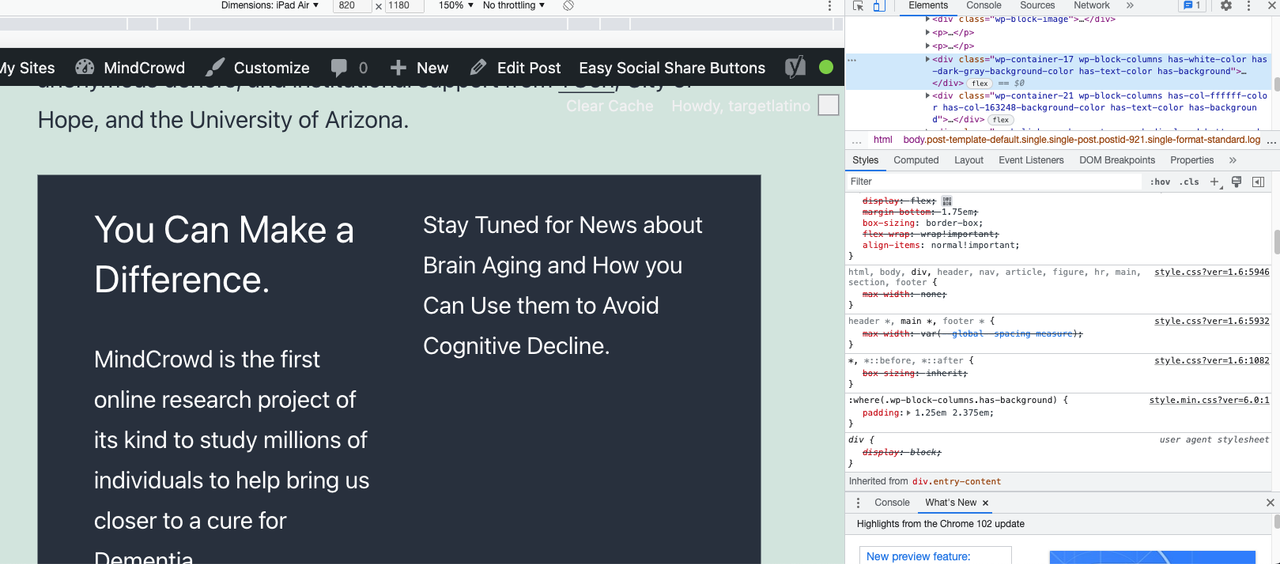
So, the padding override is an Enfold problem with WordPress 6.0. You should be able to replicate this. Also, it’s easy.
Add a Column Block. Two columns (50% each). Add text to both, change the background color and the text color. That’s it.
Help!
Maybe when you fixed: background image set in theme options->”General Styling” overrides Color Section custom background color on 4.9.1, this happened?
But this does NOT happen on Enfold 4.9. That’s on the Live site.
Note: I will refresh staging and see if updating WordPress and not Enfold avoids this issue. At least I will be able to update WordPress.
Refreshed Staging, Enfold 4.9 and WordPress 6.0 and the problem of padding being overriden happens again.
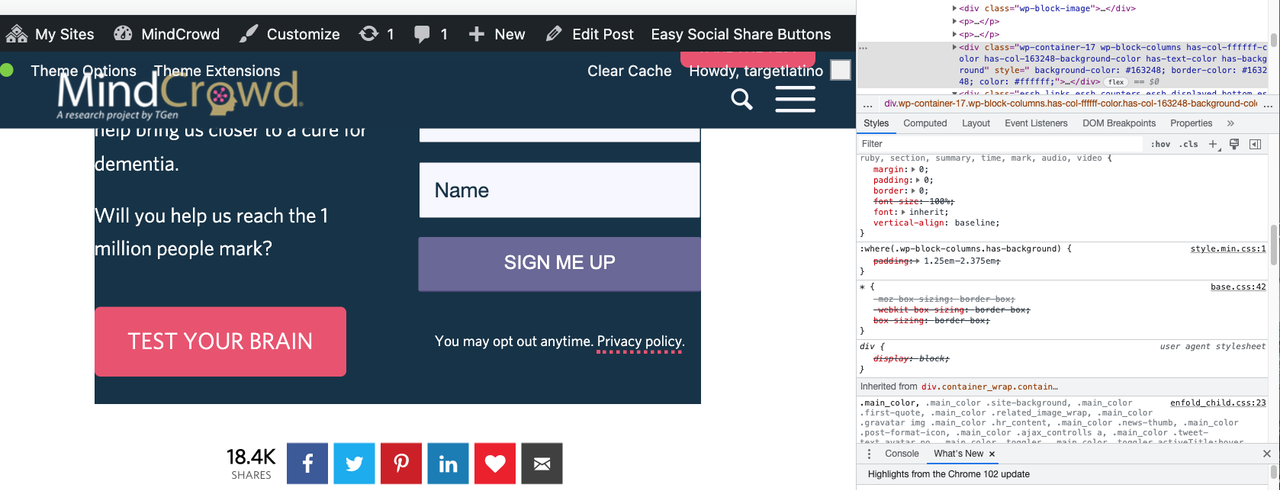
Does not happen with other themes. Happens to Enfold.
>> Something changed with WordPress 6.0 that broke Enfold. :(
Pls help!
-
This reply was modified 3 years, 10 months ago by
 havi. Reason: Something changed with Wordpress 6.0 that broke Enfold. :( Shared Staging refreshed, Enfold version 4.9 updated to Wordpress 6.0
I have not changed the theme styling. And the Block Editor should keep its own styling. If this happens on every single install of the Block Editor with any theme, then the problem is WordPress.
If this happens only with Enfold, then the problem is Enfold’s.
The padding HAS to be there. The new versions override that padding. The padding should not be overriden. It looks like hell.
I just updated to yesterday’s Enfold release 5.0 and the problem is still there.
So, I guess I will add a new theme to Staging, enable ti and see if the Block Editor Background’s padding gets overriden or not.
Will let you know.
Hello Mike
Thank you for your answer. I will hopelessly contact OVH for further information about their shared hosting config.
I tried several times, some tries were partially successful. In the end, it worked :
– switched the environment to PHP8, fpm enabled.
– deleted the site (in a multisite configuration) and recreated it.
– enabled enfold+enfold child immediatly, manual demo upload previously enabled in function.php
– manually uploaded demo files with FTP client
– installed the demo.
It may have been a lucky try, but demo has been configured in a couple of seconds.
I keep in mind your option of a local install.
Version de PHP 8.0.12 (Supporte les valeurs 64 bits)
PHP SAPI fpm-fcgi
Valeur maximale des variables PHP 16000
Limite d’exécution PHP 165
Limite de mémoire PHP 512M
Temps d’entrée max -1
Taille maximale de téléversement de fichier 128M
Taille maximale d’envoi de PHP 130M
Version de cURL 7.64.0 OpenSSL/1.1.1n
Best regards
Fabien
Hello!
We’re working on rebuilding a site for a client (with upgrades) and are having a lot of difficulty with some dynamic and organized content.
I’ve attached my best attempt in the admin space and the page we’re rebuilding.
Our issue is that the tabbed layout area is perfect in that it lets us further split up the content, and is the only block that lets us switch or hide content while also using other layout elements. However it simply does not work on mobile. The tabs do not reconfigure on smaller screens, and when we have more than 3 tabs, we’ll almost always lose a tab off screen on mobile. This would be fixed if we could put the tabs on the left or right like the tab content block, or if those content blocks allowed for more than a text block.
Custom html in a text block is not an option here, though I know it would work. Once we finish the site build we hand off and train the client who are not technical users. This is why we chose Enfold, because it’s so usable and easy to learn. So our solution for this page has to be as straight forward as possible (IE: Using existing content blocks).
Is there anything we can do here? Is there a way to make this tab section mobile friendly, or make it so the tabs format on mobile?
Hi,
Thanks for letting us know, I’ll close this thread for now then. Please open a new thread if you should have any further questions or problems.
Best regards,
Rikard
Hi,
The reason they are different is because the versions of WordPress and of Enfold are different.
Yes, but the CSS I posted above is not coming from the theme. My guess is that the new selector is weaker than the old one, and that is why the theme styling it picked up instead. If you want to remove the theme styling, then you can edit base.css and remove the padding and margin from the div element. This is not something which you can remove or override from a child theme unfortunately. Alternatively you could add an !important to the CSS being created by the block editor, but I’m not sure who to do that, or if it’s possible.
I’m sorry to hear about your health problems.
Best regards,
Rikard
Hi,
Thanks for that. Please try the following in Quick CSS under Enfold->General Styling:
.sidebar span.product-title {
  font-weight: 500;
}
Best regards,
Rikard
Hello, I would like to place the web page subtitle to the right of the logo. Is this possible? We use the current version of Enfold.
Thanks for your help
Hey Edward,
Thanks for contacting us!
Please go to Enfold theme options > Header > Header Layout > Header Title and Breadcrumbs – https://imgur.com/a/CWesEQx and enable title to add title bar to your pages which would display page name inside H1 tag :)
If you have any other questions or issues, please register to our support forum – https://kriesi.at/support/register/ using your purchase code and start new threads under Enfold sub forum :)
Best regards,
Yigit
Hi Ismael,
thank you very much for your reply.
You’re right, I just found out that I actually set jQuery to load in the footer and in addition I made a few other changes in Enfold > Performance that I can’t even remember (kind of misterious: I wouldn’t have known exactly what I was doing either).
Furthermore I just have reset all settings in Enfold > Performance the way they are set in other Enfold Backends that I have access to.
And I replaced the corresponding line in the script (thanks for your attentive note). Please see screenshot.
Now the Ajax portfolio preview on iPhone displays as intended on page load automatically with no errors.
It also works on desktop (in Firefox and Chrome), but somehow only after refreshing the page several times.
When the page is loaded for the first time, the preview is not opened and the items cannot even be clicked manually.
I have already deleted browser data and cache several times, the problem persists.
I don’t know what else to do, so please help.
Thank you very much in advance.
Best regards,
fkm
Error accessing file for download:
cURL error 28: Connection timed out after 10001 milliseconds domain name is http://www.tbsolutions.co.uk.
Hi Rikard,
The reason they are different is because the versions of WordPress and of Enfold are different.
Nothing changed on the website design itself.
I can switch to a different theme on Staging, and if the same thing happens, it’s a WordPress issue. If it doesn’t, it’s an Enfold issue. The version of Enfold on the Live site is 4.9 (as stated earlier) but on Staging it’s the latest version.
The other way to do this, is that you test adding a two column with background to your own testing sites and see if you can replicate it. This would be greatly appreciated as I am currently fighting cancer and extremely short on time (needless to say, scared) as I get ready for surgery.
Thank you in advance!
Havi
Hey,
Thanks for contacting us!
Yes, there is but Realtyna team should export it first – https://kriesi.at/documentation/enfold/import-demos/#export-demos. Please contact them and request the demo :)
Best regards,
Yigit
Hi,
Thanks for letting us know, I’ll close this thread for now then. Please open a new thread if you should have any further questions or problems.
Best regards,
Rikard
Hi Bea,
Could you try updating the theme to the latest version (5.0) to see if that helps please? https://kriesi.at/documentation/enfold/how-to-install-enfold-theme/#theme-update.
If you haven’t registered your theme license yet, then please follow this: https://kriesi.at/documentation/enfold/theme-registration/
Best regards,
Rikard
Hello,
I tried to update the table on my website: https://gilbt.com/wsparcie_led_instrukcje/
Unfortunately there is a problem: once opened the page in the editor (no changes applied) and click the preview button. In the new tab (preview) table is missing some of the rows.
I checked the html code and there is definitely missing some of the code and also spotted that the element is changed from ‘tr” to “li” I guess it came along with Enfold update.
Please take a look
old version https://ibb.co/FgmXGqR
new version https://ibb.co/w7C3Vs5 (no changes were made to the table – in WP editor all rows are visible)
Can you help please?
-
This topic was modified 3 years, 10 months ago by
 vilk85.
Hi,
Glad we were able to help, if you have any further questions please create a new thread and we will gladly try to help you. Thank you for using Enfold.
Best regards,
Mike
Hi,
Thanks for the feedback, I was looking for a phone number, but now I see it’s the text in the Enfold Theme Options ▸ Header ▸ Extra Elements ▸ Phone Number or small info text
Please try this code in the General Styling ▸ Quick CSS field or in the WordPress ▸ Customize ▸ Additional CSS field:
@media only screen and (max-width: 424px) {
	#header_meta .phone-info {
	font-size:16px;
}
}
@media only screen and (max-width: 767px) {
	#header_meta .phone-info {
	top: 64px;
    position: relative;
    width: 80%;
}
}
After applying the css, please clear your browser cache and check.
Best regards,
Mike
Hi,
@thinkjarvis I tried switching around my elements, removing the second slider, and even adding a grid row like your page, but still couldn’t reproduce.
@Steve only has two sliders on his page without other elements: clone of his page
Best regards,
Mike



