just not sure why you are making it so hard for yourself.
Why grid-row and why create that with background images.
6 1/3 columns and then images in there that get a caption. The caption is then styled.
Maybe also set the 6 columns as flex-box:
__________________
ich bin mir nur nicht sicher, warum Du es dir so schwer machst.
Warum Grid-row und warum das mit Hintergrundbildern erstellen.
6 1/3 columns und dann Bilder hinein, die ein Caption bekommen. Das Caption wird dann gestyled.
Eventuell auch noch die 6 Columns als flex-box setzen:
https://enfold.webers-webdesign.de/images/
PS: wenn du das gesehen hast, werde ich deine Bilder durch Platzhalter-Bilder ersetzen.
PPS: das Flexen geht allerdings nur wenn die flex-items nicht von anderen Elementen gestört werden. Heißt: es dürfen nur diese 6 Columns da drin sein in der Color-Section. Überschriften etc. müssen in einem anderen Container untergebracht werden.
Hey Vangone,
Thanks for the login details. Please enable debug mode so that we can change the shortcodes for you: https://kriesi.at/documentation/enfold/intro-to-advanced-layout-builder/#debug-mode. We can do it for you, if you give us permission to do so.
Best regards,
Rikard
ok – now i understand BUT
even if you could load the script and styles only for home page:
function front_page_preloader_script() {
    if( is_front_page() || is_home() ){
        wp_enqueue_script( 'avia-siteloader-js', get_template_directory_uri().'/js/avia-snippet-site-preloader.js', array('avia-default'), $vn, true, false);
        wp_enqueue_style( 'avia-siteloader', get_template_directory_uri().'/css/avia-snippet-site-preloader.css', array('avia-layout'), $vn, 'screen', false);
    }
}
add_action( 'wp_enqueue_scripts', 'front_page_preloader_script' );
in functions-enfold.php there is still that line 20:
$class = avia_get_option( 'preloader_transitions' ) != 'disabled' ? 'av-transition-enabled' : '';
because it is in a Pluggable Function ( avia_preload_screen ) we could change that in child-theme functions.php.
and we had to change some entries in header.php
but even if we could do that – the preloader will also be shown if you leave the home page …
_________________________
So my quick and dirty way is:
Set in Enfold Options the Preloader and do this to quick css:
#top:not(.home) .av-siteloader-wrap {
    display: none !important
}
Hey BrendaSarg,
Could you try updating the theme to the latest version (5.0.1) to see if that helps please? https://kriesi.at/documentation/enfold/how-to-install-enfold-theme/#theme-update.
If you haven’t registered your theme license, then please start off doing so: https://kriesi.at/documentation/enfold/theme-registration/
Best regards,
Rikard
Hi Brian,
Thanks for using Enfold. It’s unfortunately very difficult to get background images to look exactly the same on all types of screen formats. Maybe you could try to duplicate the slider in question, then use an image which is better adapted to mobile screens in the new slider? You can then select on which screen sizes your sliders should be visible on in the element options->Advanced->Responsive.
Best regards,
Rikard
yes – that is fast done with photoshop or affinity photo or if you do not use those tools often – try online on : https://www.photopea.com/
this is my layout : https://enfold.webers-webdesign.de/special-backgrounds/
color-section with custom-class: imageblend; Section divider – but you see on the image alb that even multiple backgrounds could be set; and a bit of css.
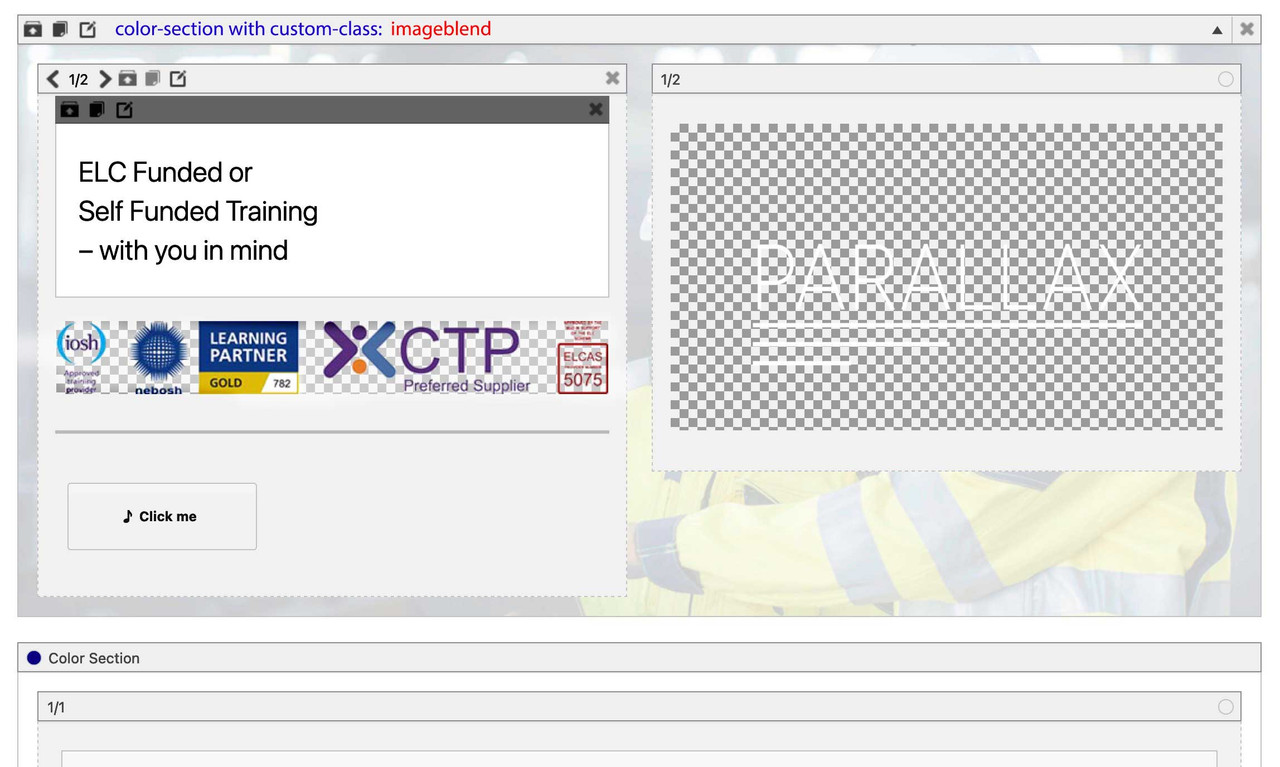
but i would set this gradient overlay only for larger screen widths.
Hi
I am ready to update to Enfold 5.01
In teh instructions it says :
To re-install enfold theme via the WordPress dashboard without losing data.
– Go to Appearance > Themes page and first, deactivate the active enfold theme as active themes cannot be removed.
– Activate the default WordPress theme.
– View the theme details of the theme you like to delete and click “Delete”.
– Upload a freshly downloaded copy of the theme from ThemeForest.
Where it says “View the theme details of the theme you like to delete and click “Delete” ” , is it the ENFOLD theme I am deleting or the ENFOLD CHILD THEME ?
Sorry for the questions, but again this is 1st time I am doing it
Ivan
Hi there, I see a few posts on there but no solution I can implement.
I do not want to use a plugin. Can you post instructions to add the code to our functions? I’m going to need to redo all my sites. The Google Services – paste your code here does not work.
This is a concerning revelation – now I’m worried all my sites that have the latest version of enfold won’t be tracking traffic anymore? When did this stop working?
Now i try to do this with enfold images … see example page
It just happens randomly after updating theme settings and saving them. It happens on all my sites that use the Enfold theme.
Hi,
Thanks for that. First off, could you try updating the theme to the latest version (5.0.1) to see if that helps please? https://kriesi.at/documentation/enfold/how-to-install-enfold-theme/#theme-update.
Best regards,
Rikard
Hi,
Thanks for contacting us!
1- Yes, that would be possible but you would need to use WooCommerce hooks and adding content this way would not be practical or user friendly.
2- You can use Product Info Tab element under Plugin Additions tab of ALB however it would not display Description tab. If you would like to add description tab a workaround would be adding Tabs element to your product page, enabling ALB debug mode – https://kriesi.at/documentation/enfold/intro-to-layout-builder/#debug-mode, adding elements you would like to add inside tabs to your product page, copy their shortcodes from debug field displayed right below ALB and paste shortcodes into tab content.
I hope that helps :)
Cheers!
Yigit
Hey,
Thanks for contacting us!
Could you please go to Enfold theme options > Performance and disable JS file merging and compression, save theme options and clear cache? If that does not help, please try de-activating all active plugins and check if that helps :)
Regards,
Yigit
see: https://caniuse.com/?search=mix-blend-mode
so why don’t you use a pseudocontainer to do the job?
#top .avia-section.imageblend {
  position: relative !important;
  overflow: hidden !important;
}

#top .avia-section.imageblend:after {
  position: absolute;
  content: " ";
  width: 100%;
  height: 100%;
  top: 0;
  left: 0;
  background-image: linear-gradient(90deg, rgba(130,208,221,1) 40%, rgba(130,208,221,0) 60%);
  background-size: cover;
  background-repeat: no-repeat !important;
  background-position: top left;
  pointer-events: none;
}
on a parallax section – selector is a bit different:
#top .avia-section.av-parallax-section.imageblend .av-section-color-overlay-wrap:after
See: https://enfold.webers-webdesign.de/special-backgrounds/
you can use the section divider here and bring it to front
Dear Support,
Only one page of my Enfold website does the following:
a) changes the footer
b) throws a warning telling me the avia_builder_button failed to initialize. (If I click ‘update’, I get the warning; if I hit ‘refresh’ it goes away.)
Any idea how I can fix both?
Please advise. Link to page and credentials in private content.
Thank you,
Tim
THP Studio.
Agree the continued work of the team has been fantastic!
I hope it continues because Enfold still stands up as a fantastic platform to build sites on (not to mention the 50+ sites I have running it!)
Hey,
Thanks for contacting us!
Please refer to this post – https://kriesi.at/documentation/enfold/optimization/#troubleshoot :)
Cheers!
Yigit
Our enfold installation has a folder that has a huge file size.
The issue is with the avia_fonts folder in wp-content/uploads. We can’t even browse to it.
This has eaten up our server space.
Hello everyone,
I am right now working on a website with the enfold theme and need to embed a youtube video while following the dsgvo.
I already managed to do so but do now have 2 Problems.
When the cookies are set to the video not beeing loaded, clicking on it opens a new tab with the video on youtube.
I would love to have a notification on the video that says “to watch this video update the cookie settings”.
Can i change the behaviour of the not loaded video and is there a possibility to show a banner notifying the user over the cookie situation?
Thank you for your help.
Best regards
Kevin
Hi Martin,
We’re happy that Yigit could help you :)
Thanks for using Enfold and have a great day!
Best regards,
Nikko
Hi Lefteris,
Please try to add this CSS code in Enfold > General Styling > QUick CSS:
@media only screen and (max-width:767px) {
  #top #wrap_all #full_slider_1 .av-q3q9qn-53925e4809ef013df04d16b8e3d727c0 .slideshow_caption {
    padding-top: 28px;
  }

  #top #wrap_all #full_slider_1 .av-q3q9qn-53925e4809ef013df04d16b8e3d727c0 .slideshow_caption .avia-caption-title {
    line-height: 1em;
  }

  #top #wrap_all #full_slider_1 .av-q3q9qn-53925e4809ef013df04d16b8e3d727c0 .slideshow_caption .avia-slideshow-button {
    margin: 12px 0 0;
  }

  #top #wrap_all #av_section_1.av-mhok2n-638bda690f6640ff90af9e62788881c3 .content {
    padding-top: 40px;
  }

  #top #wrap_all #av_section_1 .flex_column_table.av-kf05nz-46eaca2763ddd7be847a91efb3dfdb63 {
    margin-top: 0!important;
  }
}
It’s specific to the page you posted.
Hope it helps.
Best regards,
Nikko
Hi, I’ve looked at some different posts here but was not able to solve my issue. I just purchase Enfold for the 3rd or 4th time and have had great experiences, but I cannot seem to solve this issue for Fullscreen Slider. I’m using the one page demo template, and Fullscreen Slider works as desired on my laptop screen, but the image does not resize appropriately for mobile. I do not have coding skills but I need this element to work on phones, or at least be able to implement a workaround. Can I get some direction please?
Website and temp login provided.
Thanks,
Brian
-
This topic was modified 3 years, 9 months ago by
 brmurphy.
Agreed, the product page layout is now outdated, and I would love to see a few templates to choose from with different layouts. Reviews really need to be highlighted these days, not hidden away in a tab.
Look forward to seeing your example when its ready, and I hope they can implement your header builder ideas too.
All that being said, it’s very encouraging seeing all the work being done at the moment on Enfold – thanks to Gunter, Ismael, Rikard, Mike and the rest of the team! Please keep up the good work :)
Hi Martin,
Thanks for contacting us!
Please add following code to Quick CSS field in Enfold theme options > General Styling tab
.av-masonry-date {
  display: none;
}
Best regards,
Yigit
Hi frankeee,
You’re welcome :)
We’re glad that we could help you.
Thanks for using Enfold and have a great day!
Best regards,
Nikko
Thanks Rikard,
If anyone finds this thread via google – On the note of having a second menu in the header area. There is a solution on the documentation using a widget area
But it would be great to have a solution built in to Enfold that uses actual wordpress headers instead of a widget.
Technically this would work:
https://kriesi.at/documentation/enfold/example-of-stacked-logo-menu-and-widgets/
And include a menu widget in this area. Not sure if this would give full mega menu capabilities or not though without trialing it.
-
This reply was modified 3 years, 9 months ago by
 thinkjarvis.
Hi,
if you check enfold\js\avia-snippet-lightbox.js line 21:
fixedContentPos: false, // allows scrolling when lightbox is open but also removes any jumping because of scrollbar removal
Changeing this to true will do it.
There was probably a reason why it was added.
As far as I know there was no request up to now – so I would suggest to add a filter to activate this.
Edit:
added: filter ‘avf_default_lightbox_no_scroll’ – block default lightbox and body from scroll
return anything except false (e.g. true) in filter
Best regards,
Günter
-
This reply was modified 3 years, 9 months ago by
 Günter.
Trying to insert Easy sliders or the image galleries on the pages do not work, photos and texts do not appear.
wordpress 6.0
enfold 5.0.1
php 7,4,30
Hi Sven,
You should be able to use the theme token in the plugin as well, please try that out. If that shouldn’t work, and you still can’t get the necessary details, then please try to update manually via FTP until your contact person is available again: https://kriesi.at/documentation/enfold/install-enfold-theme/#ftp-install
Best regards,
Rikard
… by the way, to stop the enfold logo appearing over the top of the background I have added a transparent png to the Theme Options – Logo. This is probably not the way to do it and might alter your solution.



