Thanks for the input Ismael.
I tried Contact form 7 which is really great plugin, but it has not the “conditional logic” feature, which I need.
If you manage to put this feature in the Enfold theme future update (contact form shortcode), would be brilliant. Cos in this case we wont need to install additional plugins to create forms and bother with avoiding customizations on CSS due to conflicts.
For the time being I will try what you suggest.
Thanks again!
George
Hi!
We won’t “fix” this on our end because imo a year selection is simply not necessary and just clutters our minimal calendar design. The calendar title shows the current selected year and month and thus the user knows which day, month and year is selected at the moment and doesn’t need to remember anything.
However if you want to change it open up /wp-content/themes/enfold/framework/php/class-form-generator.php and replace
beforeShow: function(input, inst) {
with
               changeMonth: true,
               changeYear: true,
            	beforeShow: function(input, inst) {
and insert following code into the quick css field to hide the next/prev buttons
.ui-datepicker-next,.ui-datepicker-prev{display:none;}
Regards,
Peter
Hey warrentkachuk!
This feature would require some custom code and is not supported by Enfold out of the box. You can try this plugin: Magic Zoom – as far as I know it comes with such a feature and the plugin author helps you if it doesn’t work (properly) with our themes.
Regards,
Peter
Hi!
Please update your theme to Enfold 2.4.1. You’re using 1.8.4 at the moment and we need to make sure that you’re using the latest version of the theme before we start to search for bugs, etc.
Best regards,
Peter
Hey!
Yes please update the theme. You propably also need to delete the dynamic stylesheet because it seems like Enfold can’t regenerate it. Use a ftp client software like filezilla and navigate to wp-content/uploads/dynamic_avia/ and delete the stylesheet in this folder. Then make sure that the folder permission is set to 777.
Regards,
Peter
Hi!
Please create us an admin account and post the login credentials as private reply. I’ll look into it.
Cheers!
Peter
Hi!
If you want to remove the featured image from single pages open up /wp-content/themes/enfold/includes/loop-portfolio-single.php and delete
if($thumb) echo "<div class='page-thumb'>{$thumb}</div>";
Regards,
Peter
Hi!
I visited the page for the first time using Chrome and Firefox 24.0. The social icons show properly on the first load.

Regards,
Ismael
Hi asteratos!
You can try the Contact Form 7 plugin. You can actually delete or override the contact form styling on css > base.css > #Forms. Delete those line of codes or modify it.
Regards,
Ismael
Hi,
I am using the plugin simple share button that’s been suggested in several threads by the support staff; (like https://kriesi.at/support/topic/plugin-compatibility-for-sharing/)… and I love it.
However. When I put the widget into the footer, the text in the socket disappears unless the socket text (entered in the enfold options) is additionally wrapped in some kind of html, like <div> or . <span> unfortunately does not work. When using <div>, the alignment gets out of hand…
I am currently using some custom css and weird hacks to make it look ok, but I wonder what the issue is. Any ideas?
It happens both at the server and in local development environments (serverpress, xampp).
Best,
~CB.
Hi, in Enfold, is it possible to hide the title from a youtube clip?
Hi,
I just installed Enfold on a new domain, downloaded the Dummy Data, then created 9 pages and erased all the others from the Dummy Data.
If I search on Google for barcelonasitgesterrace.com I get all the pages listed (68!) and not just the 9 pages that are currently there. Besides, and that’s the most important thing, the meta description doesn’t appear.
If you do a search on Goolge, you’ll see what I mean.
How do I get Google to show for example the Homepage with its appropriate meta description, which I already created with Yoast SEO?
Do I have to re create a xml sitemap and send it over to Google? I guess Yoast did that upon installation and before I erased the Dummy Data, which may explain why I get the wrong search results?
Thanks!
Antonio
Hallo liebes Kriesi Team,
ist es mit Enfold möglich den Header mit der Navi so verschwinden zu lassen, wie es die Kollegen von Gavick können?
Hier der Demolink.
Es geht nur um den Fullscreenslider im OnePageLayout der mit dem Aufruf der Seite wirklich auf Maximum gehen soll.
Wäre schön wenn es da eine Lösung gäbe. Denn so hab ich nichts in Eurem Demo gesehen.
Gruss
Hi there.
We got a problem…
Theme, ENFOLD, latest version
WP, 3.6
If responsive option was active for the slide, it looks great at mobile devices, but, for WEB, it creates a big “empty space” under de slider
See example at http://46.137.157.107/?page_id=104
In other hand, If we deactivate “responsive” option for layerslider, this “empty space” desapeares al WEB site, but, images increase their size, resposive dosent works, even we introduce dimensions (2000×500 in this case).
See the diferece at http://46.137.157.107/?page_id=93 for example.
How to fix woth options??
We need a 2000×500 px slider without “blank space” under de slider, and of course a correct resposive behaviour.
Many thanks in advance
best!
no that didn’t work either I’m afraid? I am I adding it in the right place? I am going to:
Enfold Child
Styling
Quick CSS
Hi I’m using the enfold template. Today I signed into WP and upgraded to the latest version and then also updated the bbpress plugin to 2.4.1.
After upgrading the plugin I can no longer access my admin and get the following error: Fatal error: Allowed memory size of 41943040 bytes exhausted (tried to allocate 491520 bytes) in /home/apper/public_html/wp-content/themes/enfold/css/dynamic-css.php on line449
Please help.
Kind Regards,
Dante
This reply has been marked as private.
Hi there,
This is not working as you have described in #186228
I have in Enfold Settings.-> Set Pages to have right side bar
In Widgets -> removed all widgets from display everywhere, and added widgets to SideBar Pages
On Home Page -> under page settings set No Side Bar. (http://imgur.com/3JzLnP1)
But I still have the side Bar on my home page.
Hi!
If you choose to display sidebars in Enfold theme options and choose No Sidebar in page settings, then sidebar should not be visible. But if you choose to display no sidebar in Enfold theme options, does not matter what you choose in page settings.
Best regards,
Yigit
That worked thanks, but seems to be an issue here.
If you choose default (under Enfold options) Add sidebar, and under page, choose No Side bar
– you get sidebar X – error
If you choose default (under Enfold options) No Sidebar, then under pages you have to just on side bar when you want them.
It should really work both ways yes ?
thanks
Mark
Hey markw1!
Please add following code to Quick CSS in Enfold theme options under Styling tab
.fixed_header.social_header #main { padding-top: 117px; }
Regards,
Yigit
Hi markw1!
Please go to Enfold theme options and make sure that you have choose to display no sidebar on pages under Sidebar tab http://i.imgur.com/pcDVqNU.jpg
Best regards,
Yigit
Where can I change the prettyPhoto skin in Enfold?
It is currently dark round – I’d like to change it to dark square if possible.
Thanks.
Hey!
1) Please refer to this post to change the width to switch to mobile menu https://kriesi.at/support/topic/collapsable-menu/#post-165144
2) Please add following code to Quick CSS in Enfold theme options under Styling tab
@media only screen and (max-width: 480px; ) { .responsive .mobile_slide_out .logo {
float: left; margin-left: -18px; }}
Regards,
Yigit
Hey Sunnydog!
Please add following code to Quick CSS in Enfold theme options under Styling tab
.iconbox .iconbox_content .iconbox_content_title { text-transform: none; }
Regards,
Yigit
This reply has been marked as private.
Hey Caleb!
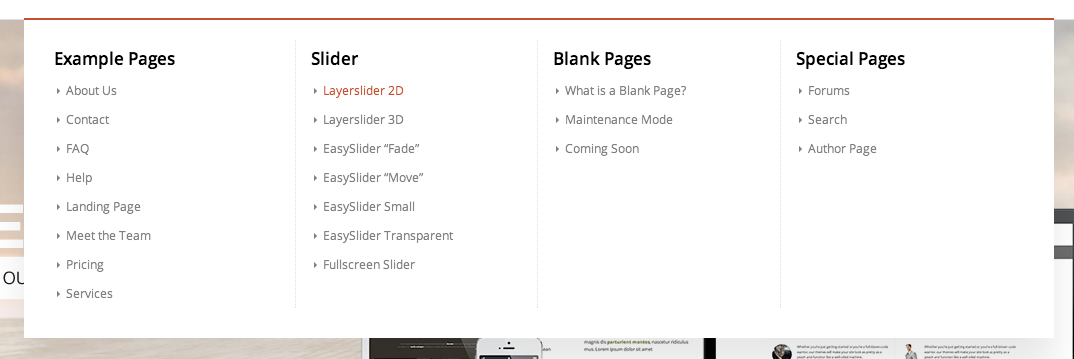
You can set it up like this and add following code to Quick CSS in Enfold theme options under Styling tab to remove titles
#header .mega_menu_title { display: none; }
Best regards,
Yigit
Hahaha, Many thanks Jackfd53 to agree with me. Now it’s the turn of Kriesi and his team to push up things.
Best regards to all you people, Adolfo