Hi, and first of all thanks a lot for this great theme.
I made a search through the forum and didn’t find the answer I was looking for, so I hope I’m not posting a duplicate.
I’m trying to add some custom css in the custom.css file, but it’s not loading. You can see here what I’m talking about.
The custom.css loaded is wp-content/themes/enfold/css/custom.css?ver=1 , if I remove the ?ver=1 it links to the right, modified custom.css.
Why is this and how can I fix this ?
Sorry if it’s some WordPress trick I don’t know about or something really stupid, I’m not a developper !
Thanks in advance
Hey Antonio!
1) “hijack the threads of other users” means that you posted a new question in a thread although you’re not the thread creator. I normally accept follow up questions based on related issues but in this case (you posted the question here: https://kriesi.at/support/topic/enfold-wpml-wrong-default-pages-for-languages/ ) your question was completely unrelated to the topic and this is imo unfair towards the user who created the original thread because everyone has the right to get a short and specific answer to his question and doesn’t want to read bug reports of other users who experience different issues. That’s why I asked to you create a new thread.
2) It seems like you need to flush the permalink rules. Go to Settings > Permalinks and click the save button. WordPress will then flush the rules and rewrite the htaccess file. If this doesn’t work you maybe need to modify the htaccess file manually: http://codex.wordpress.org/Using_Permalinks
Best regards,
Peter
Hi Devin,
here is the site (TEST) http://test.markwiltshire.com
I have
a) In Enfold Settings, set Pages to have ‘right sidebar’
b) In Widgets, removed all the widgets from the display everywhere, and added widgets to the SideBar Pages area
c) On my page ‘Home’, which is set to be the front page of the site, I have set Layout to have No Sidebar
From previous explanation from support (See #186228), this setting should have no side bar.
I want sidebar on most Pages, just not on the Home page.
thanks
Mark
Hi,
Since introducing Revolution Slider compatibility to Enfold, I’ve had a slider on my homepage, but I’ve recently noticed that the HTML5 video on the first slide doesn’t play in Safari. It’s fine in Chrome and Firefox, and I have .webm, .mp4 and.ogv videos hooked up via the slider admin, so I’m not sure where the issue lies?
Thanks in advance for any insight you can offer!
Graeme
Hi!
You can’t wrap a function around a function. If you want to call a function directly just use following code
add_action( 'after_setup_theme', 'my_function', 10);
and replace “my_function” with your function name.
Best regards,
Peter
Hey!
If you want to change the link of the featured image open up /wp-content/themes/enfold/includes/loop-index.php and replace
        //echo preview image
        if(strpos($blog_style, 'big') !== false)
        {
            if($slider) $slider = '<a href="'.$link.'">'.$slider.'</a>';
            if($slider) echo '<div class="big-preview '.$blog_style.'">'.$slider.'</div>';
        }
with
        //echo preview image
        if(strpos($blog_style, 'big') !== false)
        {
            if(!empty($url))  $slider = '<a href="'.$url.'">'.$slider.'</a>';
            if($slider) $slider = '<a href="'.$link.'">'.$slider.'</a>';
            if($slider) echo '<div class="big-preview '.$blog_style.'">'.$slider.'</div>';
        }
Regards,
Peter
Hello there,
I did a website with 9 pages (http://www.barcelonasitgesterrace.com) and two days ago I installed WPML to proceed with the set up of multilingual translations.
Initially everything seemed to be fine, yet yesterday I realized that all the pages but the homepage give a 404 error when clicked, and I think this means the links to the pages are all broken, possibly by WPML? I haven’t done anything to the site after installing it and in the beginning it seemd to me that it worked fine.
Now when I click on any page besides the Home I see the page gets redirected to a french version which has not been created yet, instead of remaining on the default english version and url.
How can it be restored?
I can provide you with access to the backend anytime. Just tell me how to give you the details.
Thanks.
Antonio
PS: note for dude: what do you mean by “hijack the threads of other users…” That’s not a nice thing at all to say and the last thing I was attemping to do…
Hi totofunk!
Did you save the quick css code for the English version of the website too? Use the language switcher on the admin page and select “English”. The theme option page name should change to “Enfold (EN)”. Then go to Enfold (EN) > Styling and insert your css code. Afterwards save the settings and the styling should work on both pages.
Cheers!
Peter
Hi!
Yes, the reason is that the hover effect will be deactivated if the image height is smaller than 100px (there’s simply not enough space to show the icon for smaller images). We’ll remove the hover effect from all logos in the next version. If you need a quickfix open up /wp-content/themes/enfold/config-templatebuilder/avia-shortcodes/logoslider.php and on line 415 search for following code
$output .= "<div {$data} class='avia-logo-element-container {$border} avia-logo-{$type} avia-content-slider avia-smallarrow-slider avia-content-{$type}-active avia-content-slider".avia_partner_logo::$slider." avia-content-slider-{$total} {$class}' >";
and replace it with
$output .= "<div {$data} class='avia-logo-element-container {$border} avia-logo-{$type} avia-content-slider avia-smallarrow-slider avia-content-{$type}-active noHover avia-content-slider".avia_partner_logo::$slider." avia-content-slider-{$total} {$class}' >";
Best regards,
Peter
No answer so far? Maybe this topic was overlooked by the amazing support team – so I try again.
This problem really seems to be a theme related issue, as the screenshots above were taken of the enfold demo site. Thanks!
Hi I have version 2.3.1 installed and want to use some Features of 2.4. In the Admin (Enfold -> Theme Update) are none Updates visible. API Key and Login Name of Envateo is entered…
What can i do ?
Regards Jack
Hey primarythoughts!
As far as I know the NextGen Gallery pagination works with Enfold. You can try to download the latest version of the plugin here: http://wordpress.org/plugins/nextgen-gallery/ and if it doesn’t work (which can happen because Nextgen 2.0 is still buggy) try to install this plugin instead: http://wordpress.org/plugins/nextcellent-gallery-nextgen-legacy/ which is based on the 1.9.x branch and it should work just fine with Enfold.
Regards,
Peter
Hello
I am now working with learnDash plugin in Enfold theme and got list of lessons messed up.
Here how the lesson list looks in Enfold:
http://gyazo.com/423f5d8cb3c9d295fcf14129a6fcc7bb
Here how it has to look (correct way) with other stock themes of WordPress:
http://gyazo.com/73cc0b654dccd46ae8823dc050f64542
Could you please suggest what to do and how to change list to correct list?
Thank you
Hi!
Yes – use Codestyling instead: http://wordpress.org/plugins/codestyling-localization/
Install the plugin, go to Tools > Localization and select “Themes”. Then search for “Enfold” in the list and select “Swedish”. Then click on “Rescan” to fetch all text strings. Afterwards click on “Edit” and translate the required strings from the “avia_framework” textdomain. At least click the “create mo file” button next to the “Textdomain” selection dropdown (top left corner).
Cheers!
Peter
Hej,
How do I add the missing content in the translation files?
Refering to message 186474 there are some german text in the mail that the the client receives. Could this be managed without installing the WPML plugin?
Hey!
But the translation seems to work for me – i.e. here http://www.yourturn-consulting.se/ the “Search” form shows “Sök” instead of “Search”. Also here: http://www.yourturn-consulting.se/?s=test all phrases/words except “If you are not happy with the results below please do another search” are translated and this sentence is probably also missing in the translation files.
Regards,
Peter
Its outside the theme folder because written data goes in the uploads folder. Its just the standard for where plugins and themes would put that kind of thing.
I am for most pages using the built in contact form I think, I did not add it but it appears in the sidebar, but on my front page I want no sidebar and a contact form down the bottom, when I use the code I get from a post I created and added the short code contact form to there is no captcha, how do I add this in please as I want to avoid using plugins unless I have to.
Temp website address is:
Hi Devin,
Sorry for the late reply.
You were right, it was a plugin issue. I had a plugin called ‘WP Multibyte Patch’ which did things to change the font files within the wordpress site. I think that caused the icons which are font library (right?) to get messed up. Just disabled the icon and wala! it’s back working again. Thanks once again :)
Best,
Neo
Hi,
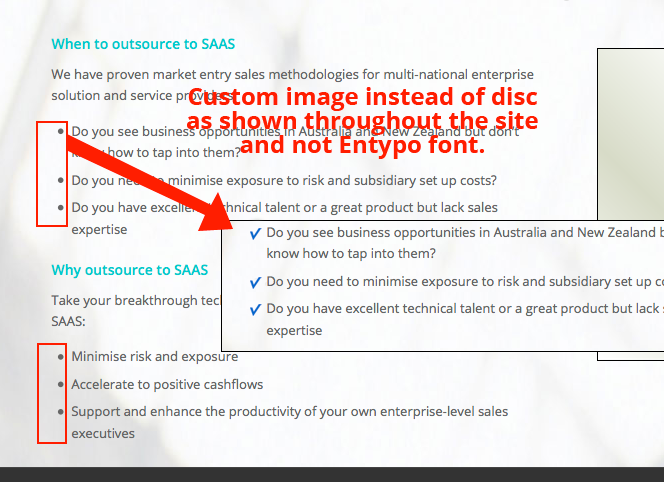
I want to use a custom image for bullets instead of the default in the list items on the site http://web8f.spring.studiocoast.com.au/ (Enfold Theme)
I have been through the forum and cannot get an easy solution.
The screen shot is here http://firoz.namroz.com/support/custom-bullet.png
Please let me know where can I change the css and where do I upload the custom image. Thank You.
Cheers
Hey GeoCreo!
Sure, please add following code to Quick CSS in Enfold theme options under Styling tab and change font family to the one you would like to use
.main_menu ul:first-child>li>a { font-family: "Times New Roman",Georgia,Serif; }
Regards,
Yigit
Hi!
Please try adding following code to Quick CSS in Enfold theme options under Styling tab and adjust as desired
li.menu-item-language-current a { color: blue; }
Best regards,
Yigit
Next problem: the three boxes in the footer is changing size and not matching. The first two are widgets within Enfold and the third is Alpine Photo Tile for Instagram. I know it’s a third part plugin, but do you have any tips on how I can make them the same size? Also when resizing the browser? Hope you can help. Thanks again /Michael
I’m changing the Bolid theme to Enfold which is for my howdoidate.com blog. The blog already contains 22 widgets and 320 posts. If activate Enfold and import the Enfold dummy information using your dummy button will it overwrite the 320 posts that I already have in howdoidate.com?
Thanks
Derek
Hi Yigit,
thx for the reply and SORRY, WPML has redirected you to the english version of my site where the logo was set to 100×97, so it was not scaling down.
I have deinstalled WPML on my testserver. Please check again, you will now see then see what I am talking about.
http://www.mhstudios.de
Best Regards
Maxim
Hi there,
I’m installing the enfold theme and i found this error message when I tried to insert the zip file of fontello icon set.
Couldn’t add the font.
The script returned the following error:
Fatal error: Call to a member function attributes() on a non object in /home/wp-content/themes/enfold/config-templatebuilder/avia-template-builder/php/font-manager.class.php on line 179.
Please help !
Thanks in advance
Hi Yigit
http://steamglass.com
But I have just realized the problem, I think.
The simple share buttons option
“Share text links to simplesharebuttons.com
Leave this checked if you are feeling kind :)”
binds their link to the footer and it somehow interferes with the <div> contatining the enfold footer text.
* unchecking the aforementioned option solves the issue.
Still not sure why though. :(
-
This reply was modified 12 years, 3 months ago by
 CarvedBlock.
Hi,
this code to change/remove flags does not work on my Enfold theme:
http://subseasweden.com/
Have put the code you posted in my Quick CSS but nothing happens.
Hi!
Changes are done. Please review your website. You can find custom CSS i added in Quick CSS section in Enfold theme options under Styling tab.
Best regards,
Yigit