Hi! I am trying to update the menu on my website however it looks like the changes I made is not showing on the frontend. I did update the color of the menu link under the Advance Styling in Enfold Theme Options, hit the Save All Changes but when I checked the live site, nothing happens.
https://snipboard.io/ViYFbG.jpg
https://snipboard.io/B87XJW.jpg
I also installed a caching plugin but it didn’t work.
Hi,
Glad we were able to help, if you have any further questions please create a new thread and we will gladly try to help you. Thank you for using Enfold.
Best regards,
Mike
Hello Enfold Team,
Thanks in advance for assistance with this issue!
I set up a color section at the top of an intended home page that has a self-hosted mp4 video background. When viewing for the first time, a loading animation shows. This isn’t a good user experience and I know my client won’t like it.
How can I hide that loading animation? If I need to edit the video itself, that can be done.
URL of the page is below in the private content.
-
This topic was modified 3 years, 5 months ago by
 rlhinirv57. Reason: I solved one part of my issue regarding forcing a background image to load
Hi,
Thanks for letting us know, I’ll close this thread for now then. Please open a new thread if you should have any further questions or problems.
Best regards,
Rikard
Hi,
Thanks for letting us know, I’ll close this thread for now then. Please open a new thread if you should have any further questions or problems.
Best regards,
Rikard
Hey chicuza,
Please enable debug mode in order to see the Layout Builder shortcodes: https://kriesi.at/documentation/enfold/intro-to-advanced-layout-builder/#debug-mode, then you can paste this shortcode in a new page, in the shortcode window, just below the regular layout window: https://pastebin.com/a45Fjghr
Best regards,
Rikard
Hi,
Thanks for letting us know, I’ll close this thread for now then. Please open a new thread if you should have any further questions or problems.
Best regards,
Rikard
Hi,
Thanks for your feedback.
Is added to next release:
–enfold-font-family-theme-body
–enfold-font-family-heading
–enfold-font-family-body
Best regards,
Günter
Hi support,
Latest major update from The Events Calendar plugin is somehow conflicting with Enfold.
Plugin addition “Upcoming events” is not including a newly created event.
The event is not displayed on the index-page and neither on the events–page.
How to fix this ?
Thanks for your time.
BR Anette Enkebøll
I have 4 or 5 Licences for enfold with this username but only one Envato Personal Token. Can this be the problem for the not workling Enfold Theme Update?
Hi Guido,
Enfold is only using the default WordPress jQuery version.
Best regards,
Rikard
Hey diefleischerei,
Thanks for the login details. First of all, could you try updating the theme to the latest version (5.1.2) to see if that helps please? https://kriesi.at/documentation/enfold/how-to-install-enfold-theme/#theme-update. If the updates are not coming through via the theme backend, then please try to install and configure this plugin: https://envato.com/market-plugin/
Best regards,
Rikard
Das jQuery Migrate soll ja nur eine Abwärtskompatibilität gewährleisten. Wenn du ziemlich aktuell bist ( WP , php-Version, enfold, plugins ) solltest du es in den Optionen: unter leistung (performance) abstellen können. : Disable jQuery Migrate
das ältere 1.12.4 kommt wahrscheinlich nicht von einem aktuellen Enfold. Schau mal ob du ein älteres Plugin mitschleppst.
Eventuell könnte es sein, dass es noch im Admin Bereich benötigt wird.
Dear Ismael,
This is a great day ! Thank you very very much.
There are still some small details:
1. when opening the footer page, as well as when previewing it, an information is visible: Notice: Undefined index: id in /home/hulaslim/public_html/wp-content/themes/enfold/config-templatebuilder/avia-shortcodes/logoslider/logoslider.php on line 1523
2. The lower part of the footer is white, moreover the 3 buttons Mentions légales, CGA and confidentiality should come into the blue zone beneath.
3. I can’t achieve making the two missing buttons smaller like the surrounding ones (the green one and the dark blue one), last time I tried one month ago the error came and it blocked everything (but it could be due to the presence of Wordfense, now deleted). Is there a code fto make them smaller like the other ones ?
Thanks again for your precious help.
Best regards,
Natacha
Ich habe Enfold geupdatet und bekomme jetzt eine Fehlermeldung wenn ich diese Seite (Frontpage) editieren möchte. Siehe Privater Content. Vielleicht könnt ihr da mal draufschauen und habt einen Tipp. Vielen herzlichen Dank!
P.S: Plugins hatte ich schon alle deaktiviert und auch gelöscht. Hat leider nichts gebracht.
Hello, Ismael
Thanks for your answers.
Displaying the masonry with the 705 px width setting make things a little better, we are almost there. As asked in my revious message, could you tell me what the exact size the original pictures should be so that I can give my customers precise information about that? I deactivated the image compresssion on the thumbnails, it does not make any real difference…
Another small problem we would like to solve: whenever we display a category and its articles/posts; we get the full display of the article and not the usual title and abstract and Read more display (see this example: https://aciege.org/category/offres-demploi/). I could not find where we can change this setting, could you please tell me how to do that in Enfold?
Thanks in advance, have a nice day
Hello, my site styles are broken since the last Update:
I use WP 6.01 and Enfold latest Version.
Errors:
Background colors of ALB-Elerments do not work anymore, Font Colours are not white anymore (defined in ALB) and cannot be changed in ALB-Element.
What happend to my site? I need help, this site woks since 3 years but is broken after the latest Update.
-
This topic was modified 3 years, 5 months ago by
 royaltask.
-
This topic was modified 3 years, 5 months ago by royaltask.
Hi Sovietovic,
We’re glad that we could help you :)
Thanks for using Enfold and have a great day!
Best regards,
Nikko
Hi,
I’ve installed “The Events Calendar” and created simple event. Then added widget to my sidebar with proper title.
However Enfold theme does not display it properly. Instead of proper formating like other widgets it does show it with plain text title.
Can you please let me know how to easily fix this? Instead of PROPER TITLE to have standard Enfold formating of widget headings
My testing site attached
Thanks
Hi guys,
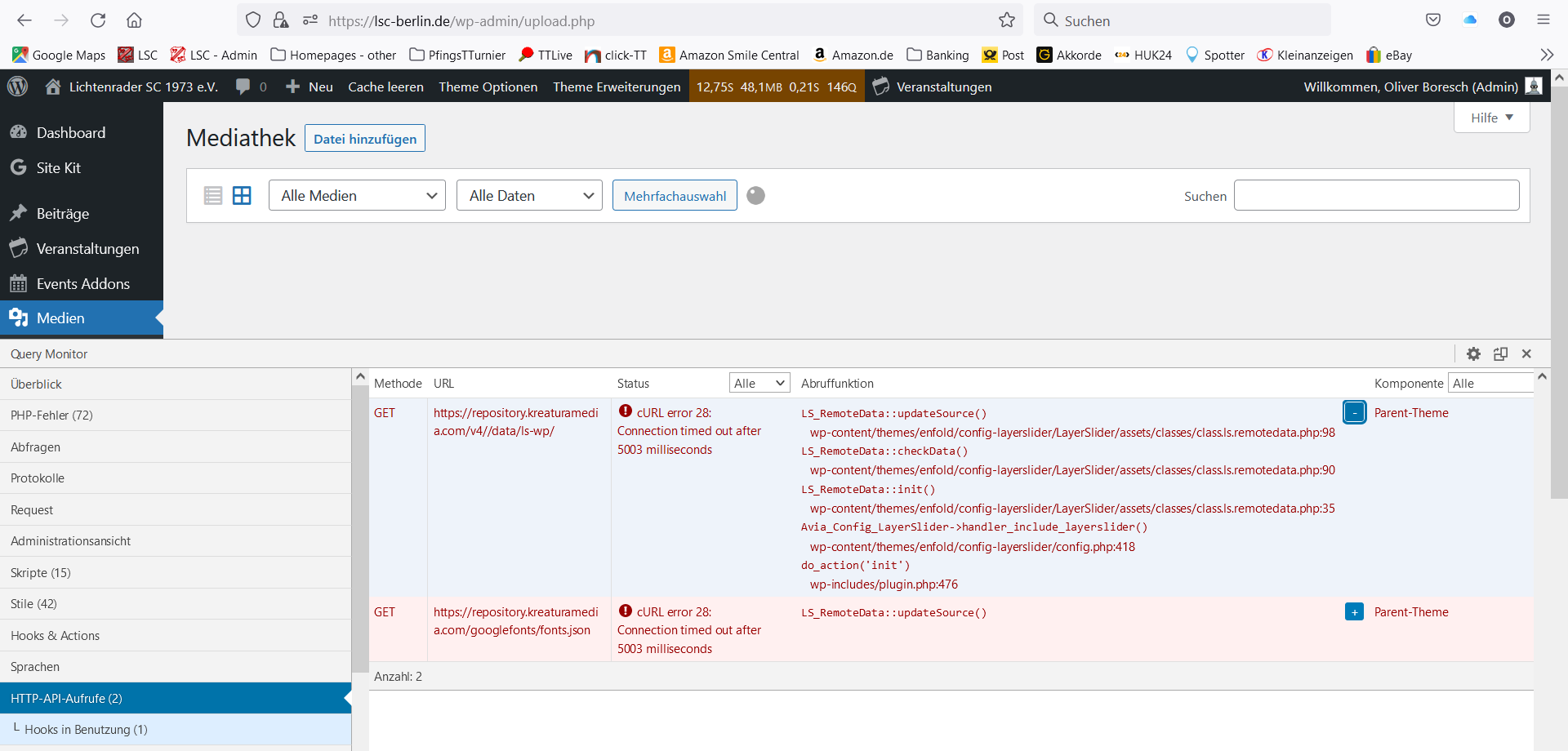
I am currently facing a very bad performance in my WordPress-Backend which seems to be caused be the Enfold-Theme or Layerslider…
I did already a lot of hints to get a better performance – like deleting Revisions, deactivating Plugins etc…but without success.
Finally I installed a Plugin “Query Monitor” which shows the loading times and showing problems… There it shows me a reason in “Parent Theme” -> Layerslider – which is loading 2x 5 seconds until a time-out occurs.
See Screenshot.
http://lsc-berlin.de/wp-content/uploads/2022/10/Wordpress_Backend_Queries.png
Do you have any hint what’s wrong there?
I am also granting you Admin-access so that you can have a look in the backend and maybe find / fix the issue.
Thanks a lot.
Best regards,
Oliver
-
This topic was modified 3 years, 5 months ago by
 don_olli.
Hey HulaSlim,
Thank you for the inquiry.
You have to install a multi-language plugin like WPML or Polylang. They contain a language switcher by default which can be appended in the main menu. The documentations below should help.
// https://wpml.org/documentation/theme-compatibility/enfold/
// https://polylang.pro/doc/the-language-switcher/
Best regards,
Ismael
Hi,
You can also create a custom shortcode for the breadcrumb and insert below the slider.
// https://kriesi.at/documentation/enfold/breadcrumbs/#insert-breadcrumbs-as-shortcodes
Use a code or text block element for the shortcode.
Best regards,
Ismael
Hi Sovietovic,
We’re glad that we could help you :)
Thanks for using Enfold and have a great day!
Best regards,
Nikko
Hey dblum,
Thank you for the inquiry.
If you want to insert a layer slider in the page, you have to use the Advance Layout Builder (ALB) and insert the Layer Slider element. You can also use the layer slider shortcode but we recommend using the ALB.
The following documentation should also help.
// https://kriesi.at/documentation/enfold/advanced-layerslider/
Best regards,
Ismael
Hallo zusammen,
ich bin neuer Enfold-Nutzer und beschäftige mich gerade erstmalig mit dessen Konfiguration.
ENFOLD 5.1.2
PHP 8.0.22
Eine meiner ersten Konfigurationen sollte sein, dass ich im Header einen Slider einbinde. Der von Enfold mit installierte LayerSlider ist aber nicht im Layout eingebunden und kann auch nicht über das Enfold-Menu konfiguriert werden. Hätte hier eigentlich etwas im Bereich “Header” erwartet.
Von daher die Frage, wie ich einen Slider zwischen Logo/Menu und Titel/Linkstruktur bekomme.
Danke.
Hi,
Thank you for the update.
We just noticed that the enfold/config-templatebuilder/avia-shortcodes/events_countdown folder is missing in your installation. Please download the theme again and place the events_countdown folder manually in the enfold/config-templatebuilder/avia-shortcodes/ folder. This should fix the issue.
Best regards,
Ismael
Hi,
Thank you for the update.
We managed to access the server via FTP and edited the /enfold/config-templatebuilder/avia-shortcodes/logoslider/logoslider.php file. The Footer page should now be accessible.
Best regards,
Ismael
Hi,
Thanks for the info @Guenni007.
@hugogimenez: Are you using the Layer Slider? If not, you can disable it by adjusting the Enfold > Layout Builder > Layerslider Options as @Guenni007 suggested above.
Best regards,
Ismael
Hi brunet77,
We apolgize for the delayed response.
Please check the answer on this thread: https://kriesi.at/support/topic/bug-in-enfold-for-woocommerce-prduct-images/#post-1362576
Best regards,
Nikko
Hi Tim,
We are happy to hear that :)
Thanks for using Enfold and have a great day!
Best regards,
Nikko