Hi,
I have installed beta version of Enfold 5.2 on your site, updated breadcrumbs shortcode function in functions.php and activated Events Calendar Pro plugin and it did not throw fatal error.
Could you please review your website? :)
Best regards,
Yigit
Hi,
Website 1
I checked your website on my iphone in landscape mode but it looks fine to me. Title font size is big however if you decrease it by referring to our previous replies, it should look great.
If I did not understand the issue, could you please post a screenshot and show the changes you would like to make? You can upload your screenshots on imgur.com and post the links here.
Website 2
5) Sidebar
It seems like “Do not show sidebar on smartphones” option not enabled in theme options. Could you please confirm that? If it is not enabled, then please check your custom CSS for following code
  @media only screen and (max-width: 767px)
.responsive #top #main .sidebar {
  display: none;
}
You can add following code to Quick CSS and change page ID (“page-id-6968” in example below) to display sidebar on mobile on specific pages
 @media only screen and (max-width: 767px) {
.responsive #top.page-id-6968 #main .sidebar {
  display: block;
}}
6) Header
Please add following code to Quick CSS field in Enfold theme options > General Styling tab
@media only screen and (max-width: 990px) {
#header_meta {
  display: none;
}}
Best regards,
Yigit
Hi,
Please read my first post again, those are the methods available for you. You could delete the current install, then upload the new version as you would with new theme though.
We can’t say if your site will be compromised or not, but please keep proper backups in case soemthing should go wrong.
A theme license is valid for life, and you can download a child theme here: https://kriesi.at/documentation/enfold/child-theme/
Best regards,
Rikard
Hey Enfold team,
when you open the menu (burger/flyout) of my website, you can move the menu items up and down with your finger on touchscreens.
Please see screenshot.
I would like to prevent the menu items from being moveable up and down after the flyout.
Please let me know how to do this.
Thank you very much in advance.
Best regards,
fkm
Hey Rikard
Thx for your advice. Got the Enfold 5.1.2 in place with the Envato plugin.
Have a nice weekend.
Best regards
Lene
Hi,
Thanks for contacting us!
Does the issue only happen on Enfold? If so, please create a testing environment and post temporary WP admin and FTP logins here privately so we can look into it.
If the issue happens on default theme as well, please ask TEC team to provide you a temporary solution :)
Regards,
Yigit
Hi Chris,
Thanks for contacting us!
The website is currently using Enfold 4.6.2 which is not compatible with your WordPress and PHP versions. Updating the theme to the latest version 5.1.2 would fix the issue.
You can purchase an Enfold license – https://themeforest.net/item/enfold-responsive-multipurpose-theme/4519990 and then refer to this post – https://kriesi.at/documentation/enfold/theme-update/ to update it.
I hope that helps! Let us know if you have any other questions and enjoy the rest of your day :)
Regards,
Yigit
 Chris Bruce
Guest
Hi
I have taken of the hosting for the above site. It looks like the theme “Enfold” is causing problems as we are on PHP 8. I need to update it but the original site developer never entered the license key in WordPress.
What are our options?
Hi,
Glad Ismael could help, if you have any further questions please create a new thread and we will gladly try to help you. Thank you for using Enfold.
Best regards,
Mike
Hello Ismael,
I just had a call with my provider “STRATO” but unfortunatley they told me that from their side is nothing blocked – so that they can not allow that domain on any whitelist.
They told me that it might be a possibility to ask you or Layerslider / Kreaturmedia to provide an TXT-record which I could use for verification – do you know that possibility?
I am wondering if I am the only one with this problem… Could you maybe ask LayerSlider-Team / Kreaturmedia if they know that issue?
By the way: For test-reasons I tried on the same server to install another clean WordPress-Instance with only Enfold – and facing exactly the same issue there.
Thank you for further support with that.
Kind regards,
Oliver
PS: If needed you can forward the credentials of my Admin-access also to Layerslider-team.
-
This reply was modified 3 years, 5 months ago by
 don_olli.
Hey diefleischerei,
Thank you for the inquiry.
You can place the adsense code in the Enfold > Google Services > Google Analytics Tracking Code field or manually insert the snippet using the wp_head hook in the functions.php file.
// https://developer.wordpress.org/reference/hooks/wp_head/
You can also use the following plugin.
// https://wordpress.org/plugins/wp-headers-and-footers/
Best regards,
Ismael
Hi,
What happens when you enable the Clone Title Menu Items To Submenu option in the Enfold > Main Menu > Burger/Mobile Menu tab?
I am not sure right now, but is it possible to create a custom mobile menu, where “Projekte” will be a empty link?
Yes, that should be possible. Just duplicate the Projekte menu item, remove the link or anchor, then enable the CSS Classes from the Screen Options panel. In the desktop version of the menu item, add these custom class names.
av-medium-hide av-small-hide av-mini-hide
For the mobile version, add this class name.
av-desktop-hide
Best regards,
Ismael
Hey Ivana,
Thank you for the inquiry.
Did you add this css code somewhere in the site?
#top #wrap_all .av-inherit-size .av-special-heading-tag {
    font-size: 0.8em;
}

#top #wrap_all .av-inherit-size .av-special-heading-tag {
    font-size: 1em;
}
Please remove the css temporarily, then toggle or temporarily disable the Enfold > Performance > File Compression settings afterwards.
Best regards,
Ismael
Hallo. Ich habe von Googel Adsense gerade einen Code zu Bestätigung meiner Website bekommen, den ich in den Header einfügen soll.
Jetzt nutze ich aber ein Child Theme. Füge ich diesen Code jetzt im Endold-Header.php ein oder in Enfold-Child-functions.php
Das ist mir noch nicht ganz klar. Vielen Dank für die Hile.
Wird das Code dann nicht überschrieben bei einem Enfold Update wenn ich das in den Header eintrage? Danke :)
Hey woogie07,
Thank you for the question.
You can use this css code to adjust the size of the content slider arrows.
#top .avia-smallarrow-slider.av-control-minimal .avia-slideshow-arrows a:before {
    line-height: 60px;
}

#top .avia-smallarrow-slider:not(.av-slideshow-ui) .avia-slideshow-arrows a, #top .avia-smallarrow-slider.av-slideshow-ui .avia-slideshow-arrows.av-visible-prev a.prev-slide, #top .avia-smallarrow-slider.av-slideshow-ui .avia-slideshow-arrows.av-visible-next a.next-slide {
    width: 60px;
    height: 60px;
}

#top .prev-slide {
    right: 60px;
}
Please toggle or temporarily disable the Enfold > Performance > File Compression settings after adding the css code.
Best regards,
Ismael
Hey marcyt3,
Thank you for the inquiry.
Looks like the css files are compressed. Did you install a css compression plugin? This is the style of the h2 element when we checked, applied in the Enfold > Advanced Styling panel.
#top #wrap_all .all_colors h2 {
    color: #800009;
    font-size: 19px;
    font-weight: lighter;
    text-transform: none;
}
Please try to disable the css compression plugin temporarily and see if it helps.
Best regards,
Ismael
the setting on “Auto Reload Page” do work on the main Cookie Consent Message:
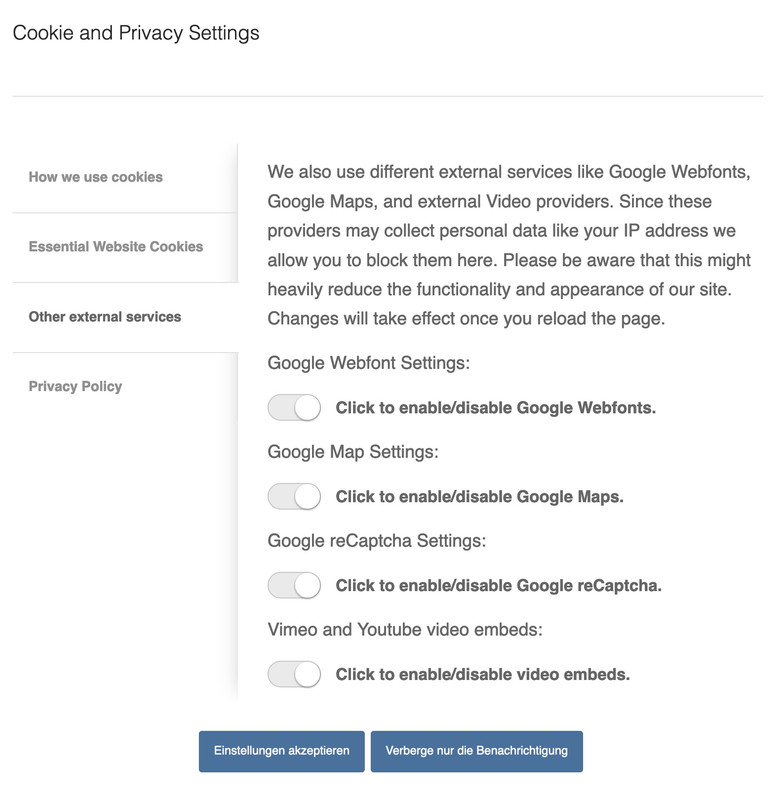
but if i place that shortcode [av_privacy_video_embeds] on a page – these settings are not respected ( i do not test the other shortcodes yet) . The switch itself works – but no reload.
I’m actually a fan of the Borlabs cookie plugin, but I’m currently looking into optimizing Enfold’s own tool – e.g. regarding video blocking. and for performance reasons it would certainly not be bad to have one less plugin at the launch.
Hey frankeee,
Thank you for the inquiry.
Did you set the Background Attachment property to Fixed? Please try to set it back to Scroll temporarily or add this css code.
.avia_mobile .avia-full-stretch {
    background-attachment: scroll !important;
}

.avia-bg-style-fixed {
    background-attachment: scroll !important;
}
You may need to toggle or temporarily disable the Enfold > Performance > File Compression settings afterwards. Let us know if this helps.
Best regards,
Ismael
Hi webdesignphx,
I’m glad that Rikard could help you :)
Thanks for using Enfold and have a great day!
Best regards,
Nikko
Hi chicuza,
Please check our documentation regarding translations: https://kriesi.at/documentation/enfold/translation/
Hope it helps :)
Best regards,
Nikko
Hi Natacha,
I’m happy to hear that :)
Thanks for using Enfold and have a great day!
Best regards,
Nikko
Hi Natacha,
We’re glad that we could help :)
Thanks for using Enfold and have a great day!
Best regards,
Nikko
Hi support, I would like to ask you a question. How can I add another language to my site?
For example: I have the Portuguese version of the site and I would like to add the English version. Do you know how I can do this?
Hi
On several websites with Enfold we use the Enfold Child Facebook Likebox.
Sometimes there is a white border on the right side of the likebox which is not very nice ;-(
See examples in the private content section.
What we can do for that this white border is not there anymore?
Thanks very much.
Best regards
Mike
 Angelo
This reply has been marked as private.
Hey Angelo,
The update to 5.1.2 has to be done manually from the version you are running, please refer to my replies in this thread: https://kriesi.at/support/topic/enfold-4-5-theme-update-update-failed-download-failed-a-valid-url-was-not-pro/#post-1021541
You can either update manually via FTP: https://kriesi.at/documentation/enfold/how-to-install-enfold-theme/#theme-update, or use a plugin to upload the theme zip file: https://wordpress.org/plugins/update-theme-and-plugins-from-zip-file/
If that doesn’t work then please try to delete the whole theme folder, then replace it with the new version. Make sure that you have backups of the site before starting updating.
Also please read this after you have updated: https://kriesi.at/documentation/enfold/theme-registration/
Best regards,
Rikard
Hey Tilman,
Please try the following in Quick CSS under Enfold->General Styling:
h3.grid-entry-title {
  font-size: 18px;
}
Best regards,
Rikard
Hi,
Great, I’m glad that you got it working, thanks for sharing your experience. I’ll close this thread for now then, please open a new thread if you should have any further questions or problems.
Best regards,
Rikard
Hey nV15OoBtg21iTn5z,
Please try the following in Quick CSS under Enfold->General Styling:
#menu-item-5189 .avia-menu-fx, #menu-item-5189:hover .avia-menu-fx {
    background-color: green;
    border-color: green;
}
Best regards,
Rikard
Hi,
Glad to hear that you have this sorted out, if you have any further questions please create a new thread and we will gladly try to help you. Thank you for using Enfold.
Best regards,
Mike



