may i give you a hint on images and enfold formats. – regardless of your question above?
The compression level of the recalculated image formats is 100% – that is a problem for the performance.
See at your start page the slider – the original image is 287kb ( Worship-5.jpg ) the recalculated image ( Worship-5-1500×630.jpg ) is about : 569kb
my tip: reduce the compression level on recalculated images:
add_filter("avf_jpeg_quality", "avf_set_quality_mod", 9999, 1);
add_filter("avf_wp_editor_set_quality", "avf_set_quality_mod", 9999, 1);
function avf_set_quality_mod($quality) { $quality = 65; return $quality;}
here to 65%
sadly – this influences only the upload – existing images are not influenced on that.
For that – there are some good plugins to recalculate the thumbnails.
For Example: https://de.wordpress.org/plugins/resmushit-image-optimizer/ or from shortpixel: https://de.wordpress.org/plugins/regenerate-thumbnails-advanced/
my recommendation now is : reSmush.it
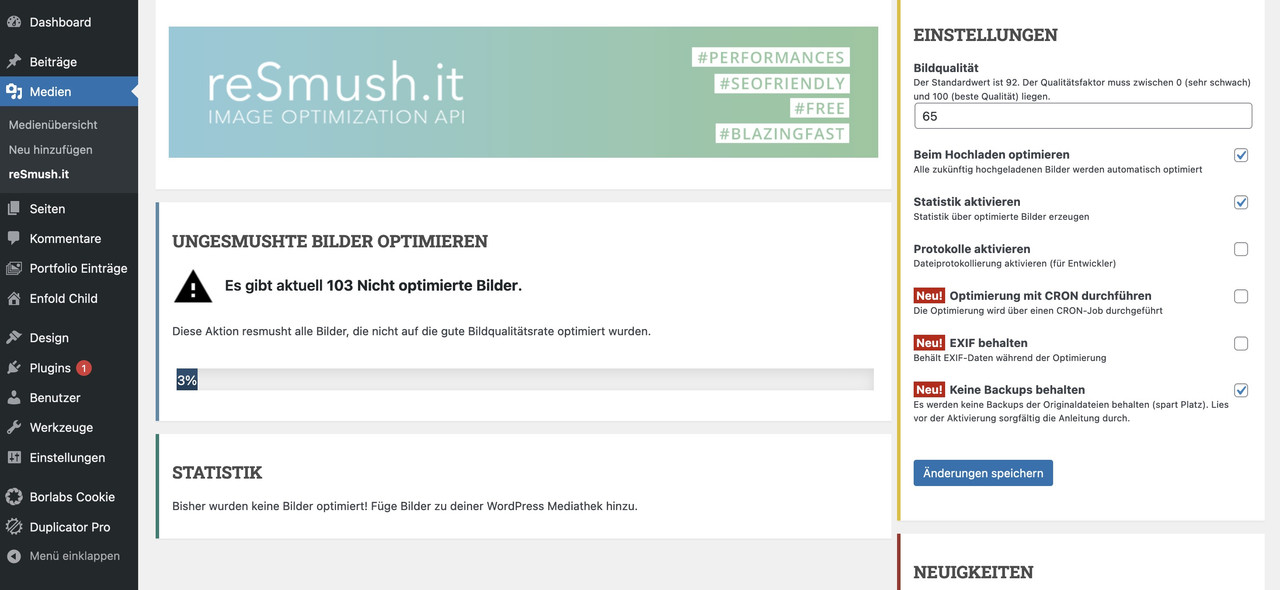
on starting with the plugin – you can choose to have backups of all images – but checking the box ( reight side – to not preserve backups ) you can delete them afterwards.
The plugin will observe the upload of images and optimize them on upload.
i do have compression level 55 on most of my websites – and see if your image on 1500x630px has a significant difference ( espacially for a background-image ) – this image got 56kb !!
https://webers-testseite.de/eleina/
Hi,
Thanks for letting us know, I’ll close this thread for now then. Please open a new thread if you should have any further questions or problems.
Best regards,
Rikard
Hey Jaro,
Thank you for the inquirry.
When an element has the attribute aria-hidden=”true”, it indicates to assistive technologies (such as screen readers) that the element and its contents should be ignored. This is often used to hide content that is not relevant to the current context or that is intended to be visually hidden, but not removed from the DOM. However, the theme doesn’t add the aria-hidden attribute to the horizontal-gallery-links by default. The code is located in the enfold\config-templatebuilder\avia-shortcodes\gallery_horizontal\gallery_horizontal.php file around line 772:
$output .= "<a {$lightbox_attr} class='av-horizontal-gallery-link' {$display_char} title='{$lightbox_title}' alt='{$alt}'>";
As you can see, the aria-hidden attribute is not included in the markup. It is possible that a plugin is dynamically adding the attribute to the links.
Best regards,
Ismael
Hey emilconsor,
Thank you for the inquiry.
It sounds like there may be an issue with the gallery script. Did you modify the enfold\config-templatebuilder\avia-shortcodes\gallery\gallery.js file? Here are a few things you can try to troubleshoot the problem:
1.) Check the modifications made to the gallery.js. This is the script that is responsible for displaying the full-size images when the thumbnails are hovered over. There may be an issue with the way this code is handling the image URLs or with the way it is updating the DOM to display the images.
2.) If you are using any custom CSS to style the gallery element, make sure that the CSS is being applied correctly and is not causing any issues. You can try temporarily disabling the custom CSS to see if the issue persists without it.
If the issue persists after trying these steps, you may want to try creating a new gallery using a different plugin or tool to see if the issue is specific to the plugin or tool you are currently using.
I hope these suggestions help! Let me know if you have any other questions or if you need further assistance.
Best regards,
Ismael
Hi,
Thank you for the update.
What do you mean by “zipped and imported it”? The font files should already be zipped or compressed after download. Do you manually compressthe files before uploading it to the custom font manager?
There are several potential reasons why you might be seeing different fonts on different pages of your website, even though you’ve only specified one font in the Enfold menu. Here are a few possibilities to consider:
1.) Different stylesheets or templates: If you have multiple stylesheets or templates being used on different pages of your site, it’s possible that they are specifying different fonts. You’ll want to check the CSS for each of these templates or stylesheets to see if any font-related rules are being applied.
2.) Conflicting CSS rules: It’s possible that there are conflicting CSS rules that are causing different fonts to be applied to different elements on your pages. You can use the browser Inspector to see which CSS rules are being applied to each element and try to determine which rule is taking precedence.
3.) Plugin conflicts: If you have any plugins installed on your site that are modifying the font or styling of your content, they could be causing the different fonts to appear. You may want to try deactivating these plugins or themes to see if that resolves the issue.
4.) Incorrect font file references: If you are linking to font files directly in your CSS, it’s possible that the font files are not being correctly loaded on some pages. You can check the network tab in the browser Inspector to see if any font file requests are returning 404 errors.
Overall, it’s likely that the issue is being caused by some combination of these factors. To identify the root cause, you’ll want to carefully examine the CSS rules being applied to your site, as well as any plugins that might be modifying the font or styling.
Best regards,
Ismael
Dear Enfold,
I hope you are happy and well. Merry Christmas. I continue to enjoy Enfold after many years of use.
I need some help with something that I just noticed today.
I have set the images in Woocommerce to be custom cropped at a 2:3 ratio. This crop is working correctly on my home page, and on my shop page.
Home
Shop
https://www.wildsugar.fashion/shop/
It has stopped working within product categories. You can see when you look at a product category that it was working because there are images there that are cropped correctly at the 2:3 ratio. Then at some point, something changed and now the images in product categories are cropped at a 1:1 ratio.
https://www.wildsugar.fashion/product-category/dresses/
I upload all my images at a 4:5 crop ratio. They display at this ratio in the product overview. I am happy with this too.
I need help getting the images in product categories (dresses, skirts, etc.) to once again crop at the 2:3 ratio.
I have checked my custom css. I have not had to enter any custom code in the past to achieve the result I have enjoyed for so long. It appears that the only setting I have access to that would make a difference is in: Customize -> Woocommerce -> Product Images (I have not changed these settings. They are set to what they have always been).
 Woocommerce Product Images Crop Ratio" />
Thank you once again and all the best for the new year.
Best,
Dameon
-
This topic was modified 3 years, 3 months ago by
 dameonjamie. Reason: Added login credentials for Kriesi customer support
Hi,
Glad Rikard could help, if you have any further questions please create a new thread and we will gladly try to help you. Thank you for using Enfold.
Best regards,
Mike
I guess I found it in the enfolds (not the child theme one) themes function file:
* With WP 5.8 block editor was introduced to widget page. This is not supported by Enfold.
* Based on https://wordpress.org/plugins/classic-widgets/ we disable this feature.
If that’s the reason you can close the topic
Hi,
Thanks for that. We cannot generate the token for you unfortunately, are you sure that you followed this step? https://kriesi.at/documentation/enfold/theme-registration/#toggle-id-5. You could also try using this plugin: https://envato.com/market-plugin/
Best regards,
Rikard
Hi,
I have just switched from classic editor to block editor in the theme settings.
What makes me wonder:
The widgets are still displayed as classic widgets and not as block widgets.
I have not installed a plugin like ‘classic widgets’ and switching to another theme will show the widgets in blog layout.
Does enfold display classical widgets by default or is there a special setting for showing widgets in block layout?
Cheers
Ralf
Hey scosee,
Thanks for the login to your site I found that you had this css in your Quick CSS that was hiding the menu, I commented it out so your menu would show and you would know which css was causing this.
Look in Enfold Theme Options ▸ General Styling ▸ Quick CSS field
/*#header_main_alternate{display:none;}*/
Best regards,
Mike
This reply has been marked as private.
i have been following this guide and trying to do it as you have it laid out but im not getting the results of hiding all the p tags?
I have added login and you can see the files i have added in when you look at the edit theme section.
hi rikard,
i contacted the support. what they told me to do for the token is exactly what i did all the time. it’s not working.
i can see that it says enfold 5.3 now. is that the latest version?
anyway, back to problem. i have two different layouts in the footer for the widget title. how does that come.
the one on the first page is wrong, first menu item is correct for example.
kind regards
veronika
-
This reply was modified 3 years, 3 months ago by
 Loveronika.
Hi,
when I run pagespeed for my Enfold page following issue appears on mobile:
[aria-hidden="true"] elements contain focusable descendents
Focusable descendents within an <code>[aria-hidden="true"]</code> element prevent those interactive elements from being available to users of assistive technologies like screen readers.
It seems to mention some resources from the Horizontal gallery.
Any ideas why it complains on mobile test about this? I’ve tried to play with the navigation controls but didn’t change a thing.
Thanks
Jaro.
Hi,
Glad updating the PHP solved the problem, I’m using PHP v8.0.26 successfully with Enfold, try checking the active PHP extensions for your v8 & v7.4 perhaps some are not activated for v8
here is what it looks like on my server:

If you have any further questions please create a new thread and we will gladly try to help you. Thank you for using Enfold.
Best regards,
Mike
Hi,
Glad we were able to help, I will refer this thread to the Dev Team for their review. If you have any further questions please create a new thread and we will gladly try to help you. Thank you for using Enfold.
Best regards,
Mike
Hi Ismael,
thank you for the fast Reply!
I am using the trillium-web and dl it directly from google, zipped and imported it via enfold (Screenshots via imgur).
The fonts are used everywhere in default alb-textfields (also in navigation and Footer-widget).
It looks bold or semi on the homepage and correctly regular on other pages (chrome), testing via ff shows a strange crossorigin-error.
Best regards,
Phil
 Borislav Dopudja
This reply has been marked as private.
Hi,
Thanks for the update. I’ll close this thread for now then, please open a new thread if you should have any further questions or problems.
Best regards,
Rikard
Hi Jelle,
You are welcome! :)
For your information, you can take a look at Enfold documentation here – https://kriesi.at/documentation/enfold/
If you have any other questions or issues, feel free to start a new thread under Enfold sub forum and we will gladly try to help you :)
Enjoy the rest of your day!
Best regards,
Yigit
Hi,
Thanks Borislav!
I noticed that Croatian translation does not work when it is named hr_HR.po & hr_HR.mo. Naming it simply hr.po & hr.mo works. Could you please check if that fixes it for you too?
I will upload the files to our GitHub. We credit translation contributors in our change log – https://kriesi.at/documentation/enfold/changelog/. How would you like to be credited? :)
Best regards,
Yigit
Hi,
Thanks for letting us know, I’ll close this thread for now then. Please open a new thread if you should have any further questions or problems.
Best regards,
Rikard
Hey Portizar,
Thanks for the login details. Please try the following in Quick CSS under Enfold->General Styling:
.html_av-overlay-side #top #wrap_all .av-burger-overlay-scroll #av-burger-menu-ul a {
    color: #fff;
}
Best regards,
Rikard
Borislav Dopudja
I tried using the translation file on the site, but the site forces English. I have seen this behavior before, where I had to delete all other langs and leave only HR one with Enfold name to work. ?
The theme is disabled because when I enable it, I get a white screen saying, “There has been a critical error on this website. Please check your site admin email inbox for instructions.”
Please see the explanation I sent to you on December 19 at 3:45 am.
I copied the error message from the browser on December 19.
Fatal error: Uncaught TypeError: count(): Argument #1 ($value) must be of type Countable|array, string given in /var/www/wp-content/themes/enfold/framework/php/function-set-avia-frontend.php:2254 Stack trace: #0 /var/www/wp-content/themes/enfold/includes/admin/option_tabs/avia_performance.php(363): avia_count_active_plugins() #1 /var/www/wp-content/themes/enfold/includes/admin/register-admin-options.php(296): include(‘/var/www/wp-con…’) #2 /var/www/wp-content/themes/enfold/framework/php/class-superobject.php(252): include(‘/var/www/wp-con…’) #3 /var/www/wp-content/themes/enfold/framework/php/class-superobject.php(205): avia_superobject->_create_option_arrays() #4 /var/www/wp-content/themes/enfold/framework/php/class-superobject.php(153): avia_superobject->init() #5 /var/www/wp-content/themes/enfold/framework/php/class-superobject.php(563): avia_superobject::instance(Array) #6 /var/www/wp-content/themes/enfold/framework/avia_framework.php(101): AviaSuperobject(Array) #7 /var/www/wp-content/themes/enfold/functions.php(194): require_once(‘/var/www/wp-con…’) #8 /var/www/wp-settings.php(585): include(‘/var/www/wp-con…’) #9 /var/www/wp-config.php(97): require_once(‘/var/www/wp-set…’) #10 /var/www/wp-load.php(50): require_once(‘/var/www/wp-con…’) #11 /var/www/wp-blog-header.php(13): require_once(‘/var/www/wp-loa…’) #12 /var/www/index.php(17): require(‘/var/www/wp-blo…’) #13 {main} thrown in /var/www/wp-content/themes/enfold/framework/php/function-set-avia-frontend.php on line 2254
There has been a critical error on this website.
Learn more about troubleshooting WordPress.
Fatal error: Uncaught TypeError: array_search(): Argument #2 ($haystack) must be of type array, string given in /var/www/wp-content/mu-plugins/gd-system-plugin/plugins/worker/init.php:59 Stack trace: #0 /var/www/wp-content/mu-plugins/gd-system-plugin/plugins/worker/init.php(59): array_search(‘gd-system-plugi…’, ”) #1 [internal function]: mwp_fail_safe() #2 {main} thrown in /var/www/wp-content/mu-plugins/gd-system-plugin/plugins/worker/init.php on line 59
Then GoDaddy said this:
I have enabled the error on the site and it is showing the below error :
/var/www/wp-content/themes/enfold/framework/php/function-set-avia-frontend.php on line 2254
The theme is causing the issue.
GoDaddy enabled the theme twenty-twenty-three to allow me access to the back end.
GoDaddy said to give you access to WordPress admin, and you would be able to fix it. I have put my login information into the Private Content.
Are you saying that GoDaddy is wrong?
I went to the FTP and tried to disable the plugin but it will not let me.
mu-plugins/gd-system-plugin/
This error came up Command: cd “/home/HEC0Mw=MoM9JUI/html/wp-content/mu-plugins/gd-system-plugin”
Response: New directory is: “/home/HEC0Mw=MoM9JUI/html/wp-content/mu-plugins/gd-system-plugin”
Command: mv “plugins” “plugins1”
Error: mv /home/HEC0Mw=MoM9JUI/html/wp-content/mu-plugins/gd-system-plugin/plugins /home/HEC0Mw=MoM9JUI/html/wp-content/mu-plugins/gd-system-plugin/plugins1: received failure with description ‘Failure’
GoDaddy said to do this, mu-plugins/gd-system-plugin/ plugins/worker and rename it and that didn’t work.
Status: Renaming ‘/home/HEC0Mw=MoM9JUI/html/wp-content/mu-plugins/gd-system-plugin/plugins/worker’ to ‘/home/HEC0Mw=MoM9JUI/html/wp-content/mu-plugins/gd-system-plugin/plugins/worker1’
Command: cd “/home/HEC0Mw=MoM9JUI/html/wp-content/mu-plugins/gd-system-plugin/plugins”
Response: New directory is: “/home/HEC0Mw=MoM9JUI/html/wp-content/mu-plugins/gd-system-plugin/plugins”
Command: mv “worker” “worker1”
Error: mv /home/HEC0Mw=MoM9JUI/html/wp-content/mu-plugins/gd-system-plugin/plugins/worker /home/HEC0Mw=MoM9JUI/html/wp-content/mu-plugins/gd-system-plugin/plugins/worker1: received failure with description ‘Failure’
Then GoDaddy said:
Okay so as it is a system plug in it May not be disable , Please check with the developer and let us know if any thing else he suggested to do,
Now what?
Hi Enfold team,
I imported a wrong theme settings file using the enfold theme menu option Import/Export and now I cannot login into the dashboard anymore.
Is there a way to reset the theme settings or replace them without entering the WordPress dashboard?
Thank you!
Hey Jescraw,
Thank you for following up.
We actually asked for the site credentials in the previous thread to further inspect the issue, but you didn’t reply back.
// https://kriesi.at/support/topic/enfold-pagebuilder-changes-amazon-iframe-code/#post-1280047
You did reply, but only after 8 months.
// https://kriesi.at/support/topic/enfold-pagebuilder-changes-amazon-iframe-code/#post-1333135
And we provided a working solution there, but you may have added it incorrectly and it broke the site. We also provided a screenshot.
// https://kriesi.at/support/topic/enfold-pagebuilder-changes-amazon-iframe-code/#post-1277142
// https://kriesi.at/support/topic/enfold-pagebuilder-changes-amazon-iframe-code/#post-1278009
The solution just creates a custom shortcode, which is quite common in WordPress, so that you don’t have to directly add the embed code or iframe in the builder. The Video element in the builder is actually an iframe or an embed code, but it is also added as shortcode.
Best regards,
Ismael
Hey Nic_007,
Thank you for the inquiry.
You can define unique styles for the h4 element in the Enfold > Advanced Styling panel. Just select the element from the dropdown and adjust the Font Family settings.
Best regards,
Ismael
Hi Yigit,
I wasn’t provided a purchase code for the 6-month support that I purchased.
I have tried to validate purchase codes from my previous Enfold licenses, but it didn’t work because they have expired.
A copy of one of my previous purchase codes is in the Private Content section below.
Please feel free to log in to my account.
Regards,
Angela



