Hey radis92,
Please check under Enfold->Privacy and Cookies->Cookie Handling.
Best regards,
Rikard
Hi,
Glad we were able to help, if you have any further questions please create a new thread and we will gladly try to help you. Thank you for using Enfold.
Best regards,
Mike
Hi,
Glad we were able to help, if you have any further questions please create a new thread and we will gladly try to help you. Thank you for using Enfold.
Best regards,
Mike
Hi,
Glad we were able to help, if you have any further questions please create a new thread and we will gladly try to help you. Thank you for using Enfold.
Best regards,
Mike
Hey salai_com,
Enfold is active on your site, and it seems to be loading without any problems. If you should need further help, then please try to explain the problem a bit further, and check the login details you posted, as they are not working.
Best regards,
Rikard
Hi,
Glad we were able to help, if you have any further questions please create a new thread and we will gladly try to help you. Thank you for using Enfold.
Best regards,
Mike
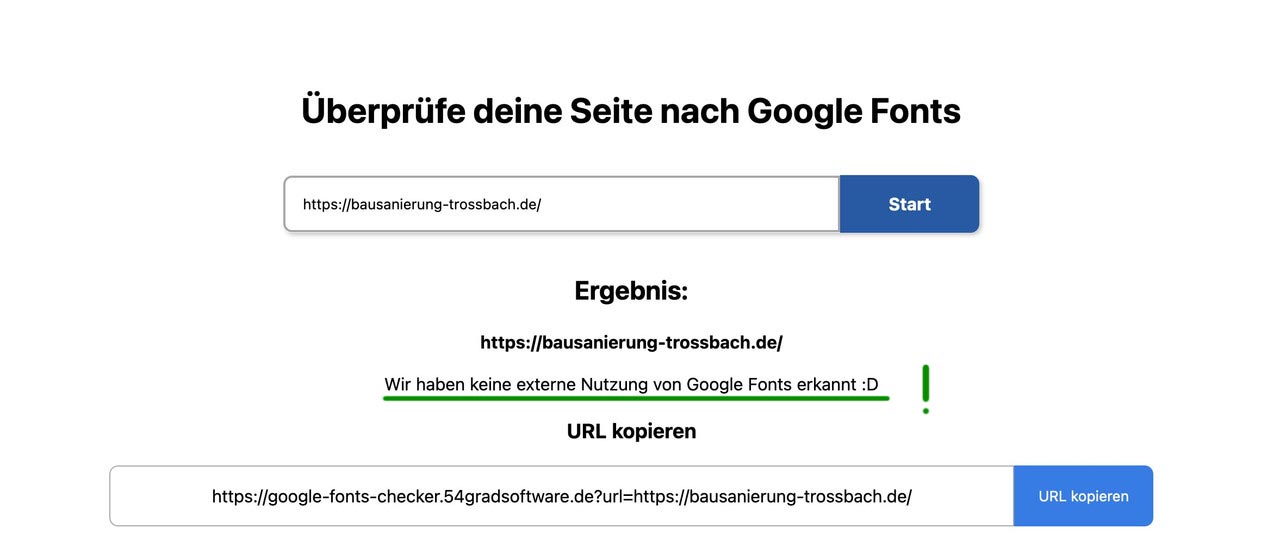
solltest Du jedoch irgendwelche Google Dienste auf deiner Seite nutzen ( Google Maps, Youtube etc. ) dann werden auch Fonts ( meist Roboto oder Google Sans Text) geladen. Hierfür gibt es aber auch lösungen ( nicht immer )
PS: nutze bitte nur das erwähnte neuere Snippet – das andere kannst du löschen:
function my_output_google_webfonts_script( $activate ){
  return false;
}
add_filter( 'avf_output_google_webfonts_script', 'my_output_google_webfonts_script', 10, 1 );
ab der nächsten Version Enfold 5.4 wird es ein Filter geben, welches das Laden von Google Fonts extern verhindert bei Nutzung von Google Maps:
avf_gmaps_no_google_fonts
PPS:
1) Du nutzt dort auf der Seite immer noch : Enfold Version: 4.8.9 – wir sind da schon ein wenig weiter !
habe ich erkannt, weil deine local eingebunden Schriften zuerst die woff laden – und dann die woff2 – umgekehrt ist besser da woff2 wengier Speicher benötigt ( das wird dann nach der Enfold Aktualisierung so sein ) – und moderner ist. Meine Empfehlung daher für Schriften: woff2 anbieten ( und woff weglassen ) und ttf als Fallback für ganz alte Browser. ( moderne Browser können alle woff2) – nur der IE11 unterstützt woff2 nicht: Can I Use woff
2) Entferne die Einbindung welche du anderweitig gesetzt hast – Es reicht vollständig der Enfold Font Manager aus.
3) Entferne ( das in die Jahre gekommene) disable Google font plugin ( das Snippet oben reicht aus )
I am developing a new website for my client using Enfold.
Homepage Banner Sliders
They like the way this company has done it (see private)
eg Strong Header and subtext left with horizontal line.
Can this style be done within the theme
The example looks like Revolution Slider. I would rather use the slider options ion the theme.
Thanks
Where do I change the body font size? It used to be in the General Settings under “Fonts” but now the setting is no longer there.
I’m using Enfold 5.3.1.1
Wordpress: 6.1.1
 Jason Eichner
Guest
Hi there,
I’m trying to update my site (linked below) but every time I try to update it, it says the update package is not available. I’ve confirmed my Envato API token is working, and put in a new one and still no luck. I’m trying to update from 5.2.1
I’m aware my support window has expired but surely that doesn’t mean updates are also blocked off after just 6 months?
Many thanks.
Wow … I’ve been trying to figure this out for 2 days. The first slide’s background stayed on the screen for the full duration but none of the layers showed up. On all subsequent slides, the background flashed for a second during the transition then turned white for the duration and no layers showed up at all. I exported the slider and imported it to another site using Enfold and it worked just fine on a test page I set up there.
Luckily I found this thread today by searching “LayerSlider showing only blank white space”
I activated Enfold on an existing site that was using a different theme and the editor in the Enfold Theme Options defaulted to “Use Block Editor”.
@andiconti … Thank you so much for the solution. It worked instantly as soon as I changed the setting to use “Classic Editor”.
ssssheff
The problem with this is that enfold groups the articles according to this column setting – meaning 3 columns will result in 3 articles in a slide-entry-wrap.
Maybe the developers could think about this behavior – because it hinders exactly this layout possibility you want to achieve.
The grouping then had to be done by flex layout
we can have a script to reach that layout – but better would be to get it on DOM generation.
( this is now only done here in my example snippet for one page ( my blog page only ID: 36400 )
function wrap_articles_in_one_flex_container(){
if(is_page(36400)){
?>
<script type="text/javascript">
window.addEventListener("DOMContentLoaded", function () {
  (function($) {
    $('.avia-content-slider-inner .slide-entry-wrap .slide-entry').each( function() {
        $(this).detach().appendTo('.avia-content-slider-inner .slide-entry-wrap:first');
    });
    $('.avia-content-slider-inner .slide-entry-wrap:empty').remove();
  })(jQuery);
});
</script>
<?php
}
}
add_action('wp_footer', 'wrap_articles_in_one_flex_container');
and for css:
#top.page-id-36400 .avia-content-slider .slide-entry-wrap {
  display: flex;
  flex-flow: row wrap;
  justify-content: center;
}

#top.page-id-36400 .avia-content-slider .slide-entry-wrap .slide-entry {
  flex: 0 1 calc(25% - 30px);
  margin: 0 15px 30px;
  width: unset !important;
}

@media only screen and (max-width:1310px) {
  #top.page-id-36400 .avia-content-slider .slide-entry-wrap .slide-entry {
    flex: 0 1 calc(33% - 30px);
    margin: 0 15px 30px;
  }
}

@media only screen and (max-width:989px) {
  #top.page-id-36400 .avia-content-slider .slide-entry-wrap .slide-entry {
    flex: 0 1 calc(50% - 30px);
    margin: 0 15px 30px;
  }
}

@media only screen and (max-width:767px) {
  #top.page-id-36400 .avia-content-slider .slide-entry-wrap .slide-entry {
    flex: 0 1 100%;
    margin-bottom: 30px !important;
  }
}
adopt to your blog ID
see here: https://webers-testseite.de/blog/
Hello,
Featured img slider is not responsive on mobile. Images are shown but cropped instead of stretched rationally. Url in private content.
Thanks
@yigit, this fix is still necessary? Or the newest version of Enfold includes it already?
Hello,
I went on Enfold/theme options/privacy and cookie
but can’t find how to change the message on cookie bar on home page
 Willem
Guest
L.S.,
I want to revive an Enfold license for a new website and need support. On the website where I bought the lincense, themeforest.net, I only see “Renew support to get help from Kriesi for 6 months. $ 41.13”. My questions:
1. Are there other options? 12 months? Subscriptions?
2. Are there other stores that I can order from? I find this Themeforest/Envato/Codecanyon labyrinth a complete nightmare.
regards,
Willem
Hey Jochen,
Thank you for your question, you will need to use individual columns and add a custom class such as negativefifty to the columns that you want offset and use this css:
.responsive #top #wrap_all .flex_column.negativefifty {
	margin-top: -50px;
}
Please see this example:

Best regards,
Mike
Hi,
Glad we were able to help, if you have any further questions please create a new thread and we will gladly try to help you. Thank you for using Enfold.
Best regards,
Mike
Hi there
Just wanted to aktivate ENFOLD on http://www.helvetia-trychler-shop.ch and got this error:
Internal Server Error
The server encountered an internal error or misconfiguration and was unable to complete your request.
Please contact the server administrator at [no address given] to inform them of the time this error occurred, and the actions you performed just before this error.
More information about this error may be available in the server error log.
Apache Server at helvetia-trychler-shop.ch Port 443
By refreshing ENFOLD is active, but as soon as I try to make changes in the Theme the error appears again and there is for me no way to make any changes…
Can you help, please?
Thank you!
Safet
Hi,
at my and a client web page I have loaded uploaded the fonts as described.
Also I added the code in the functions php of the chield theme.
I tried both versions:
/* deactivate google fonts
add_action( ‘init’, ‘enfold_customization_switch_fonts’ );
function enfold_customization_switch_fonts() {
global $avia;
$avia->style->print_extra_output = false;
} */
//deactivate google font connection
function my_output_google_webfonts_script( $activate ){
return false;
}
add_filter( ‘avf_output_google_webfonts_script’, ‘my_output_google_webfonts_script’, 10, 1 );
Example URL:
https://google-fonts-checker.54gradsoftware.de/de-DE?url=https://bausanierung-trossbach.de/
The Google Fonts checkers still find google fonts.
This one finds also lot of more connections:
https://sicher3.de/google-fonts-checker/
How can I get the website DSGVO compliant and deactive al the not needed services the website connects?
I also installed the plugins:
Disable & Remove Google Fonts AND
Embed Google Fonts
Both are tested with enfold. But no change at the google font checkers.
Would be great to get your support. Thanks a lot in advance.
BR Michael
Hello,
first of all: Happy new year and we really like Enfold ;)
We’ve a question regarding the Grid Row: Is it possible to have an “offset” – s. the link in the private section.
Kind regards
First you should place this to your child-theme functions.php:
function my_output_google_webfonts_script( $activate ){
  return false;
}
add_filter( 'avf_output_google_webfonts_script', 'my_output_google_webfonts_script', 10, 1 );
then: did you choose the uploaded font on enfold child – general styling – fonts ?
The uploaded fonts are at the end of that dropdown list:
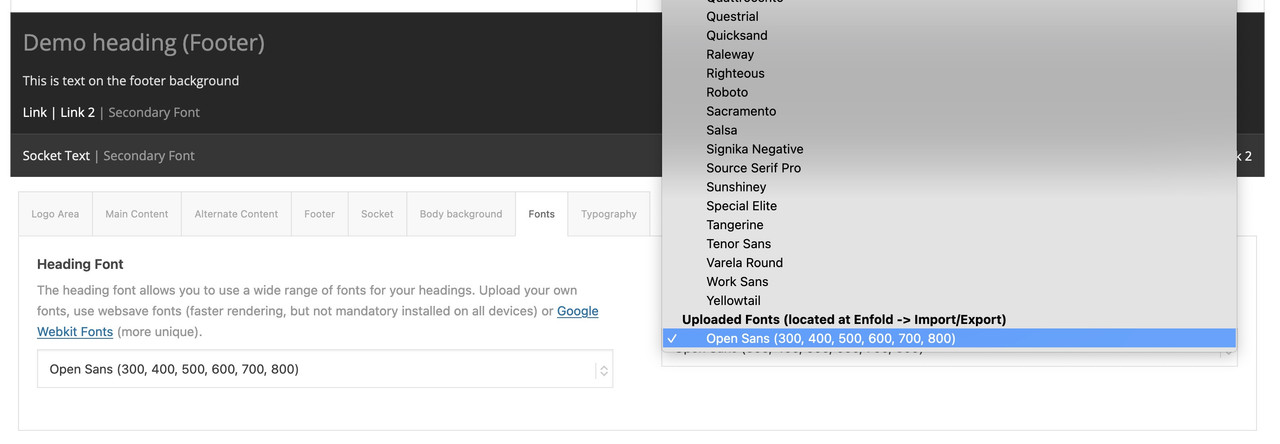
Link: https://kriesi.at/support/topic/host-web-font-yourself-some-info/
Hey James,
Thank you for the inquiry.
Using the following css code should hide the logo and remove the background of the header container. The modification will also adjust the color of the mobile menu.
/*
Mobile Styles
================================================== */
/* Note: Add new css to the media query below that you want to only effect the Mobile and Tablet Portrait view */

@media only screen and (max-width: 767px) {

  /* Add your Mobile Styles here */
  .responsive .logo img, .responsive .logo svg {
    display: none;
  }

  .responsive #top #wrap_all #header {
    position: fixed;
  }

  .responsive #top .header_bg {
    opacity: 0;
  }

  #top #wrap_all .av_header_transparency {
    background-color: transparent;
    border-color: transparent;
  }

  .header_color div .av-hamburger-inner, .header_color div .av-hamburger-inner::before, .header_color div .av-hamburger-inner::after {
    background-color: #000000;
  }
}
Please make sure to temporarily disable the Enfold > Performance > File Compression settings and purge the cache after adding the css.
Best regards,
Ismael
Hi,
We tried to access your Envato account but we were not able to get in because the site required extra verification, which is sent to the registered email. Unfortunately, we are not yet sure why your 2022 tokens are not working. You may need to update the theme manually for the meantime, only until we figure out the issue.
// https://kriesi.at/documentation/enfold/theme-update/#update-via-ftp
We will forward the thread to our channel so that other moderators can check the issue.
Best regards,
Ismael
Hey Andrew,
Thank you for the inquiry.
You can add this css code in the Quick CSS field to adjust the style of the filters on mobile view.
/*
Mobile Styles
================================================== */
/* Note: Add new css to the media query below that you want to only effect the Mobile and Tablet Portrait view */

@media only screen and (max-width: 767px) {

  /* Add your Mobile Styles here */

  .av-elegant-toggle .taglist a {
    line-height: 2.8em;
    font-size: 0.8em;
    padding: 7px 10px;
  }
}
Please make sure to toggle or temporarily disable the Enfold > Performance > File Compression settings and purge the cache after adding the css.
Best regards,
Ismael
Hello amazing Enfold Support,
I want to remove the logo on mobile. The desired output I am looking for is a burger menu in the top right-hand corner with a transparent background.
I have searched through previous threads and can’t seem to find this topic. Your help is greatly appreciated.
Hey Alexander,
Thank you for the inquiry.
Have you tried setting the Disabling Of Template Builder Elements in the Enfold > Performance panel to Always load all elements? Selecting this option and purging the cache should disable the notification boxes. If the issue persists, try to disable the Enfold > Performance > File Compression settings temporarily.
Best regards,
Ismael
Hi,
Please refer to this post – https://kriesi.at/documentation/enfold/theme-registration/#how-to-generate-a-envato-personal-token and generate a new token but only enable required ones (the one I listed above and also highlighted in docs) and then insert the new token into Envato Market plugin to update the theme :)
Best regards,
Yigit
This reply has been marked as private.
 Heiko
Heiko
Hello Rikard,
after some hectic weeks I finally found time to get back to this problem.
I updated the enfold theme to the newest version and checked if the google maps service is deactivated.
It is.
But enfold still contacts google:
https://google-fonts-checker.54gradsoftware.de/?url=https://klingenbergklause.de
Where does it come from? Any clue?
Best regards
Heiko!



