Hi Genius’
I am trying to add rounded corners to an image (see screenshot).
Screenshot of Desired Look
I can change the image css but that changes everything globally, i.e.
img.avia_image {
padding: 2px 0px 0px 0px;
border-radius: 25px 25px 0 0 !important;
}
I tried adding a class ’rounded’ in the Enfold Child CSS (as below) AND then adding “rounded” in the Advanced – Developer Settings -Custom CSS Class on the image but it didn’t effect the image.
img.avia_image .rounded {
padding: 1px;
border-radius: 25px 25px 0 0 !important;
}
Would really appreciate your help,
Thanks, Annemarie
Hey RK,
Thank you for the inquiry.
Have you confirmed that the issue only happens with Enfold and not with the default WordPress themes? We may need to access the site to properly understand the issue. Please provide the login details in the private field.
We also recommend reaching out to the plugin developer for additional information about the issue.
Best regards,
Ismael
Hi,
Why would Enfold not find and use the existing old dynamic/cached CSS and require the re-save process?
Do the containers also share the same database? Please note that the theme relies on a database entry to generate the dynamic stylesheets and scripts. So, if each of your WordPress containers has its own unique database, a desync will likely occur in the shared uploads directory or volume from one of the WordPress instances. It will only work correctly on the instance where the theme options were saved last because that action triggers the file generation and saves the correct entry in the database in favor of the instance.
Yes, the function avia_generate_stylesheet should regenerate the dynamic stylesheet, but we haven’t tested this on WP-CLI. You can try running it in each deployment to see if it correctly resolves the issue with the missing stylesheet.
Best regards,
Ismael
 RK
RKGuest
Have used the Enfold theme for several years and it has been working fine till recently. Moneris Gateway plugin did an update and now the Enfold theme is hiding the variable product pricing on the website. The simple product pricing is fine. I have run tests to confirm the conflict is with the Enfold theme and not other plugins. Are you aware of this issue and how can it be resolved as it is quite impossible to sell products on a website without a price. Please advise.
Hi,
Glad we were able to help, and I can understand that you may not want to use the snippet. If you wound like to see this built in to the theme please open a Github Feature Request for the Dev Team to review it and you can follow along with them. If you have any further questions please create a new thread and we will gladly try to help you. Thank you for using Enfold.
Best regards,
Mike
Dear Ismael,
Thank you very much for your helpful response and for providing the PHP snippet to adjust the heading structure in the Timeline element.
After reviewing this internally, the client has decided not to implement further theme-based customizations via the functions.php file at this stage. As we’re working across several Enfold-based websites, they hope this issue will be resolved in a future theme update instead.
We’ve documented the structural limitation in our accessibility report accordingly.
Thanks again for your support and your assistance on this matter!
Best regards,
Diana
Hi Mike,
sorry for the delay – the past few weeks I’ve been fully occupied making five Enfold-based websites WCAG-compliant.
Thanks again for your suggestion regarding the Scroll-to-Top button.
After reviewing the situation, my clients decided not to implement additional plugins or custom code to fix this specific theme-generated issue. Given the already significant effort and cost invested in accessibility improvements, this workaround is currently not seen as proportionate.
The issue has been transparently documented in the accessibility statements, and we hope it will be addressed in a future Enfold update.
Also, thanks for your tip regarding the alternative to the Header Footer Code Manager. I’ll definitely keep the WPCode plugin in mind for future projects …
Thanks again for your support !
Best regards
Diana
Hi,
Thanks for the update, we’ll close this thread for now then. Please open a new thread if you should have any further questions or problems.
Best regards,
Rikard
Hi,
I submitted my website to Google PageSpeed Insights and i get 3 accessibility issues regarding default WPML Language Switcher (the one that comes by default on Enfold main menu).
Here are the issues:
1. Elements with an ARIA role [role] that require child elements to contain a specific role [role] are missing some or all of these required child elements.
2. The name of the links is not distinguishable
3. List elements (<li>) are not contained within parent <ul>, <ol>, or <menu> elements.
These issues negatively impact overall PageSpeed score, preventing an effective website optimization.
Any help?
Thankyou
Hello,
I just bought Enfold theme for wordpress, when I try to install one demo I always have the same error message “curl error 28 connection timed out after 10001 milliseconds”.
I already checked firewall, plugins, SSL (everything is ok) I don”t know what to do.
Can you help me ? I am used of wordpress themes, this is the first time I bought Enfold I hope there will not be lots of errors and problems with it.
Thank you
Hi Enfold Team,
We’re seeing a recurring issue across several WordPress websites built using the ENFOLD theme. All of these websites are hosted with SiteGround, and we’re using Enfold’s built-in JavaScript file merging and compression (via Enfold > Performance), not SiteGround’s SG Optimizer plugin for JS handling.
The problem arises with the auto-generated avia-footer-scripts file in the /wp-content/uploads/dynamic_avia/ directory. Occasionally, this file appears to be served with the wrong MIME type (text/html instead of application/javascript), which causes the browser to block it and throw this error:
Refused to execute script from ‘https://example.com/wp-content/uploads/dynamic_avia/avia-footer-scripts-xxxxx.js’ because its MIME type (‘text/html’) is not executable, and strict MIME type checking is enabled.
When we visit the file directly, it displays a “Nothing found” page.
Temporary Fix
We’ve been resolving the issue manually with this process:
1. Go to Enfold > Performance in the WordPress dashboard.
2. Click “Delete old CSS and JS files”.
3. Go to Enfold > Theme Options and click “Save all changes”.
4. Clear browser cache and refresh the site.
This regenerates the file with a new hash and correct MIME type, and the issue resolves.
Our questions:
• Do you know what might be causing this to happen across multiple Enfold-powered sites?
• Is there anything we can do to prevent this from happening again in future?
Thanks again for creating such an excellent theme and offering first-class support — we really appreciate your work.
Many thanks in advance,
Ben
Enfold uses that main sometimes in a bit different way : as id=”main” and with role=”main”
if there is a main tag – enfold sets it to role=”main”
see here some thought to it. https://developer.mozilla.org/en-US/docs/Web/Accessibility/ARIA/Reference/Roles/main_role
But as with the main tag, the main role should only be used once in the document!
Edit: yes – now i see that on using a page as footer – there is another main tag. …
kannst Du den Link zu der entsprechenden Seite öffentlich machen?
Das erleichtert einiges. Als Mitstreiter sehe ich die Links im private content nicht.
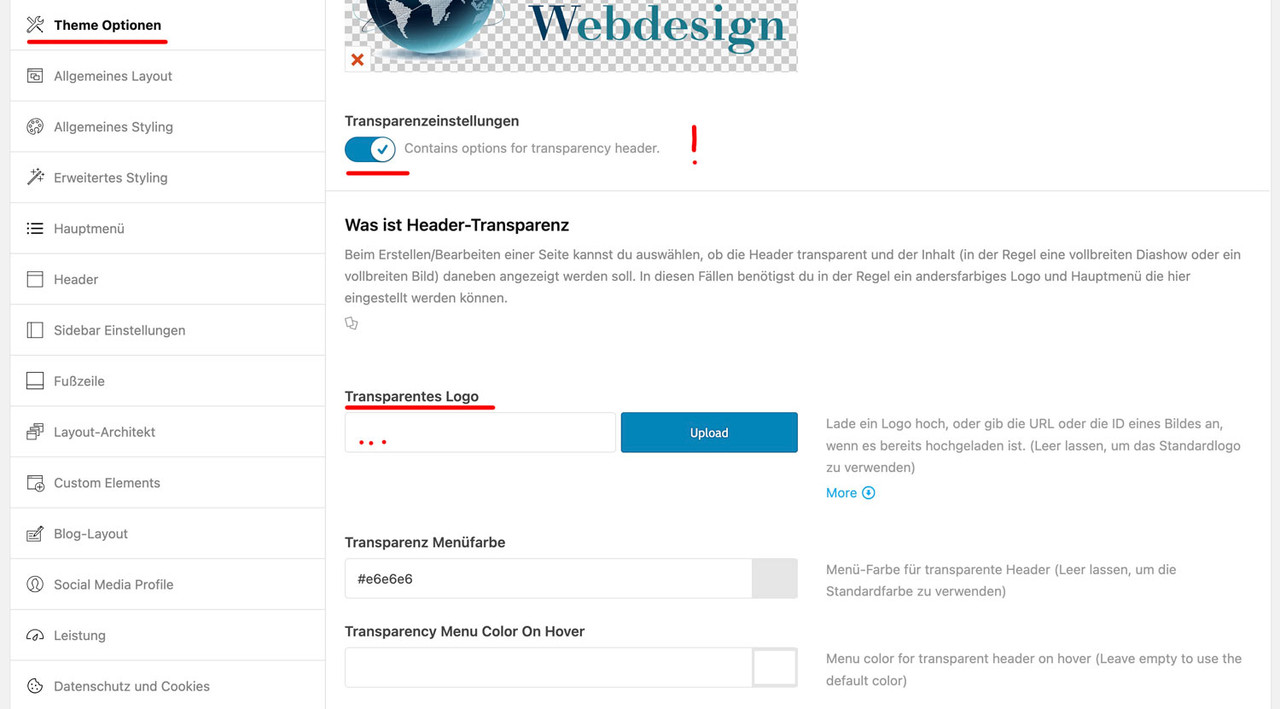
Ich vermute mal, das die Seite wo noch ein Enfold Logo gezeigt wird solche sind bei denen der Header transparent ist.
Für diese Option, die man auf den entsprechenden Seiten im Editor rechts einstellen kann, gib es ein alternativ Logo.
Das setzt man unter Enfold ( Enfold-Child falls du das eingerichtet hast) – Theme Optionen – Transparenzeinstellungen
aktivier den Switch (“Contains options for transparency header.”) – dann kannst du die Felder sehen, wo das Logo für die Transparenten Seiten eingefügt wird.
klicke es um es zu vergrößern:
PS: I just did a simple wp eval ‘avia_generate_stylesheet()’
This re-created
./wp-content/uploads/dynamic_avia/enfold_child.css
Will that be sufficient to avoid the site looking broken? Since currently the “broken” problem did not occur, I could not verify that this is what is needed.
Thanks Ismael,
I think I need to better understand the root cause of the “missing CSS ” issue to find a solution.
Since our uploads folder is persistent across deployments, I would expect the CSS would still work, but very often (not every time) it does not and the site looks broken.
Why would Enfold not find and use the existing old dynamic/cached CSS and require the re-save process?
Regarding the trigger: you list a couple of activities causing the CSS to be re-saved. All these are , as far as I see, manual tasks to be done in the Admin GUI backend.
Is there no way to achieve the re-save programatically ( wp-cli ) ? If not, this would be a very desirable feature.
Otherwise, we could try to find a better workaround. Which wpcli commands could be used to trigger CSS regeneration? I could then simply do a wp eval ‘do_action(“the_hook_that_triggers_css_saving”);
Other commands that come to mind:
directly calling avia_generate_stylesheet(); with wp eval ?
re-saving options with wp option update … , if that will trigger the css?
wp option update avia_options “$(wp option get avia_options)”
You problably know best what is the most promising path …
Regards
Ulrich
Hallo,
ich habe ein eigenes Logo hochgeladen. Es wird im Header zu klein dargestellt. Bei den Header Einstellungen habe ich rumprobiert. Ich möchte aber die Header Höhe nicht vergrößern. Wie kann ich das Logo größer darstellen, ohne die Header Höhe zu vergrößern? Das Logo ist hochgeladen in den Medien mit 2560 auf 1810 px. Im Enfold Dashboard wurde es automatisch auf 300 x 212 verkleinert.
Außerdem ist auf der HOME Seite noch das alte Enfold Logo ersichtlich. Das neue Logo sehe ich nur auf den anderen Seiten (z.B. bei Über mich).
LG
Andreas
Hi,
Thank you for the update.
You can try this css code to move the handle to the right when enabled and to the left when disabled.
#top .av-toggle-switch .toggle-track:before {
    right: 27px;
}

#top .av-toggle-switch input[type="checkbox"]:checked + .toggle-track:before {
    right: 0;
}
Please toggle or temporarily disable the Enfold > Performance > File Compression settings after adding the modification.
Best regards,
Ismael
Hey Hans Edgar Puth,
Thank you for the inquiry.
Since the purchase code has been lost, you will need to purchase another license in order to update the theme. With the current version, you will no longer be able to update the theme automatically via the dashboard, so you’ll need to upload the latest version to your server manually via FTP. Please check the documentation below.
— https://kriesi.at/documentation/enfold/theme-update/#update-via-ftp
Unfortunately, it’s not recommended to make modifications directly in the parent theme, and we can’t help you trace back the modifications you made. We recommend installing a child theme and moving all template modifications there.
— https://kriesi.at/documentation/enfold/child-theme/
Let us know if you need more info.
Best regards,
Ismael
Hi Kriesi Support,
I’m currently experiencing a fatal error that’s preventing me from editing my Contact page. In addition to this, there appear to be several other fatal errors and warnings across the site.
I spoke with WordPress Business Support, and they advised that the issue seems to be tied to the theme. When they temporarily activated the default “Twenty Twenty-Five” theme, the error on the Contact page was resolved. They’ve since reactivated the original Enfold theme to avoid disrupting the live design.
As WordPress is unable to assist further with third party themes, they recommended I reach out to you directly for support. Could you please investigate and advise on how to resolve this?
I have provided admin access below.
Thanks
Hi,
I assume that you are referring to the Layerslider, it will not update on it’s own, only when the theme updates, please see our documentation here.
Best regards,
Mike
Hi,
Glad Ismael could help, if you have any further questions please create a new thread and we will gladly try to help you. Thank you for using Enfold.
Best regards,
Mike
I received the plugin with a theme (enfold) I purchased
Hey etrain,
Enfold is not a plugin, try installing it as a theme instead.
Best regards,
Rikard
downloaded the zip file and says the link followed has expired. says i am running 4.2 and shows that as the latest version which i don’t think is right.
Installing plugin from uploaded file: themeforest-fbXW2sme-enfold-responsive-multipurpose-theme-wordpress-theme.zip
Unpacking the package…
Installing the plugin…
The package could not be installed. No valid plugins were found.
Plugin installation failed.
Hey sdesign-web,
Enfold is compatible with all of the PHP version that you are listing, so you can go ahead and update to any of them.
Best regards,
Rikard
Hi,
Thanks for the update, we’ll close this thread for now then. Please open a new thread if you should have any further questions or problems.
Best regards,
Rikard
Hi,
Thanks for the update, we’ll close this thread for now then. Please open a new thread if you should have any further questions or problems.
Best regards,
Rikard
Hi folks, I realize only now that you introduced a couple of years ago the “swipe” feature on mobile for the lightboxes.
It seems like it is not working very well on my website, please check for instance the first gallery you have on this page (but it is the same on all pages):
Checking it with Chrome and Brave on an IOS phone, if I swipe to the left, the image correctly jumps to the next one, but also the whole screen moves for one second to the left. If I swipe to the right, same behaviour: the whole pages moves for a while, and then I go to the previous slide.
Is this the way it is supposed to be working?
My website is of course updated to the last version of Enfold.
I am afraid there is some customization on my CSS/.PHP made in the past that is preventing it to work correctly…
Thanks & bye!
A.-
Hi,
recently we migrated an Enfold site into our Docker environment where we deploy our wordpress sites using CI/CD tools. The move solved a problem we had with the builtin Layerslider, but now a one came up:
After deployment, the site looks defaced due to missing dynamically generated CSS files. We then have to manually go to the theme option settings page wp-admin/admin.php?page=avia and save the settings (even without changing values) to resolve this.
Our uploads folder is persistent, so the content of uploads/dynamic_avia/… with files like avia-merged-styles-ddf276684ae525538791a02cb0e618c9—687602ac906a5.css survives deployments, but it seems as if after deployment the old dynamic css are not being used so reset/regeneration is necessary.
How can we ensure that the CSS are generated upon deployment, mabye using a WPCLI action to enforce CSS generation? Or can/should we simply delete the wp-content/uploads/dynamic_avia/ folder?
Also, if we run more than one WordPress container (in case of high load) sharing a common uploads directory, will the dynamic file names interfere?
REgards
Ulrich



