Hi,
Thanks for contacting us!
Could you please go to Enfold theme options > Performance, disable “JS file merging and compression”, check “delete old files” at the bottom of the page and save theme options and check if that helps?
Cheers!
Yigit
Hi,
Great, I’m glad that we could help. I’ll close this thread for now then, please open a new thread if you should have any further questions or problems.
Best regards,
Rikard
I’ve searched the Enfold documentation, and I am stumped! Everything is up to date, using latest php. I disabled all of the plugins, that didn’t solve the problem. I installed a fresh version of Enfold, dissabled CDN – I mean I have tried everything, I hope someone has a solution. Thanks!
Hey,
Thanks for contacting us!
Please add following code to Quick CSS field in Enfold theme options > General Styling tab
.av-image-caption-overlay-center {
  opacity: 0;
}
.av-image-caption-overlay:hover .av-image-caption-overlay-center {
  opacity: 1;
}
Best regards,
Yigit
Hi,
Thanks for contacting us!
Please make sure that you are using the latest version of Enfold. You can refer to this post – https://kriesi.at/documentation/enfold/theme-update/ and update Enfold to the latest version 5.3.1.1.
If you are using the latest version, please make sure that your PHP version is 8.0.x. You can contact your hosting provider and they can change the PHP version for you.
If you would like us to look into it, please register to our support forum – https://kriesi.at/support/register/ using your purchase code and start new thread under Enfold sub forum and temporary WP admin and FTP logins in private content field :)
Regards,
Yigit
Hey,
Thanks for contacting us!
I added following code to bottom of Quick CSS field in Enfold theme options > General Styling
.value_verifier_label {
  color: black;
}
Please review your website and adjust the color as needed :)
Best regards,
Yigit
 denis
denisGuest
Hi, I have a problem with my website metz-hagen.de
Wordpress tells an error with your theme ENFOLD
is there any chance to fix that?
Im not sure, im right here with my question…
We are using Woocommerce Product Badges for our enfold page.
On the archive pages, the badges are shown. the setup is, that they are also shown on the product pages.
but the arent shown and we dont know why?
Thanks for helping me out…
hello, i wanted to install enfold on the website mentioned below, but it is not allowed.
im getting this faul message
Hallo!
Sinds WordPress 5.2 is er een ingebouwde functie die herkent wanneer een plugin of thema een fatale fout veroorzaakt op je site en die je op de hoogte stelt met deze automatische e-mail.
In dit geval heeft WordPress een probleem gevonden in je thema,Enfold.
Bezoek eerst je site (https://jetcrone.nl/) en kijk of er zichtbare problemen zijn. Bezoek daarna de pagina waar de fout was gevonden (https://jetcrone.nl/wp-admin/themes.php?activated=true) en kijk of er zichtbare problemen zijn.
Neem contact op met je host voor hulp bij het verder onderzoeken van dit probleem.
In het geval dat je site kapot lijkt te zijn, en je het dashboard niet op de normale manier kunt benaderen, heeft WordPress nu een speciale “herstelmodus”. Deze laat je op een veilige manier op je dashboard inloggen om het probleem verder te onderzoeken.
https://jetcrone.nl/wp-login.php?action=enter_recovery_mode&rm_token=k6e8RBDmiOwv2EQ9XnvYLv&rm_key=EIusWnPwjR6neXtPaOBd5s
Om je site veilig te houden verloopt deze link over 1 dag. Maak je daar maar niet druk om, er wordt een nieuwe link naar je gestuurd wanneer het probleem zich weer voordoet nadat de link is verlopen.
Als je hulp nodig hebt met dit probleem, kan je gevraagd worden om de volgende informatie:
WordPress versie 6.1.1
Actief thema: Enfold (versie 4.6.3.1)
Huidige plugin: (versie )
PHP versie 8.1.2
Foutdetails
===========
Een fout van het type E_COMPILE_ERROR werd veroorzaakt op regelnummer 332 van het bestand /home/vhosts/jetcrone.nl/httpdocs/wp-content/themes/enfold/functions-enfold.php. Foutmelding: Unparenthesized a ? b : c ? d : e is not supported. Use either (a ? b : c) ? d : e or a ? b : (c ? d : e)
-
This topic was modified 3 years, 3 months ago by
 jeel147.
-
This topic was modified 3 years, 3 months ago by jeel147.
Hey,
I tried to reproduce the issue on my local installation using the latest version of Enfold and Event Calendar and Ticket plugins but it is working fine for me: https://church.vatoyi.it/event/family-days/
I noticed it works fine when I switch to default theme or downgrade Enfold version to 5.1.2.
Are you using additional plugin for the popup that shows up when you click purchase tickets?
Best regards,
Yigit
Hi,
Glad we were able to help, if you have any further questions please create a new thread and we will gladly try to help you. Thank you for using Enfold.
Best regards,
Mike
Hi,
@divedave please open a new thread with the url to the page in question and an admin login so we can be of more assistance. Since this is not your thread posting your login here will not be private and you will not see anything we write in the Private Content area.
I see that you have a child theme, if you have a custom header.php or footer.php please remove them from your child theme we do not recommend adding these files to your child theme, it is the most common reason for errors when updating.
Best regards,
Mike
I’m taking over a website for a client and it’s been left running version 3.8 of Enfold, which didn’t support PHP beyond 7.0. It’s causing issues with my other sites as I’ve had to drop the PHP down to allow this site to run.
I’ve just bought a licence for Enfold, so that I can update the theme and get the latest PHP restored. I’ve plugged the API in and all seems well, but it’s not giving me the option to update the theme. It just says it’s up to date, at version 3.8. Am I missing something?
Please don’t tell me the only way is to download version 5.0 and install it manually, because the previous developer didn’t use a child theme, so I assume it would wipe out the site content, no?
Thanks in advance.
Hi Mike,
i have copied the css and the code directly from your post, not from the notification email.
I pasted it into the functions.php from the enfold child theme.
Pleas see admin login data in the Private Content area.
Thank you in advance.
Best regards,
Paddy
Hi,
Glad we were able to help, if you have any further questions please create a new thread and we will gladly try to help you. Thank you for using Enfold.
Best regards,
Mike
Hi,
@alex.ndu, this thread is about the placement of the “tags”, we would like to keep each thread on a single topic as it helps future users when searching for answers.
On your page you seem to have two Blog Posts Sliders, one for posts and one for products so I don’t know if you want to move the title below the excerpt for both of them, assuming that you do try adding this code to the end of your child theme functions.php file in Appearance ▸ Editor:
function move_title_below_excerpt() { ?>
  <script>
window.addEventListener('DOMContentLoaded', function() {
(function($){
$('.slide-entry').each(function() {
$(this).find('.slide-entry-title.entry-title').css({'margin-top':'15px'}).insertAfter($(this).find('.slide-entry-excerpt.entry-content'));
});
})(jQuery);
});
</script>
  <?php
}
add_action('wp_footer', 'move_title_below_excerpt');
Please ensure to copy the code from the forum and not an email notification so the symbols are not converted.
You also have some custom css that you should remove to make this look nicer:
.avia-content-slider .slide-entry-title {
    margin-bottom: 15px!important;
}
If this doesn’t help please open a new thread with the url to the page in question and further details on what you are trying to achieve so we can be of more assistance. Thanks for understanding.
Best regards,
Mike
here is an edited testimonials.php on basis of the newest enfold : https://pastebin.com/9hje0Pg5
you can see here some styling including the dot navigation: https://webers-testseite.de/testimonial-styling/
for the dots in quick css:
.responsive #top .avia-slideshow-dots.avia-slideshow-controls a {
  display: inline-block;
  bottom: -20px;
}
/*** if you like to show the dots always synchronized with the arrows - not only on hover ***/
.avia_desktop #top .avia-slider-testimonials.av-slideshow-ui.av-nav-arrows-visible .avia-slideshow-dots a {
  opacity: 0.5;
}
.avia_desktop #top .avia-testimonial-wrapper.avia-slider-testimonials.av-nav-arrows-visible:hover .avia-slideshow-dots a {
  opacity: 1
}
-
This reply was modified 3 years, 3 months ago by
 Guenni007.
Hi,
The following suggestion might help.
// https://kriesi.at/support/topic/issue-with-adding-tickets-to-cart-enfold-eventcalendar-ticket-woocommerce/#post-1371625
Can we get access (WP and FTP) to the staging site?
Best regards,
Ismael
Possible, that FB has changed the syntax and Enfoldy isn’t correct anymore?
Pleas have a look in private area fpr details.
I came across the enfold easy slider (bottom version) in my search to build what is basically a slider containing images and text under it to tell a story. I am not succeeding very well insofar. so a few questions
1. is this the right block (easy slider) to achieve this, or do you recommend another block? I would like to achieve something as closely similar as this.
2. if this is the right block, with what CSS can I achieve some text in a background color of my choosing under the image, and the dot navigation under that?
Love the enfold theme! good work!
There is however a functionality that I think is present in some building blocks of enfold, but not in the testimonials block, which only offers ‘arrows’ ?
I would love to have a dots navigation under the testimonial slider. Can I somehow utilise that function as a navigation for testimonials, for it to appear under the content of the testimonials?
Hereby an example:
example
Hi,
Glad we were able to help, if you have any further questions please create a new thread and we will gladly try to help you. Thank you for using Enfold.
Best regards,
Mike
Hi,
If that doesn’t help please open a new thread with the url to the page in question and an admin login so we can be of more assistance. Since this is not your thread posting your login here will not be private.
Best regards,
Mike
Hi,
Thanks for your patience, I only found:
/* Popup Google Fonts */
@import url('//fonts.googleapis.com/css?family=Acme|Montserrat');

but not https://fonts.googleapis.com/css?family=Arimo:400,700%7CArimo
Try disabling all of your plugins and clearing your server cache, I think your font checker site is caching the results and not giving fresh results each time because this site says no google fonts are found when the popup maker is disabled.
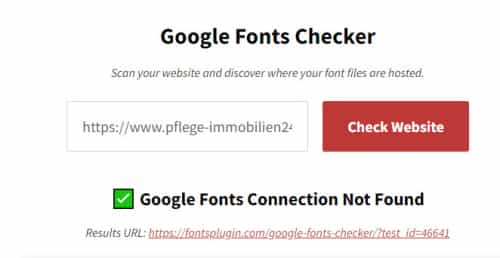
Best regards,
Mike
Hi,
Glad we were able to help, if you have any further questions please create a new thread and we will gladly try to help you. Thank you for using Enfold.
Best regards,
Mike
Hey Stefan Schmidt,
To update your version of Enfold you will need to download the latest installable WP version from your Theme Forest account and upload it to your WordPress ▸ Appearance ▸ Themes ▸ Add Themes ▸ Add New

after you choose the zip file and click install, you will see a This theme is already installed message because you are updating, you can continue

then you will see the Theme updated successfully message.

Best regards,
Mike
 Stefan Schmidt
Guest
Hi,
I’m using Enfold and the theme doesn’t install updates. Currently the version 4.5.2 is installed and I have problems to use PHP 8 an the webserver.
What can I do?
Greetings from Germany.
Hi,
Typically when the theme tries to fix an error caused by a missing closing tag but adds it into the wrong place the error is hard to find and sometimes can’t be manually corrected.
I will take a look at the page and see if I can spot the error, please ensure the Avia Layout Builder Debugger is enabled and link to the page with the error and include an admin login in the Private Content area.
Best regards,
Mike
Hi,
Glad we were able to help, if you have any further questions please create a new thread and we will gladly try to help you. Thank you for using Enfold.
Best regards,
Mike



