Viewing 30 results - 19,411 through 19,440 (of 244,585 total)
  • Author
    Search Results
  • #1396009

    In reply to: SVG borders requests

    Hi,
    Glad that this helped, I forwarded a feature request for the new SVG borders. Then Dev Team points to our documentation that shows how to add your own SVG border: Adding custom SVG dividers
    They also say that if you have svg files we can use (open source license) we would add them to the theme.

    Best regards,
    Mike

    #1396008

    Topic: Updating Enfold Theme

    in forum Enfold
    ThomasN001
    Participant

    Hi,

    awhile ago I got a notification from Envato, that there’s a new update for Enfold and I realized that my current version is quite old. So I have several questions:

    1. Why can’t I see the Enfold updates on my WP Dashboard?
    2. How can I update Enfold anyway?
    3. What do I have to consider for the updating process, especially regarding the child theme my website uses?

    Thanks in advance for your help!

    #1395999

    And Finally, this one

    Warning: preg_match_all(): Compilation failed: unknown property after \P or \p at offset 7805 in /var/www/vhosts/halligan.ie/halligan.ie/wp-content/themes/enfold/config-templatebuilder/avia-template-builder/php/class-shortcode-parser.php on line 607

    First seen: 2023-01-31 00:10:06 Europe/Dublin
    Last seen: 2023-01-31 09:01:43 Europe/Dublin
    Total events: 413

    Stack Trace
    ———–
    1. preg_match_all(‘/\[{1,2}wp_caption[\s|…’, ‘[gravityform id=”42″ t…’, Array(0), 256)
    /var/www/vhosts/halligan.ie/halligan.ie/wp-content/themes/enfold/config-templatebuilder/avia-template-builder/php/class-shortcode-parser.php:607
    2. ShortcodeParser->balance_shortcode(‘[gravityform id=”42″ t…’)
    /var/www/vhosts/halligan.ie/halligan.ie/wp-content/themes/enfold/config-templatebuilder/avia-template-builder/php/class-shortcode-parser.php:468
    3. ShortcodeParser->parse_shortcode(‘[gravityform id=”42″ t…’)
    /var/www/vhosts/halligan.ie/halligan.ie/wp-content/themes/enfold/config-templatebuilder/avia-template-builder/php/class-shortcode-helper.php:511
    4. ShortcodeHelper::clean_up_shortcode(‘[gravityform id=”42″ t…’, ‘balance_only’)
    /var/www/vhosts/halligan.ie/halligan.ie/wp-content/themes/enfold/config-templatebuilder/avia-template-builder/php/class-shortcode-template.php:1098
    5. aviaShortcodeTemplate->shortcode_handler_prepare(Array(9), ”, ‘av_font_icon’)
    /var/www/vhosts/halligan.ie/halligan.ie/wp-includes/shortcodes.php:355
    6. do_shortcode_tag(Array(7))
    7. preg_replace_callback(‘/\[(\[?)(av_font_icon)…’, ‘do_shortcode_tag’, ‘Halligan Insurances, W…’)
    /var/www/vhosts/halligan.ie/halligan.ie/wp-includes/shortcodes.php:227
    8. do_shortcode(‘Halligan Insurances, W…’)
    /var/www/vhosts/halligan.ie/halligan.ie/wp-includes/class-wp-hook.php:310
    9. WP_Hook->apply_filters(‘Halligan Insurances, W…’, Array(3))
    /var/www/vhosts/halligan.ie/halligan.ie/wp-includes/plugin.php:205
    10. apply_filters(‘widget_text’, ‘Halligan Insurances, W…’, Array(4), WP_Widget_Custom_HTML)
    /var/www/vhosts/halligan.ie/halligan.ie/wp-includes/widgets/class-wp-widget-custom-html.php:148
    11. WP_Widget_Custom_HTML->widget(Array(13), Array(2))
    /var/www/vhosts/halligan.ie/halligan.ie/wp-includes/class-wp-widget.php:394
    12. WP_Widget->display_callback(Array(13), Array(1))
    /var/www/vhosts/halligan.ie/halligan.ie/wp-includes/widgets.php:835
    13. dynamic_sidebar(‘av_footer_1’)
    /var/www/vhosts/halligan.ie/halligan.ie/wp-content/themes/enfold/footer.php:180
    14. require_once(‘/var/www/vhosts/hallig…’)
    /var/www/vhosts/halligan.ie/halligan.ie/wp-includes/template.php:783
    15. load_template(‘/var/www/vhosts/hallig…’, true, Array(0))
    /var/www/vhosts/halligan.ie/halligan.ie/wp-includes/template.php:718
    16. locate_template(Array(1), true, true, Array(0))
    /var/www/vhosts/halligan.ie/halligan.ie/wp-includes/general-template.php:92
    17. get_footer()
    /var/www/vhosts/halligan.ie/halligan.ie/wp-content/themes/enfold/page.php:57
    18. include(‘/var/www/vhosts/hallig…’)
    /var/www/vhosts/halligan.ie/halligan.ie/wp-includes/template-loader.php:106
    19. require_once(‘/var/www/vhosts/hallig…’)
    /var/www/vhosts/halligan.ie/halligan.ie/wp-blog-header.php:19
    20. require(‘/var/www/vhosts/hallig…’)
    /var/www/vhosts/halligan.ie/halligan.ie/index.php:17

    Context
    ——-
    URL : /cwu-sic-cover-plan/
    Referer : https://www.google.com/
    HTTP Method : GET
    HTTP Host : halligan.ie
    HTTP Status : 200
    isSSL : Yes
    Current Filter : widget_text
    Execution Time : 1.747 s
    Memory Usage : 75.78 MiB
    PHP SAPI : fpm-fcgi

    #1395998

    Also, getting this warning too?

    Warning: Undefined variable $sc in /var/www/vhosts/halligan.ie/halligan.ie/wp-content/themes/enfold/config-templatebuilder/avia-template-builder/php/class-shortcode-parser.php on line 2664

    First seen: 2023-01-31 00:10:06 Europe/Dublin
    Last seen: 2023-01-31 09:01:43 Europe/Dublin
    Total events: 78

    Stack Trace
    ———–
    1. ShortcodeParser->check_wp_result_array(Array(1), Array(0))
    /var/www/vhosts/halligan.ie/halligan.ie/wp-content/themes/enfold/config-templatebuilder/avia-template-builder/php/class-shortcode-parser.php:478
    2. ShortcodeParser->parse_shortcode(‘[gravityform id=”42″ t…’)
    /var/www/vhosts/halligan.ie/halligan.ie/wp-content/themes/enfold/config-templatebuilder/avia-template-builder/php/class-shortcode-helper.php:511
    3. ShortcodeHelper::clean_up_shortcode(‘[gravityform id=”42″ t…’, ‘balance_only’)
    /var/www/vhosts/halligan.ie/halligan.ie/wp-content/themes/enfold/config-templatebuilder/avia-template-builder/php/class-shortcode-template.php:1098
    4. aviaShortcodeTemplate->shortcode_handler_prepare(Array(9), ”, ‘av_font_icon’)
    /var/www/vhosts/halligan.ie/halligan.ie/wp-includes/shortcodes.php:355
    5. do_shortcode_tag(Array(7))
    6. preg_replace_callback(‘/\[(\[?)(av_font_icon)…’, ‘do_shortcode_tag’, ‘Halligan Insurances, W…’)
    /var/www/vhosts/halligan.ie/halligan.ie/wp-includes/shortcodes.php:227
    7. do_shortcode(‘Halligan Insurances, W…’)
    /var/www/vhosts/halligan.ie/halligan.ie/wp-includes/class-wp-hook.php:310
    8. WP_Hook->apply_filters(‘Halligan Insurances, W…’, Array(3))
    /var/www/vhosts/halligan.ie/halligan.ie/wp-includes/plugin.php:205
    9. apply_filters(‘widget_text’, ‘Halligan Insurances, W…’, Array(4), WP_Widget_Custom_HTML)
    /var/www/vhosts/halligan.ie/halligan.ie/wp-includes/widgets/class-wp-widget-custom-html.php:148
    10. WP_Widget_Custom_HTML->widget(Array(13), Array(2))
    /var/www/vhosts/halligan.ie/halligan.ie/wp-includes/class-wp-widget.php:394
    11. WP_Widget->display_callback(Array(13), Array(1))
    /var/www/vhosts/halligan.ie/halligan.ie/wp-includes/widgets.php:835
    12. dynamic_sidebar(‘av_footer_1’)
    /var/www/vhosts/halligan.ie/halligan.ie/wp-content/themes/enfold/footer.php:180
    13. require_once(‘/var/www/vhosts/hallig…’)
    /var/www/vhosts/halligan.ie/halligan.ie/wp-includes/template.php:783
    14. load_template(‘/var/www/vhosts/hallig…’, true, Array(0))
    /var/www/vhosts/halligan.ie/halligan.ie/wp-includes/template.php:718
    15. locate_template(Array(1), true, true, Array(0))
    /var/www/vhosts/halligan.ie/halligan.ie/wp-includes/general-template.php:92
    16. get_footer()
    /var/www/vhosts/halligan.ie/halligan.ie/wp-content/themes/enfold/page.php:57
    17. include(‘/var/www/vhosts/hallig…’)
    /var/www/vhosts/halligan.ie/halligan.ie/wp-includes/template-loader.php:106
    18. require_once(‘/var/www/vhosts/hallig…’)
    /var/www/vhosts/halligan.ie/halligan.ie/wp-blog-header.php:19
    19. require(‘/var/www/vhosts/hallig…’)
    /var/www/vhosts/halligan.ie/halligan.ie/index.php:17

    Context
    ——-
    URL : /cwu-sic-cover-plan/
    Referer : https://www.google.com/
    HTTP Method : GET
    HTTP Host : halligan.ie
    HTTP Status : 200
    isSSL : Yes
    Current Filter : widget_text
    Execution Time : 1.748 s
    Memory Usage : 75.78 MiB
    PHP SAPI : fpm-fcgi

    #1395997
    gerhalligan
    Participant

    Hi,
    I’m getting lots of the below warnings after switching to php 8. The warning didn’t occur in 7.4. Is this an issue with the enfold theme?
    I have the latest version installed 5.4.

    Thanks,
    Ger

    Warning: Trying to access array offset on value of type null in /var/www/vhosts/halligan.ie/halligan.ie/wp-content/themes/enfold/config-templatebuilder/avia-template-builder/php/class-shortcode-parser.php on line 2664

    Timestamp: 2023-01-31 09:01:43 UTC

    Stack Trace
    ———–
    1. ShortcodeParser->check_wp_result_array(Array(1), Array(0))
    /var/www/vhosts/halligan.ie/halligan.ie/wp-content/themes/enfold/config-templatebuilder/avia-template-builder/php/class-shortcode-parser.php:478
    2. ShortcodeParser->parse_shortcode(‘[gravityform id=”42″ t…’)
    /var/www/vhosts/halligan.ie/halligan.ie/wp-content/themes/enfold/config-templatebuilder/avia-template-builder/php/class-shortcode-helper.php:511
    3. ShortcodeHelper::clean_up_shortcode(‘[gravityform id=”42″ t…’, ‘balance_only’)
    /var/www/vhosts/halligan.ie/halligan.ie/wp-content/themes/enfold/config-templatebuilder/avia-template-builder/php/class-shortcode-template.php:1098
    4. aviaShortcodeTemplate->shortcode_handler_prepare(Array(9), ”, ‘av_font_icon’)
    /var/www/vhosts/halligan.ie/halligan.ie/wp-includes/shortcodes.php:355
    5. do_shortcode_tag(Array(7))
    6. preg_replace_callback(‘/\[(\[?)(av_font_icon)…’, ‘do_shortcode_tag’, ‘Halligan Insurances, W…’)
    /var/www/vhosts/halligan.ie/halligan.ie/wp-includes/shortcodes.php:227
    7. do_shortcode(‘Halligan Insurances, W…’)
    /var/www/vhosts/halligan.ie/halligan.ie/wp-includes/class-wp-hook.php:310
    8. WP_Hook->apply_filters(‘Halligan Insurances, W…’, Array(3))
    /var/www/vhosts/halligan.ie/halligan.ie/wp-includes/plugin.php:205
    9. apply_filters(‘widget_text’, ‘Halligan Insurances, W…’, Array(4), WP_Widget_Custom_HTML)
    /var/www/vhosts/halligan.ie/halligan.ie/wp-includes/widgets/class-wp-widget-custom-html.php:148
    10. WP_Widget_Custom_HTML->widget(Array(13), Array(2))
    /var/www/vhosts/halligan.ie/halligan.ie/wp-includes/class-wp-widget.php:394
    11. WP_Widget->display_callback(Array(13), Array(1))
    /var/www/vhosts/halligan.ie/halligan.ie/wp-includes/widgets.php:835
    12. dynamic_sidebar(‘av_footer_1’)
    /var/www/vhosts/halligan.ie/halligan.ie/wp-content/themes/enfold/footer.php:180
    13. require_once(‘/var/www/vhosts/hallig…’)
    /var/www/vhosts/halligan.ie/halligan.ie/wp-includes/template.php:783
    14. load_template(‘/var/www/vhosts/hallig…’, true, Array(0))
    /var/www/vhosts/halligan.ie/halligan.ie/wp-includes/template.php:718
    15. locate_template(Array(1), true, true, Array(0))
    /var/www/vhosts/halligan.ie/halligan.ie/wp-includes/general-template.php:92
    16. get_footer()
    /var/www/vhosts/halligan.ie/halligan.ie/wp-content/themes/enfold/page.php:57
    17. include(‘/var/www/vhosts/hallig…’)
    /var/www/vhosts/halligan.ie/halligan.ie/wp-includes/template-loader.php:106
    18. require_once(‘/var/www/vhosts/hallig…’)
    /var/www/vhosts/halligan.ie/halligan.ie/wp-blog-header.php:19
    19. require(‘/var/www/vhosts/hallig…’)
    /var/www/vhosts/halligan.ie/halligan.ie/index.php:17

    Context
    ——-
    URL : /cwu-sic-cover-plan/
    Referer : https://www.google.com/
    HTTP Method : GET
    HTTP Host : halligan.ie
    HTTP Status : 200
    isSSL : Yes
    Current Filter : widget_text
    Execution Time : 1.748 s
    Memory Usage : 75.78 MiB
    PHP SAPI : fpm-fcgi

    • This topic was modified 3 years, 2 months ago by gerhalligan.
    #1395996

    In reply to: SVG borders requests

    Many thanks!!

    I made the css for each page separately and it works perfect! Very happy with this.

    Hope to see my other SVG proposals (as mentioned in my first message) in Enfold updates in the future as well ;) 😉
    Have a nice day!

    This reply has been marked as private.
    Rustum
    Participant

    Hi there,

    I am using the avia_product_slider product grid layout for my search results page as per:
    https://kriesi.at/support/topic/search-results-page-grid-layout/ and https://kriesi.at/support/topic/incorrect-counting-in-search-results/

    I get the following error:

    Fatal error: Uncaught Error: Call to a member function get_style_tag() on null in /home2/patiowarehouse3z/public_html/wp-content/themes/enfold/config-templatebuilder/avia-shortcode-helpers/class-avia-product-slider.php:269 Stack trace: #0 /home2/patiowarehouse3z/public_html/wp-content/themes/enfold-child/search.php(72): avia_product_slider->html() #1 /home2/patiowarehouse3z/public_html/wp-includes/template-loader.php(106): include(‘/home2/patiowar…’) #2 /home2/patiowarehouse3z/public_html/wp-blog-header.php(19): require_once(‘/home2/patiowar…’) #3 /home2/patiowarehouse3z/public_html/index.php(17): require(‘/home2/patiowar…’) #4 {main} thrown in /home2/patiowarehouse3z/public_html/wp-content/themes/enfold/config-templatebuilder/avia-shortcode-helpers/class-avia-product-slider.php on line 269.

    I am using the latest version of enfold 5.4.

    Please advise how I can resolve the error.

    #1395989
    werbeagenturlauf
    Participant

    Screencast

    Hi @enfold
    pretty conflict with the enfold theme (latest download). I get a white-screen after activating the plugins with the enfold theme. first I thought it has to do with the plugins, but then I found out it only happens using the enfold theme. please take a look.

    Thank and see you
    Michael F. Kraus

    #1395987
    AlainTernet
    Participant

    I use Enfold since
    I updated my site from version 4… to 5.4 and since then I have a lot of problems. I managed to repair several of them but there are still some left. I updated all the components (WordPress, Woocommerce, Plugins, Theme, etc) and tried to deactivate the plugins but I still have some unresolved issues:

    1 – When I load the home page of the site, the slider does not load correctly, The image appears but there is a large white space below with the arrows of the slider. When I go down to the bottom of the page and go up to the top everything goes back to normal layout.

    2 – Same problem a little further down in the same home page, the green icons appear very small but after unwinding the page and reassembling, they return to their normal shape

    3 – Since the last update I have problems with Masonry Gallery.
    I fixed the missing spaces problem with some code I found on this forum, but I have another problem:
    When the page loads the layout of the masonry is not correct but it readjusts correctly when I resize the browser window
    (see image attached), see problem here: https://vestiges.ca/portfolio-tournage/ and here: https://vestiges.ca/portfolio-couteaux/

    4- I using enfold for almost 10 years. It has always been very slow for me. I made all these updates in the hope of improving the performance of my site which has always been rather slow, but with these last updates it is worse than before. The home page takes forever to load (a average of E score at GTMetric with 12 seconds to load). Even the backend is very slow, 4-5 seconds up to 30 seconds when I click. Why I lost so much speed, it’s at least 3 times worse than before!

    Thanks for your help !

    #1395980

    Hey NicomIT,

    Thank you for the inquiry.

    Are you trying to control the visibility of the widgets in the footer, or display different sets of widgets on certain pages? If so, you can try the following plugins.

    // https://wordpress.org/plugins/if-widget/
    // https://wordpress.org/plugins/widget-logic/

    You can also display a page based footer (Enfold > Footer > Default Footer & Socket Settings) and control the visibility of the content using css.

    Best regards,
    Ismael

    #1395975

    last conversation to envato | fyi

    Envato Market Development Team (Market)
    Jan 30, 2023, 10:47 GMT+11
    Hi Stefan
    I appreciate your getting back to me. I know there has been a lot of questions asked of you. I want to re-assure you that we have 3 engineers on this issue and we will get to the bottom of it.

    I can see your token in our database, which has the correct credentials. However, it is an application token, not a personal token.

    We think the next useful step is to create a personal token and use that in the Envato WordPress Plugin. The token you need to generate can be done at this link: https://build.envato.com/create-token/?default=t&purchase:download=t&purchase:list=t.

    We understand it’s confusing, the application tokens are at the top of build.envato.com, and the personal tokens are at the bottom of the page.

    If you are able to take a few screenshots of the process along the way, that would help. We would also like a copy of the token that is generated.

    If you can take those steps and get back to us, we are looking forward to hearing how you get on.

    Thanks

    Envato Marketplace Developer
    Melbourne, Australia
    Envato

    Answer:

    Howdy,
    a hero was born in Envato-land!
    That’s it.
    I got it right ten times, didn’t pay attention once in one day and made 3 mistakes when I wanted to create the personal tokens
    for 3 licenses bought in short succession.
    Instead of pressing the ‘Create a new token’ button, I pressed the ‘register a new app’ button.
    It also says ‘my apps’ in the menu, this is the signpost in the wrong direction.

    An extra menu item ‘my personal tokens’ would be useful here.

    Life can be so easy…
    So many questions, such a simple solution.
    Yes, shit happens – I wasn’t paying attention.

    Thanks for the support.
    The solution just in time, because today I have to buy license number 14 for Enfold for the next customer….

    Stefan | Hamburg

    #1395970

    In reply to: Edit Front Problem

    dear sir

    we do not have security mod activated so the problem not in the security mod the problem is as below ( Please i need to solve this problem my client is waiting, i have multiple websites with different themes and no problem happened like this before

    Thank you for holding Ibrahim. Here is what is being output in the error logs for that site. (This is the only errors that are being shown from the 25th-now These errors happen very often)
    [30-Jan-2023 21:11:39 UTC] PHP Warning: include(/home/healtogrow/public_html/wp-content/uploads/avia_fonts/lifestyles/charmap.php): Failed to open stream: No such file or directory in /home/healtogrow/public_html/wp-content/themes/enfold/config-templatebuilder/avia-template-builder/php/class-font-manager.php on line 659
    [30-Jan-2023 21:11:39 UTC] PHP Warning: include(): Failed opening ‘/home/healtogrow/public_html/wp-content/uploads/avia_fonts/lifestyles/charmap.php’ for inclusion (include_path=’.:/opt/cpanel/ea-php81/root/usr/share/pear’) in /home/healtogrow/public_html/wp-content/themes/enfold/config-templatebuilder/avia-template-builder/php/class-font-manager.php on line 659

    #1395953

    And just for your info, mansory element give me that fatal error :
    Fatal error: Uncaught Error: Call to a member function get_style_tag() on null in /homepages/17/d806812310/htdocs/medianeartetcom2020/wp-content/themes/enfold/config-templatebuilder/avia-shortcode-helpers/class-avia-masonry.php:537 Stack trace: #0 /homepages/17/d806812310/htdocs/medianeartetcom2020/wp-content/themes/enfold-child/shortcodes/masonry_entries/masonry_entries.php(639): avia_masonry->html() #1 /homepages/17/d806812310/htdocs/medianeartetcom2020/wp-content/themes/enfold/config-templatebuilder/avia-template-builder/php/class-shortcode-template.php(1311): avia_sc_masonry_entries->shortcode_handler(Array, ”, ‘av_masonry_entr…’, Array) #2 /homepages/17/d806812310/htdocs/medianeartetcom2020/wp-includes/shortcodes.php(355): aviaShortcodeTemplate->shortcode_handler_prepare(Array, ”, ‘av_masonry_entr…’) #3 [internal function]: do_shortcode_tag(Array) #4 /homepages/17/d806812310/htdocs/medianeartetcom2020/wp-includes/shortcodes.php(227): preg_replace_callback(‘/\\[(\\[?)(av_mas…’, ‘do_shortcode_ta…’, ‘\n[av_hea in /homepages/17/d806812310/htdocs/medianeartetcom2020/wp-content/themes/enfold/config-templatebuilder/avia-shortcode-helpers/class-avia-masonry.php on line 537

    (masonry custom used to work)

    #1395928

    In reply to: full screen image

    ich möchte das Bild so anzeigen

    oben muss das Menu sichtbar sein
    und unten das Copyright

    Bild von meiner Seite siehe unten

    Vielen Dank im Voraus
    Freundliche Grüsse

    #1395922
    mkuzman
    Participant

    Hello,
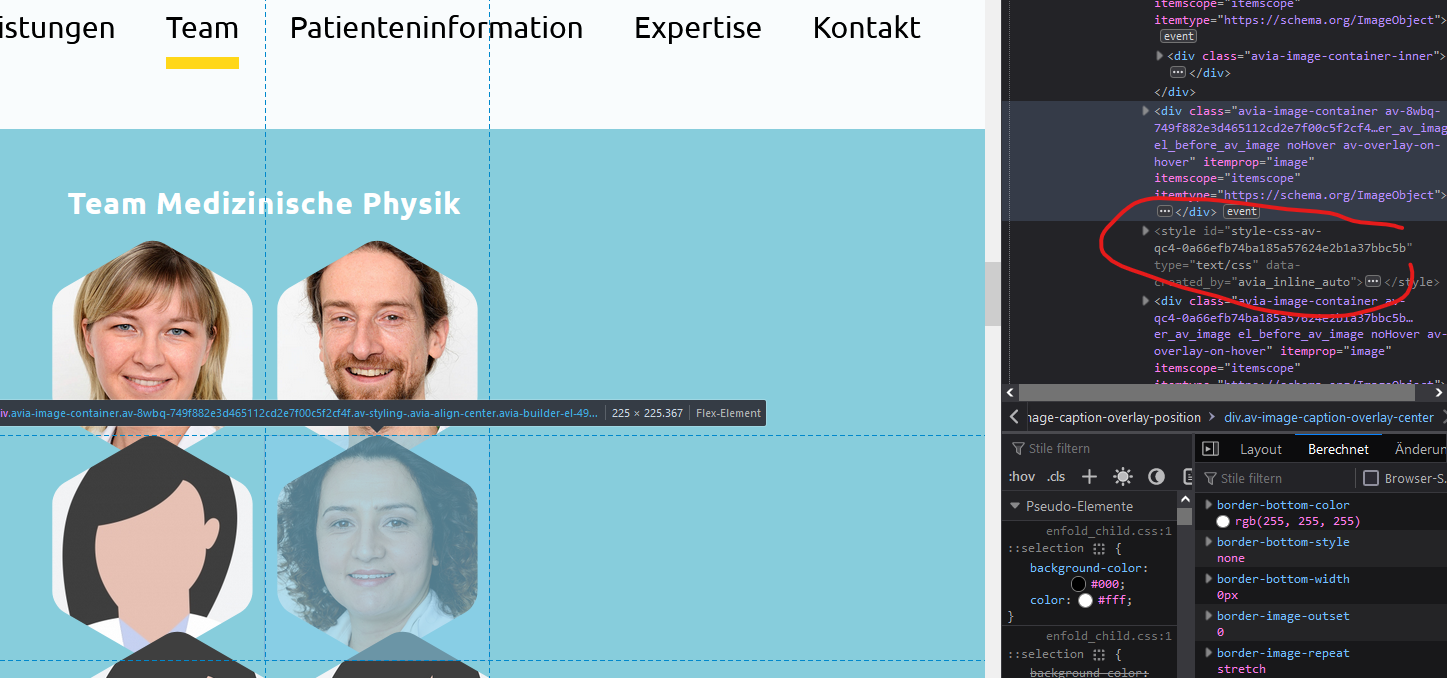
    we have a issue, that with the latest update the avia layout architect inserts styles between the image-containers, breaking the layout of the website.
    You can check the page here: https://nordstrahl.de/
    In the section “Team” you will 10 team-members, which are okay – we have already “cleaned” the backend by creating the content new.
    But if you click on the arrow below you will get shown more member groups, with the layout broken.

    Here a screenshot of the frontend:
    https://nordstrahl.de/wp-content/uploads/2023/01/Screenshot-2023-01-30-153447.png

    In the backend we only work with images here, using only a few styling:
    https://nordstrahl.de/wp-content/uploads/2023/01/Screenshot-2023-01-30-153517.png
    https://nordstrahl.de/wp-content/uploads/2023/01/Screenshot-2023-01-30-153522.png

    The Enfold-Theme used: 5.4
    Wordpress: newest version.
    Plugins: we only use few plugins. The issue occurs also if we deactivate them all.

    Could you please check this issue?
    Thank you very much!

    Regards
    Marko

    #1395920
    NicomIT
    Participant

    Hi,
    I want to create and set up different footers for different pages, but not able to do that with enfold theme, can anyone help me??

    #1395905

    Hey,

    You should be able to click the link in your email to reply to your thread.

    It seems like a caching issue. Could you please go to Enfold theme options > Performance and disable CSS and JS file merging and compression options, save theme options, and clear cache on your caching plugin?

    You can use (Email address hidden if logged out) but please post logins credentials here privately so any available moderator can look into it :)

    Cheers!
    Yigit

    #1395902
    Robin
    Guest

    Hi !
    One of my new client is using your ENFOLD theme for WordPress and I have to duplicate its website (https://sab-avocat.com) in a DEV / PREPRODUCTION environnement because a virus trojan is embeded in its installation.

    As I will have to reinstall its theme in a working environnement (eg. https://temporary.domaine.com) to recreate for her a new safe website , is there the possibility to do that according your licence please ?

    Such as your licence could cover :
    -1 production website
    – 1 developpement (localhost or online) website

    How can I do please ?
    Thank You
    Best Regards
    Robin Fritig / cosmik.me

    #1395901

    Hi,
    Glad we were able to help, if you have any further questions please create a new thread and we will gladly try to help you. Thank you for using Enfold.

    Best regards,
    Mike

    #1395900

    In reply to: Masonry dont show

    Hey,

    Thanks for contacting us!

    Could you please create a staging copy of your site and post WP admin logins here privately so we can look into it?

    You can simply remove your Personal Token from Enfold theme options > Theme Update tab if you would not like to receive auto updates.

    Best regards,
    Yigit

    #1395898

    In reply to: row too high on mobile

    Hi,
    For the special heading element you can choose the font size based on screen size, go to the screen options tab and pick your sizes:
    Enfold_Support_262.jpeg

    Best regards,
    Mike

    #1395895

    Hey Peter,

    Thanks for contacting us!

    You can refer to this post: https://kriesi.at/documentation/enfold/theme-registration/#how-to-generate-a-envato-personal-token and generate a new Personal Token and use it to receive auto updates.

    If you do not receive the update after inserting your token in Enfold theme options, please try using the Envato Market plugin: https://www.envato.com/lp/market-plugin/. You can insert the Token in plugin settings and check “Themes” tab for the update :)

    Best regards,
    Yigit

    #1395891
    Peter Koopmanschap
    Guest

    Geachte,

    Voor de website http://www.astrid-izelaar.nl
    weet ik mijn token niet meer voor Enfold
    Deze wel gekocht en betaald maar voor up-dates geen token of inlog code voorhanden

    #1395885

    Hi,
    It looks like we both wrote at the same time, so I reopened the thread. We don’t have a way to make the blog element show 6 columns, if you want to manually create 6 columns you can follow our documentation: Six Columns or more.
    Unless there is anything else we can assist with on this issue, shall we close this then?

    Best regards,
    Mike

    #1395880

    Hello Ricard and Yigit,
    This is the reply of WPML’s support:
    “I’m not familiar with Enfold builder but I had a similar situation with a plugin that creates blog post cards. “Optional” comes from the WPML taxonomy “Translation priority”. Your plugin/ builder probably takes all taxonomies related to the post not only the WP standard “taxonomy=category”.
    Do you have any settings for that builder? Can you include/exclude some taxonomies from that breadcrumbs?”

    My answer:
    “It is not possible to include or exclude taxonomies from that breadcrumb trail by default in the builder but I hope to get a solution by Enfold’s developers. I’ll send them your answer and please find the debug infos attached.”

    Attached please find a shot of the WPML-plugin page “Taxononmie-Übersetzung > Übersetzungsprioritäten (taxonomy translation > Translation priority)”
    I’m looking forward to your ideas to solve the issue.
    Best regards
    Anne

    #1395879
    This reply has been marked as private.

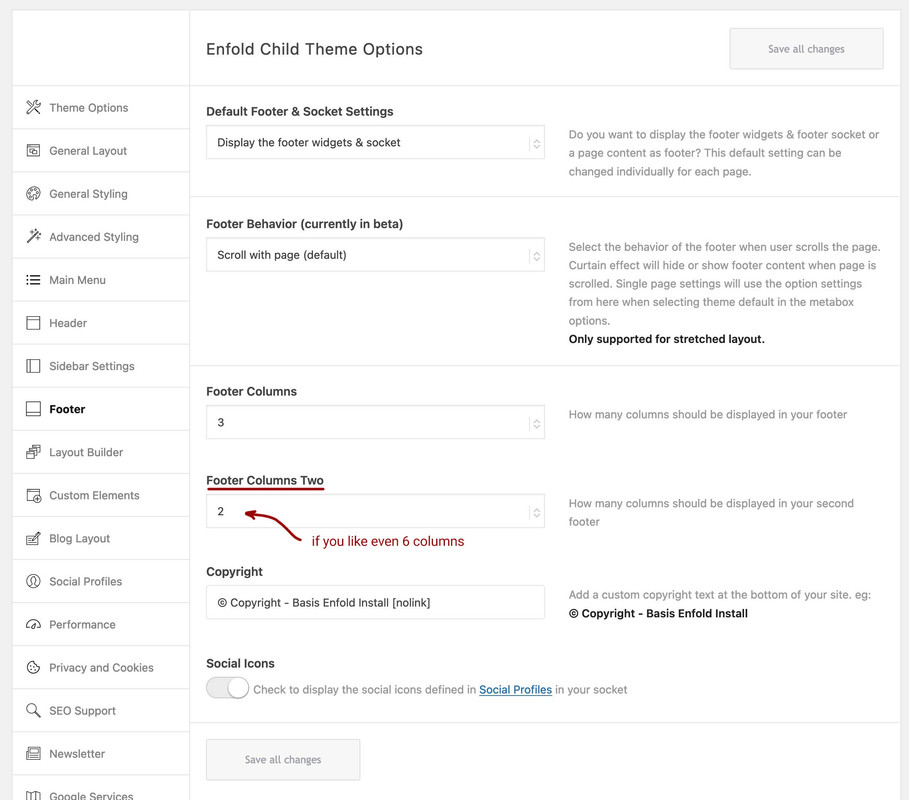
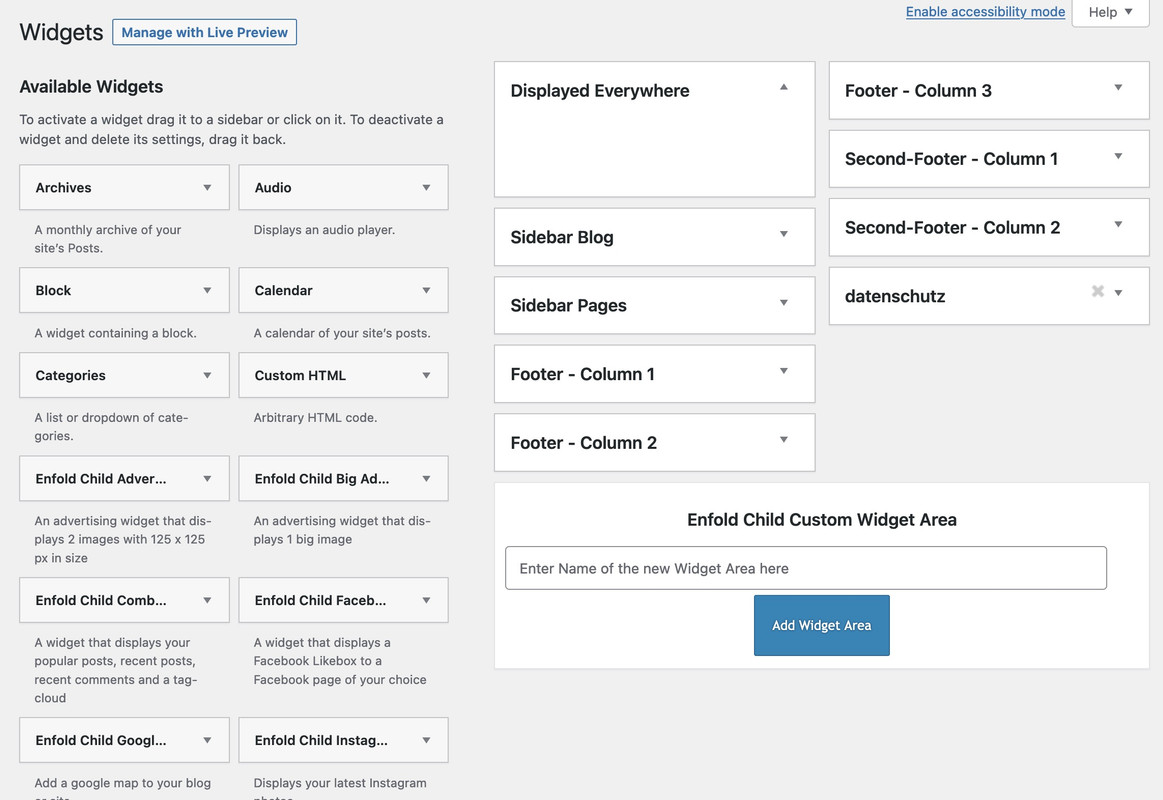
    long time ago i managed to implement a second footer row.
    on Enfold Options you will see:

    On widgets your will have :

    you will need for it a child-theme footer.php a child-theme functions.php snippet and less code for quick css.

    The snippet is:

    
    /***** insert the options dialog to Enfold Footer segment. Just after the other footer_columns ****/
    function my_avf_option_page_data_add_elements( array $avia_elements = array() ){
      $slug = 'footer';
      $id = 'footer_columns';
      
      $new_element =  array(
      "slug"  => "footer",
      "name"  => __("Footer Columns Two", 'avia_framework'),
      "desc"  => __("How many columns should be displayed in your second footer", 'avia_framework'),
      "id"  => "footer_two_columns",
      "required"  => array( 'display_widgets_socket', '{contains_array}all;nosocket' ),
      "type"  => "select",
      "std"   => "4",
      "subtype" => array(
        __('1', 'avia_framework') =>'1',
        __('2', 'avia_framework') =>'2',
        __('3', 'avia_framework') =>'3',
        __('4', 'avia_framework') =>'4',
        __('5', 'avia_framework') =>'5',
        __('6', 'avia_framework') =>'6')
      );
      
      $found = false;
      $index = 0;
      
      foreach( $avia_elements as $key => $element ){
      $index++;
        if( isset( $element['id'] ) &&  ( $element['id'] == $id ) && isset( $element['slug'] ) && ( $element['slug'] == $slug ) ) { 
          $found = true;
          break;
        }
      } 
      if(! $found ){ 
        $avia_elements[] = $new_element;
      }
      else {
        $avia_elements = array_merge( array_slice( $avia_elements, 0, $index ), array( $new_element ), array_slice( $avia_elements, $index ));
      }
      return $avia_elements;
    }
    add_filter( 'avf_option_page_data_init', 'my_avf_option_page_data_add_elements', 10, 1 );
    
    /*** Register new footer widget areas */
    function footer_two_widgets_init() {
      $footer_two_columns = avia_get_option( 'footer_two_columns', '6' );
      for ($i = 1; $i <= $footer_two_columns; $i++){
        register_sidebar(array(
          'name' => 'Second-Footer - Column '.$i,
          'before_widget' => '<section id="%1$s" class="widget clearfix %2$s">', 
          'after_widget' => '<span class="seperator extralight-border"></span></section>', 
          'before_title' => '<h3 class="widgettitle">', 
          'after_title' => '</h3>', 
          'id'=>'av_footer_two_'.$i
        ));
      }
    }
    add_action( 'widgets_init', 'footer_two_widgets_init' );
    
    #footer .container > div {
        display: flex;
        flex-flow: row wrap;
        align-items: stretch;
    }
    
    #second-column-row {
      position: relative;
      margin-top: 10px;
    }

    the edited footer.php can be found ( on basis of Enfold 5.4 ) : PasteBin

    #1395865

    In reply to: full screen image

    A page like this: https://kriesi.at/themes/enfold-health-coach/
    Or just without all ( header, footer, socket ) ?
    Note, however, that an image that must always maintain screen height will need to be cropped if the screen width is variable.

    WOW!
    well, it would seems as tho i figured it out!

    after MORE searching, i came across https://learn.wordpress.org/lesson-plan/widget-areas

    apparently i had to “register” a “sidebar” – which thru me, as i was wanting to modify in the footer. after looking that up, the term “sidebar” is used anywhere the theme allows the user to add widgets in. and since the Enfold footer allows for widgets, i had to “register_sidebar” and THEN modify a line in the template.
    i also didn’t understand why i had to “register” the “widget area’s” at all, thinking that just by creating the custom widgets in WP admin > Appearance > Widgets, that should do it, but no. ya gotta create them there and ALSO register them in the child functions too.

    so after reading that wordpress page (linked above), i started hunting around in the main Enfold theme files, trying to find something similar. since apparently, some things are named differently than in other themes, which is why my copy/pasting of examples i found elsewhere didn’t work.
    i found it in… themes > enfold > includes > admin > register-widget-area.php

    so i combined what that wordpress link offered with the footer widget registration and came up with this code that i put in my child functions.php

    add_action( 'widgets_init', 'MYWIDGETAREA' );
    function MYWIDGETAREA() 
    {
    	register_sidebar( array(
    		'name'			=> 'Respect Footer - Column ' . $i,
    		'id'			=> 'espect_foot_widget_' . $i,
    		'before_widget'	=> '<section id="%1$s" class="widget clearfix %2$s">',
    		'after_widget'	=> '<span class="seperator extralight-border"></span></section>',
    		'before_title'	=> '<h3 class="widgettitle">',
    		'after_title'	=> '</h3>'
    	));
    }

    in the array, i only changed the “name” & “id”, leaving the rest so the structure matches the original theme.

    then i went to my template-custom.php and found this line…

    if( ! ( function_exists( 'dynamic_sidebar' ) && dynamic_sidebar( 'Footer - Column ' . $i ) ) )
    

    …and replaced it with…

    if( ! ( function_exists( 'dynamic_sidebar' ) && dynamic_sidebar( 'Respect Footer - Column ' . $i ) ) )
    

    AMAZING!!!

    well hopefully all this may benefit someone else in a similar position some day.

Viewing 30 results - 19,411 through 19,440 (of 244,585 total)