
-
AuthorSearch Results
-
July 18, 2023 at 4:52 am #1413554
In reply to: Google maps
Hi,
This is possible but you may need to directly edit the enfold/config-templatebuilder/avia-shortcodes/google_maps/google_maps.php file and add the aria-hidden attribute around line 878.
$out = "<div {$add_id} class='av_gmaps_sc_main_wrap av_gmaps_main_wrap {$add_css}'>";Replace it with:
$out = "<div aria-hidden='true' {$add_id} class='av_gmaps_sc_main_wrap av_gmaps_main_wrap {$add_css}'>";Best regards,
IsmaelJuly 18, 2023 at 3:52 am #1413551In reply to: Blog news as masonery but withput single post page
Hey Sebastian,
Thank you for the inquiry.
No single post page should be loading after click on the image or title only the postings as overview.
Unfortunately, this option is not available in the Masonry or Blog Posts element. However, you can try the AJAX Portfolio option by using the Portfolio Grid element. To get a better understanding of how it works, you can refer to the example provided in the demo.
// https://kriesi.at/themes/enfold/portfolio/portfolio-ajax/
Best regards,
IsmaelJuly 17, 2023 at 8:56 pm #1413536Hi,
Glad we were able to help, if you have any further questions please create a new thread and we will gladly try to help you. Thank you for using Enfold.Best regards,
MikeJuly 17, 2023 at 8:53 pm #1413535In reply to: Text Block
Hi,
Glad we were able to help, if you have any further questions please create a new thread and we will gladly try to help you. Thank you for using Enfold.Best regards,
MikeJuly 17, 2023 at 8:11 pm #1413531Hi,
Thanks for the clarification. I think you will have to add them manually to a widget area in the header for example: https://kriesi.at/documentation/enfold/header/#adding-a-header-widget-area
Best regards,
RikardJuly 17, 2023 at 8:03 pm #1413529In reply to: Contact Form 7
Hey M-Graphics24,
Please share a screenshot highlighting your intentions, and a link to where we can see the actual elements. Please note that we are here to provide support for the Enfold theme first of all, but we’re willing to help with minor adjustments for third party plugins as well.
Best regards,
RikardJuly 17, 2023 at 7:55 pm #1413524In reply to: Layout Blog
Hi,
Thanks for letting us know, we’ll close this thread for now then. Please open a new thread if you should have any further questions or problems.
Best regards,
RikardJuly 17, 2023 at 7:55 pm #1413523In reply to: Gallery element – image size
Hi,
Great, I’m glad that you found a working solution, and thanks for sharing your code. I’ll close this thread for now then, please open a new thread if you should have any further questions or problems.
Best regards,
RikardJuly 17, 2023 at 5:54 pm #1413519Rikard, thanks for the quick response and the links. I appreciate that. The enfold theme builder is very new to me and I did not follow along with how to add those buttons to the right of the Infinit-I workforce logo as provided in my example link. Is this even possible? We do not want those buttons in the main nav but instead along the same line as the logo in the header so that we can reduce header height. Like you see in this example https://pasteboard.co/LYJqIooEblS8.jpg
Thanks, Jesse
July 17, 2023 at 4:30 pm #1413512In reply to: enfold template saves which data?
Hey mtothearius,
Thank you for using Enfold.
Enfold itself does not save/use any user data. The numeric captcha are only random numbers created during page load and checked by js.
3rd party services like Google have their own data handling – independent from Enfold.
Hope this answers your question.
Best regards,
GünterJuly 17, 2023 at 1:55 pm #1413498In reply to: PHP Warning – Undefined array key “term_rel”
Hey Ben,
Thank you for reporting this – and sorry for the problems.
Will be fixed in next release.
Meanwhile you can replace
../enfold/config-templatebuilder/avia-shortcodes/blog/blog.php
with the contents of
Do not forget to make a backup of the original file for a fallback.
Best regards,
GünterJuly 17, 2023 at 1:47 pm #1413497Dear Enfold staff
I’ll try to summarize my question:
is it normal for Enfold to send emails starting from an Enfold Form inserted in an old version of the page?In my many years of using Enfold, this is the first time this has happened to me :(
Best regards
OrianoJuly 17, 2023 at 1:24 pm #1413494Topic: PHP Warning – Undefined array key “term_rel”
in forum EnfoldBen
ParticipantHi Team,
I noticed a few of our sites are showing the following error:
Warning: Undefined array key “term_rel” in /home/customer/www/domain-name.com/public_html/wp-content/themes/enfold/config-templatebuilder/avia-shortcodes/blog/blog.php on line 562
It seems to be when a short code is used to display blog posts or shop categories on a page.
Is this fixed in the upcoming ENFOLD version 5.6.5.?
For now, I’ve hidden the PHP error on the front end of WordPress by adding the following to the wp-config file, just before the /* That’s all, stop editing! Happy publishing. */ line:
ini_set('display_errors','Off');
ini_set('error_reporting', E_ALL );
define('WP_DEBUG', false);
define('WP_DEBUG_DISPLAY', false);
The affected sites are running PHP 8.2.8 with ENFOLD 5.6.4 and WordPress 6.2.2.
The error remains even with all plugins disabled.
July 17, 2023 at 12:31 pm #1413488In reply to: Theme Licence
Hi,
Thanks for the update, we’ll go ahead and close this thread for now then. Please open a new thread if you should have any further questions or problems.
Best regards,
RikardJuly 17, 2023 at 12:30 pm #1413487In reply to: H2 Problem mobile
Hi,
Did you try setting a font size for all screen sizes for the H2 element under Enfold->General Styling->Typography?
Best regards,
RikardJuly 17, 2023 at 12:12 pm #1413476In reply to: getting 2 images to touch
Hi,
Great, I’m glad that you found a solution. I’ll close this thread for now then, please open a new thread if you should have any further questions or problems.
Best regards,
RikardJuly 17, 2023 at 9:37 am #1413459Topic: enfold template saves which data?
in forum Enfoldmtothearius
ParticipantWe are using the enfold Template from Kriesi on our Homepage. There is an captcha where the customer has to combine 2 numbers. Which data of the customer are used for this process (e. g. IP-address) and how long will this data be saved?
July 17, 2023 at 8:37 am #1413455In reply to: Marker OpenstreetMap
Dear Ismael,
now today I have updated the ENFOLD theme for the second time, now to the latest version Enfold 5.6.4.
Unfortunately the marker still does not appear on Openstreetmap. What else can I do now so that this is displayed?Many greetings, Diana
July 17, 2023 at 8:35 am #1413454I stopped using the “Contact Form Enfold”, but Enfold keeps sending emails from a Contact Form Enfold that I can’t find :(
Please help.
Best regards
OrianoHere an attach “Event” from Easy WP SMTP:
= = = = = =
Theme: Enfold
/home/associationfranc/public_html/wp-content/themes/enfold/framework/php/class-form-generator.php (line: 1463)
Backtrace:
[0] wp_mail called at [/home/associationfranc/public_html/wp-content/themes/enfold/framework/php/class-form-generator.php:1463]
[1] avia_form->send called at [/home/associationfranc/public_html/wp-content/themes/enfold/framework/php/class-form-generator.php:450]
[2] avia_form->display_form called at [/home/associationfranc/public_html/wp-content/themes/enfold/config-templatebuilder/avia-shortcodes/contact/contact.php:1011]
[3] avia_sc_contact->shortcode_handler called at [/home/associationfranc/public_html/wp-content/themes/enfold/config-templatebuilder/avia-template-builder/php/class-shortcode-template.php:1332]
[4] aviaShortcodeTemplate->shortcode_handler_prepare called at [/home/associationfranc/public_html/wp-includes/shortcodes.php:355]
[5] do_shortcode_tag called at [:]
[6] preg_replace_callback called at [/home/associationfranc/public_html/wp-includes/shortcodes.php:227]
[7] do_shortcode called at [/home/associationfranc/public_html/wp-content/themes/enfold/config-templatebuilder/avia-template-builder/php/class-shortcode-helper.php:559]
[8] ShortcodeHelper::avia_remove_autop called at [/home/associationfranc/public_html/wp-content/themes/enfold/config-templatebuilder/avia-shortcodes/grid_row/cell.php:788]
[9] avia_sc_cell->shortcode_handler called at [/home/associationfranc/public_html/wp-content/themes/enfold/config-templatebuilder/avia-template-builder/php/class-shortcode-template.php:1332]
[10] aviaShortcodeTemplate->shortcode_handler_prepare called at [/home/associationfranc/public_html/wp-includes/shortcodes.php:355]
[11] do_shortcode_tag called at [:]
[12] preg_replace_callback called at [/home/associationfranc/public_html/wp-includes/shortcodes.php:227]
[13] do_shortcode called at [/home/associationfranc/public_html/wp-content/themes/enfold/config-templatebuilder/avia-template-builder/php/class-shortcode-helper.php:559]
[14] ShortcodeHelper::avia_remove_autop called at [/home/associationfranc/public_html/wp-content/themes/enfold/config-templatebuilder/avia-shortcodes/grid_row/grid_row.php:712]
[15] avia_sc_grid_row->shortcode_handler called at [/home/associationfranc/public_html/wp-content/themes/enfold/config-templatebuilder/avia-template-builder/php/class-shortcode-template.php:1332]
[16] aviaShortcodeTemplate->shortcode_handler_prepare called at [/home/associationfranc/public_html/wp-includes/shortcodes.php:355]
[17] do_shortcode_tag called at [:]
[18] preg_replace_callback called at [/home/associationfranc/public_html/wp-includes/shortcodes.php:227]
[19] do_shortcode called at [/home/associationfranc/public_html/wp-includes/class-wp-hook.php:308]
[20] WP_Hook->apply_filters called at [/home/associationfranc/public_html/wp-includes/plugin.php:205]
[21] apply_filters called at [/home/associationfranc/public_html/wp-content/themes/enfold/template-builder.php:102]
[22] include called at [/home/associationfranc/public_html/wp-includes/template-loader.php:106]
[23] require_once called at [/home/associationfranc/public_html/wp-blog-header.php:19]
[24] require called at [/home/associationfranc/public_html/index.php:17]July 17, 2023 at 5:35 am #1413449In reply to: Fatal Error after PHP update
Hi Obrmarketing,
1. Make a backup:
– Site Backup: https://kriesi.at/documentation/enfold/backup-wordpress-site/
– Theme Settings Backup: https://kriesi.at/documentation/enfold/backup-theme-settings/2. Disable any caching or optimization plugins.
3. Update the theme via following options:
a. Update using Theme Update in Theme Options
b. Use Envato market plugin: https://envato.com/market-plugin/
c. Upload manually via Appearance > Themes and replace the old Enfold theme
d. Upload manually via cPanel or FTP
4. Review the updated staging site, if anything is messed up, go to Enfold > Theme Options > Performance, then disable CSS File Merging And Compression and Javascript File Merging And CompressionI hope this helps.
Best regards,
NikkoJuly 16, 2023 at 11:45 pm #1413441In reply to: Producto slider lay out
Hi,
Try this CSS in your Enfold Theme Options ▸ General Styling ▸ Quick CSS field:#top #main .inner_product_header { min-height: 170px; }After applying the css, please clear your browser cache and check.
Best regards,
MikeJuly 16, 2023 at 10:31 pm #1413436In reply to: Header-Stil does not change
Hey radkeartur,
Thanks for the link to your site, if you want to change your menu buttons, changing the header style will not help, you need to go to menus and change each menu item to “default” instead of “button” style

Best regards,
MikeJuly 16, 2023 at 10:10 pm #1413434In reply to: Gallery element – image size
Hi,
Thank you for the link to your site, I see that your gallery is about 400px square with very little space between them while your other images are 300px square with a lot of space between them, so to match these try this CSS in your Enfold Theme Options ▸ General Styling ▸ Quick CSS field:#top.home div .avia-gallery img { padding: 50px; }After applying the css, please clear your browser cache and check.
Best regards,
MikeJuly 16, 2023 at 9:35 pm #1413431In reply to: Post Slider Icon
Hi,
To remove the fallback icon try this CSS in your Enfold Theme Options ▸ General Styling ▸ Quick CSS field:.main_color .fallback-post-type-icon { display:none; }After applying the css, please clear your browser cache and check.
Best regards,
MikeJuly 16, 2023 at 9:32 pm #1413429In reply to: full width slide
Hi,
Glad Nikko was able to help, if you have any further questions please create a new thread and we will gladly try to help you. Thank you for using Enfold.Best regards,
MikeJuly 16, 2023 at 8:43 pm #1413425In reply to: Problem editing class-avia-combo widget.php
Hey zimbo,
I have compared /class-avia-combo.php in v5.5 & v5.6.4 and don’t see anything that would prevet you from adding a comma after'order' => 'desc'after popular / recent / comments code blocks and adding your code:

I don’t use Dreamweaver so I don’t know why it would show you an error, I use VS Code and don’t see any errors.Best regards,
MikeJuly 16, 2023 at 7:54 pm #1413422In reply to: HI Demo install problem, i tried everything :(
Hi,
Thank you for the link to your site, it looks like you have installed the parallax demo, but the frontpage is set as the Blog

this kept it from showing as your homepage, I have corrected for you.
Please clear your browser cache and check.Best regards,
MikeJuly 16, 2023 at 6:24 pm #1413419In reply to: Text Block
Hi,
Thank you for your patience, I didn’t see the error you referenced above but I did see errors on your page for Optima Express, Query Monitor, & Yoast SEO but deactivating these didn’t correct the text element. Since you had the Avia Layout Builder Debugger enabled I was able to check your page with the Enfold Shortcode Parser and it found no errors, so I copied your page to my test site and I found that you had a div closing tag but no opening tag

So I corrected this for you. I examined your other text block element on the page and see that you added div tags around your content:
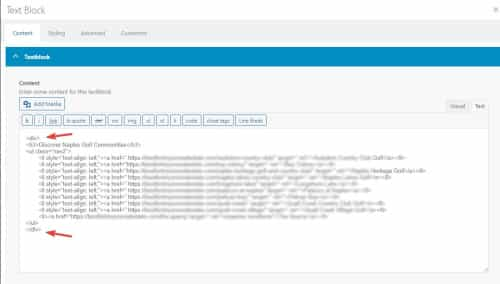
If you add these please be careful that you ensure any extra tags are closed properly, if you didn’t intend to add these then perhaps you copied the content from somewhere and pasted into the “visual” tab of the editor, in these cases please also check the “text” tab to ensure that extra tags are not being added.

Best regards,
MikeJuly 16, 2023 at 3:27 pm #1413409In reply to: Fatal Error after PHP update
Hi Obrmarketing,
Thanks, I was able to access it and it seems the reason why you are having this error is because you are using the latest version of WordPress (6.2.2) and Enfold 4.7.4 which has been released 3 years ago. The only way to fix this is to update to the latest version of Enfold (5.6.4) and you also need to update header.php and footer.php of your child theme.
Best regards,
NikkoJuly 16, 2023 at 3:13 pm #1413408In reply to: YouTube Videos Not Embedding Using Layout Builder
Hi Cloud Construct,
Thanks for giving us admin access.
I tried to check it however I can’t seem to find the cause of the issue, the video works properly when the parent theme (Enfold) is used but when you use the child theme, the video stops working. There’s no custom code in the child theme so, the only thing I could think is the settings but I could not figure out which setting is causing the issue.
I think a workaround is to export the theme settings, use the parent theme and then import the settings back.Best regards,
Nikko -
AuthorSearch Results
Viewing 30 results - 14,881 through 14,910 (of 244,622 total)
-
Search Results
-
Hi Team,
I noticed a few of our sites are showing the following error:
Warning: Undefined array key “term_rel” in /home/customer/www/domain-name.com/public_html/wp-content/themes/enfold/config-templatebuilder/avia-shortcodes/blog/blog.php on line 562
It seems to be when a short code is used to display blog posts or shop categories on a page.
Is this fixed in the upcoming ENFOLD version 5.6.5.?
For now, I’ve hidden the PHP error on the front end of WordPress by adding the following to the wp-config file, just before the /* That’s all, stop editing! Happy publishing. */ line:
ini_set('display_errors','Off'); ini_set('error_reporting', E_ALL ); define('WP_DEBUG', false); define('WP_DEBUG_DISPLAY', false);The affected sites are running PHP 8.2.8 with ENFOLD 5.6.4 and WordPress 6.2.2.
The error remains even with all plugins disabled.


