Hi,
Try this CSS in your Enfold Theme Options ▸ General Styling ▸ Quick CSS field:
.avia-team-member .team-member-description {
	display: none;
}
After applying the css, please clear your browser cache and check.
Best regards,
Mike
Hi,
I would not recommend editing the template directly as it will be lost when you update in the future, please link to your page with the headings that you want to change and we can help with some code you can add to your child theme or a plugin like WPCode, that supports PHP code snippets, JavaScript code snippets, & CSS code snippets so your customizations won’t be lost in the future.
Perhaps adding a screenshot of your desired changes would help us.
Best regards,
Mike
Hey frawer,
Try going to Product ▸ Product categories choose your category and add a Thumbnail

this will add the image above the products on the category page:

Please give this a try.
Best regards,
Mike
Hi,
Glad we were able to help, if you have any further questions please create a new thread and we will gladly try to help you. Thank you for using Enfold.
Best regards,
Mike
Help!
I have forgotten what I once did several times.
I need to have a different category banner and Category Image.
To See my problem go to https://www.pixelcomputer.de/shop/
If you click on a category like Workstations, Laptops or Phase One – A new page is opened and I see a category banner which is different from the overview thumbnail. This is fine and I want this behavior everywhere.
But I have forgotten how to achieve this. Like I added a new category in Laptops. If you go here
https://www.pixelcomputer.de/produkt-kategorie/laptops/
You see Laptops Auslaufmodelle 2022/2023 if you click on this, you see a scaled image of the thumbnail. And I don’t find the way to define a banner image different from the thumbnail image.
I gooled and found that there should be an Option in Edit Categories to define a banner, but its not there:
Navigate to Dashboard > Posts > Categories and edit the category. You’ll see the image upload option for the banner there. I only see one for the image but not for the banner.
In another post I found that I should go to Enfold, Theme Options and Shop Options to Enable the Category Banner there but I have no option there.
Please help!
Hello Yigit,
I updated Enfold to it’s latest version, but the issue persist. I still can’t edit the page “Kontakt” because of this.
I created a temporary admin login and shared the information with you.
I look forward to an update!
Best regards,
Maarten
 Bettonville
Guest
Hello, a friend asked me to take control of his website. I purchased your Enfold Template. When I wanted to upload it to WordPress it was already installed. In my opinion, it was purchased a very long time ago by my friend and he had forgotten about this purchase. Conclusion, I don’t know how to upload my last purchase since it is already installed. Would it be possible to cancel and refund me so as not to pay twice for the same template?
Thank you
Hi there,
I made some changes in the cookie policy settings and want to re-add a toggle for google maps. How can i achieve that?
There was a shortcode placed there which I deleted since I thought I would not use google maps on that website. Now it seems that I will have to use it for functionality…
especially here: Enfold > Privacy & Cookie > Advanced Options > Show reopen badge
I also added the shortcode
[av_privacy_cookie_info id="" class=""]
at the very end of the COOKIE POLICY page to show a list of the currently running cookies and there is no cookie for GOOGLE MAPS listed.
Any idea?
Thx, GePu
Hi Buddy,
Thanks, installed new code and cleared caches but not working yet. Give me an email address and I will send small image of the one we want to remove.
You can upload your screenshots on imgur.com or Dropbox and share the links with us.
Also how can I add telephone number to right of logo and Mark Post Law, LLC then spaces and telephone number.
Please refer to this post: https://kriesi.at/documentation/enfold/logo/#toggle-id-1
Best regards,
Yigit
Hi Enfold
I’m using Easy Fullwidth Easy slider on all pages, one image only, and I’d like to the transition to none on all pages.
Thanks ;)
on some installations with Enfold 5.6.5 – i got now two custom widget areas :
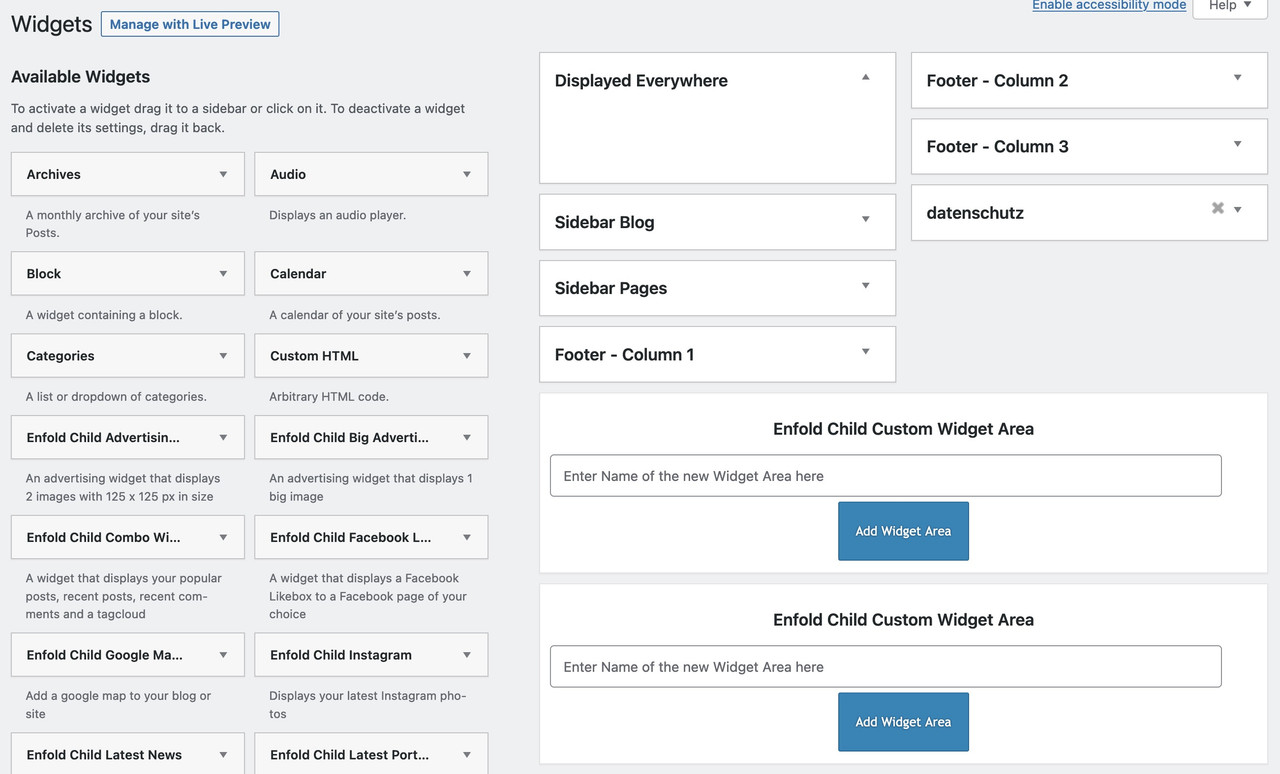
can anyone observe this too?
 Emanuel Ramann
Guest
Hello. I make website for clients with demos. On how many websites / domains i can register the Enfold theme with the same license ?
Hi,
Glad Rikard could help, if you have any further questions please create a new thread and we will gladly try to help you. Thank you for using Enfold.
Best regards,
Mike
Hi,
Thanks Guenni007 that is the hook in the documentation that I used.
Glad we were able to help buddy1, if you have any further questions please create a new thread and we will gladly try to help you. Thank you for using Enfold.
Best regards,
Mike
Hey Taja,
Thanks for using Enfold. It looks like your support period has expired, please refer to this if you would like to extend it: https://help.market.envato.com/hc/en-us/articles/207886473-Extending-and-Renewing-Item-Support
Best regards,
Rikard
Hi,
Glad we were able to help, if you have any further questions please create a new thread and we will gladly try to help you. Thank you for using Enfold.
Best regards,
Mike
Hello,
My website looks very awful on mobile. The homepage for example (link in private content) has big white spaces, font is big, logo slider and other images are not displaying, the bar of the menu is overlapping the logo which also too big. Nearly all of the pages of my website are not responsive for mobile. (I tried on different mobile size and brand : samsung, Iphone etc still the same)
Same for my landing page : there is a big blank space, some elements are too close, some are to far away, titles are too big…There is a Google Ads campaign running at the moment. People will not click on a page like this.
Enfold is supposed to be mobile responsive. Maybe I am missing something ?
Thank you for your help.
Regards,
-
This topic was modified 2 years, 8 months ago by
 sofiadadci.
-
This topic was modified 2 years, 8 months ago by sofiadadci.
Hi Melanie,
Thanks for the update. First of all, could you try updating the theme to the latest version (5.6.5) to see if that helps please? https://kriesi.at/documentation/enfold/how-to-install-enfold-theme/#theme-update. If not, then please include FTP login details in private as well.
Best regards,
Rikard
Dear Support,
I guess my other ticket just stuck, no one is answering in the last 2 days.
I have a problem, could you please help me with it?
I used slider revolution to make some pages.
Without logging in to WP you can see:
In smaller screen size under 800px width there is a blank sidebar like thing on the right.
If you don’t see at first try to check on a mobile or you can try to grab the screen and try to move left and right you will see the problem.
I tried to solve it with the slider revolution support, they asked me to change the theme to another one and it was working well there.
I switched back and also installed Enfold child theme, but the problem is still there.
I got a solution from you which only working on 1 page.
The solution from you was this code:
rs-module-wrap,
rs-module {
width: 100% !important;}
It solved the problem on the “Test” page but only there.
I checked on laptop with inspect mode I can see in Opera and Chrome.
On mobile in normal mode I checked with Safari, Mozilla Firefox, Chrome as well and the problem is still there for the rest of the pages.
(So I removed the code)
Could you please help me to solve the problem?
Thanks
Hey georgbiel,
The files that you are referring to are created by the Enfold Theme Options ▸ Performance ▸ JS & CSS file merging and compression which is all of the css for your site combined. You would not want to edit these files or any other css files manually as you would lose your customization each time you update the theme.
If you want to add some padding to your content-area of single events add your css to the Enfold Theme Options ▸ General Styling ▸ Quick CSS field.
Best regards,
Mike
Hey Tanja,
Try this CSS in your Enfold Theme Options ▸ General Styling ▸ Quick CSS field:
.slide-content .slide-meta {
	display: none;
}
After applying the css, please clear your browser cache and check.
Best regards,
Mike
Hey Emanon,
Thanks for the link to your site I’m not sure why your arrow font would change but it is now:
content: “\E803”;
font-family: ‘fontello’;
and the font-family: ‘friendly’; is a globe

so I fixed your css for you so on your blog your arrows show:

but on your homepage you have added html to your special heading title field, which is not recommend:

but since you already have this in place I added this css to override them and add the arrow:
.red-arrow-title .av-icon-char:after {
  color: #EB5847;
 content: "\E803";
font-family: 'fontello';
  font-size: 16px;
  position: absolute;
  margin-left: 5px;
}
.red-arrow-title .av-icon-char:before {
  display: none;
}
now now they show the arrows:

please clear your browser cache and check.
Best regards,
Mike
Hey hector1069,
Try this CSS in your Enfold Theme Options ▸ General Styling ▸ Quick CSS field:
#top.page-id-4254 .slide-meta {
	display: none;
}
After applying the css, please clear your browser cache and check.
Best regards,
Mike
Hey Bumandal,
You would add [nolink] into the copyright field, please see our documentation for more info.
Best regards,
Mike
Hi,
It looks like you forgot Step 1: Activate header widget area I added the code for you in your WP Code plugin, you had also named your widget area incorrectly, it needed to match the function, so I corrected it for you.
I also didn’t see any css for the header widget, so I added it for you for the Logo left, Widget center, Menu right
Now it shows please check and adjust the css to suit your needs.
Best regards,
Mike
Hi,
How to remove the link between brackets from the footer:
© Copyright – Ezdaher Website – (((( Enfold WordPress Theme by Kriesi )))
Thanks,
Ali
 Taja di Leonardi
Guest
Hello, I am a longtime Enfold user trying to ask a question on the support forum.
I do not see a button or call to action to initiate my question.
I confirmed from Evanto that my licence is up to date.
Can you please help me with getting into the support section that enables me to ask a support question? I have a pressing issue.
Taja di Leonardi
username: tajadojo
Purchase code: 9e8f0909-fa86-44e9-9421-4df4e73831ee
taja
Thanks Gunter,
The main reason for using Relevanssi for me was a speed improvement (where the SKU is included in the search). Relevanssi creates its own search index which helps keep the lookups quick.
I now have a couple of extremely large woocommerce sites with Enfold that are all running extremely smoothly so Relevanssi is a natural progression to improve search.
Hey buddy1,
I would recommend using a header widget, please see our documentation: Adding a header widget area there are links to many examples in the documentation, such as this one.
Best regards,
Mike
Hi,
Yes you are correct, I reviewed the classes in the CSS safelist for the Wp Rocket REMOVE UNUSED CSS option and added a few more and now the burger menu looks correct when I open it on my Android device in a incognito tab when not logged in, this is what I see:

.main_menu
.menu-item-avia-special
.av-hamburger
.av-hamburger-box
.av-hamburger-inner
.av-burger-overlay
.av-burger-overlay-scroll
.av-burger-overlay-inner
.av-active-burger-items
.av-burger-overlay-active
.av-burger-overlay-active-delayed
.av-hamburger--spin
.av-js-hamburger
.avia_hidden_link_text
.av-burger-menu-main
#av-burger-menu-ul
#avia-menu
.av-width-submenu
.av-active-burger-items
.current_page_item
.current-menu-item
.av-active-burger-items
.avia-menu
.av-main-nav-wrap
Please note that testing with iPads & iPhones can be hard to clear the cache, often you need to also clear the history to fully purge the cache, following these steps for Safari and note Step 4 where you will Clear the History.
Best regards,
Mike



