Viewing 30 results - 13,801 through 13,830 (of 244,586 total)
  • Author
    Search Results
  • #1417549

    Hey @studioinktvis,

    Please refer to this post: https://kriesi.at/documentation/enfold/optimization/#troubleshoot.

    Best regards,
    Yigit

    #1417546

    Hey Stephen,

    Would you like to display an edit icon when hovering over the images inside the Masonry Gallery element ( https://i.imgur.com/oEvQJAJ.png ) in the backend?

    I will post this as a request to our developers at https://github.com/KriesiMedia/Enfold-Feature-Requests/.

    Best regards,
    Yigit

    #1417539

    In reply to: Theme Not Updating

    Hello,
    i just bought yesterday the enfold theme via envato i order to be able to update my theme to the latest version.
    I am running (4.1.2)
    Please help me update to the latest version as i am not able to finde the API Key as indicated in the enfold account.
    Is the API key the same with purchase code?
    Is it better to do it via FTP ? How do you recomand update ?

    Thank you

    #1417536

    Hey John,

    Please try the following in Quick CSS under Enfold->General Styling:

    .container_wrap {
        border-top-width: 0;
    }

    Best regards,
    Rikard

    #1417524

    In reply to: Demos not visible

    Hi Gerry,

    Does this page https://kriesi.at/themes/enfold-overview/, not load on your end?

    I checked it on different browsers and it is loading fine on my end. Maybe there was a temporary hiccup on our server. Please try loading the page again.

    If this doesn’t help, please send us a screenshot of the issue. You can upload screenshots on imgur.com and share the links here.

    Best regards,
    Yigit

    #1417517

    Topic: Form doesn’t work

    in forum Enfold
    shedoesitcoaching
    Participant

    SOLVED the below problem.
    I’ve downloaded the MC4WP plugin. Now it works.

    If this isn’t the best solution, please let me know as I still prefer to use the WordPress mailchimp elemement.

    —————

    Hi Enfold Team,

    I’ve created a page for my lunch&learn with a Mailchimp form content element.
    This always used to work, and if I try it now it says: “please fill in all required fields”.
    But, In the sign up form there aren’t any other fields highlighted.

    If I try to add a new Mailchimp form content element and I select the right audience in the drop-down (challenge & webinar registrants), it doesn’t show me any fields.

    Could you please help me with this?
    See the link to the page in the private content.

    Many thanks.
    Eefke

    What I have done before the error occureed:
    1. switched the PHP version from 7.4 to 8.1
    2. upgrade the Nginx server from 1.20 to 1.22

    What I have tried to solve the problem but failed:

    1: deleted the whole enfold file and reupload the newest package, FAILED(can’t solve)!
    2: some setting in the Enfold Theme Options -> Performance, FAILED(can’t solve)!
    3: Set PHP back to 7.4 and Nginx to 1.20, FAILED(can’t solve)!

    Hey pnamroud,

    Your current menu looks like a standard menu, so I don’t think that you will run into any problems if you should switch to Enfold. We don’t have any specific tools or plugins for transferring current sites to Enfold unfortunately. I would recommend that you transfer the site in a staging area first of all, then push it live.

    Best regards,
    Rikard

    #1417510
    Guenni007
    Participant

    does custom link work on gallery ( setting: use custom link – fallback is image link) on your installations ( newest Enfold 5.6.6)

    moonswamp
    Participant

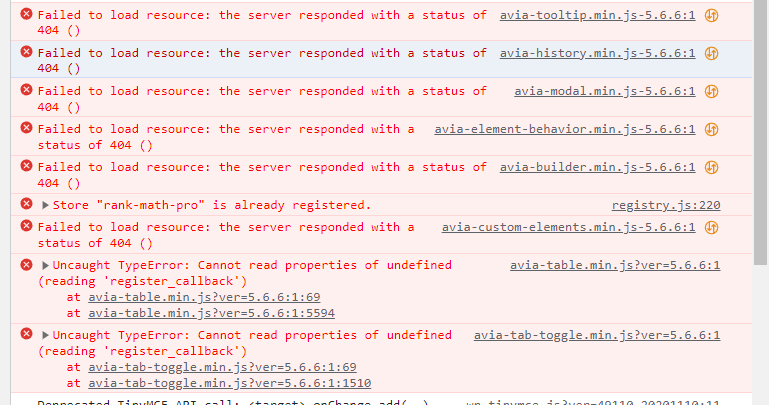
    I encountered a serious issue while trying to publish or edit a new blog post in the backend. The editor displays the following error message: “Failed to initialize plugin: avia_builder_button.”

    I used the F12 key to inspect the error and found that many files are missing, such as:

    /wp-content/themes/enfold/config-templatebuilder/avia-template-builder/assets/css/avia-modal.min.css-5.6.6
    /wp-content/themes/enfold/config-templatebuilder/avia-template-builder/assets/css/avia-custom-elements.min.css-5.6.6
    /wp-content/themes/enfold/config-templatebuilder/avia-template-builder/assets/js/avia-builder.min.js-5.6.6

    please check the image: https://i.postimg.cc/DZ0FWjjW/20230830143315.png

    There are many files like this. Upon closer inspection of the file formats, I noticed that these files have a version number appended at the end, but the format is incorrect. This is preventing them from loading and resulting in a 404 error!

    This issue is very critical. Please assist in resolving it!

    P.S. I just created an admin account so you can login to check it!

    #1417505
    Martin
    Participant

    Hello,

    I have a strange problem with this page: https://www.vuble.de/
    On mobile devices, a large green area is displayed above the navigation system and there also seems to be an error message in there. What I was able to copy was this:

    avia_is_mobile=!1;if(/Android|webOS|iPhone|iPad|iPod|BlackBerry|IEMobile|Opera Mini/i.test(navigator.userAgent)&&’ontouchstart’ in document.documentElement){avia_is_mobile=!0;document.documentElement.className+=’ avia_mobile ‘} else{document.documentElement.className+=’ avia_desktop ‘};document.documentElement.className+=’ js_active ‘;(function(){var e=[‘-webkit-‘,’-moz-‘,’-ms-‘,”],n=”,o=!1,a=!1;for(var t in e){if(e[t]+’transform’ in document.documentElement.style){o=!0;n=e[t]+’transform’};if(e[t]+’perspective’ in document.documentElement.style){a=!0}};if(o){document.documentElement.className+=’ avia_transform ‘};if(a){document.documentElement.className+=’ avia_transform3d ‘};if(typeof document.getElementsByClassName==’function’&&typeof document.documentElement.getBoundingClientRect==’function’&&avia_is_mobile==!1){if(n&&window.innerHeight>0){setTimeout(function(){var e=0,o={},a=0,t=document.getElementsByClassName(‘av-parallax’),i=window.pageYOffset||document.document

    Enfold is up to date, so is WordPress. What could be the reason or what can I do?

    Best regards,
    Martin

    #1417496

    In reply to: Centre Footer

    Hi,
    You can change it in the cookie bar settings Enfold Theme Options ▸ Cookie Consent Message Bar ▸ Message

    Best regards,
    Mike

    #1417494

    In reply to: Theme Not Updating

    This reply has been marked as private.
    #1417493
    woogie07
    Participant

    Hi,

    I have been having issues with the cookie consent pop up box.

    It appears to stick on the site even if cookies are accepted.

    I tried disabling the cookie consent pop up in the Enfold settings, but when I do this, the navigation does not work on mobile.

    Could you advise.

    I have included login details in Private.

    Thanks

    #1417492
    risestrategic
    Participant

    Similar to this issue it is pulling default WP widgets instead of those specified in Widgets>Appearance.

    I do have a child footer.php and have tried 1) replacing it with the most recent main enfold footer.php version as well as 2) deleting it from the child theme. Both end up in NO footer showing at all.

    Please help if you can.

    #1417486
    extraeyes
    Participant

    NEVER MIND IT WAS ON THE HOST END.

    The theme will not reinstall. Please advise. it would not update so I am trying to reinstall and it just spins and spins. I am trying to upload the correct folder. Any idea why it will not be reinstalled?

    PLEASE HELP WEBSITE IS DOWN with a temp theme until resolved.

    I have the correct folder downloaded. Inside the panel there is this message.

    Failed to install enfold theme on http://www.survivalfoodngear.com.
    Failed to install %%themeName%% theme on WordPress websites. Installation “Survival Food and Gear”: Unable to install theme ‘enfold’ with version ‘5.6.6’ to ‘WordPress installation #1920 (‘https://www.survivalfoodngear.com’)’. WP-CLI response: ‘Error: The ‘enfold’ theme could not be found.
    [error]FailedToExecuteWpCliCommand: exit status 1[/error]

    • This topic was modified 2 years, 7 months ago by extraeyes.
    • This topic was modified 2 years, 7 months ago by extraeyes.
    #1417483

    Hey jasonlthornton,
    Thank you for the link to your site, when two buttons are in the menu some css is added so they are closer together, try this CSS in your Enfold Theme Options ▸ General Styling ▸ Quick CSS field so there is more space:

    .av-menu-button + .av-menu-button {
        margin-left: 0;
    }

    if you want more space you are adjust like this:

    .av-menu-button + .av-menu-button {
        margin-left: 10px;
    }

    After applying the css, please clear your browser cache and check.

    Best regards,
    Mike

    #1417482

    Hi,
    Glad to hear that you have this sorted out, if you have any further questions please create a new thread and we will gladly try to help you. Thank you for using Enfold.

    Best regards,
    Mike

    allegriadesign jo
    Participant

    Hello to the team,

    I just wanted to update my Enfold Theme to 5.6.2. I work with a child theme. If I do the update via FTP the Footer-Widgets and the Footer disappears.
    I tried already to copy the footer.php from the parent to the child theme – this brings no solution.
    At the moment the Child theme has no footer.php.

    Looking forward to your assistance.
    Thank you
    Jutta

    #1417475

    Topic: Theme Not Updating

    in forum Enfold
    pamk21
    Participant

    This may be part on my end. I did a manual check and noticed on 3 of 15+ sites the Envato private token went missing. Although I save them I could not find them so I created new tokens. When I go and check manually it says I have the latest version which I know is not the case. Does it take some time until it finds that I am running an older Enfold version? Any direction would be appreciated so I do not end up with a theme that may cause me problems not having the latest version.

    I would prefer not having to FTP the new updated theme as I manage an abundance of sites so I am looking for a fix.

    Thank you!

    #1417471

    In reply to: Centre Footer

    Hi,
    Try this CSS in your Enfold Theme Options ▸ General Styling ▸ Quick CSS field:

    @media only screen and (max-width: 767px) {
    .responsive #top #wrap_all #footer .container {
        display: flex;
        flex-wrap: wrap;
        justify-content: space-between;
        width: 90%;
    	max-width: 90%;
    }
    
    .responsive #top #wrap_all #footer .flex_column.av_one_third:first-child {
        width: calc(50%);
        clear: none; 
    }
    .responsive #top #wrap_all #footer .flex_column.av_one_third:first-child .widgettitle {
    	width: 98%;
    }
    .responsive #top #wrap_all #footer .flex_column.av_one_third:nth-child(2) .widgettitle {
    	width: 43%;
    }
    .responsive #top #wrap_all #footer .flex_column.av_one_third:nth-child(2) #menu-item-1422 a {
    	padding-right: 0;
    }
    .responsive #top #wrap_all #footer .flex_column.av_one_third:nth-child(2) {
        text-align: right;
        width: calc(50%);
    }
    
    .responsive #top #wrap_all #footer .flex_column.av_one_third:last-child {
        width: 100%;
        text-align: center;
    }
    
    }
    #top #footer.footer_color input[type='tel'] {
    	background-color: #fff;
    }

    Please see the screenshot in the Private Content area of the expected results.

    Best regards,
    Mike

    #1417467

    Hi,

    You are welcome!

    For your information, you can take a look at Enfold documentation at https://kriesi.at/documentation/enfold/.

    If you have any other questions or issues, feel free to start a new thread under the Enfold sub-forum and we will gladly try to help you.

    Best regards,
    Yigit

    #1417461

    Hi,
    Can someone take a closer look at the error? We would like to continue using the Enfold option to place the Google code in the header so that we can continue to use the Enfold cookie banner. I can provide you with access.
    Best regards.

    #1417456

    Hey Buddy,

    Please temporarily switch from Enfold to one of the default themes in Appearance > Themes and check if that resolves the issue.

    If you are only experiencing the issue when Enfold is active, please create a staging copy of your site and send us temporary admin logins and FTP logins in private content so we can look into it.

    Best regards,
    Yigit

    #1417453

    Hey,

    Please make sure that you are using the latest version of Enfold as @thomasjarvisdesign suggested. If you are experiencing the issue on Enfold 5.6.6, please share a link to your website in the private content field as well.


    @thomasjarvisdesign
    thanks for your help :)

    Best regards,
    Yigit

    #1417450

    Looks like the Enfold demo is still running 5.4 so the cart fragments bug wont have been fixed.

    #1417449

    Hey what version of Enfold are you using.

    Woocommerce changed the way the cart fragments work in version 7.8.

    This was fixed in Enfold 5.6.3

    The latest Enfold release 5.6.6 is a stable release. Please update to the latest version and this should fix the issue.

    #1417445
    Vangone
    Participant

    Hi,

    my shopping-cart on the page is not showing products on hover.

    There is this lttle indicator, but no products are seen.
    shopping cart

    The same issue is on your demo Shop Site

    #1417440
    lucanova02
    Participant

    I’m having a lot of trouble building my site with the Enfold theme!
    It happens to me all the time that when I create, for example, a “block of text” or a “special title” or insert an image etc, when I then update the page and go to preview .. all the changes I’ve made suddenly they disappear and I have to start over!?
    Can you help me understand why?
    Is it a Template Bug? what can be the reason?? I am desperate

    #1417439

    Hey Gabriele-Marie,

    Please try following this: https://kriesi.at/documentation/enfold/theme-registration/

    Best regards,
    Rikard

Viewing 30 results - 13,801 through 13,830 (of 244,586 total)