Hi,
Glad we were able to help, if you have any further questions please create a new thread and we will gladly try to help you. Thank you for using Enfold.
Best regards,
Mike
Hi,
This would have to be done in the woocommerce plugin, according to this post you can not prices with and without tax at the same time without customization or a plugin.
If the suggestion in the post doesn’t help please reach out the woocommerce plugin support as they would know more about this than us.
Please note that we ask that each thread stays on a specific topic, this helps other users find solutions based on the opening subject line quicker. This thread has touched on three topics now and if you are happy with the first solution we should close this thread, for further questions please open a new thread Thank you for your patience and understanding and using Enfold.
Best regards,
Mike
Hey Patrick,
Thank you for using Enfold.
Shortcode syntax can be:
[shortcode xx='']....[/shortcode]
or
[shortcode xx='']
The second is “self closing”.
Best regards,
Günter
@Mike and company. I have a more pressing issue. It seems after updating Woocommerce, there is a conflict with Enfold theme (child) and it. Users are getting “Sorry, your session expired” messages at the point of checkout where one enters city/state/zip. Switching theme to Storefront fixes it. This is on our full ecomm store. Thanks.
Ok.. have fixed it..
enabled debug mode and switched to a wordpress theme. This showed the code for the home page which I could then edit.
removed the code for the header and updated. went back to child theme and viewed the home page which still showed the full screen slide show.
however, when I clicked on edit this time the enfold editor opened and works again.
Why that slider was still there I do not know as I purged the cache as well!
Any thoughts as to why the full screen slider remained?
Hi,
Thank you for the update.
The error seems to be related to the Fullwidth Easy Slider. Have you tried to delete the slider and recreate it from scratch? If you’re unable to remove the slider from the builder due to the error, try switching the builder to debug mode and then remove the actual shortcodes from the shortcodes field. Please check the documentation below for more info.
// https://kriesi.at/documentation/enfold/intro-to-layout-builder/#debug-mode
Best regards,
Ismael
Hi,
Glad we were able to help, if you have any further questions please create a new thread and we will gladly try to help you. Thank you for using Enfold.
Best regards,
Mike
Hi,
Please note that we ask that each thread stays on a specific topic, so please open a new thread
When I checked your staging site shop I was able to get to your check out with no issues, so in your new thread please explain how to reproduce the issue and if it require demo credit card and billing info, please also include that info as we won’t be able to enter our info for testing.
Best regards,
Mike
Hi,
We are creating custom enfold elements in most of our project but there’s one thing I don’t really understand.
When do I have to set $this->config['self_closing'] = 'yes'; and when $this->config['self_closing'] = 'no';
Best,
Patrick
Hi pampself,
I’m glad that we could help you :)
Thanks for using Enfold and have a great day!
Best regards,
Nikko
Hi pampself,
Please add this CSS code in Enfold > General Styling Quick CSS:
#top .products .avia_cart_buttons {
    background-color: #524e63;
    opacity: 1;
    display: flex;
}
Best regards,
Nikko
Hi,
Thank you for following up.
Please check the documentation that we linked above. You can add more icons from fontello and monocolored ones from flaticon.
// https://kriesi.at/documentation/enfold/icon/#adding-your-own-fontello-or-flaticon-icons-
Best regards,
Ismael
Hey woogie07,
Thank you for the inquiry.
There is no option for this by default, but you can try the following css code to stack the items above each other. You may need to toggle or temporarily disable the Enfold > Performance > File Compression after applying the css.
@media only screen and (max-width: 768px) {
  /* Add your Mobile Styles here */
  #top .avia-accordion.av-lgxa50ax-1e97fbcac290d3df69c38cef630b7911 {
    max-height: 9999px;
    height: 999px;
  }

  #top .avia-accordion.av-lgxa50ax-1e97fbcac290d3df69c38cef630b7911 .aviaccordion-inner {
    overflow: visible;
    display: flex;
    flex-direction: column;
    height: 100%;
  }

  #top .avia-accordion.av-lgxa50ax-1e97fbcac290d3df69c38cef630b7911 .aviaccordion-slide {
    position: relative;
    left: 0;
  }
}
Best regards,
Ismael
Hi,
Thank you for the info.
We just noticed that the theme is quite outdated. Please upgrade the theme from 5.4.1 to the most recent version, 5.6.6. You may need to download the latest version from your Themeforest account and do the update manually via FTP.
// https://kriesi.at/documentation/enfold/theme-update/#update-via-ftp
Best regards,
Ismael
Hey woogie07,
Thank you for the inquiry.
You can add the phone in a text widget, then insert it to the header using an action hook. Please check the documentation below for more info.
// https://kriesi.at/documentation/enfold/header/#adding-a-header-widget-area
Best regards,
Ismael
Hi,
Thank you for the update.
We disabled the Enfold > Performance > File Compression settings temporarily, and it looks like the css rules for the element visibility settings are missing. Please try to upgrade the theme from version 5.6.2 to the latest version 5.6.6. Let us know if the upgrade helps.
Best regards,
Ismael
Hi,
Thank you for the inquiry.
1.) You can add this css code to adjust the breakpoint of the burger menu.
@media only screen and (max-width: 1180px) {
  nav.main_menu li:not(.av-burger-menu-main, .av-active-burger-items) {
    display: none;
  }

  .av-burger-menu-main {
    display: block;
  }
}
2.) Add this code in the functions.php file to disable the default language flags.
function ava_remove_default_flags(){
    remove_filter( 'wp_nav_menu_items', 'avia_append_lang_flags', 9998, 2 );
    remove_filter( 'avf_fallback_menu_items', 'avia_append_lang_flags', 9998, 2 );
    remove_action( 'avia_meta_header', 'avia_wpml_language_switch', 10);
}
add_action('after_setup_theme','ava_remove_default_flags');
3.) You can enable the sharing links in the Enfold > Blog Layout > Share Links At The Bottom Of Your Blog Post section.
Best regards,
Ismael
Hello Enfold Team,
I am using the Partner/Logo Element and would like to maintain the scrolling effect I have on desktop on mobile. Ideally, I would only show two logos at a time on mobile (five on desktop), but they should scroll through the 12 or so that I am going to load. I have searched through previous threads but couldn’t find anything on this.
Can you please point me in the right direction?
Thank you
-James
Hi
Is there a possiblity to protect email address links in Enfold to prevent SPAM?
And if not, do you can recommend a plugin for this?
Thanks very much.
Best regards
Mike
Thanks Mike. Does this CSS effect the mobile hamburger menu and cart moving closer to the logo, and if so, how to adjust those back to the right?
I now also have a more pressing issue. It seems after updating Woocommerce, there is a conflict with Enfold theme (child) and it. Users are getting Sorry, your session expired messages. Switching theme to Storefront fixes it. New ticket, or can you help with this? This is on our full ecomm store. Thanks.
-
This reply was modified 2 years, 6 months ago by
 Illingco.
-
This reply was modified 2 years, 6 months ago by Illingco.
-
This reply was modified 2 years, 6 months ago by Illingco.
Hi,
When I check it doesn’t look like you have made a choice for your font size:
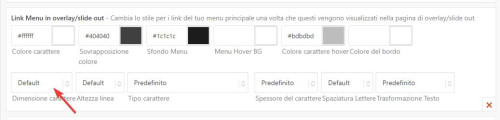
after you make a choice remember to make it for each language and save.

Best regards,
Mike
Hello
I’m in the process of adding a blog and a second language to a site made with Enfold several years ago and I’m having trouble.
I still have 3 problems to solve:
1- Find a way to modify the breakpoint (at 1180px) to display the burger instead of the menu.
2- Permanently remove these language choice flags that regularly appear twice (in the enfold > header > extra elements menu, I don’t have the option to remove these damn flags).
3- Do you have an Enfold open graph solution for sharing posts on Linkedin and Whatsapp? I’ve installed the free version of Yoast SEO.
Thanks for your feedback.
Translated with http://www.DeepL.com/Translator (free version)
Hi,
On the page that you linked to I didn’t see your example, so here is a screenshot of the first item:

do you want the large 20,00 € + IVA to be small.
and the small 24,40 € to be large?
both can stay in their places, you just want the font size changed, correct?
Best regards,
Mike
Hi,
Oh I see, for that you want to disable your sticky header, at Enfold Theme Options ▸ Header ▸ Header behavior ▸ Sticky Header I did it for you, please check.
Best regards,
Mike
Hi,
Try adding the CSS in the Enfold Theme Options ▸ General Styling ▸ Quick CSS field
Best regards,
Mike
Hey Michael,
Please refer to this on how to register your theme license: https://kriesi.at/documentation/enfold/theme-registration/
If you should need further help with installing a demo, then please post admin WordPress login details in private.
Best regards,
Rikard
 Michael Logemann
Guest
Guten Tag,
kurze Frage. Ich habe das Theme bei Envato Market gekauft, meinen Key nimmt er nicht an und des Paralax Themes lässt sich auch nicht installieren.
Am getting a critical error message when trying to edit the home page of the website http://www.oxsec.co.uk
can log into admin fine and am also able to view the site.
Error message appears when trying to edit the home page.
error details email says..
Error Details
=============
An error of type E_ERROR was caused in line 3768 of the file /home/sites/26a/8/8b9cdb854b/public_html/wp-content/themes/enfold/config-templatebuilder/avia-template-builder/php/class-element-templates.php. Error message: Uncaught TypeError: Argument 1 passed to aviaElementTemplates::set_locked_attributes() must be of the type array, string given, called in /home/sites/26a/8/8b9cdb854b/public_html/wp-content/themes/enfold/config-templatebuilder/avia-shortcodes/slideshow_fullsize/slideshow_fullsize.php on line 1128 and defined in /home/sites/26a/8/8b9cdb854b/public_html/wp-content/themes/enfold/config-templatebuilder/avia-template-builder/php/class-element-templates.php:3768
Stack trace:
#0 /home/sites/26a/8/8b9cdb854b/public_html/wp-content/themes/enfold/config-templatebuilder/avia-shortcodes/slideshow_fullsize/slideshow_fullsize.php(1128): aviaElementTemplates->set_locked_attributes(”, Object(avia_sc_slider_full), ‘av_slide_full’, Array, Array, ”)
#1 /home/sites/26a/8/8b9cdb854b/public_html/wp-content/themes/enfold/config-templatebuilder/avia-shortcodes/slideshow_fullsize/slideshow_fullsize.php(1172): avia_sc_slider_full->get_element_styles(Array)
#2 /home/sites/26a/8/8b9cdb854b/public_html/wp-content/themes/enfold/config-t
have set enfold login and etails below in private content
Hey Fazius,
Thanks for reaching out to us.
You can purchase an Enfold license at https://themeforest.net/item/enfold-responsive-multipurpose-theme/4519990.
After that, you can generate a Personal Token ( https://kriesi.at/documentation/enfold/theme-registration/#how-to-generate-a-envato-personal-token ) and insert it in Enfold theme options to receive auto updates.
If that doesn’t work, you can try using the Envato Market ( https://www.envato.com/lp/market-plugin/ ) plugin to update the theme.
If that doesn’t work either, please update the theme via FTP ( https://kriesi.at/documentation/enfold/theme-update/ ).
I hope this helps. Let us know if you have any other questions.
Best regards,
Yigit
 Fazius
Guest
Hello,
I am new administrator of a website. Enfold is used as a theme there. Unfortunately it no longer works since the PHP update. Unfortunately I don’t see any way to update it and have no concat to old administrator.
I also have no way of updating it via Themeforest.
How can I get the latest version of Enfold?
I See only in a config file: Envato_ID: 4519990.
Can you help?



