Hi,
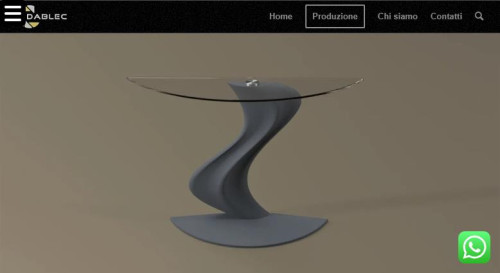
As I understand your issue, on mobile in portrait mode you are seeing this instead of the full image:

Try this CSS in your Enfold Theme Options ▸ General Styling ▸ Quick CSS field:
@media only screen and (max-width: 450px) and (orientation: portrait) {
#full_slider_2 .avia-slideshow-inner {
	height: 100vh !important;
}
}
After applying the css, please clear your browser cache and check.
This is the expected results:

It looks like landscape is fine:
Best regards,
Mike
Hey ero1812,
Please refer to this on how to register your license: https://kriesi.at/documentation/enfold/theme-registration/
If you should need further help with saving the theme options, then please post admin WordPress login details in private.
Best regards,
Rikard
Hi,
Try this CSS in your Enfold Theme Options ▸ General Styling ▸ Quick CSS field:
.single-product .single-product-summary {
	float: left;
}
After applying the css, please clear your browser cache and check.
Best regards,
Mike
Hey zeustrucker,
Try using a grid row element with the text and button on the left and table image on the right, you can even use 1/3 + 2/3 instead of 50/50 when you set the cell size:

Best regards,
Mike
Hey profumopuntoit,
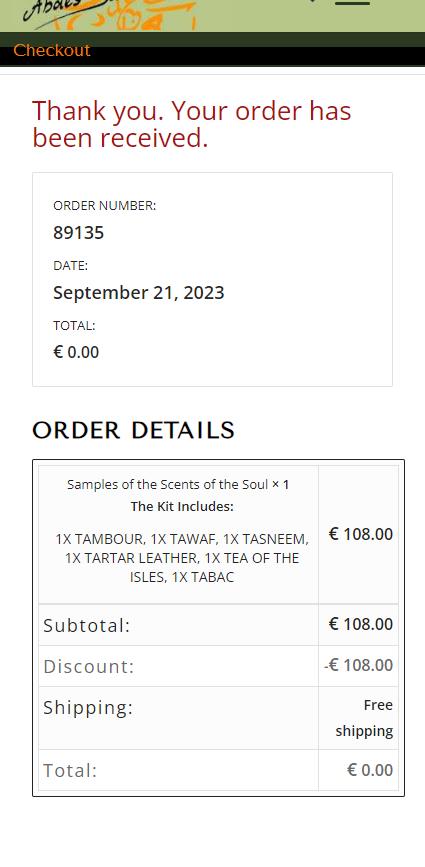
This is pretty tricky to get it exactly as your screenshot, but try this CSS in your Enfold Theme Options ▸ General Styling ▸ Quick CSS field:
@media only screen and (max-width: 767px) {
.responsive table.shop_table td {
    display: table-cell;
}
.responsive .shop_table .product-quantity {
	display: inline !important;
}
#top .order_details .product-name li {
	 margin: auto;
	 padding: 0;
	 border-right: none;
}
#top .order_details li {
	 border-right: none;
}
#top table.shop_table td {
    padding: 5px;
}
}
this is the expected results:
Best regards,
Mike
Hi,
Glad that this helped, we will go ahead and close this then, but please create a new thread if you have any further questions and we will gladly try to help you. Thank you for using Enfold.
Best regards,
Mike
Hi,
Thank you for your patience and the link to your site, I couldn’t find the above css on your site, but I believe the reason it doesn’t work is because the css is for the social share buttons and not the custom [social-bookmarks] shortcode that you are using. Nonetheless try this CSS in your Enfold Theme Options ▸ General Styling ▸ Quick CSS field:
/* Icon style */
.widget .social_bookmarks li a {
  width: 30px!important;
   height: 30px!important;
   line-height: 24px !important;
   border-radius: 30px!important;
   padding: 3px 0 !important;
   background: #fff !important;
}
/* Icon color */
.widget .social_bookmarks li a:before {
  color: #00737A;
  transition: all .5s ease;
}
/* Icon color on hover */
.widget .social_bookmarks li a:hover:before {
  color: #000;
  transition: all .35s ease;
}
After applying the css, please clear your browser cache and check.
Best regards,
Mike
Hey achteins,
Thank you for your patience, as I understand your question disabling the theme lightbox may help with the Event Tickets Plus plugin, to do so try the settings at Enfold Theme Options ▸ Lightbox Modal Window.
Unfortunately I don’t think it is possible to deactivate the data collection of all other guests, in Enfold the plugin needs to do this.
I don’t have any experience with Event Tickets Plus and the only documentation I could find says woocommerce is required, I see that you are not using woocommerce and that the The Events Calendar support was not able to help you, they would know a lot more about this.
If disabling the lightbox doesn’t help then try creating a test page where we can see the issue, perhaps we will understand better.
Best regards,
Mike
Hi,
To have very large menu items and align them at the top try this CSS in your Enfold Theme Options ▸ General Styling ▸ Quick CSS field:
#top #av-burger-menu-ul {
	vertical-align: top;
}
@media only screen and (max-width: 767px) {
#av-burger-menu-ul .avia-menu-text {
	font-size: 60px;
}
}
@media only screen and (min-width: 767px) {
	#av-burger-menu-ul .avia-menu-text {
	font-size: 80px;
}
}
feel free to adjust to suit, this is the expected results:

Since the original question has been answered we will close this thread as it has now covered multiple topics, please note that we ask each thread to limit to one topic.
If you have any further questions please create a new thread and we will gladly try to help you. Thank you for using Enfold.
Best regards,
Mike
Hi,
Thank you for your patience and the link to your site, I cloned your last slider item and saw the font size error on the frontend, it looks like the css for the slide was not added to the style for some reason, if you add this css to your Enfold Theme Options ▸ General Styling ▸ Quick CSS field it will correct this if you want to add more slides:
#top #wrap_all .avia-slideshow .av-slideshow-caption .avia-caption-title {
    font-size: 36px;
}
#top .avia-slideshow .avia-caption-content p {
    font-size: 20px;
}
I didn’t add this and I removed the cloned slide I created.
I don’t know why this has occurred, I tried looking at your Enfold Theme Options ▸ Performance settings and your plugins, etc but didn’t find a cause.
I created a test page on my site with 10 slides and your layout and font sizes and they all worked correctly. So you could try using this css for now and if you find any other issues in the future perhaps they will also point to a cause for this.
Or you could try disabling all of your plugins. If that resolves the issue, reactivate each one individually until you find the cause.
Perhaps your server is also caching, so try clearing your server cache and if it is using object-oriented cache such as Memcached, Redis, Varnish, Litespeed, etc try disabling it to see if this helps. Otherwise if you don’t have any other issues I would try using the css for now.
Best regards,
Mike
Hey Thomas,
In my test, 1/4 columns are designed to show at 48% between 768px and 989px, with a column spacing is set to 4% this is the correct behavior.
Whe two 1/4 columns are side-by-side, both columns are the same size, 48%.

Best regards,
Mike
Hi,
When I compare your site and the google font 300, then look the same to me.

Best regards,
Mike
Hi,
Thank you for your patience, to add the descriptions below the mega menu items and show a icon next to the menu items:

Try adding this code to the end of your child theme functions.php file in Appearance ▸ Editor:
function enfold_menu_description($item_output, $item, $depth, $args) {
    if (!empty($item->description)) {
        $item_output .= '<span class="menu-description">' . esc_html($item->description) . '</span>';
    }
    return $item_output;
}
add_filter('walker_nav_menu_start_el', 'enfold_menu_description', 10, 4);
function enqueue_font_awesome() {
    wp_enqueue_style('font-awesome', 'https://cdnjs.cloudflare.com/ajax/libs/font-awesome/5.15.3/css/all.min.css');
}
add_action('wp_enqueue_scripts', 'enqueue_font_awesome');
function add_icon_to_menu_item($item_output, $item, $depth, $args) {
    // Get the custom icon class from the menu item's CSS Classes
    $custom_classes = implode(' ', $item->classes);
    preg_match('/menu-item-icon-([^ ]+)/', $custom_classes, $matches);

    if (!empty($matches[1])) {
        // Use the custom icon class specified in the menu item
        $icon_class = esc_attr($matches[1]);
        $icon = '<i class="fa ' . $icon_class . '"></i>';
        $item_output = $icon . $item_output;
    }
    return $item_output;
}
add_filter('walker_nav_menu_start_el', 'add_icon_to_menu_item', 10, 4);
The first one adds the description below the menu item, the second one adds the Font Awesome icons because it is easier to use a class name to determine the icon used, entypo-fontello icons don’t use class names the same way, and the third function adds the icon next to the menu item based on the class used in the menu item.
So to show the menu item description and custom classes please enable it in the menu page screen options at the top of the page:

then add your description and the icon you want to use in this format menu-item-icon-fa-users
the first part menu-item-icon- tells the function that a icon will be used, and then the Font Awesome Icon code is appened to the class fa-users

these are the classes I used in this example:
menu-item-icon-fa-users
menu-item-icon-fa-phone
menu-item-icon-fa-question
menu-item-icon-fa-life-ring
then add this CSS in your Enfold Theme Options ▸ General Styling ▸ Quick CSS field:
#top #header .avia_mega_div > .sub-menu > li > ul > li.menu-item > i ~ a {
	display: inline-block;
}
#top #header .avia_mega_div > .sub-menu > li > ul > li.menu-item .menu-description {
	display: block;
    padding: 0 25px;
}
Please give this a try.
Please ensure to copy the code from the forum and not an email notification so the symbols are not converted.
Best regards,
Mike
Hi,
Thank you for reporting this.
Both fixes will be added to next release 5.6.7.
If you want you can replace the following 2 files:
enfold\footer.php
enfold\config-templatebuilder\avia-shortcodes\menu\menu.php
with
https://github.com/KriesiMedia/enfold-library/blob/master/temp_fixes/Enfold_5_6_6/footer.php
https://github.com/KriesiMedia/enfold-library/blob/master/temp_fixes/Enfold_5_6_6/config-templatebuilder/avia-shortcodes/menu/menu.php
Do not forget to make a backup of the original files for a fallback.
Best regards,
Günter
Hi Julian,
I’m glad that we could help you :)
Thanks for using Enfold and have a great day!
Best regards,
Nikko
Hi,
I found that this is due to the title length of some of your elements, earlier it looks like we offered a customization to move the portfolio title, but now for smaller screens some of the titles are three lines and others are one line, so when the grid is created they will all have the height of the larest item giving the smaller items some white space. I have adjusted the css a little but it you could change the length of the items to similar it would be better.

Best regards,
Mike
Hi,
Great, I’m glad that Nikko could help you. Please open a new thread if you should have any further questions or problems.
Best regards,
Rikard
Hi Henningcircle,
Please open a new thread and include WordPress admin login details in private, so that we can have a closer look at your site.
Best regards,
Rikard
Hello,
Is it possible to change the Enfold theme’s direction from RTL to LTR and vice versa, depending on the language selector? For example, I have two languages on the website, with English as the default and Arabic as the other. If I choose Arabic, I want to completely switch the theme’s direction to RTL (including the header, logo, page contents, and footer). Is this possible in Enfold, and is there a website that operates in this manner that I can take a look at?
Thanks
Is there a way that I can create a similar layout as seen in the image?
https://pasteboard.co/6WSSeCqgSCjY.png
I have tried the “Color Section” and then added a 1/1 Column and then added a color to it. I do not see a way to split that 1/1 column into 2 columns to get the same look and feel as presented in the image linked above. Any ideas would be much appreciated.
Thanks,
Jesse
Hi,
Thanks for letting us know, we’ll close this thread for now then. Please open a new thread if you should have any further questions or problems.
Best regards,
Rikard
Hi,
Also make sure to update WordPress and Enfold to the latest versions: https://kriesi.at/documentation/enfold/how-to-install-enfold-theme/#theme-update.
Best regards,
Rikard
Hey diogovareta,
I’m not entirely sure that I understand your intentions, but you can create different layouts with the built in layout builder in Enfold. If you want to create your own blog listing page, then you can use the Blog Posts element for example. The same principle applies for single posts, which you can create with the layout builder as well.
Best regards,
Rikard
Hi,
I’m not sure exactly what you mean by that? If you want to activate the new version, then please rename the new version to enfold, and the old to for example enfold_old via FTP. You can then recreate the missing slider on the front page, and assign a menu as your main menu under Appearance->Menus.
Best regards,
Rikard
Hi,
Wir verwenden auf der Website eines Kunden The Events Calendar mit Event Tickets Plus (ohne WooCommerce) und Enfold (überall den aktuellen Release) und dort sollen ausschließlich Reservierungen vorgenommen werden können. Im Event Tickets Plus-Plugin kann in den Einstellungen (Teilnehmerregistrierung) konfiguriert werden, dass im Frontend-Formular keine Nutzerdaten weiterer Gäste (bspw. wenn eine Person mit 4 Gästen teilnehmen möchte, müssen nur die Daten des ersten Gasts hinterlegt werden) eingegeben werden können/müssen – Stichwort IAC. Leider hat dieser Einstellungspunkt und auch alle weiteren im Tab “Teilnehmerregistrierung” keinen Einfluss auf das Frontend, wenn Enfold aktiviert ist.
Wir haben uns die Theme-Daten angesehen und es scheint so zu sein, dass Enfold das Modal-Popup von Event Tickets Plus überschreibt und stattdessen das Formular in den Post einbettet, was nicht geändert werden kann.
Gibt es eine Möglichkeit diesen Override in Enfold zu deaktivieren und stattdessen den Modal-Popup des Plugins selbst zu nutzen? Oder kann die Datensammlung aller weiterer Gäste über eine Enfold-Variable deaktiviert werden?
Der Kunde wünscht entweder keine weiteren Nutzerdaten der Gäste über das Formular zu sammeln, oder für jeden Namen und E-Mail Adresse als Pflichtfeld einzubinden – was genauso nicht möglich ist. Natürlich könnten wir einzelne Skripte von Enfold überschreiben, was aber aus unserer Sicht nicht zielführend ist und sicherlich in Zukunft mit Updates Probleme mit sich bringen wird.
Vielleicht kann uns hier jemand helfen, da wir bereits beim Support von The Events Calendar gescheitert sind.
Falls weitere Infos benötigt werden, gerne kurz auflisten.
Vielen Dank im voraus!
Hello,
I’m creating a new website (https://novosite.graphitheque.net/) using the enfold-business-flat demo.
On the current website my posts have a certain layout and with a square image (https://graphitheque.net/como_captar_e_reter_clientes)
On this new website I’m creating, I want a new layout for new posts.
Since I no longer have the original images from the current website, I’m unable to change their dimensions, so I ask if it is possible to have two different layouts for the blog.
Hi,
Glad we were able to help, if you have any further questions please create a new thread and we will gladly try to help you. Thank you for using Enfold.
Best regards,
Mike
Ich habe ein Mp4 Video hochgeladen und eingebunden, folgende beiden Probleme treten auf.
1. In den Player Einstellung ist Video stummschalten nicht angehakt – funktioniert nicht
2. Auf dem Handy fehlt der Lautstärke Regler/ Button auf der normalen Webansicht ist er da.
Es macht keinen Unterschied ob ich das Video per Url -Youtube einbinde oder direkt einbette – Problem ist dasselbe.
Wenn ich das Video ohne die Funktion Automatische Wiedergabe – Player Einstellungen einbinde
Dann startet es zwar nicht automatisch, aber der Ton ist auf an.
Wie kann ich die automatische Stummschaltung deaktivieren
Automatische Wiedergabe habe ich aktiviert – funktioniert.
Genutzt wird Enfold 5.6.6 auf WordPress 6.3.1
Hi JMaz12,
Thanks for that. I see that things are breaking when switching to the new version on my end as well. I’m not sure what has been done to your site, but the first section on the front page which disappears is not in the layout on the backend, how exactly was that added?
The menu also resets, and it seems like a new menu location was added; Enfold Header Menu, that is not a default location in the theme. Do you know how that was added?
If there has been modification to the core files in the old version, then they should have been placed in a child theme.
If you want to switch versions, then you can rename the theme folders under /wp-content/themes/. The active theme should be called enfold.
Best regards,
Rikard



