After activating the Debug Mode the shortcodes shown under the layout insertion field.:
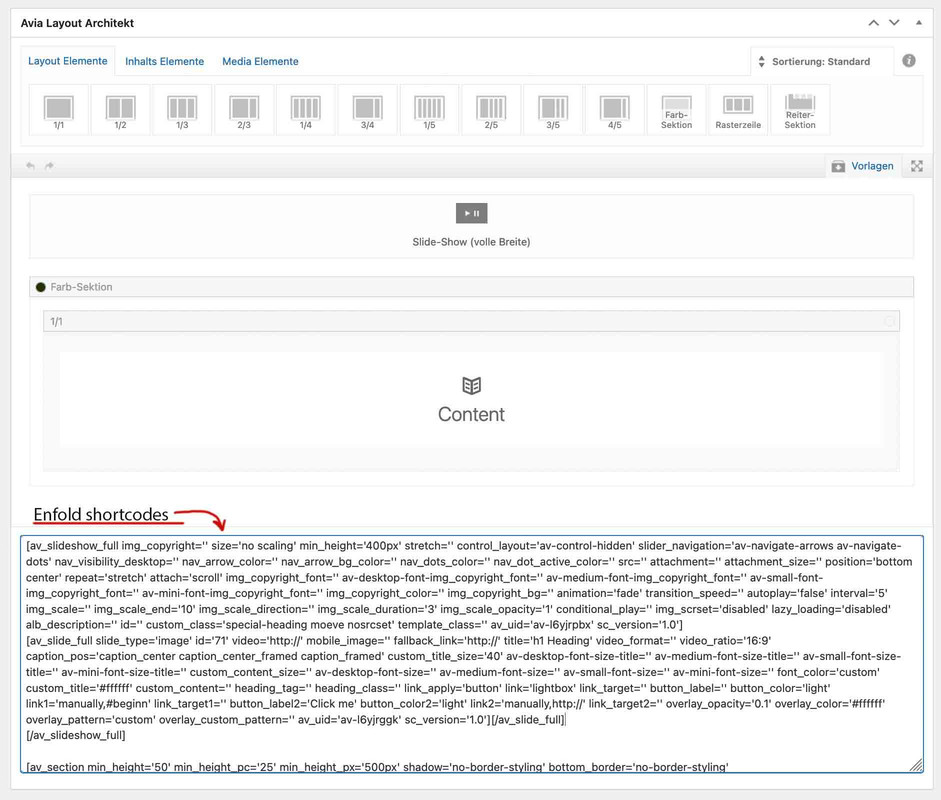
copy all shortcodes from there and input these to the same field in a new created page on the other installation.
And save now.
After that you had to fix the content – as the links, e.g. from images, still point to the first domain.
Hi,
Hm, but what is that space there? I there a way to make it a little bit smaller?
Yes, that should be possible. Please add this code in the Enfold > General Styling > Quick CSS field or add it in the child theme’s style.css file.
@media only screen and (max-width: 767px) {

  /* Add your Mobile Styles here */
  .av-lmuro99q-efb5a91e80c2f3c7de60c4602a959104 .article-icon-entry {
    margin-bottom: -50px;
  }
}
You may need to toggle or temporarily disable the Enfold > Performance > File Compression settings afterward.
Best regards,
Ismael
Hey Jackie,
Thank you for the inquiry.
The error occurs because the site contains a very old version of the theme, which is no longer compatible with later versions of PHP. You will have to manually update the theme to version 5.6.9 manually via FTP. Please check the link below for more info.
// https://kriesi.at/documentation/enfold/theme-update/#update-via-ftp
// https://kriesi.at/archives/the-complete-guide-to-updating-enfold
Best regards,
Ismael
Hey Flashpaper,
Thank you for the inquiry.
The automatic update will no longer work in the current version installed in your site. You will need to download the latest version (5.6.9) from your Themeforest account, then upload it to your server manually via S/FTP. Please check the documentation below for more info.
// https://kriesi.at/documentation/enfold/theme-update/#update-via-ftp
Best regards,
Ismael
Dear support,
I still have a couple of problems on this site I’m developing. on the checkout page, the flag to accept terms and conditions never shows up.
I have already tried to disable Woocommerce-paypal-payment plugin, and to remove all the custom CSS, but it doesn’t work. the only test I haven’t done is to disable the enfold theme. can you please check if is there any incompatibility between WooCommerce and Enfold?
Another problem I have on the same site is that the favicon doesn’t show even if the icon is set on enfold settings.
thanks
I’ve got the theme license intact and just realized the theme version is rather old. Yet, when I manually check for an update to the theme it returns a message that 4.8.6.2 is the latest. Any ideas on how to correct that? We’re running WordPress 6.4.2, PHP 7.4.33
Dear Mike,
thanks for your reply.
Yes, I will try to upload a copy of the live site on another test host tomorrow to see what happens there. Keep you informed.
I will ask my client what he thinks about putting the live site into maintenance. Is there an easy way, preferably within Enfold, to put the live site into maintenance mode?
Best regards,
C
Got this message from WP for the site
Howdy!
WordPress has a built-in feature that detects when a plugin or theme causes a fatal error on your site, and notifies you with this automated email.
In this case, WordPress caught an error with your theme, Enfold.
First, visit your website (https://mixitupmarketplace.com/) and check for any visible issues. Next, visit the page where the error was caught (https://mixitupmarketplace.com/wp-admin/) and check for any visible issues.
If your site appears broken and you can’t access your dashboard normally, contact your host provider (GoDaddy) – which I did, they said I need to troubleshoot through theme provider.
When seeking help with this issue, you may be asked for some of the following information:
WordPress version 6.4.2
Active theme: Enfold (version 4.6.2)
PHP version 8.0.30
Error Details:
An error of type E_COMPILE_ERROR was caused in line 332 of the file /var/www/wp-content/themes/enfold-2/functions-enfold.php. Error message: Unparenthesized a ? b : c ? d : e is not supported. Use either (a ? b : c) ? d : e or a ? b : (c ? d : e)
And within WP Admin, there is this ERROR MESSAGE at Themes:
Broken Themes – The following themes are installed but incomplete.
Enfold This theme failed to load properly and was paused within the admin backend. Resume Delete
I deleted this version and re-uploaded the Enfold zip file that I have, but it did not correct the problem. Please help –
JACKIE GAMBILL
Hi,
Thanks for that. It looks like you have selected the sans version of the font under Enfold->Advanced styling. Please change the font there.
You can check the minified CSS file in private, it’s likely easier if you simply inspect the elements you are interested in using your browser though.
Best regards,
Rikard
Hi,
Thanks for the login, I tested both of your custom buttons:
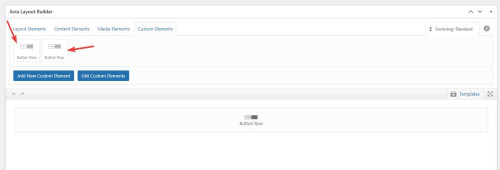
and they both show the add more button option:
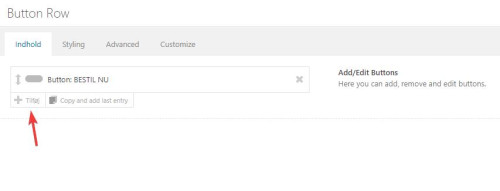
so I added more buttons and saved your page:
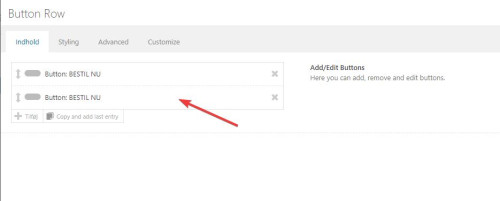
please check, if you still are unable to add buttons then please try the login you posted for us.
Best regards,
Mike
Hi,
Thanks for letting us know, we’ll close this thread for now then. Please open a new thread if you should have any further questions or problems.
Best regards,
Rikard
Hi Enfold!
I have a question. The font size of the text in all the blogposts is not the same as the size of the body on the rest of our website.
I want all of them in the same as the rest of the website: 16 pt. Is it possible to change it so the blogposts are also 16 pt?
Also I want all the single posts are left lined. Now they are in block. Is that possible?
Please let me know :-)
Hi,
Thanks for the update, we’ll close this thread for now then. Please open a new thread if you should have any further questions or problems.
Best regards,
Rikard
Hey ballindigital,
You can do that by copying the shortcodes, you can activate debug mode under Enfold->Layout Builder->Show advanced options->Debug Mode in order to display the shortcodes.
Best regards,
Rikard
Hi,
Is there an easy way to do this?
I’ve made a webpage in an Enfold site that I would I like to copy to another website which also uses Enfold.
I don’t want to migrate the entire site.
Just one page only.
Thanks,
Harvinder
Hi, thanks, I’ve changed the home page so that it does not include the grid row which was breaking the layout now, but I can see you’ve created a ‘Test Home’ page, on which I have recreated the problem. Simply add the empty grid row at the bottom there, and it will break the footer display and responsiveness, or add ‘006 grid row’ saved in Templates with content, and the grid row is not responsive (and breaks the footer as well). I attached the link to Dropbox in private section, here is the list of screenshots:
001 – correct layout desktop
002 – correct layout mobile
003 – added empty grid row at the bottom
004 – footer display changed in desktop view (no white borders)
005 – footer not responsive in mobile view
006 – added grid row with content (named 006 grid row in templates) – incorrect footer display in desktop view
007 – added grid row with content (named 006 grid row in templates) – incorrect footer display in tablet view and grid row layout broken – not full width and not stacked
008 – added grid row with content (named 006 grid row in templates) – incorrect footer display in mobile view and grid row layout broken – not full width and not stacked
009 – added grid row with content (named 006 grid row in templates) – incorrect footer display in the narrowest mobile view and grid row layout broken – full width but not stacked
Now, I’m also pretty sure if you now removed the top slider and left this ‘006 grid row’ which breaks the layout and responsiveness, the layout and responsiveness would be correct again… no idea why and how those elements are related (and perhaps this would also happen if you removed other layout elements, but I wasn’t checking that).
Just for the record, it was built on a clean WordPress install, then clean Enfold, followed by clean Enfold Child, and then one of your Demos loaded, so you can follow the same route if necessary. As you can also see not many plugins installed yet, and the ones that are there are rather standard.
Thanks,
Tom
-
This reply was modified 2 years, 3 months ago by
 Tom_Tom_UK.
Hey car4rent,
Thank you for the inquiry.
What is the name of the other theme that you’re using? It’s possible that the difference in response time is due to the scripts, stylesheets, and other resources that are loaded by the theme. It’s true that it can be a little slower compared to default themes only because the Enfold theme contains more features and offers more options. To improve the loading speed, consider referring to the articles below.
// https://kriesi.at/archives/scoring-100-100-in-google-pagespeed-insights-gtmetrix-pagespeed-and-yslow
// https://gtmetrix.com/wordpress-optimization-guide.html
Best regards,
Ismael
Thanks for your quick reply!
double lightbox was a mistake from my side: indeed, Enfold lightbox was still enabled.
Situation now:
Meow lightbox works with the Masonry gallery on pages.
Meow lightbox does not work on Masonry gallery on portfolio page. Meow also doesn’t work on single images on pages.
As selector I use the following classes:
.av-masonry-image-container, .av-masonry-item-with-image, .entry-content, .gallery, .mgl-gallery, .wp-block-gallery, .wp-block-image
As anti-selector:
.archive, .emoji, .attachment-post-image, .no-lightbox
It now opens the images as full screen image.
Hi,
Thank you for the update.
Are you trying to use the Advanced Layout Builder to modify the content of the Blog page? If so, you have to configure the Enfold > Blog Layout > Blog Layout settings to the last option (Use the Advanced Layout Builder…). Once done, you should be able to customize the content using the builder.
Best regards,
Ismael
Hello fellow Enfold users,
I’m encountering an issue with Enfold Version: 5.6.9, and I’m hoping you can help or perhaps share your experiences if you’ve faced a similar problem.
When I use a different theme, my server response seems to be fine. However, when I switch back to Enfold, my server score significantly drops. Is this a known issue among others? For clarification, I use https://www.seobility.net/en/seocheck/ with a free profile for testing.
In addition to Enfold, I also use WPML, where English is the main language, and French is the second language. Interestingly, I also notice considerable delays in the waterfall view on GTmetrix.
Does anyone have similar experiences or suggestions for improving server response and reducing delays?
Any help and insights would be greatly appreciated! Thank you in advance.
Best regards,
Hey ausgesonnen,
Typically you can add your javascript into your child theme functions.php with this function:
function custom_script() { ?>
  <script>

/* your javascript here */

  </script>
  <?php
}
add_action( 'wp_footer', 'custom_script', 99 );
If you are not using a child theme I recommend the WPcode plugin this plugin supports PHP code snippets, JavaScript code snippets, & CSS code snippets.
Best regards,
Mike
Hi,
Glad we were able to help, if you have any further questions please create a new thread and we will gladly try to help you. Thank you for using Enfold.
Best regards,
Mike
Hallo,
ich habe hier ein Javascript und würde gern wissen, wie ich es in Enfold integrieren kann. Unter Theme editor? In welcher Datei genau?
beste Grüße
Hi
Although I have installed the latest version of WordPress (6.4.2) I get the following message when debugging:
Deprecated: Der Hook avf_avia_builder_masonry_lightbox_img_size ist seit Version 4.8.2 veraltet! Verwende stattdessen avf_alb_lightbox_image_size. in /home/webmanuf/www/staging.immo-cons.ch/wp-includes/functions.php on line 6031
Any solution or do I have to live with it?
I have this in my functions.php (because of the image sizes):
add_filter( ‘avf_avia_builder_masonry_lightbox_img_size’, ‘enfold_customization_change_popup_size’ );
function enfold_customization_change_popup_size( $size ) {
return ‘fullsize’;
}
Thanks for your reply …
Hi,
You homepage had a border around it because it had been saved as a Block Editor page:

I switch it back to a Advanced Layout Builder page and saved it for you.
I also tested a few pages and the ALB worked on all the pages.
Please check and then ask your web host about your cPanel backups, typically cPanel creates a backup each week, you may wish to enable this.
Best regards,
Mike
Hi,
On mobile there is not enough room for the buttons next to the logo, so they will need to be smaller and under the logo.
Try this CSS in your Enfold Theme Options ▸ General Styling ▸ Quick CSS field:
@media only screen and (max-width: 430px) {
	.responsive #top #header #header_main .inner-container .widget {
    order: 3;
    flex-basis: 100%;
	}
	.responsive #top #header #header_main .inner-container .widget .avia-button.avia-size-medium {
	padding: 12px 5px 10px;
    font-size: 12px;
    min-width: 60px;
	}
	.responsive #top #header #header_main .inner-container .widget>div {
		padding: 0;
	}
	.responsive #top #header #header_main .inner-container .widget>div>div {
	text-align: center;
	}
}
Please ensure to copy the code from the forum and not an email notification so the symbols are not converted.
After applying the css, please clear your browser cache and check.
Best regards,
Mike
Hey kerrya4446,
Please see our documentation for the blog there are a couple of different ways to set it up.
After reviewing the documentation, if you need further help please explain which way you want to set up the blog and include a admin login so we can help.
Best regards,
Mike
Hi,
Thank you for your patience, I have examined the test page on your site removing & adding the slider and then checked the page shortcode carefully with the Avia Layout Builder Debugger and at one point I thought this might be related to the wp:paragraph tags that I found in some text elements:

but removing them didn’t help, so I copied the page to my test site to see the error would follow but it didn’t, I linked to the test page in the Private Content area so you could also check. This make me think that it was related to your footer widgets somehow, so I copied your to my site and I still couldn’t reproduce the error.
I then disabled the header on your test page and reuploaded the theme and disabled your plugins, but this didn’t help.
I also disabled your File Compression and cleared your Old CSS And JS Files.
So I’m not sure what the issue is from, but it doesn’t seem to be a error in the theme, since I can’t reproduce the error.
Your Site Health report says that your PHP module, imagick, is not installed, I don’t see how that could cause an error like this but it may be worth tring.
You could also try a different PHP version, I’m using v8.0.30, and you are using v8.1.26, perhaps try v8.2 or v7.4
Best regards,
Mike
Hi Support,
I tried to add a custom code snippet to enable the ALB editor on the woocommerce shop page detailed here:
However, something went wrong, and it didn’t work, and I now have two issues that need to be fixed.
1) the site now has a white border around all the content on the homepage; the other pages don’t seem to be affected.
2) when I go to edit any page, the ALB no longer loads on the back end; all I see are the page’s shortcode and nothing else.
I tried updating the theme to the latest version, but that hasn’t helped.
I’d be very grateful if you could help me get these issues fixed, please.
Thanks
In all my other themes, the blog page only shows excerpts of blog posts with a more… button/link to the full aritcle.
How can I do this in Enfold?
Any help appreciated
Kerry



