Dear support,
I’m using Enfold+WPML and I’m trying to translate the footer widgets and a header widget.
The first and second-column widgets are okay, but the third should contain a footer menu, and the fourth a custom HTML. every time i switch to a different language, I lose the translations I just made manually.
Also in the section WPML > Strings translation, I can’t find the widget areas I need to translate. is there a work-around or other solutions compatible with Enfold, to have different widgets in different languages?
thanks
Hi Munford,
I’m glad that Ismael could help you :)
Thanks for using Enfold and have a great day!
Best regards,
Nikko
Hi Petra,
I can’t seem to see the issue on my end, is it fixed?
If not, please try to add this CSS code in Enfold > General Styling > Quick CSS:
.html_av-overlay-side #top #wrap_all #header .av-burger-overlay-scroll #av-burger-menu-ul li:hover a {
    color: inherit;
}

.html_av-overlay-side #top #wrap_all #header .av-burger-overlay-scroll #av-burger-menu-ul li a:hover {
    color: #8ca9d3;
}
Best regards,
Nikko
Hi solf,
I’m glad that @Guenni007 could help you :)
Thanks for using Enfold and have a great day!
@Guenni007 thanks for helping out :)
Best regards,
Nikko
Hi Justin,
I’m glad that Ismael could help you :)
Thanks for using Enfold and have a great day!
Best regards,
Nikko
Hi Doug,
Please try to add this CSS code in Enfold > General Styling > Quick CSS:
.search-results .blog-author,
#top.search-results .post-meta-infos > .text-sep:nth-last-child(2) {
    display: none;
}
Best regards,
Nikko
Hi JannyPolak,
We’ll wait for the link then.
You can also try to go to Enfold > Performance > CSS File Merging And Compression set it to Disable – no CSS file merging and compression and see if it helps.
Best regards,
Nikko
Hi Monika,
I’m glad that we could help you :)
Thanks for using Enfold and have a great day!
Best regards,
Nikko
hi,
what should I do to maintain the demo of your home page changes for me when I insert the photos, I’m still working locally. tks


-
This topic was modified 2 years, 3 months ago by
 wosky.
Hi,
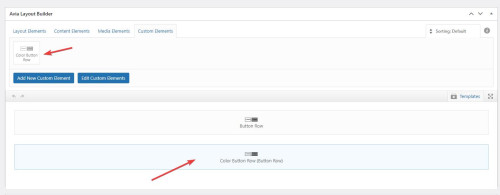
Please note in our documentation Custom Elements Advanced Options about the opton: Custom Elements For Subitems which by default is set to All sub-items use the same custom element template for button rows you will want to change this to Individually select subitem custom element templates
Please scroll down to this part of the documentation for Button Rows and review.
I have done this for you on your test page:

Best regards,
Mike
Hi,
Thanks for letting us know, we’ll close this thread for now then. Please open a new thread if you should have any further questions or problems.
Best regards,
Rikard
Hey Alexandre,
If you can’t get access to the account which was used to purchase the license, then I would recommend that you purchase a new license. Otherwise you will have this problem every time you need to update or access the theme files.
Once you have access to the theme files, then the update to 5.6.9 has to be done manually from the version you are running, please refer to my replies in this thread: https://kriesi.at/support/topic/enfold-4-5-theme-update-update-failed-download-failed-a-valid-url-was-not-pro/#post-1021541
You can either update manually via FTP: https://kriesi.at/documentation/enfold/how-to-install-enfold-theme/#theme-update, or upload the new theme files via Appearance->Themes->Add New, and select to overwrite the old theme files after the upload has finished.
If that doesn’t work then please try to delete the whole theme folder, then replace it with the new version. Make sure that you have backups of the site before starting updating.
Also please read this after you have updated: https://kriesi.at/documentation/enfold/theme-registration/
Best regards,
Rikard
Hi,
Please try the following in Quick CSS under Enfold->General Styling:
.sidebar li.page-item-4851 {
  display: none;
}
Best regards,
Rikard
Well,
I put your code it in the Enfold > General Styling > Quick CSS field or in the child theme’s style.css file, but the result remains the same. Nothing changes. 🤷♂️
So, can you now please help with what I mentioned in my previous request?
 Alexandre Schweitzer
Guest
Hi,
I’m a freelance web developer and one of my client has an Enfold Theme bought about 7 years ago by another person. As you can guess, I need to update his website and it means update his theme as is actually run in 4.1.2 version. I’m stuck with the PHP update as long as I will not update the theme.
I don’t have the API key and other information about the Themeforest account that bought the theme so I’m looking for another solution to find the latest update and apply it on my client’s website.
Could you help me with that ?
Thank you very much.
Best Regards,
Alexandre.S
Hi,
Thanks for that. I activated debug mode under Enfold->Layout Builder->Show advanced options->Debug mode, then copied the shortcodes from the problem page to a new page, and that seems to have worked. Please check the test page in private.
Best regards,
Rikard
I am using enfolds Products List content element and adding product details into the ‘Product Short Description’ however I would like to limit the text length it displays on the listings I have seen function code for the Product Description but not the ‘Product Short Description’ can any one assist me with this please.
HI,
I tried this as stated in de documentation
*—————————————-
// CSS – Contact form submit button
//————————————–*/
#top .avia_ajax_form input[type=’submit’] {
border: none;
background: #eb5424;
color: #f6f6f5;
}
#top .avia_ajax_form input[type=’submit’]:hover {
background: #000000;
}
but it did not change, even after clearing the cache.
I changed submit to the Dutch ‘Verzenden’ for the button, so I tried that wording in the CSS as well, but without success
Maybe ‘submit’ has to be something else,since I use the Dutch version of WordPress/Enfold?
Hey!
We will include a fix in the next patch. If you would like to test it yourself, please edit the enfold/config-templatebuilder/avia-shortcodes/masonry_gallery/masonry_gallery.php and the enfold/config-templatebuilder/avia-shortcodes/masonry_entries/masonry_entries.php file, remove everything and replace it with the following code.
masonry_gallery.php: https://pastebin.com/YudgryRc
masonry_entries.php : https://pastebin.com/nyM4istw
Best regards,
Ismael
Hey Monique,
Thank you for the inquiry.
Please temporarily edit the enfold/config-templatebuilder/avia-template-builder/php/class-element-templates.php and remove this code around line 672.
			$duplicate  = '<a href="' . $notify_url . '" aria-label="' . esc_attr__( 'Make a duplicate from this element template', 'avia_framework' ) . '" rel="permalink">';
			$duplicate .=		esc_html__( 'Duplicate', 'avia_framework' );
			$duplicate .= '</a>';

			$actions['duplicate'] = $duplicate;
Let us know if this removes the Duplicate button.
Best regards,
Ismael
Hey mgyura,
Thank you for the inquiry.
This issue has been fixed in the latest version of the theme. Please upgrade from 5.6.6 to the latest version 5.6.9. You may need to toggle or temporarily disable the Enfold > Performance > File Compression settings afterward.
Best regards,
Ismael
Hey Marion,
Thank you for the inquiry.
The pricing table in the demo is just a simple column containing image and text elements. If you want to use the layout of the demo page on your own site, we can provide you with the shortcodes. First, you need to set the builder to debug mode.
// https://kriesi.at/documentation/enfold/intro-to-layout-builder/#debug-mode
You can then paste the shortcodes in the shortcode field, located just below the Advance Layout Builder:
// https://wtools.io/paste-code/bS5K
Best regards,
Ismael
Hi,
I followed your instructions and put the code in the text block,
The css code above should be added in the Enfold > General Styling > Quick CSS field or in the child theme’s style.css file, not in the Custom CSS Class field.
Best regards,
Ismael
Hello
How do I remove the author’s name on posts, events, and blog articles? I have used the church theme and every post that is public has my name. Is there a place where I can remove that? Please help
Hello,
Since the latest Enfold update was installed, I noticed I am getting a “duplicate” post link when I roll over an order link in WooCommerce. I spoke to Woo Support and they said it is from the parent theme since the CSS on the button says Avia Framework. Is there a simple solution to fix this?
Thanks,
Monique
 Håkan
HåkanGuest
Hello, is it possible to add a video.like this one (see link) with Enfold? Will I need a plugin?
It should be intregrated to the website, not with a play-button or frames.
Hi,
If you are using Enfold v5.6.9 you don’t need to use a plugin to use webP images, I have tested two webP images as logos and a transparent header with no issues.
Try ensuring that you are using this version and disabled the plugin and check again, also check if you have any custom css that could be causing a conflict.
If you continue to experience this issue please open a new thread and include a admin login so we can examine, as this is not your thread, posting your admin login here will not be private and you will not see our comments in the Private Content area.
This thread is quite old so we will close it and look for your new thread, if you have further issues.
Best regards,
Mike
Possible to add tool bar options to the WYSIWYG editor in Enfold (specifically the Text Field) module? and if so can you point me in the right direction on how to do it?
 Marion
Guest
hi there,
I’d like to start with another demo page, but include the pricing table like shown here: https://kriesi.at/themes/enfold-gym/pricing/
Is that possible? Which element is that?
Many thanks and best, Marion



