Hey jaimemerz,
Thank you for the link to your site I added this snippet to your WP Code plugin and ensured that in the top right corner it was a code type: PHP snippet

then I added this code and saved.
function mobile_sub_menu_sticky() { ?>
<script>
window.addEventListener('DOMContentLoaded', function() {
  (function($){
  	var width = $(window).width();
    var $stickyTop = $('#sub_menu1');
    if (width <= 767) {
    $stickyTop.waypoint(function(direction) {
      if (direction === 'down') {
         $stickyTop.addClass('sticky-top');
      }
      if (direction === 'up') {
         $stickyTop.removeClass('sticky-top');
      }
    }, {
      offset: '0%'
    });
    }
  })(jQuery);
});
</script>
  <?php
}
add_action('wp_footer', 'mobile_sub_menu_sticky');
I then added a second snippet with this css:
.responsive #top #sub_menu1.av-switch-768.av-submenu-container.sticky-top {
	position:fixed!important;
	top:0!important;
	z-index:600!important;
}
and now on your page the fullwidth submenu is sticky when it reachs the top, and un-sticks with you scroll back to the top:

Please clear your browser cache and check.
Best regards,
Mike
Hi Rikard,
Checking the Enfold admin it looks like ‘News Stuff’ is the selected page for the blog.
So you’re saying if that is selected as the blog page it will impose a template that overrides any customisation I might do to the page?
That’s fine, I just didn’t know what would happen when I select the page for the blog in the Enfold options – it doesn’t say “don’t try and customise you page”…!!
regards
Hugh
Hi,
Thank you for your patience, this is because you have set the header to:
Header is invisible and appears as soon as the user scrolls down
Header ist unsichtbar und erscheint, sobald die Nutzer nach unten scrollt

please choose a different option according to your desires.
Best regards,
Mike
Hi,
Typically if you enable the Enfold Theme Options ▸ Performance ▸ Delete old CSS and JS files and clear your cache plugin cache and the reload the frontend of your site incognito mode this should empty your /wp-content/uploads/dynamic_avia/ directory
then try fix wp bug, disable unique timestamps or disable adding unique timestamps only and also reload the frontend of your site incognito mode, not as the admin user. Please note that you should also completely clear the WP Rocket cahe.
Best regards,
Mike
Hi,
Great, we’ll close this thread for now then. Please open a new thread if you should have any further questions or problems.
Best regards,
Rikard
Hi,
Great, I’m glad to hear that you managed to solve your problem. We’ll close this thread for now then, please open a new thread if you should have any further questions or problems.
Best regards,
Rikard
Hi,
Glad to hear that you have this sorted out, if you have any further questions please create a new thread and we will gladly try to help you. Thank you for using Enfold.
Best regards,
Mike
Hey Meetx,
Please try the following in Quick CSS under Enfold->General Styling:
.main_color .pricing-table li.avia-heading-row {
  height: 290px;
  min-height: 290px;
}
Best regards,
Rikard
Hi,
I have made no changes to teh blog apart from update the enfold theme over time. However, when i post a post now to the blog it does not show in the same style as the older ones why is this:
Old: https://a-wise.co.uk/how-to-register-as-a-sole-trader/
New: https://a-wise.co.uk/uk-dividend-tax-explained-step-by-step-guide/
Hi Rikard,
I made another thread for a problem that came up after the Enfold update, but afte 23+ hours there’s been no reply?
Here’s the link – https://kriesi.at/support/topic/on-click-pop-up-opt-in-form-not-working-after-enfold-update/#post-1437135
Hi,
Thanks for the update. Please open a new thread if you should have any further questions or problems.
Best regards,
Rikard
Enfold has been successfully installed and filled on the domain “xyz.de”.
The intention now is to configure the domains “xyz.com” and “yyy.de” to automatically redirect to “xyz.de”, ensuring users always land on the primary domain.
What steps are needed to set up this redirection?
Hi liuxuewu,
Please open a new thread and include WordPress admin login details in private, so that we can have a closer look at your site.
Best regards,
Rikard
 El
ElParticipant
Hey there,
we geht an error that is triggered by the Enfold minify script process:
AH01071: Got error ‘PHP message: PHP Fatal error: Uncaught ValueError: fread(): Argument #2 ($length) must be greater than 0 in /var/www/vhosts/aerobis.com/httpdocs/wp-content/themes/enfold/framework/php/function-set-avia-backend.php:1146\nStack trace:\n#0 /var/www/vhosts/aerobis.com/httpdocs/wp-content/themes/enfold/framework/php/function-set-avia-backend.php(1146): fread()\n#1 /var/www/vhosts/aerobis.com/httpdocs/wp-content/themes/enfold/config-templatebuilder/avia-template-builder/php/class-asset-manager.php(810): avia_backend_create_file()\n#2 /var/www/vhosts/aerobis.com/httpdocs/wp-content/themes/enfold/config-templatebuilder/avia-template-builder/php/class-asset-manager.php(358): aviaAssetManager->generate_file()\n#3 /var/www/vhosts/aerobis.com/httpdocs/wp-content/themes/enfold/config-templatebuilder/avia-template-builder/php/class-asset-manager.php(243): aviaAssetManager->merge()\n#4 /var/www/vhosts/aerobis.com/httpdocs/wp-includes/class-wp-hook.php(324): aviaAssetManager->try_minifying_scripts()\n#5 /var/www/vhosts/aerobis…’
—
This happens (or at least affects us) since the provider updated to the latest recommended Woocommerce / WordPress versions of MySQL and PHP.
Best,
El
Hey nadinedomnink,
You can change that under Enfold->General Styling->Typography.
Best regards,
Rikard
On some of my Enfold-based sites I use google analytics to monitor traffic and try to improve my google ranking.
Now, I’m not an expert on cookies… but I would like to make sure I comply with all the regulations in force.
My question is: to comply with all the regulations, do I need to install third-party plugins?
Or can I just use the “Privacy and Cookies > Cookie Handing” options panel and “Enable cookie consent messages”?
Best regards
Oriano
Hi,
As I understand you would like to be able to add icons next to your main menu items, here is a easy was to add icons like this:
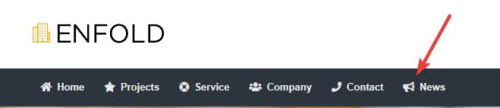
We will add this function to the end of your child theme functions.php file in Appearance ▸ Editor or if you are not using a child theme you could use the WP Code plugin then add a new snippet, in the top right corner use the PHP snippet as the code type:
then add this code and save:
function enqueue_font_awesome() {
    wp_enqueue_style('font-awesome', 'https://cdnjs.cloudflare.com/ajax/libs/font-awesome/5.15.3/css/all.min.css');
}
add_action('wp_enqueue_scripts', 'enqueue_font_awesome');
function add_icon_to_menu_item($item_output, $item, $depth, $args) {
    $custom_classes = implode(' ', $item->classes);
    preg_match('/menu-item-icon-([^ ]+)/', $custom_classes, $matches);
    if (!empty($matches[1])) {
        $icon_class = esc_attr($matches[1]);
        $icon = '<i class="fa ' . $icon_class . '"></i>';
        $position = strpos($item_output, '<span class="avia-menu-text">');
        if ($position !== false) {
            $item_output = substr_replace($item_output, $icon, $position, 0);
        }
    }
    return $item_output;
}
add_filter('walker_nav_menu_start_el', 'add_icon_to_menu_item', 10, 4);
Please ensure to copy the code from the forum and not an email notification so the symbols are not converted.
Then add this CSS in your Enfold Theme Options ▸ General Styling ▸ Quick CSS field:
#top #header li.menu-item > i ~ a {
	display: inline-block;
}
#top #header li.menu-item > i:before {
	color: #fff;
}
.av-main-nav li[class*="menu-item-icon-"] > a > i ~ .avia-menu-text {
    border-left-style: none;
    border-left-width: 0;
    padding-left: 13px;
    margin-left: -6px;
}
#av-burger-menu-ul li > a > i ~ .avia-menu-text {
	  padding-left: 13px;
    margin-left: -6px;
}
Please note that you may want to change the color, in this example I’m using white because my menu is dark.
Then go to your menus and ensure that the Custom Class field is enabled for your menu items:
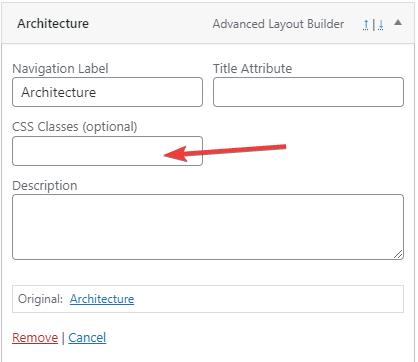
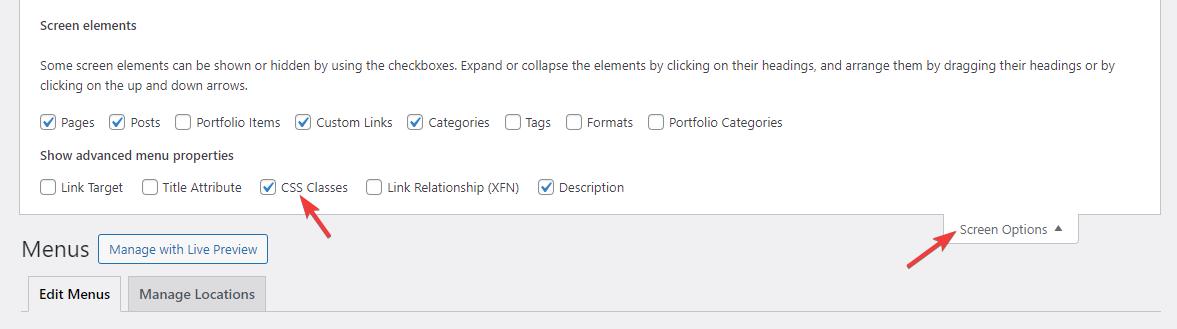
If you don’t see it go to the Screen Options and enable it.
Now we will use the Font Awesome icons because it will be easier to use a class name to determine the icon used in the custom class field, the built-in entypo-fontello icons don’t use class names the same way so it would be a little trickier for you. The function adds the icon next to the menu item based on the class used in the menu item custom class field.
Use this format: menu-item-icon-fa-home the first part menu-item-icon- tells the function that a icon will be used, and then the Font Awesome icon code is appened to the class fa-home, for example:
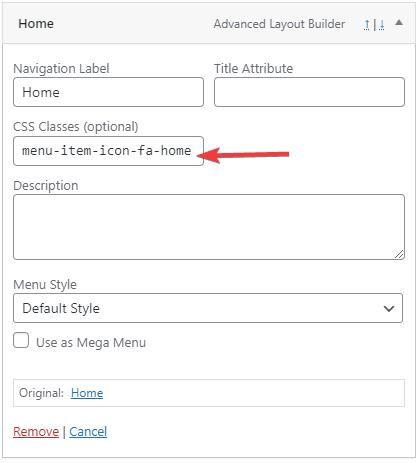
these are the classes I used in this example:
menu-item-icon-fa-home
menu-item-icon-fa-star
menu-item-icon-fa-life-ring
menu-item-icon-fa-users
menu-item-icon-fa-phone
menu-item-icon-fa-bullhorn
This also works for the sub-menu items:

and the mobile menu:
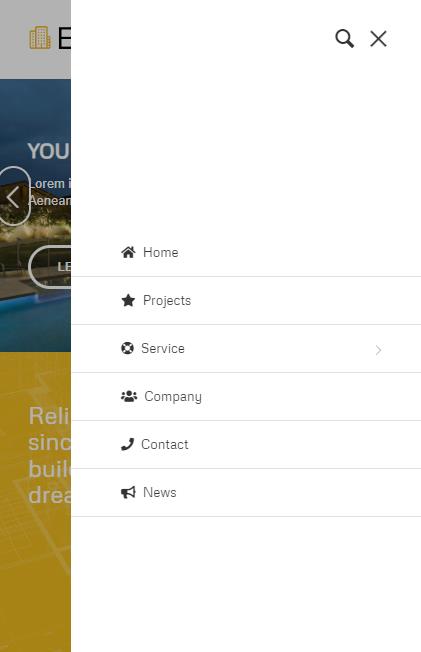
Best regards,
Mike
Hi,
Ok, on your page you have two odd third items, for both of these I added the custom class odd-item

Then I added this CSS in your Enfold Theme Options ▸ General Styling ▸ Quick CSS field:
@media only screen and (max-width: 767px) {
.odd-item {
    position: relative;
    left: -23%;
}
}
now on mobile they are centered:

Please clear your browser cache and check.
Best regards,
Mike
Hey Nfeehw873,
Thanks for the login details. Could you try updating the theme to the latest version (5.6.10) to see if that helps please? https://kriesi.at/documentation/enfold/how-to-install-enfold-theme/#theme-update.
Best regards,
Rikard
Hallo zusammen,
ich schreibe ausnahmsweise auf Deutsch heute.
Ein Kunde von uns möchte Google Ads schalten und will den Versand einer Anfrage über das Kontaktformular als Conversion tracken.
Verständlicherweise. Allerdings funktioniert unser Setup nicht wirklich.
Folgendes Script wäre super wenn es mal ein paar Infos in die Datalayer schreiben würde…
Bisher hab ich das aber nicht zum laufen bekommen in Enfold (weder über die functions.php noch sonst wo)
<script>
document.addEventListener(‘submit’, function(event) {
// Stellen Sie sicher, dass das Ereignis von einem Formular stammt
if (event.target.tagName === ‘FORM’) {
// Erfassen Sie die ID des Formulars und die aktuelle URL
var formId = event.target.getAttribute(‘id’);
var pageUrl = window.location.href;
// Senden der Daten an den Google Tag Manager
window.dataLayer = window.dataLayer || [];
window.dataLayer.push({
‘event’: ‘customFormSubmission’,
‘formId’: formId,
‘pageUrl’: pageUrl
});
}
}, true); // Verwenden Sie die Capture-Phase, um sicherzustellen, dass das Ereignis erfasst wird
</script>
Was wäre mit Enfold eine praktikable Lösung?
Herzllichen Dank für Euer schnelles Feedback.
FelixL
Liebes Enfold Team,
leider funktioniert das Enfold Kontaktformular nicht richtig. Es kommt die Nachricht das Formular wurde erfolgreich versendet, aber dann kommt keine Mail und ich finde auch keine Stelle wo ich nachschauen kann in Enfold das eine Nachricht gesendet wurde … und ich möchte auch kein zusätzliches Plug in verwenden. Ich benötige Hilfe.
Vielen Dank! Beste Grüße Natalie
I don’t quite understand what you mean by alb element.
I don’t have a defined page for the layout.
I have set this layout:
Enfold Child > Blog Layout > Grid Layout
but in the archive.php I have now found the customization I had to make to display it correctly.
$atts = array(
										'type'			=> 'grid',
										'items'			=> get_option( 'posts_per_page' ),
										'columns'		=> 2,
										'class'			=> 'avia-builder-el-no-sibling',
										'paginate'		=> 'yes',
										'preview_mode'	=> 'entry_with_sidebar',
										'image_size'	=> 'entry_with_sidebar',
										'use_main_query_pagination' => 'yes',
										'custom_query'	=> array(
																'post__in'	=> $post_ids,
																'post_type'	=> get_post_types()
															)
									);
Thanks for the help
Hi,
Glad we were able to help, if you have any further questions please create a new thread and we will gladly try to help you. Thank you for using Enfold.
Best regards,
Mike
Hi,
Glad we were able to help, if you have any further questions please create a new thread and we will gladly try to help you. Thank you for using Enfold.
Best regards,
Mike
Hi,
Thanks for the screenshot, it looks like you are using the ALB for your single posts and currently the post body is a single column and you want to add a 1/5 column on both sides to reduce the post content width, but instead of editing each post you could use css.
So your two empty 1/5 columns would be about 40% of the page, so we will set the page width to 60% and we will have it only work on screens larger than 1024px.
Try this CSS in your Enfold Theme Options ▸ General Styling ▸ Quick CSS field:
@media only screen and (min-width: 1024px) {
.responsive #top.single-post .container_wrap_first > .container {
	max-width: 60%;
}
}
Please ensure to copy the code from the forum and not an email notification so the symbols are not converted.
After applying the css, please clear your browser cache and check.
feel free to adjust to suit.
Best regards,
Mike
Hi,
To remove the sidebar please see the options at Enfold Theme Options ▸ Sidebar Settings and for the footer, it looks like you using a footer page at Enfold Theme Options ▸ Footer if you are using a footer page then the regular footer won’t show.
If this doesn’t help please include an admin login in the Private Content area so we can examine closer.
Best regards,
Mike
Hi,
Glad we were able to help, if you have any further questions please create a new thread and we will gladly try to help you. Thank you for using Enfold.
Best regards,
Mike
Hello,
I recently did an Enfold update.
I have a couple pages where I have a pop up email opt-in that only comes up when the link is clicked.
Since the update, the pop up now appears when the page is opened, and the page just reloads when the link is clicked.
Here’s the code in the link:
<a href="#" onclick="awf_Form_.showForm(); return false;"><strong>click here</strong></a>
Here’s the code I have at the bottom of the page:
<script type="text/javascript">(function(d, s, id) {
    var js, fjs = d.getElementsByTagName(s)[0];
    if (d.getElementById(id)) return;
    js = d.createElement(s); js.id = id;
    js.src = "//forms.aweber.com/form/55/810397455.js";
    fjs.parentNode.insertBefore(js, fjs);
    }(document, "script", "aweber-wjs-q8p2d1sy8"));
</script>
What can I do to get this working again?



