-
Search Results
-
Hallo,
ich baue gerade wieder eine Seite mit enfold auf, welches mein absolutes Lieblingstheme ist. Mitten im Prozess sehe ich zwar im Backend die Slide Show volle Breite noch, im Frontend wird aber kein Bild mehr angezeigt. Das Bild/die Bilder WAREN aber zu sehen. Ich habe das Theme schon upgedatet und alle vorhandenen Plugins nach und nach deaktiviert – leider ohne Erfolg. Uach die CSS Codes, die ich im Netz zu diesem Problem gefunden habe:
.responsive .container {
width: 100% !important;
max-width: 100% !important;
}
.av_slideshow_full {
width: 100% !important;
}, haben mir leider nicht geholfen. Deswegen brauche ich bitte Hilfe. Danke!
Topic: Ticket system in demo enfold
Hi
Is there a demo in enfold where it shows how the events calendar works with its ticket system?Tnx in advance
Greetz
KarinHi Support-Team, hi all,
Unfortunately, I’m stuck when it comes to adding new logos to the menu. I thought SVG would be a good idea. Unfortunately, my attempts were not successful. Even reverting to the previous state didn’t work properly. I’ve spent quite some time troubleshooting and would really appreciate your help.
Setup: Enfold 7.1.4, child theme active, WordPress 6.9.4. PHP memory limit is set to 256M. Active plugins are listed in the separate system info section.
1. Logo too large: Uploaded PNG (600×44 px) displays oversized. Enfold renders height=”100″ width=”300″ regardless of actual dimensions. Header Size set to “slim”.
2. SVG logo won’t save: Uploaded SVG (877×64 px) to media library successfully. Clicking “Use Image as logo” with Full Size selected does nothing. Safe SVG 2.4.0 active.
3. Transparency logo not loading: Default logo (dark version) is set. White version is uploaded via Enfold → Header → Transparency Options → Transparency Logo. But when scrolling up to the transparent header area, the white logo does not appear — only the dark logo is shown on the dark banner.
4. Child theme CSS ignored: Custom CSS added to child theme style.css via SFTP (file content verified). CSS never loads on frontend. Autoptimize bundles all CSS and serves old cached versions. Deleted /wp-content/cache/*, emptied Autoptimize cache, hard reloaded — no effect. URLs still contain .pagespeed.ce. suffixes from server-level PageSpeed cache that cannot be cleared from WordPress.
5. “Saving didnt work”: Every save attempt in Enfold Theme Options (including Quick CSS) fails with this error. Interestingly, some changes (like switching the logo image) do seem to take effect despite the error message — but I cannot be sure which changes are actually saved and which are not. Tested in a different browser, deactivated SG Security – error persists. PHP memory limit is 256M, so that shouldn’t be the cause.What I’ve already tried:
Clearing all caches (Autoptimize, WP Super Cache, admin bar “Delete Cache”)
Manually deleting /wp-content/cache/* via SFTP
Hard reload (Ctrl+Shift+R) and incognito/private browsing
Deactivating SG Security
Increasing WP_MEMORY_LIMIT to 256MQuestions:
Do you have any ideas on how I can successfully incorporate both new logos?
Why does Enfold hardcode width=”300″ height=”100″ on logo images ignoring actual dimensions?
Why does SVG logo selection not save?
Why does the transparency logo not display on the transparent header?
What causes the persistent “Saving didnt work” error — and why do some changes save despite the error?
How to make child theme CSS load when Autoptimize + server-level PageSpeed cache everything?Many thanks for your help!
Kind regards,
bleistiftTopic: Enfold Theme update
Hallo nach Austria,
unser Kunde hatte wohl das Enfold Template bei euch gekauft und nach dem letzten PHP update funktioniert es nicht mehr. Aktuelle Version: 4.1.2.
Wir würde gerne die neuste Verion kaufen, schickt uns bitte die Modalitäten.Danke und LG aus Bozen
JörgTopic: Like / Dislike system?
Enfold doesn’t have a like dislike system on posts.
Can you recommend an implementation that would work with it the best?
The idea is to enable users to click upvote and downvote on posts.
Hi dear support team
I have bought a regular license for Enfold last year and have a valide token (generated on 15.12.2025).As I wanted to do some update for the website, all my pages in the advanced editor are grey (no possibilities to edit with the Advanced Layout Builder). So I checked my automatic updates and have seen that the latest version of enfold is 6.0.8. No further updates are possible.
Why is this and what can I do?I also deactivated all plugins and cleared my cache to check from where this behavior could come, but no change… all the pages I want to edit stays gray.
Thanks for your assistance and inputs on how to proceed.I am writing to request a written clarification regarding Enfold license requirements for a specific WordPress Multisite project, before we proceed with the build. I would appreciate a clear answer I can retain on file.
About the organisation:
The client is a registered non-profit religious association. The association operates a network of local churches across severa locations). All of these churches belong to the same single legal entity and share the same mission, branding, and governance. No revenue is generated from the websites; they exist to serve the association’s religious and community work.Planned technical architecture:
We are planning a WordPress Multisite network with the following characteristics:– One single domain:
– Subdirectory structure:
– One WordPress installation, one database, one Multisite network
– One shared Enfold parent theme installed at the network level
– One shared custom child theme used by all sites in the network (identical header, footer, navigation, branding and styling across all sites)
– All subsites serve the same association and the same overall purpose: presenting the local congregationsThe websites are not sold, licensed, or transferred to third parties. Each local congregation is an internal part of the same association – they are not separate clients or customers. The purpose is to provide each congregation with its own local content area (events, contact details, pastor information) within the shared association website.
My question:
For this specific architecture: single domain, single WordPress Multisite installation, single Enfold parent theme, single child theme, single non-profit association, does one single Regular License cover the entire Multisite network, or does ThemeForest / Kriesi require a separate Regular License for each subsite in the network?I have seen varying interpretations in your support forum over the years, and I want to ensure we act correctly and in compliance with your licensing terms from the start. A written confirmation from you of the correct interpretation for this specific scenario would be very helpful.
Thank you for your time and for the excellent theme. I look forward to your reply.
Kind regards,
Topic: Masonry portfolio
How do I create a masonry portfolio with category filter?
example: https://kriesi.at/themes/enfold/portfolio/masonry-portfolio/Hello Kriesi Team,
After accidentally using the Enfold “Reset” option, we experienced a major issue with our media.
What happened:
- Immediately after the reset, all images and graphics disappeared from the website.
- The WordPress Media Library is now empty.
Current findings:
- All media files still physically exist on the server.
- Verified via FTP (FileZilla) under:
- <i>/wp-content/uploads/</i>
- Files are present in their original folders (year/month structure).
- File names are unchanged and match what was previously uploaded.
Conclusion so far:
- This appears to be a database/media index issue, not actual file deletion.
- It seems the Media Library entries (attachments) were removed or disconnected during the reset.
What we need help with:
- Is it possible that the Enfold reset removed or affected WordPress media database entries?
- What is the recommended way to re-sync or rebuild the Media Library from existing files?
- Is there a known Enfold-related process that could have triggered this behavior?
Additional context:
- This occurred at the same time as a full theme options reset.
- No manual deletion of media files was performed.
- The issue impacts all existing content that previously referenced these images.
This has effectively broken all visual elements across the site, so any guidance on restoring the Media Library from existing files would be greatly appreciated.
Thank you,<br>
ArmenHello Kriesi Team,
I’ve been unable to register the Enfold theme for automatic updates via Envato, despite multiple attempts using different tokens and methods.
Setup Steps Completed:
- Installed Envato Market plugin
- Created OAuth app + API key via Envato
- Generated multiple Personal Tokens (basic + full permissions)
Issue:
- Envato connects, but purchased items do not display
- Theme cannot be registered for updates
Error Output:
- Connected to Envato successfully
- Purchases accessible
- Username & Email not accessible
- username Errorcode 403 – <i>not_authenticated</i>
- email Errorcode 403 – <i>not_authenticated</i>
Context:
- This issue has persisted for years (even with a new license)
- Previously assumed license ownership issue → resolved by buying new license
- Problem remains unchanged
Questions:
- What is the correct current method to register Enfold with Envato?
- Are specific token permissions required?
- Should this use OAuth or Personal Token?
- Why would Envato return 403 for username/email but still partially connect?
Any guidance would be greatly appreciated.
Thank you,<br>
ArmenHello Kriesi Support Team,
We encountered a critical issue while working within the Enfold theme and are seeking guidance on recovery.
What happened:
- We were troubleshooting an issue where the Enfold theme was not updating properly.
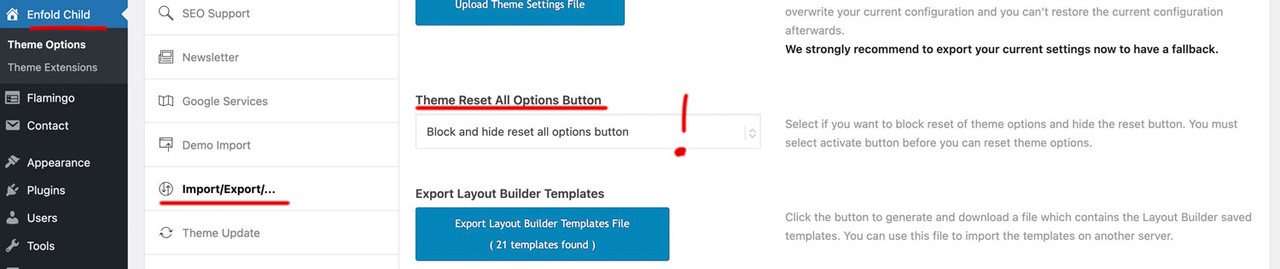
- During this process, we clicked the “Reset” button, assuming it would clear cached/token-related data.
- Instead, this action reset/deleted all Enfold theme options globally.
Current situation:
- All Enfold theme settings (layout, styling, header, footer, etc.) have reverted to defaults.
- All media files disappeared immediately after the reset.
- We do not have a direct export/backup of the Enfold theme options.
- We do have a full website backup in .zip format.
What we have already checked:
- Searched the backup archive for Enfold-related configuration or option files.
- Reviewed wp-content (themes, uploads, etc.) but did not find identifiable option storage files.
- Looked for database-related content expecting to find theme settings (e.g., wp_options entries), but could not locate a usable database or clearly identifiable Enfold settings.
What we need help with:
- Are Enfold theme options stored in the WordPress database (wp_options) or in files?
- If stored in the database, what specific option names or prefixes should we look for (e.g.,avia_*)?
- Can theme options be restored from a backup without restoring the entire site?
- From a full .zip backup, which specific files or database tables are required to restore Enfold settings?
- Any guidance on recovering the missing media files would also be appreciated.
Important feedback:
- The “Reset” button appears to reset all global theme options without a clear warning of the full impact.
- This behavior is extremely destructive in a production environment.
- We strongly recommend:
- Moving this function to a separate, clearly labeled section, and/or
- Adding a prominent confirmation warning explaining that ALL theme settings will be permanently reset.
This action resulted in a complete loss of configuration and media unexpectedly, so any assistance in recovery would be greatly appreciated.
Thank you;
ArmenEnfold 7.1.4
Wordpress 6.9.4
Block EditorHi team, I think I found an uncaught issue created by wrong user input. If I insert a youtube block at a page and type in this wrong URL https://www.youtube.com/embed/u0ynt7CK2og , then wordpress converts the block to an usual embed block, but without enfold there are no display issues. With Enfold active, the video thumbnail looks only half-height, and a space to the bottom end of the block. At the rendered page, there is a huge space at the bottom of the video.
The solution is to use the correct link https://www.youtube.com/watch?v=u0ynt7CK2og
I don’t need support here, only FYI.
best regards