
-
AuthorSearch Results
-
April 14, 2024 at 5:30 pm #1439979
In reply to: Anpassung Schriftgröße Portfolio Titel
Hey Petra,
For the font size in that element try this CSS in your Enfold Theme Options ▸ General Styling ▸ Quick CSS field:#av-sc-portfolio-1 h3.grid-entry-title.entry-title a { font-size: 14px; }For adjusting the position of the ajax portfolio element try adding this code to the end of your child theme functions.php file in Appearance ▸ Editor:
function custom_portfolio_preview_container_script() { ?>
  <script>
jQuery(document).ready(function($) {
    // Listen for clicks on elements with the specified class
    $('.page-id-3419 .grid-sort-container .grid-entry').click(function() {
        // Use setInterval to check every 100 milliseconds if the element has become visible
        var checkVisibility = setInterval(function() {
            // Check if the element is visible
            if ($('.page-id-3419 .portfolio_preview_container.open_container').is(':visible')) {
                // Clear the interval once the element is visible
                clearInterval(checkVisibility);

                // Calculate the top position of the element and adjust it
                var elementTop = $('.page-id-3419 #av_section_2').offset().top;
                var newScrollTop = elementTop - 30; // Adjusting to scroll 20px above the element

                // Scroll the page to the new position
                $('html, body').animate({
                    scrollTop: newScrollTop
                }, 1200); // 1200ms for a smooth animation
            }
        }, 100); // Check every 100 milliseconds
    });
});
</script>
  <?php
}
add_action( 'wp_footer', 'custom_portfolio_preview_container_script', 99 );
note that the script specifically checks the page ID because the scroll position is calculated by the bottom of the element above the portfolio grid, so keep this in mind if you want to duplicate this for another page.
Best regards,
MikeApril 14, 2024 at 4:13 pm #1439976In reply to: Changing Left Hand menu font size
Hey JennyGr,
Thanks for the link to your site, it looks like you have some custom css that is setting the size:.breadcrumb-trail { font-size: 16px !important; }Try to find this and adjust to suit. The !important; in the css overrides the theme settings.
If you didn’t have this css you could use the Enfold Theme Options ▸ Advanced Styling ▸ Breadcrumbs to adjust the font size.Best regards,
MikeApril 14, 2024 at 3:52 pm #1439972In reply to: Add Icons to Enfold Menu
Hey JennyGr,
Thanks for the link to your site, I don’t see any custom classes in your menu items, are you sure you followed this step?
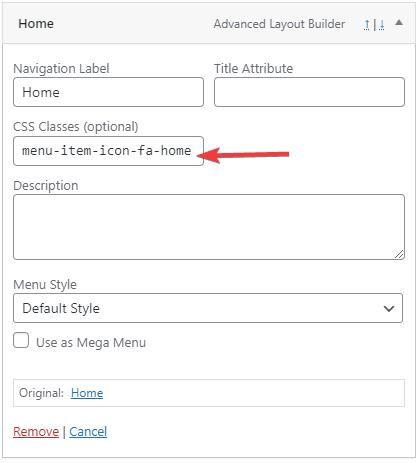
If so please include an admin login in the Private Content area so we can investigate.Best regards,
MikeApril 14, 2024 at 3:45 pm #1439971In reply to: open direct link in portfolio
Hi,
Glad we were able to help, if you have any further questions please create a new thread and we will gladly try to help you. Thank you for using Enfold.Best regards,
MikeApril 14, 2024 at 3:42 pm #1439970In reply to: Enfold Theme Gallery duplicate image issue
Hi,
Thanks for the login, I tried to duplicate your page with the gallery on my test site, but I was not able to reproduce the error.

I tried disabling your plugins and enabling the parent theme but it didn’t help.
In the browser console I see this message:Uncaught SyntaxError: Unexpected token '<'from the gallery.js file but when I compare it with my theme version they are the same so the error could be in a different file. So I don’t know what could be causing this. Perhaps if you have manually updated in the past by overwriting the theme files via FTP, an old file could have beed left behind. Perhaps uploading a new theme version would help, here is a safe way to do this:To manually update your version of Enfold you will need to download the latest installable WP version from your Theme Forest account and upload it to your WordPress ▸ Appearance ▸ Themes ▸ Add Themes ▸ Add New

after you choose the zip file and click install, you will see a This theme is already installed message because you are updating, you can continue

then you will see the Theme updated successfully message.

Best regards,
MikeApril 14, 2024 at 2:49 pm #1439968In reply to: how to add hyperlink to table cell
Hi,
Glad we were able to help, if you have any further questions please create a new thread and we will gladly try to help you. Thank you for using Enfold.Best regards,
MikeApril 14, 2024 at 1:29 pm #1439962In reply to: Header has black bar on Mobile view
Hi,
Glad we were able to help, this is the css that is in your Quick CSS:@media only screen and (max-width: 767px) { .responsive #top #main { padding-top: 88px !important; } .responsive.html_header_transparency #top #main { padding-top: 0 !important; } }If you have any further questions please create a new thread and we will gladly try to help you. Thank you for using Enfold.
Best regards,
MikeApril 14, 2024 at 1:49 am #1439944Topic: Add Icons to Enfold Menu
in forum EnfoldJennyGr
ParticipantHI I followed Mike’s instructions in this post https://kriesi.at/support/topic/how-to-add-a-enfold-icon-to-the-menu-link/#post-1437108
But the icons are not showing on my menu.
Any advice?
Many thanks
April 13, 2024 at 11:55 pm #1439941Topic: Unable to upload into media library
in forum Enfoldwaterwalk
ParticipantHi,
We started having issues with being unable to load ANY images, no matter how small into the media library. I turned off all the plugins and that did nothing. Then I noticed that there is a footer.php error message. I’m not sure if that would have any effect but just thought I’d mention it. This is the error:
PHP Warning: Undefined array key “footer_behavior” in /home/f2iaq2g7whgl/public_html/wp-content/themes/enfold/footer.php on line 288
Also, just looked at the developer console and I see this error:
…/wp-admin/admin-ajax.php 400 (Bad Request)followed by several commands involving: ‘moxie.min.js
-
This topic was modified 1 year, 11 months ago by
waterwalk.
April 13, 2024 at 10:05 pm #1439933In reply to: Instalacion de tema
Hi,
Please see our documentation here about importing the demos.Best regards,
MikeApril 13, 2024 at 9:54 pm #1439931In reply to: Twitter X icon not showing on social header
Hi,
Please try removing the code that you added to the functions.php and enable the theme editor menu item so we can see if there is anything else in your functions.php that could cause an error:

Typically the iThemes Security plugin is what hides the menu item but this plugin shows an error when I check.Best regards,
MikeApril 13, 2024 at 8:47 pm #1439928Hi,
Glad to hear that you have this sorted out, if you have any further questions please create a new thread and we will gladly try to help you. Thank you for using Enfold.Best regards,
MikeApril 13, 2024 at 8:46 pm #1439927In reply to: Add a header widget area
Hi,
Glad we were able to help, if you have any further questions please create a new thread and we will gladly try to help you. Thank you for using Enfold.Best regards,
MikeApril 13, 2024 at 6:54 pm #1439921In reply to: Header has black bar on Mobile view
Hi,
It looks like you had this thread that was for a different donain and the css you added creates the black bar by adding padding to the top, I removed it for you.Best regards,
MikeApril 13, 2024 at 6:39 pm #1439919In reply to: Help needed
Hi,
Thanks for the login, your theme is very old v4.7.6.3, and you can not automatically update it, please follow these steps you should not lose any settings or content, but you can also use your webhost options to backup your site & database if you are worried.
To update your version of Enfold you will need to download the latest installable WP version from your Theme Forest account and upload it to your WordPress ▸ Appearance ▸ Themes ▸ Add Themes ▸ Add New
after you choose the zip file and click install, you will see a This theme is already installed message because you are updating, you can continue
then you will see the Theme updated successfully message.
Best regards,
MikeApril 13, 2024 at 6:30 pm #1439918In reply to: Two problems with the main menue and more…
Hi,
You write that you are using a separate menu for mobiles but when I check your menus the “Mobil” menu only has two items:

and your theme option for using a separate mobile menu is not activate

so how are you adding the separate mobile menu?
Also I can’t vew your child theme functions.php file because the theme editor is not an option:
Best regards,
MikeApril 13, 2024 at 6:16 pm #1439917In reply to: portfolio category page style changed
Hi,
Please enable the theme editor option so we can see and edit the child theme functions.php file.
Best regards,
MikeApril 13, 2024 at 5:59 pm #1439915In reply to: Add a header widget area
Hi,
It looked like you added many menu options in the Enfold Theme Options ▸ Advanced Styling and each was empty so the empty setting was overriding the Enfold Theme Options ▸ General Styling settings. I removed these for you and now your menu is back to the way it was.
If you want to use the Enfold Theme Options ▸ Advanced Styling to change the colors then you can, but to need to add the new colors for it to work.
I believe that we have solved your Header Widget that was the topic of this thread, please let us know if so we should now close this thread.
Please note that we ask that each thread stays on a specific topic, this helps other users and Mods. For further questions please open a new threadBest regards,
MikeApril 13, 2024 at 5:46 pm #1439914In reply to: how to add hyperlink to table cell
Hi,
I’m not clear on what you are tring to do, the page that you linked to has big squares with background colors, text & icons:

so I don’t think that the table element is the correct element to use, perhaps a column element with the column link is better:

or the grid row, which has the same option.
If I have misunderstood please explain further.Best regards,
MikeApril 13, 2024 at 4:57 pm #1439907Hey Thomas,
The plugin shows the images sizes for me, perhaps you have a conflict with another plugin or customization.

Best regards,
MikeApril 13, 2024 at 4:53 pm #1439905In reply to: Two problems with the main menue and more…
Hello Mike,
I have a separate menu for mobiles – that is one possibility in Enfold and perhaps it causes this?“So I don’t know if this is a plugin conflict or if you have some customization in your child theme because the theme editor is not showing so I can’t see the child theme functions.php.”
What do you mean?“Do you know if you have any customizations that might remove the classes?”
I even don’t know how to do it – if I did it was not conscious…“Do you want to create a staging site for us the test on?”
That would be the best to get the problems fixed, but the file size of the site is 10 GB… I can’t clone it easily…Kind regards,
Kati-
This reply was modified 1 year, 11 months ago by
KittenAdmin.
April 13, 2024 at 4:46 pm #1439904In reply to: Saving didnt work
Hi,
Sorry to hear this, but we don’t have a way to fix server errors. You can login to your Theme Forest account and request a refund We will go ahead and close this thread, Thank you for your patience and understanding and for using Enfold.Best regards,
MikeApril 13, 2024 at 4:11 pm #1439903In reply to: Help needed
Hi Rikard,
My problem is this. It won’t do the auto update of the theme. I have already put my content on the construction theme. I am scared if I drop all the new Enfold files into FTP it will overwrite everything I have built. I get this error when trying the auto update:
Installing the latest version…
Theme update failed.
An error occurred while updating Enfold: Could not move the old version to the upgrade-temp-backup directory.April 13, 2024 at 4:10 pm #1439902In reply to: Saving didnt work
Unfortunately we haven’t solved anything. I’ll have to change Theme, we’ve already spent a lot of time. I used avada and a couple other themes used by other clients to try and had no problems. Enfold code must be mad at me :-D
April 13, 2024 at 3:38 pm #1439900Hey Julien,
Try adding this code to the end of your child theme functions.php file in Appearance ▸ Editor:function avf_magazine_entries_query_mod($query, $params) { if (is_page(3961)) { $query['order'] = 'ASC'; } return $query; } add_filter('avf_magazine_entries_query', 'avf_magazine_entries_query_mod', 10, 2);adjust the page ID to suit.
If you are not using a child theme you could use the WP Code plugin then add a new snippet, in the top right corner use the PHP snippet as the code type:

then add the above code and save.Best regards,
MikeApril 13, 2024 at 3:25 pm #1439898In reply to: Einzelpost ohne Beitragsbild
Hi Hans,
Please try the following in Quick CSS under Enfold->General Styling:
.single-post .blog-meta {
  display: none;
}
Best regards,
RikardApril 13, 2024 at 2:29 pm #1439891In reply to: Two problems with the main menue and more…
Hi,
When I check your mobile menu items they do not include any attributes, such as the proper classes:

The parent menu items have classes, but all menu items should have classes, I also don’t know why each menu item is wrapped in a “sub-menu” ul
this is what they should look like:

note that the current menu item has the class current-menu-item this is what tells the css to highlight it, without classes it won’t work.
Your desktop menu seems to be correct.
So I don’t know if this is a plugin conflict or if you have some customization in your child theme because the theme editor is not showing so I can’t see the child theme functions.php.
Do you know if you have any customizations that might remove the classes?
Do you want to create a staging site for us the test on?Best regards,
MikeHey vbonora,
Please try the following in Quick CSS under Enfold->General Styling:
.home #sub_menu1 {
  bottom: 0;
}
Best regards,
RikardApril 13, 2024 at 2:22 pm #1439889In reply to: Help needed
Hey robsdesigns,
1. Please refer to this and make sure that you give the correct permissions to the token: https://kriesi.at/documentation/enfold/theme-registration/
2. It should likely disappear after you have updated theme.
3. If these problems should persist after the update, then please try the suggestions listed here: https://kriesi.at/documentation/enfold/contact-form/#my-contact-form-is-not-sending-emails-
Best regards,
RikardApril 13, 2024 at 12:53 pm #1439881In reply to: Sudden site-wide display problems
Hi,
Thank you but this file is called “access.log” so it doesn’t show any errors, try to post the “error.log”
Nonetheless your site still shows the “mixed content” error, so the css files are not loaded and this is why the pages like your contact page are broken.
Are you sure that WordPress ▸ Settings ▸ General ▸ Site Address and WordPress ▸ Settings ▸ General ▸ WordPress Address both use “https” for your URL?
This is a screenshot of the setting:

Best regards,
Mike -
This topic was modified 1 year, 11 months ago by
-
AuthorSearch Results
-
Search Results
-
Topic: Add Icons to Enfold Menu
HI I followed Mike’s instructions in this post https://kriesi.at/support/topic/how-to-add-a-enfold-icon-to-the-menu-link/#post-1437108
But the icons are not showing on my menu.
Any advice?
Many thanks
Hi,
We started having issues with being unable to load ANY images, no matter how small into the media library. I turned off all the plugins and that did nothing. Then I noticed that there is a footer.php error message. I’m not sure if that would have any effect but just thought I’d mention it. This is the error:
PHP Warning: Undefined array key “footer_behavior” in /home/f2iaq2g7whgl/public_html/wp-content/themes/enfold/footer.php on line 288
Also, just looked at the developer console and I see this error:
…/wp-admin/admin-ajax.php 400 (Bad Request)followed by several commands involving: ‘moxie.min.js


