Hi,
Glad that we could help, if you have further questions please open a new thread and we will try to help. Thanks for using Enfold.
Best regards,
Mike
Hi,
Glad that we could help, if you have further questions please open a new thread and we will try to help. Thanks for using Enfold.
Best regards,
Mike
Hi,
When I checked using the Enfold > Layout Builder > Show advanced Options > Debug Mode I found on Post 1785 that you have a unclosed strong tag:
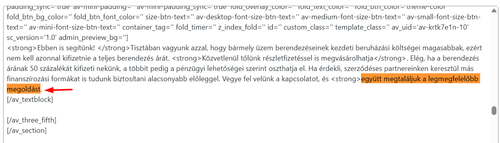
Correcting this solved.
I see that you have many templates saved:
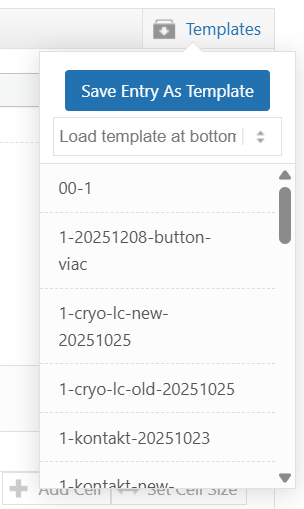
Note that if any of these have unclosed tags they will cause issues on additional pages that you use them on. They can not be repaired, you would need to delete them and rebuild them.
I also note that you are using the Advanced Editor Tools plugin and recall back when it was called TinyMCE Advanced there were issues with it, not sure if they have been resolved in the plugin’s current build, but it may be worth considering.
I also tried to reproduce this on my test site, but was unable to without purposely forcing unclosed tags.
Best regards,
Mike
Hi,
my website was perfect but, the day after i lost menu size type, submenu size type, width of the main window content (normally full width), body size type…
All my enfold/advanced styles are her. So I tryed to reset some but no effect (tested a MENU type size to 40px but it display on front end a kind of small 10px for example).
The ENFOLD cookies tool seems to have an issue too… When trying to disable it i have this message: Saving didnt work! Please reload the page and try again.
7.1.4 ENFOLD RUNNING and reinstalled for testing
PHP : 8.3.23
For info: i installed/tested Forminator, CRM Peks Form, Eventon.
I try to deactivated all plugins. No results
EDIT*** Now the ENFOLD Save all update button each time gives: “Saving didnt work! Please reload the page and try again.”
-
This topic was modified 4 days, 7 hours ago by
 jb84.
jb84.
-
This topic was modified 4 days, 7 hours ago by jb84.
-
This topic was modified 4 days, 7 hours ago by jb84.
Hi,
Glad that we could help, if you have further questions please open a new thread and we will try to help. Thanks for using Enfold.
Best regards,
Mike
Hi,
Great, I’m glad that Mike could help you out. Please open a new thread if you should have any further questions or problems.
Best regards,
Rikard
Hello Support!
I would appreciate some help with a display issue with woo commerce product page on my site. I’ve made all the woo formats but it looks like Enfold may be overriding them. The problem is that the first product image in the grid displays correctly, but the images in the next two containers are cut off. It looks like the containers are not all the same size, but the images are the same height and width.
I also tried a couple of code fixes in CSS but that didn’t fix it either. This is the latest:
/* Force consistent image heights */
.woocommerce ul.products li.product a img {
height: 250px; /* Adjust height as needed */
object-fit: cover; /* Ensures image covers area without stretching */
}
/* Force equal product container heights */
.woocommerce ul.products li.product {
display: flex;
flex-direction: column;
justify-content: space-between;
}
Thank you for looking into this for me!
Valerie
Hi,
Glad that we could help, if you have further questions please open a new thread and we will try to help. Thanks for using Enfold.
Best regards,
Mike
Hi,
Glad that Ismael could help, if you have further questions please open a new thread and we will try to help. Thanks for using Enfold.
Best regards,
Mike
Hi,
Glad that Rikard could help, if you have further questions please open a new thread and we will try to help. Thanks for using Enfold.
Best regards,
Mike
Hey JannyPolak,
Thank you for the inquiry.
Looks like the Advanced Styling settings may be getting overridden by another css rule, or the styles may be cached. Before anything else, please try to disable the Enfold > Performance > File Compression settings, save, and purge your cache, then check again.
If the styling still doesn’t apply, you can force the font and text-transform for the main nav links with this custom css added on the Enfold > General Styling > Quick CSS field:
#top .av-main-nav > li > a > .avia-menu-text {
    font-family: 'Josefin Sans', sans-serif;
    font-size: 30px;
    font-weight: 400;
    text-transform: uppercase;
}
Make sure Josefin Sans is loaded on your site. If you’re using it via Enfold > Advanced Styling, it should already be enqueued. If not, you may need to select it under Enfold > General Styling > Fonts.
Please make sure to purge the cache before testing.
Let us know if the issue persists.
Best regards,
Ismael
Hey JannyPolak,
Thank you for the inquiry.
The text not being full-width is expected behavior. Even with a stretched layout, the content inside sections is constrained by the container width. You can increase this by going to Enfold > General Layout > Dimensions > Maximum Container Width. The default is 1310px — try increasing this value to allow more content width.
Let us know the result.
Best regards,
Ismael
Hi,
The text on my website is not screen-wide as I would like to, have it, Although I set dimensions to stretched layout and resp, 100%, 80%|20% and 100% in general layout>dimensions in Enfold Child
And when I use a colour section and a textblock inside, same issue, why is the text not as wide as possible in the the colour section? (no paddings)
Also (and main issue) as a result the widgets – with or without a colour section – are not showing uo on small screens or Ipad with low resolution. That is why I think need wider containers? the widgets are responsive, you can see it when you make the screen on you pc as small as possible.
Can you help to find the issues? See test link in private area
Enfold 7.1.4, no active plugins, no child-theme modifications in functions.php or header.php.
Transparent header logo is an SVG.
On normal pages like /fuer-geschaeftskunden/ the logo is visible.
On single blog posts with date-based URLs like /2026/03/23/story/ the logo is not visible.
Inspector shows the transparency logo rendered as:
<img src="../wp-content/uploads/2026/03/logo_b.svg" />
If I replace that with the absolute URL, the logo loads correctly.
So it looks like the transparency SVG logo is rendered with a relative path that breaks on single post permalinks.
Access in PC
Hi,
Sorry for the delay. We’re now able to publish a page without issue. We edited the enfold/config-templatebuilder/avia-template-builder/php/class-shortcode-template.php file around line 2502:
$this->config['self_closing'] = is_array( $params ) && array_key_exists( 'content', $params ) && is_null( $params['content'] ) ? 'yes' : 'no';
Please confirm if the fix is working on your end.
Best regards,
Ismael
Hi Mike,
Yes, I understand that I can duplicate the slider for each language.
I also understand that Enfold is not the author of the Layerslider plugin. However, Layerslider is bundled in the Enfold theme, this wasn’t purchased directly, so I am unable to contact Layerslider support as they require a purchase code/license key.
Please advise if you can pass this message to the Layerslider support team.
Thanks.
I’ve only used html for a couple of paragraphs on the homepage, custom ccs to change case and get rid of the top right enfold logo and the issues started well after. And I have issues with the contact page – the form disappears after I fill it out instead of it giving me “message sent. and I never see the form submissions in my inbox. I put no custom html or script tags inside any of the elements on pages. I’d appreciate if you can check it out. Thanks
Hi,
Great, I’m glad that you found the problem. We’ll close this thread for now then, please open a new thread if you should have any further questions or problems.
Best regards,
Rikard
Hi,
Glad that Ismael could help, if you have further questions please open a new thread and we will try to help. Thanks for using Enfold.
Best regards,
Mike
Hey,
Thank you for the inquiry.
To add a custom social icon in the current version, you need to make sure the icon is registered through the iconfont manager. If you are using a custom fontello font, you need to upload it via Enfold > Import/Export first so the theme recognizes the font family and unicode character.
After uploading the icon pack, update your snippet like this:
function avia_add_custom_icon( $icons ) {
    $icons['spotify'] = array(
        'font'  => 'fontello',
        'icon'  => 'ue907'
    );
    return $icons;
}
add_filter( 'avf_default_icons', 'avia_add_custom_icon', 10, 1 );

function avia_add_custom_social_icon( $icons ) {
    $icons['spotify'] = 'spotify';
    return $icons;
}
add_filter( 'avf_social_icons_options', 'avia_add_custom_social_icon', 10, 1 );
A couple of things to check:
1. Make sure the code is placed in your child theme’s functions.php, not the parent theme.
2. Confirm the font family name in the uploaded pack is exactly “fontello” and the unicode value matches what is in the font.
3. Go to Enfold > Performance and disable file compression temporarily, then clear your cache and test.
If the icon still does not appear after confirming those steps, please share a screenshot of your Enfold > Import/Export tab showing the uploaded font pack, and also let us know where exactly the icon is not showing up (social icons in theme options, or inside the page builder). You can post login details in the private field if needed.
You can also refer to the icon documentation here for more context:
— https://kriesi.at/documentation/enfold/icon/
Let us know the result.
Best regards,
Ismael
Hey maryenvato,
Thank you for the inquiry.
There are a few things that could be preventing the Google Maps iframe from displaying correctly in Enfold.
First, check if Google Maps is enabled in the theme options. Go to Enfold > Google Services and make sure the Google Maps feature is not disabled there. If it is disabled, the map element will not render on the frontend.
Second, it’s possible that a privacy, cookie consent, or GDPR plugin is blocking the embedded map from loading. These plugins sometimes intercept external resources like Google Maps iframes and prevent them from rendering until the user gives consent. Please try disabling any such plugin temporarily to see if the map loads correctly without it.
You should also check the built-in cookie handling settings in the theme. Go to Enfold > Privacy & Cookies > Cookie Handling and review the settings there, as Enfold has its own conditional loading options for external services like Google Maps.
If you’re using the built-in Google Map element in the layout builder, make sure you have a valid API key entered under Enfold > Google Services as well, since Google now requires an API key for maps to load.
Let us know the result, and feel free to share a screenshot or the code snippet you mentioned if the issue persists.
Best regards,
Ismael
Hey Gonmyr,
Thank you for the inquiry.
To get a header that look something closer to the samanthasiffring.com site, try to go to Enfold > Header > Header Layout and set Menu and Logo Position to “Logo center, Menu above”. On the specific page, open the Layout tab and set the header transparency to transparent or glassy. Build the hero section using a fullscreen Color Section or slideshow in the Advance Layout uilder.
For a full overview of the available header options, please check the documentation:
— https://kriesi.at/documentation/enfold/header/
Let us know if you have more questions.
Best regards,
Ismael
Hey reqonsult,
The shop is created with the woocommerce plugin
See our documentation here.
Best regards,
Mike
Hey Tilman,
You have a CORS error:
Access to font at 'https://auto-wulf.de/wp-content/themes/enfold/config-templatebuilder/avia-template-builder/assets/fonts/entypo-fontello/entypo-fontello.woff' from origin 'https://www.auto-wulf.de' has been blocked by CORS policy: No 'Access-Control-Allow-Origin' header is present on the requested resource.
This is a www vs non-www mismatch issue. Even though it feels like the “same domain,” browsers treat auto-wulf.de and http://www.auto-wulf.de as two completely different origins.
Option 1 — Add CORS headers in .htaccess (easiest for Apache/WordPress)
Add this to your .htaccess file in the root of your site:
<FilesMatch "\.(woff|woff2|ttf|otf|eot|svg)$">
    Header set Access-Control-Allow-Origin "*"
</FilesMatch>
Option 2 — Redirect all non-www to www (recommended anyway)
This fixes the root cause by making sure all assets are always loaded from the same origin. Add to .htaccess:
RewriteEngine On
RewriteCond %{HTTP_HOST} ^auto-wulf\.de [NC]
RewriteRule ^(.*)$ https://www.auto-wulf.de/$1 [R=301,L]
You can edit .htaccess via FTP/SFTP or through your hosting control panel’s file manager.
Best regards,
Mike
Hi,
Glad that Guenni007 could help, thanks Guenni007, if you have further questions please open a new thread and we will try to help. Thanks for using Enfold.
Best regards,
Mike
Hey mjrielly,
Typically the solution is to apply css height so all of the testimony slides will have the same height, and also calculate the needed height for each screen size. The following javascript will do this automatically for you. Add the following code to your child theme functions.php file. If you are not using a child theme you could use the WP Code plugin then add a new snippet, in the top right corner use the PHP snippet as the code type:
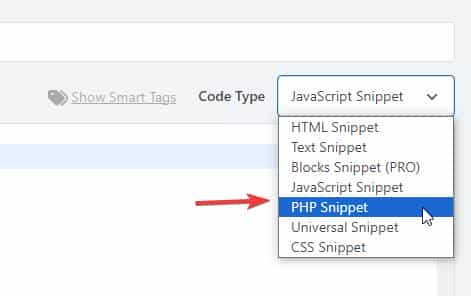
then add the following code and save.
function equalise_testimonial_heights() { ?>
  <script>
(function () {

  function equaliseTestimonialHeights() {

    const row = document.querySelector('.avia-testimonial-row');
    if (!row) return;

    const slides = row.querySelectorAll('.avia-testimonial');
    if (!slides.length) return;

    slides.forEach(function (slide) {
      slide.style.height = '';
    });

    let maxHeight = 0;
    slides.forEach(function (slide) {
      const h = slide.offsetHeight;
      if (h > maxHeight) maxHeight = h;
    });

    slides.forEach(function (slide) {
      slide.style.height = maxHeight + 'px';
    });
  }

  function debounce(fn, delay) {
    let timer;
    return function () {
      clearTimeout(timer);
      timer = setTimeout(fn, delay);
    };
  }

  if (document.readyState === 'loading') {
    document.addEventListener('DOMContentLoaded', equaliseTestimonialHeights);
  } else {
    equaliseTestimonialHeights();
  }

  window.addEventListener('resize', debounce(equaliseTestimonialHeights, 150));

})();
</script>
  <?php
}
add_action( 'wp_footer', 'equalise_testimonial_heights', 99 );
Best regards,
Mike
Hello, I would like to implement Enfolds e-commerce functionality (such as adding a shopping cart, product pages, and related features). How can I properly set up or activate the “shop” version of Enfold, as shown on your demo site (https://kriesi.at/themes/enfold-shop/)? Thank you.
Hi,
I am experiencing an issue with embedding a Google Maps iframe in Enfold.
Previously, I modified the code block to allow the iframe insertion, but the map is still not displaying correctly. It seems that the changes are not taking effect, or there might be an additional restriction preventing the iframe from rendering.
Could you please help me understand where the issue might be and how to properly enable the Google Maps iframe within Enfold?
If needed, I can provide the current code snippet and further details.
Looking forward to hearing from you.
Best regards
MS
Hi,
Glad that we could help, if you have further questions please open a new thread and we will try to help. Thanks for using Enfold.
Best regards,
Mike
Hi,
These were added to the theme 2 years ago. Ensure that you are using the latest theme version 7.1.4
If you are still having an issue then it must be a different issue. Please open a new thread and detail your issue carefully so we can duplicate and explain to the Dev Team, or you can post yourself to the Dev Team here and follow along as they review.
Best regards,
Mike



