Hi Rikard,
I’m glad to see you study my case, thanks for that.
I have just switched between the 5.6.12 version and the 6.0.5 one and here are the 3 errors I had:
(hope it helps)
Warning: fopen(/volume4/web/cserp/wp-content/uploads/dynamic_avia/avia-merged-styles-18ecd38336cb985ece6556faf31d6e7a—670a5d4bd6c89.css):
failed to open stream: Permission denied in /volume4/web/cserp/wp-content/themes/enfold/framework/php/function-set-avia-backend.php on line 984 Call Stack: 0.0001 368624
1. {main}() /volume4/web/cserp/index.php:0 0.0001 368904
2. require(‘/volume4/web/cserp/wp-blog-header.php’) /volume4/web/cserp/index.php:17 3.4384 57892464
3. require_once(‘/volume4/web/cserp/wp-includes/template-loader.php’) /volume4/web/cserp/wp-blog-header.php:19 3.5285 60283368
4. include(‘/volume4/web/cserp/wp-content/themes/enfold/template-builder.php’) /volume4/web/cserp/wp-includes/template-loader.php:106 3.5286 60283368
5. get_header() /volume4/web/cserp/wp-content/themes/enfold/template-builder.php:15 3.5379 60349904
6. locate_template() /volume4/web/cserp/wp-includes/general-template.php:48 3.5380 60349984
7. load_template() /volume4/web/cserp/wp-includes/template.php:745 3.5475 60378328
8. require_once(‘/volume4/web/cserp/wp-content/themes/enfold/header.php’) /volume4/web/cserp/wp-includes/template.php:810 3.5925 60385800
9. wp_head() /volume4/web/cserp/wp-content/themes/enfold/header.php:228 3.5925 60385800
10. do_action() /volume4/web/cserp/wp-includes/general-template.php:3065 3.5925 60386176
11. WP_Hook->do_action() /volume4/web/cserp/wp-includes/plugin.php:517 3.5925 60386176
12. WP_Hook->apply_filters() /volume4/web/cserp/wp-includes/class-wp-hook.php:348 3.6548 60390136
13. wp_enqueue_scripts() /volume4/web/cserp/wp-includes/class-wp-hook.php:324 3.6548 60390136
14. do_action() /volume4/web/cserp/wp-includes/script-loader.php:2263 3.6548 60390512
15. WP_Hook->do_action() /volume4/web/cserp/wp-includes/plugin.php:517 3.6548 60390512
16. WP_Hook->apply_filters() /volume4/web/cserp/wp-includes/class-wp-hook.php:348 3.7716 60756224
17. aviaAssetManager->try_minifying_scripts() /volume4/web/cserp/wp-includes/class-wp-hook.php:324 3.7716 60756224
18. aviaAssetManager->merge() /volume4/web/cserp/wp-content/themes/enfold/config-templatebuilder/avia-template-builder/php/class-asset-manager.php:243 3.7812 61881584
19. aviaAssetManager->generate_file() /volume4/web/cserp/wp-content/themes/enfold/config-templatebuilder/avia-template-builder/php/class-asset-manager.php:358 3.7820 62667408
20. avia_backend_create_file() /volume4/web/cserp/wp-content/themes/enfold/config-templatebuilder/avia-template-builder/php/class-asset-manager.php:810 3.7820 62667408
21. fopen() /volume4/web/cserp/wp-content/themes/enfold/framework/php/function-set-avia-backend.php:984
Warning: fopen(/volume4/web/cserp/wp-content/uploads/dynamic_avia/avia-head-scripts-388e3ec585846faac3926658720b7d69—670a5d4bd887a.js):
failed to open stream: Permission denied in /volume4/web/cserp/wp-content/themes/enfold/framework/php/function-set-avia-backend.php on line 984 Call Stack: 0.0001 368624
1. {main}() /volume4/web/cserp/index.php:0 0.0001 368904
2. require(‘/volume4/web/cserp/wp-blog-header.php’) /volume4/web/cserp/index.php:17 3.4384 57892464
3. require_once(‘/volume4/web/cserp/wp-includes/template-loader.php’) /volume4/web/cserp/wp-blog-header.php:19 3.5285 60283368
4. include(‘/volume4/web/cserp/wp-content/themes/enfold/template-builder.php’) /volume4/web/cserp/wp-includes/template-loader.php:106 3.5286 60283368
5. get_header() /volume4/web/cserp/wp-content/themes/enfold/template-builder.php:15 3.5379 60349904
6. locate_template() /volume4/web/cserp/wp-includes/general-template.php:48 3.5380 60349984
7. load_template() /volume4/web/cserp/wp-includes/template.php:745 3.5475 60378328
8. require_once(‘/volume4/web/cserp/wp-content/themes/enfold/header.php’) /volume4/web/cserp/wp-includes/template.php:810 3.5925 60385800
9. wp_head() /volume4/web/cserp/wp-content/themes/enfold/header.php:228 3.5925 60385800
10. do_action() /volume4/web/cserp/wp-includes/general-template.php:3065 3.5925 60386176
11. WP_Hook->do_action() /volume4/web/cserp/wp-includes/plugin.php:517 3.5925 60386176
12. WP_Hook->apply_filters() /volume4/web/cserp/wp-includes/class-wp-hook.php:348 3.6548 60390136
13. wp_enqueue_scripts() /volume4/web/cserp/wp-includes/class-wp-hook.php:324 3.6548 60390136
14. do_action() /volume4/web/cserp/wp-includes/script-loader.php:2263 3.6548 60390512
15. WP_Hook->do_action() /volume4/web/cserp/wp-includes/plugin.php:517 3.6548 60390512
16. WP_Hook->apply_filters() /volume4/web/cserp/wp-includes/class-wp-hook.php:348 3.7716 60756224
17. aviaAssetManager->try_minifying_scripts() /volume4/web/cserp/wp-includes/class-wp-hook.php:324 3.7835 61854080
18. aviaAssetManager->merge() /volume4/web/cserp/wp-content/themes/enfold/config-templatebuilder/avia-template-builder/php/class-asset-manager.php:246 3.7883 61905560
19. aviaAssetManager->generate_file() /volume4/web/cserp/wp-content/themes/enfold/config-templatebuilder/avia-template-builder/php/class-asset-manager.php:358 3.7887 62218048
20. avia_backend_create_file() /volume4/web/cserp/wp-content/themes/enfold/config-templatebuilder/avia-template-builder/php/class-asset-manager.php:810 3.7887 62218048
21. fopen() /volume4/web/cserp/wp-content/themes/enfold/framework/php/function-set-avia-backend.php:984
Warning: fopen(/volume4/web/cserp/wp-content/uploads/dynamic_avia/avia_posts_css/post-2.css):
failed to open stream: Permission denied in /volume4/web/cserp/wp-content/themes/enfold/framework/php/function-set-avia-backend.php on line 984 Call Stack: 0.0001 368624
1. {main}() /volume4/web/cserp/index.php:0 0.0001 368904
2. require(‘/volume4/web/cserp/wp-blog-header.php’) /volume4/web/cserp/index.php:17 3.4384 57892464
3. require_once(‘/volume4/web/cserp/wp-includes/template-loader.php’) /volume4/web/cserp/wp-blog-header.php:19 3.5285 60283368
4. include(‘/volume4/web/cserp/wp-content/themes/enfold/template-builder.php’) /volume4/web/cserp/wp-includes/template-loader.php:106 3.5286 60283368
5. get_header() /volume4/web/cserp/wp-content/themes/enfold/template-builder.php:15 3.5379 60349904
6. locate_template() /volume4/web/cserp/wp-includes/general-template.php:48 3.5380 60349984
7. load_template() /volume4/web/cserp/wp-includes/template.php:745 3.5475 60378328
8. require_once(‘/volume4/web/cserp/wp-content/themes/enfold/header.php’) /volume4/web/cserp/wp-includes/template.php:810 3.5925 60385800
9. wp_head() /volume4/web/cserp/wp-content/themes/enfold/header.php:228 3.5925 60385800
10. do_action() /volume4/web/cserp/wp-includes/general-template.php:3065 3.5925 60386176
11. WP_Hook->do_action() /volume4/web/cserp/wp-includes/plugin.php:517 3.5925 60386176
12. WP_Hook->apply_filters() /volume4/web/cserp/wp-includes/class-wp-hook.php:348 3.6548 60390136
13. wp_enqueue_scripts() /volume4/web/cserp/wp-includes/class-wp-hook.php:324 3.6548 60390136
14. do_action() /volume4/web/cserp/wp-includes/script-loader.php:2263 3.6548 60390512
15. WP_Hook->do_action() /volume4/web/cserp/wp-includes/plugin.php:517 3.6548 60390512
16. WP_Hook->apply_filters() /volume4/web/cserp/wp-includes/class-wp-hook.php:348 3.7901 61904376
17. aviaPostCssManagement->handler_enqueue_post_styles() /volume4/web/cserp/wp-includes/class-wp-hook.php:324 3.7902 61904376
18. aviaPostCssManagement->check_create_file() /volume4/web/cserp/wp-content/themes/enfold/config-templatebuilder/avia-template-builder/php/class-post-css-management.php:205 3.8737 61743384
19. aviaPostCssManagement->create_file() /volume4/web/cserp/wp-content/themes/enfold/config-templatebuilder/avia-template-builder/php/class-post-css-management.php:275 3.8743 61751896
20. avia_backend_create_file() /volume4/web/cserp/wp-content/themes/enfold/config-templatebuilder/avia-template-builder/php/class-post-css-management.php:1064 3.8743 61751896
21. fopen() /volume4/web/cserp/wp-content/themes/enfold/framework/php/function-set-avia-backend.php:984
Surprisingly, these erros are not listed in my PHP error log window maintained by the Error Log Monitor WP plugin?
Hi,
Thanks for the update, we’ll close this thread for now then. Please open a new thread if you should have any further questions or problems.
Best regards,
Rikard
Hey Ben,
Those error messages are because you haven’t configured a token yet, please follow the guide step by step: https://kriesi.at/documentation/enfold/theme-registration/
The registration on our site is only to use the support forum, if you have already registered then you can simply login.
Best regards,
Rikard
 Ben
BenGuest
Non of these are a solution below. I have clicked on both of these and nothing is working, keeps telling me that –
Last time we checked the token we were not able to connected to Envato:
Purchases could not be accessed
Username could not be accessed (needed for your information only)
E-Mail could not be accessed (needed for your information only)
Following errors occurred:
Purchases: Your private token is invalid.
username Your private token is invalid.
email Your private token is invalid.
Purchases: A problem occurred accessing your purchases. Unable to check for updates.
so, instead of closing off tickets and fobbing off people, why can’t you fix these issues.?
If you don’t want me to use your theme can you let me know ASAP so I can go elsewhere like most people seam to be doing because of the terrible support and resolve.
Hey Ben,
What exactly are you using it for? If you are looking to get updates, then please follow this: https://kriesi.at/documentation/enfold/theme-registration/. If you are looking to register on our support forum, then you can do so here: https://kriesi.at/support/register/
Best regards,
Rikard
How do I get my purchase code to work.?
On going issues with this.
Thank you
Hey whdsolutions,
Please try the following in Quick CSS under Enfold->General Styling:
#js_sort_items a {
  border: 1px solid #eee;
}
Best regards,
Rikard
Hi,
Great, I’m glad that we could help. We’ll close this thread for now then, please open a new thread if you should have any further questions or problems.
Best regards,
Rikard
Hi everyone,
For some reasons, I’m stucked with that old version of Enfold for a couple of years now.
I mean I can update Enfold with the lastest vesion like the 6.0.5 but then, the entire interface of both the back and front offices would be fulfill of error messages.
And I just don’t know all what it means. I’m not techee enough to understand what’s going on.
I really need support to solve that so I can enjoy all the new functionnalities arisen these past years.
Maybe the best thing is I give you credentials through private message?
Let me know…
-
This topic was modified 1 year, 5 months ago by
 rvga. Reason: mispelling correction
Hey Ben,
What exactly are you using it for? If you are looking to get updates, then please follow this: https://kriesi.at/documentation/enfold/theme-registration/. If you are looking to register on our support forum, then you can do so here: https://kriesi.at/support/register/
Best regards,
Rikard
 Yamil
YamilGuest
Hello,
I would like to ask if a discount is possible when purchasing several Enfold themes (approx. 15-25).
Best regards
Yamil Omar Gimenez
Hi,
Try this CSS in your Enfold Theme Options ▸ General Styling ▸ Quick CSS field:
.single-tribe_events #tribe-events-footer {
	display: none;
}
Best regards,
Mike
Hello,
I am using the Enfold theme, and I don’t know how to get rid of the huge empty space under the boxes that move just under the top photo. I’d attach a picture, but I don’t know how… but if you scroll down slighly from the top of the home space, after the boxes, and before the video, there is a huge space.
How can I control this?
I need to change the order of cells when the cells move to single column, for example, when viewed on mobile. I need cell 5 to move to position 10, and cell 6 to move to position 7, cell 7 to move to position 6, cell 8 to move to position 9, cell 9 to move to position 8, and cell 15 to disappear. How can this be achieved?
If possible, I’d also like the images to stretch to fit (fully fill the cell—and only the cell—regardless of browser width).
Hey maryenvato,
Thanks for the kind words and for using Enfold :-)
We don’t provide customisation like that unfortunately, but I’m not sure I fully understand what you are looking to achieve? Do you mean that you want to replicate layouts from other themes or sites?
Best regards,
Rikard
 Ida
IdaGuest
Hi,
I am currently using the Enfold theme with the Advanced Layout Builder to manage content on my website. I would like to inquire if it is possible to schedule changes in posts and pages while using the Advanced Layout Builder. Specifically, I’m looking for a way to edit existing content and set a future date and time for those changes to go live automatically.
Additionally, could you let me know if Enfold’s Advanced Layout Builder is compatible with any third-party plugins that support scheduled content updates? If so, I would appreciate any recommendations or guidance on how to implement this feature.
Thank you for your assistance, and I look forward to your response.
Best regards,
Ida
Go to Enfold Options Page – Header – Tab: Extra Elements
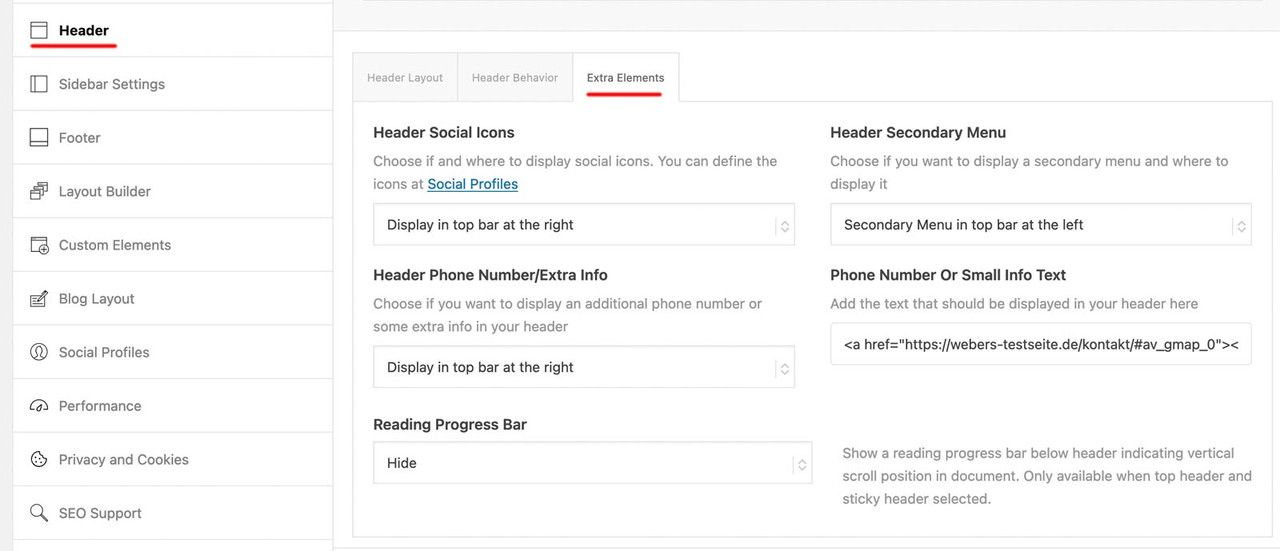
for the first two settings Header Social Icons and Header Secondary Menu these content had to be set – if they should be shown on that header_meta (top-bar).
For secondary menue – you had to declare a menu as secondary menue on appearance – menus :
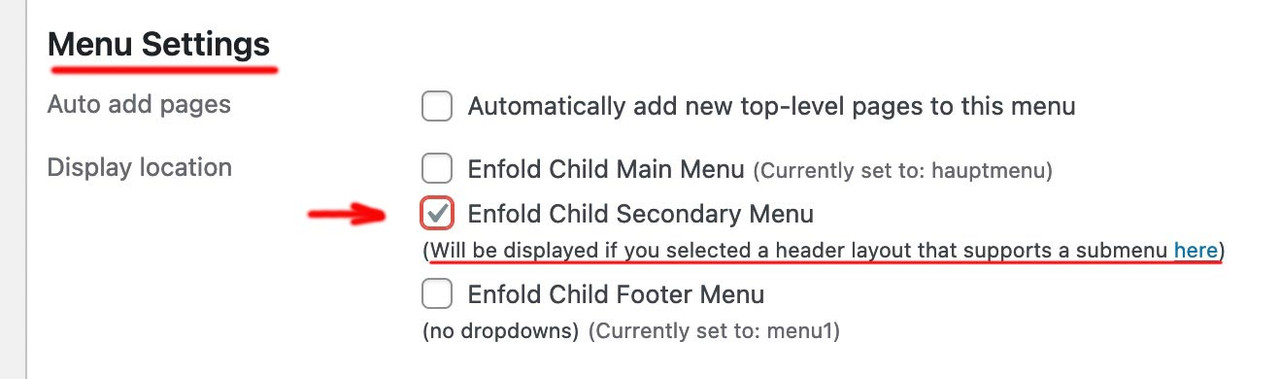
For Social icons – go to Enfold Option – Social Profiles.
For Phone Number – you had on the right side an input field for that content ( tags are allowed here)
you might have something like:
<a href="domain/kontakt/#av_gmap_0"><span class="map">Location</span></a><a href="domain/kontakt/"><span class="contact">Contact</span></a><a href="tel:+492281234567"><span class="tel">Phone</span></a>

Hello.
No matter how much I search, I can’t seem to find how to make the top bar appear (Like the grey-blue one at https://kriesi.at/themes/enfold-shop/ with the “Give us a call now” text), or how to edit it’s content. Can you please let me know?
Thank you
Thanks now it’s perfect but why this time it was necessary to act on the css and I can’t modify it directly from the enfold options?
Hi,
Thank you for the update.
Have you tried adding this code in the functions.php file as @Guenni007 suggested in the previous thread?
function admin_head_mod() {
echo '<style type="text/css">
	#postbox-container-2 { clear: left; }
	.index-php #postbox-container-2 { clear: none; }
</style>';
}
add_action('admin_head', 'admin_head_mod');
Thread; https://kriesi.at/support/topic/enfold-back-end-not-working-in-safari-on-sequoia/#post-1468431
Best regards,
Ismael
Hello everyone,
For those who are interested, you can download the latest version of the Italian language
Download here
Translation: Italian language
Version: Enfold 6.0.5
Released on: 10th October 2024
Strings: 6549
All translations are synchronised with the source files
Regards
Luigi
what is that wpo minifiy ? maybe this is not working correct.
i got 35 error listiings in dev console.
f.e.: Uncaught ReferenceError: jQuery is not defined
try to deactivate your WP Super Minify clear cachings and have a look if enfold works as expected.
Hi,
Thanks for that, it’s still working when the parent theme is activate though. You could try using a clean child theme insted: https://kriesi.at/documentation/enfold/child-theme/. There’s no need to use plugins for that.
Best regards,
Rikard
Hi,
After migrating to the new events calendar …. on single events the sidebar moved to the bottom.
I am using Enfold on this website. I use your theme and The events plugin for years now. So I really appreciate a solution for this.
Thank you in advance and looking forward to your reply.
Cheers, Ariane
Hi,
Please see our documentation: Add Images to mega menu
and create a new column in the mega menu with the image.
Best regards,
Mike
Hi,
Thanks for the update, we’ll close this thread for now then. Please open a new thread if you should have any further questions or problems.
Thanks @guenni007 for helping out :-)
Best regards,
Rikard
Hey Gianluca,
Did you check your settings under Enfold->General Styling, and Enfold->Advanced Styling?
Best regards,
Rikard
Hi,
Please try the following in Quick CSS under Enfold->General Styling:
.page-id-2002 .avia-content-slider-inner span.blog-categories {
  display: none;
}

.page-id-2002 .avia-content-slider .slide-image {
  max-height: 210px;
  height: 210px;
}
Note that it will only apply to the blog page.
Best regards,
Rikard
Hi,
Thanks for the update, we’ll close this thread for now then. Please open a new thread if you should have any further questions or problems.
Best regards,
Rikard
well – be more specific in your selectors – change your rule to :
.header_color .main_menu ul:first-child > li.current-menu-item > a > .avia-menu-text {
  font-weight:700
}
the greater than (>) indicates that only the direct descendants are meant, and not grandchildren etc.
or you can do that by enfold – under advanced styling there is the choice to style only “main menu links” and that means only first level items.



