Hi,
Thanks for the login, but you are not using the Enfold theme:

You will need to contact “p-themes”:

Best regards,
Mike
Hi,
I see in your Enfold Theme Options ▸ Blog Layout ▸ Blog Styling you are using the “default” is this the closest to want you want, such as the title size?

Did you see the “modern business” option with the category and larger title?

Both have a date, do you want this removed?
Best regards,
Mike
Hi,
Glad we were able to help, if you have any further questions please create a new thread and we will gladly try to help you. Thank you for using Enfold.
Best regards,
Mike
Yes I do
I have an wordpress installation here https://itjenter.no/workshop/helfy/
I am running medin by enfold see pic attached 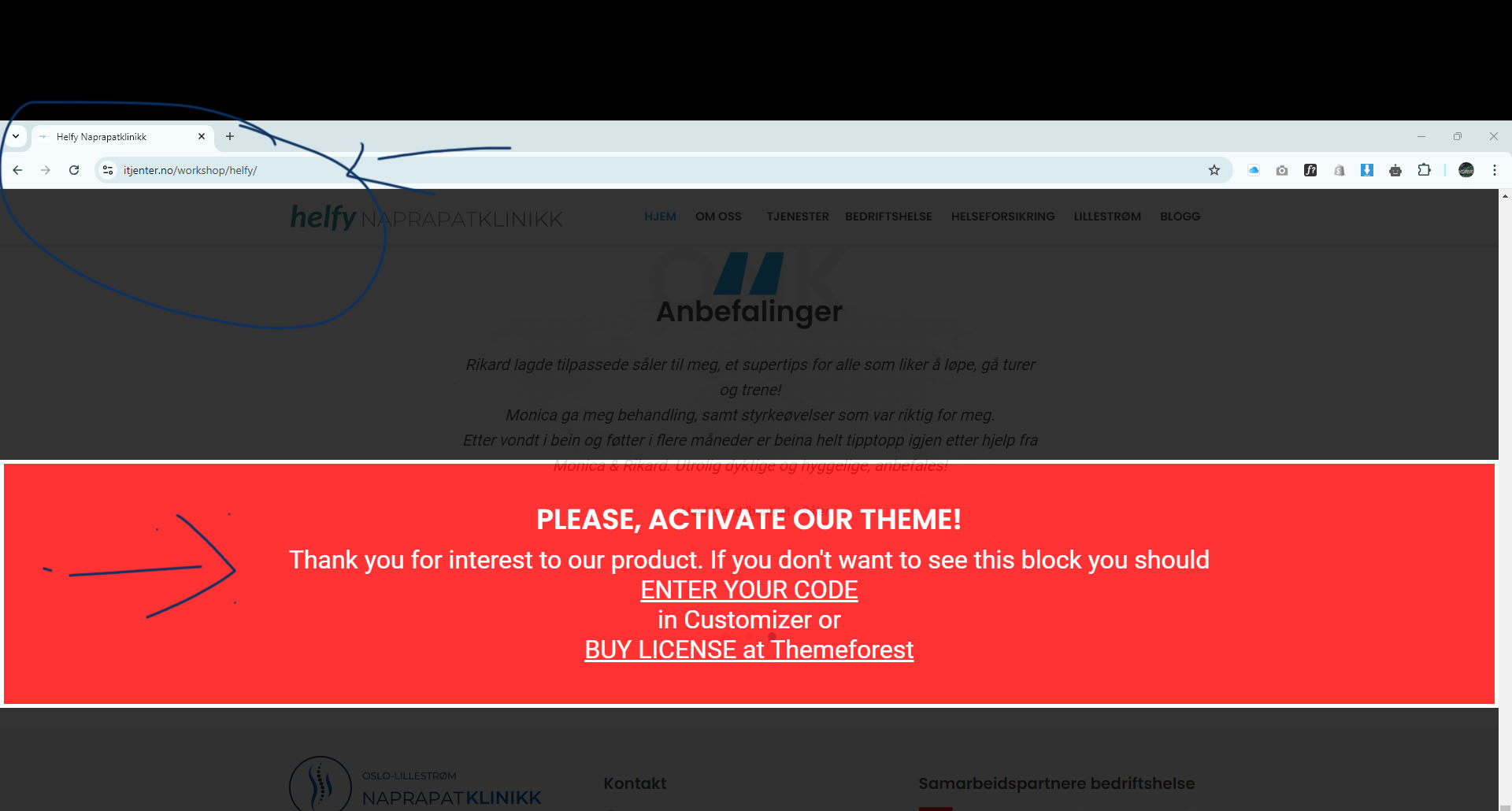
Hi,
Thank you for the screenshot.
Why are the font weights separated? You can just download the font collection from Google as a set and upload them to the font manager at the same time.
// https://fonts.google.com/specimen/Montserrat
Did you select the font in the Enfold > General Styling > Heading Font or Font for Your Body Text settings? The font will not be loaded if it’s not selected.
Best regards,
Ismael
Hey Dr. Abraham Peters,
Thank you for your interest in the Enfold theme.
We don’t directly build websites for our users, but you can contact our partner Codeable for customizations. Please check the link below for more info.
// https://kriesi.at/contact/customization
Best regards,
Ismael
Hey ibuzaev,
Thank you for the inquiry.
The element for the search icon is missing. Please try temporarily disable the Enfold > Performance > File Compression settings, then purge the cache. If the issue persists, please provide the login details in the private field.
Best regards,
Ismael
Hi,
Glad Rikard could help, if you have any further questions please create a new thread and we will gladly try to help you. Thank you for using Enfold.
Best regards,
Mike
Hey clbdcnpafe,
Please try the following in Quick CSS under Enfold->General Styling:
#top .fullsize .template-blog .post .entry-content-wrapper {
  text-align: left;
}
Best regards,
Rikard
Hi,
Glad we could help, for the Scroll Snap I recommend trying a plugin, this is not a Enfold feature and I have not tested any specific plugins to achieve this.
If you would like to request this feature the Dev Team has opened a new Github Feature Request for users to place requests and follow them as the Dev Team reviews them.
Best regards,
Mike
Thanks Mike, excellent!
I set it to 90% and it works brilliantly!
One more quick question on the matter.
On this very page I tried mouse scrolling and wished to achieve a magnetic stop on the next section. I hope you know what I mean. it seems to be called Scroll Snap in Elementor [PRO].
Many other pages come with a similar feature.
Would you know how to accomplish this, or a something alike with Enfold, or would that be a feature request?
Thanks for your always brilliant help!
Stefan
Hi,
Do you mean copy layouts from our other demos into one new layout for your site? Or do you mean create a new layout based on some site that you have seen, ie: not a Enfold demo?
Enfold is typically very customizable but sometimes it can take some trial an error with all the different setting to get an exact look.
While we are always able to help with modifications, we are limited to building out a whole site based on some other site you found on the internet, for this we recommend Codeable
Best regards,
Mike
Dear Enfold Team,
I created a color section with a full-screen (stretched to fit) background image (or Video).
The first background section displays correctly. But when I press the scroll down arrow the next section seems to be added to the (reduced) header and the down arrow is hiding below.
So the ‘next’ scroll down arrow key is not visible, only when you mouse-wheel down. Could you please help out, so we can see the scroll button on #av_section_2 / #av_section_3 / etc. ?
To get a better idea I attach the page and also give you access to the page.
Thanks,
Stefan
Hi,
Thanks for the update. If you have questions that are off the current topic, then please open a new thread.
Best regards,
Rikard
Hi Rikard,
I confirm, I want to use Enfold and modify the design based on the layout of other sites.
Who can help me with that?
Best regards,
Ms
Hey Bryan,
Thanks for that, you can submit feature requests here if you like: https://github.com/KriesiMedia/Enfold-Feature-Requests/issues
Best regards,
Rikard
Dear Support Team,
I have a question about OpenStreetMap. I have integrated “OpenStreetMap” on the website https://www.schlosswirtschaft-schwaige.de/kontakt/anfahrt/ according to your instructions using the “Leaflet Map” plugin.
If I now use this plugin and integrate it according to your instructions https://kriesi.at/documentation/enfold/openstreetmaps-leaflet-maps/, what about hosting the data?
– Is OpenStreetMap hosted on the servers of the OpenStreetMap Foundation?
– Or will OpenStreetMap be hosted on our own servers?
Best regards, Diana
I understand. But I want to entirely disable the the portfolio custom post type so I don’t see it at all on the admin side.
Is it possible that the way Enfold manages custom post types, especially the portfolio post type, has changed between versions, and your code for disabling the portfolio is no longer compatible with the latest version?
-
This reply was modified 1 year, 5 months ago by
 cmactv.
Hi,
Glad to hear that you have this sorted out, if you have any further questions please create a new thread and we will gladly try to help you. Thank you for using Enfold.
Best regards,
Mike
I think I got it.
I guess I messed up months ago with the WP_DEBUG constant. It was set on ‘false’ so it was displaying error messages on the back and front offices. The funny thing is that errors weren’t displayed with the 5.6.12 version but they were with lastest version of enfold!
In the mean time, I understood how to change the name of the group using the ‘chgrp’ command through a putty session. I have changed files that were under ‘http’ group instead of ‘users’ and… it seems to work!
I don’t understand why the name of the owner and the name of the group have changed randomly on some folders and files over the time ?
The 6.0.5 version is enable with no more messages, it looks ok so far.
No more help needed for now.
Later.
Hey Nick_Skehan,
Please check the Enfold Theme Options ▸ Blog Layout ▸ Blog Styling each option has a different layout and some are only available for certain options. Please choose the one that is closest to what you are looking for, we can help with javascript & css to make any final adjustments.
Please link to your page so we can make these final adjustments viewing your site.
Best regards,
Mike
Hi,
Try adding this code to the end of your child theme functions.php file in Appearance ▸ Editor:
function custom_script() { ?>
  <script>
document.addEventListener("DOMContentLoaded", function() {
    var footer = document.getElementById('footer');
    var afterSlideshow = document.getElementsByClassName('el_after_av_slideshow');
    if (footer) {
        var newDivFooter = document.createElement('div');
        newDivFooter.className = 'custom-header-background-footer';
        footer.appendChild(newDivFooter);
    }
    if (afterSlideshow.length > 0) {
        var newDivSlideshow = document.createElement('div');
        newDivSlideshow.className = 'custom-header-background-bottom';
        afterSlideshow[0].appendChild(newDivSlideshow);
    }
});
</script>
  <?php
}
add_action( 'wp_footer', 'custom_script', 99 );
Then add this CSS in your Enfold Theme Options ▸ General Styling ▸ Quick CSS field:
.custom-header-background-footer {
    background-image: url(/wp-content/uploads/2024/09/top_no_fade.png);
    background-repeat: repeat-x;
    background-position: bottom center;
    background-size: auto;
    height: 50px;
    width: 100%;
    position: absolute;
    top: -50px;
}
.custom-header-background-bottom {
    background-image: url(/wp-content/uploads/2024/09/top_no_fade.png);
    background-repeat: repeat-x;
    background-position: bottom center;
    background-size: auto;
    height: 50px;
    width: 109%;
    position: absolute;
    top: 25px;
    left: -5%;
    transform: rotate(180deg);
}
Please ensure to copy the code from the forum and not an email notification so the symbols are not converted.
Best regards,
Mike
Hi,
I’m not sure what is the issue with your multiple FTP users or your permissions, I can not reproduce this on my install. Please try updating this way instead:
To update your version of Enfold download the latest installable WP version from your Theme Forest account and upload it to your WordPress ▸ Appearance ▸ Themes ▸ Add Themes ▸ Add New

after you choose the zip file and click install, you will see a This theme is already installed message because you are updating, you can continue

then you will see the Theme updated successfully message.

Best regards,
Mike
Hi,
Try this CSS in your Enfold Theme Options ▸ General Styling ▸ Quick CSS field:
#top #header.header_color .av-main-nav > li#menu-item-11678 > a:hover,
#top #header.header_color .av-main-nav > li#menu-item-11678 > a:focus,
#top #header.header_color .av-main-nav > li#menu-item-11678 > a:hover .avia-menu-text,
#top #header.header_color .av-main-nav > li#menu-item-11678 > a:focus .avia-menu-text,
#top #header.header_color .av-main-nav > li#menu-item-11678 > a:hover .avia-menu-subtext,
#top #header.header_color .av-main-nav > li#menu-item-11678 > a:focus .avia-menu-subtext,
#top #header.header_color.av_header_transparency .av-main-nav > li#menu-item-11678 > a:hover,
#top #header.header_color.av_header_transparency .av-main-nav > li#menu-item-11678 > a:focus,
#top #header.header_color.av_header_transparency .av-main-nav > li#menu-item-11678 > a:hover .avia-menu-text,
#top #header.header_color.av_header_transparency .av-main-nav > li#menu-item-11678 > a:focus .avia-menu-text,
#top #header.header_color.av_header_transparency .av-main-nav > li#menu-item-11678 > a:hover .avia-menu-subtext,
#top #header.header_color.av_header_transparency .av-main-nav > li#menu-item-11678 > a:focus .avia-menu-subtext {
	color: green;
}
Please ensure to copy the code from the forum and not an email notification so the symbols are not converted.
After applying the css, please clear your browser cache and check.
Best regards,
Mike
Hi,
The code is not CSS, it is PHP. If you are not using a child theme you could use the WP Code plugin then add a new snippet, in the top right corner use the PHP snippet as the code type:

and ensure that it is activated, then add the code and save.
Best regards,
Mike
Hi all,
I need to order posts in the Woocommerce Slider integrated in Enfold by a custom meta, which happens a date.
I am not sure I understand the filter capability, but I tried the short plugin below, with no effect. The custom ordering is not appearing in the dropdown menu. I am overiding the priority of Enfold ordering by a priority, but I would be more than happy to use more elegant solution if possible, and this does not work anyway…
<?php

// Add custom sorting option to Enfold's sorting dropdown
add_filter( 'avf_wc_product_order_dropdown_frontend', 'add_custom_sorting_option' );

function add_custom_sorting_option( $product_order ) {
    $product_order['course_date'] = __( 'Sort by course date', 'woocommerce-course-date-sorting' );
    return $product_order;
}

// Modify the ordering arguments after Enfold's modifications
add_filter( 'woocommerce_get_catalog_ordering_args', 'custom_catalog_ordering_args', 30 );

function custom_catalog_ordering_args( $args ) {
    if ( isset( $_GET['product_order'] ) && 'course_date' === $_GET['product_order'] ) {
        $order = isset( $_GET['product_sort'] ) ? strtoupper( $_GET['product_sort'] ) : 'ASC';
        $args['orderby'] = 'meta_value';
        $args['order'] = $order;
        $args['meta_key'] = '_course_date';
        $args['meta_type'] = 'DATE';
    }
    return $args;
}

// Modify the product query to include only products with '_course_date' meta key
add_action( 'woocommerce_product_query', 'custom_woocommerce_product_query' );

function custom_woocommerce_product_query( $query ) {
    if ( ! is_admin() && $query->is_main_query() && is_shop() ) {
        if ( isset( $_GET['product_order'] ) && 'course_date' === $_GET['product_order'] ) {
            $meta_query = $query->get( 'meta_query' );
            if ( ! is_array( $meta_query ) ) {
                $meta_query = array();
            }
            $meta_query[] = array(
                'key'     => '_course_date',
                'compare' => 'EXISTS',
            );
            $query->set( 'meta_query', $meta_query );
        }
    }
}
Can you please guide me on how to tackle this properly? Thanks, Jakub
Hi,
I tried enabling “Delay Java Script” and changed your mobile menu to “Display submenu items on click” and tested in Safari with Responsive Design Mode to emulate a iPhone and in Chrome as a mobile device on a Mac but found no issues after more than six clicks.
I see that your “Excluded JavaScript Files” has one file “menu.js” so perhaps you have not cleared your iPhone cache. Please note that testing with iPhones can be hard to clear the cache, often you need to also clear the history to fully purge the cache, following these steps for Safari and note Step 4 where you will Clear the History.
But note that the recommended “Excluded JavaScript Files” are more than your one file.
/jquery-?[0-9.](.*)(.min|.slim|.slim.min)?.js
/jquery-migrate(.min)?.js
/dynamic_avia/avia-footer-scripts-(.*).js
var avia_is_mobile
/enfold/js/avia.js
/enfold/js/shortcodes.js
/enfold/config-templatebuilder/avia-shortcodes/
/enfold/js/avia-compat.js
Also note that the plugin offers a “One-click exclusions” option for the theme:

but I’m not able to reproduce the error on your site now, so I assume that it is a cache issue on your device, please check.
Best regards,
Mike
Rikard, I know what it is. It’s a permission (and possibly a folder ownership) issue.
When I set manually 777 permission to wp-content/uploads/*folders then I don’t have errors any more.
As soon as I come back to 755, errors come back too.
I have 2 thoughts and no anwsers
1) Using FileZilla to upgrade enfold version, I don’t understand why WP is not able to allow permission automatically during the process of swapping folder-V.5.6.12 into folder-V.6.0.5 !
2) On top of that, it seems I have different owners inside my wp-content/upload folder and sub-folders. I think (but I’m not sure) this is where comes from the problem and I have no clue how to fix that.

I hope it gives you ideas to help me to get out of this blocking situation.
PS. I’m aware about my late php version too, I need to take care about that some day. Thx for the reminder.
-
This reply was modified 1 year, 5 months ago by
 rvga.
rvga.
-
This reply was modified 1 year, 5 months ago by rvga.
-
This reply was modified 1 year, 5 months ago by rvga.
-
This reply was modified 1 year, 5 months ago by rvga.
Hi Rikard,
I’m glad to see you study my case, thanks for that.
I have just switched between the 5.6.12 version and the 6.0.5 one and here are the 3 errors I had:
(hope it helps)
Warning: fopen(/volume4/web/cserp/wp-content/uploads/dynamic_avia/avia-merged-styles-18ecd38336cb985ece6556faf31d6e7a—670a5d4bd6c89.css):
failed to open stream: Permission denied in /volume4/web/cserp/wp-content/themes/enfold/framework/php/function-set-avia-backend.php on line 984 Call Stack: 0.0001 368624
1. {main}() /volume4/web/cserp/index.php:0 0.0001 368904
2. require(‘/volume4/web/cserp/wp-blog-header.php’) /volume4/web/cserp/index.php:17 3.4384 57892464
3. require_once(‘/volume4/web/cserp/wp-includes/template-loader.php’) /volume4/web/cserp/wp-blog-header.php:19 3.5285 60283368
4. include(‘/volume4/web/cserp/wp-content/themes/enfold/template-builder.php’) /volume4/web/cserp/wp-includes/template-loader.php:106 3.5286 60283368
5. get_header() /volume4/web/cserp/wp-content/themes/enfold/template-builder.php:15 3.5379 60349904
6. locate_template() /volume4/web/cserp/wp-includes/general-template.php:48 3.5380 60349984
7. load_template() /volume4/web/cserp/wp-includes/template.php:745 3.5475 60378328
8. require_once(‘/volume4/web/cserp/wp-content/themes/enfold/header.php’) /volume4/web/cserp/wp-includes/template.php:810 3.5925 60385800
9. wp_head() /volume4/web/cserp/wp-content/themes/enfold/header.php:228 3.5925 60385800
10. do_action() /volume4/web/cserp/wp-includes/general-template.php:3065 3.5925 60386176
11. WP_Hook->do_action() /volume4/web/cserp/wp-includes/plugin.php:517 3.5925 60386176
12. WP_Hook->apply_filters() /volume4/web/cserp/wp-includes/class-wp-hook.php:348 3.6548 60390136
13. wp_enqueue_scripts() /volume4/web/cserp/wp-includes/class-wp-hook.php:324 3.6548 60390136
14. do_action() /volume4/web/cserp/wp-includes/script-loader.php:2263 3.6548 60390512
15. WP_Hook->do_action() /volume4/web/cserp/wp-includes/plugin.php:517 3.6548 60390512
16. WP_Hook->apply_filters() /volume4/web/cserp/wp-includes/class-wp-hook.php:348 3.7716 60756224
17. aviaAssetManager->try_minifying_scripts() /volume4/web/cserp/wp-includes/class-wp-hook.php:324 3.7716 60756224
18. aviaAssetManager->merge() /volume4/web/cserp/wp-content/themes/enfold/config-templatebuilder/avia-template-builder/php/class-asset-manager.php:243 3.7812 61881584
19. aviaAssetManager->generate_file() /volume4/web/cserp/wp-content/themes/enfold/config-templatebuilder/avia-template-builder/php/class-asset-manager.php:358 3.7820 62667408
20. avia_backend_create_file() /volume4/web/cserp/wp-content/themes/enfold/config-templatebuilder/avia-template-builder/php/class-asset-manager.php:810 3.7820 62667408
21. fopen() /volume4/web/cserp/wp-content/themes/enfold/framework/php/function-set-avia-backend.php:984
Warning: fopen(/volume4/web/cserp/wp-content/uploads/dynamic_avia/avia-head-scripts-388e3ec585846faac3926658720b7d69—670a5d4bd887a.js):
failed to open stream: Permission denied in /volume4/web/cserp/wp-content/themes/enfold/framework/php/function-set-avia-backend.php on line 984 Call Stack: 0.0001 368624
1. {main}() /volume4/web/cserp/index.php:0 0.0001 368904
2. require(‘/volume4/web/cserp/wp-blog-header.php’) /volume4/web/cserp/index.php:17 3.4384 57892464
3. require_once(‘/volume4/web/cserp/wp-includes/template-loader.php’) /volume4/web/cserp/wp-blog-header.php:19 3.5285 60283368
4. include(‘/volume4/web/cserp/wp-content/themes/enfold/template-builder.php’) /volume4/web/cserp/wp-includes/template-loader.php:106 3.5286 60283368
5. get_header() /volume4/web/cserp/wp-content/themes/enfold/template-builder.php:15 3.5379 60349904
6. locate_template() /volume4/web/cserp/wp-includes/general-template.php:48 3.5380 60349984
7. load_template() /volume4/web/cserp/wp-includes/template.php:745 3.5475 60378328
8. require_once(‘/volume4/web/cserp/wp-content/themes/enfold/header.php’) /volume4/web/cserp/wp-includes/template.php:810 3.5925 60385800
9. wp_head() /volume4/web/cserp/wp-content/themes/enfold/header.php:228 3.5925 60385800
10. do_action() /volume4/web/cserp/wp-includes/general-template.php:3065 3.5925 60386176
11. WP_Hook->do_action() /volume4/web/cserp/wp-includes/plugin.php:517 3.5925 60386176
12. WP_Hook->apply_filters() /volume4/web/cserp/wp-includes/class-wp-hook.php:348 3.6548 60390136
13. wp_enqueue_scripts() /volume4/web/cserp/wp-includes/class-wp-hook.php:324 3.6548 60390136
14. do_action() /volume4/web/cserp/wp-includes/script-loader.php:2263 3.6548 60390512
15. WP_Hook->do_action() /volume4/web/cserp/wp-includes/plugin.php:517 3.6548 60390512
16. WP_Hook->apply_filters() /volume4/web/cserp/wp-includes/class-wp-hook.php:348 3.7716 60756224
17. aviaAssetManager->try_minifying_scripts() /volume4/web/cserp/wp-includes/class-wp-hook.php:324 3.7835 61854080
18. aviaAssetManager->merge() /volume4/web/cserp/wp-content/themes/enfold/config-templatebuilder/avia-template-builder/php/class-asset-manager.php:246 3.7883 61905560
19. aviaAssetManager->generate_file() /volume4/web/cserp/wp-content/themes/enfold/config-templatebuilder/avia-template-builder/php/class-asset-manager.php:358 3.7887 62218048
20. avia_backend_create_file() /volume4/web/cserp/wp-content/themes/enfold/config-templatebuilder/avia-template-builder/php/class-asset-manager.php:810 3.7887 62218048
21. fopen() /volume4/web/cserp/wp-content/themes/enfold/framework/php/function-set-avia-backend.php:984
Warning: fopen(/volume4/web/cserp/wp-content/uploads/dynamic_avia/avia_posts_css/post-2.css):
failed to open stream: Permission denied in /volume4/web/cserp/wp-content/themes/enfold/framework/php/function-set-avia-backend.php on line 984 Call Stack: 0.0001 368624
1. {main}() /volume4/web/cserp/index.php:0 0.0001 368904
2. require(‘/volume4/web/cserp/wp-blog-header.php’) /volume4/web/cserp/index.php:17 3.4384 57892464
3. require_once(‘/volume4/web/cserp/wp-includes/template-loader.php’) /volume4/web/cserp/wp-blog-header.php:19 3.5285 60283368
4. include(‘/volume4/web/cserp/wp-content/themes/enfold/template-builder.php’) /volume4/web/cserp/wp-includes/template-loader.php:106 3.5286 60283368
5. get_header() /volume4/web/cserp/wp-content/themes/enfold/template-builder.php:15 3.5379 60349904
6. locate_template() /volume4/web/cserp/wp-includes/general-template.php:48 3.5380 60349984
7. load_template() /volume4/web/cserp/wp-includes/template.php:745 3.5475 60378328
8. require_once(‘/volume4/web/cserp/wp-content/themes/enfold/header.php’) /volume4/web/cserp/wp-includes/template.php:810 3.5925 60385800
9. wp_head() /volume4/web/cserp/wp-content/themes/enfold/header.php:228 3.5925 60385800
10. do_action() /volume4/web/cserp/wp-includes/general-template.php:3065 3.5925 60386176
11. WP_Hook->do_action() /volume4/web/cserp/wp-includes/plugin.php:517 3.5925 60386176
12. WP_Hook->apply_filters() /volume4/web/cserp/wp-includes/class-wp-hook.php:348 3.6548 60390136
13. wp_enqueue_scripts() /volume4/web/cserp/wp-includes/class-wp-hook.php:324 3.6548 60390136
14. do_action() /volume4/web/cserp/wp-includes/script-loader.php:2263 3.6548 60390512
15. WP_Hook->do_action() /volume4/web/cserp/wp-includes/plugin.php:517 3.6548 60390512
16. WP_Hook->apply_filters() /volume4/web/cserp/wp-includes/class-wp-hook.php:348 3.7901 61904376
17. aviaPostCssManagement->handler_enqueue_post_styles() /volume4/web/cserp/wp-includes/class-wp-hook.php:324 3.7902 61904376
18. aviaPostCssManagement->check_create_file() /volume4/web/cserp/wp-content/themes/enfold/config-templatebuilder/avia-template-builder/php/class-post-css-management.php:205 3.8737 61743384
19. aviaPostCssManagement->create_file() /volume4/web/cserp/wp-content/themes/enfold/config-templatebuilder/avia-template-builder/php/class-post-css-management.php:275 3.8743 61751896
20. avia_backend_create_file() /volume4/web/cserp/wp-content/themes/enfold/config-templatebuilder/avia-template-builder/php/class-post-css-management.php:1064 3.8743 61751896
21. fopen() /volume4/web/cserp/wp-content/themes/enfold/framework/php/function-set-avia-backend.php:984
Surprisingly, these erros are not listed in my PHP error log window maintained by the Error Log Monitor WP plugin?
Hi,
Thanks for the update, we’ll close this thread for now then. Please open a new thread if you should have any further questions or problems.
Best regards,
Rikard



