Hi,
I am using the Meow AI Engine Plugin with my website. However, when applying the popup mode of the chatbot (should only apply on selected pages via shortcode), it is covered by some parts of the website which hides the chatbot icon and hinders entries to the chatbot. The chatbot is activated on a selected page by a shortcode. I used the code block to put the chatbot in place on page.
Tried to fix it by increasing the z-index but didn’t work.
Here is what the Meow Support wrote me:
“By default, the z-index already uses the highest value on the chatbot container, so you don’t have to worry about that. If you see an element above the chatbot, it means it’s a child relative to these other elements. Z-index only works at the same hierarchy level; changing the value here will not change anything.
I visited your site, and by moving the chatbot container outside your main content, it displays as expected. Your issue is happening because the chatbot is rendered in an “avia codeblock,” which is a child of your other content.”
I somehow understand the issue but since I am not a programmer, I do not know how actually to put this into practice… :(
Best regards
Olaf
Hi,
After updating theme to latest version facing difficulties like many elements does not open for editing at the back end of the website. (Heading, Separator / Whitespace, Icon List, button).
It just shows empty white block or sometime it takes lot of time to load the block element for editing.
Thought some plugins might be causing this conflict and tried to disable all the plugins which was installed already, by doing so I got critical error and fixed it with the help of Host provider.
Now the website is up, enabled few plugins and content elements showing up sometime and not showing option for editing sometime, but still error pops up on the top of the page if we are in ‘Edit Advance Layout Builder’.
These were the few error which I copied for your reference.
Notice: Function WP_Abilities_Registry::get_registered was called incorrectly. Ability “gd-mcp/get-site-info” not found. Please see Debugging in WordPress for more information. (This message was added in version 6.9.0.) in /var/www/wp-includes/functions.php on line 6131
Notice: Function WP_Abilities_Registry::get_registered was called incorrectly. Ability “gd-mcp/get-post” not found. Please see Debugging in WordPress for more information. (This message was added in version 6.9.0.) in /var/www/wp-includes/functions.php on line 6131
Warning: Cannot modify header information – headers already sent by (output started at /var/www/wp-includes/functions.php:6131) in /var/www/wp-admin/admin-header.php on line 14
Warning: Cannot modify header information – headers already sent by (output started at /var/www/wp-includes/functions.php:6131) in /var/www/wp-includes/option.php on line 1740
Warning: Cannot modify header information – headers already sent by (output started at /var/www/wp-includes/functions.php:6131) in /var/www/wp-includes/option.php on line 1741
Theme Version: 7.1.3
Using Enfold Child theme
PHP Version 7.4
I selected the font from the Enfold – General Styling – Fonts and I think the cookie compliance is (suddenly) blocking it.
I uploaded it and it’s fine now.
In the future – do I always need to self-host? I haven’t had issue with this before but maybe it’s GDPR rules changing.
Thanks for your help!
Nancy
you like to have the oswald font for them? How did you embed the font? via Font-Manager / selfhosted or just by choosing it form the drop-down on Enfold – General Styling – Fonts ? i do not find any @font-face rule
i can find a redefinition of :
:root {
  --enfold-font-family-heading:'oswald',Helvetica,Arial,sans-serif
}
but if there is no loading of oswald then the Helvetica is loaded
by the way – what is hu-blocked – i can see a block of google webfonts – maybe that is the reason for it.
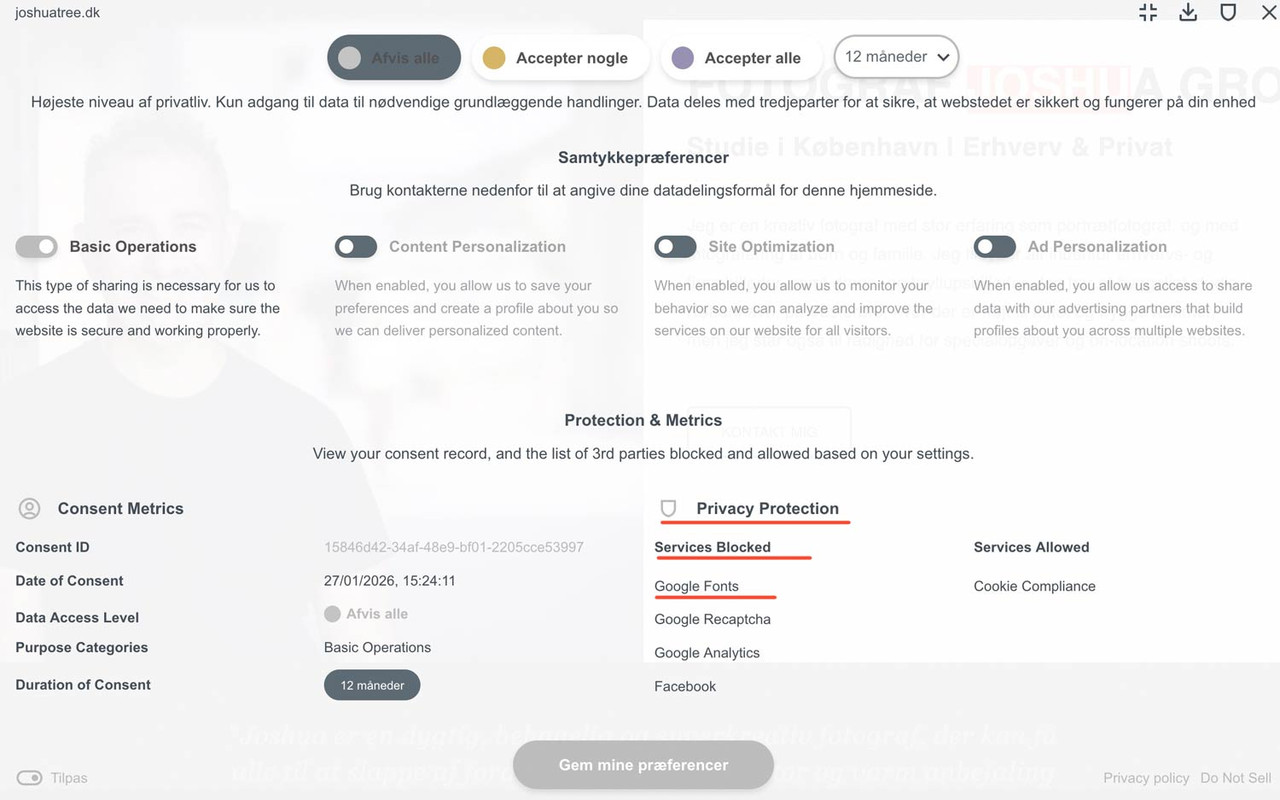
PS i can reproduce it – before consent – and after reload – one looks more condensed than the other one.
PPS: i recommend using a selfhosted font – by font-manager of Enfold
You must be referring to the arrows that open submenus. Unfortunately, none of the Enfold demos have this type of hamburger navigation. Otherwise, I could tell you the selectors based on that.
Hello Enfold Support Team,
I am using the Enfold theme on my WordPress website and would like to ensure that it updates automatically whenever a new version is released.
Could you please guide me on how to set up automatic updates?
I already have my Envato/ThemeForest purchase code (Token). Where exactly in the theme settings do I need to enter it to enable auto-updates?
Thank you for your help!
Best regards,
Hi,
Thanks for the update. Please open a new thread if you should have any further questions or problems.
Best regards,
Rikard
Is there are way to have the Masonry Gallery image title visible at the bottom then when you hover over the image more text appears. Like the portrait feature boxes on this page
If not possible in Enfold is there a plug-in that with achieve this? I have tried Image Hover Effects Ultimate but could get it like the example above.
Regards
Colin
Hey schweg33,
I don’t see anything related to Enfold in those warnings. Did you try to temporarily deactivate all plugins and remove any custom code that you might have added? You can also turn off debugging messages on the front end: https://wordpress.org/support/article/debugging-in-wordpress/
Best regards,
Rikard
Hey sky19er,
Thank you for the inquiry.
The sorting buttons are indeed defined as links, but you can modify them in the
enfold/config-templatebuilder/avia-shortcode-helpers/class-avia-masonry.php file. Look for the following block of code around line 494:
	$sort_loop .= 	"<span class='text-sep {$term->slug}_sort_sep {$show_item}'>/</span>";
					$sort_loop .= 	'<a href="#" data-filter="' . $term->slug . '_sort" class="'.$term->slug.'_sort_button ' . $show_item . '" >';
					$sort_loop .=		'<span class="inner_sort_button">';
					$sort_loop .=			'<span>' . esc_html( trim( $term->name ) ) . '</span>';
					$sort_loop .=			"<small class='avia-term-count'> " . $term_count[ $term->term_id ] . ' </small>';
					$sort_loop .=		'</span>';
					$sort_loop .= 	'</a>';
Best regards,
Ismael
Hello everyone,
I have installed the Enfod and Enfold Child themes on this domain link below:
Import: Medical Demo
When logging in and out, I receive the following error message:
What can I do here?
Thank you in advance.
Warning: Undefined array key “path” in /home/httpd/vhosts/anlaesse.li/httpdocs/wp-includes/l10n.php on line 1192 Warning: Undefined array key “path” in /home/httpd/vhosts/anlaesse.li/httpdocs/wp-includes/l10n.php on line 1218 Warning: Undefined array key “path” in /home/httpd/vhosts/anlaesse.li/httpdocs/wp-includes/l10n.php on line 1236 Warning: Undefined array key “path” in /home/httpd/vhosts/anlaesse.li/httpdocs/wp-includes/l10n.php on line 1192 Warning: Undefined array key “path” in /home/httpd/vhosts/anlaesse.li/httpdocs/wp-includes/l10n.php on line 1218 Warning: Undefined array key “path” in /home/httpd/vhosts/anlaesse.li/httpdocs/wp-includes/l10n.php on line 1236 Warning: Undefined array key “path” in /home/httpd/vhosts/anlaesse.li/httpdocs/wp-includes/l10n.php on line 1192 Warning: Undefined array key “path” in /home/httpd/vhosts/anlaesse.li/httpdocs/wp-includes/l10n.php on line 1218 Warning: Undefined array key “path” in /home/httpd/vhosts/anlaesse.li/httpdocs/wp-includes/l10n.php on line 1236
Hey christina495,
The Enfold layout builder is not available for the shop page unfortunately, you would have to use the default WordPress editor for that page.
Best regards,
Rikard
Hi,
Thanks for the update, we’ll close this thread for now then. Please open a new thread if you should have any further questions or problems.
Best regards,
Rikard
Hi,
Thanks for the update. Please open a new thread if you should have any further questions or problems.
Best regards,
Rikard
Hi,
Glad that Guenni007 could help, if you have further questions please open a new thread and we will try to help. Thanks for using Enfold.
Best regards,
Mike
Hallo,
wie kann ich statt Google Tracking Matomo Tracking verwenden? Ich möchte, dass Matomo im Cookie-Consent Banner erwähnt wird und der Besucher das Cookie abwählen kann. Daraufhin trackt Matomo ohne Cookies.
Wie ist Ihre Empfehlung Matomo im Enfold Theme zu verwenden? Ich wundere mich etwas, dass ein östereichisches Unternehmen die Datenschutzvorgaben der EU nicht in sein Theme integriert hat. Sicher geht es vielen anderen Nutzern des Themes genauso.
Vielen Dank für Ihre Unterstützung und freundliche Grüße
LoMoe
Hallo,
i want to add a button above the main menu right but inside the menu block not in the top menu line.
So, i used the hooks but i guess, there is no such hook for my need… any idea how to place the button like this?
Button was created as custom widget.
This is the code i use to implement:
/* widget in header */
add_action( 'ava_main_header', 'enfold_customization_header_widget_area' );
function enfold_customization_header_widget_area() {
	dynamic_sidebar( 'btn-immo-bewerten' );
}
This is how it looks like

And this is has it has to be

-
This topic was modified 2 months, 1 week ago by
 xeovision.
try this in child-theme functions.php:
function custom_replace_burger_anchor_with_button( $items, $args ){
    $pattern = '/(<li[^>]*class="[^"]*av-burger-menu-main[^"]*"[^>]*>)\s*<a([^>]*)>/is';
    $items = preg_replace($pattern, '$1<button type="button" $2>', $items);
    $items = preg_replace('/<\/a>(\s*<\/li>\s*$)/', '</button>$1', $items);
    return $items;
}
add_filter( 'wp_nav_menu_items', 'custom_replace_burger_anchor_with_button', 9999, 2 );
BUT: Please note that in this case, you will no longer need to assign all styles to the a tag, but rather to the button tag.
In this case, it might be better to use role=”button” and class=avia-button.
function custom_enhance_burger_anchor_regex( $items, $args ) {
    $pattern = '/<a href="#" aria-label="(.*?)"/i';
    $replacement = '<a href="#" role="button" class="avia-button" aria-label="$1"';
    $items = preg_replace($pattern, $replacement, $items);
    return $items;
}
add_filter( 'wp_nav_menu_items', 'custom_enhance_burger_anchor_regex', 9999, 2 );
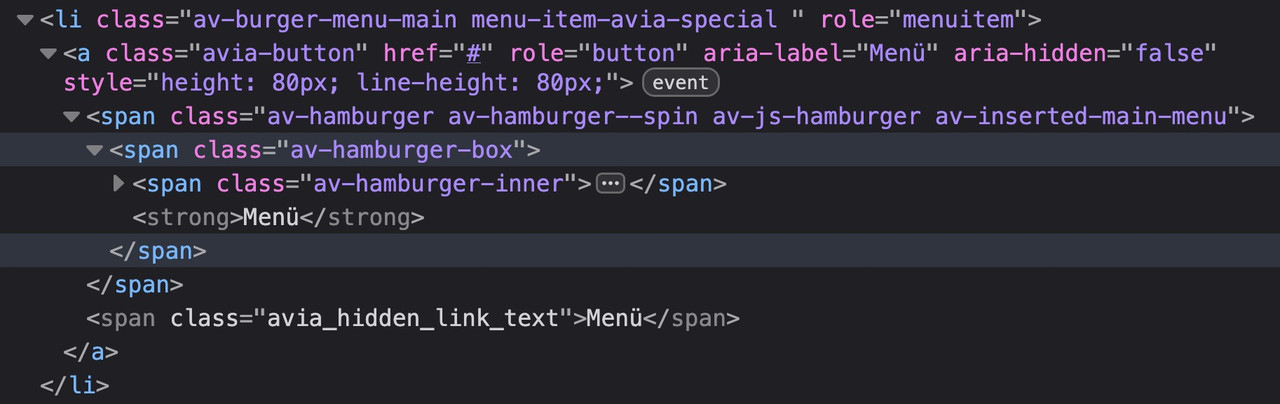
No CSS break: Since it remains an anchor-tag, all Enfold styles for the menu continue to work perfectly.
A11y-compliant: With role=”button,” we tell the screen reader: “Ignore that there is a link here; treat this element like a button.”
maybe it is better to not add the class avia-button because it might come into conflict with some stylings.
use a different class there f.e.: avia-burger-button
then you can easily select it via this class.
First of all, the icon is marked with aria-label=“Menu,” which is best practice.
And to understand your question correctly, they consider an anchor tag with such a label to be misleading?
So you would prefer it to be like this?

by the way – all enfold buttons do not have the button tag – they got that extra-class : avia-button
Hello Yigit:
I’m continuing to experience “THE SAME recurring FATAL ERROR” on this live website (https://www.drisabelbalza.com) that triggers WordPress “Your Site is Experiencing a Technical Issue” emails repeatedly. I don’t know why this annoying E_ERROR doesn’t go away, even though I tried your previous recommendations. What can I do next?
This is from yesterday, January 24, 2026:
Environment:
WordPress version: 6.8.3
Parent theme: Enfold 7.1.3
Active theme: Enfold Child (version 1.0)
Current plugin: (version )
PHP version: 7.4.33
Error Details
=============
An error of type E_ERROR was caused in line 223 of the file /home/drisabel/public_html/wp-content/themes/enfold/includes/classes/class-social-media-icons.php. Error message: Uncaught Error: Class ‘avia_font_manager’ not found in /home/drisabel/public_html/wp-content/themes/enfold/includes/classes/class-social-media-icons.php:223
Stack trace:
#0 /home/drisabel/public_html/wp-content/themes/enfold/includes/classes/class-social-media-icons.php(259): avia_social_media_icons->build_icon(Array)
#1 /home/drisabel/public_html/wp-content/themes/enfold/includes/classes/class-social-media-icons.php(288): avia_social_media_icons->html()
#2 /home/drisabel/public_html/wp-content/themes/enfold/includes/helper-main-menu.php(22): avia_social_media_icons(Array, false)
#3 /home/drisabel/public_html/wp-includes/template.php(812): require(‘/home/drisabel/…’)
#4 /home/drisabel/public_html/wp-includes/template.php(745): load_template(‘/home/drisabel/…’, false, Array)
#5 /home/drisabel/public_html/wp-includes/general-template.php(206): locate_template(Array, true, false, Array)
#6 /home/drisabel/public_html/wp-content/themes/enfold/header.php(275): get_template_part(‘includes/helper’, ‘main-menu’)
#
Best regards,
Claudia
try in your child-theme functions.php:
function ava_custom_toggle_behavior(){
?>
<script type="text/javascript">
(function($) {
    $(window).on('load', function() {
        $('.toggler').on('click', function() {
            var $current = $(this);

            // Short delay so Enfold can set its own classes
            setTimeout(function() {
                if ($current.hasClass('activeTitle')) {
                    // Find all other togglers on the page that are active
                    $('.toggler').not($current).each(function() {
                        if ($(this).hasClass('activeTitle')) {
                            // Simulate click or remove classes manually
                            $(this).trigger('click');
                        }
                    });
                }
            }, 100);
        });
    });
})(jQuery);
</script>
<?php
}
add_action('wp_footer', 'ava_custom_toggle_behavior');
Hi,
Glad that you were able to solve this, if you have further questions please open a new thread and we will try to help. Thanks for using Enfold.
Best regards,
Mike
Hi,
Glad that you were able to solve it, if you have further questions please open a new thread and we will try to help. Thanks for using Enfold.
Best regards,
Mike
I solved it by doing the following as instructed by Gemini.
1. Check the ‘Overwrite Link’ setting for your portfolio items.
Enfold allows you to manually configure where links are sent from individual portfolio posts. If this section is blank or incorrect, an about:blank error will occur.
How to check: In the WordPress admin, click [Portfolio Items] on the left menu -> the post in question.
Check: Locate the [Additional Portfolio Settings] section on the right or bottom of the editing window.
Fix: If the Overwrite Portfolio Link setting is set to ‘Define custom link,’ check that the address is correct. (If it’s blank, try changing it to ‘Link to item.’)
or even better – just use the team-member element as it is and parse a popup by your own.
see with snippet on that example page: https://webers-testseite.de/teammember-vitae-2/
PS: It is always best to examine each individual case closely, as this is the only way to offer a customized solution. Otherwise, one indulges in speculation.
The last solution has the advantage that you only use the pure Enfold element for team members and then create your own lightbox with it. Disadvantage: you would have to rebuild your page and discard our previous design. In the window on the right side of the page, you can see that only plain text is entered in the Description Input Fiele — the Lightbox retrieves the image, name, and position from the existing DOM elements.
To change the aria-label – just edit these lines:
tPrev: 'Previous Biography',
tNext: 'Next Biography',
 Kai
KaiGuest
Hello,
We are planning to create a website for a client and are considering using Enfold for this project. The client intends to sell services to their customers through a plugin we will develop.
We would like to know which license would be appropriate for this purpose: the “Regular” or the “Extended” license? Additionally, would it be better for the client to purchase the license themselves, or can we purchase the license on behalf of the client?
Thank you in advance for your assistance.
Hi,
Glad that we could help, if you have further questions please open a new thread and we will try to help. Thanks for using Enfold.
Best regards,
Mike



