Hey! Never mind, looks like a the upgrade did, indeed, fix things.
I copied the Enfold parent theme folder from a working site with the newest version and pasted it into the /friends themes folder. Then I renamed it “assets” and everything worked. I still have no idea why my predecessor set it up that way. If you don’t see any problems with doing it this way, I’ll just leave it.
Sorry this was so drawn out. Thanks for your time.
– Mike
Hi,
Glad to hear that you have this sorted out, if you have any further questions please create a new thread and we will gladly try to help you. Thank you for using Enfold.
Best regards,
Mike
Hi,
Glad we were able to help, if you have any further questions please create a new thread and we will gladly try to help you. Thank you for using Enfold.
Best regards,
Mike
Hi,
Glad to hear that you have this sorted out, if you have any further questions please create a new thread and we will gladly try to help you. Thank you for using Enfold.
Best regards,
Mike
Hi,
Thanks for the update, we’ll close this thread for now then. Please open a new thread if you should have any further questions or problems.
Best regards,
Rikard
Hi,
Thanks for the update. Please open a new thread if you should have any further questions or problems.
Best regards,
Rikard
Hi!
If you have a minute, can you scan over the messages I exchanged with Rikard? I didn’t set up this installation and it looks like it’s using an older method for parent/child themes. When I downgrade the PHP, the setup actually works just fine, and has for years.
That said, I’m happy to re-set it up and upgrade Enfold. But I’m not sure the best way to do that. Can you please walk me through that?
– Mike
Hi,
Great, I’m glad that you found a solution and thanks for the update. Please open a new thread if you should have any further questions or problems.
Best regards,
Rikard
Hi,
Thanks for the update. Please open a new thread if you should have any further questions or problems.
Best regards,
Rikard
Hi,
Thanks for the update. Please open a new thread if you should have any further questions or problems.
Best regards,
Rikard
Dear Rikard
i have now the child-theme moved in other folder. Without folder themes…
Now is main theme enfold…
Now can’t also in enfold come in the settings …. Blank page without setting options….
The main enfold is in this morning to the newest version updated….
What is here happened??
Can you help me fast?
I move my child theme back in themes folder. Than is my site style back… But without cookie buttons and settings options…
arrrrrgggg.
Regards strumpel
Hey bradmon,
Thank you for the inquiry.
The theme should automatically detect YouTube videos and open them in a lightbox, provided that the Enfold > Theme Options > Lightbox Modal Window option is enabled. Please check if this option is active.
Best regards,
Ismael
Hi,
While doing all this, I also realized that this site is running an older version of the Enfold Parent. (4.x)
Have you tried removing the older version and updating the theme to version 6.0.6? Looks like you didn’t place the theme files in the correct folder.
friends/wp-content/themes/assets/header.php
The path should be:
friends/wp-content/themes/enfold/header.php
Best regards,
Ismael
I made this issue because it would be good to have an easy way when using Enfold to select not to show image title on hover.
It seems that Blocksy and Gutenberg will not display the image title. If I want to include the Image title in an Image block in Gutenberg I would need to open Advanced and add in the title as mentioned by Ismael.
Now instead of a customer needing to include code to not show the image title on hover it would be helpful that Enfold itself found a way to handle it without needing the customer to tackle it.
Thank you for the discussion!
Hi,
Are you trying to update the theme manually? If so, then make sure that you are using the correct file. If you are download the theme package from Themeforest, then you might have to unpack the downloaded file, then use enfold.zip which is located inside the unzipped folder. I would suggest that you register your theme license instead, so that you will receive automatic updates: https://kriesi.at/documentation/enfold/theme-registration/
Best regards,
Rikard
Hi,
You can find all Enfold demos here: https://kriesi.at/themes/enfold-overview/. Note that the page which is linked is not an actual demo.
Best regards,
Rikard
Hi,
Please try the following in Quick CSS under Enfold->General Styling:
#anfahrt {
  border-color: transparent;
}
Best regards,
Rikard
While doing all this, I also realized that this site is running an older version of the Enfold Parent. (4.x)
Hello!
I activated debug mode in the /friends wp-config.php file and then I changed the theme to twentrytwentytwo, and then I exited Recovery Mode. Then I activated out Enfold Child theme. But I can’t find the debug.log file anywhere. You have FTP access, are you able to locate it?
One new thing. Now when I activate the Enfold child, instead of just not loading, it showed me this:
Deprecated: Creation of dynamic property avia_sidebar::$title is deprecated in /home/customer/www/ecpubliclibrary.info/public_html/friends/wp-content/themes/assets/framework/php/class-sidebar-generator.php on line 34
Fatal error: Unparenthesized a ? b : c ? d : e is not supported. Use either (a ? b : c) ? d : e or a ? b : (c ? d : e) in /home/customer/www/ecpubliclibrary.info/public_html/friends/wp-content/themes/assets/functions-enfold.php on line 324
There has been a critical error on this website. Please check your site admin email inbox for instructions.
Learn more about troubleshooting WordPress.
Hi,
We recently updated our Enfold theme to the latest version. The links from the front page are no longer working – every link takes you back to the front page. Any ideas?
Thanks.
This page is the overview page of existing demos! : “Choose a Enfold Demo”
That Demo Overview is nothing special – it just shows you a masonry with sorting options on the bottom with the offered Demos.
A variety of font size settings are available in Enfold.
As Rikard mentioned above: Enfold->General Styling->Typography.
(click to enlarge the images)

or on each alb with text there are options to have different font-sizes depending on screenwidth – f.e. headings:

I sometimes prefer the option to set a fluid font size – for this I activate the option to change the field for setting the font size to an input field.
on a (default hidden option) – you can choose to have that:
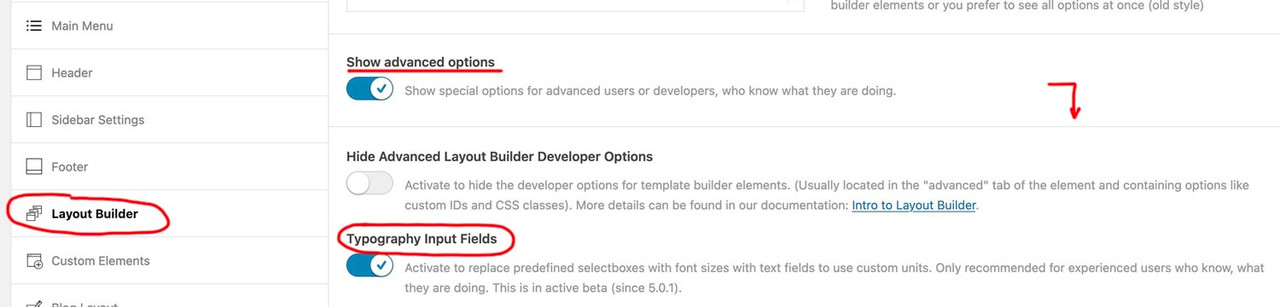
on that page here you can calculate that css for it – for maximum browser support, i use the min-max option – see image on the bottom
https://websemantics.uk/tools/fluid-responsive-property-calculator/
f.e.:

see an example page : https://webers-testseite.de/heading-with-fluid-font-size/
Hi there,
we just updated our site to Enfold 6.0.6 and (propably) found a bug.
With Enfold 6.0.6 the [av_dropcap2 ...] isn’t displayed correctly,

s. https://summ-it.de/wp-content/uploads/design-with-enfold-6-0-6.jpg
Please have a look into the private section.
-
This topic was modified 1 year, 5 months ago by
 jochenmaier.
Hi,
Please try to install a clean child theme, then copy your code into that: https://kriesi.at/documentation/enfold/child-theme/
Best regards,
Rikard
Hey!
Thank you for the inquiry.
You may need to place the map inside a Color Section element, then set the width of the element container to 100%. Please check the documentation below for more info:
// https://kriesi.at/documentation/enfold/color-section/#color-section-with-100-content-width
Regards,
Ismael
Hey woogie07,
Thank you for the inquiry.
Yes, the theme includes an Instagram widget but it relies on the Smash Balloon plugin. Please check the documentation below for more info:
// https://kriesi.at/documentation/enfold/instagram/
// https://wordpress.org/plugins/instagram-feed/
Best regards,
Ismael
Hi,
Thank you for the update.
From the exploration above Using the new Twenty Twenty Five upcoming default theme or a Blocksy theme I was not able to see any image title show up on hover. I do with the Enfold theme.
The title tooltip doesn’t display because the Block Images don’t have the title attribute. The title and alt attributes do display when using the Image element from the Enfold theme. Unfortunately, we do not know why this is the case for the Image Blocks. They are supposed to have alt and class attributes, but they are not rendering.
Best regards,
Ismael
Hey
I am using the Brave browser which is a variation of Chrome.
Duckduckgo logo here.https://duckduckgo.com/
Using the Brave browser I do not see any image title on hover when hovering over the logo.
I mentioned testing the default theme Twenty Twenty Four on another site here: https://bluewinddesign.com/
I was wrong I am testing the new upcoming theme Twenty Twenty Five and RC1 of WP 6.7
Using Gutenberg. A cover block with an image. It does not show image title on hover. I also added other kinds of blocks below it.
Do you see any image title on hover on any of these?
Another site running the theme Blocksy.
Hover over the image used there: https://okosamfunn.no/
Do you see any image title show up?
Now for Enfold I have to add JavaScript to remove the image title so it is not seen on hover. Adding JS is not a good approach. As you say the image title should not be removed.
Go to https://wordpress.org/ do any of the images show an image title when you hover the images?
From the exploration above Using the new Twenty Twenty Five upcoming default theme or a Blocksy theme I was not able to see any image title show up on hover. I do with the Enfold theme. Again I am testing using the Brave browser.
Suggestions?
 Amanda Stansfield
Guest
Hi there, my web developer is no longer in business, he has told me I need to contact you directly for support now. EEK.
When I log into WordPress, I can see the information regarding the purchase of Enfold and have shared in in the private content area below.
Can you please help me register so I have you for support please.
I am having a problem with the menu not showing on phones/tablets. I can tap where it should be and it appears to be invisible because there is an active link. Can you please advise?



