Hi,
Glad that Rikard could help, if you have further questions please open a new thread and we will try to help. Thanks for using Enfold.
Best regards,
Mike
 Dave Chapple
Guest
Hey Mike, Ismael,
I do need help. I’ve been uploading images for 3 days, organizing a type-heavy graphic design portfolio. Porting over one site to a new desing based on the Photography theme in a subdirectory
ENFOLD Images are not being generated at the size expected, AND Images getting crunched way too much, losing all detail. Even if setting the “Styling” to “No Scaling”. it is still crunching and resizing.
I am running no plug-ins yet.
It is like the images are randomly getting resized to weird sizes down from the original and then being reinterpolated back up. This is all when simply dragging an image into the Portfolio Masonry Gallery.
Is this a simple setting? im hoping I dont have to reimport. the images in the GALLERY look fine.
Dave Chapple
Hi,
Glad that you have this sorted out, if you have further questions please login to the support forum open a new thread and we will try to help. Thanks for using Enfold.
Best regards,
Mike
Hi Ismael,
Thanks for your continued replies.
Yes, I have tried changing the size of the small preview image many times in the Enfold > Blog Panel Layout. It does not change the small preview image size as it should
.small-preview img, .big-preview img {
width: 100%;
object-fit: cover;
height: 80px;
}
I took out the height tag… thinking that might affect the small preview…but it did not
 Fabrice Court
Guest
Hello,
I plan to use Enfold for a new website, but I see that a security update is needed. It was announced in January, but still hasn’t been done in February.
Is the Kriesi team planning to abandon this theme?
It’s really important for me to know before I start renting a new website.
Hey Sebastian,
Did you try building the layout as a page, then set that page to be your footer under Enfold->Footer?
Best regards,
Rikard
Hi,
Thank you for the info.
Have you tried adjusting the Blog Layout and Styling in the Enfold > Blog Layout panel? Try adjusting the settings until you restore the previous layout.
Best regards,
Ismael
Hey Dave Chapple,
Thank you for the inquiry.
You may need to import the demo manually using the XML files. Simply download the demo you want from the github repository, extract it to wp-content/uploads/avia_demo_files/, and then go back to Enfold > Demo Import.
Please check this documentation for more information: https://kriesi.at/documentation/enfold/import-demos/#how-to-manually-import-a-theme-demo
Best regards,
Ismael
Hey Emilia Nevena,
Thank you for your interests in the theme.
Yes, it’s possible to add a video slider using either the Fullwidth Slider or the Fullscreen Slider. Please note that videos must be muted in order to play automatically.
You can also use the Layer Slider, which is natively included in the theme, if you need to create a more advanced slider. To help you get started with the theme, please check the documentation. You can always reach out to us here in the forum if you have any further questions.
— https://kriesi.at/documentation/enfold/
Best regards,
Ismael
Hey promosapien,
Thank you for the inquiry.
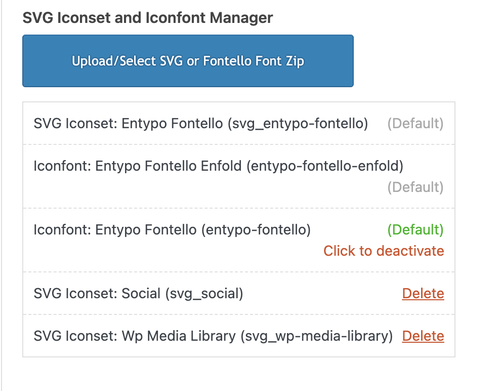
After reimporting the icons, have you tried performing a search and replace in your database? Also, instead of just deleting the zip files, you may need to remove them from Enfold > Import/Export > SVG Iconset and Iconfont Manager before reuploading the icons. After that, you may also need to reconfigure the pages to use the new icon set.
Best regards,
Ismael
Hey Akhurst,
Thank you for the inquiry.
You can insert a widget area in the header and add a Search widget to it. Please check this documentation for more info: https://kriesi.at/documentation/enfold/header/#adding-a-header-widget-area
Best regards,
Ismael
Dave ChappleGuest
Hi,
I need to change out my design and the photography Demo content is not uploading. I see others talking about this, trying to get help. I have been working with my support team at ipage,com to increase all of the memory limits of the PHP. Still nothing. What next?
Still not working as It did before before upgrade
POSTS USED TO WORK HERE — this earlier Enfold install
Nicer small preview image to left of Blog Excerpt
and no featured image
Now Grey Box shows without pencil icon…would rather see pencil or no grey box at all
Preview images are smaller than 180 x 180 selected thumbnail — not the size selected in Post Element
Preview images on blog listing Do not show up at all in Safari
Hi,
Glad that we could help, if you have further questions please open a new thread and we will try to help. Thanks for using Enfold.
Best regards,
Mike
I’m reaching out to see if anyone else has had the same issue I am having with icon fonts added via Enfold’s Theme Options SVG Iconset and Iconfont Manager.
I have never had a problem with creating icons using this feature of Enfold, and the problem I am currently having is not the fault of the theme. But, I need to know if anyone else has had the same experience that I am having with their icon fonts disappearing from their website. Not all the icons. Just the ones that I have added via the SVG Iconset and Iconfont Manager.
Three of our websites built with Enfold are hosted on GoDaddy Managed WordPress hosting. GoDaddy recently began migrating their Managed WordPress hosting customers to what they are calling Managed WordPress Hosting 2.0.
After they migrated our websites to the new environment, all the links to our custom icon fonts were broken – and they appeared to be pointing back to the previous hosting environment.
Using the Enfold Theme Options dashboard, I deleted all the icon fonts and removed their zip files from the media library. I then imported them all again, which restored all the font icons. Problem solved. I did this exact same procedure for all three of our websites.
The next day, when I checked our websites, all the icons were gone again. When I used the Chrome browser’s “Inspect” feature, I could see that the links to the icon fonts appeared to be incorrect again. I had done nothing else to the website after fixing the icons.
I sent a support request to GoDaddy 20 days ago and have had a long back and forth conversation with them. I have asked them if there is any way that their hosting processes are overwriting our database or modifying it – because no matter what I do to fix the icons (I have reimported them about 15 times now) my repairs do not last. Eventually, the icons will disappear from the website.
If anyone has experienced something similar, or if you have any suggestions for what I should be discussing with the support team for our Managed WordPress hosting at GoDaddy, please share it here. Thank you for any help you can offer.
 Emilia Nevena
Guest
Hello, I would love to buy the Enfold theme. Is it possible to create video slider in the top section on the home page? I need 3 videos (no static photos) in background (with text layers) appeared one by one automatically. They should be also upload from library as eg. mpeg (no embed links etc.).
Thanks in advanced for the fast answer (I need to decide asap about the template).
Kind regards, Emilia
https://preview.themeforest.net/item/enfold-responsive-multipurpose-theme/full_screen_preview/4519990
Hey daninap,
Thank you for the inquiry.
Did you use an ACF shortcode?
— https://www.advancedcustomfields.com/resources/shortcode/
You can also use the Dynamic Content option to display a specific ACF field. Please check this documentation for more information.
— https://kriesi.at/documentation/enfold/custom-layout-and-dynamic-content/#acf-advanced-custom-fields-support
Let us know if you need more info.
Best regards,
Ismael
Hi,
Thanks for the update. Please open a new thread if you should have any further questions or problems.
Best regards,
Rikard
Hi,
Thanks for the update. We’ll close this thread for now then, please open a new thread if you should have any further questions or problems.
Best regards,
Rikard
Hi,
Thanks for the update. Problems with external caching solutions is not a theme problem, so we cannot fix it in Enfold.
Best regards,
Rikard
Have you tried making changes yourself using CSS? Because the spacing between the images is not the Enfold standard spacing when set to “large gap.”
so in total : replace the snippet by:
( btw. i changed the code on my page too – if you hover the snippet there is on top right of the codeblock a copy button)
/**
 * Enfold Masonry Caption Fix - NUR für Perfect Grid
 * Schiebt die Caption unter das Bild, ohne es zu verdecken.
 */

function enfold_masonry_perfect_grid_caption_fix() {
?>
<style>
    /* ========================================
       PERFECT GRID CSS
       ======================================== */

    /* Erlaubt der Caption, über den Container hinauszuragen */
    #top .av-masonry.av-fixed-size.av-masonry-gallery .av-inner-masonry,
    #top .av-masonry-gallery.av-masonry-gallery-fixed figure.av-inner-masonry {
        overflow: visible !important;
    }

    /* Positioniert die Caption direkt unter das Bild-Quadrat */
    #top .av-masonry.av-fixed-size.av-masonry-gallery .av-inner-masonry-content,
    #top .av-masonry-gallery.av-masonry-gallery-fixed figcaption.av-inner-masonry-content {
        position: relative !important;
        top: 100%;
        background: #ffffff; /* Hier ggf. deine Wunschfarbe für den Hintergrund */
    }

    /* Korrektur für Tablets */
    @media only screen and (min-width: 767px) and (max-width: 989px) {
        .responsive .av-masonry-gallery .av-masonry-entry .av-masonry-entry-title + .av-masonry-entry-content {
            display: block !important;
        }
    }
</style>

<script>
    (function($) {
        'use strict';

        function fixPerfectGrid() {
            // Nur für Masonry Galerien mit festem Raster (Perfect Grid)
            $('.av-masonry-gallery.av-masonry-gallery-fixed, .av-masonry.av-fixed-size.av-masonry-gallery').each(function() {
                var $gallery = $(this);
                var columnCount = 1;

                // Spaltenanzahl ermitteln
                if ($gallery.hasClass('av-masonry-col-2')) columnCount = 2;
                else if ($gallery.hasClass('av-masonry-col-3')) columnCount = 3;
                else if ($gallery.hasClass('av-masonry-col-4')) columnCount = 4;
                else if ($gallery.hasClass('av-masonry-col-5')) columnCount = 5;
                else if ($gallery.hasClass('av-masonry-col-6')) columnCount = 6;

                if ($gallery.hasClass('av-masonry-col-flexible')) {
                    var $items = $gallery.find('.av-masonry-item-with-image:visible');
                    if ($items.length >= 2) {
                        var firstTop = $items.eq(0).offset().top;
                        var itemsInFirstRow = 1;
                        for (var i = 1; i < Math.min($items.length, 10); i++) {
                            if (Math.abs($items.eq(i).offset().top - firstTop) < 10) {
                                itemsInFirstRow++;
                            } else { break; }
                        }
                        columnCount = itemsInFirstRow;
                    }
                }

                // Maximalhöhe der Captions finden, damit die Zeilen gleichmäßig bleiben
                var maxCaptionHeight = 0;
                $gallery.find('.av-masonry-item-with-image').each(function() {
                    var $caption = $(this).find('figcaption.av-inner-masonry-content, .av-inner-masonry-content');
                    if ($caption.length && $caption.is(':visible')) {
                        maxCaptionHeight = Math.max(maxCaptionHeight, $caption.outerHeight(true));
                    }
                });

                // Abstand unten einfügen, damit das Masonry-Layout Platz für die Caption lässt
                if (maxCaptionHeight > 0) {
                    $gallery.find('a.av-masonry-entry, .av-masonry-item-with-image').css('margin-bottom', maxCaptionHeight + 'px');
                }
            });

            // Layout neu berechnen
            $('.av-masonry-gallery.av-masonry-gallery-fixed, .av-masonry.av-fixed-size.av-masonry-gallery').isotope('layout');
        }

        // ========================================
        // INITIAL LOAD - Nur auf Bilder warten, nicht auf die ganze Seite
        // ========================================
        (function() {
            var $gallery = $('.av-masonry-gallery');

            if ($gallery.length && typeof $.fn.imagesLoaded === 'function') {
                // Wartet NUR auf die Bilder in der Galerie
                $gallery.imagesLoaded(function() {
                    setTimeout(fixPerfectGrid, 200);
                });
            } else {
                // Fallback für den Notfall
                setTimeout(fixPerfectGrid, 600);
            }
        })();


        // Nach Enfold Events
        $(document).on('av-masonry-complete', function() {
            setTimeout(fixPerfectGrid, 250);
        });

        // Bei Größenänderung
        $(window).on('debouncedresize', function() {
            // Reset Margin
            $('.av-masonry-gallery.av-masonry-gallery-fixed .av-masonry-item-with-image, .av-masonry.av-fixed-size.av-masonry-gallery .av-masonry-item-with-image').css('margin-bottom', '');
            fixPerfectGrid();
        });

    })(jQuery);
</script>
<?php
}
add_action('wp_footer', 'enfold_masonry_perfect_grid_caption_fix', 999);
i also replaced the on load event by:
// Run initially
$(window).on('load', function() {
    $('.av-masonry-gallery').imagesLoaded(function() {
        setTimeout(fixAllMasonryModes, 200);
    });
});
and implemented the enfold debounceresize function on performance reasons.
I can’t seem to find which demo of Enfold I have installed, if any, and what the default fonts are for the theme or theme demo installed. I see “Default” in all of the drop downs inside of the Advanced Styling area, but can’t identify the fonts themselves.
Any help would be appreciated.
For the past couple weeks I have had issues with images showing up on my Enfold theme websites. All are hosted with GoDaddy and as soon as I clear the cache and they are fine. This happening randomly several times a week. I have contacted the host and they have not solved.
Is this a new issue with Enfold and if so how do I fix as I have dozens of Enfold websites.
Thank you!
Hi,
Great, I’m glad that Ismael could help you out. Please open a new thread if you should have any further questions or problems.
Best regards,
Rikard
Hey Ad-Min747,
Please try the following in Quick CSS under Enfold->General Styling:
@media only screen and (max-width: 1024px) {
  nav.main_menu {
    display: block !important;
  }
  #avia-menu .menu-item {
    display: none;
  }
  .av-burger-menu-main.menu-item-avia-special {
    display: block;
  }
}
Best regards,
Rikard
Hey Zayd Khaial,
The update to 7.1.3 has to be done manually from the version you are running, please refer to my replies in this thread: https://kriesi.at/support/topic/enfold-4-5-theme-update-update-failed-download-failed-a-valid-url-was-not-pro/#post-1021541
You can either update manually via FTP: https://kriesi.at/documentation/enfold/how-to-install-enfold-theme/#theme-update, or upload the theme as if it was new under Appearance->Themes->Add New Theme.
If that doesn’t work then please try to delete the whole theme folder, then replace it with the new version. Make sure that you have backups of the site before starting updating.
Also please read this after you have updated: https://kriesi.at/documentation/enfold/theme-registration/
Best regards,
Rikard
Hi,
Thanks for the update, we’ll close this thread for now then. Please open a new thread if you should have any further questions or problems.
Best regards,
Rikard
Hey condonp,
Please try the following in Quick CSS under Enfold->General Styling:
.avia-content-slider-element-container .entry-content svg {
  fill: red;
}
Best regards,
Rikard
Hey diefleischerei,
You can set that under Enfold->Blog Layout->Single Post Navigation.
Best regards,
Rikard



