Hi,
I was not able to login to your site, as the typically login url is not working /wp-admin/ I assume that you have set a custom one.
I tried to recreate your page on my site with five color sections, each 100vh and with a button and a contact form at the bottom. All five buttons work with no bouncing.
Please share your login url and Enable the Avia Layout Builder Debugger to your functions.php file. You may need to scroll the documentation page to the Debug mode section or use the sidebar TOC link.
With this I can copy your page exactly and add it to my test site to see if the same error occurs there.
Best regards,
Mike
Hi,
I can not view your page as it is maintenance mode. You can not use the advanced layer builder on category pages.
But we can change the Prints link in the breadcrumb to your prints page instead of the new prints page that you want to use as a custom category page.
So the first step is to add a new product category “Prints” and make it the parent of any other category that you wish for it to show in the breadcrumb trail.
Then add this code to your child theme functions.php if you are not using a child theme you could use the WP Code plugin then add a new snippet, in the top right corner use the PHP snippet as the code type: 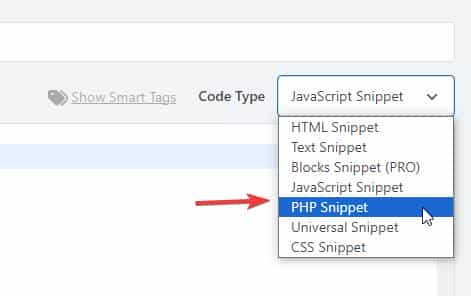 then add the code below and save.
function change_breadcrumb_trail() { ?>
  <script>
document.addEventListener('DOMContentLoaded', function() {
const printsLink = document.querySelector('.breadcrumb-trail a[href="http://enfold.test/product-category/prints/"]');

if (printsLink) {
  printsLink.href = 'http://enfold.test/prints/';
}
});
</script>
  <?php
}
add_action( 'wp_footer', 'change_breadcrumb_trail', 99 );
Ensure that you change the URLs in the code above to your site, and make sure to use the full URL.
Best regards,
Mike
Hi, I bought the theme and installed the restaurant demo data, ie.: https://kriesi.at/themes/enfold-restaurant-one-page/ Does buying the theme with the regular license give me the right to use the demo content? Since I got an email from a german Copyrights agency, COPYTRACK that wants me to show the license to them for a particular image from the demo data, or otherwise risk a fine 350 euro? But it sounds a bit skechy…
The image in question is this one: https://kriesi.at/themes/enfold-restaurant-one-page/wp-content/uploads/sites/42/2014/07/cheese-1030×686.jpg
Just to be safe I removed the image from my wordpress image library already.
Hey Munford,
Glad to hear that you sorted it out, if you have further questions please open a new thread and we will try to help. Thanks for using Enfold.
Best regards,
Mike
Hi,
Glad that we could help, if you have further questions please open a new thread and we will try to help. Thanks for using Enfold.
Best regards,
Mike
Hi,
I do not have experience with elfsight, but from examining your button I can tell that there is no direct link to your side form popout, it works via the data-elfsight-show-form attribute:
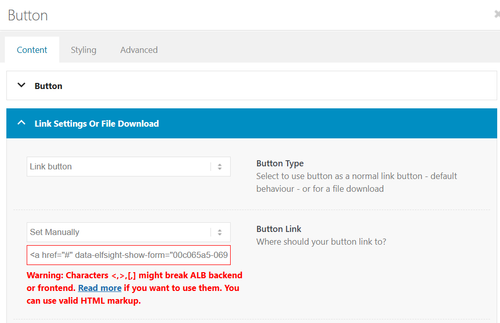
There is not a built-in way to add a data attribute to a button.
So I created a second button for you with your link snippet and the Enfold classes so the style is the same. Please check.
Best regards,
Mike
Hi,
Glad that we could help, if you have further questions please open a new thread and we will try to help. Thanks for using Enfold.
Best regards,
Mike
hi
my client wants to disable the change of size transition in the lightbox slideshow.
I tried a few things but nothing worked. Can it be that the images just fade into each other without moving in and out when you click on them?
thanks
Nancy
tried this:
/* Disable Enfold Lightbox Animation/Transition */
.mfp-zoom-in.mfp-ready.mfp-bg.mfp-zoom-in.mfp-ready .mfp-preloader {
    opacity: 0.8;
}

.mfp-zoom-in.mfp-ready .mfp-content.mfp-zoom-in.mfp-removing .mfp-content {
    transform: scale(1);
    opacity: 1;
}

.mfp-zoom-in.mfp-removing.mfp-bg {
    opacity: 0;
}

/* Force instant transition */
.mfp-zoom-in .mfp-content {
    transition: none !important;
}
-
This topic was modified 1 month, 4 weeks ago by
 Munford.
Hi,
Not sure, perhaps you used a different element than the portfolio grid, but it is only ment to show portfolio categories.
So try creating a portfolio category with a portfolio item to show.
Or if you don’t want to try the masonry or blog post element.
Best regards,
Mike
Hey Tilman,
When I check your page the horizontal galleries behave as intended, clicking a image enlarges it until the next one is clicked. It’s true that they stay enlarged. If you want the image size to be restored after 5 seconds, try this function in your child theme function.php file. If you are not using a child theme you could use the WP Code plugin then add a new snippet, in the top right corner use the PHP snippet as the code type:
then add the code below and save.
function restore_horizontal_gallery_size() { ?>
  <script>
document.querySelectorAll('.av-horizontal-gallery-wrap').forEach(item => {
    item.addEventListener('click', function () {
        clearTimeout(this._galTimer);
        this._galTimer = setTimeout(() => {
            this.classList.remove('av-active-gal-item');
        }, 5000);
    });
});
</script>
  <?php
}
add_action( 'wp_footer', 'restore_horizontal_gallery_size', 99 );
Best regards,
Mike
Hey dreyerjm,
Please see our documentation: Add Images to mega menu you may need to scroll to the section, or use the link in the sidebar.
Best regards,
Mike
Hey Luigi,
When I check the changelog it shows February 20th 2026 – Version 7.1.4
Please refer to this one.
Best regards,
Mike
Hey Sabina,
Did you try to activate the Layout Builder at the top of each page?
You need to register at the support forum: https://kriesi.at/support/register/. The start a new thread in the Enfold sub forum.
Best regards,
Rikard
Sorry for the lag replying, @Guenni007 — I always appreciate your time and effort! Frankly, I didn’t really dig into your replies too much — I just scanned them and couldn’t quickly find a reason to not use the Claude code that was already working for me, so I just stuck with that. Here’s a leaner version of that code — again, this is adding aria labels to prev/next arrows for enfolds lightbox galleries and the custom popups @Guenni007 provided me previously, which both use the Magnific Popup code. So this is just fyi, unless anyone sees any serious issue with it:
/* ==========================================================================
   MAGNIFIC POPUP ARIA LABELS
   ========================================================================== */
add_action('wp_footer', 'abode_magnificpopup_aria_labels', 999);
function abode_magnificpopup_aria_labels() { ?>
<script>
jQuery(document).ready(function($) {
  $.extend(true, $.magnificPopup.defaults, {
    closeMarkup: '<button title="Close (Esc)" type="button" class="mfp-close" aria-label="Close popup">×</button>',
    gallery: {
      arrowMarkup: '<button title="%title%" type="button" class="mfp-arrow mfp-arrow-%dir%" aria-label="%title%"></button>',
      tPrev: 'Previous bio',
      tNext: 'Next bio'
    }
  });

  var observer = new MutationObserver(function(mutations) {
    mutations.forEach(function(mutation) {
      mutation.addedNodes.forEach(function(node) {
        if (node.nodeType === 1) {
          var $node = $(node);
          if ($node.hasClass('mfp-arrow') || $node.find('.mfp-arrow').length) {
            var isImage = $('.mfp-figure').length > 0;
            var prevLabel = isImage ? 'Previous image' : 'Previous bio';
            var nextLabel = isImage ? 'Next image' : 'Next bio';
            $('.mfp-arrow-left').attr('aria-label', prevLabel);
            $('.mfp-arrow-right').attr('aria-label', nextLabel);
          }
        }
      });
    });
  });

  observer.observe(document.body, {childList: true, subtree: true});
});
</script>
<?php }
Hi,
I was not able to login as Wordfence blocked me. When you look at the theme settings for the license do you see any errors?
Have you recently updated the token?
Envato limits daily update checks across all tokens on your account. Wait up to 24 hours if you’ve recently updated your token or checked 15 or more times for all tokens on your account.
If not try the Envato Market Plugin, or follow these steps to manually update.
To update Enfold manually you can download the latest installable WP version from your Theme Forest account and upload it to your WordPress ▸ Appearance ▸ Themes ▸ Add Themes ▸ Add New
after you choose the zip file and click install, you will see a This theme is already installed message because you are updating, you can continue,
then you will see the Theme updated successfully message.
Best regards,
Mike
Hello
Thanks for the information. I only have the current version of the Enfold theme and Enfold child theme version 1.
Okay, I’ll rename the current Enfold folder and then install the latest version via FTP.
The child theme will then automatically access the Enfold folder, right?
Afterwards, I’ll gradually increase the PHP version to 8.4!
Hi,
You can keep the old version just in case, you can rename the folder to enfold-old or something like that. When you can see that everything is working as it should, then it can be deleted.
Please update the theme first, then the PHP version. The latest version of Enfold should work with 7.3, but since it’s an outdated version, we recommend that you use a more recent and supported version.
Best regards,
Rikard
Sorry but the condition you added
    if ( ! wp_script_is( 'avia_element_js', 'registered' ) ) {
        wp_register_script( 'avia_element_js', false );
    }
prevents Enfold to select Avia elements in editing the page (I try to click on Media tab or Content Elements tab) and it is stuck.
I had to delete it
Hi, I can’t upgrade the theme , even if we have the license.
this is the message: There was an error while updating Enfold: Update package not available.
Looking forward to hearing from you.
Best regards.
M.
-
This topic was modified 2 months ago by
 maryenvato.
This reply has been marked as private.
Hey Erik,
The update to 7.1.4 has to be done manually from the version you are running, please refer to my replies in this thread: https://kriesi.at/support/topic/enfold-4-5-theme-update-update-failed-download-failed-a-valid-url-was-not-pro/#post-1021541
You can either update manually via FTP: https://kriesi.at/documentation/enfold/how-to-install-enfold-theme/#theme-update, or upload the theme as if it was new under Appearance->Themes->Add New Theme.
If that doesn’t work then please try to delete the whole theme folder, then replace it with the new version. Make sure that you have backups of the site before starting updating.
Also please read this after you have updated: https://kriesi.at/documentation/enfold/theme-registration/
Best regards,
Rikard
 Erik
ErikGuest
Hello,
I am using Enfold Theme version 4.3.2. I purchased and downloaded the latest version from ThemeForest. I am also using Enfold Child Version: 1.0.
Question: How do I update the theme now?
Do I simply delete the enfold folder in “wp-content/themes”? Unfortunately, I couldn’t find any instructions on the website.
Currently, PHP (7.3.33) is still running, and this also needs to be changed. I would like to take the intermediate step to 7.4 and then to 8.5. Is this possible with the Enfold Theme I am currently using?
I would be grateful if you could help me.
Best regards, Erik
Hi,
Great, I’m glad that Ismael could help you out. Please open a new thread if you should have any further questions or problems.
Best regards,
Rikard
Hi,
Thanks for the update, we’ll close this thread for now then. Please open a new thread if you should have any further questions or problems.
Best regards,
Rikard
Thanks very much. It is much better now, but I still see some warnings. I report here the debug log, when opening Enfold Theme options and one page with layout builder on
[26-Feb-2026 09:14:54 UTC] PHP Notice: Function WP_Scripts::add was called <strong>incorrectly</strong>. The script with the handle "avia_template_save_js" was enqueued with dependencies that are not registered: avia_element_js. Please see <a href="https://developer.wordpress.org/advanced-administration/debug/debug-wordpress/">Debugging in WordPress</a> for more information. (This message was added in version 6.9.1.) in /home/yqmnhcyo/public_html/wp-includes/functions.php on line 6131
In another installation it seems ok though. I have to check the options settings
Hi Ismael,
Thank you so much for looking into this further.
We have not installed any new plugins recently. However, we have been updating existing plugins, as well as the Enfold theme. The last changes we pushed from our dev environment to live were the Enfold theme update and the Yoast plugin update five days ago, and we believe that may be when this issue started.
What I find especially interesting is that I checked our dev site, and the builder appears to be working properly there, while the issue is happening on our live site. I’m sharing the dev login credentials below as well in case it is helpful for comparison.
One other thing that may be worth mentioning: last month I made a change to the functions.php file because our EveryAction (our nonprofit CRM we use for donations, data collection) forms that are embedded throughout our website had stopped working on the backend (same issue, infinite spinning, but just on the pages were the forms were embedded). I added a script there to fix that issue, and it resolved the problem. Since everything was working fine afterward, I do not think that is the cause here, but I wanted to mention it just in case it may be relevant. I’m also sharing the code changes below for reference.
Unfortunately, as a very small nonprofit, we do not have in-house developers. I am largely self-taught and far from an expert, so I would be very grateful if you could please help us identify what is causing this issue and what might be going wrong. We edit our site on a daily basis, so not being able to access or use the builder properly is a significant issue for us right now.
Thank you again for your help, we really appreciate it.
Roberta
Hi Rikard,
you asked me to open a new thread “Me too; I have the same problem and now I used an older Backup to restore. But how can I find “open html markup” that is breaking up my layout?”
Since I have replayed an older backup. The website works.
My problems were missing containers in the Header (Logo and Slider), missing pictures under Header (verical picture “Drucken”) and empty containers underneath. Also the links in the Menüpoint “Shop” did not work.
Thanks for taking care.
Michael F
Your description of the whole thing is quite unclear.
Which Enfold element did you use? Portfolio Grid? ( When I searched for avia_post_grid in the Enfold folder, I only found portfolio.php as an element with such an entry. )
Then you selected “Open in Lightbox” for link handling.
You can set the preview image size in the “Styling” tab – Grid settings:
To do this, you must first select “Select the grid image size manually” under “Portfolio Grid Image Size”—a second drop-down menu will then open where you can specify the grid image size.
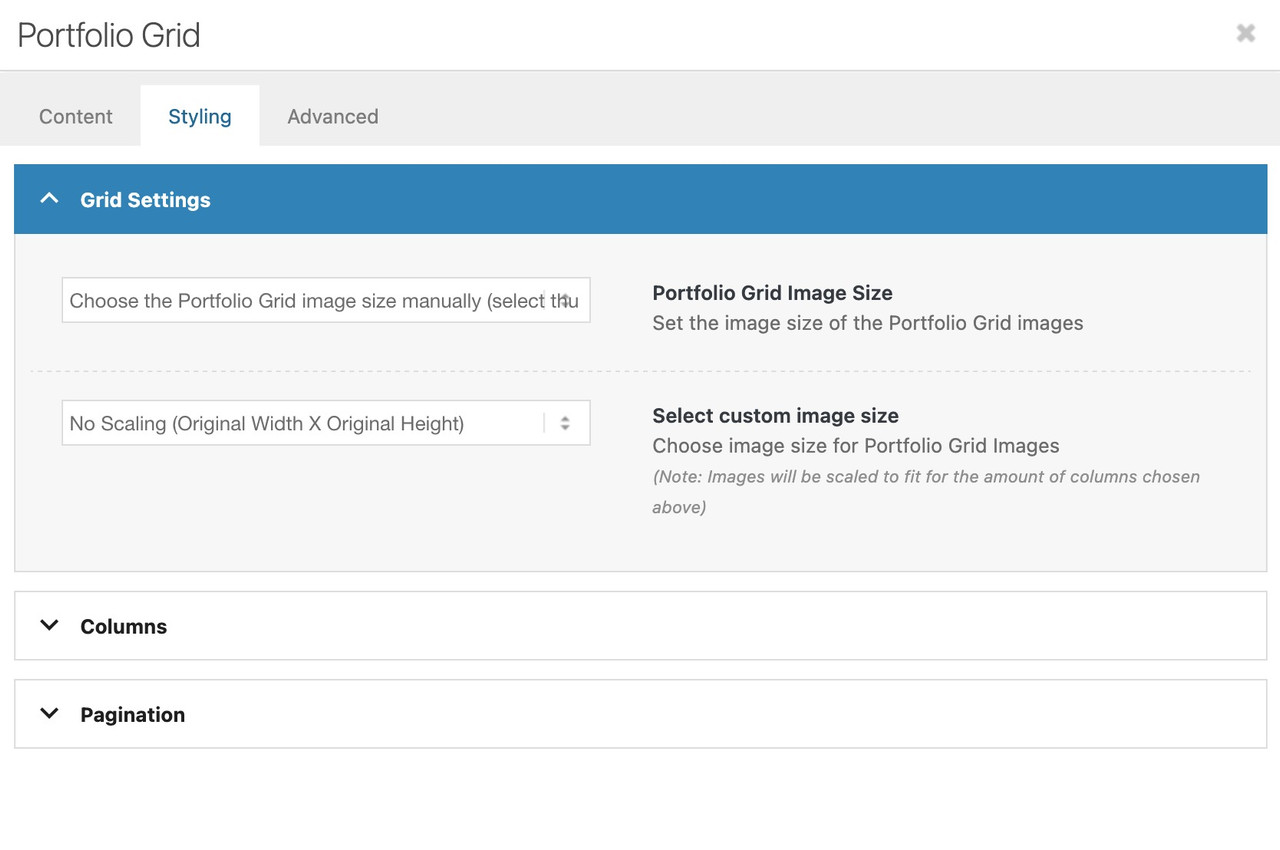
Do you like to change something on the lightbox images – or the bottom-bar text?
Hi,
Your screenshots are not working but I understand. Your issue seems to be related to a cache, when I check your page with Firefox & Edge the accodeon toggles are gray because the mouseover color is set by the main-color-bg set in the theme options #e1e1e1:
.main_color .toggler:hover {
background: var(--enfold-main-color-bg2);
}
If you what them to be orange then try changing that color in the theme settings, but note that this color setting changes many elements in the theme. If you don’t want everything to change then try this css:
#top .main_color .toggler:hover {
	background: #db5200;
}
As for your second question, I can’t see the screenshot but I see that the top color section has a background color of white. Try changing the color in the color section, or try this css:
.page-id-9206 #av_section_1.main_color {
	background-color: #d5c58a;
}
After these changes clear all of your caches.
Best regards,
Mike



