Hey jjorge1,
Could you try updating the theme to the latest version (7.1) to see if that helps please? https://kriesi.at/documentation/enfold/theme-update/.
Best regards,
Rikard
Hey Frank,
Thanks for reaching out to us. Do you have access to the Themeforest account which was used to purchase your theme license? If you do, then please follow this documentation: https://kriesi.at/documentation/enfold/theme-registration/
Best regards,
Rikard
Hey jscarlett,
Please try the following in Quick CSS under Enfold->General Styling:
#top #header_meta .phone-info {
  line-height: inherit;
}
Best regards,
Rikard
I need help. We have been using the Enfold theme for many years. Today, we just noticed that our website has an error. It was displaying the following message:
There has been a critical error on this website. Please check your site admin email inbox for instructions. If you continue to have problems, please try the support forums.
Learn more about troubleshooting WordPress
We contacted the host of our website and they identified our site theme as causing the problem. When they changed it to a default theme, now the website is working but the format is very wrong.
I just purchased the new enfold and I need help setting it up.
 Frank Karau
Guest
Hallo lieber Support!
Wir benötigen einen Zugang um passendes Updates einzuspielen für das Enfold Version: 4.7.1 – folgendes Theme benutzen wir: https://www.wjw-digital.de
Das Theme wurde vor vielen Jahren bei Envato dummerweise wurde auch kein Schlüssel implementiert für Updates des Themes.
Könnte Ihr uns da weiterhelfen, dass wir einen Zugang bekommen um das Theme upzudaten?
Viele Grüße
Frank Karau
I’m experiencing major performance issues on a WordPress site I’m working on that runs the Enfold theme. When analyzing performance diagnostics with New Relic, I consistently see the avia_deep_decode function appearing as a bottleneck.
Details:
- The avia_deep_decode function is frequently flagged in New Relic performance reports
- It appears to be significantly slowing down page load times
- I’m working on optimizing this site and this function appears to be a major blocker
Questions:
- What is the purpose of the avia_deep_decode function in Enfold?
- Is it safe to disable or modify this function to improve performance?
- Are there any recommended alternatives or optimizations for this function?
Additional Information:
I’ve examined the comment above the avia_get_option function (\wp-content\themes\enfold\framework\php\function-set-avia-frontend.php) which has a $decode argument that is supposed to be false by default, however currently it is set to default to true. I’d like to know if setting this parameter to false would be a safe approach to improve performance, as it would bypass the avia_deep_decode function that’s causing the slowdown.
Are there specific scenarios where decoding is absolutely necessary?
Any guidance would be greatly appreciated as I’m trying to improve the site’s speed without compromising functionality.
Thank you!
Hi Ismael,
it works but I had to make a little change to my code.
Here is the full working code to add custom image sizes to WP and enable them in Enfold ALB, in case anybody needs it:
// Add image sizes to WP
function add_custom_image_size() {
    // add_image_size( 'name', width, height, crop );
    add_image_size( 'medium_squared', 600, 600, true );
}
add_action( 'after_setup_theme', 'add_custom_image_size' );

// Make custom image sizes selectable from WP admin
function add_custom_image_sizes_to_editor( $sizes ) {
	return array_merge( $sizes, array(
		'medium_squared' => 'Medium squared',
	) );
}
add_filter( 'image_size_names_choose', 'add_custom_image_sizes_to_editor' );

// Make custom image sizes selectable from Enfold ALB elements
function add_custom_image_sizes_to_enfold_alb( array $selectableImgSize, array $imgSizes ) {
    $selectableImgSize['medium_squared'] = 'Medium squared';
    return $selectableImgSize;
}
add_filter( 'avf_modify_selectable_image_sizes', 'add_custom_image_sizes_to_enfold_alb', 10, 2 );
Thanks
Best regards,
Alessio
Hey AuroraArcus,
I can’t see a link to your actual site? If you haven’t registered your theme license, then please try doing so first of all: https://kriesi.at/documentation/enfold/theme-registration/
Best regards,
Rikard
Hi Mike
I ask because ENFOLD offers a funtion in VIDEO Mask «Video Steuerung ausblenden» but that unfortunately does not work:

Any other ideas? If not, I’m considering to create an IMAGE gallery for the Video thumbnails and link them to the Original Youtube videos in lightbox as I only need Video thumbnail with PLAY Button centered.
What you think?
Steve
Hi,
Thanks for the update, we’ll close this thread for now then. Please open a new thread if you should have any further questions or problems.
Best regards,
Rikard
Hello support,
I went through several of your helping posts, but couldn’t find a way to activate the avia builder for new posts and blogs. Can you help me out?
At the same time it looks like my enfold theme hasnt been updated for a year. I purchased a license long time ago, but it suddenly doesnt work anymore.
Ive added login info and my license key for you
Hey Daniel,
Thank you for the inquiry.
It might be an issue with the compression or the cache plugin. Please try to toggle or temporarily disable the Enfold > Performance > File Compression settings, then deactivate the cache plugin. Let us know the result. If the issue persists, please provide the site URL and login details in the private field.
Best regards,
Ismael
Hi,
I disabled your Enfold Theme Options ▸ Header ▸ Header Layout ▸ Header Title and Breadcrumbs ▸ Display only title and added this to your code to the end of your child theme functions.php file in Appearance ▸ Editor:
add_filter('avf_header_setting_filter', 'avf_header_setting_filter_mod', 50, 1);
function avf_header_setting_filter_mod($header_settings) {
    if (is_tax() || is_archive()) {
        $header_settings['header_title_bar'] = "title_bar";
    }
    return $header_settings;
}
to only show the title on your category pages.
and I added this css:
.category .container_wrap_first {
	border: none;
}
.category .title_container {
	text-align: center;
	padding-top: 50px;
	background-color: #f2f0eb !important;
}
.category .title_container h1 a {
	font-weight: 600 !important;
	line-height: 1.3em;
	font-size: 30px;
}
so compared to one of you posts:

your category title looks like this:

But note that they are both H1, I don’t see H2 like you asked.
Best regards,
Mike
Hey NicomIT,
This is not a known issue. Try turning off file compression in the theme, and activate the option to delete old CSS and JS files under Enfold->Performance to see if that helps.
Best regards,
Rikard
Hi,
Thanks for the update, we’ll close thi shtread for now then. Please open a new thread if you should have any further questions or problems.
Best regards,
Rikard
 jessica venturi
Guest
Good morning,
I am writing to this pre-sale thread as requested by Yigit after I encountered ongoing issues with my Enfold theme and support access.
Initially, I experienced a problem where changes made to my homepage in the backend were not reflecting on the frontend (www.alchemicha.it). The site seemed stuck on an older version, and some formatting had unexpectedly changed.
Yigit suggested clearing caches, and when that didn’t resolve the issue, directed me to the support forum.
However, I have been unable to access the Kriesi support forum for approximately three months. My purchase code (f734ef99-b5b3-4754-96ef-7fa60a22513e) is recognized as being linked to an account, but I cannot log in. I have contacted Envato multiple times, but they have instructed me to contact you directly. The “forgot password” feature indicates that my email address is not recognized.
After attempting to revalidate my purchase code as suggested, I still cannot access the support forum. Therefore, as requested by Yigit, I am reaching out through this pre-sale thread.
To reiterate, my purchase code is f734ef99-b5b3-4754-96ef-7fa60a22513e.
I would greatly appreciate your assistance in resolving both the account access issue and the original website update problem.
Thank you for your time and help.
Ismael,
Thank you very much for your solution. I have added your shortcode generator in functions.php of the child-theme.
function av_wpbs_wpml_cb() {
    $lang = apply_filters('wpml_current_language', null);
    $id = 1;
    $language = 'en';

    switch ($lang) {
        case 'nl':
            $id = 1;
            $language = 'nl';
            break;
        case 'en':
            $id = 1;
            $language = 'en';
            break;
        case 'fr':
            $id = 1;
            $language = 'de';
            break;
        default:
            $id = 1;
            $language = 'nl';
            break;
    }

    return do_shortcode('[wpbs id="' . esc_attr($id) . '" language="' . esc_attr($lang) . '" show_prices="yes" title="no" legend="yes" legend_position="side" display="1" year="0" month="0" start="1" dropdown="yes" jump="no" history="1" tooltip="1" highlighttoday="no" weeknumbers="no" show_first_available_date="no" form_id="1" form_position="bottom" auto_pending="yes" selection_type="multiple" selection_style="split" minimum_days="7" maximum_days="0" booking_start_day="6" booking_end_day="6" show_date_selection="no"]');

}
add_shortcode('av_wpbs_wpml', 'av_wpbs_wpml_cb');
Then added the shortcode to a text block:
[av_wpbs_wpml]
Test URL:
https://villasari.de/nl/test-shortcode/
I get this error:
Fatal error: Uncaught TypeError: ksort(): Argument #1 ($array) must be of type array, null given in /var/www/vhosts/villasari.de/httpdocs/wp-content/plugins/multilingual-tools-2.2.6/inc/class-mltools-shortcode-attribute-filter.php:86 Stack trace: #0 /var/www/vhosts/villasari.de/httpdocs/wp-content/plugins/multilingual-tools-2.2.6/inc/class-mltools-shortcode-attribute-filter.php(86): ksort() #1 /var/www/vhosts/villasari.de/httpdocs/wp-content/plugins/multilingual-tools-2.2.6/inc/class-mltools-shortcode-attribute-filter.php(66): MLTools_Shortcode_Attribute_Filter->add_tag() #2 /var/www/vhosts/villasari.de/httpdocs/wp-includes/class-wp-hook.php(326): MLTools_Shortcode_Attribute_Filter->do_shortcode_tag_filter() #3 /var/www/vhosts/villasari.de/httpdocs/wp-includes/plugin.php(205): WP_Hook->apply_filters() #4 /var/www/vhosts/villasari.de/httpdocs/wp-includes/shortcodes.php(447): apply_filters() #5 [internal function]: do_shortcode_tag() #6 /var/www/vhosts/villasari.de/httpdocs/wp-includes/shortcodes.php(273): preg_replace_callback() #7 /var/www/vhosts/villasari.de/httpdocs/wp-content/themes/enfold/config-templatebuilder/avia-template-builder/php/class-shortcode-helper.php(580): do_shortcode() #8 /var/www/vhosts/villasari.de/httpdocs/wp-content/themes/enfold/config-templatebuilder/avia-shortcodes/textblock/textblock.php(541): ShortcodeHelper::avia_apply_autop() #9 /var/www/vhosts/villasari.de/httpdocs/wp-content/themes/enfold/config-templatebuilder/avia-template-builder/php/class-shortcode-template.php(1329): avia_sc_text->shortcode_handler() #10 /var/www/vhosts/villasari.de/httpdocs/wp-includes/shortcodes.php(434): aviaShortcodeTemplate->shortcode_handler_prepare() #11 [internal function]: do_shortcode_tag() #12 /var/www/vhosts/villasari.de/httpdocs/wp-includes/shortcodes.php(273): preg_replace_callback() #13 /var/www/vhosts/villasari.de/httpdocs/wp-includes/class-wp-hook.php(324): do_shortcode() #14 /var/www/vhosts/villasari.de/httpdocs/wp-includes/plugin.php(205): WP_Hook->apply_filters() #15 /var/www/vhosts/villasari.de/httpdocs/wp-content/themes/enfold/template-builder.php(102): apply_filters() #16 /var/www/vhosts/villasari.de/httpdocs/wp-includes/template-loader.php(106): include('...') #17 /var/www/vhosts/villasari.de/httpdocs/wp-blog-header.php(19): require_once('...') #18 /var/www/vhosts/villasari.de/httpdocs/index.php(17): require('...') #19 {main} thrown in /var/www/vhosts/villasari.de/httpdocs/wp-content/plugins/multilingual-tools-2.2.6/inc/class-mltools-shortcode-attribute-filter.php on line 86
Any clue?
I cannot enlarge or see what you sent me. Again, I have mentioned several times that I do not understand code. I do not use that text box the way you are using it.
I have almost 300 pages. I need to change it in the theme settings for all 300 pages in the Enflod settings .
I need to change the theme as I mentioned in the Enfold . I AM IN THE : Enfold alternate content Font color for links, dropcaps and other element and changing the color there and it is not changing in the website.
MY BIGGER CONCERN OF THE TWO IS THE LINK COLOR.. it significantly affects SEO when you cannot tell the link from the text.
I did disable all of the plugins to see if one if interfering with the ability for the link color change to take effect but that was very long ago.
Pam
-
This reply was modified 12 months ago by
 extraeyes.
FYI the log is filling up for magazine and post slider. Here’s the post slider example:
KILLED QUERY (16570 characters long generated in /nas/content/live/wels/wp-content/themes/enfold/config-templatebuilder/avia-shortcodes/postslider/postslider.php:1542): SELECT SQL_CALC_FOUND_ROWS wp_posts.ID#012#011#011#011#011#011 FROM wp_posts LEFT JOIN wp_term_relationships ON (wp_posts.ID = wp_term_relationships.object_id)#012#011#011#011#011#011 WHERE 1=1 AND ( #012 wp_term_relationships.term_taxonomy_id IN (94)#012) AND ((wp_posts.post_type = ‘alb_custom_layout’ AND (wp_posts.post_status = ‘publish’ OR wp_posts.post_status = ‘tribe-ea-success’ OR wp_posts.post_status = ‘tribe-ea-failed’ OR wp_posts.post_status = ‘tribe-ea-schedule’ OR wp_posts.post_status = ‘tribe-ea-pending’ OR wp_posts.post_status = ‘tribe-ea-draft’ #012OR wp_posts.post_status = ‘private’ #012OR wp_posts.post_status = ‘sent’)) OR (wp_posts.post_type = ‘ame_ac_changeset’ AND (wp_posts.post_status = ‘publish’ OR wp_posts.post_status = ‘tribe-ea-success’ OR wp_posts.post_status = ‘tribe-ea-failed’ OR wp_posts.post_status = ‘tribe-ea-schedule’ OR wp_posts.post_status = ‘tribe-ea-pending’ OR wp_posts.post_status = ‘tribe-ea-draft’ #012OR wp_posts.post_status = ‘private’ #012OR wp_posts.post_status = ‘sent’)) OR (wp_posts.post_type = ‘attachment’ AND (wp_posts.post_status = ‘publish’ OR wp_posts.post_status = ‘tribe-ea-success’ OR wp_posts.post_status = ‘tribe-ea-failed’ OR wp_posts.post_status = ‘tribe-ea-schedule’ OR wp_posts.post_status = ‘tribe-ea-pending’ OR wp_posts.post_status = ‘tribe-ea-draft’ #012OR wp_posts.post_status = ‘private’ #012OR wp_posts.post_status = ‘sent’)) OR (wp_posts.post_type = ‘avia_framework_post’ AND (wp_posts.post_status = ‘publish’ OR wp_posts.post_status = ‘tribe-ea-success’ OR wp_posts.post_status = ‘tribe-ea-failed’ OR wp_posts.post_status = ‘tribe-ea-schedule’ OR wp_p
Hi,
Great, I’m glad that Ismael could help you out. We’ll close this thread for now then, please open a new thread if you should have any further questions or problems.
Best regards,
Rikard
Hi,
Thanks for the update, we’ll close this thread for now then. Please open a new thread if you should have any further questions or problems.
Best regards,
Rikard
Hi,
Please try the following in Quick CSS under Enfold->General Styling:
#top div .avia-gallery .avia-gallery-big {
  padding: 0;
  border-width: 0;
}
Best regards,
Rikard
Hiya there!
I’m using the Enfold theme in combination with ACF to create a cool website.
Currently I’m facing an issue on a single blog item. I want to have 2 image galleries on that page, but I needed them filled with external API images.
So I built some code that replicates the standard gallery block, and it all works fine for the first one.
However the images from the second gallery are also loaded into the first gallery. Which I don’t want, because they’ re 2 different image subjects so to speak.
How can I make them unique in the code of the site?
Image of code in private section :)
Also a link to the page I’m working on.
We are using WP Rocket on a few of our websites that use Enfold and it’s fairly common to see background images set in containers such as color sections not displaying for users not logged into WordPress.
Is this a known issue and if so, can you provide some info on how to get around this? Are there specific settings in WP Rocket that do not work with Enfold? I have tried clearing the cache files for individual pages as well as the entire website. Neither seems to help.
-
This topic was modified 12 months ago by
 NicomIT.
Hi all,
We’ve tried disabling PHP-FPM as directed, but that hasn’t resolved the issue either.
Thanks for your help. We’ve had to go with a workaround unfortunately (removing the contact form altogether), in the absence of any solution.
It must be related to server config in some way, and the way the Enfold contact form and Google Captcha work – as we don’t have the issue if we remove either of these variables.
Moderators: Kindly remove the brand identifying screenshot in the previous post and the mention of the company name in your post on March 17, 2025 at 10:52 am.
Thank you!
No I am in the Enfold alternate content Font color for links, dropcaps and other element and changing the color there and it is not changing in the website.
this page has a lot of links… when I change the color in the Enfold page it does not change in website and back to where we started yes I cleared the cache:
I do not understand anything about the picture of the code you sent me.
Thank you for your patience since I don’t know code.
Hi,
Thanks for the update. Please open a new thread if you should have any further questions or problems.
Best regards,
Rikard
Hey ballindigital,
You can remove the linked image overlay under Enfold->Advanced Styling. Please post a link to where we can see the actual elements so that we can have a look at the border.
Best regards,
Rikard
but isn’t it a simple section / section boundary – with shiftet content elements?
see f.e.: the Church Demo: https://kriesi.at/themes/enfold-church/
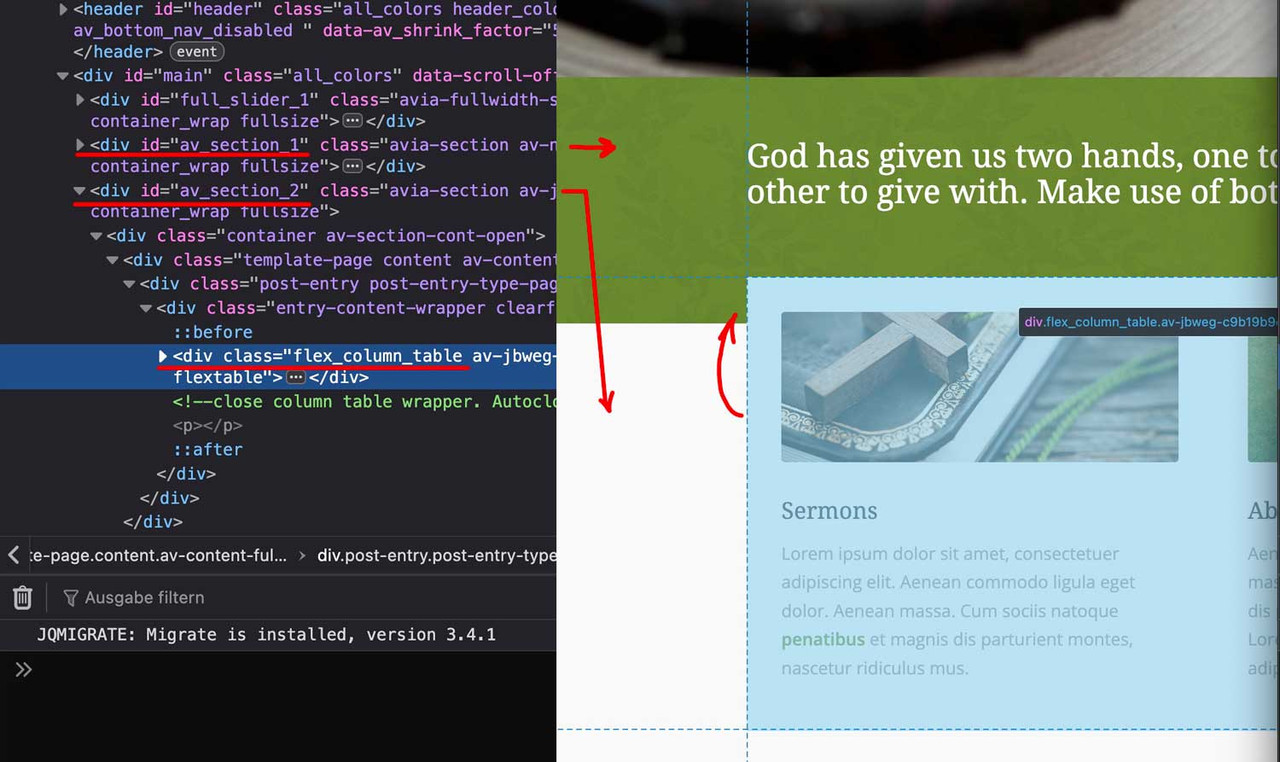
you see both color-sections – and the content of the second one is shifted with negative top margin.
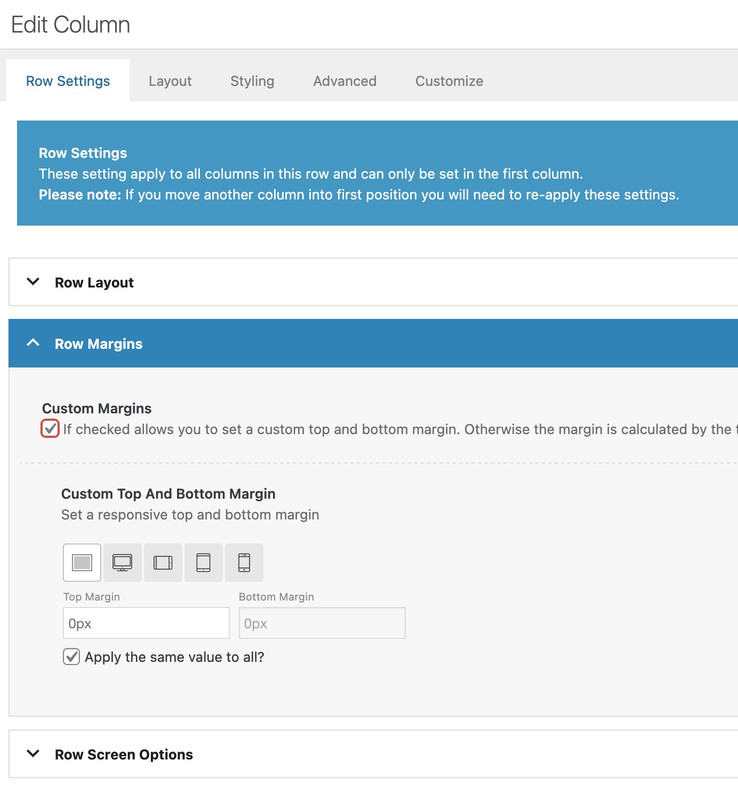
this can be done ( in this case the first column ) on row-settings – row margins:
because the columns are set to equal height – the value of only -60px goes to flex_column_table – but you can use even relative values like -50%
We’ve encountered a strage bug with the Enfold theme. The page “Kennis” (knowledge) has several child pages. Whenever I visit one of those pages the page “Oplossingen” (solutions) also gets the class “current-menu-item”. So, the menu has two active links. You van view this in the private link. Any way to fix this?



