
-
Search Results
-
Hi Enfold team,
In search console google marked some of my pages as problematic from mobile point of view.
The problem is that some elements are too close to click on mobile devices.You can check those pages:
https://archvizmasters.com/3d-max-kurs/
https://archvizmasters.com/
https://archvizmasters.com/3d-max-kurs-besplatni-tutorijali/There are 74 problematic pages in total.
Can you please help me solving this.
Thanks in advance.
Hi enfold team , thanks so much for your continued support ;
Currently i am having an issue removing the date from products in my search results and in my search query .
I Previously referred to an enfold help post where two snippets of code we’re recommended, however neither snippet of code worked
.post-meta-infos { display: none; font-size: 12px; position: relative; top: -8px; } .header_color .ajax_search_excerpt { display: none; }Hi Kriesi, I hope that you can help me with an issue I am having at:
https://www.juliesilvester.com.au/The Mobile Menu Icon and Flyout Menu are Invisible. At first I thought they just weren’t there at all. Then I enabled the search icon and hovered the mouse pointer over the spot where the Mobile Menu should be. I got a hand over an invisible spot and clicked that. There is a flyout, but that is blank too.
I have tried to change the theme colours under general style but that made no difference.
I have another site at https://www.madisonfashionmagazine.com.au/ that is using enfold and this demo theme and it DOES NOT have this issue.
Please help!Best,
DameonDear Sirs,
In my Enfold website http://www.camporan.com in mobile version the slider don’t look nice. The images aren’t scaled neither center and don’t look well.
And in the top the setion of social bookmarks is too higher and doesn’t appear the social icons. Below this section, in the top menu mixed the logo, the menu icon and the search bar.How can i fix this errors?
Thanks!
I want to put the description of the categories below the products of the category.
I have searched in google and found a solution add this line in functions.php
remove_action( ‘woocommerce_archive_description’,’woocommerce_taxonomy_archive_description’, 10 );
add_action( ‘woocommerce_after_shop_loop’, ‘woocommerce_taxonomy_archive_description’ );Apparently if you add the description at the end of the category but do not delete it from the beginning.
I do not know if the Enfold theme can do something different.
Thank you.
Hi,
I’ve installed Gravity Forms on a website and I’m trying to create a notification. When I’m adding a notification I am unable to add any text within the “Message” section. I have the latest Gravity Forms plugin, WordPress, and Enfold theme versions. This works on other websites I’m supporting, but not this one for some reason.
When I go to the page to edit the notification I see the following error:
Uncaught ReferenceError: LS_MCE_l10n is not definedI’ve done some research and it seems like the error is related to the LayerSlider? Do you know anything about this error and how to fix?
Thanks!
Hi there,
At a single events page created using Events Calendar, the H1 is saying exactly the same as H2. The H1 and H2 are obviously both taken from the events title inserted in a single event. So you get:
H1: Combiles Tai Chi Qigong – Yin Yoga zaterdagochtend Oirschot
H2: Combiles Tai Chi Qigong – Yin Yoga zaterdagochtend OirschotHow can I (overall) change the H1 for single events pages (which is anyway a double text since the H2 says the same) to something static, such as “Activiteiten”? This seems more logic. Then we would get:
H1: Activiteiten
H2: Combiles Tai Chi Qigong – Yin Yoga zaterdagochtend OirschotApart from the more logical H1 and H2, that would also help solving the issue of sometimes way too long H1’s for events on the site…
I searched the support forum and found advice somewhere to change the enfold-child > config-events-calendar > views > single-event.php, however there is no H1 in this file (anymore > I think it was taken out from the original Events Calendar files to Enfold).
Can you help me to achieve that?
Thanks & regards,
MoniqueHello team,
Probably after the last WP or Enfold update (but I noticed it only a few days ago) the featured image in my blog is not centered anymore in mobile version.
I searched a solution here in the support forum but did’nt find one.
How can I fix it?
Please see link in private content.
Thanks!Topic: Enfold
Hi, I was recommended to use your Enfold theme. Because of the recommendation, I’m very much inclined to buy this theme – however, the one that I found by myself by a different company has a feature that I would definitely need. This is a map feature: on the map, links to posts and offers will be shown for the city/area, ratings are shown next to the link text, can be searched and results can be filtered (e.g. for hotels or restaurants). Are you aware of a suitable plug-in that would integrate seamlessly with your theme and could be expected to be reliable in the long run?
Thanks a lot!
I did a search on this, but found ways to use the Social Share element in ALB, or how to do this via magic wand.
What I am hoping to find is how automatically add these at bottom of posts without manually going through 175 posts and activating the social share button (and so new posts automatically show the buttons).
I have all Social Share buttons checked in Enfold > Theme Options > Blog Layout > Share links at the bottom of your blog post
I think there is probably a Custom CSS I can add someplace, or to a php document that will accomplish this as an automated thing for all existing posts and all future posts that I create? I just did not find that in my search. I will keep looking, and if I find it before y’all respond, I’ll link to it here.
Thanks
JonI sure don’t understand this one from Google. Google is having a mobility usage problem with the site at https://carpetwoodtilegallery.com
Google says that the text is too small to read and gives this link as to the problem:
https://carpetwoodtilegallery.com/wp-content/themes/enfold/framework/images/icons/You can see the entire report here:
https://search.google.com/search-console/mobile-usability/drilldown?resource_id=https%3A%2F%2Fcarpetwoodtilegallery.com%2F&item_key=CAw&sharing_key=KsAvo67U3puen1kdJk33oQI don’t want to be downgraded on mobile. How can I fix this?
Thanks.HI there,
Love this theme, thank you! I am using the most recent version of Enfold with the most recent version of The Events Calendar & The Events Calendar Pro. On the main calendar page, when I click into the date field in the search bar, the calendar pops up underneath the website header. Can you help with this?
Topic: second widget line in footer
There was a question about a second Footer Widget Column Line.
Topic is here: https://kriesi.at/support/topic/add-a-line-to-the-footer/
At first time i misunderstood this a bit , but i thought it had to be possible.So I did some research on how to set an input field for the enfold options.
this was a code Günter gave me to insert an apple touch icon from enfold dialog. I have adapted it to these needs
( there might be easier methods – but this will find the element and insert it after it. Sometimes the admin options change position number so this is an update independent method to do it )
and here we go:What we need
First : child-theme functions.php
Second : A child-theme footer.php : Link: footer.php/***** insert the options dialog to Enfold Footer segment. Just after the other footer_columns ****/ function my_avf_option_page_data_add_elements( array $avia_elements = array() ) { $slug = 'footer'; $id = 'footer_columns'; $new_element = array( "slug" => "footer", "name" => __("Second Row of Footer Columns", 'avia_framework'), "desc" => __("How many columns should be displayed in your footer", 'avia_framework'), "id" => "footer_two_columns", "required" => array( 'display_widgets_socket', '{contains_array}all;nosocket' ), "type" => "select", "std" => "4", "subtype" => array( __('1', 'avia_framework') =>'1', __('2', 'avia_framework') =>'2', __('3', 'avia_framework') =>'3', __('4', 'avia_framework') =>'4', __('5', 'avia_framework') =>'5')); $found = false; $index = 0; foreach( $avia_elements as $key => $element ) { $index++; if( isset( $element['id'] ) && ( $element['id'] == $id ) && isset( $element['slug'] ) && ( $element['slug'] == $slug ) ) { $found = true; break; } } if( ! $found ) { $avia_elements[] = $new_element; } else { $avia_elements = array_merge( array_slice( $avia_elements, 0, $index ), array( $new_element ), array_slice( $avia_elements, $index ) ); } return $avia_elements; } add_filter( 'avf_option_page_data_init', 'my_avf_option_page_data_add_elements', 10, 1 );now we have allready an input-field after the footer
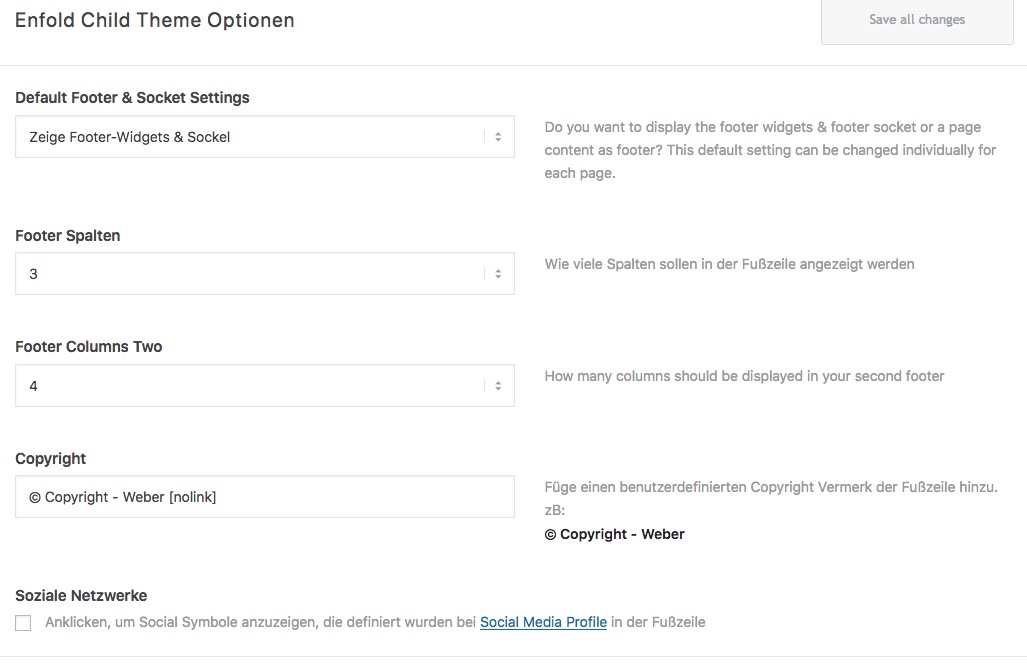
these had to be registered now:
/*** Register new footer widget areas */
function footer_two_widgets_init() {
	$footer_two_columns = avia_get_option( 'footer_two_columns', '5' );
	for ($i = 1; $i <= $footer_two_columns; $i++)
	{
		register_sidebar(array(
			'name' => 'Second-Footer - column'.$i,
			'before_widget' => '<section id="%1$s" class="widget clearfix %2$s">',
			'after_widget' => '<span class="seperator extralight-border"></span></section>',
			'before_title' => '<h3 class="widgettitle">',
			'after_title' => '</h3>',
			'id'=>'av_footer_two_'.$i
		));
	}
}
add_action( 'widgets_init', 'footer_two_widgets_init' );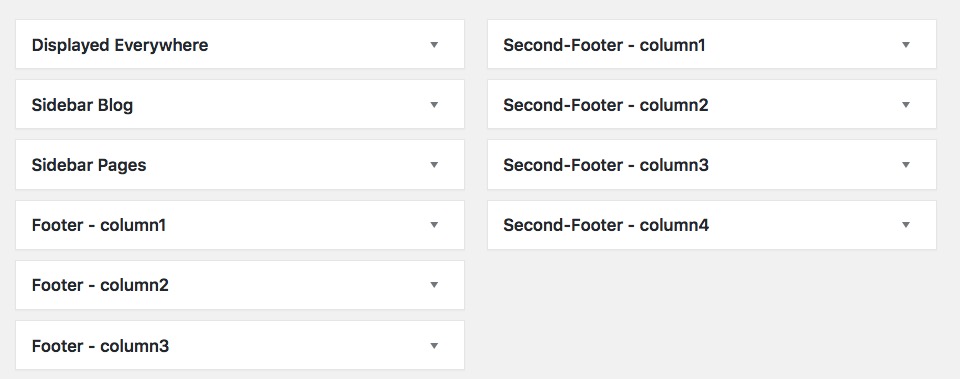
now upload the footer.php to your child-theme folder.
Look and Download
The source will then look like this:
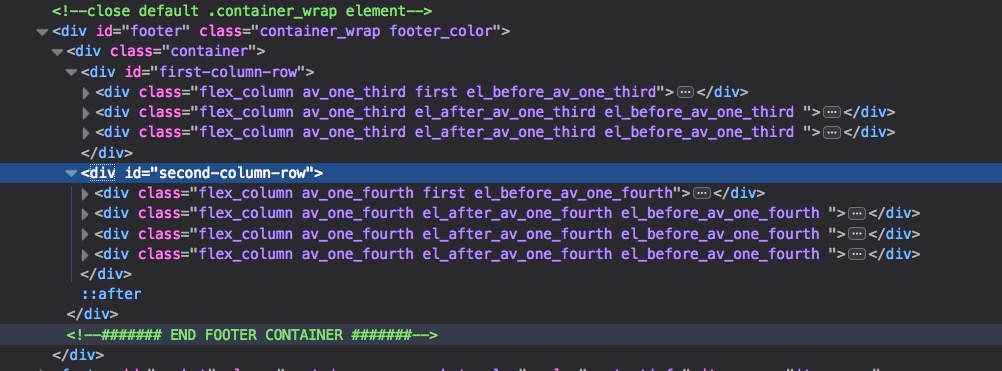
Maybe someone like this to have ;) – see here in action: https://webers-testseite.de/weber/
Hello,
it seems the theme adds ?s= even to URL that are not search url, causing 404 and duplicated content.
Editing the function.php doesn’t work and neither blocking them in robots.txt.
However the robots.txt solution would be the last one, because I think it’s better if these URL wouldn’t be generated at all instead of blocking them.Thank you


